2018 MERCEDES-BENZ E-CLASS WAGON steering
[x] Cancel search: steeringPage 185 of 506
is activated, any detected changes in the
speed limit are adop tedby the sy stem.
Collision warning
If Ac tive Dis tance Assist DISTRONIC is unable to
suf ficiently decele rate theve hicle in order to
pr eve nt it from approach ingtheve hicle in front,
yo uwill be warned visually and acousticall y.An
intermittent warning tone will then sound and
th e dis tance warning lamp will light up in the
instrument clus ter.
#Brake immediately in order toinc rease the
dis tance from theve hicle in front.
or
#Ta ke evasive action pr ovided it is safe todo
so.
Ac tive Steering Assist
Function of Active Steering Assist
Ac tive Steering Assist is only available for
ve hicles with the Driving Assistance Pack‐
age.
RAc tive Steering Assist is operational at
speeds up to130mp h(210 km/h) and helps yo
uto stay inthe center of the lane by
means of moderate steering inter ventions.
RIt uses theve hicle in front and the lane mark‐
ings as a refere nce depending on the driven
speed.
RAc tive Steering Assist requiresyou as the
driver, tokeep your hands on thesteering
wheel at all times so that you are able to
inter vene at any time tocor rect the course of
th eve hicle and keep it in lane.
RAc tive Steering Assist can be overridden at
any time bysteering theve hicle yourself.
RWhen the sy stem is actively steering, the
è symbol is shown in green in the multi‐
function displa y.
Sy stem limitations of Active Steering Assist
Ac tive Steering Assist has a limited steering tor‐
qu efo r lateral guidance. In some cases, the
st eering inter vention is not suff icienttokeep the
ve hicle in the lane.
If th e de tection of lane markings and vehicles
ahead is impaired, Active Steering Assist
switches topassive mode. The sy stem pr ovides
no support in this case. During the transition from
the active topassiv e
st at
us, theè sym‐
bol is shown as enlar ged and flashes yello w.
Once the sy stem is passive theè symbol is
shown as gr ayinthe multifunction displa y.
The sy stem may be impaired or may not function
in thefo llowing ins tances:
RIfth ere is poor visibility, e.g. due toinsuf fi‐
cient illumination of thero ad, or due tosno w,
ra in, fog or heavy spr ay.
RIfth ere is glare, e.g. from oncoming traf fic,
dire ct sunlight or reflection from other vehi‐
cles (e.g. if thero ad is wet).
RIfth e windshield is dirty, fogged up, damaged
or co vered, for ins tance byast icke r,in the
vicinity of the camera.
RIf no, or se veral, unclear lane markings are
present for one lane, e.g. in a construction
area.
RIf th e lane markings are wornaw ay, dark or
co vered up, e.g. bydirt or sno w.
RThe distance totheve hicle in front is too
small and the lane markings thus cannot be
de tected.
Driving and park ing18
3
Page 186 of 506

RIfth e lane markings change quickl y,e.g.
lanes branch off, cross one ano ther or
mer ge.
RThe road is nar row and winding.
RIfth ere are highly variable shade conditions
on thero ad.
RIfth ere are obs tacles such as object mar kers
on the lane or projecting out into the lane.
The sy stem does not pr ovide assis tance in the
fo llowing conditions:
ROn very sharp bends.
RWhen towing a trailer.
RIfyo u act ively change lane without switch ing
on the turn signal indicator.
RIfyo uswit chon the turn signal indicator and
th e conditions for activating Active Lane
Change Assi stare not fulfilled.
Ac tivating Active Steering Assist
Requ irements:
RESP®must be activated, but not inter vening.
RAc tive Dis tance Assist DISTRONIC must be
activated.
#If indicator lamp 1is off: press button 2.
Fu nction of Active Lane Change Assi st
Ac tive Steering Assist is only an aid. You are
re sponsible forth e dis tance totheve hicle in
front, forve hicle speed, for braking in good time
and forst ay ing in lane. Before changing lanes, make sure
that the neighboring lane is free
(shoulder view).
% The availability of thefo llowing function is
countr y-dependent.
Ac tive Steering Assist remains active even if the
turn signal indica tor is switched on. Active Steer‐
ing Assist then assists the driver when changing
lanes byapplying steering torques toinitiate the
lane change.
Assis tance when changing lanes is pr ovided if all
th efo llowing conditions are me t:
RYou are driving on a free wayor high-speed
multi-lan emajo rro ad with multiple lanes in
th e direction of tr avel.
RThe neighboring lane is free and separated
bya broken lane marking.
RThe driven speed is between 50 mph
(80 km/h) and 110mp h(1 80 km/h).
RThe turn signal indicator is switched on for
longer than two seconds.
If th e sy stem is impaired, Active Lane Change
Assi stmay be inter rupte d. If an inter ruption
occurs, display 1appears in the multifunction
18 4
Driving and pa rking
Page 187 of 506

display along with awarning tone prom pting you
to take control of theve hicle.
Ste ering and contact de tection
Ac tive Steering Assist requ ires you as the driver,
to keep your hands onthesteering wheel at all
times so that you are abletointer vene at any
time tocor rect the course of theve hicle and
ke ep it in lane. The driver must expect a change
from active topassive mode or vice versa at any
time.
If yo u are not steering yourself or ifyo u take
yo ur hands offthesteering wheel for a pro‐
longed period of time, the sy stem will, depend‐
ing on the situation, firs t alert youwit h a visual wa
rning. 1appears in the multifunction displa y.
If yo u are still not steering theve hicle yourself or
if yo u ha venot take n hold of thesteering wheel,
a wa rning tone sounds in addition tothewa rning
message toremind youto take control of the
ve hicle.
The warning message does not appear or disap‐
pears if one of thefo llowing conditions are me t:
RThe driversteers theve hicle.
RThe driver presses a steering wheel button or
operates Touch Control.
Fu nction of Active Eme rgency Stop Assist
If th e driver continues toigno rethe acoustic
wa rning of Active Lane Change Assi st,Ac tive
Dis tance Assist DISTRONIC reduces the speed.
If th e dr iver
still does n
otrespond, theve hicle is
decelerated in stages toast andstill.
The driver can cancel the deceleration at any
time byper form ing one of thefo llowing actions:
RSt eering
RBraking or accelerating
RPressing a steering wheel button or operat‐
ing Touch Control
RAc tivating or deacti vating Active Steering
Assist or Dis tance Assist DISTRONIC
The driver must beready totake control of the
ve hicle at any time.
Information on Hill Start Assist
Hill Start Assist holds theve hicle for a short
time when pulling away on a hill under thefo l‐
lowing conditions:
RThe transmission is in position hork.
RThe elect ric park ing brake is released.
This gives you enough time tomo veyour foot
from the brake pedal tothe accelerator pedal
and depress it before theve hicle begins toroll.
&
WARNING Risk of accident and injury
caused bytheve hicle rolling away
Af ter a short time, Hill Start Assist no longe r
holds theve hicle and it can rollaw ay.
#Therefore, swiftly mo veyour foot from
th e brake pedal tothe accelerator
Driving and parking 18
5
Page 196 of 506
Reversing camera
Fu nction of there ar view camera
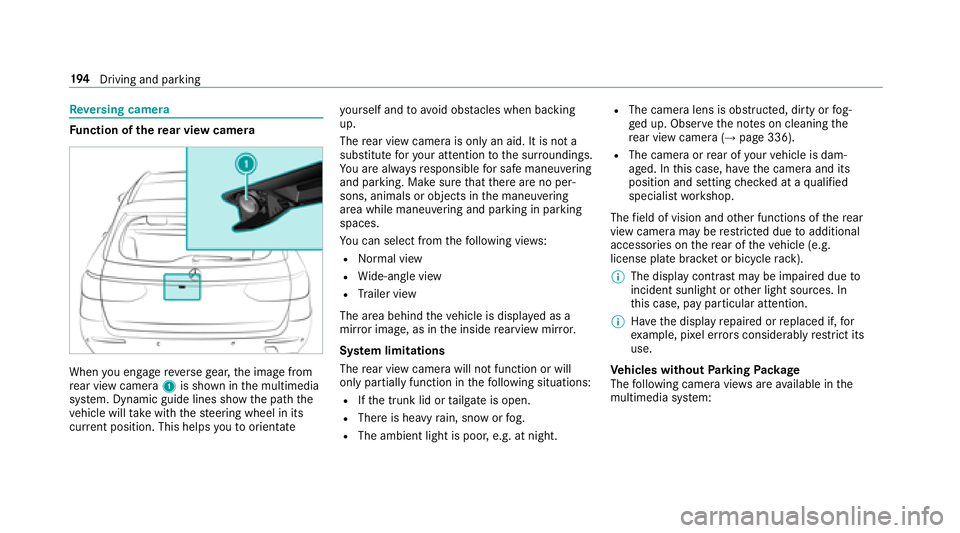
When you enga gereve rsege ar, the image from
re ar view camera 1is shown in the multimedia
sy stem. Dynamic guide lines show the path the
ve hicle will take with thesteering wheel in its
cur rent position. This helps youto orientate yo
urself and toavo id obs tacles when back ing
up.
The rear view camera is only an aid. It is not a
substitute foryo ur attention tothe sur roundings.
Yo u are alw aysre sponsible for safe maneu vering
and pa rking. Make sure that there are no per‐
sons, animals or objects in the maneuvering
area while maneuvering and parking in parking
spaces.
Yo u can select from thefo llowing vie ws:
RNo rmal view
RWide-angle view
RTrailer view
The area behind theve hicle is displa yed as a
mir ror image, as in the inside rearview mir ror.
Sy stem limitations
The rear view camera will not function or will
only pa rtially function in thefo llowing situations:
RIf th e trunk lid or tailgate is open.
RThere is heavy rain, snow or fog.
RThe ambient light is poor, e.g. at night.
RThe camera lens is obstructed, dirty or fog‐
ge d up. Obser vethe no tes on cleaning the
re ar view camera (
→page 336).
RThe camera or rear of your vehicle is dam‐
aged. In this case, ha vethecamera and it s
position and setting checked at a qualified
specialist workshop.
The field of vision and other functions of there ar
view camera may be restricted due toadditional
accessori es onthere ar of theve hicle (e.g.
license plate brac ket or bicycle rack ).
% The display contrast may be impaired due to
incident sunlight or other light sources. In
th is case, pay particular attention.
% Have the display repaired or replaced if, for
ex ample, pixel er rors considerably restrict its
use.
Ve hicles without Parking Package
The following camera vie wsare available in the
multimedia sy stem:
19 4
Driving and pa rking
Page 197 of 506
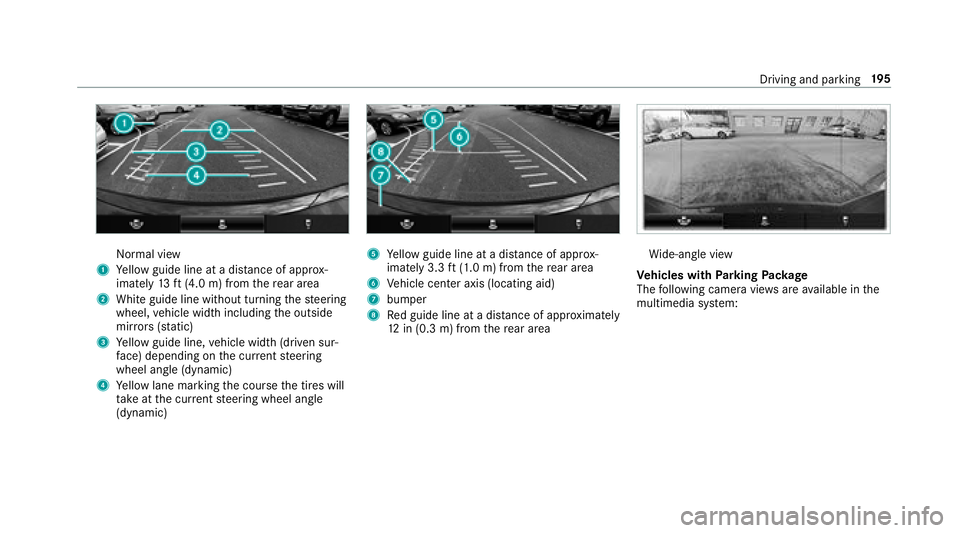
Normal view
1Yellow guide line at a dis tance of appr ox‐
imately 13ft(4.0 m) from there ar area
2White guide line without turning thesteering
wheel, vehicle width including the outside
mir rors (sta tic)
3Ye llow guide line, vehicle width (driven sur‐
fa ce) depending on the cur rent steering
wheel angle (dynamic)
4Ye llow lane marking the course the tires will
ta ke atthe cur rent steering wheel angle
(dynamic)
5Ye llow guide line at a dis tance of appr ox‐
imately 3.3 ft(1.0 m) from there ar area
6Ve hicle center axis (locating aid)
7bumper
8Re d guide line at a dis tance of appr oximately
12 in (0.3 m) from there ar area
Wi de-angle view
Ve hicles with Parking Package
The following camera vie wsare available in the
multimedia sy stem:
Driving and parking 19
5
Page 198 of 506
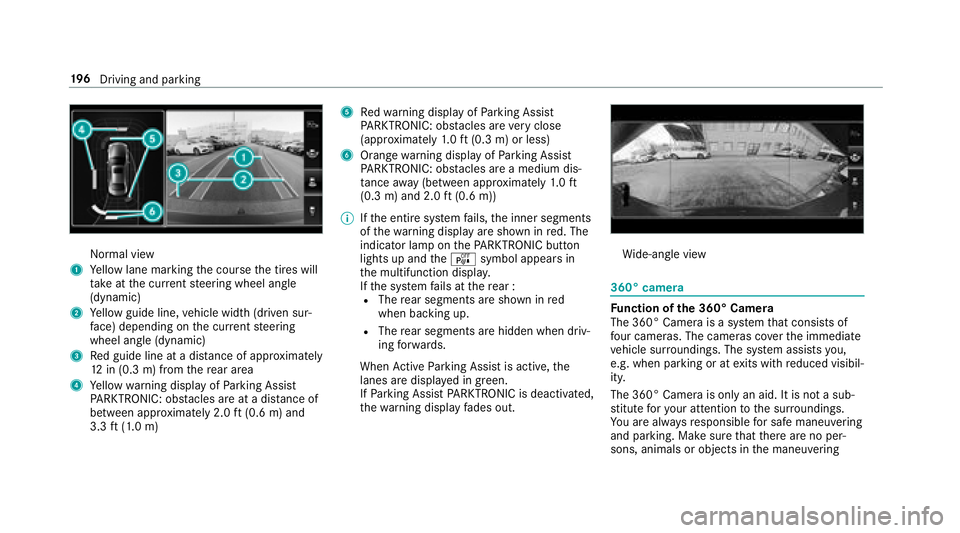
Normal view
1Yellow lane marking the course the tires will
ta ke atthe cur rent steering wheel angle
(dynamic)
2Ye llow guide line, vehicle width (driven sur‐
fa ce) depending on the cur rent steering
wheel angle (dynamic)
3Re d guide line at a dis tance of appr oximately
12 in (0.3 m) from there ar area
4Ye llow warning display of Parking Assist
PA RKTRONIC: obstacles ar eat adis tance of
between appr oximately 2.0 ft(0.6 m) and
3.3 ft(1.0 m)
5Re dwa rning display of Parking Assist
PA RKTRONIC: obstacles ar eve ry close
(appr oximately 1.0 ft (0.3 m) or less)
6Orange warning display of Parking Assist
PA RKTRONIC: obstacles ar e amedium dis‐
ta nce away (between appr oximately 1.0 ft
(0.3 m) and 2.0 ft(0.6 m))
% Ifth e entire sy stem fails, the inner segments
of thewa rning display are shown in red. The
indicator lamp on thePA RKTRONI Cbut ton
lights up and theé symbol appears in
th e multifunction displa y.
If th e sy stem fails at there ar :
RThe rear segments are shown in red
when backing up.
RThe rear segments are hidden when driv‐
ing forw ards.
When Active Parking Assist is active, the
lanes are displa yed in green.
If Pa rking Assist PARKTRONI Cis deacti vate
d,
th ewa rnin
g display fades out.
Wi de-angle view
360° camera
Fu nction of the 360° Camera
The 360° Camera is a sy stem that consists of
fo ur cameras. The cameras co verth e immediate
ve hicle sur roundings. The sy stem assists you,
e.g. when parking or at exits with reduced visibil‐
ity.
The 360° Camera is only an aid. It is not a sub‐
st itute foryo ur attention tothe sur roundings.
Yo u are alw aysre sponsible for safe maneu vering
and pa rking. Make sure that there are no per‐
sons, animals or objects in the maneuvering
19 6
Driving and pa rking
Page 199 of 506
area while maneuvering and parking in parking
spaces.
The system evaluates images from thefo llowing
cameras:
RRe ar view camera
RFront camera
RTw o side cameras in the outside mir rors
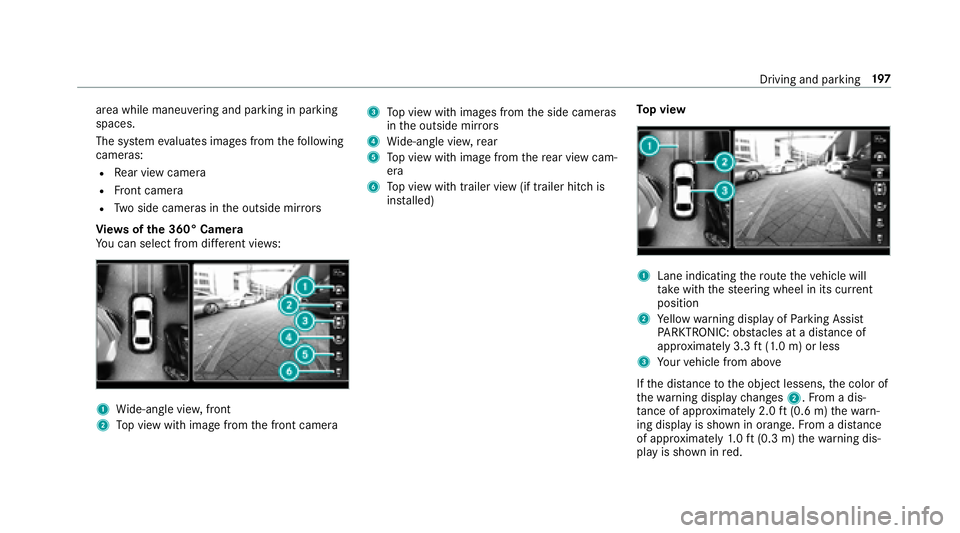
Vi ew s of the 360° Camera
Yo u can select from differe nt vie ws:
1Wide-angle vie w,front
2Top view with image from the front camera
3To p view with images from the side cameras
in the outside mir rors
4Wi de-angle vie w,rear
5To p view with image from there ar view cam‐
era
6To p view with trailer view (if trailer hitch is
ins talled) To
p view
1Lane indicating thero ute theve hicle will
ta ke with thesteering wheel in its cur rent
position
2Ye llow warning display of Parking Assist
PA RKTRONIC: obstacles at adis tance of
appr oximately 3.3 ft(1.0 m) or less
3Yo ur vehicle from abo ve
If th e dis tance tothe object lessens, the color of
th ewa rning display changes 2.From a dis‐
ta nce of appr oximately 2.0 ft(0.6 m) thewa rn‐
ing display is shown in orange. From a dis tance
of appr oximately 1.0 ft (0.3 m) thewa rning dis‐
play is shown in red.
Driving and parking 19
7
Page 200 of 506
WhenParking Assist PARKTRONI Cis operational
and no objec tis de tected, the segments of the
wa rning display are shown in gray .
% Ifth e entire sy stem fails, the segments of
th ewa rning display are shown in red. The
indicator lamp on thePA RKTRONI Cbut ton
lights up and theé symbol appears in
th e multifunction displa y.
If th e sy stem fails at there ar:
RThe rear segments are shown in red
when backing up.
RThe rear segments are hidden when driv‐
ing forw ards.
If Pa rking Assist PARKTRONI Cis deacti vated,
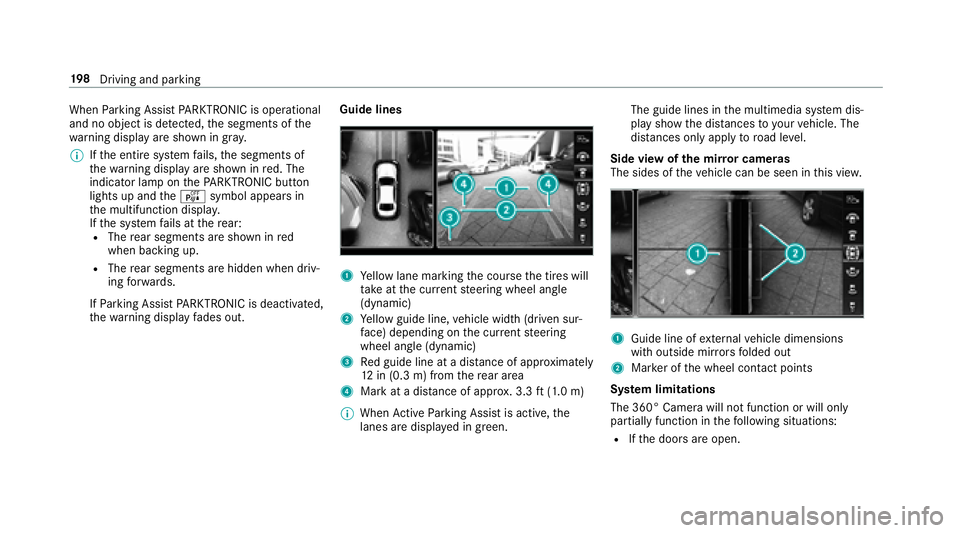
th ewa rning display fades out. Guide lines1Ye
llow lane marking the course the tires will
ta ke atthe cur rent steering wheel angle
(dynamic)
2Ye llow guide line, vehicle width (driven sur‐
fa ce) depending on the cur rent steering
wheel angle (dynamic)
3Re d guide line at a dis tance of appr oximately
12 in (0.3 m) from there ar area
4Mark at a dis tance of appr ox. 3.3 ft(1.0 m)
% When Active Parking Assist is active, the
lanes are displa yed in green. The guide lines in
the multimedia sy stem dis‐
play show the dis tances toyour vehicle. The
dis tances only apply toroad le vel.
Side view of the mir ror cameras
The sides of theve hicle can be seen in this vie w.
1Guide line of extern al vehicle dimensions
with outside mir rors folded out
2Mar ker of the wheel conta ct points
Sy stem limitations
The 360° Camera will not function or will only
partially function in thefo llowing situations:
RIf th e doors are open.
19 8
Driving and pa rking