Page 64 of 506
#Tounlock theve hicle: touch the inner sur‐
fa ce of the door handle.
#To lock theve hicle: touch sensor sur face
1 or2.
#Co nvenience closing: touch recessed sen‐
sor surf ace2for an extended pe riod.
% For fur ther information on con venience clos‐
ing (
→pa ge 73).
If yo u open theta ilgate from outside it is auto‐
matically unloc ked.
Problems with KEYLESS-GO
Problem
Possible causes/consequences and MSolutions
Yo u can no longe r lock or unlock the
ve hicle using KEYLESS-GO. Po
ssible causes are:
RKEYLESS-GO has been deactivated .
RThe SmartK eybattery is dischar ged or near lydischar ged.
RThere is inter fere nce from a po werful radio signal source.
62
Opening and closing
Page 66 of 506

Unlocking/locking the driver's door using
th e mechanical key
%
Ifyo uwish tolock theve hicle entirely using
th e mechanical key,firs t press the button for
locking from the inside while the driver's
door is open. Then proceed tolock the driv‐
er's door using the mechanical key.
#Insertthe mechanical keyas far as it will go
into opening 1inthe co ver.
#Pull and hold the door handle.
#Pull the co ver on the mechanical keyas
st ra ight as possible away from theve hicle
until it releases.
#Re lease the door handle.
#To unlock :turn the mechanical keycounter -
clo ckwise toposition 1.
#Tolock: turnthe mechanical keyclo ckwise
to position 1.
#Carefully press the co ver onto the lock cylin‐
der until it engages and is seated firm ly.
Load compa rtment
Opening the tail gate
&
WARNING Risk ofexhaust gas poisoning
Combustion engines emit poisonous exhaust
ga ses such as carbon monoxide. Exhaust
ga ses can enter theve hicle interior if theta il‐
gate is open when the engine is running,
especially if theve hicle is in motion.
#Alw ays switch off the engine before
opening theta ilgate.
#Ne ver drive with theta ilgate open.
64
Opening and closing
Page 68 of 506
cally opening,this process is stopped. The auto‐
matic obs tacle de tection function is only an aid.
It is not a substitute foryo ur attentiveness when
opening theta ilgate.
Closing the tailgate
&
WARNING Risk of injury from unsecured
items in theve hicle
If objects, luggage or loads are not secured
or not secured suf ficientl y,they could slip,
tip ove r or be throw n around and thereby hit
ve hicle occupants.
There is a risk of injur y,particularly in the
ev ent of sudden braking or a sudden change
in direction.
#Alw aysstow objects in such a wayth at
th ey cannot be thro wn around.
#Before the journe y,secure objects, lug‐
ga ge or loads against slipping or tipping
ove r.
&
WARNING Risk of becoming trapped
duri ng au tomatic closing of theta ilgate
Pa rts of the body could become trapped dur‐
ing automatic closing of theta ilgate. More‐
ove r,people, e.g. children, may be standing
in the closing area or may enter the closing
area during the closing process.
#Make sure that nobody is in the vicinity
of the closing area during the closing
process.
Use one of thefo llowing options tostop the
closing process:
RPress thep button on the SmartK ey.
RPress or pull there mo teoperating switch
on the driver's door.
RPress the closing or locking button on the
ta ilgate.
RPull theta ilgate handle.
Ve hicles with HANDS-FREE ACCESS: It is also
possible tostop the closing process bymoving
yo ur foot in a kicking motion under there ar
bumper. To
close theta ilgate, thefo llowing options are
av ailable:
#Pull theta ilgate down wards slightly. Release
it as soon as it begins toclose.
#Press and hold thep button on the
SmartK ey(with the SmartK eyinthe vicinity
of theve hicle).
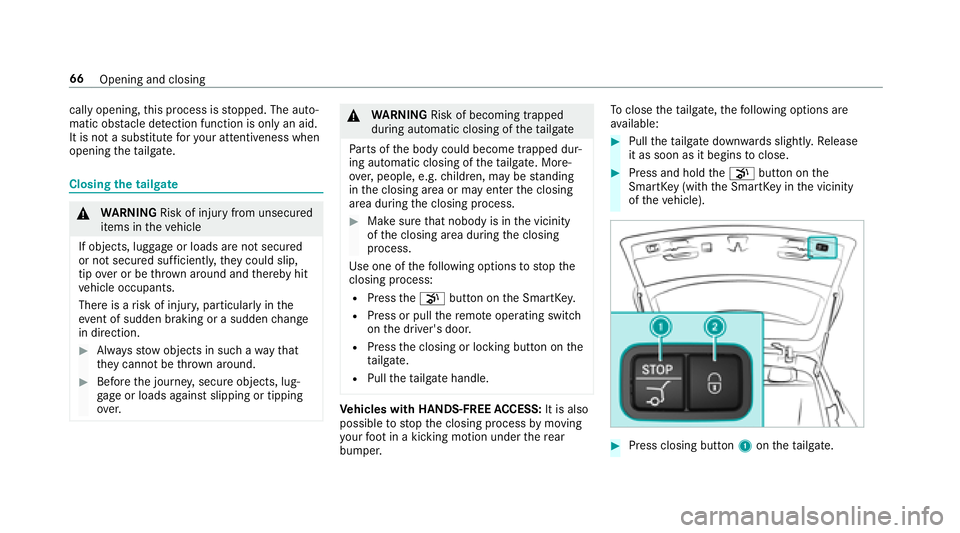
#Press closing button 1ontheta ilgate.
66
Opening and closing
Page 69 of 506

#Vehicles with KEYLESS-GO: Press locking
button 2inthetai lgate.
If a keyis de tected outside theve hicle, the
ta ilgate closes and theve hicle is loc ked.
#Press remo teoperating switch 1forth e
ta ilgate.
#Ve hicles with HANDS-FREE ACCESS: Use
yo ur foot to kick below the bumper
(
→page 68).
Au tomatic reve rsing function for the tail gate
The tailgate is equipped with automatic obs tacle
de tection wi threve rsing function. If a solid
object bloc ksorrestricts theta ilgate when auto‐
matically closing, theta ilgate automatically
opens again slightly . The automatic obs tacle
de tection wi threve rsing function is only an aid.
It is not a substitute foryo ur attentiveness when
closing theta ilgate.
#When closing, make sure that no body parts
are in the closing area.
&
WARNING Risk of becoming trapped
despite there ve rsing function
The reve rsing function does not react:
RTo soft, light and thin objects, e.g. fin‐
ge rs.
ROver the last Óin (8 mm) of the closing
path.
In these situations in particular, there ve rsing
function cannot pr event someone being trap‐
ped.
#When closing, make surethat no body
parts are in the closing area.
If someone is trapped:
RPress thep button on the SmartK ey,
or
RPress or pull there mo teoperating switch
on the driver's door, or
RPress the closing or locking button on the
ta ilgate, or
RPull theta ilgate handle.
Opening and closing 67
Page 74 of 506
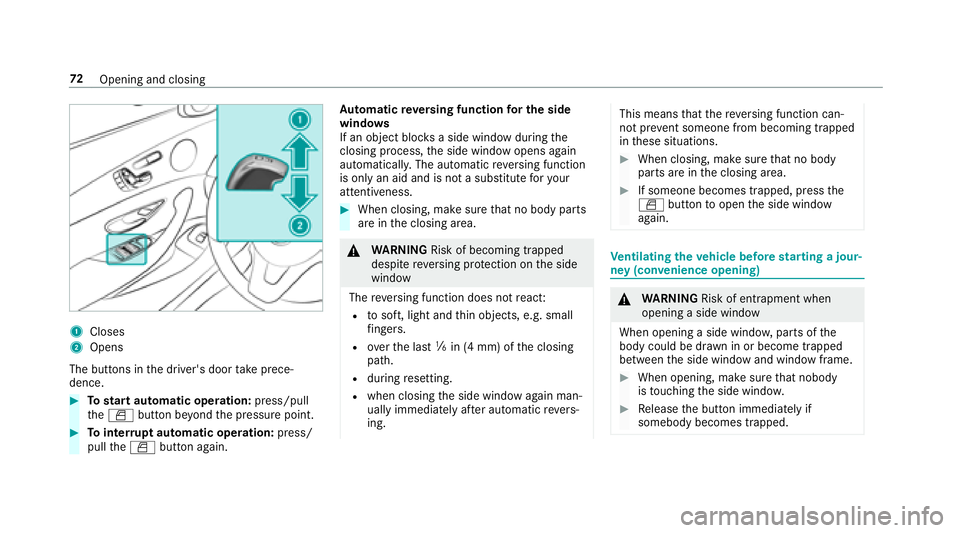
1Closes
2Opens
The butto ns inthe driver's door take prece‐
dence.
#To start automatic operation: press/pull
th eW button be yond the pressure point.
#To inter rupt automatic operation: press/
pull theW button again. Au
tomatic reve rsing function for the side
windo ws
If an object bloc ksa side wind owduring the
closing process, the side window opens again
automaticall y.The automatic reve rsing function
is only an aid and is not a substitute foryo ur
attentiveness.
#When closing, make sure that no body parts
are in the closing area.
&
WARNING Risk of becoming trapped
despite reve rsing pr otection on the side
window
The reve rsing function does not react:
Rto soft, light and thin objects, e.g. small
fi ngers.
Rove rth e last ãin (4 mm) of the closing
path.
Rduring resetting.
Rwhen closing the side window again man‐
ually immediately af ter au tomatic reve rs‐
ing.
This means that there ve rsing function can‐
not pr event someone from becoming trapped
in these situations.
#When closing, make sure that no body
parts are in the closing area.
#If someone becomes trapped, press the
W button toopen the side window
again.
Ve ntilating theve hicle before starting a jour‐
ney (con venience opening)
&
WARNING Risk of entrapment when
opening a side window
When opening a side windo w,parts of the
body could be dr awn in or become trapped
between the side window and window frame.
#When opening, make sure that nobody
is touching the side windo w.
#Release the button immediately if
somebody becomes trapped.
72 Opening and closing
Page 82 of 506

Anti-theft protection
Fu nction of the immobilizer
The immobilizer pr events your vehicle from being
st ar ted without the cor rect SmartK ey.
The immobilizer is automatically activated when
th e ignition is switched off and deactivated when
th e ignition is switched on.
When leaving theve hicle, alw aysta ke the Smart‐
Ke ywit hyo u and lock theve hicle. An yone can
st art the engine if a valid SmartK eyhas been left
inside theve hicle.
% Ifth eeve ntthat the engine cannot bestar‐
te d (y ettheve hicle's battery is charge d), the
sy stem is not operational. Contact an
authorized Mercedes-Benz Center or call
1-800-FO R-MERCedes (in the USA) or
1-800-387-0 100 (in Canada).
ATA (anti-theft alarm system)
Fu nction of theATA system (anti-theft ala rm
sy stem)
If th eATA system is armed, a visual and audible
alarm is triggered in thefo llowing situations:
RA door is opened.
RThe tailgate is opened.
RThe hood is opened.
The ATA system is armed automatically af ter
appr oximately 10seconds:
RAfter locking theve hicle with the SmartK ey.
RAf ter locking theve hicle using KEYLESS-GO.
When theATA system is armed, indicator lamp
1 flashes.
The ATA sy stem is automatically deactivated:
RAf ter unlocking theve hicle with the Smart‐
Ke y.
RAfter pressing thest art/ stop button with the
SmartK eyinside theve hicle.
80
Opening and closing
Page 83 of 506
RAfter unlocking theve hicle using KEYLESS-
GO.
% When the mbrace service (
→page 295) is
active and the alarm stay s on for more than
30 seconds, a message is automatically sent
to the Cus tomer Assis tance Center.
Deacti vating the ATA(anti-theft alarm sys‐
te m) ala rm
#Pressthe%, &orp button on the
SmartK ey.
or
#Press thest art/ stop button (the SmartK eyis
inside theve hicle).
St opping the ala rmusing KEYLESS-GO
#Grasp the outside door handle (with the
SmartK eyoutside theve hicle).
Opening and closing 81
Page 89 of 506
#Toselect the front passenger seat: press
button 1.
When the indicator lamp lights up, the front
passenger seat is selected.
#Ad just the front passenger seat using the
buttons in the door control panel on the driv‐
er's side.
Ad justing the 4-w aylumbar support
1Toraise
2To sof ten
3To lowe r
4To harden
#Using buttons 1to4, adjust the conto ur
of the backrest individually tosuit your bac k.
Headrestra ints
Ad justing the front seat head restra ints man‐
ually
& WARNING Risk of injury from adjusting
th eve hicle settings while theve hicle is in
motion
Yo u could lose cont rol of theve hicle in the
fo llowing situations:
Rifyo u adjust the driver's seat, the head
re stra int, thesteering wheel or the mir ror
while theve hicle is in motion
Rifyo ufa sten your seat belt while theve hi‐
cle is in motion
#Before starting the engine: adjust the
driver's seat, the head restra int, the
st eering wheel or the mir ror and fasten
yo ur seat belt.
Seats and stowing 87


