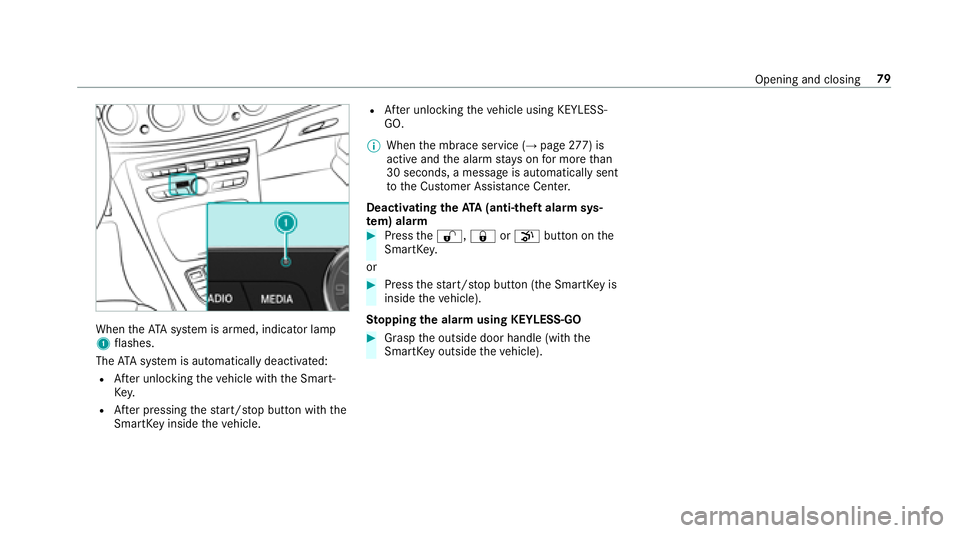
Page 65 of 486
Unlocking/locking the driver's door using
th e emer gency key
%
Ifyo uwish tolock theve hicle entirely using
th e emer gency key,firs t press the button for
locking from the inside while the driver's
door is open. Then proceed tolock the driv‐
er's door using the emer gency key.
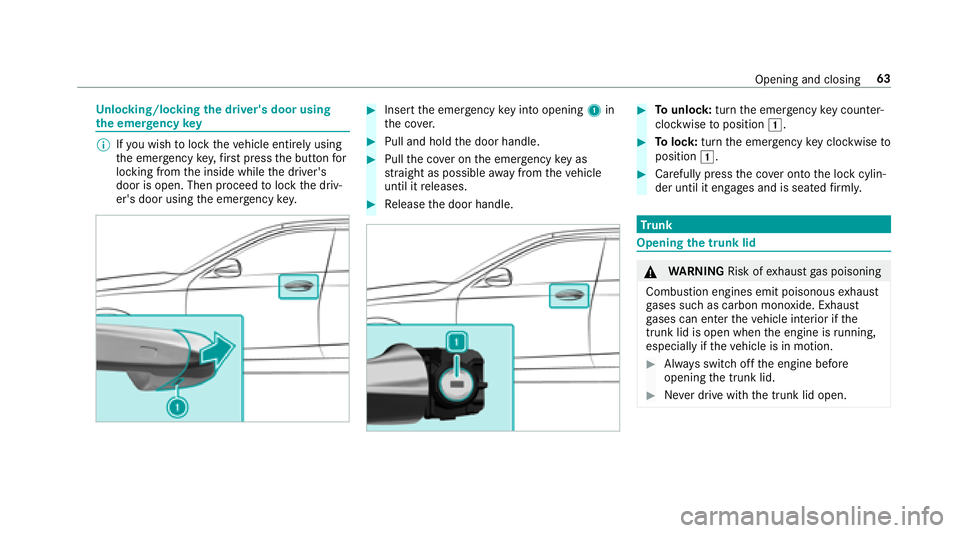
#Insert the emer gency keyin to opening 1in
th e co ver.
#Pull and hold the door handle.
#Pull the co ver on the emer gency keyas
st ra ight as possible away from theve hicle
until it releases.
#Re lease the door handle.
#To unlock :turn the emer gency keycounter -
clo ckwise toposition 1.
#Tolock: turnthe emer gency keyclo ckwise to
position 1.
#Carefully press the co ver onto the lock cylin‐
der until it engages and is seated firm ly.
Tr unk
Opening the trunk lid
&
WARNING Risk ofexhaust gas poisoning
Combustion engines emit poisonous exhaust
ga ses such as carbon monoxide. Exhaust
ga ses can enter theve hicle interior if the
trunk lid is open when the engine is running,
especially if theve hicle is in motion.
#Alw ays switch off the engine before
opening the trunk lid.
#Ne ver drive with the trunk lid open.
Opening and closing 63
Page 67 of 486

inthe closing area or may enter the closing
area during the closing process.
#Make sure that nobody is in the vicinity
of the closing area during the closing
process.
#Use one of thefo llowing options tostop
th e closing process:
RPress thep button on the
SmartK ey.
RPress or pull there mo teoperating
switch on the driver's door.
RPress the closing or locking button
on the trunk lid.
RPress theto p of thest ar on the
trunk lid.
Ve hicles with HANDS-FREE ACCESS: It is also
possible tostop the closing process bymoving
yo ur foot in a kicking motion under there ar
bumper.
Yo u ha vethefo llowing options toclose the trunk
lid:
#Pull the trunk lid down using the handle
re cess and push it closed.
#Ve hicles with trunk lid co nvenience clos‐
ing: Press and hold thep button on the
SmartK ey(with the SmartK eyinthe vicinity
of theve hicle).
#Ve hicles with trunk lid co nvenience clos‐
ing: Press closing button 1inthe trunk lid.
#Ve hicles with trunk lid co nvenience clos‐
ing and KEYLESS-GO: Press locking button
2 inthe trunk lid.
If a SmartK eyis de tected outside theve hicle,
th e trunk lid closes and theve hicle is loc ked.
#Ve hicles with trunk lid co nvenience clos‐
ing: Press trunk lid remo teoperating switch
1.
Opening and closing 65
Page 69 of 486

%Awa rning tone sounds while the trunk lid is
opening or closing.
& WARNING Risk of burn s causedbya hot
ex haust sy stem
The vehicle exhaust sy stem can become very
hot. If you use HANDS- FREEACCES S,you
could burn yourself by touching theex haust
sy stem.
#Alw ays ensure that you only ma kea
kicking mo vement within the de tection
ra nge of the sensors.
* NO
TEDama getotheve hicle caused by
unin tentional lyopening the trunk lid
RWhen using an automatic car wash
RWhen using a high pressure cleaner
#Deactivate KEYLESS-GO or make sure
that the SmartK eylocated is at least
10 ft(3 m) away from theve hicle in
such situations.
When making the kicking mo vement, make sure
th at you are standing firm ly on the ground, oth‐
erwise you could lose your balance, e.g. on ice.
Re quirements:
RThe SmartK eyis behind theve hicle.
RStand at least 12in (30 cm) away from the
ve hicle while per form ing the kicking mo ve‐
ment.
RDo not come into contact with the bumper
while making the kicking mo vement.
RDo not car ryout the kicking mo vement too
slowl y.
RThe kicking mo vement must be towa rdsth e
ve hicle and bac k.
1Sensor detection range
If se veral consecutive kicking mo vements are
not successful, waitte n seconds.
Sy stem limitations
The sy stem may be impaired or may not function
if:
RThe area around the sensor is dirty, e.g. due
to road salt or snow .
RThe kicking movement is made using a pros‐
th etic leg.
Opening and closing 67
Page 70 of 486

The trunk lid could be opened or closed uninten‐
tionally,in thefo llowing situations:
RIf persons' arms or legs mo veinthe sensor
de tection range, e.g. when polishing theve hi‐
cle, sitting on the edge of the trunk, or pick‐
ing up objects.
RIf objects are guided behind or placed behind
th eve hicle, e.g. charging cables, tensioning
st ra ps or luggage.
RWhen working on the trailer coupling, trailers
or rear bicycle rack s.
Deactivate KEYLESS-GO (
→page 56) or do not
car rythe SmartK eyabout your person insuch
situations.
Switch ing separate trunk locking on/off
Ifyo u centrally unlo cktheve hicle while separate
locking is activated, the trunk remains loc ked.
#To switch on: slidethe switch toposition
1.
#To switch off: slidethe switch toposition
2.
% If an accident has been de tected, the trunk
unloc kseve n if separate lo cking is switched
on.
Un locking the trunk with the emer gency
re lease from inside
Re quirement:RThe 12Vve hicle battery is connected and
ch arge d.
#Press emer gency release button 1brief ly.
The trunk lid unloc ksand opens.
68
Opening and closing
Page 74 of 486

Closing side windowsfrom the outside (con‐
ve nience closing)
&
WARNING Risk of entrapment caused by
inadver tent con venience closing
When the con venience closing feature is
operating, parts of the body could become
trapped in the closing area of the side win‐
dow and the sliding sunroof.
#Obser vethe comple teclosing proce‐
dure when using con venience closing.
#When closing, make surethat no body
parts are in the closing area.
#Press and hold the& button on the
SmartK ey.
The following functions are per form ed:
RThe vehicle is loc ked.
RThe side windo wsare closed.
RThe pano ramic sliding sunroof is closed.
#To close thero ller sunblinds: pressthe
& button again.
#Tointer rupt convenience closing: release
th e& button.
% Con venience closing can also be operated
wi th KEYLESS-GO (
→page 60).
Problems with the side windo ws
Problem
Possible causes/consequences and MSolutions
A side window cannot be closed and
yo u cannot see the cause.
#Check tosee if any objects are in the window guide.
& WARNING Risk of becoming trapped or fata lly injured if reve rsing pr otection is not activated
If yo u close a side windowagain immediately af ter it has been bloc ked or reset, the side window closes
with increased or maximum forc e. The reve rsing feature is then not active.
Pa rts of the body could become trapped in the closing area in the process.
#Make sure that no parts of the body are in the closing area.
#To stop the closing process, release the button or press the button again toreopen the side win‐
do w.
72
Opening and closing
Page 80 of 486

ProblemPossible causes/consequences and MSolutions
Ve hicles with a panoramic sliding
sunroof: The sliding sunroof or the
ro ller sunblind does not opera te
smoo thly.
#Pull the3 button down repeatedly tothe point of resis tance until the sliding sunroof is fully closed.
#Pull the3 button for ano ther second.
#Pull and hold the3 button down until thero ller sunblind is comple tely closed.
#Pull the3 button for ano ther second.
#Use automatic operation tofully open and then close the sliding sunroof.
Anti-theft pr otection
Immobilizer
The immobilizer pr events your vehicle from being
st ar ted without the cor rect key.
The immobilizer is automatically activated when
th e ignition is switched off and deactivated when
th e ignition is switched on.
When leaving theve hicle, alw aysta ke theke y
with you and lock theve hicle. An yone can start
th e engine if a valid keyhas been lef tinside the
ve hicle.
% Intheeve ntthat the engine cannot bestar‐
te d (y etthest ar ter battery is charge d), the
sy stem is not operational. Contact an authorized Mercedes-Benz Center or call
1-800-FO
R-MERCedes (in the USA) or
1-800-387-0 100 (in Canada).
ATA (anti-theft alarm system)
Fu nction of theATA system (anti-theft ala rm
sy stem)
If th eATA system is armed, a visual and audible
alarm is triggered in thefo llowing situations:
RA door is opened.
RThe trunk lid is opened.
RThe hood is opened. The
ATA sy stem is armed automatically af ter
appr oximately 10seconds:
RAfter locking theve hicle with the SmartK ey.
RAf ter locking theve hicle using KEYLESS-GO.
78
Opening and closing
Page 81 of 486
WhentheATA system is armed, indicator lamp
1 flashes.
The ATA sy stem is automatically deactivated:
RAf ter unlocking theve hicle with the Smart‐
Ke y.
RAfter pressing thest art/ stop button with the
SmartK eyinside theve hicle.
RAfter unlocking theve hicle using KEYLESS-
GO.
% When the mbrace service (
→page 277) is
active and the alarm stay s on for more than
30 seconds, a message is automatically sent
to the Cus tomer Assis tance Center.
Deacti vating the ATA(anti-theft alarm sys‐
te m) ala rm
#Pressthe%, &orp button on the
SmartK ey.
or
#Press thest art/ stop button (the SmartK eyis
inside theve hicle).
St opping the ala rmusing KEYLESS-GO
#Grasp the outside door handle (with the
SmartK eyoutside theve hicle).
Opening and closing 79
Page 97 of 486
The handlingcharacteristics of your vehicle are
dependent on the distribution of the load within
th eve hicle. You should bear thefo llowing in
mind when loading theve hicle:
RNe verex ceed the permissible gross mass or
th e permissible axle load forth eve hicle
(including occupants). The values are speci‐
fi ed on theve hicle identification plate on the
ve hicle's B-pillar.
RThe load must not pr otru de abo vethe upper
edge of the seat backrests.
RAlw ays place the load behind unoccupied
seats if possible.
RSecure the load using the tie-down eyes and
distribute the load evenly.
St ow age spaces in theve hicle interior
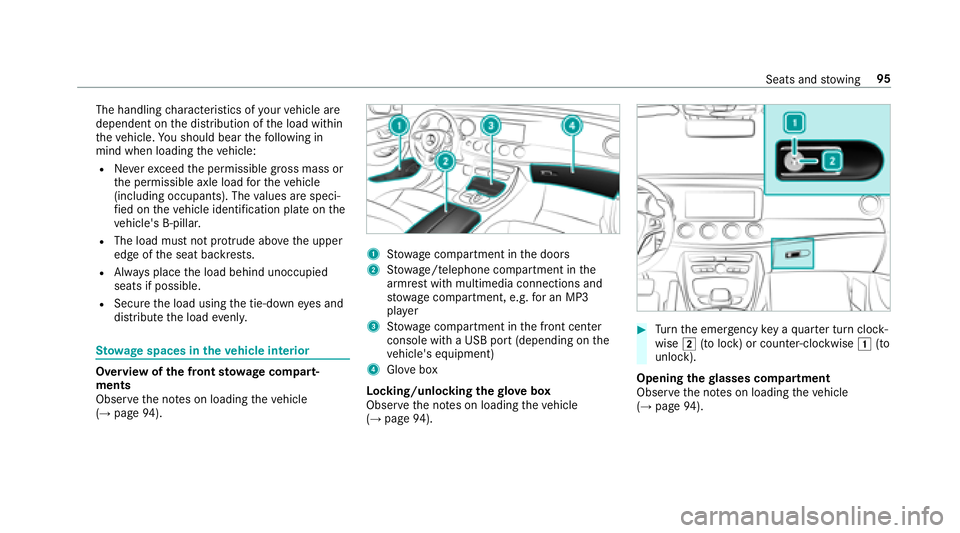
Overview of the front stowage compa rt‐
ments
Observ eth e no tes on loading theve hicle
(
→page 94).
1Stow age compartment in the doors
2St ow age/telephone compartment in the
armrest with multimedia connections and
stow age compartment, e.g. for an MP3
pla yer
3Stow age compartment in the front center
console with a USB port (depending on the
ve hicle's equipment)
4Glo vebox
Locking/unlocking thegl ove box
Obser vethe no tes on loading theve hicle
(
→page 94).
#Turn the emer gency key a quarter turn clock‐
wise 2(to lock) or counter-clockwise 1(to
unlock).
Opening thegl asses co mpartment
Observ eth e no tes on loading theve hicle
(
→page 94).
Seats and stowing 95