2018 MERCEDES-BENZ CLS check engine
[x] Cancel search: check enginePage 148 of 334
Have the brake system checked immediately.
Consult a qualified specialist workshop to
arrange this.
! Vehicles with 4MATIC: function or per-
formance tests may only be carried out on a 2-
axle dynamometer. If you wish to operate the
vehicle on such a dynamometer, please con-
sult a qualified specialist workshop in
advance. You could otherwise damage the
drive train or the brake system.
! Vehicles with 4MATIC: as the ESP ®
sys-
tem operates automatically, the engine and
the ignition must be switched off (SmartKey in
position 0 or 1 in the ignition lock or Start/
Stop button in position 0 or 1 ) while the park-
ing brake is being tested on a brake dyna-
mometer.
Braking maneuvers triggered automatically
by ESP ®
may seriously damage the brake sys-
tem.
! Vehicles with 4MATIC: as the ESP ®
sys-
tem operates automatically, the engine and
the ignition system must be switched off
(SmartKey in position 0 or 1 in the ignition
lock or Start/Stop button in position 0 or 1 )
when: R
testing the parking brake on a brake dyna-
mometer. R
you intend to have the vehicle towed with
one of the axles raised.
Braking maneuvers triggered automatically
by ESP ®
may seriously damage the brake sys-
tem.
All checks and maintenance work on the brake
system must be carried out at a qualified spe-
cialist workshop.
Have brake pads installed and brake fluid
replaced at a qualified specialist workshop.
If the brake system has only been subject to
moderate loads, you should test the functional-
ity of your brakes at regular intervals. To do so,
press firmly on the brake pedal when driving at a
high speed. This improves the grip of the brake
pads.
You can find a description of Brake Assist (BAS)
on ( Y
page 65) or of BAS PLUS on ( Y
page 65). The braking characteristics of the vehicle can be
seriously impaired if: R
brake pads other than those recommended
are installed R
the recommended brake fluid is not used
Safe braking can no longer be guaranteed.
AMG high-performance and ceramic
brakes The high-performance brake system is only
installed on the Mercedes-AMG
CLS 63 S 4MATIC model.
The AMG brake systems are designed for heavy
loads. This may lead to noise when braking. This
will depend on: R
Speed R
Braking force R
Environmental conditions, such as tempera-
ture and humidity
The wear of individual components of the brake
system, such as the brake pads/linings or brake
discs, depends on the individual driving style
and operating conditions.
For this reason, it is impossible to state a mile-
age that will be valid under all circumstances. An
aggressive driving style will lead to high wear.
You can obtain further information about this
from your authorized Mercedes-Benz Center.
New and replaced brake pads and discs only
reach their optimum braking effect after several
hundred kilometers of driving. Compensate for
this by applying greater force to the brake pedal.
Keep this in mind, and adapt your driving and
braking accordingly during this break-in period.
Excessive heavy braking results in correspond-
ingly high brake wear. Observe the brake wear
warning lamp in the instrument cluster and note
any brake status messages in the multifunction
display. Especially for high performance driving,
it is important to maintain and have the brake
system checked regularly.146
Driving tips
Driving and parking
Page 172 of 334
i The text shown in the multimedia system
depends on the language setting. The follow-
ing are examples of rear view camera displays
in the multimedia system.
Important safety notes The rear view camera is only an aid. It is not a
replacement for your attention to your immedi-
ate surroundings. You are always responsible
for safe maneuvering and parking. When maneu-
vering or parking, make sure that there are no
persons, animals or objects in the area in which
you are maneuvering.
Under the following circumstances, the rear
view camera will not function, or will function in
a limited manner: R
if the trunk lid is open R
in heavy rain, snow or fog R
at night or in very dark places R
if the camera is exposed to very bright light R
if the area is lit by fluorescent bulbs or LED
lighting (the display may flicker) R
if there is a sudden change in temperature,
e.g. when driving into a heated garage in win-
ter R
if the camera lens is dirty or obstructed
Observe the notes on cleaning
( Y
page 274)R
if the rear of your vehicle is damaged. In this
event, have the camera position and setting
checked at a qualified specialist workshop
The field of vision and other functions of the rear
view camera may be restricted due to additional
accessories on the rear of the vehicle (e.g.
license plate holder, bicycle rack).
On vehicles with height-adjustable chassis,
leaving the standard height can result in inac-
curacies in the guide lines, depending on tech-
nical conditions.
i The rear view camera is protected from rain-
drops and dust by means of a flap. When the
rear view camera is activated, this flap opens.
The flap closes again when: R
you have finished the maneuvering process R
you switch off the engine R
you open the trunk
Observe the notes on cleaning ( Y
page 274).
For technical reasons, the flap may remain
open briefly after the rear view camera has
been deactivated. Switching the rear view camera on/off X
To switch on: make sure that the Activa‐
tion by R gear function is selected in the
multimedia system (see Digital Operator's
Manual). X
Engage reverse gear.
The rear view camera flap opens. The multi-
media system shows the area behind the vehi-
cle with guide lines.
The image from the rear view camera is avail-
able throughout the maneuvering process. X
To switch off: shift the transmission to posi-
tion P .
or X
Drive forwards a short distance.
Displays in the multimedia system The rear view camera may show a distorted view
of obstacles, show them incorrectly or not at all.
The rear view camera does not show objects in
the following positions: R
very close to the rear bumper R
under the rear bumper R
in the area immediately above the tailgate
handle
! Objects not at ground level may appear to
be further away than they actually are, e.g.: R
the bumper of a parked vehicle R
the drawbar of a trailer R
the ball coupling of a trailer tow hitch R
the rear section of an HGV R
a slanted post
Use the guidelines only for orientation.
Approach objects no further than the bottom-
most guideline.170
Driving systems
Driving and parking
Page 190 of 334
Important safety notes
G WARNIN G
If you operate information systems and com-
munication equipmen t integrate d in th e vehi-
cle while driving , you will be distracte d from
traffic conditions. You could also lose control
of th e vehicle. Ther e is a ris k of an accident.
Only operate th e equipmen t when th e traffic
situation permits. If you are no t sur e that this
is possible , park th e vehicl e payin g attention
to traffic condition s and operate th e equip-
men t when th e vehicl e is stationary.
You must observ e th e legal requirements for th e
country in whic h you are currentl y driving when
operating th e on-board computer.
G WARNIN G
If th e instrumen t cluste r has faile d or mal-
functioned, you may no t recognize function
restriction s in systems relevan t to safety. The
operating safet y of your vehicl e may be
impaired . Ther e is a ris k of an accident.
Drive on carefully. Hav e th e vehicl e checke d
at a qualified specialist workshop immedi-
ately.
The on-board computer only shows message s or
warning s from certain systems in th e multifunc-
tion display. You should therefor e mak e sur e
your vehicl e is operating safely at all times .
If th e operating safet y of your vehicl e is
impaired , pull ove r as soo n as it is saf e to do so.
Contac t a qualified specialist workshop.
Fo r an overview, see th e instrumen t panel illus-
tration ( Y
page 34).
Displays and operation
Speedometer with segments
The segments in th e speedometer indicat e
whic h spee d range is available.R
Cruis e control activated ( Y
page 148):
The segments ligh t up from th e store d spee d
to th e en d of th e scale.R
DISTRONI C PLU S activated ( Y
page 149): On e or two segments in th e set spee d range
ligh t up. R
DISTRONI C PLU S detects a vehicl e in fron t
moving mor e slowly than th e store d speed:
The segments between th e spee d of th e vehi-
cle in fron t and th e store d spee d ligh t up.
Tachometer
! Do no t driv e in th e overrevving range, as this
could damag e th e engine.
The red ban d in th e tachometer indicates th e
engine's overrevving range.
The fuel suppl y is interrupted to protect th e
engin e when th e red ban d is reached.
Outside temperature display You should pay special attention to road condi-
tion s when temperatures are aroun d freezing
point.
Bea r in min d that th e outside temperature dis-
play indicates th e temperature measured and
does no t record th e road temperature.
The outside temperature display is in th e multi-
function display ( Y
page 190).
The multifunction display shows changes in th e
outside temperature wit h a delay.
Coolant temperature gauge
G WARNIN G
Opening th e hoo d when th e engin e is over-
heated or when there is a fir e in th e engin e
compartmen t could expos e you to hot gase s
or other servic e products . Ther e is a ris k of
injury.
Let an overheate d engin e cool down before
opening th e hood. If there is a fir e in th e
engin e compartment, keep th e hoo d closed
and contact th e fir e department.
! A display message is shown if th e coolan t
temperature is to o high .
If th e coolan t temperature is ove r 24 8 ‡
(12 0 †), do no t continue driving . The engin e
will otherwise be damaged.188
Displays and operation
On-board computer and displays
Page 208 of 334

Display messages
Possible causes/consequences and P Solutions
' (US A only)
M (Canada only)
Check Brake Fluid
Level There is no t enough brak e fluid in th e brak e fluid reservoir .
In addition , th e ' (US A only) or M (Canada only) warning lamp
lights up in th e instrumen t cluste r and a warning tone sounds.
G WARNIN G
The braking effec t may be impaired.
There is a ris k of an accident.X
Pull ove r and stop th e vehicl e safely as soo n as possible, payin g
attention to roa d and traffic conditions. Do no t continu e drivin g
under any circumstances. X
Secur e th e vehicl e against rollin g away ( Y
page 141).X
Consult a qualified specialist workshop .X
Do no t add brak e fluid . This does no t correc t th e malfunction .
& Check Brake Pad Wea r The brak e pads/linings hav e reached their wear limit.X
Visit a qualified specialist workshop .
S mbrace Inoperative On e or mor e main features of th e mbrace system are malfunctioning .X
Visit a qualified specialist workshop .
Collision Preven ‐
tio n Assist Plu s
Currently Unavaila‐
ble See Operator' s
Manual COLLISION PREVENTION ASSIST PLU S is temporarily no t operational.
Possibl e causes are: R
th e radar sensor system is temporarily inoperative, e.g. due to elec -
tromagneti c radiation emitted by nearby TV or radi o station s or
other source s of electromagneti c radiationR
th e system is outside th e operating temperature rangeR
th e on-boar d voltag e is to o low.
Whe n th e causes state d abov e no longer apply, th e display message
disappears.
COLLISION PREVENTION ASSIST PLU S is operational again .
If th e display message does no t disappear :X
Pull ove r and stop th e vehicl e safely as soo n as possible, payin g
attention to roa d and traffic conditions.X
Secur e th e vehicl e against rollin g away ( Y
page 141).X
Restart th e engine.
Collision Preven ‐
tio n Assist Plu s
Inoperative COLLISION PREVENTION ASSIST PLU S is temporarily inoperative due
to a malfunction . Adaptive Brake Assis t may also hav e failed.X
Visit a qualified specialist workshop .
PRE-SAFE
Inoperative See
Operator' s Manual Importan t function s of PRE-SAF E ®
hav e failed. Al l other occupant
safet y systems , e.g. air bags , remain available.X
Visit a qualified specialist workshop .206
Display messages
On-board computer and displays
Page 233 of 334
Warning/
indicator
lamp Q Signal type
Possible causes/consequences and P Solutions
t
Q Mercedes-AMG vehicles only:
The yellow SPORT handling mode warning lamp is lit while the engine is running.
SPORT handling mode is activated.
G WARNING
When SPORT handling mode is switched on, ESP ®
is unable to stabilize the vehicle.
There is an increased risk of skidding and an accident. X
Only switch to SPORT handling mode in accordance with the conditions descri-
bed in the "Activating/deactivating ESP" section ( Y
page 71).
u
Q The red restraint system warning lamp is lit while the engine is running.
The restraint system is malfunctioning.
G WARNING
The air bags or Emergency Tensioning Devices may either be triggered uninten-
tionally or, in the event of an accident, may not be triggered.
There is an increased risk of injury. X
Observe the additional display messages in the multifunction display. X
Drive on carefully. X
Have the restraint system checked immediately at a qualified specialist work-
shop.
Observe the additional information on restraint systems ( Y
page 41).Warning and indicator lamps in the instrument cluster 231
On-board computer and displays Z
Page 268 of 334
X
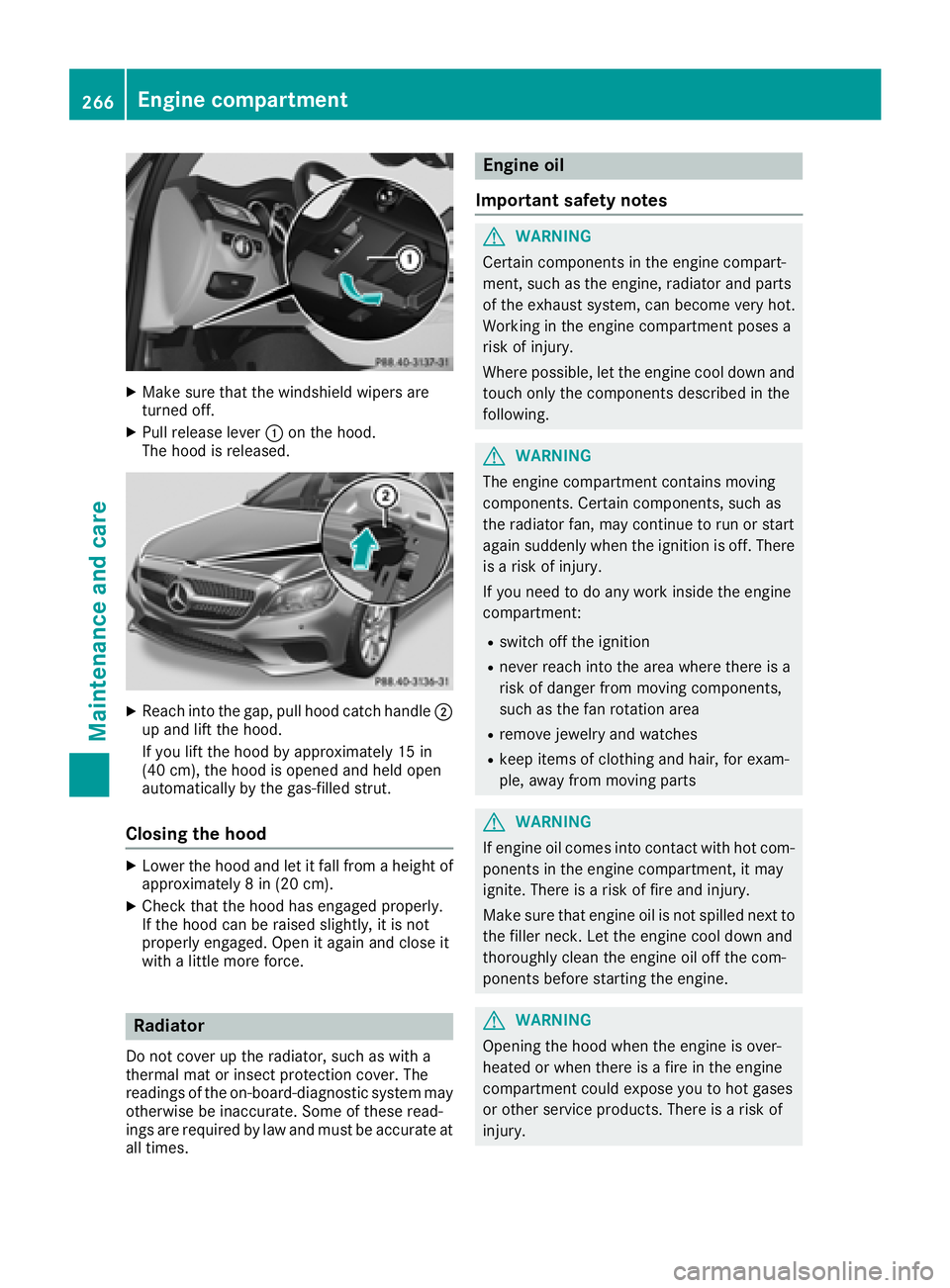
Make sure that the windshield wipers are
turned off. X
Pull release lever C on the hood.
The hood is released.
X
Reach into the gap, pull hood catch handle D
up and lift the hood.
If you lift the hood by approximately 15 in
(40 cm), the hood is opened and held open
automatically by the gas-filled strut.
Closing the hood X
Lower the hood and let it fall from a height of
approximately 8 in (20 cm). X
Check that the hood has engaged properly.
If the hood can be raised slightly, it is not
properly engaged. Open it again and close it
with a little more force.
Radiator
Do not cover up the radiator, such as with a
thermal mat or insect protection cover. The
readings of the on-board-diagnostic system may
otherwise be inaccurate. Some of these read-
ings are required by law and must be accurate at
all times. Engine oil
Important safety notes
G WARNING
Certain components in the engine compart-
ment, such as the engine, radiator and parts
of the exhaust system, can become very hot.
Working in the engine compartment poses a
risk of injury.
Where possible, let the engine cool down and
touch only the components described in the
following.
G WARNING
The engine compartment contains moving
components. Certain components, such as
the radiator fan, may continue to run or start
again suddenly when the ignition is off. There
is a risk of injury.
If you need to do any work inside the engine
compartment: R
switch off the ignition R
never reach into the area where there is a
risk of danger from moving components,
such as the fan rotation area R
remove jewelry and watches R
keep items of clothing and hair, for exam-
ple, away from moving parts
G WARNING
If engine oil comes into contact with hot com-
ponents in the engine compartment, it may
ignite. There is a risk of fire and injury.
Make sure that engine oil is not spilled next to
the filler neck. Let the engine cool down and
thoroughly clean the engine oil off the com-
ponents before starting the engine.
G WARNING
Opening the hood when the engine is over-
heated or when there is a fire in the engine
compartment could expose you to hot gases
or other service products. There is a risk of
injury.266
Engine compartment
Maintenance and care
Page 269 of 334
Let an overheated engine cool down before
opening the hood. If there is a fire in the
engine compartment, keep the hood closed
and contact the fire department.
General notes Depending on your driving style, the vehicle
consumes up to 0.8 US qt (0.8 liters) of oil per
600 miles (1,000 km). The oil consumption may
be higher than this when the vehicle is new or if
you frequently drive at high engine speeds.
Depending on the engine, the oil dipstick may be
in a different location.
When checking the oil level: R
park the vehicle on a level surface R
the engine should be switched off for approx-
imately five minutes if the engine is at normal
operating temperature R
if the engine is not at normal operating tem-
perature, e.g. if the engine was only started
briefly, wait about 30 minutes before carrying
out the measurement
Checking the oil level using the oil dip-
stick
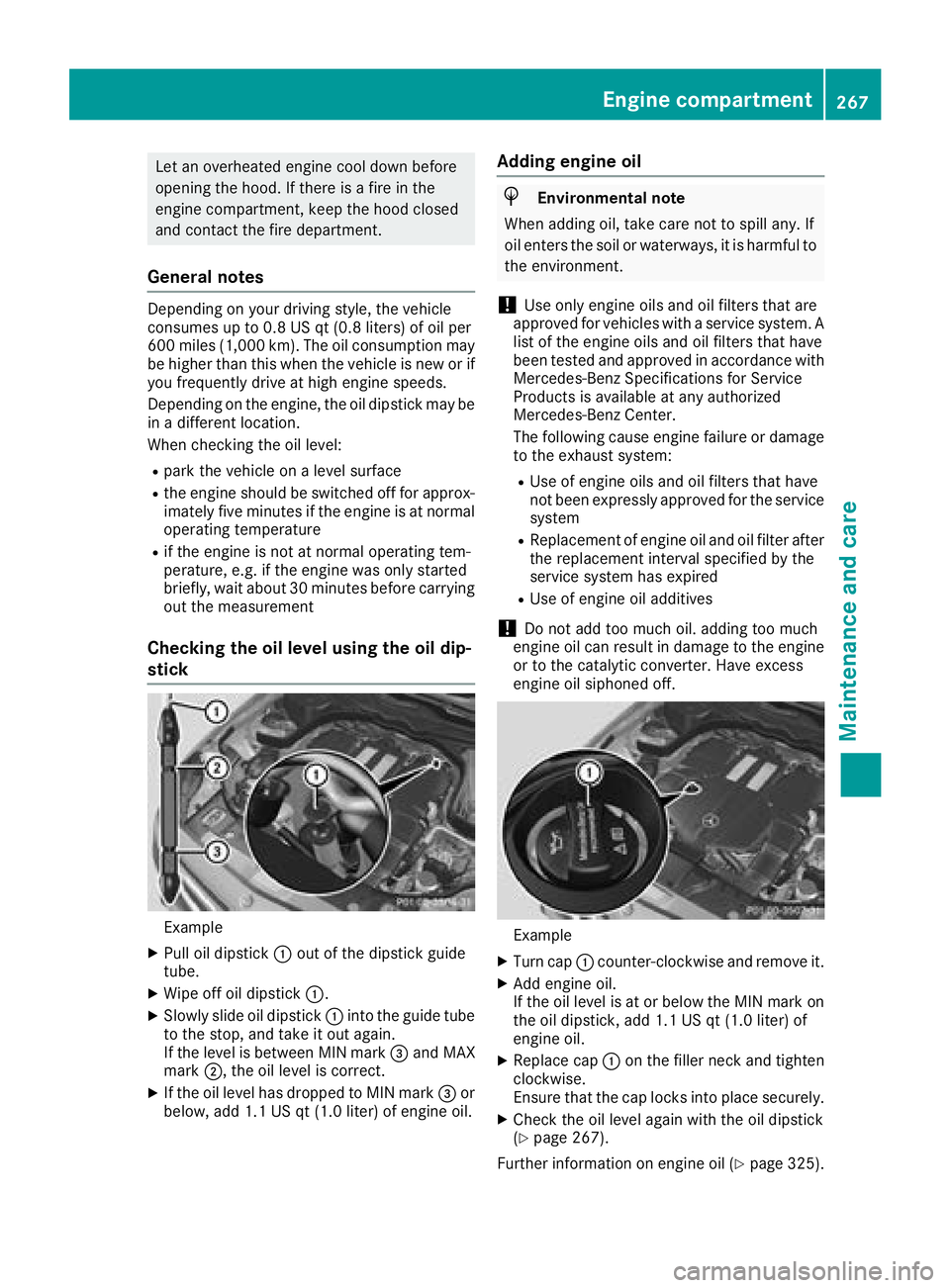
Example X
Pull oil dipstick C out of the dipstick guide
tube. X
Wipe off oil dipstick C .X
Slowly slide oil dipstick C into the guide tube
to the stop, and take it out again.
If the level is between MIN mark
Page 270 of 334
Additional service products
Import ant safety notes
G WARNIN G
Certain component s in th e engin e compart-
ment, suc h as th e engine, radiato r and part s
of th e exhaust system, can become ver y hot .
Working in th e engin e compartmen t poses a
ris k of injury.
Wher e possible, let th e engin e cool down and
touch only th e component s described in th e
following.
G WARNIN G
The engin e compartmen t contain s moving
components. Certain components, suc h as
th e radiato r fan , may continu e to run or start
again suddenly when th e ignition is off . There
is a ris k of injury.
If you need to do any wor k inside th e engin e
compartment: R
switch off th e ignitionR
never reac h int o th e area wher e there is a
ris k of danger from moving components,
suc h as th e fan rotation areaR
remove jewelr y and watchesR
keep items of clothing and hair , for exam-
ple, away from moving part s
G WARNIN G
The coolin g system is pressurized, particularly
when th e motor is warm . If you open th e cap ,
you could be scalded if hot coolan t sprays out .
There is a ris k of injury.
Let th e engin e cool down before you open th e
cap . Wear gloves and eye protection . Slowly
open th e cap to reliev e pressure.
G WARNIN G
Opening th e hoo d when th e engin e is over-
heated or when there is a fir e in th e engin e
compartmen t could expos e you to hot gase s
or other servic e products . There is a ris k of
injury. Let an overheate d engin e cool down before
opening th e hood. If there is a fir e in th e
engin e compartment, keep th e hoo d closed
and contact th e fir e department.
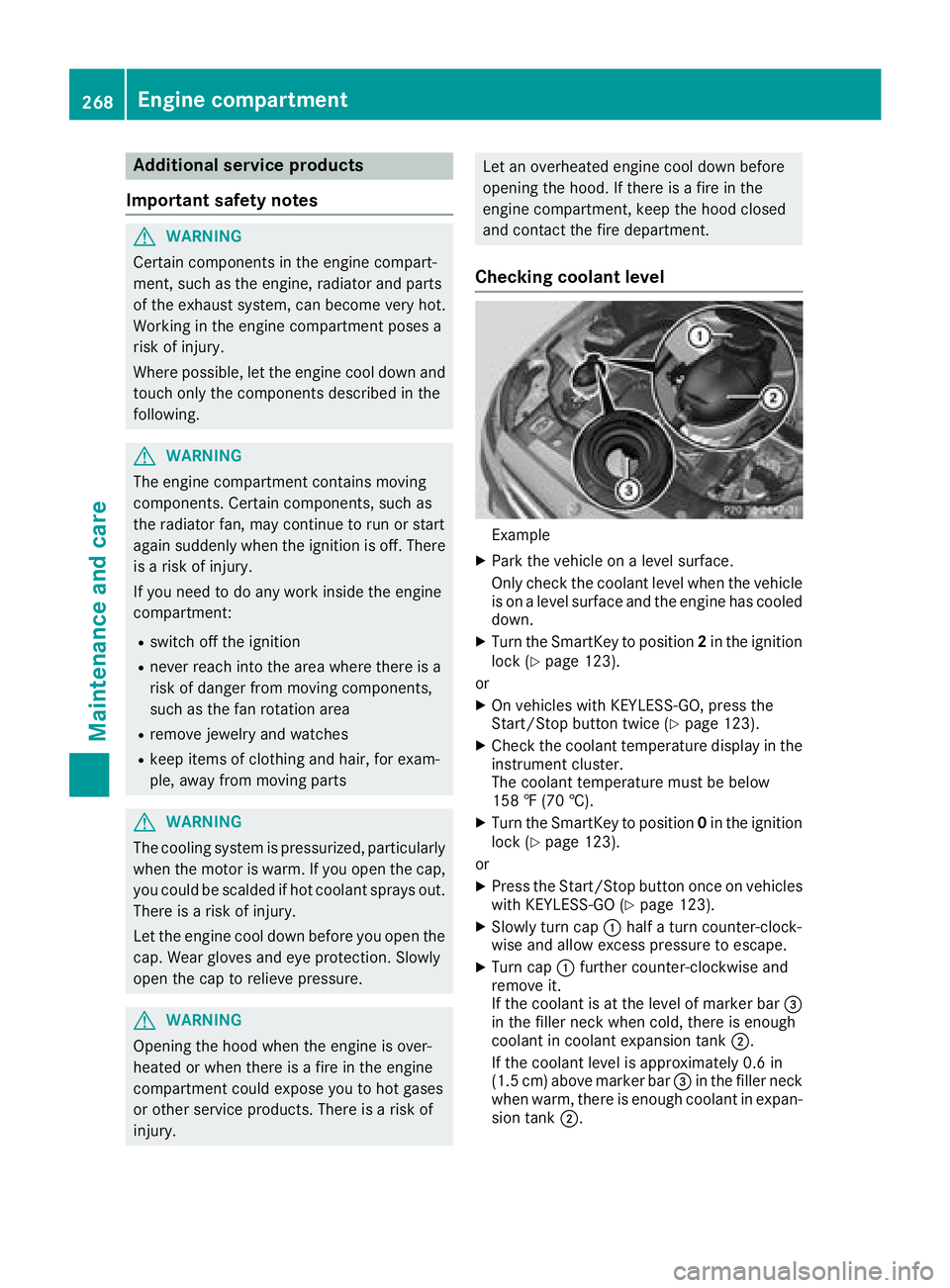
Checking coolant level
Exampl e X
Park th e vehicl e on a level surface.
Only chec k th e coolan t level when th e vehicl e
is on a level surfac e and th e engin e has cooled
down . X
Turn th e SmartKey to position 2 in th e ignition
loc k ( Y
page 123).
or X
On vehicles wit h KEYLESS-GO , press th e
Start/Sto p butto n twice ( Y
page 123).X
Chec k th e coolan t temperature display in th e
instrumen t cluster.
The coolan t temperature mus t be belo w
15 8 ‡ (70 †). X
Turn th e SmartKey to position 0 in th e ignition
loc k ( Y
page 123).
or X
Press th e Start/Sto p butto n once on vehicles
wit h KEYLESS-GO ( Y
page 123).X
Slowly tur n cap C half a tur n counter-clock -
wise and allow excess pressur e to escape.X
Turn cap C further counter-clockwise and
remove it .
If th e coolan t is at th e level of marke r bar