2018 MERCEDES-BENZ C CLASS phone
[x] Cancel search: phonePage 24 of 370

Suspension tuningSETUP (on-board computer,
Mercedes-AMG vehicles) ............... 227
Switching air-recirculation mode
on/off .................................................1 30
Switching on media mode
Via the device list .......................... 279
T
Tachometer ........................................ 211
Tail lamps
Display message ............................ 242
Tank
see Fuel tank
Tank content
Fuel gauge ....................................... 37
Technical data
Capacities ...................................... 361
Information .................................... 359
Vehicle data ................................... 367
Telephone
Accepting a call (multifunction
steering wheel) .............................. 220
Authorizing a mobile phone (con-
necting) ......................................... 278
Connecting a mobile phone (gen-
eral information) ............................ 277
Display message ............................ 257
Introduction ................................... 220
Menu (on-board computer) ............ 220
Number from the phone book ........ 220
Redialing ........................................ 221
Rejecting/ending a call ................. 220
see also Digital Operator's Man-
ual .................................................. 270
Switching between mobile
phones ........................................... 278
see Mobile phone
Temperature
Coolant (display in the instrument
cluster) .......................................... 211
Engine oil (on-board computer,
Mercedes-AMG vehicles) ............... 226
Outside temperature ...................... 211
Setting (climate control) ................ 128
Transmission oil (on-board com-
puter, Mercedes-AMG vehicles) ..... 226 Through-loading feature
................... 283
Timing (RACETIMER) ......................... 228
Tire pressure
Calling up (on-board computer) ..... 340
Checking manually ........................ 339
Display message ............................ 252
Maximum ....................................... 339
Not reached (TIREFIT) .................... 321
Notes ............................................. 337
Reached (TIREFIT) .......................... 321
Recommended ............................... 336
Using the TIREFIT kit ...................... 320
Tire pressure loss warning system
General notes ................................ 339
Important safety notes .................. 339
Restarting ...................................... 340
Tire pressure monitor
Checking the tire pressure elec-
tronically ........................................ 342
Function/notes ............................. 340
Genera l note
s ................................ 340
Important safety notes .................. 340
Radio type approval for the tire
pressure monitor ........................... 343
Restarting ...................................... 342
Warning lamp ................................. 268
Warning message .......................... 342
Tire pressure sensors
Display message ............................ 253
Tire-change tool kit ........................... 317
TIREFIT kit
Important safety notes .................. 319
Storage location ............................ 317
Tire pressure not reached .............. 321
Tire pressure reached .................... 321
Using ............................................. 320
Tires
Aspect ratio (definition) ................. 352
Average weight of the vehicle
occupants (definition) .................... 350
Bar (definition) ............................... 350
Changing a wheel .......................... 352
Characteristics .............................. 350
Checking ........................................ 334
Curb weight (definition) ................. 351
Definition of terms ......................... 350
Direction of rotation ...................... 353
Display message ............................ 252
22Index
Page 40 of 370

Multifunction steering wheel
FunctionPage
:Multifunction display212
;Multimedia system display
=~Rejects or ends a call
6Makes or accepts a call
Further telephone functions220
WXAdjusts volume
8 Mute
óSwitches on voice-
operated control for naviga-
tion or the Voice Control Sys-
tem
FunctionPage
?ò Opens the menu list
9:Selects a menu
aConfirms the selection
%Back
Operates the on-board com-
puter211
ñSwitches on voice-
operated control for naviga-
tion or the Voice Control Sys-
tem
iVehicles with Audio 20 multimedia sys-
tem: you can find further information
Ron the multimedia system in the Digital
Operator's Manual
Ron voice-controlled navigation in the man-
ufacturer's operating instructions
iVehicles with COMAND multimedia sys-
tem: you can find further information
Ron the multimedia system in the Digital
Operator's Manual
Ron the single DVD drive in the Digital Oper-
ator's Manual
Ron the Voice Control System in the sepa-
rate operating instructions
38Multifunction steering wheel
At a glance
Page 41 of 370

Center console
Center console, upper section
FunctionPage
:Climate control systems124
;£Hazard warning lamps115
=ØVehicle functions/
system settings button (see
Digital Operator's Manual)
?% Telephone button (see
Digital Operator's Manual)
APASSENGER AIRBAG indica-
tor lamps45
ATA indicator lamp76
FunctionPage
BAnalog clock
CÕ Media button (see Dig-
ital Operator's Manual)
D$ Radio button (see Digi-
tal Operator's Manual)
EØ Navigation button (see
Digital Operator's Manual)
Fþ Inserts or ejects a CD
or DVD (see Digital Opera-
tor's Manual)
Center console39
At a glance
Page 44 of 370

Overhead control panel
FunctionPage
:pSwitches the left-hand
reading lamp on/off116
;| Switches the automatic
interior lighting control
on/off
117
=G SOS button (mbrace
system)294
?c Switches the front inte-
rior lighting on/off117
Au Switches the rear inte-
rior lighting on/off117
Bp Switches the right-
hand reading lamp on/off116
Cï Info call button
(mbrace system)295
DEyeglasses compartment281
FunctionPage
E3 Operates the sliding
sunroof95
3 Operates the pano-
rama roof with power tilt/
sliding panel
96
Operates the roller sunblinds96
FRear-view mirror
Automatic anti-glare109
Manual anti-glare108
GButtons for the garage door
opener300
HMicrophone for mbrace sys-
tem, telephone and the Voice
Control System, see the sep-
arate operating instructions
IF Breakdown assistance
call button (mbrace system)295
42Overhead control panel
At a glance
Page 79 of 370

The emergency call system sends a message
or establishes a data connection provided
that:
Ryou have subscribed to the mbrace service.
Rthe mbrace service has been activated
properly.
Rthe necessary mobile phone network is
available.
Protection against theft77
Safety
Z
Page 80 of 370

SmartKey
Important safety notes
GWARNING
If children are left unsupervised in the vehicle,
they could:
Ropen the doors, thus endangering other
people or road users.
Rget out and disrupt traffic.
Roperate the vehicle's equipment.
Additionally, children could set the vehicle in
motion if, for example, they:
Rrelease the parking brake.
Rshifting the automatic transmission out of
park position P
RStart the engine.
There is a risk of an accident and injury.
When leaving the vehicle, always take the
SmartKey with you and lock the vehicle. Never
leave children or animals unattended in the
vehicle. Always keep the SmartKey out of
reach of children.
GWARNING
If you attach heavy or large objects to the
SmartKey, the SmartKey could be uninten-
tionally turned in the ignition lock. This could
cause the engine to be switched off. There is a risk of an accident.
Do not attach any heavy or large objects to the
SmartKey. Remove any bulky key rings before
inserting the SmartKey into the ignition lock.
!Keep the SmartKey away from strong mag-
netic fields. Otherwise, the remote control
function could be affected.
Strong magnetic fields can occur in the vicin-
ity of powerful electrical installations.
Do not keep the SmartKey:
Rwith electronic devices, e.g. a mobile phone
or another SmartKey.
Rwith metallic objects, e.g. coins or metal foil.
Rinside metallic objects, e.g. a metal case.
This can affect the functionality of the Smart- Key. Vehicles with KEYLESS-GO start function:
do
not keep the SmartKey on the parcel shelf or in
the trunk. Otherwise, the SmartKey may not be
detected, e.g. when starting the engine using
the Start/Stop button.
A brief radio connection between the vehicle
and the SmartKey determines whether a valid
SmartKey is in, or in the direct vicinity of, the
vehicle. This occurs, for example:
Rwhen starting the engine
Rwhile driving
Rwhen using HANDS-FREE ACCESS
Rwhen the external door handles are touched
Rduring convenience closing
SmartKey functions
:& Locks the vehicle
;FOpens/closes the trunk lid
=%Unlocks the vehicle
XTo unlock centrally: press the%button.
If you do not open the vehicle within approx-
imately 40 seconds of unlocking:
Rthe vehicle is locked again.
Rprotection against theft is reactivated.
XTo lock centrally: press the&button.
The SmartKey centrally locks and unlocks the
following components:
Rthe doors
Rthe trunk lid
Rthe fuel filler flap
The turn signals flash once when unlocking and
three times when locking.
You can also set an audible signal to confirm
that the vehicle has been locked. The audible
signal can be activated and deactivated via the
78SmartKey
Opening and closing
Page 126 of 370
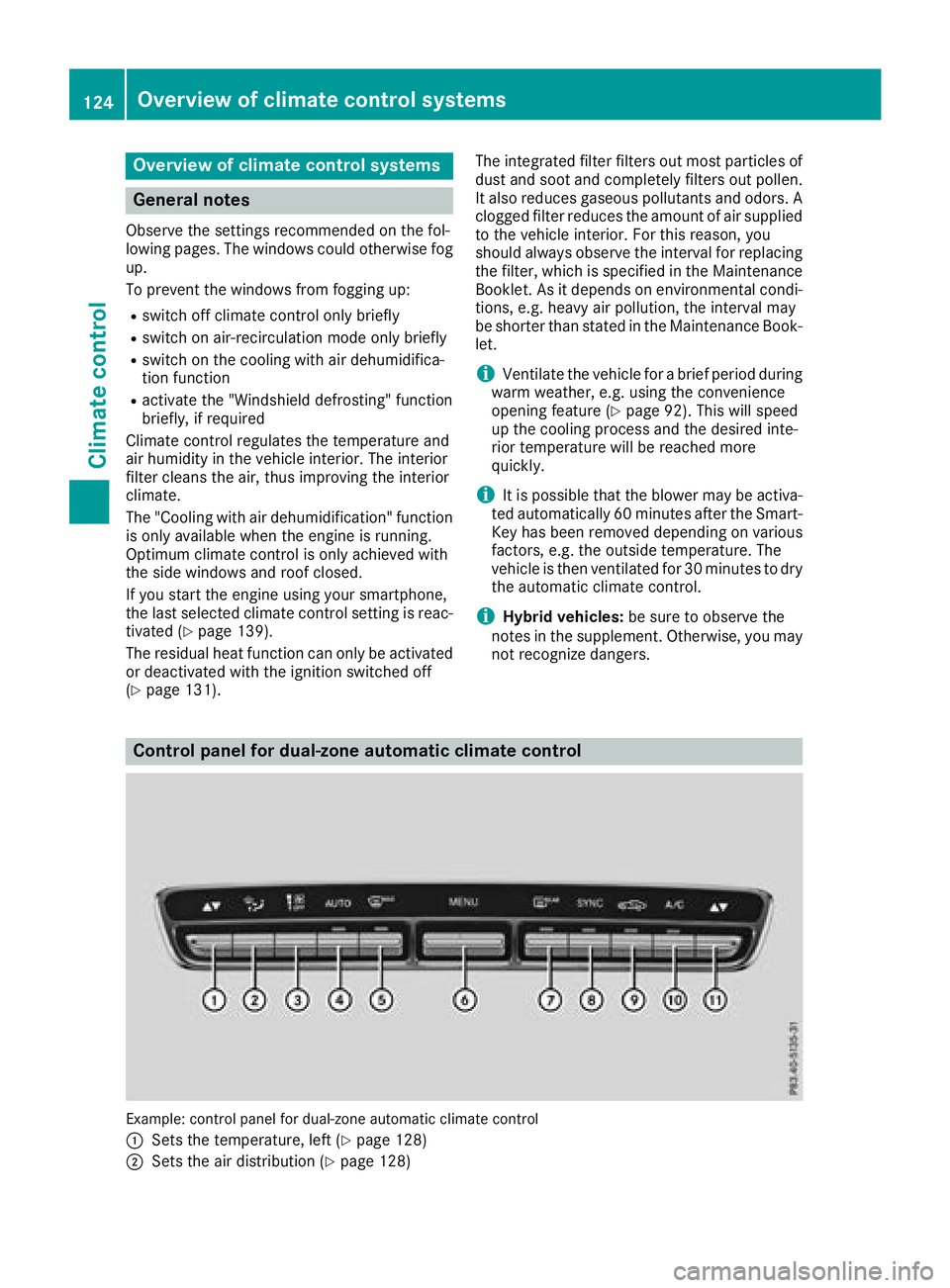
Overview of climate control systems
General notes
Observe the settings recommended on the fol-
lowing pages. The windows could otherwise fog
up.
To prevent the windows from fogging up:
Rswitch off climate control only briefly
Rswitch on air-recirculation mode only briefly
Rswitch on the cooling with air dehumidifica-
tion function
Ractivate the "Windshield defrosting" function
briefly, if required
Climate control regulates the temperature and
air humidity in the vehicle interior. The interior
filter cleans the air, thus improving the interior
climate.
The "Cooling with air dehumidification" function
is only available when the engine is running.
Optimum climate control is only achieved with
the side windows and roof closed.
If you start the engine using your smartphone,
the last selected climate control setting is reac-
tivated (
Ypage 139).
The residual heat function can only be activated
or deactivated with the ignition switched off
(
Ypage 131). The integrated filter filters out most particles of
dust and soot and completely filters out pollen.
It also reduces gaseous pollutants and odors. A
clogged filter reduces the amount of air suppliedto the vehicle interior. For this reason, you
should always observe the interval for replacing
the filter, which is specified in the Maintenance
Booklet. As it depends on environmental condi-
tions, e.g. heavy air pollution, the interval may
be shorter than stated in the Maintenance Book-
let.
iVentilate the vehicle for a brief period during
warm weather, e.g. using the convenience
opening feature (
Ypage 92). This will speed
up the cooling process and the desired inte-
rior temperature will be reached more
quickly.
iIt is possible that the blower may be activa-
ted automatically 60 minutes after the Smart-
Key has been removed depending on various
factors, e.g. the outside temperature. The
vehicle is then ventilated for 30 minutes to dry
the automatic climate control.
iHybrid vehicles: be sure to observe the
notes in the supplement. Otherwise, you may
not recognize dangers.
Control panel for dual-zone automatic climate control
Example: control panel for dual-zone automatic climate control
:
Sets the temperature, left (Ypage 128)
;Sets the air distribution (Ypage 128)
124Overview of climate control systems
Climate control
Page 139 of 370

the vehicle. This occurs, for example, when
starting the engine.
To start the vehicle without actively using the
SmartKey:
Rthe Start/Stop button must be inserted in the
ignition lock.
Rthe SmartKey must be in the vehicle.
Rthe vehicle must not be locked with the
SmartKey or KEYLESS-GO. (Ypage 79)
Do not keep the SmartKey:
Rwith electronic devices, e.g. a mobile phone
or another SmartKey.
Rwith metallic objects, e.g. coins or metal foil.
Rinside metallic objects, e.g. a metal case.
This can affect the functionality of the Smart-
Key.
If you lock the vehicle with the SmartKey remote control or with KEYLESS-GO, after a short time:
Ryou will not be able to switch on the ignition
with the Start/Stop button.
Ryou will no longer be able to start the engine
with the Start/Stop button until the vehicle is
unlocked again.
If you lock the vehicle centrally using the button
on the front door (
Ypage 84), you can continue
to start the engine with the Start/Stop button.
The engine can be switched off while the vehicle
is in motion by pressing and holding the Start/
Stop button for three seconds. This function
operates independently of the ECO start/stop
automatic engine switch-off function.
Key positions with the Start/Stop button
:Start/Stop button
;Ignition lock
As soon as the ignition is switched on, all the
indicator lamps in the instrument cluster light up. Warning and indicator lamps: see
(
Ypage 258).
If Start/Stop button :has not yet been
pressed, this corresponds to the SmartKey
being removed from the ignition.
XTo switch on the power supply: press
Start/Stop button :once.
The power supply is switched on. You can now activate the windshield wipers, for example.
The power supply is switched off again if:
Rthe driver's door is opened and
Ryou press Start/Stop button :twice when in
this position
XTo switch on the ignition: press Start/Stop
button :twice.
The ignition is switched on.
The ignition is switched off again if:
Ryou do not start the engine from this position within 15 minutes
Ryou press Start/Stop button :once when in
this position
The power supply is switched off again if:
Rthe driver's door is opened and
Ryou press Start/Stop button :once when in
this position
Removing the Start/Stop button
You can remove the Start/Stop button from the ignition lock and start the vehicle as normal
using the SmartKey.
It is possible to switch between Start/Stop bu t-
to
n mode and key operation only when the
transmission is in position j.
XRemove Start/Stop button :from ignition
lock ;.
You do not have to remove the Start/Stop but-
ton from the ignition lock when you leave the
vehicle. You should, however, always take the
SmartKey with you when leaving the vehicle. As
long as the SmartKey is in the vehicle:
Rthe vehicle can be started using the Start/
Stop button
Rthe electrically powered equipment can be
operated
Driving137
Dr iving an d parking
Z