Page 199 of 609
Garage door opener
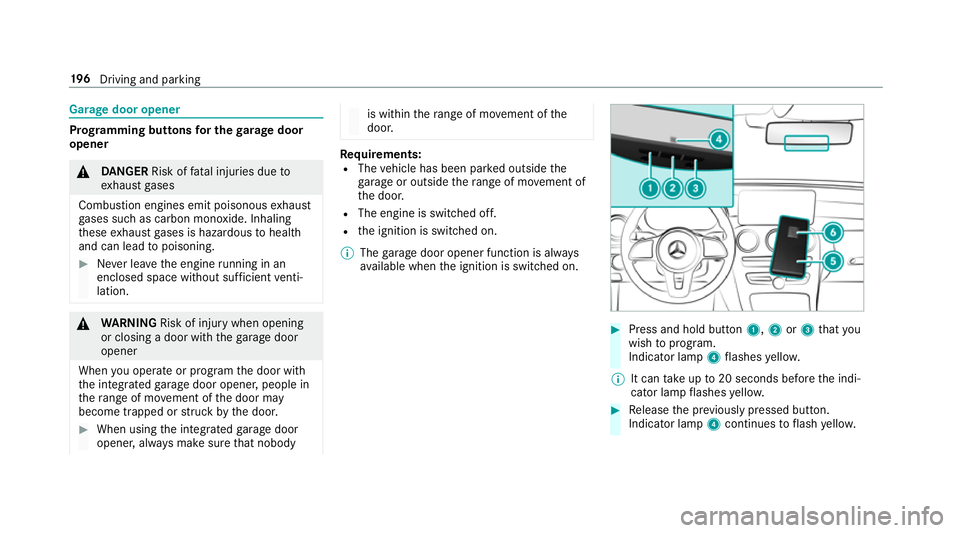
Prog
ramming buttons for the garage door
opener 000A
DANG ER Risk of fata l injuries due to
ex haust gases
Combustion engines emit poisonous exhaust
ga ses such as carbon monoxide. Inhaling
th ese exhaust gases is hazardous tohealth
and can lead topoisoning. 0007
Never lea vethe engine running in an
enclosed space wi thout suf ficient venti‐
lation. 000A
WARNING Risk of inju rywhen opening
or closing a door with thega rage door
opener
When you operate or program the door with
th e integrated garage door opener, people in
th era nge of mo vement of the door may
become trapped or stru ck bythe door. 0007
When using the integrated garage door
opener, alw ays make sure that nobody is within
thera nge of mo vement of the
door. Re
quirements:
R The vehicle has been par ked outside the
ga rage or outside thera nge of mo vement of
th e door.
R The engine is switched off.
R the ignition is switched on.
0009 The garage door opener function is alw ays
av ailable when the ignition is switched on. 0007
Press and hold button 1,2or3 that you
wish toprog ram.
Indicator lamp 4flashes yello w.
0009 It can take up to20 seconds before the indi‐
cator lamp flashes yello w. 0007
Release the pr eviously pressed button.
Indicator lamp 4continues toflash yello w. 19 6
Driving and pa rking
Page 201 of 609
0007
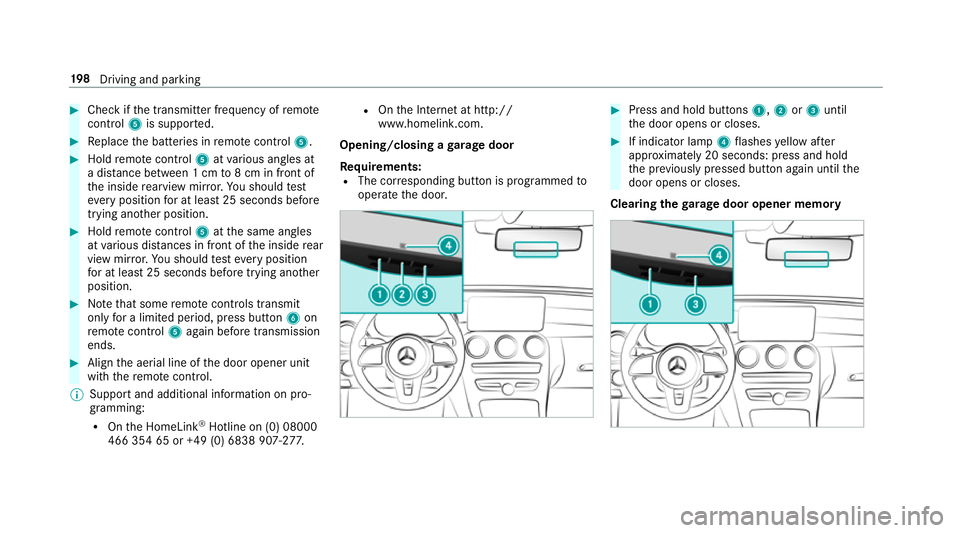
Check if the transmit ter frequency of remo te
control 5is suppo rted. 0007
Replace the batteries in remo tecontrol 5. 0007
Hold remo tecontrol 5atvarious angles at
a dis tance between 1 cm to8 cm in front of
th e inside rearview mir ror.Yo u should test
eve ryposition for at least 25 seconds before
trying ano ther position. 0007
Hold remo tecontrol 5atthe same angles
at various dis tances in front of the inside rear
view mir ror.Yo u should test eve ryposition
fo r at least 25 seconds before trying ano ther
position. 0007
Notethat some remo tecontrols transmit
only for a limi ted period, press button 6on
re mo tecontrol 5again before transmission
ends. 0007
Align the aerial line of the door opener unit
with there mo tecontrol.
0009 Support and additional information on pro‐
gramming:
R Onthe HomeLink ®
Hotline on (0) 08000
466 354 65 or +49 (0) 6838 907-2 77.R
Onthe Internet at http://
www.homelin k.com.
Opening/closing a garage door
Requ irements:
R The cor responding button is programmed to
operate the door. 0007
Press and hold buttons 1,2or3 until
th e door opens or closes. 0007
If indicator lamp 4flashes yellow af ter
appr oximately 20 seconds: press and hold
th e pr eviously pressed button again until the
door opens or closes.
Clearing thega rage door opener memo ry19 8
Driving and pa rking
Page 581 of 609

Low outside
temp eratures ...................4 80
Pe trol ................................................... 479
Quality (diesel) .................................... 480
Quality (petrol) ..................................... 479
Re fuelling ............................................ 188
Sulphur content ................................... 479
Ta nk content ........................................ 481
Fu el consum ption
On-board computer ............................ .277
Fu nction seat
see Door cont rol panel
Fu ses ........................................................ 447
Before replacing a fuse ........................ 447
Fu se assignment diagram .................... 447
Fu se box in the engine compartment .. 448
Fu se box in the front passenger foot‐
we ll .................................................... .449
Fu se box in the load compartment ...... 449
Fu se box on the dashboard ................. 449
No tes ................................................... 447G
Garage door opener Clearing the memory ........................... 19 8Opening or closing
the door ................1 98
Programming buttons .......................... 19 6
Ra dio equipment appr oval numbers .... 19 9
Re solving problems ............................. 197
Synchronising thero lling code ............ .197
Gearshift recommendation ............182, 186
Genera l operating permit number
(EU) .......................................................... .475
Genuine parts ............................................ 20
Glide mode ............................................... 186
Glo vebox
Locking/unlocking .............................. .112 H
Handbrake see Electric parking brake
Handling characteristics (unusual) ....... 450
HANDS-FREE ACCESS ................................ 83
Haza rdwa rning lights ............................ .137
HD prog rammes
see CI+ module Head
restra int
Fr ont (adjusting mechanically) .............1 02
Re ar (adjusting) .................................. .103
Re ar (fitting/removing) ........................ 104
Head-up display ....................................... 282
Ad justing display elements (on-board
compu ter) ............................................ 282
Ad justing the brightness (on-board
computer) ............................................ 282
Fu nction .............................................. 282
Menu (on-board compu ter) .................. 282
Setting the position (on-board com‐
puter) .................................................. 282
Switching on/off ................................. 283
Headla mpflasher ................................... .136
Heating see Clima tecontrol
High beam Adaptive Highbeam Assist .................. .139
Switching on/off ................................. 13 6
High-pressure cleaner (care) ..................417
Hill Start Assist ....................................... 232 578
Index