2018 LINCOLN NAVIGATOR oil pressure
[x] Cancel search: oil pressurePage 8 of 649

Reporting Safety Defects (U.S. Only)......340
Reporting Safety Defects (Canada Only).......................................................................341
Fuses
Fuse Specification Chart...........................342
Changing a Fuse.........................................358
Maintenance
General Information.....................................361
Opening and Closing the Hood...............361
Under Hood Overview...............................362
Engine Oil Dipstick.....................................364
Engine Oil Check........................................364
Oil Change Indicator Reset......................365
Engine Coolant Check...............................366
Automatic Transmission Fluid Check......371
Transfer Case Fluid Check.........................371
Brake Fluid Check.......................................372
Washer Fluid Check....................................373
Fuel Filter.......................................................373
Changing the 12V Battery.........................373
Checking the Wiper Blades......................375
Changing the Wiper Blades......................376
Adjusting the Headlamps..........................376
Changing a Bulb..........................................378
Bulb Specification Chart............................378
Changing the Engine Air Filter.................381
Vehicle Care
General Information....................................382
Cleaning Products......................................382
Cleaning the Exterior.................................383
Waxing...........................................................384
Cleaning the Engine...................................385
Cleaning the Windows and Wiper Blades......................................................................385
Cleaning the Interior..................................386
Cleaning the Instrument Panel andInstrument Cluster Lens........................388
Cleaning Leather Seats.............................388
Repairing Minor Paint Damage................389
Cleaning the Wheels..................................389
Vehicle Storage...........................................390
Body Styling Kits...........................................391
Wheels and Tires
General Information...................................392
Tire Care........................................................394
Using Snow Chains....................................408
Tire Pressure Monitoring System...........409
Changing a Road Wheel.............................414
Technical Specifications............................420
Capacities and Specifications
Engine Specifications.................................422
Motorcraft Parts...........................................423
Vehicle Identification Number.................424
Vehicle Certification Label........................424
Transmission Code Designation.............425
Capacities and Specifications..................426
Audio System
General Information....................................434
Audio Unit.....................................................436
Satellite Radio..............................................442
USB Port........................................................445
5
Navigator (TB9) Canada/United States of America, enUSA, Edition date: 201708, Third-Printing-
Table of Contents
Page 138 of 649
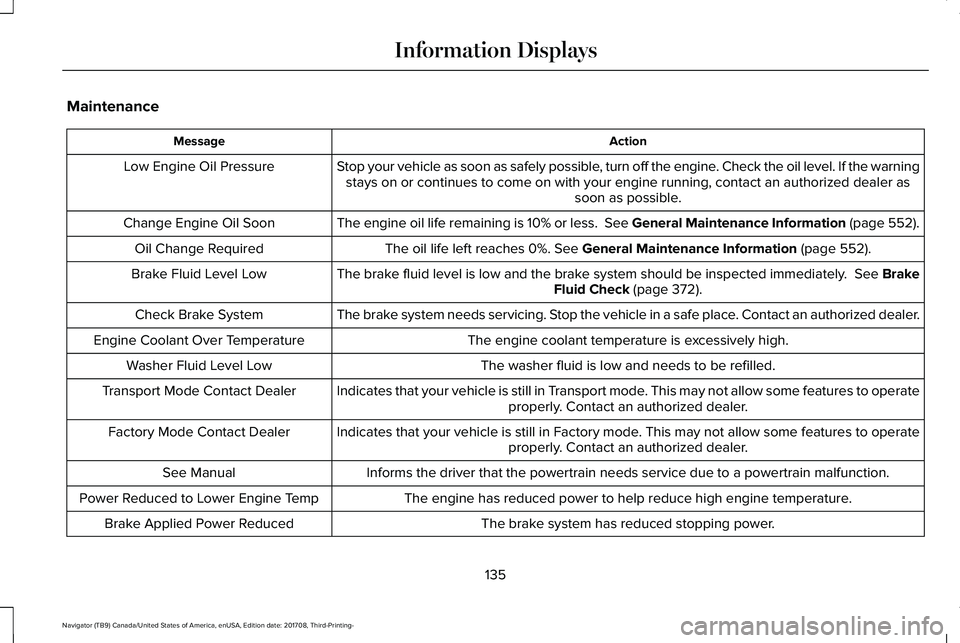
Maintenance
ActionMessage
Stop your vehicle as soon as safely possible, turn off the engine. Check the oil level. If the warningstays on or continues to come on with your engine running, contact an authorized dealer assoon as possible.
Low Engine Oil Pressure
The engine oil life remaining is 10% or less. See General Maintenance Information (page 552).Change Engine Oil Soon
The oil life left reaches 0%. See General Maintenance Information (page 552).Oil Change Required
The brake fluid level is low and the brake system should be inspected immediately. See BrakeFluid Check (page 372).Brake Fluid Level Low
The brake system needs servicing. Stop the vehicle in a safe place. Contact an authorized dealer.Check Brake System
The engine coolant temperature is excessively high.Engine Coolant Over Temperature
The washer fluid is low and needs to be refilled.Washer Fluid Level Low
Indicates that your vehicle is still in Transport mode. This may not allow some features to operateproperly. Contact an authorized dealer.Transport Mode Contact Dealer
Indicates that your vehicle is still in Factory mode. This may not allow some features to operateproperly. Contact an authorized dealer.Factory Mode Contact Dealer
Informs the driver that the powertrain needs service due to a powertrain malfunction.See Manual
The engine has reduced power to help reduce high engine temperature.Power Reduced to Lower Engine Temp
The brake system has reduced stopping power.Brake Applied Power Reduced
135
Navigator (TB9) Canada/United States of America, enUSA, Edition date: 201708, Third-Printing-
Information Displays
Page 369 of 649

From the main menu scroll to:
Action and descriptionMessage
Press the right arrow button,then from this menu scroll tothe following message.
Settings
Press the right arrow button,then from this menu scroll tothe following message.
Vehicle
Press the right arrow button,then from this menu scroll tothe following message.
Oil Life
Press and hold the OK buttonuntil the instrument clusterdisplays the followingmessage.
Hold OK toReset
Reset Successful
When the oil change indicatorresets the instrument clusterdisplays 100%.
Remaining Life
{00}%
Action and descriptionMessage
If the instrument clusterdisplays one of the followingmessages, repeat theprocess.
Not Reset
Reset Cancelled
ENGINE COOLANT CHECK
WARNING: Do not remove thecoolant reservoir cap when the coolingsystem is hot. Wait 10 minutes for thecooling system to cool down. Cover thecoolant reservoir cap with a thick cloth toprevent the possibility of scalding andslowly remove the cap. Failure to followthis instruction could result in personalinjury.
WARNING: Do not put coolant in thewindshield washer reservoir. If sprayed onthe windshield, coolant could make itdifficult to see through the windshield.
WARNING: To reduce the risk ofpersonal injury, make sure the engine iscool before unscrewing the coolantpressure relief cap. The cooling system isunder pressure. Steam and hot liquid cancome out forcefully when you loosen thecap slightly.
WARNING: Do not add coolantfurther than the MAX mark.
When the engine is cold, check theconcentration and level of the coolant at theintervals listed in the scheduled maintenanceinformation. See Scheduled Maintenance(page 552).
Note:Make sure that the coolant level isbetween the MIN and MAX marks on thecoolant reservoir.
Note: Coolant expands when it is hot. Thelevel may extend beyond the MAX mark.
366
Navigator (TB9) Canada/United States of America, enUSA, Edition date: 201708, Third-Printing-
Maintenance
Page 388 of 649

•Do not allow wax to come in contact withany non-body (low-gloss black) coloredtrim. The wax will discolor or stain theparts over time.
•Roof racks.
•Bumpers.
•Grained door handles.
•Side moldings.
•Mirror housings.
•Windshield cowl area.
•Do not apply wax to glass areas.
•After waxing, your car's paint should feelsmooth, and be free of streaks andsmudges.
CLEANING THE ENGINE
Engines are more efficient when they areclean because grease and dirt buildup keepthe engine warmer than normal.
When washing:
•Take care when using a power washerto clean the engine. The high-pressurefluid could penetrate the sealed partsand cause damage.
•Do not spray a hot engine with cold waterto avoid cracking the engine block orother engine components.
•Spray Motorcraft Engine Shampoo andDegreaser on all parts that requirecleaning and pressure rinse clean. InCanada, use Motorcraft Engine Shampoo.
•Never wash or rinse the engine while itis hot or running; water in the runningengine may cause internal damage.
•Never wash or rinse any ignition coil,spark plug wire or spark plug well, or thearea in and around these locations.
•Cover the battery, power distribution box,and air filter assembly to prevent waterdamage when cleaning the engine.
CLEANING THE WINDOWS AND
WIPER BLADES
Car wash chemicals and environmentalfallout can result in windshield and wiperblade contamination. Dirty windshield andwipers will result in poor windshield wiperoperation. Keep the windshield and wiperblades clean to maintain windshield wiperperformance.
To clean the windshield and wiper blades:
•Clean the windshield with a non-abrasiveglass cleaner. When cleaning the interiorof the windshield, avoid getting any glasscleaner on the instrument panel or doorpanels. Wipe any glass cleaner off thesesurfaces immediately.
•For windshields contaminated with treesap, chemicals, wax or bugs, clean theentire windshield using steel wool (nogreater than 0000 grade) in a circularmotion and rinse with water.
•Clean the wiper blades with isopropylrubbing alcohol or windshield washerconcentrate.
385
Navigator (TB9) Canada/United States of America, enUSA, Edition date: 201708, Third-Printing-
Vehicle Care
Page 394 of 649

Cooling system
•Protect against freezing temperatures.
•When removing your vehicle fromstorage, check coolant fluid level.Confirm that there are no cooling systemleaks and that fluid is at therecommended level.
Battery
•Check and recharge as necessary. Keepconnections clean.
•If storing your vehicle for more than 30days without recharging the battery, werecommend that you disconnect thebattery cables to maintain battery chargefor quick starting.
Note:It is necessary to reset memoryfeatures if battery cables are disconnected.
Brakes
•Make sure the brakes and parking brakerelease fully.
Tires
•Maintain recommended air pressure.
Miscellaneous
•Make sure all linkages, cables, levers andpins under your vehicle are covered withgrease to prevent rust.
•Move vehicles at least 25 ft (7.5 m) every15 days to lubricate working parts andprevent corrosion.
Removing Vehicle From Storage
When your vehicle is ready to come out ofstorage, do the following:
•Wash your vehicle to remove any dirt orgrease film build-up on window surfaces.
•Check windshield wipers for anydeterioration.
•Check under the hood for any foreignmaterial that may have collected duringstorage such as mice or squirrel nests.
•Check the exhaust for any foreignmaterial that may have collected duringstorage.
•Check tire pressures and set tire inflationper the Tire Label.
•Check brake pedal operation. Drive yourvehicle 15 ft (4.5 m) back and forth toremove rust build-up.
•Check fluid levels (including coolant, oiland gas) to make sure there are no leaks,and fluids are at recommended levels.
•If you remove the battery, clean thebattery cable ends and check fordamage.
Contact an authorized dealer if you have anyconcerns or issues.
BODY STYLING KITS
The distance between the underside of yourvehicle and the ground is less than that ofother models. Drive with extreme care toavoid damage to your vehicle.
391
Navigator (TB9) Canada/United States of America, enUSA, Edition date: 201708, Third-Printing-
Vehicle Care
Page 429 of 649

CAPACITIES AND SPECIFICATIONS
Capacities
WARNING: The air conditioning refrigerant system contains refrigerant under high pressure. Only qualified personnel should servicethe air conditioning refrigerant system. Opening the air conditioning refrigerant system can cause personal injury.
CapacityItem
6.0 qt (5.7 L)Engine oil (with oil filter).
18.5 qt (17.5 L)Engine coolant (Base radiator with auxiliary rear heat).
18.0 qt (17 L)Engine coolant (Heavy duty trailer towing with auxiliary rear heat).
Between MIN and MAX on brake fluid reservoirBrake fluid.
1.8 qt (1.7 L)Front axle.
2.2 qt (2.1 L)1Rear axle.
13.1 qt (12.4 L)2Automatic transmission fluid.
1.6 qt (1.5 L) - 1.8 qt (1.7 L)Transfer case fluid (Four Wheel Drive with Electronic Shift on the Fly).
1.5 qt (1.4 L)Transfer case fluid (Four Wheel Drive with Torque on Demand).
Fill as requiredWindshield washer fluid.
426
Navigator (TB9) Canada/United States of America, enUSA, Edition date: 201708, Third-Printing-
Capacities and Specifications
Page 557 of 649

Check Every Month
Engine oil level.
Function of all interior and exterior lights.
Tires (including spare) for wear and proper pressure.
Windshield washer fluid level.
Fuel and water separator. Drain if necessary (or if indicated by the information display).
Holes and slots in the tail pipe to make sure they are functional and clear of debris.
Check Every Six Months
Battery connections. Clean if necessary.
Body and door drain holes for obstructions. Clean if necessary.
Cooling system fluid level and coolant strength.
Door weatherstrips for wear. Lubricate if necessary.
Hinges, latches and outside locks for proper operation. Lubricate if necessary.
Parking brake for proper operation.
554
Navigator (TB9) Canada/United States of America, enUSA, Edition date: 201708, Third-Printing-
Scheduled Maintenance
Page 559 of 649

Multi-Point Inspection
Steering and linkageExterior lamps operation
Tires (including spare) for wear and proper pressure2Fluid levels1; fill if necessary
Windshield for cracks, chips or pitsFor oil and fluid leaks
Washer spray and wiper operationHalf-shaft dust boots
1 Brake, coolant recovery reservoir, automatic transmission and window washer2If your vehicle is equipped with a temporary mobility kit, check the tire sealant expiration Use By date on the canister. Replace as needed.
Be sure to ask your dealership serviceadvisor or technician about the multi-pointvehicle inspection. It is a comprehensive wayto perform a thorough inspection of yourvehicle. Your checklist gives you immediatefeedback on the overall condition of yourvehicle.
NORMAL SCHEDULED
MAINTENANCE
Intelligent Oil-Life Monitor
Your vehicle is equipped with an IntelligentOil-Life Monitor that determines when youshould change the engine oil based on howyour vehicle is used. By using severalimportant factors in its calculations, themonitor helps reduce the cost of owning yourvehicle and reduces environmental waste atthe same time.
This means you do not have to remember tochange the oil on a mileage-based schedule.Your vehicle lets you know when an oilchange is due by displaying a message inthe information display.
The following table provides examples ofvehicle use and its impact on oil changeintervals. It is a guideline only. Actual oilchange intervals depend on several factorsand generally decrease with severity of use.
556
Navigator (TB9) Canada/United States of America, enUSA, Edition date: 201708, Third-Printing-
Scheduled Maintenance