2018 LINCOLN MKZ seats
[x] Cancel search: seatsPage 332 of 595

When washing:
•Take care when using a power washerto clean the engine. The high-pressurefluid could penetrate the sealed partsand cause damage.
•Do not spray a hot engine with cold waterto avoid cracking the engine block orother engine components.
•Spray Motorcraft Engine Shampoo andDegreaser on all parts that requirecleaning and pressure rinse clean. InCanada, use Motorcraft Engine Shampoo.
•Never wash or rinse the engine while itis hot or running; water in the runningengine may cause internal damage.
•Never wash or rinse any ignition coil,spark plug wire or spark plug well, or thearea in and around these locations.
•Cover the battery, power distribution box,and air filter assembly to prevent waterdamage when cleaning the engine.
CLEANING THE WINDOWS AND
WIPER BLADES
Car wash chemicals and environmentalfallout can result in windshield and wiperblade contamination. Dirty windshield andwipers will result in poor windshield wiperoperation. Keep the windshield and wiperblades clean to maintain windshield wiperperformance.
To clean the windshield and wiper blades:
•Clean the windshield with a non-abrasiveglass cleaner. When cleaning the interiorof the windshield, avoid getting any glasscleaner on the instrument panel or doorpanels. Wipe any glass cleaner off thesesurfaces immediately.
•For windshields contaminated with treesap, chemicals, wax or bugs, clean theentire windshield using steel wool (nogreater than 0000 grade) in a circularmotion and rinse with water.
•Clean the wiper blades with isopropylrubbing alcohol or windshield washerconcentrate.
Note: Do not use razor blades or othersharp objects to clean or remove decals fromthe inside of the heated rear window. Thevehicle warranty does not cover damagecaused to the heated rear window grid lines.
CLEANING THE INTERIOR
WARNINGS
Do not use cleaning solvents, bleachor dye on the vehicle’s safety belts, asthese actions may weaken the belt webbing.
On vehicles equipped withseat-mounted airbags, do not usechemical solvents or strong detergents. Suchproducts could contaminate the side airbagsystem and affect performance of the sideairbag in a collision.
Note:Follow the same procedure forcleaning leather seats when cleaning leatherinterior. See Cleaning Leather Seats (page332).
329
MKZ (CC9) Canada/United States of America, enUSA, Edition date: 201706, First Printing
Vehicle Care
Page 333 of 595
Note:Do not use household cleaningproducts or glass cleaners, which can stainand discolor the fabric and affect the flameretardant abilities of the seat materials.
For fabric, carpets, cloth seats, safety beltsand seats equipped with side airbags:
•Remove dust and loose dirt with avacuum cleaner.
•Remove light stains and soil withMotorcraft Professional Strength Carpet& Upholstery Cleaner.
For grease or tar stains:
•Spot clean the area with Motorcraft Spotand Stain Remover (MotorcraftMulti-Purpose Cleaner in Canada).
•If a ring forms on the fabric after spotcleaning, clean the entire areaimmediately (but do not oversaturate) orthe ring will set.
Cleaning Alcantara Microfiber ClothFabric (If Equipped)
Note:Alcantara microfiber cloth fabric ismade of polyester microfiber withmicro-porous polyurethane. Usingcommercially available fabric cleaners cancause permanent damage.
Note:Do not use commercially availableleather and vinyl cleaning products onAlcantara microfiber cloth fabric.
Note:Some vehicles may have Alcantaramicrofiber cloth fabric on the seats,headliner, floor mats and door panels.
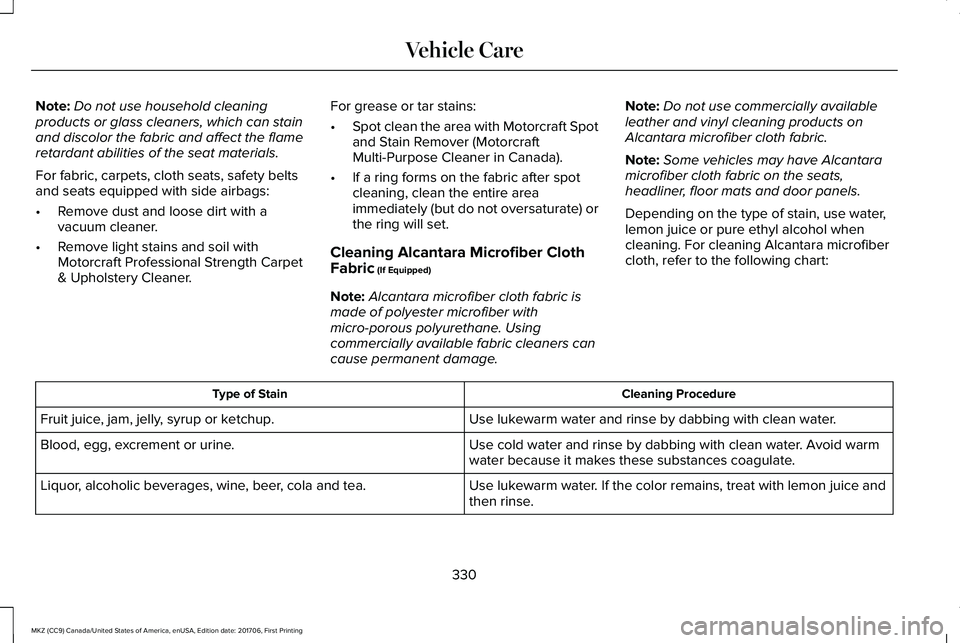
Depending on the type of stain, use water,lemon juice or pure ethyl alcohol whencleaning. For cleaning Alcantara microfibercloth, refer to the following chart:
Cleaning ProcedureType of Stain
Use lukewarm water and rinse by dabbing with clean water.Fruit juice, jam, jelly, syrup or ketchup.
Use cold water and rinse by dabbing with clean water. Avoid warmwater because it makes these substances coagulate.Blood, egg, excrement or urine.
Use lukewarm water. If the color remains, treat with lemon juice andthen rinse.Liquor, alcoholic beverages, wine, beer, cola and tea.
330
MKZ (CC9) Canada/United States of America, enUSA, Edition date: 201706, First Printing
Vehicle Care
Page 334 of 595
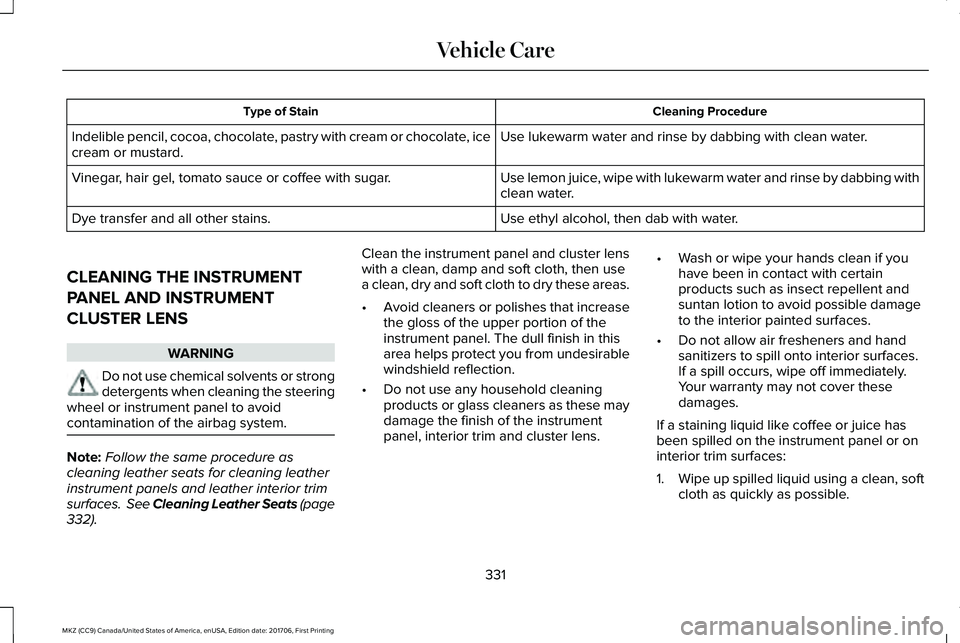
Cleaning ProcedureType of Stain
Use lukewarm water and rinse by dabbing with clean water.Indelible pencil, cocoa, chocolate, pastry with cream or chocolate, icecream or mustard.
Use lemon juice, wipe with lukewarm water and rinse by dabbing withclean water.Vinegar, hair gel, tomato sauce or coffee with sugar.
Use ethyl alcohol, then dab with water.Dye transfer and all other stains.
CLEANING THE INSTRUMENT
PANEL AND INSTRUMENT
CLUSTER LENS
WARNING
Do not use chemical solvents or strongdetergents when cleaning the steeringwheel or instrument panel to avoidcontamination of the airbag system.
Note:Follow the same procedure ascleaning leather seats for cleaning leatherinstrument panels and leather interior trimsurfaces. See Cleaning Leather Seats (page332).
Clean the instrument panel and cluster lenswith a clean, damp and soft cloth, then usea clean, dry and soft cloth to dry these areas.
•Avoid cleaners or polishes that increasethe gloss of the upper portion of theinstrument panel. The dull finish in thisarea helps protect you from undesirablewindshield reflection.
•Do not use any household cleaningproducts or glass cleaners as these maydamage the finish of the instrumentpanel, interior trim and cluster lens.
•Wash or wipe your hands clean if youhave been in contact with certainproducts such as insect repellent andsuntan lotion to avoid possible damageto the interior painted surfaces.
•Do not allow air fresheners and handsanitizers to spill onto interior surfaces.If a spill occurs, wipe off immediately.Your warranty may not cover thesedamages.
If a staining liquid like coffee or juice hasbeen spilled on the instrument panel or oninterior trim surfaces:
1.Wipe up spilled liquid using a clean, softcloth as quickly as possible.
331
MKZ (CC9) Canada/United States of America, enUSA, Edition date: 201706, First Printing
Vehicle Care
Page 335 of 595
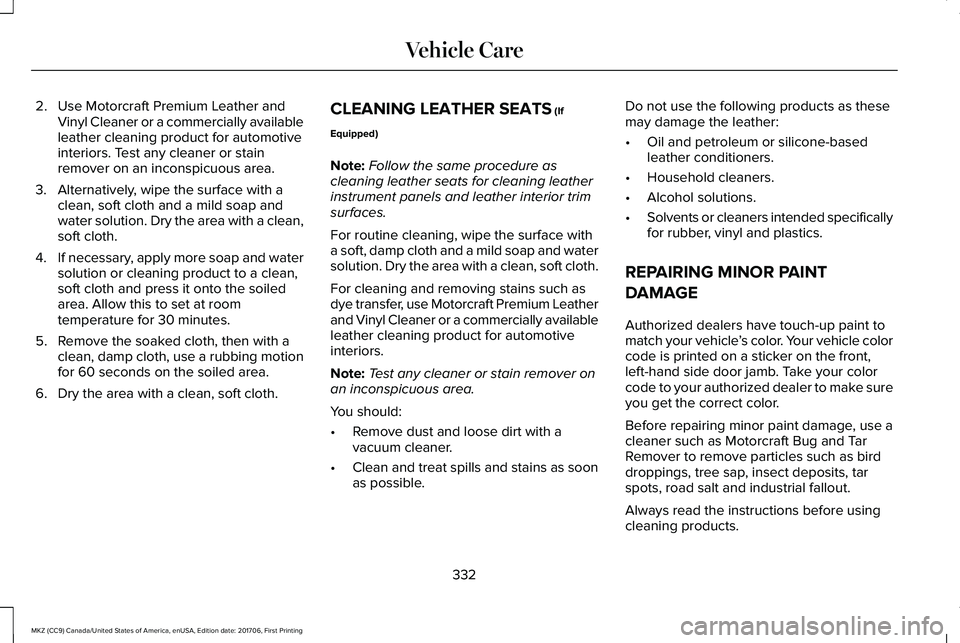
2. Use Motorcraft Premium Leather andVinyl Cleaner or a commercially availableleather cleaning product for automotiveinteriors. Test any cleaner or stainremover on an inconspicuous area.
3. Alternatively, wipe the surface with aclean, soft cloth and a mild soap andwater solution. Dry the area with a clean,soft cloth.
4.If necessary, apply more soap and watersolution or cleaning product to a clean,soft cloth and press it onto the soiledarea. Allow this to set at roomtemperature for 30 minutes.
5. Remove the soaked cloth, then with aclean, damp cloth, use a rubbing motionfor 60 seconds on the soiled area.
6. Dry the area with a clean, soft cloth.
CLEANING LEATHER SEATS (If
Equipped)
Note:Follow the same procedure ascleaning leather seats for cleaning leatherinstrument panels and leather interior trimsurfaces.
For routine cleaning, wipe the surface witha soft, damp cloth and a mild soap and watersolution. Dry the area with a clean, soft cloth.
For cleaning and removing stains such asdye transfer, use Motorcraft Premium Leatherand Vinyl Cleaner or a commercially availableleather cleaning product for automotiveinteriors.
Note:Test any cleaner or stain remover onan inconspicuous area.
You should:
•Remove dust and loose dirt with avacuum cleaner.
•Clean and treat spills and stains as soonas possible.
Do not use the following products as thesemay damage the leather:
•Oil and petroleum or silicone-basedleather conditioners.
•Household cleaners.
•Alcohol solutions.
•Solvents or cleaners intended specificallyfor rubber, vinyl and plastics.
REPAIRING MINOR PAINT
DAMAGE
Authorized dealers have touch-up paint tomatch your vehicle’s color. Your vehicle colorcode is printed on a sticker on the front,left-hand side door jamb. Take your colorcode to your authorized dealer to make sureyou get the correct color.
Before repairing minor paint damage, use acleaner such as Motorcraft Bug and TarRemover to remove particles such as birddroppings, tree sap, insect deposits, tarspots, road salt and industrial fallout.
Always read the instructions before usingcleaning products.
332
MKZ (CC9) Canada/United States of America, enUSA, Edition date: 201706, First Printing
Vehicle Care
Page 413 of 595

of electronically or verbally disclosing to 911operators your vehicle location or otherdetails about your vehicle or crash to assist911 operators to provide the most appropriateemergency services. If you do not want todisclose this information, do not switch thefeature on.
Safety Information
WARNING
Driving while distracted can result inloss of vehicle control, crash and injury.We strongly recommend that you useextreme caution when using any device thatmay take your focus off the road. Yourprimary responsibility is the safe operationof your vehicle. We recommend against theuse of any hand-held device while drivingand encourage the use of voice-operatedsystems when possible. Make sure you areaware of all applicable local laws that mayaffect the use of electronic devices whiledriving.
•Do not attempt to service or repair thesystem. Have an authorized dealercheck your vehicle.
•Do not operate playing devices if thepower cords or cables are broken, splitor damaged. Place cords and cables outof the way, so they do not interfere withthe operation of pedals, seats,compartments or safe driving abilities.
•Do not leave playing devices in yourvehicle during extreme conditions as itcould cause them damage. See yourdevice's user guide for furtherinformation.
•For your safety, some SYNC 3 functionsare speed-dependent. Their use is limitedto when your vehicle is traveling atspeeds under 3 mph (5 km/h). Make surethat you review your device's manualbefore using it with SYNC 3.
Speed-restricted Features
Some features of this system may be toodifficult to use while your vehicle is movingso they are restricted from use unless yourvehicle is stationary.
•Screens crowded with information, suchas Point of Interest reviews and ratings,SiriusXM Traffic and Travel Link sportsscores, movie times or ski conditions.
•Any action that requires you to use akeyboard is restricted, such as enteringa navigation destination or editinginformation.
•All lists are limited so the user can viewfewer entries (such as phone contacts orrecent phone call entries).
See the following table for more specificexamples.
410
MKZ (CC9) Canada/United States of America, enUSA, Edition date: 201706, First Printing
SYNC™ 3
Page 445 of 595
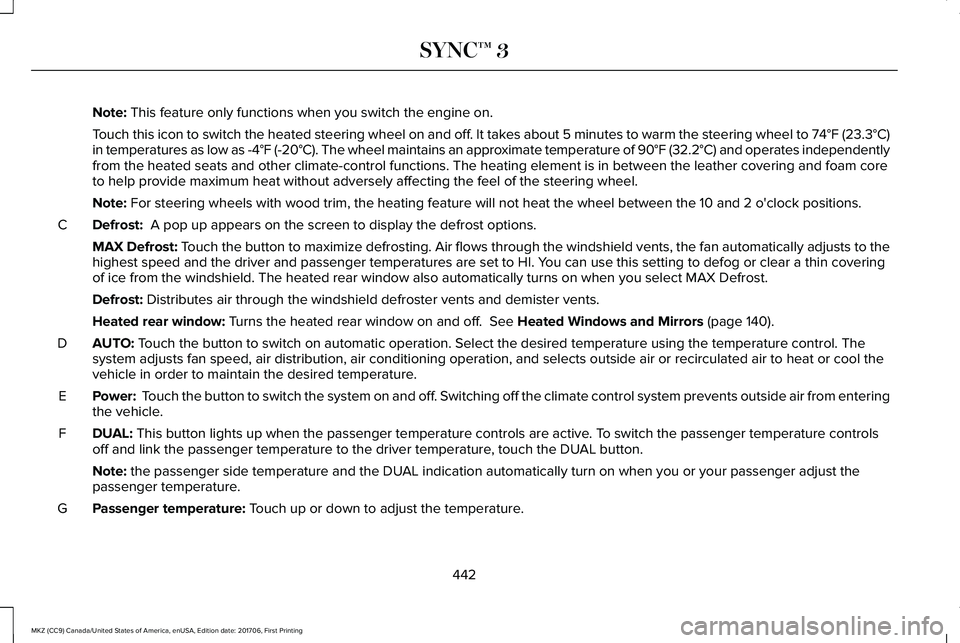
Note: This feature only functions when you switch the engine on.
Touch this icon to switch the heated steering wheel on and off. It takes about 5 minutes to warm the steering wheel to 74°F (23.3°C)in temperatures as low as -4°F (-20°C). The wheel maintains an approximate temperature of 90°F (32.2°C) and operates independentlyfrom the heated seats and other climate-control functions. The heating element is in between the leather covering and foam coreto help provide maximum heat without adversely affecting the feel of the steering wheel.
Note: For steering wheels with wood trim, the heating feature will not heat the wheel between the 10 and 2 o'clock positions.
Defrost: A pop up appears on the screen to display the defrost options.C
MAX Defrost: Touch the button to maximize defrosting. Air flows through the windshield vents, the fan automatically adjusts to thehighest speed and the driver and passenger temperatures are set to HI. You can use this setting to defog or clear a thin coveringof ice from the windshield. The heated rear window also automatically turns on when you select MAX Defrost.
Defrost: Distributes air through the windshield defroster vents and demister vents.
Heated rear window: Turns the heated rear window on and off. See Heated Windows and Mirrors (page 140).
AUTO: Touch the button to switch on automatic operation. Select the desired temperature using the temperature control. Thesystem adjusts fan speed, air distribution, air conditioning operation, and selects outside air or recirculated air to heat or cool thevehicle in order to maintain the desired temperature.
D
Power: Touch the button to switch the system on and off. Switching off the climate control system prevents outside air from enteringthe vehicle.E
DUAL: This button lights up when the passenger temperature controls are active. To switch the passenger temperature controlsoff and link the passenger temperature to the driver temperature, touch the DUAL button.F
Note: the passenger side temperature and the DUAL indication automatically turn on when you or your passenger adjust thepassenger temperature.
Passenger temperature: Touch up or down to adjust the temperature.G
442
MKZ (CC9) Canada/United States of America, enUSA, Edition date: 201706, First Printing
SYNC™ 3
Page 544 of 595

ELECTROMAGNETIC
COMPATIBILITY
WARNINGS
Do not place objects or mountequipment on or near the airbag cover,on the side of the seatbacks (of the frontseats), or in front seat areas that may comeinto contact with a deploying airbag. Failureto follow these instructions may increase therisk of personal injury in the event of a crash.
WARNINGS
Do not fasten antenna cables tooriginal vehicle wiring, fuel pipes andbrake pipes.
Keep antenna and power cables atleast 4 in (10 cm) from any electronicmodules and airbags.
Note:We test and certify your vehicle tomeet electromagnetic compatibilitylegislation (UNECE Regulation 10 or otherapplicable local requirements). It is yourresponsibility to make sure that anyequipment an authorized dealer installs onyour vehicle complies with applicable locallegislation and other requirements.
Note:Any radio frequency transmitterequipment in your vehicle (such as cellulartelephones and amateur radio transmitters)must keep to the parameters in the followingtable. We do not provide special provisionsor conditions for installations or use.
541
MKZ (CC9) Canada/United States of America, enUSA, Edition date: 201706, First Printing
Appendices
Page 585 of 595

Automatic Transmission Fluid Check.......3146F35/HF35 transmission...................................3146F50/6F55 Transmission..................................315
Autowipers.......................................................85Autowipers Settings.............................................86Low Temperature Wipe Inhibit..........................86
Auxiliary Power Points.................................160110 Volt AC Power Point....................................16012 Volt DC Power Point......................................160Locations...............................................................160
AWDSee: All-Wheel Drive...........................................186
B
BatterySee: Changing the 12V Battery........................319
Blind Spot Information System.................238Switching the System Off and On..................239System Errors......................................................239Using the Blind Spot InformationSystem..............................................................238
Body Styling Kits...........................................335Bonnet LockSee: Opening and Closing the Hood............302
Booster Seats..................................................30Types of Booster Seats........................................31
Brake Fluid Check.........................................318
Brakes..............................................................195General Information............................................195
Breaking-In.....................................................263Bulb Specification Chart.............................323
C
Cabin Air Filter................................................141California Proposition 65...............................12Capacities and Specifications - 2.0L.......380Alternative Engine Oil for Extremely ColdClimates............................................................385Specifications.......................................................381
Capacities and Specifications - 3.0L.......387Alternative Engine Oil for Extremely ColdClimates...........................................................392Specifications......................................................388
Capacities and Specifications...................373Car WashSee: Cleaning the Exterior...............................327
Catalytic Converter........................................177On-Board Diagnostics (OBD-II)........................178Readiness for Inspection and Maintenance(I/M) Testing......................................................179
Center Console.............................................162Rear Seat Armrest...............................................162
Changing a Bulb...........................................323Replacing Bulbs..................................................323
Changing a Fuse..........................................299Fuses.....................................................................299
Changing a Road Wheel.............................363Changing a Road Wheel Procedure..............365Dissimilar Spare Wheel and Tire AssemblyInformation.......................................................364Stowing the Flat Tire Using the RetainerStrap..................................................................369Stowing the Flat Tire Without the RetainerStrap..................................................................369
Changing the 12V Battery...........................319Changing the Engine Air Filter.................325Changing the Wiper Blades.......................321Checking MyKey System Status.................66MyKey Distance....................................................66Number of Admin Keys.......................................66Number of MyKeys...............................................66
Checking the Wiper Blades........................321Child Restraint and SeatbeltMaintenance..................................................44Child Restraint Positioning...........................33Child Safety.......................................................19General Information..............................................19
Child Safety Locks..........................................34Left-Hand Side.......................................................35Right-Hand Side....................................................35
Cleaning Leather Seats..............................332
582
MKZ (CC9) Canada/United States of America, enUSA, Edition date: 201706, First Printing
Index