2018 LINCOLN MKZ lock
[x] Cancel search: lockPage 75 of 595

The lamps turn off when all the doors remainclosed and:
•25 seconds have elapsed.
•You press the push button ignitionswitch.
Battery Saver
If you leave the courtesy lamps, interiorlamps or headlamps on, the battery savershuts them off 10 minutes after you switchthe ignition off.
Accessory Mode Battery Saver forIntelligent Access Keys
If you leave the ignition switched on, it shutsoff when it detects a certain amount ofbattery drain, or after 45 minutes.
Luggage Compartment
From Inside Your Vehicle
Press the button on the instrumentpanel to open the luggagecompartment.
With the Remote Control
Press twice within three secondsto open the luggage compartment.
From Outside Your Vehicle
Press the exterior release button to open theluggage compartment. Your vehicle must beunlocked or have an intelligent accesstransmitter within 3 ft (1 m) of the luggagecompartment.
POWER DECKLID (If Equipped)
WARNINGS
Make sure all persons are clear of thepower decklid area before using thepower decklid control.
Keep keys out of the reach of children.Do not allow children to operate or playnear an open or moving power decklid. Youshould supervise the operation of the powerdecklid at all times.
Note:Do not drive with the decklid openunless you switch off the power feature.Make sure the decklid is fully closed beforeyou drive your vehicle.
72
MKZ (CC9) Canada/United States of America, enUSA, Edition date: 201706, First Printing
Doors and LocksE138633 E138630 E205262
Page 76 of 595

You can switch the power decklid feature onor off in the information display. See GeneralInformation (page 111). The remote controland instrument panel button will still operatethe decklid regardless of the setting.
Opening and Closing the Power
Decklid
Note:You can reverse the decklidmovement. Press the instrument panel ordecklid button again, or press the remotecontrol button twice.
Note:Do not push or pull on the powerdecklid while it is under operation, as thismay cause damage to your vehicle.
The decklid will only operate with thetransmission in park (P).
If the decklid reverses or starts to close afteran open request, you will hear a fastcontinuous chime. This indicates excessiveload on the decklid or a possible gas strutfailure. If the decklid continues to close afteropening, have the system checked by anauthorized dealer.
From Inside Your Vehicle
Press the button on the instrumentpanel.
With the Remote Control
Press the button twice within threeseconds.
From Outside Your Vehicle
Press the exterior release button to open theluggage compartment. Your vehicle must beunlocked or have an intelligent accesstransmitter within 3 ft (1 m) of the luggagecompartment.
73
MKZ (CC9) Canada/United States of America, enUSA, Edition date: 201706, First Printing
Doors and LocksE138633 E138630 E205262
Page 77 of 595

Note:Let the power system operate thedecklid after pressing the control. Pushingor pulling the decklid may activate theobstacle detection feature and stop thepower operation.
With the Decklid Close Button
Press the button inside the decklidon the left-hand side.
Obstacle Detection
The decklid will reverse to full open if itdetects an obstacle while closing. Threechimes will sound as the decklid begins toreopen. Remove the obstacle to close thedecklid.
Note:Before driving your vehicle, check theinstrument cluster for a trunk ajar or doorajar message or warning indicator. Failureto do this could result in unintentionallyleaving the decklid open while driving.
The decklid will stop and three chimes willsound if it detects an obstacle while opening.Remove the obstacle to operate the decklid.
Resetting the Power Decklid
The decklid may not operate correctly andyou may need to reset it if:
•The vehicle battery charge is low.
•You disconnect the battery.
•You manually close the decklid and leaveit unlatched.
To reset the power decklid:
1. Disconnect the battery for 20 secondsthen reconnect the battery.
2. Manually close the decklid making sureit is fully closed.
3.Power open the decklid using the remotecontrol or instrument panel button.
KEYLESS ENTRY
SECURICODE™ KEYLESS ENTRYKEYPAD
The keypad is located near the driverwindow. It is invisible until you touch it, thenit lights up so you can see and touch theappropriate buttons.
Note:If you enter your entry code too faston the keypad, the unlock function may notwork. Re-enter your entry code more slowly.
You can use the keypad to:
•Lock or unlock the doors.
•Program and erase personal entry codes.
•Arm and disarm the anti-theft alarm.
•Release the trunk.
Note:The keypad does not operate a powerdecklid.
74
MKZ (CC9) Canada/United States of America, enUSA, Edition date: 201706, First Printing
Doors and LocksE194407 E138637
Page 78 of 595

You can operate the keypad with thefactory-set 5-digit entry code. The code islocated on the owner’s wallet card in theglove box and is available from an authorizeddealer. You can also create up to five of yourown 5-digit personal entry codes.
Programming a Personal Entry Code
To create your own personal entry code:
1. Enter the factory-set code.
2. Press 1·2 on the keypad within fiveseconds.
3. Enter your personal 5-digit code. Youmust enter each number within fiveseconds of each other.
4.Press 1·2 on the keypad to save personalcode 1.
The doors lock then unlock to confirm thatprogramming was successful.
To program additional personal entry codes,repeat Steps 1-3, then for Step 4:
•Press 3·4 to save personal code 2
•Press 5·6 to save personal code 3
•Press 7·8 to save personal code 4
•Press 9·0 to save personal code 5.
You may also program a personal entry codeusing the touchscreen. See Settings (page466).
Tips:
•Do not set a code that uses five of thesame number.
•Do not use five numbers in sequentialorder.
•The factory-set code works even if youhave set your own personal code.
Erasing a Personal Code
1. Enter the factory-set 5-digit code.
2. Press and release 1·2 on the keypadwithin five seconds.
3. Press and hold 1·2 for two seconds. Youmust do this within five seconds ofcompleting Step 2.
If you complete this successfully, you haveerased all personal codes and only thefactory-set 5-digit code works.
Anti-Scan Feature
The keypad goes into an anti-scan mode ifyou enter the wrong code seven times (35consecutive button presses). This modedisables the keypad for one minute and thekeypad lamp flashes.
The anti-scan feature turns off after:
•One minute of keypad inactivity.
•Pressing the unlock button on the remotecontrol.
•Switching the ignition on.
•Unlocking your vehicle using intelligentaccess.
Unlocking and Locking the Doors
To Unlock the Driver Door
Enter the factory-set 5-digit code or yourpersonal code. You must press each numberwithin five seconds of each other. Theinterior lamps illuminate.
Note:All doors unlock if you enable the alldoor unlocking mode. See Locking andUnlocking (page 68).
75
MKZ (CC9) Canada/United States of America, enUSA, Edition date: 201706, First Printing
Doors and Locks
Page 79 of 595

To Unlock All Doors
Enter the factory-set code or your personalcode, then press 3·4 within five seconds.
To Lock All Doors
Press and hold 7·8 and 9·0 at the same timewith the driver door closed. You do not needto enter the keypad code first.
To Release the Trunk
Enter the factory-set code or your personalcode, then press 5·6 within five seconds.
Note:The keypad does not operate a powerdecklid.
Displaying the Factory Set Code
Note:You need to have two programmedintelligent access keys for this procedure.
To display the factory-set code in theinformation display:
1.Remove the rubber covering (A) from thecupholder. With the buttons facingupwards and the unlock button facingthe front of the vehicle, place the firstintelligent access in the backup slot (B).
2.Press the START/STOP button once andwait a few seconds.
3.Press the START/STOP button again andremove the key.
4. Insert the second programmed key intothe backup slot, and then press theSTART/STOP button.
The factory-set code appears in theinformation display for a few seconds.
Note:The code may not display until afterany other warning messages first display.
INTERIOR LUGGAGE
COMPARTMENT RELEASE
WARNINGS
Keep vehicle doors and luggagecompartment locked and keep keysand remote transmitters out of a child’sreach. Unsupervised children could lockthemselves in the trunk and risk injury.Children should be taught not to play invehicles.
Do not leave children or animalsunattended in the vehicle. On hot days,the temperature in the trunk or vehicleinterior can rise very quickly. Exposure ofpeople or animals to these hightemperatures for even a short time can causedeath or serious heat-related injuries,including brain damage. Small children areparticularly at risk.
76
MKZ (CC9) Canada/United States of America, enUSA, Edition date: 201706, First Printing
Doors and LocksE155835
Page 80 of 595
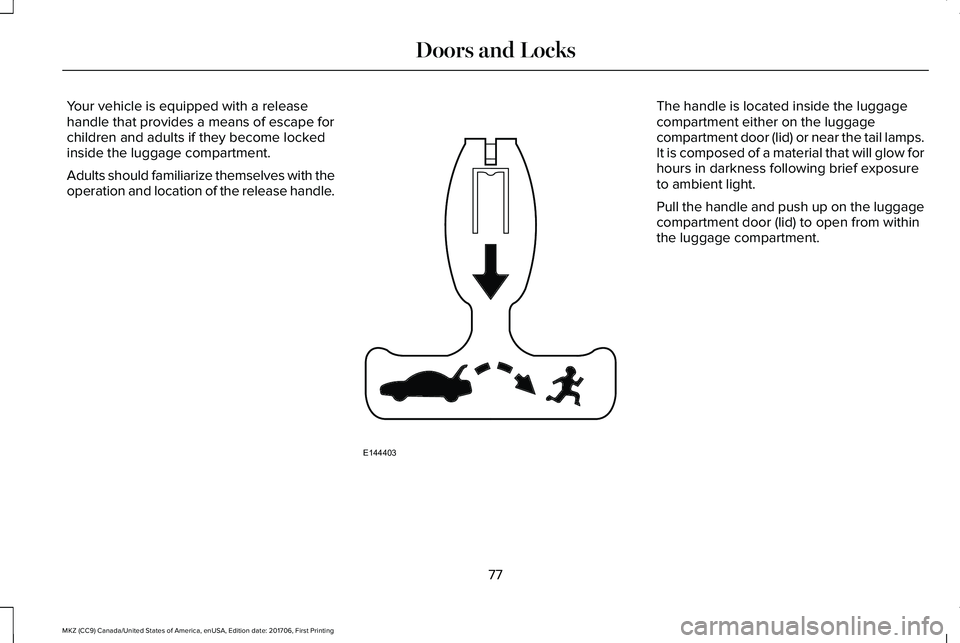
Your vehicle is equipped with a releasehandle that provides a means of escape forchildren and adults if they become lockedinside the luggage compartment.
Adults should familiarize themselves with theoperation and location of the release handle.
The handle is located inside the luggagecompartment either on the luggagecompartment door (lid) or near the tail lamps.It is composed of a material that will glow forhours in darkness following brief exposureto ambient light.
Pull the handle and push up on the luggagecompartment door (lid) to open from withinthe luggage compartment.
77
MKZ (CC9) Canada/United States of America, enUSA, Edition date: 201706, First Printing
Doors and LocksE144403
Page 81 of 595

PASSIVE ANTI-THEFT SYSTEM
Note: The system is not compatible withnon-Ford aftermarket remote start systems. Use of these systems may result in vehiclestarting problems and a loss of securityprotection.
Note: Metallic objects, electronic devicesor a second coded key on the same keychain may cause vehicle starting problemsif they are too close to the key when startingyour vehicle. Prevent these objects fromtouching the coded key while starting yourvehicle. Switch the ignition off, move allobjects on the key chain away from thecoded key and restart your vehicle if aproblem occurs.
Note: Do not leave a duplicate coded keyin your vehicle. Always take your keys andlock all doors when leaving your vehicle.
SecuriLock
The system helps prevent your vehicle fromstarting unless you use a coded keyprogrammed to your vehicle. Using thewrong key may prevent your vehicle fromstarting. A message may appear in theinformation display.
If you are unable to start your vehicle with acorrectly coded key, it is not operatingproperly. A message may appear in theinformation display.
Automatic Arming
Your vehicle arms immediately afterswitching the ignition off.
Automatic Disarming
Switching the ignition on with a coded keydisarms your vehicle.
Replacement Keys
Note:Your vehicle comes equipped with twointelligent access keys.
The intelligent access key functions as aprogrammed key that operates the driverdoor lock and activates the intelligent accesswith push button start system, as well as aremote control.
If your programmed transmitters are lost orstolen and you do not have an extra codedkey, have your vehicle towed to anauthorized dealer. You need to erase thekey codes from your vehicle and programnew coded keys.
Store an extra programmed key away fromyour vehicle in a safe place to help preventany inconveniences. See your authorizeddealer to purchase additional spare orreplacement keys.
Programming a Spare Intelligent AccessKey
Note: You can program a maximum of fourintelligent access keys to your vehicle.
78
MKZ (CC9) Canada/United States of America, enUSA, Edition date: 201706, First Printing
Security
Page 82 of 595

You must have two previously programmedintelligent access keys inside your vehicleand the new unprogrammed intelligentaccess keys readily accessible. See anauthorized dealer to have the spare keyprogrammed if two previously programmedkeys are not available.
Make sure that your vehicle is off beforebeginning this procedure. Make sure thatyou close all the doors before beginning andthat they remain closed throughout theprocedure. Perform all steps within 30seconds of starting the sequence. Stop andwait for at least one minute before startingagain if you perform any steps out ofsequence.
Read and understand the entire procedurebefore you begin.
1.Remove the rubber covering (A) from thecupholder. With the buttons facingupwards and the unlock button facingthe front of the vehicle, place the firstintelligent access in the backup slot (B).
2. Press the push button ignition switch.
3. Wait five seconds and then press thepush button ignition switch again.
4. Remove the intelligent access key.
5. Within 10 seconds, place a secondprogrammed intelligent access key in thebackup slot. Press the push buttonignition switch.
6. Wait five seconds and then press thepush button ignition switch again.
7. Remove the intelligent access key.
8. Place the unprogrammed intelligentaccess key in the backup slot and pressthe push button ignition switch.
Programming is now complete. Verify theremote control functions operate and yourvehicle starts with the new intelligent accesskey.
If programming was not successful, wait 10seconds and repeat Steps 1 through 7. If youare still unsuccessful, take your vehicle toyour authorized dealer.
ANTI-THEFT ALARM
The system will warn you of an unauthorizedentry to your vehicle. It will be triggered ifany door, the luggage compartment or thehood is opened without using the key,remote control or keyless entry keypad.
The direction indicators will flash and thehorn will sound if unauthorized entry isattempted while the alarm is armed.
79
MKZ (CC9) Canada/United States of America, enUSA, Edition date: 201706, First Printing
SecurityE155835