2018 LINCOLN MKZ light
[x] Cancel search: lightPage 77 of 595

Note:Let the power system operate thedecklid after pressing the control. Pushingor pulling the decklid may activate theobstacle detection feature and stop thepower operation.
With the Decklid Close Button
Press the button inside the decklidon the left-hand side.
Obstacle Detection
The decklid will reverse to full open if itdetects an obstacle while closing. Threechimes will sound as the decklid begins toreopen. Remove the obstacle to close thedecklid.
Note:Before driving your vehicle, check theinstrument cluster for a trunk ajar or doorajar message or warning indicator. Failureto do this could result in unintentionallyleaving the decklid open while driving.
The decklid will stop and three chimes willsound if it detects an obstacle while opening.Remove the obstacle to operate the decklid.
Resetting the Power Decklid
The decklid may not operate correctly andyou may need to reset it if:
•The vehicle battery charge is low.
•You disconnect the battery.
•You manually close the decklid and leaveit unlatched.
To reset the power decklid:
1. Disconnect the battery for 20 secondsthen reconnect the battery.
2. Manually close the decklid making sureit is fully closed.
3.Power open the decklid using the remotecontrol or instrument panel button.
KEYLESS ENTRY
SECURICODE™ KEYLESS ENTRYKEYPAD
The keypad is located near the driverwindow. It is invisible until you touch it, thenit lights up so you can see and touch theappropriate buttons.
Note:If you enter your entry code too faston the keypad, the unlock function may notwork. Re-enter your entry code more slowly.
You can use the keypad to:
•Lock or unlock the doors.
•Program and erase personal entry codes.
•Arm and disarm the anti-theft alarm.
•Release the trunk.
Note:The keypad does not operate a powerdecklid.
74
MKZ (CC9) Canada/United States of America, enUSA, Edition date: 201706, First Printing
Doors and LocksE194407 E138637
Page 80 of 595
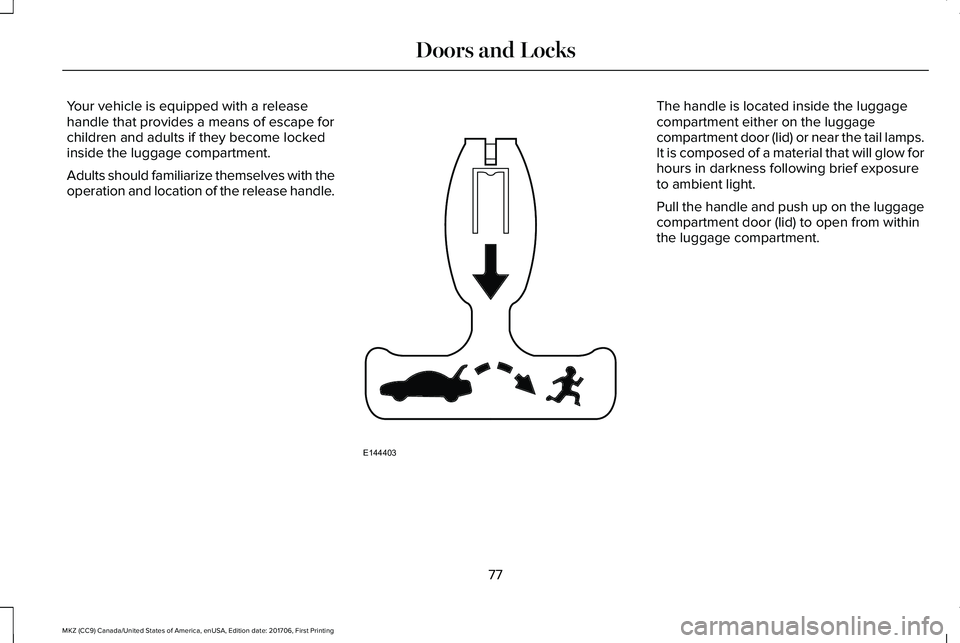
Your vehicle is equipped with a releasehandle that provides a means of escape forchildren and adults if they become lockedinside the luggage compartment.
Adults should familiarize themselves with theoperation and location of the release handle.
The handle is located inside the luggagecompartment either on the luggagecompartment door (lid) or near the tail lamps.It is composed of a material that will glow forhours in darkness following brief exposureto ambient light.
Pull the handle and push up on the luggagecompartment door (lid) to open from withinthe luggage compartment.
77
MKZ (CC9) Canada/United States of America, enUSA, Edition date: 201706, First Printing
Doors and LocksE144403
Page 91 of 595

GENERAL INFORMATION
Condensation in the Exterior FrontLamps and Rear Lamps
Exterior front lamps and rear lamps havevents to accommodate normal changes inair pressure.
Condensation can be a natural by-productof this design. When moist air enters thelamp assembly through the vents, there is apossibility that condensation can occur whenthe temperature is cold. When normalcondensation occurs, a fine mist can form onthe interior of the lens. The fine misteventually clears and exits through the ventsduring normal operation.
Clearing time may take as long as 48 hoursunder dry weather conditions.
Examples of acceptable condensation are:
•The presence of a fine mist (no streaks,drip marks or large droplets).
•A fine mist covers less than 50% of thelens.
Examples of unacceptable condensation are:
•A water puddle inside the lamp.
•Streaks, drip marks or large dropletspresent on the interior of the lens.
If you see any unacceptable condensation,have your vehicle checked by an authorizeddealer.
LIGHTING CONTROL
Off.A
Parking lamps, instrument panellamps, license plate lamps and taillamps.
B
Headlamp low beam.C
88
MKZ (CC9) Canada/United States of America, enUSA, Edition date: 201706, First Printing
LightingE142449
Page 92 of 595

Headlamp High Beam
Push the lever away from you to switch thehigh beam on.
Push the lever away from you again or pullthe lever toward you to switch the high beamoff.
Headlamp Flasher
Slightly pull the lever toward you and releaseit to flash the headlamps.
AUTOLAMPS
WARNING
The system does not relieve you ofyour responsibility to drive with duecare and attention. You may need to overridethe system if it does not turn the headlampson in low visibility conditions, for exampledaytime fog.
When the lighting control is in the autolampsposition, the headlamps turn on in low lightsituations, or when the wipers turn on.
The headlamps remain on for a period oftime after you switch the ignition off. Usethe information display controls to adjust theperiod of time that the headlamps remainon.
Note: If you switch the autolamps on, youcannot switch the high beams on until thesystem turns the low beams on.
89
MKZ (CC9) Canada/United States of America, enUSA, Edition date: 201706, First Printing
LightingE222347 E222348 E142451
Page 93 of 595

Windshield Wiper Activated Headlamps
When you switch the autolamps on, theheadlamps turn on within 10 seconds ofswitching the wipers on. They turn offapproximately 60 seconds after you switchthe windshield wipers off.
The headlamps do not turn on with thewipers:
•During a single wipe.
•When using the windshield washers.
•If the wipers are in intermittent mode.
Note:If you switch the autolamps and theautowipers on, the headlamps turn on whenthe windshield wipers continuously operate.
INSTRUMENT LIGHTING DIMMER
Note:If you disconnect and connect thebattery, or fully discharge and charge thebattery, the illuminated components switchto the maximum setting.
Press repeatedly or press and holdto dim.A
Press repeatedly or press and holdto brighten.B
HEADLAMP EXIT DELAY
Note:Perform steps one through four withina 10 second period. Autolamps and parkinglamps turn on.
Switch the headlamps and parking lamps onand off with the following sequence:
1. Deselect the autolamps.
2. Switch on the vehicle.
3. Switch off the vehicle.
4. Select the autolamps.
5. To switch the lamps off, deselect theautolamps after about three minutes.
DAYTIME RUNNING LAMPS
WARNING
The daytime running lamps systemdoes not activate the rear lamps andmay not provide adequate lighting duringlow visibility driving conditions. Make sureyou switch the headlamps on, as appropriate,during all low visibility conditions. Failure todo so may result in a crash.
90
MKZ (CC9) Canada/United States of America, enUSA, Edition date: 201706, First Printing
LightingE165337AB
Page 94 of 595

Type One - Conventional (Non-Configurable)
The daytime running lamps turn on when:
1. Switching the ignition on.
2. The transmission is not in park (P) forvehicles with automatic transmissions, orreleasing the parking brake for vehicleswith manual transmissions.
3. The lighting control is in the off, parkinglamp or autolamps positions.
4. The headlamps are off.
Type Two - Configurable
Switch the daytime running lamps on or offusing the information display. SeeInformation Displays (page 111).
The daytime running lamps turn on when:
1. The lamps are on in the informationdisplay.
2. Switching the ignition on.
3. The transmission is not in park (P) forvehicles with automatic transmissions, orreleasing the parking brake for vehicleswith manual transmissions.
4. The lighting control is in the autolampsposition.
5. The headlamps are off.
The other lighting control switch positionsdo not turn on the daytime running lamps.
If the daytime running lamps are off in theinformation display, the lamps stay off in allswitch positions.
AUTOMATIC HIGH BEAM
CONTROL (If Equipped)
WARNING
The system does not relieve you ofyour responsibility to drive with duecare and attention. You may need to overridethe system if it does not turn the high beamson or off.
The system turns on high beams if it is darkenough and no other traffic is present. If itdetects an approaching vehicle’s headlampsor tail lamps, or street lighting ahead, thesystem turns off high beams before they candistract other road users. Low beams remainon.
Note:The system may not operate properlyif the sensor is blocked. Keep the windshieldfree from obstruction or damage.
Note:The system may not operate properlyin cold or inclement conditions. You canswitch on the high beams by overriding thesystem.
Note:If the system detects a blockage, forexample bird droppings, bug splatter, snowor ice, the system goes into low beam modeuntil you clear the blockage. A message mayappear in the information display if thecamera is blocked.
Note:Using much larger tires or equippingvehicle accessories such as snowplows canmodify your vehicle's ride height anddegrade automatic high beam controlperformance.
91
MKZ (CC9) Canada/United States of America, enUSA, Edition date: 201706, First Printing
Lighting
Page 95 of 595

A camera sensor, centrally mounted behindthe windshield of your vehicle, continuouslymonitors conditions to turn the high beamson and off.
Once the system is active, the high beamsturn on if:
•The ambient light level is low enough.
•There is no traffic in front of your vehicle.
•The vehicle speed is greater thanapproximately 32 mph (51 km/h).
The high beams turn off if:
•The ambient light level is high enoughthat high beams are not required.
•The system detects an approachingvehicle's headlamps or tail lamps.
•The vehicle speed falls belowapproximately 27 mph (44 km/h).
•The system detects severe rain, snow orfog.
•The camera is blocked.
Switching the System On and Off
Switch the system on using the informationdisplay. See Information Displays (page111).
Switch the lighting control to the autolampsposition. See Autolamps (page 89).
Overriding the System
When you switch on the high beams, pushingor pulling the stalk provides a temporaryoverride to low beam.
Automatic High Beam Indicator (If Equipped)
The indicator lamp illuminates toconfirm when the system is readyto assist.
ADAPTIVE HEADLAMPS (If Equipped)
Note:There is a delay of two to five secondsbefore the system operates when you driveyour vehicle.
Note:The system is only active at speedsabove 3 mph (5 km/h).
The headlamp beams move in the samedirection as the steering wheel. This providesmore visibility when driving around curves.
A. Without adaptive headlamps.
B. With adaptive headlamps.
92
MKZ (CC9) Canada/United States of America, enUSA, Edition date: 201706, First Printing
LightingE142451
Page 96 of 595

The system only works with the lightingcontrol in the autolamp position. You canswitch this feature on or off in the informationdisplay.
The system has a power-up movement checkfeature. When you start your vehicle, thelamps track left to right, then back to centerto alert the driver that the system is workingproperly.
DIRECTION INDICATORS
•To operate the left-hand directionindicator, push the lever down until itstops.
•To operate the right-hand directionindicator, push the lever up until it stops.
•To cancel direction indicator operation,push the lever again in either direction.
Lane Change
To indicate a lane change:
•Push the lever up or down to the firststop position and release. The directionindicator flashes three times and stops.
•Push the lever up or down to the firststop position and hold. The directionindicator flashes for as long as you holdthe lever in this position.
WELCOME LIGHTING
The Lincoln welcome mat projection lightsare on the bottom of the exterior mirrorhousings. They project an image onto theground a short distance from your vehiclewhen welcome lighting or lighted entry turnson.
For auto-fold mirrors, the Lincoln welcomemat turns on when welcome lighting orlighted entry turns on and the mirrors fold inupon locking or using the switch on the door.
You can switch this feature on or off in theinformation display.
93
MKZ (CC9) Canada/United States of America, enUSA, Edition date: 201706, First Printing
LightingE161714
B
A E222351