2018 LINCOLN MKZ tires
[x] Cancel search: tiresPage 195 of 595

Your vehicle has anti-lock brakes, thereforeapply the brakes steadily. Do not “pump” thebrakes.
Driving on Snow and Ice
WARNING
If you are driving in slippery conditionsthat require tire chains or cables, thenit is critical that you drive cautiously. Keepspeeds down, allow for longer stoppingdistances and avoid aggressive steering toreduce the chances of a loss of vehiclecontrol which can lead to serious injury ordeath. If the rear end of your vehicle slideswhile cornering, steer in the direction of theslide until you regain control of your vehicle.
Note:Your vehicle may have originalequipment tires designed to optimize theperformance of your vehicle in dry or wetsummer road conditions. If your vehicle isequipped with such tires, we recommendusing a dedicated set (all 4 tires) of wintertires in snow and ice conditions. Do not mixwinter tires and performance tires betweenaxles or degraded traction and handlingcharacteristics could result.
Note:Excessive tire slippage can causedriveline damage.
AWD vehicles have advantages overtwo-wheel drive (2WD) vehicles in snow andice but can skid like any other vehicle.
Should you start to slide while driving onsnowy or icy roads, turn the steering wheelin the direction of the slide until you regaincontrol.
192
MKZ (CC9) Canada/United States of America, enUSA, Edition date: 201706, First Printing
All-Wheel Drive (If Equipped)
Page 206 of 595

PRINCIPLE OF OPERATION
WARNINGS
Vehicle modifications involving brakingsystem, aftermarket roof racks,suspension, steering system, tireconstruction and wheel and tire size maychange the handling characteristics of yourvehicle and may adversely affect theperformance of the electronic stability controlsystem. In addition, installing any stereoloudspeakers may interfere with andadversely affect the electronic stabilitycontrol system. Install any aftermarket stereoloudspeaker as far as possible from the frontcenter console, the tunnel, and the frontseats in order to minimize the risk ofinterfering with the electronic stability controlsensors. Reducing the effectiveness of theelectronic stability control system could leadto an increased risk of loss of vehicle control,vehicle rollover, personal injury and death.
WARNINGS
Remember that even advancedtechnology cannot defy the laws ofphysics. It’s always possible to lose controlof a vehicle due to inappropriate driver inputfor the conditions. Aggressive driving on anyroad condition can cause you to lose controlof your vehicle increasing the risk of personalinjury or property damage. Activation of theelectronic stability control system is anindication that at least some of the tires haveexceeded their ability to grip the road; thiscould reduce the operator’s ability to controlthe vehicle potentially resulting in a loss ofvehicle control, vehicle rollover, personalinjury and death. If your electronic stabilitycontrol system activates, SLOW DOWN.
The system automatically turns on each timeyou switch the ignition on.
If a fault occurs in either the stability controlor the traction control system, you mayexperience the following conditions:
•The stability and traction control lightilluminates steadily.
•The stability control and traction controlsystems do not enhance your vehicle'sability to maintain traction of the wheels.
If a driving condition activates either thestability control or the traction control systemyou may experience the following conditions:
•The stability and traction control lightflashes.
•Your vehicle slows down.
•Reduced engine power.
•A vibration in the brake pedal.
•The brake pedal is stiffer than usual.
•If the driving condition is severe and yourfoot is not on the brake, the brake pedalmay move as the system applies higherbrake force.
The stability control system has severalfeatures built into it to help you maintaincontrol of your vehicle:
203
MKZ (CC9) Canada/United States of America, enUSA, Edition date: 201706, First Printing
Stability Control
Page 214 of 595

If you are uncomfortable with the proximityto any vehicle or object, you may choose tooverride the system by grabbing the steeringwheel or by pressing the button.
Parallel Park Out Assist automatically steersyour vehicle out of a parallel parking space(hands-free) while you control theaccelerator, gearshift and brakes. The systemvisually and audibly guides you to entertraffic.
The system may not correctly operate in anyof the following conditions:
•You use a spare tire or a tire significantlyworn more than the other tires.
•One or more tires are improperly inflated.
•You try to park on a tight curve.
•Something passes between the frontbumper and the parking space. Forexample, a pedestrian or cyclist.
•The edge of the neighboring parkedvehicle is high off the ground. Forexample, a bus, tow truck or flatbedtruck.
•The weather conditions are poor. Forexample, during heavy rain, snow or fog.
Note: Keep the sensors on the bumper orfascia free from snow, ice and largeaccumulations of dirt. Covered sensors canaffect the system's accuracy. Do not cleanthe sensors with sharp objects.
Note:The sensors may not detect objectswith surfaces that absorb ultrasonic wavesor cause ultrasonic interference. Forexample, motorcycle exhaust, truck airbrakes or horns.
Note:Following a change in tire size, thesystem must recalibrate and operation maybe impaired for a short time.
Do not use the system if:
•You have attached a foreign object closeto the sensors on the front or rear of yourvehicle. For example, a bike rack ortrailer.
•You attach an overhanging object to theroof. For example, a surfboard.
•A foreign object damages or obstructsthe front or rear bumper or side sensors.
•The correct tire size is not in use on yourvehicle. For example, a mini-spare tire.
Using Active Park Assist - Parallel Parking
Press the Active Park Assist buttononce to search for a parallelparking space.
When driving at a speed less than 22 mph(35 km/h), the system automatically scansboth sides of your vehicle for an availableparking space. The system displays amessage and a corresponding graphic toindicate it is searching for a parking space.Use the direction indicator to selectsearching either to the left-hand side orright-hand side of your vehicle.
Note:If the direction indicators are not used,the system defaults to the passenger sideof your vehicle.
211
MKZ (CC9) Canada/United States of America, enUSA, Edition date: 201706, First Printing
Parking AidsE146186
Page 221 of 595
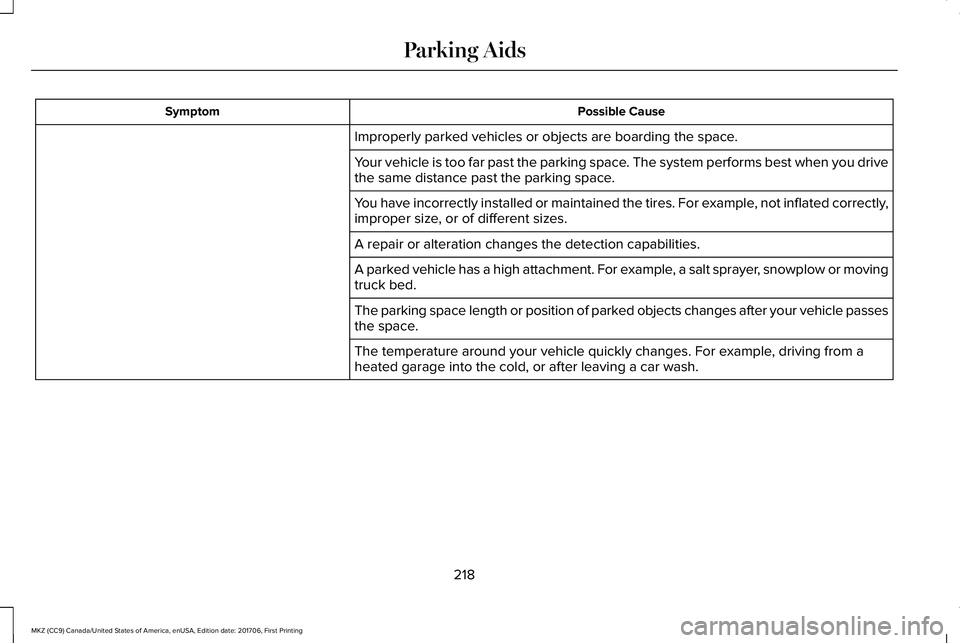
Possible CauseSymptom
Improperly parked vehicles or objects are boarding the space.
Your vehicle is too far past the parking space. The system performs best when you drivethe same distance past the parking space.
You have incorrectly installed or maintained the tires. For example, not inflated correctly,improper size, or of different sizes.
A repair or alteration changes the detection capabilities.
A parked vehicle has a high attachment. For example, a salt sprayer, snowplow or movingtruck bed.
The parking space length or position of parked objects changes after your vehicle passesthe space.
The temperature around your vehicle quickly changes. For example, driving from aheated garage into the cold, or after leaving a car wash.
218
MKZ (CC9) Canada/United States of America, enUSA, Edition date: 201706, First Printing
Parking Aids
Page 229 of 595

Adaptive Cruise Control Gap Settings
Dynamic behaviorGraphic display, barsindicated betweenvehicles
Sport.1
Normal.2
Normal.3
Comfort.4
Each time you switch the system on, itselects the last chosen gap setting.
Overriding the Set Speed
WARNING
If you override the system by pressingthe accelerator pedal, it does notautomatically apply the brakes to maintain agap from any vehicle ahead.
When you press the accelerator pedal, youoverride the set speed and gap distance.
When you override the system, thegreen indicator light illuminatesand the vehicle image does notappear in the information display.
The system resumes operation when yourelease the accelerator pedal. The vehiclespeed decreases to the set speed, or a lowerspeed if following a slower vehicle.
Changing the Set Speed
•Press RES+ or SET- to change the setspeed in small increments.
•Press the accelerator or brake pedal untilyou reach the desired speed. Press RES+or SET-.
•Press and hold RES+ or SET- to changethe set speed in large increments.Release the control when you reach thedesired speed.
The system may apply the brakes to slowthe vehicle to the new set speed. The setspeed displays continuously in theinformation display when the system isactive.
Canceling the Set Speed
Press CNCL or tap the brake pedal. The setspeed does not erase.
Resuming the Set Speed
Note:Only use resume if you are aware ofthe set speed and intend to return to it.
Press RES+. Your vehicle speed returns tothe previously set speed and gap setting. The set speed displays continuously in theinformation display when the system isactive.
Automatic Cancellation
Note:If the engine speed drops too low, anaudible warning sounds and a messageappears in the information display.Automatic braking releases.
Automatic cancellation can also occur if:
•The tires lose traction.
•You apply the parking brake.
226
MKZ (CC9) Canada/United States of America, enUSA, Edition date: 201706, First Printing
Cruise ControlE144529
Page 240 of 595

Why is the feature not available (line markings are gray) when I can see the lane markings on the road?
Faint lane markings (partial yellow lane markings on concrete roads)
Lane width too narrow or too wide
Camera not calibrated after a windshield replacement
Driving on tight roads or on uneven roads
Why does the vehicle not come back toward the middle of the lane, as expected, in the Aid or Aid + Alert mode?
High cross winds are present
There is a large road crown
Rough roads, grooves, shoulder drop-offs
Heavy uneven loading of the vehicle or improper tire inflation pressure
The tires have been changed, or the suspension has been modified
237
MKZ (CC9) Canada/United States of America, enUSA, Edition date: 201706, First Printing
Driving Aids
Page 257 of 595

The gross combined weight must neverexceed the Gross Combined WeightRating.
Note: For trailer towing informationrefer to the RV and Trailer Towing Guideavailable at an authorized dealer.
WARNINGS
Do not exceed the GVWR or theGAWR specified on the SafetyCompliance Certification label.
Do not use replacement tires withlower load carrying capacities thanthe original tires because they maylower your vehicle’s GVWR and GAWRlimitations. Replacement tires with ahigher limit than the original tires do notincrease the GVWR and GAWR
limitations.
Exceeding any vehicle weightrating limitation could result inserious damage to your vehicle,personal injury or both.
Steps for determining the correct loadlimit:
1.Locate the statement "The combinedweight of occupants and cargoshould never exceed XXX kg or XXXlb." on your vehicle’s placard.
2.Determine the combined weight ofthe driver and passengers that willbe riding in your vehicle.
3.Subtract the combined weight of thedriver and passengers from XXX kgor XXX lb.
4. The resulting figure equals theavailable amount of cargo andluggage load capacity. For example,if the “XXX” amount equals 1,400 lb.and there will be five 150 lb.
passengers in your vehicle, theamount of available cargo andluggage load capacity is 650 lb.(1400-750 (5 x 150) = 650 lb.)
5.Determine the combined weight ofluggage and cargo being loaded onthe vehicle. That weight may notsafely exceed the available cargoand luggage load capacity calculatedin Step 4.
6.If your vehicle will be towing a trailer,load from your trailer will betransferred to your vehicle. Consultthis manual to determine how thisreduces the available cargo andluggage load capacity of yourvehicle.
Helpful examples for calculating theavailable amount of cargo andluggage load capacity
Suppose your vehicle has a 1400-pound(635-kilogram) cargo and luggagecapacity. You decide to go golfing. Isthere enough load capacity to carry you,four of your friends and all the golf bags?You and four friends average 220pounds (99 kilograms) each and the golfbags weigh approximately 30 pounds(13.5 kilograms) each. The calculationwould be: 1400 - (5 x 220) - (5 x 30) =
254
MKZ (CC9) Canada/United States of America, enUSA, Edition date: 201706, First Printing
Load Carrying
Page 259 of 595
TOWING A TRAILER
WARNINGS
Do not exceed the GVWR or theGAWR specified on the certificationlabel.
Towing trailers beyond themaximum recommended grosstrailer weight exceeds the limit of yourvehicle and could result in enginedamage, transmission damage,structural damage, loss of vehiclecontrol, vehicle rollover and personalinjury.
Note:There may be electrical itemssuch as fuses or relays that can affect
trailer towing operation. See Fuses(page 282).
The load capacity of your vehicle isdesignated by weight not volume. Youmay not necessarily be able to use allavailable space when loading yourvehicle or trailer.
Towing a trailer places extra load on theengine, transmission, axle, brakes, tires,and suspension. Inspect thesecomponents before, during and aftertowing.
Load Placement
To help minimize how trailer movementaffects the vehicle when driving:
•Load the heaviest items closest tothe trailer floor.
•Load the heaviest items in the centerof the left and right side trailer tires.
•Load the heaviest items above thetrailer axles or just slightly forwardtoward the trailer tongue. Do notallow the final trailer tongue weightto go above or below 10-15% of theloaded trailer weight.
•Select a ball mount with the correctrise or drop. When both the loadedvehicle and trailer are connected, thetrailer frame should be level, orslightly angled down toward thevehicle, when viewed from the side.
When driving with a trailer or payload, aslight takeoff vibration or shudder maybe present due to the increased payloadweight. Additional information regardingproper trailer loading and setting yourvehicle up for towing is located in theLoad Carrying chapter. See Load Limit(page 251).
You can also find information in the RV& Trailer Towing Guide available at yourauthorized dealer, or online.
256
MKZ (CC9) Canada/United States of America, enUSA, Edition date: 201706, First Printing
Towing