2018 LINCOLN MKT climate settings
[x] Cancel search: climate settingsPage 380 of 564

Action and Description
Menu Item
Item
This bar displays icons and messages pertaining to current system activi\
ties including climate
settings, voice commands and phone functions such as text messages.
Status Bar
A
This button is available on the main screens. Pressing it takes you to the home screen view.
Home
B
This shows the current time. You can set the clock manually or have it controlled by the vehicle's
GPS location. See Settings (page 443).
Clock
C
This displays the current outside temperature.
Outside Temperature
D
You can touch any of the buttons on this bar to select a feature.
Feature Bar
E
The touchscreen allows you quick access to
all of your comfort, navigation,
communication and entertainment options.
Using the status and feature bar you can
quickly select the feature you want to use. Note:
Your system is equipped with a feature
that allows you to access and control audio
features for 10 minutes after you switch the
ignition off (and no doors open). The Status Bar
Additional icons also display in the status bar
depending on market, vehicle options and
current operation. If a feature is not active,
the icon does not display. Certain icons may
move to the left or right depending on what
options are active.
377
MKT (TP4) , enUSA, Edition date: 201703, First Printing SYNC™ 3
Page 383 of 564

Messages may also appear in the status bar
to provide you with notifications. You can
select the message to view the associated
feature.
Feature Bar Functions
Feature Bar Item
Allows you to control the media playing in your vehicle. You can
control all audio features including AM, FM and satellite radio, CDs,
and media streaming over a Bluetooth device or through a USB
connection.
Audio
Allows you to adjust the temperature, fan speed and airflow within
the vehicle.
Climate
Allows you to make calls, receive calls, and access the phonebook
of your connected device.
Phone
Allows you to see your vehicle's location on a virtual road map, get
driving directions to your destination and find points of interest along\
your route.
Navigation
(If equipped)
Connect and control SYNC 3 compatible apps running on your iphone
or android device. Also, access built-in additional features such as
SiriusXM Traffic and Travel Link (if equipped).
Apps
You can customize your system with various settings for the touch-
screen display, feature preferences, and how you want to interact
with your vehicle.
Settings
380
MKT (TP4) , enUSA, Edition date: 201703, First Printing SYNC™ 3
Page 388 of 564

•
DISP: Switch the display on or off. You
can also touch the screen to switch the
display back on.
• Temperature, fan and climate control
buttons:
Control the temperature, fan
speed or settings of the climate control
system. See Climate Control (page 129).
911 Assist WARNINGS
Unless the 911 Assist setting is set on
before a crash, the system will not dial
for help which could delay response time,
potentially increasing the risk of serious
injury or death after a crash. Do not wait for 911 Assist to make an
emergency call if you can do it yourself.
Dial emergency services immediately to
avoid delayed response time which could
increase the risk of serious injury or death
after a crash. If you do not hear 911 Assist
within five seconds of the crash, the system
or phone may be damaged or non-functional. WARNINGS
Always place your phone in a secure
location in your vehicle so it does not
become a projectile or get damaged in a
crash. Failure to do so may cause serious
injury to someone or damage the phone
which could prevent 911 Assist from working
properly. Note:
The SYNC 911 Assist feature must be
set on before the incident.
Note: The SYNC 911 Assist feature only
operates in the U.S., Canada or in a territory
in which 911 is the emergency number.
Note: Before setting this feature on, make
sure that you read the 911 Assist Privacy
Notice later in this section for important
information.
Note: If any user sets 911 Assist to on or off,
that setting applies for all paired phones. If
911 Assist is switched off and the phone is
connected to SYNC, an icon displays on the
status bar. Note:
Every phone operates differently.
While SYNC 911 Assist works with most
cellular phones, some may have trouble
using this feature.
If a crash deploys an airbag (excluding knee
airbags and rear inflatable safety belts [if
equipped]) or activates the fuel pump
shut-off, your SYNC-equipped vehicle may
be able to contact emergency services by
dialing 911 through a paired and connected
Bluetooth-enabled phone. You can learn
more about the 911 Assist feature, by visiting: Website
www.owner.lincoln.com
www.syncmyride.ca
www.syncmaroute.ca
For important information about airbag
deployment and the fuel pump shut-off
please see the Supplementary Restrains and
Roadside Emergencies sections of your
owner manual.
To switch 911 Assist on and off please view
the settings information. See Settings (page
443
).
385
MKT (TP4) , enUSA, Edition date: 201703, First Printing SYNC™ 3
Page 400 of 564

Climate Voice Commands
You can control the temperature of the
vehicle using voice commands.
___ is a dynamic listing, meaning that for
climate voice commands it can be the
desired degrees for the temperature setting.
To adjust the temperature, say: Description
Voice command
Adjust the temperature between 60–85°F (15.5–29.5°C).
Climate Set Temperature ___
Phone Voice Commands
Pairing a Phone
You can use voice commands to connect
your Bluetooth-enabled phone to the system.
To pair your phone, press the voice button and when prompted, say: Description
Voice command
Follow the on-screen instructions to complete the pairing process.
See Settings (page 443).
Pair Phone
397
MKT (TP4) , enUSA, Edition date: 201703, First Printing SYNC™ 3
Page 406 of 564
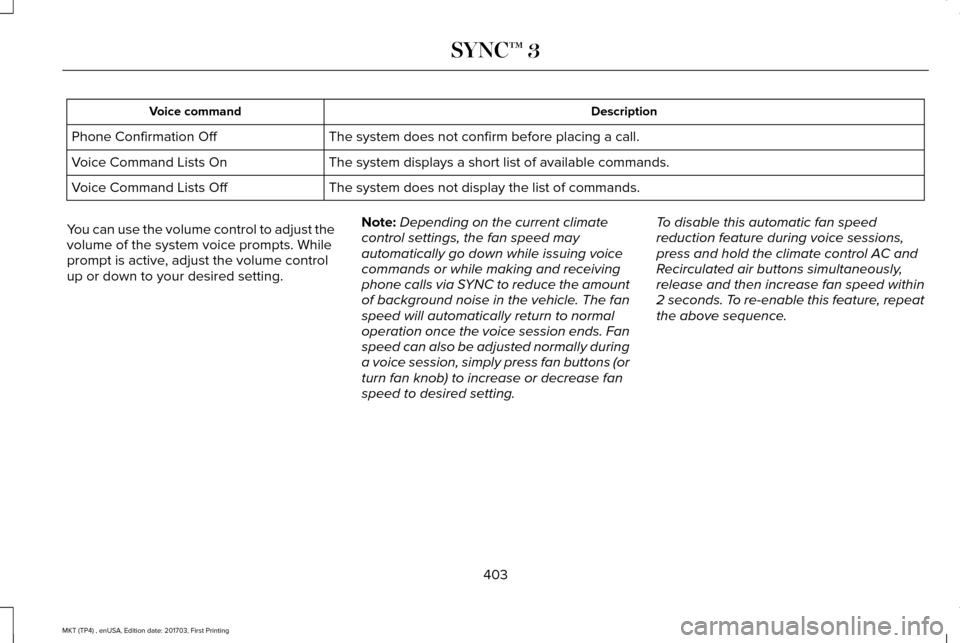
Description
Voice command
The system does not confirm before placing a call.
Phone Confirmation Off
The system displays a short list of available commands.
Voice Command Lists On
The system does not display the list of commands.
Voice Command Lists Off
You can use the volume control to adjust the
volume of the system voice prompts. While
prompt is active, adjust the volume control
up or down to your desired setting. Note:
Depending on the current climate
control settings, the fan speed may
automatically go down while issuing voice
commands or while making and receiving
phone calls via SYNC to reduce the amount
of background noise in the vehicle. The fan
speed will automatically return to normal
operation once the voice session ends. Fan
speed can also be adjusted normally during
a voice session, simply press fan buttons (or
turn fan knob) to increase or decrease fan
speed to desired setting. To disable this automatic fan speed
reduction feature during voice sessions,
press and hold the climate control AC and
Recirculated air buttons simultaneously,
release and then increase fan speed within
2 seconds. To re-enable this feature, repeat
the above sequence.
403
MKT (TP4) , enUSA, Edition date: 201703, First Printing SYNC™ 3
Page 420 of 564

USB Ports
The USB ports are in the center console or
behind a small access door in the instrument
panel.
This feature allows you to plug in USB media
devices, memory sticks, flash drives or thumb
drives, and charge devices if they support
this feature.
Select this option to play audio from your
USB device. Apps
The system supports the use of certain audio
apps such as iHeartRadio through a USB or
bluetooth-enabled device.
Each app gives you different on-screen
options depending on the app's content.
See Apps (page 440).
Supported Media Players, Formats and
Metadata Information
The system is capable of hosting nearly any
digital media player, including iPod, iPhone,
and most USB drives.
Supported audio formats include MP3, WMA,
WAV, AAC, and FLAC.
Supported audio file extensions include MP3,
WMA, WAV, M4A, M4B, AAC, and FLAC.
Supported USB file systems include: FAT,
exFAT, and NTFS. SYNC 3 is also able to organize the media
from your USB device by metadata tags.
Metadata tags, which are descriptive
software identifiers embedded in the media
files, provide information about the file.
If your indexed media files contain no
information embedded in these metadata
tags, SYNC 3 may classify the empty
metadata tags as unknown.
SYNC 3 is capable of indexing up to 50,000
songs per USB device, for up to 10 devices.
CLIMATE
Touch the climate button on the touchscreen
to access your climate control features.
Depending on your vehicle line and option
package, your climate screen may look
different from one of the screens shown
below. Your screen may not contain all of
the features shown.
Note:
You can switch temperature units
between Fahrenheit and Celsius.
See
Settings (page 443).
417
MKT (TP4) , enUSA, Edition date: 201703, First Printing SYNC™ 3E211463
Page 423 of 564

Touch the power icon to switch the rear climate control functions off and\
on.
Touch Rear Control to allow the rear seat passengers to adjust the rear climate settings. \
Touch it again to prevent the rear seat
passengers from adjusting the settings. Rear Control automatically turns off when you use the touchscreen to adjust the rear\
climate
settings.
If your vehicle has automatic climate controls, select
Auto to connect the rear climate settings to the Auto settings of the driver\
.
Touch the up and down arrows to adjust the temperature.
Manual airflow distribution controls:
Select these controls individually or together to direct the air flow t\
o the desired area.
K
Panel:
Distributes air through the instrument panel vents.
Floor:
Distributes air through the demister vents, floor vents and rear seat f\
loor vents.
A/C:
A pop-up appears on the screen to display the air conditioning options.\
L
MAX A/C:
Touch to cool your vehicle with recirculated air. Touch again for normal A/C operation. MAX A/C distributes air through
instrument panel vents and may help reduce odors from entering your vehi\
cle. MAX A/C is more economical and efficient than
normal A/C mode.
A/C:
Touch to switch the air conditioning on or off. Use A/C with recirculated air to improve cooling performance and effic\
iency.
A/C engages automatically in MAX A/C, defrost and footwell/defrost.
Recirculated air:
Touch to switch the recirculated air on or off which may reduce the amoun\
t of time needed to cool down the
interior and help reduce odors from reaching the interior. Recirculated air also engages automatically when you select MAX A/C.
You can engage this manually in any airflow mode except defrost. It may also turn off in all airflow modes except MAX A/C to reduce
fog potential.
Driver heated and climate controlled seats:
M
Touch the heated seat icon to adjust the heated seat off and on (if equi\
pped).
Touch the climate-controlled seat icon to adjust the climate-controlled s\
eat off and on (if equipped).
420
MKT (TP4) , enUSA, Edition date: 201703, First Printing SYNC™ 3
Page 556 of 564

Underbody............................................................312
Under Hood..........................................................312
Cleaning the Instrument Panel and Instrument Cluster Lens............................315
Cleaning the Interior.....................................313
Cleaning Black Label or Presidential
Interior................................................................314
Cleaning the Wheels
....................................316
Cleaning the Windows and Wiper Blades............................................................313
Clearing All MyKeys
.......................................67
Climate.............................................................417
Climate Control
..............................................129
Climate Controlled Seats............................152 Cooled Seats........................................................152
Heated Seats........................................................152
Collision Warning System..........................230 PRINCIPLE OF OPERATION............................230
Coolant Check See: Engine Coolant Check............................
293
Crash Sensors and Airbag Indicator
..........57
Creating a MyKey...........................................66 Programming/Changing Configurable
Settings...............................................................66
Cross Traffic Alert.........................................226 False Alerts..........................................................229
Switching the System Off and On..................229
System Errors......................................................229 System Lights, Messages and Audible
Alerts.................................................................228
System Limitations.............................................228
Using the System...............................................226
Cruise Control
.................................................85
Principle of Operation.......................................208
Type One................................................................85
Type Two.................................................................86
Cruise control See: Using Cruise Control...............................208
Customer Assistance
..................................259
D
Data Recording
..................................................9
Event Data Recording...........................................10
Service Data Recording.........................................9
Daytime Running Lamps...............................93
Direction Indicators
........................................96
Doors and Locks.............................................72
Drive Control
.................................................233
LINCOLN DRIVE CONTROL............................233
Driver Alert......................................................216 Using Driver Alert................................................217
Driver and Passenger Airbags.....................51 Children and Airbags...........................................52
Proper Driver and Front Passenger Seating
Adjustment.........................................................52 Driving Aids
....................................................216
Driving Hints..................................................250
Driving Through Water...............................250
DRL See: Daytime Running Lamps...........................93
E
Economical Driving
......................................250
Electromagnetic Compatibility...................515
Emission Law..................................................175
Noise Emissions Warranty, Prohibited
Tampering Acts and Maintenance..............176
Tampering With a Noise Control System......175
End User License Agreement..................520 VEHICLE SOFTWARE END USER LICENSE
AGREEMENT (EULA) ....................................
520
Engine Block Heater....................................166 Using the Engine Block Heater.......................167
Engine Coolant Check
................................293
Adding Coolant...................................................294
Coolant Change.................................................296
Engine Coolant Temperature
Management...................................................297
Fail-Safe Cooling................................................296
Recycled Coolant...............................................295
Severe Climates.................................................295
Engine Emission Control.............................175
553
MKT (TP4) , enUSA, Edition date: 201703, First Printing Index