2018 LINCOLN CONTINENTAL key
[x] Cancel search: keyPage 467 of 615
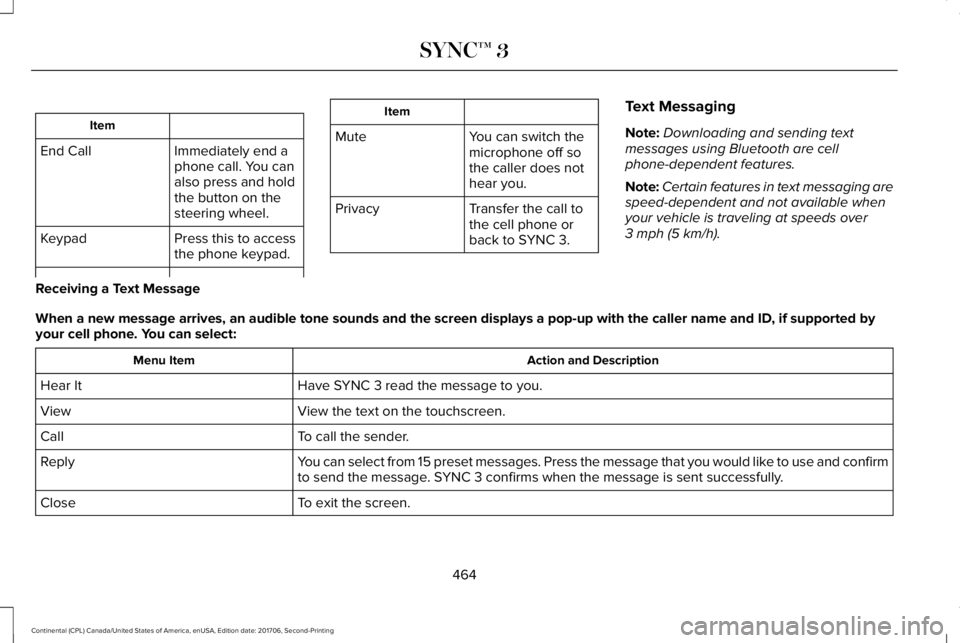
Item
Immediately end aphone call. You canalso press and holdthe button on thesteering wheel.
End Call
Press this to accessthe phone keypad.Keypad
Item
MuteYou can switch themicrophone off sothe caller does nothear you.
Transfer the call tothe cell phone orback to SYNC 3.
Privacy
Text Messaging
Note:Downloading and sending textmessages using Bluetooth are cellphone-dependent features.
Note:Certain features in text messaging arespeed-dependent and not available whenyour vehicle is traveling at speeds over3 mph (5 km/h).
Receiving a Text Message
When a new message arrives, an audible tone sounds and the screen displays a pop-up with the caller name and ID, if supported byyour cell phone. You can select:
Action and DescriptionMenu Item
Have SYNC 3 read the message to you.Hear It
View the text on the touchscreen.View
To call the sender.Call
You can select from 15 preset messages. Press the message that you would like to use and confirmto send the message. SYNC 3 confirms when the message is sent successfully.Reply
To exit the screen.Close
464
Continental (CPL) Canada/United States of America, enUSA, Edition date: 201706, Second-Printing
SYNC™ 3
Page 500 of 615
Note:The Vehicle Wi-Fi Hotspot (VehicleHotspot) may be operational while ignitionis On and may remain operational while theignition is Off.
Note:Vehicle Hotspot services are providedby the vehicle network carrier, subject toyour vehicle network carrier agreement,coverage and availability.
Note:It is the account owner’s responsibilityto remove the vehicle from the vehiclenetwork carrier account when ownership ofthe vehicle is transferred. If the owner wouldlike to remove the vehicle from the accountfor any reason, please contact your vehiclenetwork carrier for more information.
Note:Data, such as the Vehicle IdentificationNumber (VIN), SIM Card ID, and data planusage, is shared between us and the vehiclenetwork carrier to provide the VehicleHotspot service in accordance with yourvehicle network carrier agreement, coverageand availability, and may be used to enablea seamless transition from an old to newembedded modem and to confirm anyupdates are successfully delivered.
Note:For your convenience data usage maybe available for monitoring under Settingsbut may not reflect actual or current usage.The vehicle network carrier is responsiblefor providing information about your account.Please contact the vehicle network carrierfor more information.
Note:We may need to update operatingsystem software on your vehicle, includingsecurity updates and bug fixes, to keepconnected services current, like VehicleHotspot, without prior notice to you.
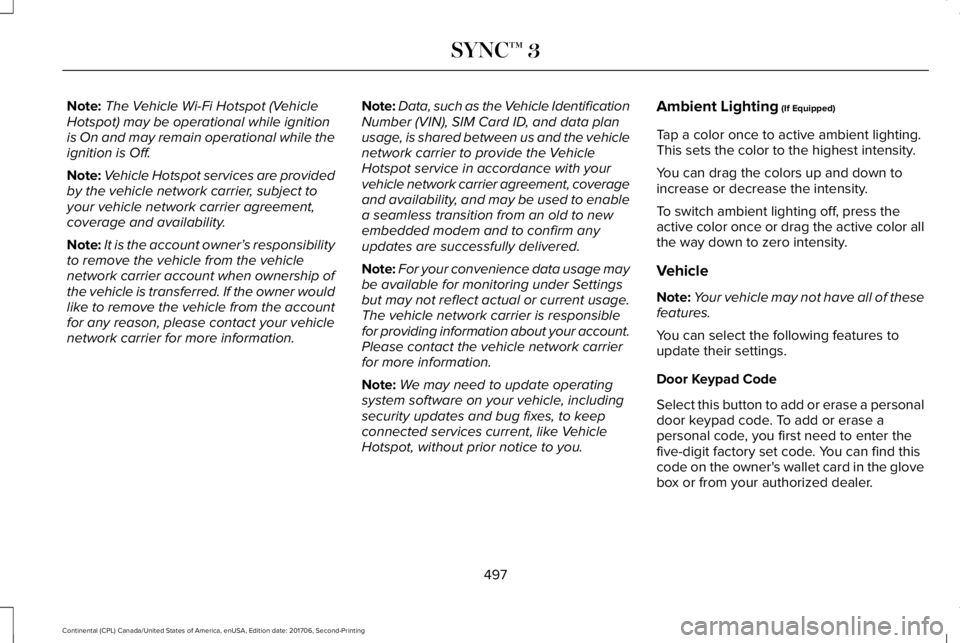
Ambient Lighting (If Equipped)
Tap a color once to active ambient lighting.This sets the color to the highest intensity.
You can drag the colors up and down toincrease or decrease the intensity.
To switch ambient lighting off, press theactive color once or drag the active color allthe way down to zero intensity.
Vehicle
Note:Your vehicle may not have all of thesefeatures.
You can select the following features toupdate their settings.
Door Keypad Code
Select this button to add or erase a personaldoor keypad code. To add or erase apersonal code, you first need to enter thefive-digit factory set code. You can find thiscode on the owner's wallet card in the glovebox or from your authorized dealer.
497
Continental (CPL) Canada/United States of America, enUSA, Edition date: 201706, Second-Printing
SYNC™ 3
Page 515 of 615
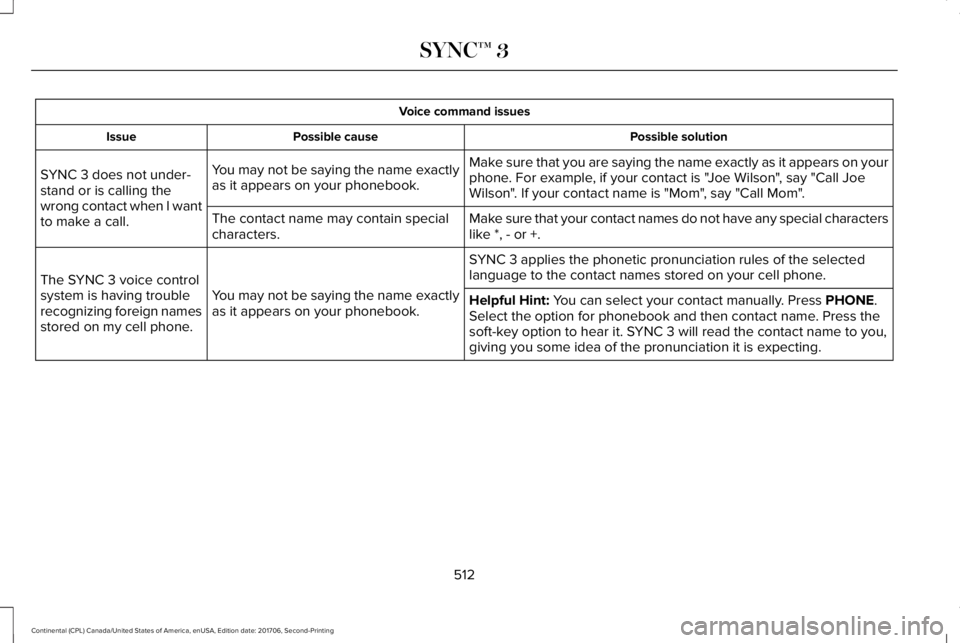
Voice command issues
Possible solutionPossible causeIssue
Make sure that you are saying the name exactly as it appears on yourphone. For example, if your contact is "Joe Wilson", say "Call JoeWilson". If your contact name is "Mom", say "Call Mom".
You may not be saying the name exactlyas it appears on your phonebook.SYNC 3 does not under-stand or is calling thewrong contact when I wantto make a call.Make sure that your contact names do not have any special characterslike *, - or +.The contact name may contain specialcharacters.
SYNC 3 applies the phonetic pronunciation rules of the selectedlanguage to the contact names stored on your cell phone.
You may not be saying the name exactlyas it appears on your phonebook.
The SYNC 3 voice controlsystem is having troublerecognizing foreign namesstored on my cell phone.
Helpful Hint: You can select your contact manually. Press PHONE.Select the option for phonebook and then contact name. Press thesoft-key option to hear it. SYNC 3 will read the contact name to you,giving you some idea of the pronunciation it is expecting.
512
Continental (CPL) Canada/United States of America, enUSA, Edition date: 201706, Second-Printing
SYNC™ 3
Page 517 of 615
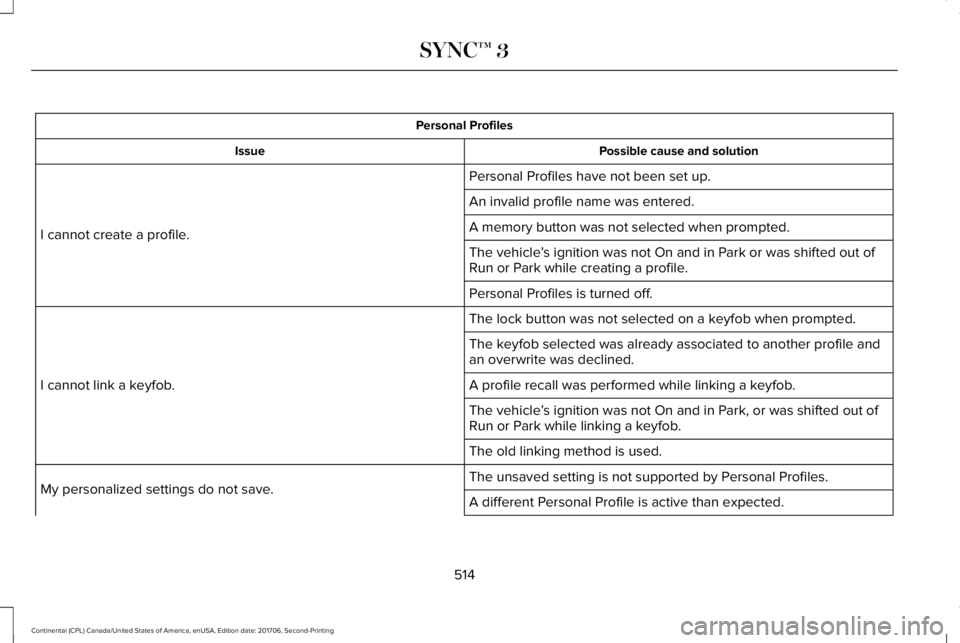
Personal Profiles
Possible cause and solutionIssue
Personal Profiles have not been set up.
I cannot create a profile.
An invalid profile name was entered.
A memory button was not selected when prompted.
The vehicle’s ignition was not On and in Park or was shifted out ofRun or Park while creating a profile.
Personal Profiles is turned off.
The lock button was not selected on a keyfob when prompted.
I cannot link a keyfob.
The keyfob selected was already associated to another profile andan overwrite was declined.
A profile recall was performed while linking a keyfob.
The vehicle’s ignition was not On and in Park, or was shifted out ofRun or Park while linking a keyfob.
The old linking method is used.
The unsaved setting is not supported by Personal Profiles.My personalized settings do not save.A different Personal Profile is active than expected.
514
Continental (CPL) Canada/United States of America, enUSA, Edition date: 201706, Second-Printing
SYNC™ 3
Page 518 of 615
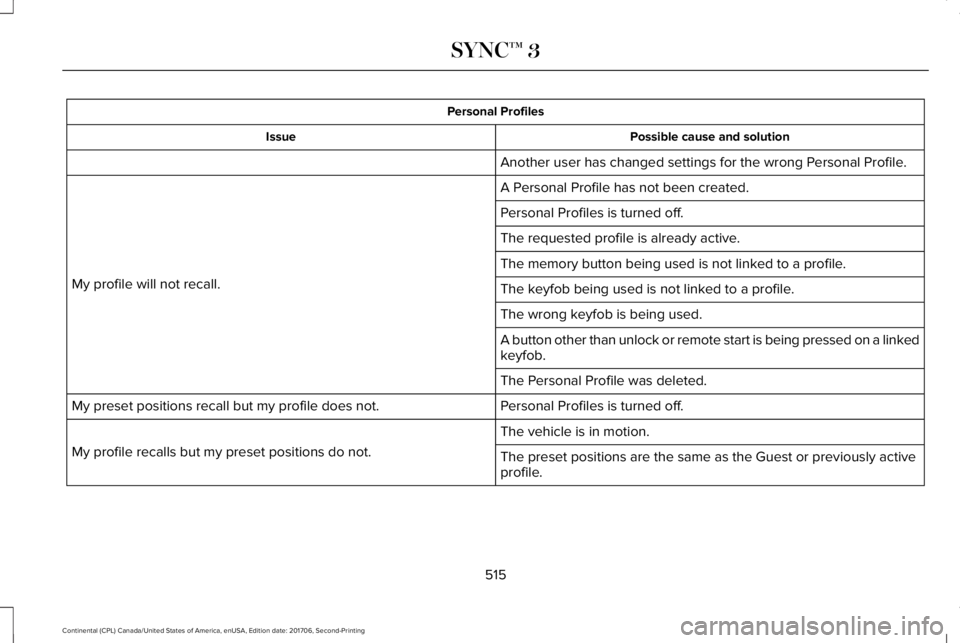
Personal Profiles
Possible cause and solutionIssue
Another user has changed settings for the wrong Personal Profile.
A Personal Profile has not been created.
My profile will not recall.
Personal Profiles is turned off.
The requested profile is already active.
The memory button being used is not linked to a profile.
The keyfob being used is not linked to a profile.
The wrong keyfob is being used.
A button other than unlock or remote start is being pressed on a linkedkeyfob.
The Personal Profile was deleted.
Personal Profiles is turned off.My preset positions recall but my profile does not.
The vehicle is in motion.
My profile recalls but my preset positions do not.The preset positions are the same as the Guest or previously activeprofile.
515
Continental (CPL) Canada/United States of America, enUSA, Edition date: 201706, Second-Printing
SYNC™ 3
Page 519 of 615
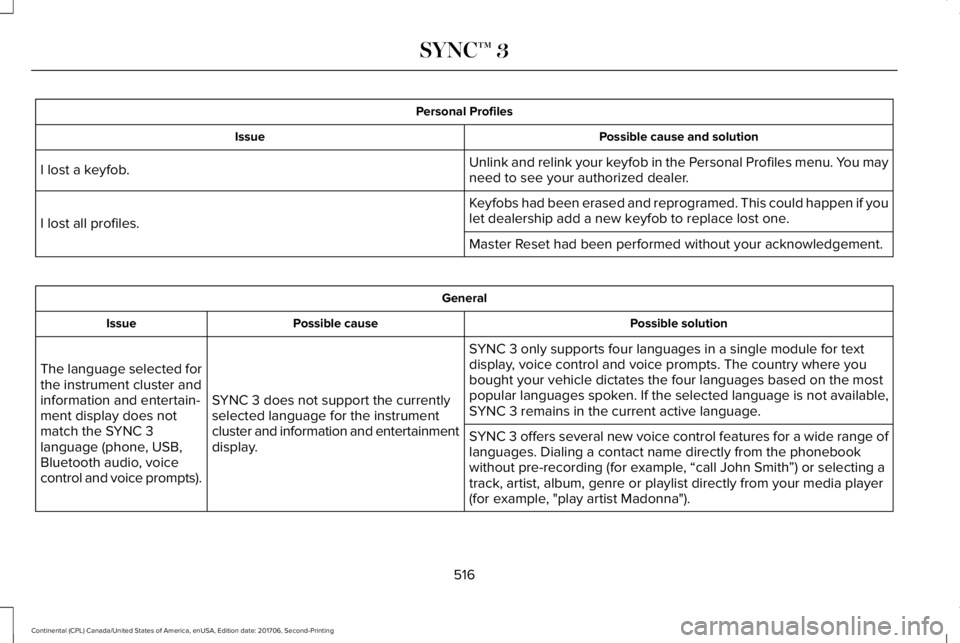
Personal Profiles
Possible cause and solutionIssue
Unlink and relink your keyfob in the Personal Profiles menu. You mayneed to see your authorized dealer.I lost a keyfob.
Keyfobs had been erased and reprogramed. This could happen if youlet dealership add a new keyfob to replace lost one.I lost all profiles.
Master Reset had been performed without your acknowledgement.
General
Possible solutionPossible causeIssue
SYNC 3 only supports four languages in a single module for textdisplay, voice control and voice prompts. The country where youbought your vehicle dictates the four languages based on the mostpopular languages spoken. If the selected language is not available,SYNC 3 remains in the current active language.SYNC 3 does not support the currentlyselected language for the instrumentcluster and information and entertainmentdisplay.
The language selected forthe instrument cluster andinformation and entertain-ment display does notmatch the SYNC 3language (phone, USB,Bluetooth audio, voicecontrol and voice prompts).
SYNC 3 offers several new voice control features for a wide range oflanguages. Dialing a contact name directly from the phonebookwithout pre-recording (for example, “call John Smith”) or selecting atrack, artist, album, genre or playlist directly from your media player(for example, "play artist Madonna").
516
Continental (CPL) Canada/United States of America, enUSA, Edition date: 201706, Second-Printing
SYNC™ 3
Page 604 of 615

3
360 Degree Camera...................................234Front Camera......................................................235Side Camera........................................................236Using the System...............................................235
A
A/CSee: Climate Control..........................................146
About This Manual............................................7ABSSee: Brakes..........................................................209
ABS driving hintsSee: Hints on Driving With Anti-LockBrakes................................................................210
Accessories....................................................518Exterior Style........................................................518Interior Style..........................................................518Lifestyle..................................................................518Peace of Mind......................................................518
AccessoriesSee: Replacement Parts Recommendation.....13
ACCSee: Using Adaptive Cruise Control.............238
Active Park Assist.........................................223Using Active Park Assist...................................224
Adaptive Headlamps.....................................96System Check........................................................97
Adjusting the Headlamps...........................328Horizontal Aim Adjustment..............................329Vertical Aim Adjustment...................................328
Adjusting the Steering Wheel.....................85End of Travel Position..........................................85Memory Feature....................................................85
AFSSee: Adaptive Headlamps..................................96
Airbag Disposal...............................................56Air ConditioningSee: Climate Control..........................................146
Air FilterSee: Changing the Engine Air Filter - 2.7LEcoBoost™/3.0L EcoBoost™.........................332See: Changing the Engine Air Filter - 3.7L....332
AlarmSee: Anti-Theft Alarm...........................................84
All-Wheel Drive.............................................200Ambient Lighting...........................................100Adjusting the Brightness...................................100Changing the Color............................................100Switching Ambient Lighting Off......................100Switching Ambient Lighting On.......................100
Anti-Theft Alarm..............................................84Arming the Alarm..................................................84Disarming the Alarm............................................84
Appendices...................................................555Apps.................................................................477.................................................................................477SiriusXM Traffic and Travel Link......................478
At a Glance........................................................17Audible Warnings and Indicators...............114Headlamps On Warning Chime........................114Key in Ignition Warning Chime..........................114Keyless Warning Alert.........................................114Parking Brake On Warning Chime...................114
Audio Control..................................................86Seek, Next or Previous........................................86
Audio System................................................403General Information...........................................403
Audio Unit......................................................405Rear Passenger Audio......................................408
Auto Hold........................................................213Using Auto Hold..................................................215
Autolamps.........................................................93Windshield Wiper Activated Headlamps........94
Automatic Climate Control..........................146A/C...........................................................................147Air Distribution Control.......................................147AUTO......................................................................148Automatic Fan Settings......................................148Driver Temperature Control..............................147DUAL.......................................................................149Fan Speed Control..............................................148
601
Continental (CPL) Canada/United States of America, enUSA, Edition date: 201706, Second-Printing
Index
Page 606 of 615

Changing a Fuse..........................................309Fuses.....................................................................309
Changing a Road Wheel.............................364Dissimilar Spare Wheel and Tire AssemblyInformation......................................................365Stowing the flat tire ...........................................369Tire Change Procedure....................................366
Changing the 12V Battery..........................325Changing the Engine Air Filter - 2.7LEcoBoost™/3.0L EcoBoost™.....................332Changing the Engine Air Filter - 3.7L......332Changing the Wiper Blades.......................327Changing the Windshield Wiper Blades......328
Checking MyKey System Status.................64MyKey Distance.....................................................64Number of Admin Keys.......................................65Number of MyKeys...............................................64
Checking the Wiper Blades.......................327Child Restraint and SeatbeltMaintenance..................................................44Child Restraint Positioning...........................33Child Safety.......................................................19General Information..............................................19
Child Safety Locks..........................................34Child Seats........................................................21Cleaning Leather Seats...............................341Cleaning Products........................................334Materials................................................................334
Cleaning the Engine....................................337Cleaning the Exterior...................................335Cleaning the Headlamps..................................335Exterior Chrome Parts.......................................336Exterior Plastic Parts..........................................336Stripes or Graphics............................................336Underbody...........................................................336Under Hood.........................................................336
Cleaning the Instrument Panel andInstrument Cluster Lens...........................340Cleaning the Interior....................................338Cleaning Black Label or PresidentialInterior...............................................................338
Cleaning the Wheels....................................341Cleaning the Windows and WiperBlades...........................................................337Clearing All MyKeys.......................................64Climate............................................................454Climate Control..............................................146Climate Controlled Seats............................168Ventilated Seats...................................................168
Coolant CheckSee: Engine Coolant Check..............................319
Crash Sensors and Airbag Indicator..........55Creating a MyKey...........................................63Programming/Changing ConfigurableSettings...............................................................64
Cross Traffic Alert.........................................255Blocked Sensors................................................258Switching the System Off and On..................258System Errors......................................................258System Lights, Messages and AudibleAlerts.................................................................258System Limitations.............................................258Using the Cross Traffic Alert System............255
Cruise Control.................................................86Principle of Operation.......................................237Type One................................................................86Type Two.................................................................87
Cruise controlSee: Using Cruise Control................................237
Customer Assistance..................................286
D
Data Recording................................................10Event Data Recording...........................................10Service Data Recording.......................................10
Daytime Running Lamps...............................94Type One - Conventional(Non-Configurable)..........................................95Type Two - Configurable....................................95
Direction Indicators........................................97Indicating a Lane Change...................................97
Doors and Locks.............................................67
603
Continental (CPL) Canada/United States of America, enUSA, Edition date: 201706, Second-Printing
Index