2018 LINCOLN CONTINENTAL tow
[x] Cancel search: towPage 235 of 615
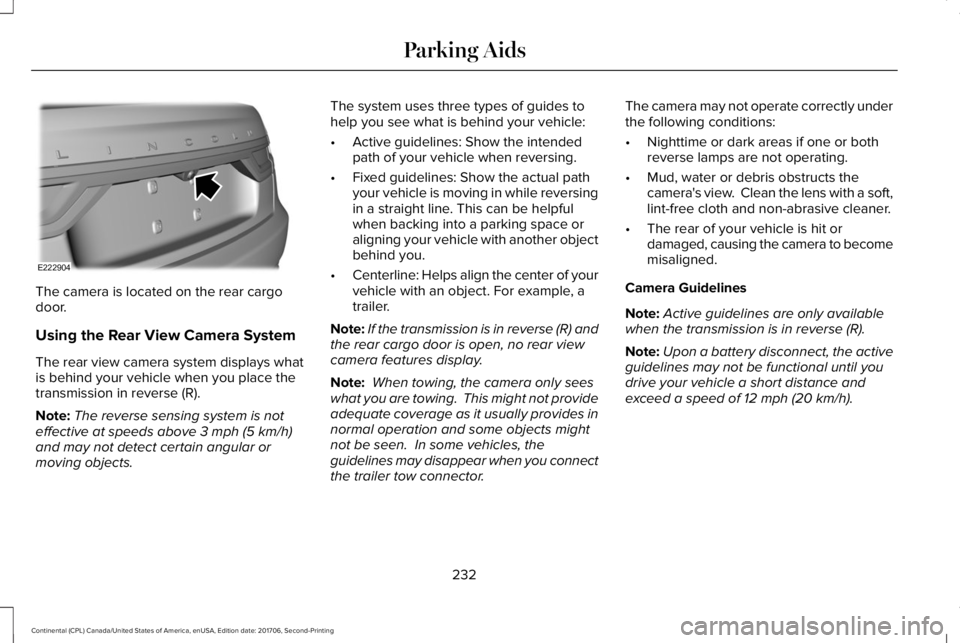
The camera is located on the rear cargodoor.
Using the Rear View Camera System
The rear view camera system displays whatis behind your vehicle when you place thetransmission in reverse (R).
Note:The reverse sensing system is noteffective at speeds above 3 mph (5 km/h)and may not detect certain angular ormoving objects.
The system uses three types of guides tohelp you see what is behind your vehicle:
•Active guidelines: Show the intendedpath of your vehicle when reversing.
•Fixed guidelines: Show the actual pathyour vehicle is moving in while reversingin a straight line. This can be helpfulwhen backing into a parking space oraligning your vehicle with another objectbehind you.
•Centerline: Helps align the center of yourvehicle with an object. For example, atrailer.
Note:If the transmission is in reverse (R) andthe rear cargo door is open, no rear viewcamera features display.
Note: When towing, the camera only seeswhat you are towing. This might not provideadequate coverage as it usually provides innormal operation and some objects mightnot be seen. In some vehicles, theguidelines may disappear when you connectthe trailer tow connector.
The camera may not operate correctly underthe following conditions:
•Nighttime or dark areas if one or bothreverse lamps are not operating.
•Mud, water or debris obstructs thecamera's view. Clean the lens with a soft,lint-free cloth and non-abrasive cleaner.
•The rear of your vehicle is hit ordamaged, causing the camera to becomemisaligned.
Camera Guidelines
Note:Active guidelines are only availablewhen the transmission is in reverse (R).
Note:Upon a battery disconnect, the activeguidelines may not be functional until youdrive your vehicle a short distance andexceed a speed of 12 mph (20 km/h).
232
Continental (CPL) Canada/United States of America, enUSA, Edition date: 201706, Second-Printing
Parking AidsE222904
Page 236 of 615

Active guidelinesA
CenterlineB
Fixed guideline: Green zoneC
Fixed guideline: Yellow zoneD
Fixed guideline: Red zoneE
Rear bumperF
Active guidelines are only shown with fixedguidelines. To use active guidelines, turnthe steering wheel to point the guidelinestoward an intended path. If you change thesteering wheel position while reversing, yourvehicle might deviate from the originalintended path.
The fixed and active guidelines fade in andout depending on the steering wheelposition. The active guidelines do notdisplay when the steering wheel position isstraight.
Always use caution while reversing. Objectsin the red zone are closest to your vehicleand objects in the green zone are fartheraway. Objects are getting closer to yourvehicle as they move from the green zoneto the yellow or red zones. Use the side viewmirrors and rear view mirror to get bettercoverage on both sides and rear of thevehicle.
Camera System Settings
You can access the rear view camera systemsettings through the display screen. SeeSettings (page 480).
Enhanced Park Aids or Park Pilot
Selectable settings for this feature are onand off.
233
Continental (CPL) Canada/United States of America, enUSA, Edition date: 201706, Second-Printing
Parking AidsABCD
F
E
E142436 E190459
Page 241 of 615
Resuming the Set Speed
Press RES.
Switching Cruise Control Off
Note:You erase the set speed when youswitch the system off.
Press OFF when the system is in standbymode, or switch the ignition off.
USING ADAPTIVE CRUISE
CONTROL (If Equipped)
WARNING: Always pay close attentionto changing road conditions when usingadaptive cruise control. The system does notreplace attentive driving. Failing to payattention to the road may result in a crash,serious injury or death.
WARNING: Do not use the adaptivecruise control when entering or leaving ahighway, on roads with intersections orroundabouts or non-vehicular traffic or roadsthat are winding, slippery, unpaved, or steepslopes.
WARNING: Do not use the system inpoor visibility, for example fog, heavy rain,spray or snow.
WARNING: Do not use the systemwhen towing a trailer with aftermarket trailerbrake controls. Aftermarket trailer brakes willnot function properly when you switch thesystem on because the brakes areelectronically controlled. Failing to do so mayresult in loss of vehicle control, which couldresult in serious injury.
WARNING: Do not use tire sizes otherthan those recommended because this canaffect the normal operation of the system.Failure to do so may result in a loss of vehiclecontrol, which could result in serious injury.
WARNING: Adaptive cruise controlmay not detect stationary or slow movingvehicles below 6 mph (10 km/h).
WARNING: Adaptive cruise controldoes not detect pedestrians or objects in theroad.
WARNING: Adaptive cruise controldoes not detect oncoming vehicles in thesame lane.
WARNING: Adaptive cruise control isnot a crash warning or avoidance system.
Note:It is your responsibility to stay alert,drive safely and be in control of the vehicleat all times.
The system adjusts your vehicle speed tomaintain the set gap between you and thevehicle in front of you in the same lane. Youcan select four gap settings.
The system uses a radar sensor that projectsa beam directly in front of your vehicle.
238
Continental (CPL) Canada/United States of America, enUSA, Edition date: 201706, Second-Printing
Cruise Control
Page 249 of 615

DRIVER ALERT (If Equipped)
WARNING: The system is designed toaid the driver. It is not intended to replaceyour attention and judgment. You are stillresponsible to drive with due care andattention.
WARNING: At all times, you areresponsible for controlling your vehicle,supervising the system and intervening, ifrequired. Failure to take care may result inthe loss of control of your vehicle, seriouspersonal injury or death.
WARNING: The system may notfunction if the sensor is blocked.
WARNING: Take regular rest breaks ifyou feel tired. Do not wait for the system towarn you.
WARNING: Certain driving styles mayresult in the system warning you even if youare not feeling tired.
WARNING: In cold and severe weatherconditions the system may not function. Rain,snow and spray can all limit sensorperformance.
WARNING: The system will not operateif the sensor cannot track the road lanemarkings.
WARNING: If damage occurs in theimmediate area surrounding the sensor, haveyour vehicle checked as soon as possible.
WARNING: The system may notcorrectly operate if your vehicle is fitted witha suspension kit not approved by us.
Note:Keep the windshield free fromobstructions. For example, bird droppings,insects and snow or ice.
Note:If the camera is blocked or if thewindshield is damaged, the system may notfunction.
The system automatically monitors yourdriving behavior using various inputsincluding the front camera sensor.
If the system detects that your drivingalertness is reduced below a certainthreshold, the system will alert you using atone and a message in the informationdisplay.
246
Continental (CPL) Canada/United States of America, enUSA, Edition date: 201706, Second-Printing
Driving AidsE249505
Page 252 of 615
System Settings
The system has optional setting menusavailable. To view or adjust the settings, SeeSettings (page 480). The system stores thelast-known selection for each of thesesettings. You do not need to readjust yoursettings each time you switch the system on.
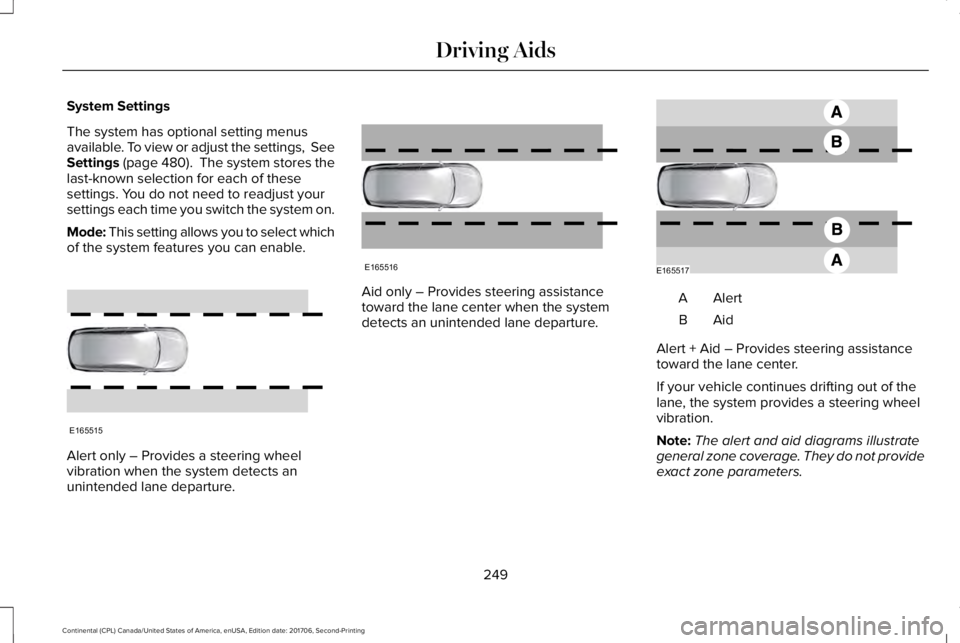
Mode: This setting allows you to select whichof the system features you can enable.
Alert only – Provides a steering wheelvibration when the system detects anunintended lane departure.
Aid only – Provides steering assistancetoward the lane center when the systemdetects an unintended lane departure.
AlertA
AidB
Alert + Aid – Provides steering assistancetoward the lane center.
If your vehicle continues drifting out of thelane, the system provides a steering wheelvibration.
Note:The alert and aid diagrams illustrategeneral zone coverage. They do not provideexact zone parameters.
249
Continental (CPL) Canada/United States of America, enUSA, Edition date: 201706, Second-Printing
Driving AidsE165515 E165516 E165517
Page 255 of 615
Why is the feature not available (line markings are gray) when I can see the lane markings on the road?
Transitioning between no lane markings to lane markings or vice versa.
There is standing water on the road.
Faint lane markings, for example partial yellow lane markings on concrete roads.
Lane width is too narrow or too wide.
The camera has not been calibrated after a windshield replacement.
Driving on tight roads or on uneven roads.
Why does the vehicle not come back toward the middle of the lane, as expected, in the Aid or Aid + Alert mode?
High cross winds are present.
There is a large road crown.
Rough roads, grooves or shoulder drop-offs.
Heavy uneven loading of the vehicle or improper tire inflation pressure.
The tires have been changed, or the suspension has been modified.
252
Continental (CPL) Canada/United States of America, enUSA, Edition date: 201706, Second-Printing
Driving Aids
Page 257 of 615

System Lights and Messages
When the system detects a vehicle, an alertindicator illuminates in the exterior mirror onthe side the approaching vehicle is comingfrom. If you turn the direction indicator on forthat side of your vehicle, the alert indicatorflashes.
Note:The system may not alert you if avehicle quickly passes through the detectionzone.
Blocked Sensors
The sensors are behind the rear bumper onboth sides of your vehicle.
Note:Keep the sensors free from snow, iceand large accumulations of dirt.
Note:Do not cover the sensors with bumperstickers, repair compound or other objects.
Note:Blocked sensors could affect systemperformance.
If the sensors are blocked, a message mayappear in the information display. SeeInformation Messages (page 123). The alertindicators remain illuminated but the systemdoes not alert you.
System Errors
If the system detects a fault, a warning lampilluminates and a message displays. SeeInformation Messages (page 123).
Switching the System Off and On
You can switch the system off using theinformation display. See GeneralInformation (page 115). When you switch thesystem off, a warning lamp illuminates anda message displays. When you switch thesystem on or off, the alert indicators flashtwice.
Note:The system remembers the last settingwhen you start your vehicle.
Note:The system may not correctly operatewhen towing a trailer. For vehicles with atrailer tow module and tow bar approved byus, the system turns off when you attach atrailer. For vehicles with an aftermarkettrailer tow module or tow bar, werecommend that you switch the system offwhen you attach a trailer.
To permanently switch the system off,contact an authorized dealer.
254
Continental (CPL) Canada/United States of America, enUSA, Edition date: 201706, Second-Printing
Driving AidsE142442 E205199
Page 262 of 615
Note:The system turns on each time youswitch the ignition on and you shift intoreverse (R). If you temporarily switch thesystem off, it turns on the next time youswitch the ignition on.
Note:The system may not correctly operatewhen towing a trailer. For vehicles with atrailer tow module and tow bar approved byus, the system turns off when you attach atrailer. For vehicles with an aftermarkettrailer tow module or tow bar, werecommend that you switch the system offwhen you attach a trailer.
To permanently switch the system off,contact an authorized dealer.
STEERING
Electric Power Steering
WARNING: If the system detects anerror, you may not feel a difference in thesteering, however a serious condition mayexist. Have your vehicle checked as soon aspossible, failure to do so may result in lossof steering control.
WARNING: The electric power steeringsystem has diagnostic checks thatcontinuously monitor the system. If a fault isdetected, a message displays in theinformation display. Stop your vehicle assoon as it is safe to do so. Switch the ignitionoff. After at least 10 seconds, switch theignition on and watch the information displayfor a steering system warning message. If asteering system warning message returns,have the system checked as soon aspossible.
Your vehicle has an electric power steeringsystem. There is no fluid reservoir. Nomaintenance is required.
If your vehicle loses electrical power whileyou are driving, electric power steeringassistance is lost. The steering system stilloperates and you can steer your vehiclemanually. Manually steering your vehiclerequires more effort.
Extreme continuous steering may increasethe effort required for you to steer yourvehicle. This increased effort preventsoverheating and permanent damage to thesteering system. You do not lose the abilityto steer your vehicle manually. Typicalsteering and driving maneuvers allow thesystem to cool and return to normaloperation.
Steering Tips
Steering wander or pull could be caused byany of the following:
•Incorrect tire pressures.
•Uneven tire wear.
•Crowned road surface.
•High crosswind.
If the problem persists, have your vehiclechecked as soon as possible.
259
Continental (CPL) Canada/United States of America, enUSA, Edition date: 201706, Second-Printing
Driving Aids