2018 LINCOLN CONTINENTAL engine
[x] Cancel search: enginePage 66 of 615
Note:Not every feature applies to everyvehicle in every market. When they areavailable for your vehicle, then they appearin your information display, providing choicesto switch them on or off, or to select a morespecific setting.
•Various vehicle speed limits so theMyKey driver cannot exceed certainspeeds. The information display showswarnings followed by an audible tonewhen the MyKey driver reaches the setspeed. You cannot override the setspeed by fully depressing the acceleratorpedal.
WARNING: Do not set MyKeymaximum speed limit to a limit that willprevent the driver from maintaining a safespeed considering posted speed limits andprevailing road conditions. The driver isalways responsible to drive in accordancewith local laws and prevailing conditions.Failure to do so could result in accident orinjury.
•Various vehicle speed reminders soMyKey drivers know when their vehiclespeed approaches the limits. Warningsappear in your information display and atone sounds when the MyKey driversexceed the set vehicle speed.
•The audio system's maximum volumelimits to 45% so MyKey drivers canconcentrate on the road. A messageappears in the information display whenMyKey drivers attempt to exceed thelimited volume. MyKey also disables theautomatic volume control. Note: If yourvehicle includes an AM/FM radio or avery basic audio system, then the radiomay not limit.
•Always on setting. This setting forcescertain features to remain on and activefor MyKey drivers. For example, E911 oremergency assistance and the do notdisturb features stay on even if a MyKeydriver uses the feature's control to switchit off. When you select, you will not beable to turn off Advance Trac or tractioncontrol (if your vehicle has this feature).
CREATING A MYKEY
Use the information display to create aMyKey:
1. Insert the key you want to program intothe ignition. See Starting a GasolineEngine (page 179). If your vehicle isequipped with a push-button start, placethe remote control into the backup slot.See Passive Anti-Theft System (page82).
2. Switch the ignition on.
3.Access the main menu in the informationdisplay and then scroll through themenus to change the settings of yourMyKey. From the MyKey menu select theoption Create MyKey. See InformationDisplays (page 115).
4.When prompted, hold the OK button untilyou see a message informing you to labelthis key as a MyKey. The programmedrestrictions apply when you key off, openand close the driver door and restart yourvehicle with the programmed key ortransmitter.
63
Continental (CPL) Canada/United States of America, enUSA, Edition date: 201706, Second-Printing
MyKey™
Page 85 of 615
PASSIVE ANTI-THEFT SYSTEM
Note: The system is not compatible withnon-Lincoln aftermarket remote startsystems. Use of these systems may result inengine starting problems and a loss ofsecurity protection.
Note: Metallic objects, electronic devicesor a second coded key on the same keychain may result in vehicle starting problems,especially if they are too close to the keywhen starting your vehicle. Prevent theseobjects from touching the coded key whenstarting your vehicle. Switch the ignition off,move all objects on the key chain away fromthe coded key and restart your vehicle if aproblem occurs.
Note: Do not leave a duplicate coded keyin your vehicle. Always take your keys andlock all doors when leaving your vehicle.
SecuriLock®
The system helps prevent the engine fromstarting unless you use a coded keyprogrammed to your vehicle. Using thewrong key may prevent your vehicle fromstarting. A message may appear in theinformation display.
If you are unable to start your vehicle with acoded key, it is not operating correctly. Amessage may appear in the informationdisplay.
Automatic Arming
The system arms when you switch theignition off.
Automatic Disarming
The system disarms when you switch theignition on with a coded key.
Replacement Keys
Note: Your vehicle comes with two keys.
The intelligent access key functions as aprogrammed key that operates the driverdoor lock and turns on the intelligent accesswith push button start system, as well as aremote control.
If your programmed transmitters are lost orstolen and you do not have an extra codedkey, you will need to have your vehicletowed to an authorized dealer. You need toerase the key codes from your vehicle andprogram new coded keys.
Store a spare intelligent access key awayfrom your vehicle in a safe place. You canpurchase replacement keys or remotecontrols from an authorized dealer.
Programming a Spare Intelligent AccessKey
Note:You can program a maximum of fourkeys to your vehicle.
You must have two previously programmedintelligent access keys inside your vehicleand the new unprogrammed intelligentaccess key readily accessible. You canpurchase replacement keys or remotecontrols from an authorized dealer.
82
Continental (CPL) Canada/United States of America, enUSA, Edition date: 201706, Second-Printing
Security
Page 91 of 615

Type ThreeType Four
See Information Displays (page 115).
HEATED STEERING WHEEL (If Equipped)
Switch the heated steering wheel on and offusing the touchscreen.
Touch the button to switch theheated steering wheel on and off.
Note:You can use the heated steeringwheel only when the engine is running.
Note:The system uses a sensor and isdesigned to control the temperature of thesteering wheel and to prevent it fromoverheating.
Note:In warm temperatures, the steeringwheel quickly reaches its maximumtemperature and the system reduces thecurrent to the heating element. This couldcause you to think that the system hasstopped working but it has not. This isnormal.
88
Continental (CPL) Canada/United States of America, enUSA, Edition date: 201706, Second-Printing
Steering WheelE223601 E251878
Page 104 of 615
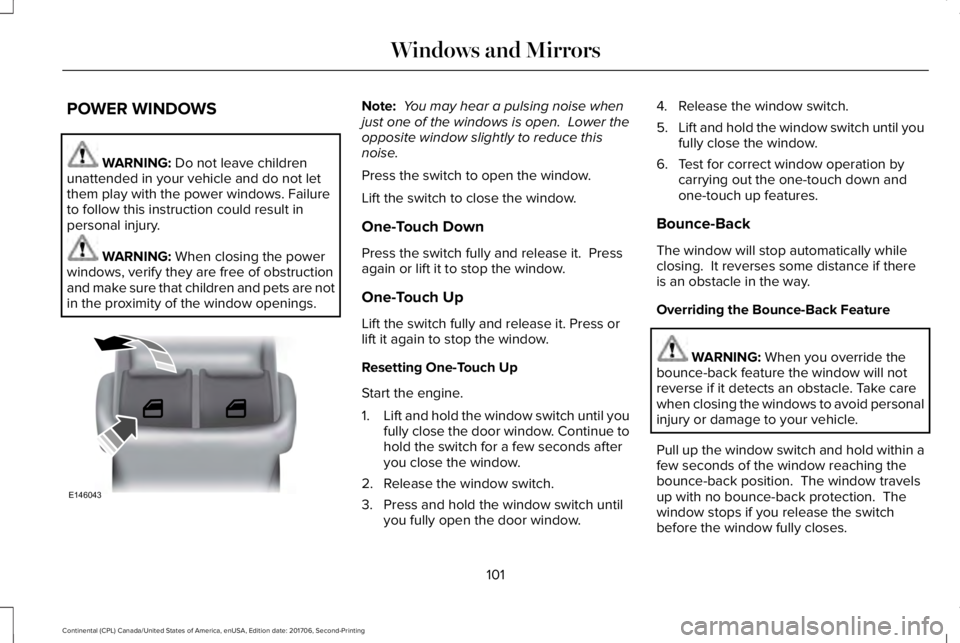
POWER WINDOWS
WARNING: Do not leave childrenunattended in your vehicle and do not letthem play with the power windows. Failureto follow this instruction could result inpersonal injury.
WARNING: When closing the powerwindows, verify they are free of obstructionand make sure that children and pets are notin the proximity of the window openings.
Note: You may hear a pulsing noise whenjust one of the windows is open. Lower theopposite window slightly to reduce thisnoise.
Press the switch to open the window.
Lift the switch to close the window.
One-Touch Down
Press the switch fully and release it. Pressagain or lift it to stop the window.
One-Touch Up
Lift the switch fully and release it. Press orlift it again to stop the window.
Resetting One-Touch Up
Start the engine.
1.Lift and hold the window switch until youfully close the door window. Continue tohold the switch for a few seconds afteryou close the window.
2. Release the window switch.
3. Press and hold the window switch untilyou fully open the door window.
4. Release the window switch.
5.Lift and hold the window switch until youfully close the window.
6. Test for correct window operation bycarrying out the one-touch down andone-touch up features.
Bounce-Back
The window will stop automatically whileclosing. It reverses some distance if thereis an obstacle in the way.
Overriding the Bounce-Back Feature
WARNING: When you override thebounce-back feature the window will notreverse if it detects an obstacle. Take carewhen closing the windows to avoid personalinjury or damage to your vehicle.
Pull up the window switch and hold within afew seconds of the window reaching thebounce-back position. The window travelsup with no bounce-back protection. Thewindow stops if you release the switchbefore the window fully closes.
101
Continental (CPL) Canada/United States of America, enUSA, Edition date: 201706, Second-Printing
Windows and MirrorsE146043
Page 114 of 615

Adaptive Steering Off (yellow, solid): Theadaptive steering system is off. It is possiblethat the steering wheel may not be straightwhen you drive straight ahead. If thismessage persists, see an authorized dealer.
Adaptive Steering Loss (red, solid): Theadaptive steering system integrity cannot beverified. Do not drive the vehicle and contactan authorized dealer immediately. SeeSteering (page 259).
Anti-Lock Braking System
If it illuminates when you aredriving, this indicates amalfunction. You continue to havethe normal braking system (without ABS)unless the brake system warning lamp is alsoilluminated. Have the system checked byyour authorized dealer.
Autohold Active
Illuminates when the system holdsyour vehicle stationary.
Autohold Unavailable
Illuminates when the system is on,but unavailable to hold yourvehicle stationary.
Battery
It illuminates when you switch theignition on.
If it illuminates when the engine isrunning this indicates a malfunction. Haveyour vehicle checked as soon as possible.
Blind Spot Monitor (If Equipped)
It illuminates when you switch thisfeature off or in conjunction with amessage. See Blind SpotInformation System (page 253).
Brake System
It illuminates when you engage theparking brake with the ignition on.
If it illuminates when you are driving, checkthat the parking brake is not engaged. If theparking brake is not engaged, this indicateslow brake fluid level or a brake systemmalfunction. Have the system checkedimmediately by your authorized dealer.
WARNING: Driving your vehicle withthe warning lamp on is dangerous. Asignificant decrease in braking performancemay occur. It may take you longer to stopyour vehicle. Have your vehicle checked assoon as possible. Driving extended distanceswith the parking brake engaged can causebrake failure and the risk of personal injury.
Cruise Control (If Equipped)
Illuminates when you switch thisfeature on.
111
Continental (CPL) Canada/United States of America, enUSA, Edition date: 201706, Second-Printing
Instrument Cluster E197933 E197934 E151262 E144522 E71340
Page 115 of 615

Direction Indicator
Illuminates when the left or rightturn signal or the hazard warningflasher is turned on. If theindicators stay on or flash faster, check for aburned out bulb. See Changing a Bulb(page 329).
Door Ajar
Displays when the ignition is onand any door is not completelyclosed.
Also displays when there is a lack of batterypower to the electronic door system. If thisdisplays with all doors closed, have yourvehicle serviced by an authorized dealerimmediately.
Electric Park Brake
Illuminates or flashes when theelectric parking brake has amalfunction. See Electric ParkingBrake (page 210).
Engine Coolant Temperature
Illuminates when the enginecoolant temperature is high. Stopthe vehicle as soon as possible,switch off the engine and let cool. SeeEngine Coolant Check (page 319).
Engine Oil
If it illuminates with the enginerunning or when you are driving,this indicates a malfunction. Stopyour vehicle as soon as it is safe to do soand switch the engine off. Check the engineoil level.
See Engine Oil Check (page 317).
Note:Do not resume your journey if itilluminates despite the level being correct.Have the system checked by your authorizeddealer immediately.
Fasten Seatbelt
Illuminates and a chime sounds toremind you to fasten your seatbelt.See Seatbelt Reminder (page 42).
Front Airbag
If it fails to illuminate when youstart your vehicle, continues toflash or remains on, it indicates amalfunction. Have the system checked byyour authorized dealer.
Head Up Display (If Equipped)
A red beam of lights illuminates onthe windshield in certain instanceswhen using adaptive cruise controlor the collision warning system. It alsoilluminates momentarily when you start yourvehicle to make sure the display works.
High Beam
Illuminates when you switch thehigh beam headlamps on. It flasheswhen you use the headlampflasher.
112
Continental (CPL) Canada/United States of America, enUSA, Edition date: 201706, Second-Printing
Instrument Cluster E146190 E71880 E67017 E156133
Page 116 of 615

Hood Ajar
Displays when the ignition is onand the hood is not completelyclosed.
Low Fuel Level
Illuminates when the fuel level islow or the fuel tank is nearlyempty. Refuel as soon as possible.
Low Tire Pressure Warning
It illuminates if the tire pressure inone or more tires is below thecorrect tire pressure.
See Tire Pressure Monitoring System (page359).
Low Beam Malfunction Warning Lamp
(If Equipped)
It illuminates when there is amalfunction with the low beamheadlamp bulb.
Low Washer Fluid
Illuminates when the windshieldwasher fluid is low.
Parking Lamps
Illuminates when you switch theparking lamps on.
Powertrain Fault
Illuminates when a powertrain oran AWD fault has been detected. Contact an authorized dealer.
Service Engine Soon
If it illuminates when the engine isrunning this indicates amalfunction. The On BoardDiagnostics system has detected amalfunction of the vehicle emission controlsystem.
If it flashes, engine misfire may be occurring. Increased exhaust gas temperatures coulddamage the catalytic converter or othervehicle components. Drive in a moderatefashion (avoid heavy acceleration anddeceleration) and have your vehicleimmediately serviced.
It illuminates when you switch the ignitionon prior to engine start to check the bulb andto indicate whether your vehicle is ready forInspection and Maintenance (I/M) testing.
Normally, it illuminates until the engine iscranked and automatically turns off if nomalfunctions are present. However, if after15 seconds it flashes eight times, thisindicates that your vehicle is not ready forInspection and Maintenance (I/M) testing.See Emission Law (page 190).
113
Continental (CPL) Canada/United States of America, enUSA, Edition date: 201706, Second-Printing
Instrument ClusterE159324 E181350 E132353
Page 121 of 615
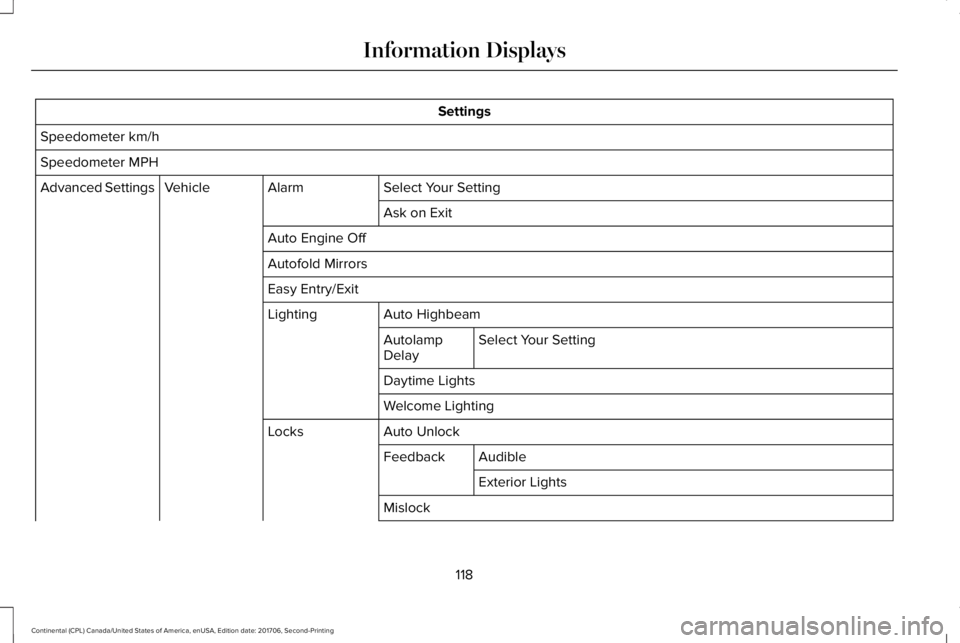
Settings
Speedometer km/h
Speedometer MPH
Select Your SettingAlarmVehicleAdvanced Settings
Ask on Exit
Auto Engine Off
Autofold Mirrors
Easy Entry/Exit
Auto HighbeamLighting
Select Your SettingAutolampDelay
Daytime Lights
Welcome Lighting
Auto UnlockLocks
AudibleFeedback
Exterior Lights
Mislock
118
Continental (CPL) Canada/United States of America, enUSA, Edition date: 201706, Second-Printing
Information Displays