2018 LEXUS RX450h lights
[x] Cancel search: lightsPage 375 of 792

3754-5. Using the driving support systems
4
Driving
RX450h_RX450hL _U_OM48F85U■
If you notice any symptoms
If you notice any of the following symp toms, refer to the likely cause and the
solution, and re-check.
If the symptom is not resolved by the solution, have the vehicle inspected by
your Lexus dealer.Things you should know Likely cause Solution
The image is difficult to see
• The vehicle is in a dark area
• The temperature around the lens is
either high or low
• The outside temperature is low
• There are water droplets on the cam-
era
• It is raining or humid
• Foreign matter (mud, etc.) is adhering
to the camera
• There are scratches on the camera
• Sunlight or headlights are shining
directly into the camera
•The vehicle is unde r fluorescent lights,
sodium lights, mercury lights etc. If this happens due to these causes, it
does not indicate a malfunction.
Back up while visually checking the vehi-
cle’s surroundings. (Use the monitor
again once conditions have been
improved.)
The image on the Lexus parking assist
monitor system screen can be adjusted.
(Vehicles with a Lexus Display Audio sys-
tem: → P. 417) (Vehicles with a navigation
system: → “NAVIGATION SYSTEM
OWNER’S MANUAL”)
The image is blurry
Dirt or foreign matter (such as water
droplets, snow, mud, etc.) is adhering to
the camera. Flush the camera with a large quantity of
water and wipe the camera lens clean
with a soft and wet cloth.
The image is out of alignment
The camera or surrounding area has
received a strong impact. Have the vehicle inspected by your Lexus
dealer.
The guide lines are very far out of alignment
The camera position is out of alignment. Have the vehicle inspected by your Lexus
dealer.
• The vehicle is tilted (there is a heavy
load on the vehicle, tire pressure is low
due to a tire puncture, etc.)
• The vehicle is used on an incline. If this happens due to these causes, it
does not indicate a malfunction.
Back up while visually checking the vehi-
cle’s surroundings.
Page 378 of 792
378 4-5. Using the driving support systems
RX450h_RX450hL _U_OM48F85UNOTICE ■
How to use the camera ●
The parking assist monitor may not oper ate properly in the following cases.
• If the back of the vehicle is hit, the position and mounting angle of the camera may
change.
• As the camera has a water proof construction, do not detach, disassemble or
modify it. This may cause incorrect operation.
• When cleaning the camera lens, flush the camera with a large quantity of water
and wipe it with a soft and wet cloth. Strongly rubbing the camera lens may cause
the camera lens to be scratched and unable to transmit a clear image.
• Do not allow organic solvent, car wax, window cleaner or glass coat to adhere to
the camera. If this happens, wi pe it off as soon as possible.
• If the temperature changes rapidly, such as when hot water is poured on the vehi-
cle in cold weather, the system may not operate normally.
• When washing the vehicle, do not apply intensive bursts of water to the camera or
camera area. Doing so may result in the camera malfunctioning.
• When the camera is used under fluorescen t lights, sodium light or mercury light
etc., the lights and the illuminated areas may appear to flicker. ●
Do not expose the camera to strong impact as this could cause a malfunction.
If this happens, have the vehicle inspected by your Lexus dealer as soon as possible.
Page 389 of 792

3894-6. Driving tips
4
Driving
RX450h_RX450hL _U_OM48F85U◆ Delays
Repeated acceleration and deceleration, as well as long waits at traffic lights,
will lead to bad fuel economy. Check traffic reports before leaving and avoid
delays as much as possible. When drivin g in a traffic jam, gently release the
brake pedal to allow the vehicle to move forward slightly while avoiding over-
use of the accelerator pedal. Doing so can help control excessive gasoline
consumption.
◆ Highway driving
Control and maintain the vehicle at a co nstant speed. Before stopping at a toll
booth or similar, allow plenty of ti me to release the accelerator and gently
apply the brakes. A greater amount of electrical energy can be regenerated
when slowing down.
◆ Air conditioning
Use the air conditioning only when necessary. Doing so can help reduce
excessive gasoline consumption.
In summer: When the ambient temperature is high, use the recirculated air
mode. Doing so will help to reduce the burden on the air conditioning system
and reduce fuel consumption as well.
In winter: Because the gasoline engine will not automatically cut out until it
and the interior of the vehicle are warm , it will consume fuel. Also, fuel con-
sumption can be improved by av oiding overuse of the heater.
◆ Checking tire inflation pressure
Make sure to check the tire inflation pr essure frequently. Improper tire infla-
tion pressure can cause poor fuel economy.
Also, as snow tires can cause large amou nts of friction, their use on dry roads
can lead to poor fuel economy. Use ti res that are appropriate for the season.
◆ Luggage
Carrying heavy luggage will lead to poor fuel economy. Avoid carrying
unnecessary luggage. Installing a large roof rack will also cause poor fuel
economy.
◆ Warming up before driving
Since the gasoline engine starts up an d cuts out automatically when cold,
warming up the engine is unnecessary. Moreover, frequently driving short dis-
tances will cause the engine to repeated ly warm up, which can lead to excess
fuel consumption.
Page 390 of 792

390 4-6. Driving tips
RX450h_RX450hL _U_OM48F85U●
Use fluids that are appropriate to the prevailing outside temperatures.
•Engine oil
• Engine/power cont rol unit coolant
• Washer fluid ●
Have a service technician inspect the condition of the 12-volt battery. ●
Have the vehicle fitted with four snow tires or purchase a set of tire chains for
the front tires. Ensure that all tires are of the specified size and the same brand, and that chains
match the size of the tires.
Perform the following according to the driving conditions: ●
Do not try to forcibly open a window or move a wiper that is frozen. Pour
warm water over the frozen area to me lt the ice. Wipe away the water imme-
diately to prevent it from freezing. ●
To ensure proper operation of the c limate control system fan, remove any
snow that has accumulated on the air inlet vents in front of the windshield. ●
Check for and remove any excess ice or snow that may have accumulated on
the exterior lights, vehicle’s roof, chassi s, around the tires or on the brakes.●
Remove any snow or mud from the bottom of your shoes before getting in the
vehicle.Winter driving tips Carry out the necessary preparations an d inspections before driving the vehi-
cle in winter. Always drive the vehicle in a manner appropriate to the prevail-
ing weather conditions.
Pre-winter preparations
Before driving the vehicle
Page 417 of 792

4175-2. Setup
5
Lexus Display Audio system
RX450h_RX450hL _U_OM48F85UGo to “Display”: “MENU” button → “Display”
Turn off screen.
Adjust screen quality.
Adjust screen quality of the rear
view monitor camera.
Change to day mode.
This setting turns the screen off. To tu rn it on, press any button such as the
“AUDIO” button or “MENU” button. If a screen off image has been se t, the set image will be displayed.
When the headlights are turned on, the screen dims.
However, the screen can be switched to day mode by selecting “Day Mode”.The screen will stay in day mode when the headlights are turned on until “Day Mode”
is selected again.
Select “General” or “Camera” on the “D isplay” screen or select “Display” on
audio menu screen. ( → P. 423)
Adjust the display as desired by turning the controller clockwise (+) or coun-
terclockwise (-). To select “Contrast”, “Brightness”, “Color” or “Tone”, move the controller to the left.
(“Color” and “Tone” are available when “Display” on the audio settings screen for
each audio source is selected.) ■
Changing the sample image (when “General” is selected)
Move the controller to the right and select the desired sample image.Display settings Settings are available for adjusting the contrast and brightness of the screen.
The display can also be turned off.
Screen for display settings 1
2
3
4
Screen off
Day mode
Adjusting the screen quality 1
2
Page 499 of 792
499
6Interior features
RX450h_RX450hL _U_OM48F85U6-1. Basic operation of the
Remote Touch screen
Remote Touch ............................ 500
12.3-inch display........................ 504
6-2. Using the air conditioning
system and defogger
Lexus Climate
Concierge ................................. 506
Front automatic air
conditioning system ...............507
Rear automatic air
conditioning system ...............522
Heated steering wheel/
seat heaters/
seat ventilators .........................525
6-3. Using the interior lights
Interior lights list......................... 528
• Interior lights ..........................529
• Personal lights ...................... 530
6-4. Using the storage features
List of storage features.............532
• Glove box ...............................534
• Console box ...........................534
• Cup holders........................... 535
• Door pockets .........................537 • Bottle holders ........................ 537
• Coin box ..................................538
• Auxiliary boxes .....................539
Luggage compartment
features .......................................540
6-5. Using the other interior
features
Other interior features ............ 547
• Sun visors ................................ 547
• Vanity mirrors ....................... 547
• Clock ........................................548
• Wireless charger .................548
• Power outlets.........................555
• Front passenger
footwell hooks ....................... 557
• Rear door sunshades ......... 557
• Armrest ................................... 558
• Assist grips..............................559
• Coat hooks .............................559
Garage door opener ...............560
Compass ....................................... 567
LEXUS Enform Safety
Connect ........................................571
LEXUS Enform Remote ......... 576
LEXUS Enform Service
Connect ...................................... 577
Page 526 of 792
526 6-2. Using the air conditio ning system and defogger
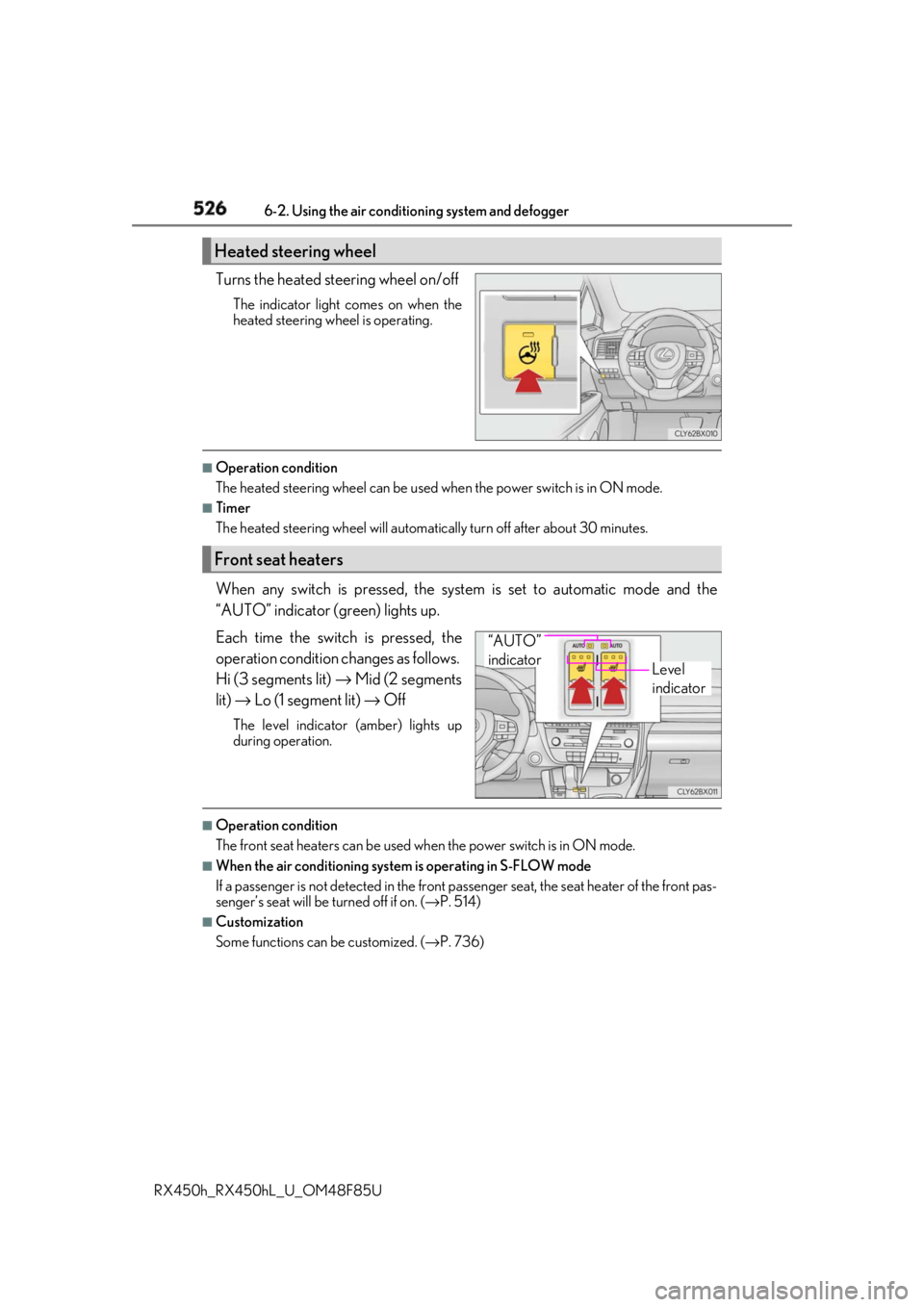
RX450h_RX450hL _U_OM48F85UTurns the heated steering wheel on/off The indicator light comes on when the
heated steering wheel is operating. ■
Operation condition
The heated steering wheel can be used when the power switch is in ON mode.■
Timer
The heated steering wheel will automati cally turn off after about 30 minutes.
When any switch is pressed, the system is set to automatic mode and the
“AUTO” indicator (green) lights up.
Each time the switch is pressed, the
operation cond ition changes as follows.
Hi (3 segments lit) → Mid (2 segments
lit) → Lo (1 segment lit) → OffThe level indicator (amber) lights up
during operation.
■
Operation condition
The front seat heaters can be used when the power switch is in ON mode. ■
When the air conditioning system is operating in S-FLOW mode
If a passenger is not detected in the front pa ssenger seat, the seat he ater of the front pas-
senger’s seat will be turned off if on. ( → P. 514)■
Customization
Some functions can be customized. ( → P. 736)Heated steering wheel
Front seat heaters
Level
indicator“AUTO”
indicator
Page 527 of 792
5276-2. Using the air conditioning system and defogger
RX450h_RX450hL _U_OM48F85U 6
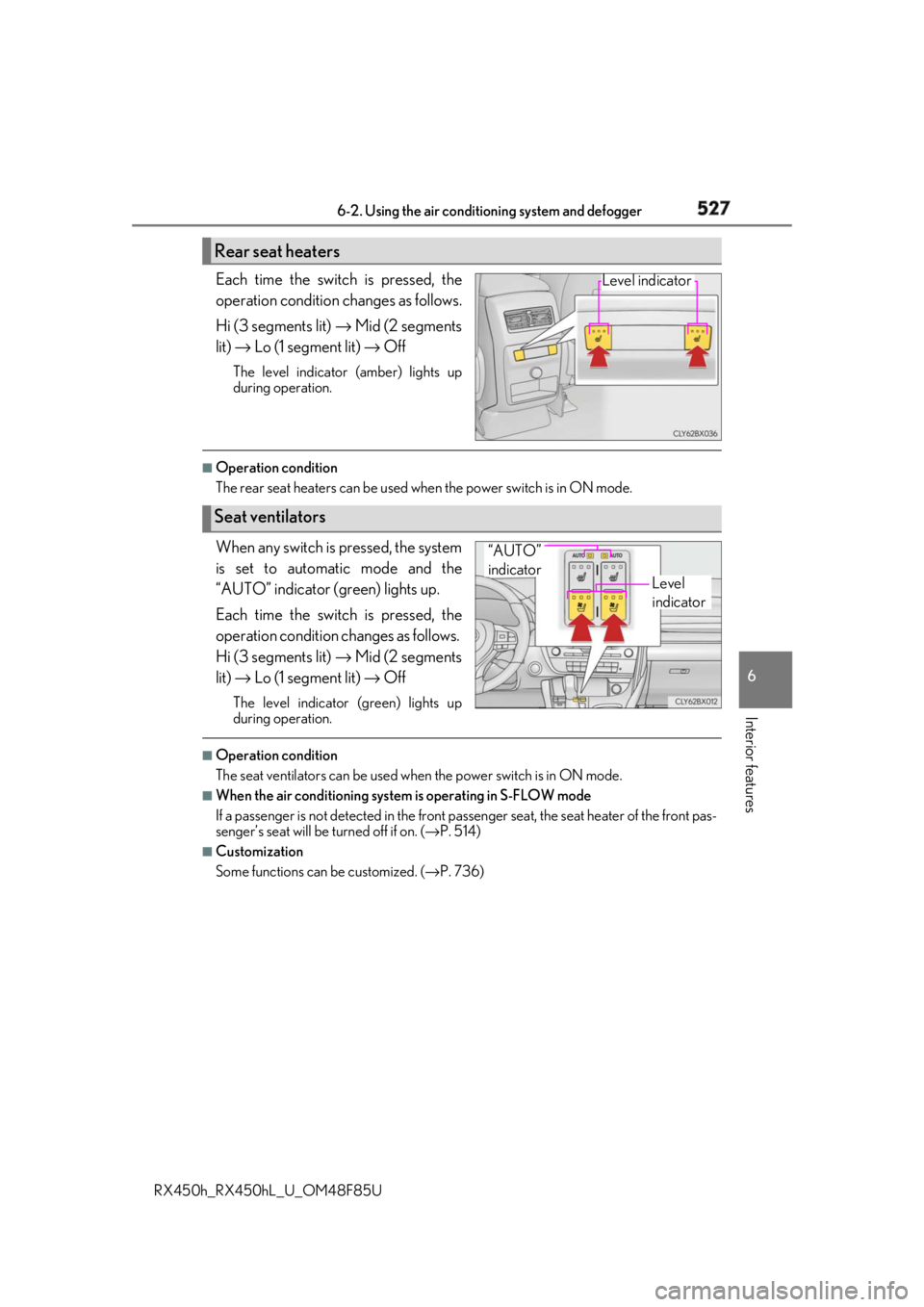
Interior features Each time the switch is pressed, the
operation condition changes as follows.
Hi (3 segments lit) → Mid (2 segments
lit) → Lo (1 segment lit) → OffThe level indicator (amber) lights up
during operation. ■
Operation condition
The rear seat heaters can be used wh en the power switch is in ON mode.
When any switch is pressed, the system
is set to automatic mode and the
“AUTO” indicator (green) lights up.
Each time the switch is pressed, the
operation cond ition changes as follows.
Hi (3 segments lit) → Mid (2 segments
lit) → Lo (1 segment lit) → OffThe level indicator (green) lights up
during operation. ■
Operation condition
The seat ventilators can be used when the power switch is in ON mode.■
When the air conditioning system is operating in S-FLOW mode
If a passenger is not detected in the front pa ssenger seat, the seat he ater of the front pas-
senger’s seat will be turned off if on. ( → P. 514)■
Customization
Some functions can be customized. ( → P. 736)Rear seat heaters Level indicator
Seat ventilators Level
indicator“AUTO”
indicator