2018 LEXUS RX450h belt
[x] Cancel search: beltPage 180 of 792
180 3-3. Adjusting the seats
RX450h_RX450hL _U_OM48F85UWARNING ■
Jam protection function (power seats)
Observe the following precautions.
Failure to do so may result in death or serious injury.●
Never use any part of your body to intentionally activate the jam protection function. ●
The jam protection function may not operate if something is caug ht just before the
fully folded position. Be careful so th at fingers, etc. do not get caught.●
The jam protection function may not operat e depending on the shape or position of
the obstruction. Be careful so that fingers, etc. do not get caught.■
Precautions for third-row seat (RX450hL)
When operating a third-row seat, make sure to press and hold the sw itch until the third-
row seat seatback is complete ly folded/upright. Do not use a third-row seat in a posi-
tion other than the completely upright position, as doing so may lead to death or seri-
ous injury in an accident. (If the switch is released while the seatback is still moving, a
buzzer will sound continuously until the seatback is complete ly folded/upright.)
NOTICE ■
Before folding a rear seat seatback ●
Second-row seats: Make sure to stow the center seat seat belt buckle and armrest
before folding the second-row seat seatbacks. ( → P. 558)●
Third-row seats: Make sure th at the third-row seats and trays are free of obstructions
before folding the seatbacks. Otherwise the seat or tray may be damaged. ■
When moving the second-row seat for third-row seat access (RX450hL)
Do not slide the second-row se at forward if an electronic device is connected to the
power outlet on the rear console. Otherwise, the second-row seat may contact the
electronic device, possibly resu lting in damage to the device.■
Before returning the third-row seat seatbacks to the upright position (RX450hL)
If the luggage cover is insta lled in the luggage compartmen t, make sure to remove it
before returning the third-row seat seatbacks. ( → P. 541) Otherwise, the luggage
cover may be damaged.
Page 181 of 792
1813-3. Adjusting the seats
3
Operation of each component
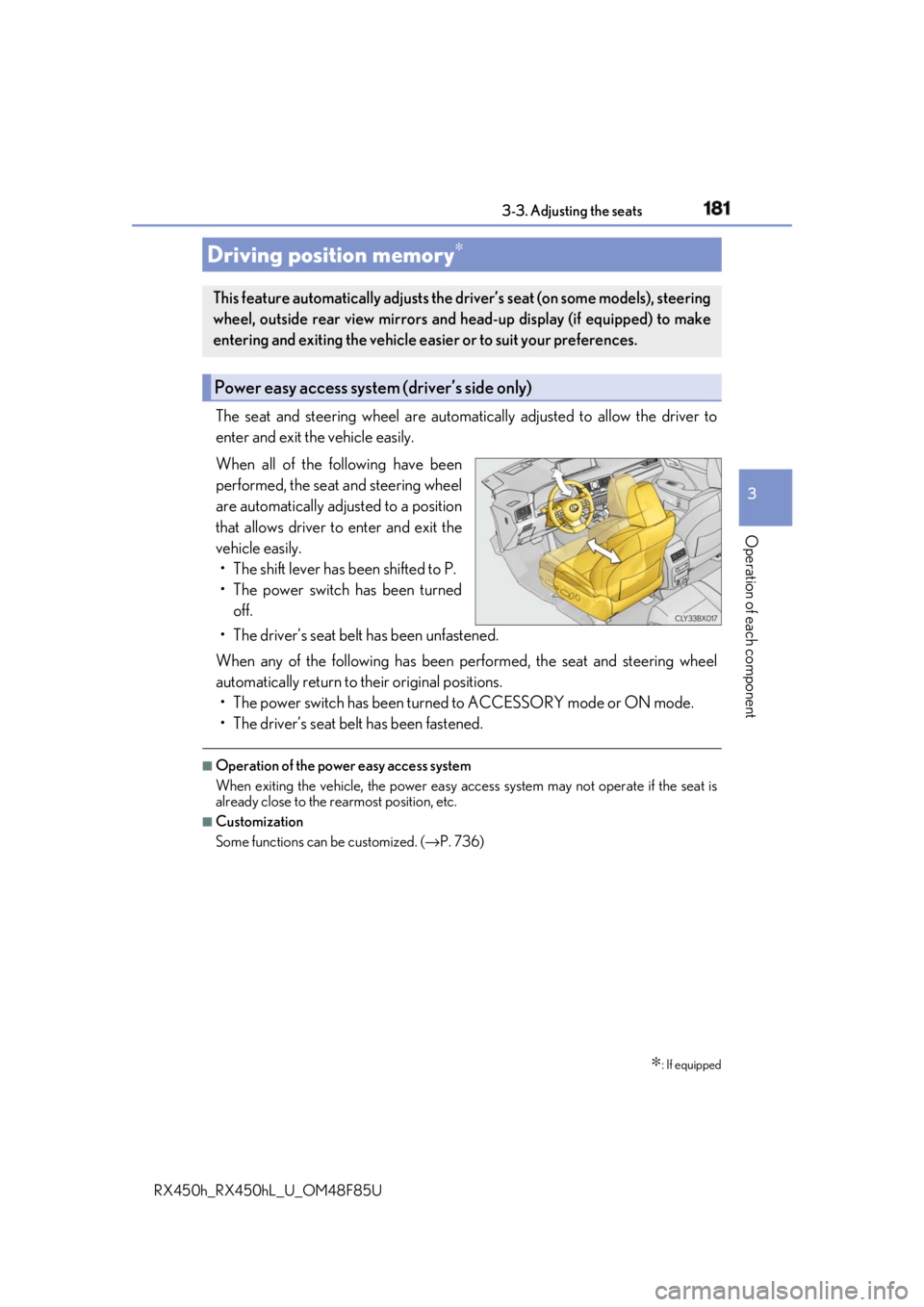
RX450h_RX450hL _U_OM48F85UThe seat and steering wheel are automati cally adjusted to allow the driver to
enter and exit the vehicle easily.
When all of the following have been
performed, the seat and steering wheel
are automatically adjusted to a position
that allows driver to enter and exit the
vehicle easily.
• The shift lever has been shifted to P.
• The power switch has been turned
off.
• The driver’s seat belt has been unfastened.
When any of the following has been performed, the seat and steering wheel
automatically return to their original positions.
• The power switch has been turned to ACCESSORY mode or ON mode.
• The driver’s seat belt has been fastened. ■
Operation of the power easy access system
When exiting the vehicle, the power easy ac cess system may not operate if the seat is
already close to the rearmost position, etc. ■
Customization
Some functions can be customized. ( → P. 736)Driving position memory ∗
∗ : If equippedThis feature automatically adjusts the driver’s seat (on some models), steering
wheel, outside rear view mirrors and head-up display (if equipped) to make
entering and exiting the vehicle easi er or to suit your preferences.
Power easy access system (driver’s side only)
Page 184 of 792

184 3-3. Adjusting the seats
RX450h_RX450hL _U_OM48F85UEach electronic key can be registered to recall your preferred driving position.■
Registering procedure
Record your driving position to button “1”, “2” or “3” before performing the
following:
Carry only the key you want to regist er, and then close the driver’s door.
If 2 or more keys are in the vehicle, the driving position cannot be recorded
properly.
Check that the shift lever is in P.
Turn the power switch to ON mode.
Recall the driving position that you want to record.
While pressing the recalled but-
ton, press and hold the door lock
switch (either lock or unlock) until
the buzzer sounds. If the button could not be registered,
the buzzer sounds continuously for
approximately 3 seconds.
■
Recall procedure
Make sure that the doors are locked before recalling the driving position.
Carry the electronic key that has been registered to the driving position,
and then unlock and open the driver’s door using the smart access system
with push-button start or wireless remote control. The driving position will move to the recorded position (not including the steering
wheel and head-up display
* ). However, the seat will move to a position slightly
behind the recorded position in order to make entering the vehicle easier.
If the driving position is in a position th at has already been recorded, the seat and
outside rear view mirrors will not move.
* : If equipped
Turn the power switch to ACCESSORY mode or ON mode, or fasten a
seat belt. The seat, steering wheel and head-up display (if equipped) will move to the
recorded position.Memory recall function (driver’s side only) 1
2
3
4
1
2
Page 190 of 792

190 3-4. Adjusting the steering wheel and mirrors
RX450h_RX450hL _U_OM48F85U■
The steering wheel can be adjusted when
The power switch is in ACCESSORY or ON mode
* .
* : If the driver’s seat belt is fastened, the steering wheel can be adjusted regardless of
power switch mode. ■
Automatic adjustment of the steering position (if equipped)
A desired steering position ca n be entered to memory and recalled automatically by the
driving position memory system. ( → P. 181)■
Power easy access system
The steering wheel and driver’s seat (on so me models) move in ac cordance with power
switch mode and the driver’s seat belt condition. ( → P. 181)■
Customization
Some functions can be customized. ( → P. 736)
WARNING
Do not adjust the steeri ng wheel while driving.
Doing so may cause the driver to mishandle the vehicle and cause an accident, result-
ing in death or serious injury.
Page 222 of 792

222 4-1. Before driving
RX450h_RX450hL _U_OM48F85UWARNING ■
Storage precautions
Observe the following precautions.
Failure to do so may prevent the pedals from being depressed properly, may block the
driver’s vision, or may result in items hittin g the driver or passeng ers, possibly causing
an accident. ●
Stow cargo and luggage in the luggage compartment whenever possible.●
Do not stack cargo and luggage in the luggage compartment higher than the seat-
backs. ●
When you fold down the rear seats, long items should not be placed directly behind
the front seats. ●
Never allow anyone to ride in the luggage compartment. It is not designed for pas-
sengers. They should ride in their seats with their se at belts properly fastened.●
Do not place cargo or luggage in or on the following locations.
• At the feet of the driver
• On the front passenger or re ar seats (when stacking items)
•On the luggage cover
• On the instrument panel
•On the dashboard ●
Secure all items in the occupant compartment. ■
Capacity and distribution ●
Do not exceed the maximum axle weight rating or the total vehicle weight rating. ●
Even if the total load of occupant’s weight and the cargo load is less than the total load
capacity, do not apply the load unevenly. Improper loading may cause deterioration
of steering or braking control whic h may cause death or serious injury.■
Roof luggage carrier precautions
Observe the following precautions: ●
Place the cargo so that its weight is distributed evenly between the front and rear
axles. ●
If loading long or wide cargo, never exceed the vehicle overall length or width.
( → P. 710) ●
Before driving, make sure the cargo is secu rely fastened on the roof luggage carrier.●
Loading cargo on the roof luggage carrier will make the center of gravity of the vehi-
cle higher. Avoid high speeds, sudden star ts, sharp turns, sudden braking or abrupt
maneuvers, otherwise it may re sult in loss of control or vehicle rollover due to failure
to operate this vehicle correctly and result in death or serious injury.●
If driving for a long distance, on rough road s, or at high speeds , stop the vehicle now
and then during the trip to make sure the cargo remains in its place.●
Do not exceed 165 lb. (75 kg) cargo weight on the roof luggage carrier.
NOTICE ■
When loading cargo (vehicles with a moon roof or panoramic moon roof)
Be careful not to scratch the surface of the moon roof or panoramic moon roof.
Page 256 of 792

256 4-2. Driving procedures
RX450h_RX450hL _U_OM48F85UTurns the brake hold system on The brake hold standby indicator
(green) comes on. Wh ile the system is
holding the brakes, the brake hold oper-
ated indicator (yellow) will illuminate. ■
Brake hold system operating conditions
The brake hold system cannot be turn ed on in the following conditions:●
The driver’s door is not closed. ●
The driver’s seat seat belt is not buckled.
If either of the conditions above are detected when the brake hold system is enabled, the
system will turn off and the brake hold standby in dicator light will go off. In addition, if any
of the conditions are detected while the sy stem is holding the brakes, a warning buzzer
will sound and a message will be shown on th e multi-information di splay. The parking
brake will then be set automatically. ■
Brake hold function ●
If the brake pedal is left released for a pe riod of about 3 minutes after the system has
started holding the brakes, the parking brake will be set automatically. In this case, a
warning buzzer sounds and a message is shown on the multi- informatio n display.●
To turn the system off while the system is holding the brakes, firmly depress the brake
pedal and press the switch again. ●
The brake hold function may not hold the vehicle when the vehicle is on a steep incline.
In this situation, it may be necessary for the driver to apply the brakes. A warning
buzzer will sound and the mult i-information display will info rm the driver of this situa-
tion. If a warning message is shown on the multi-information display, read the message
and follow the instructions.Brake Hold The brake hold system keeps the brake appl ied when the shift lever is in D, S or
N with the system on and the brake peda l has been depressed to stop the vehi-
cle. The system releases the brake wh en the accelerator pedal is depressed
with the shift lever in D or S to allow smooth start off.
Page 257 of 792

2574-2. Driving procedures
4
Driving
RX450h_RX450hL _U_OM48F85U■
When the parking brake is set automatically while the system is holding the brakes
Perform any of the following operat ions to release the parking brake.●
Depress the accelerator pedal. (The parking brake will not be released automatically if
the seat belt is not fastened.) ●
Operate the parking brake switch with the brake pedal depressed.
Make sure that the parking brake indicator light goes off. ( → P. 253) ■
When an inspection at your Lexus dealer is necessary
When the brake hold standby indicator (green) does not illu minate even when the brake
hold switch is pressed with the brake hold system operating conditions met, the system
may be malfunctioning. Ha ve the vehicle inspected at your Lexus dealer. ■
If “Brake Hold Fault Depress Brake to Deacti vate Visit Your Dealer” is displayed on the
multi-information display
The system may be malfunctioning. Have th e vehicle inspected by your Lexus dealer.■
Warning messages and buzzers
Warning messages and buzzers are used to indicate a system malfunction or to inform
the driver of the need for caution. If a warn ing message is shown on the multi-information
display, read the message and follow the instructions.■
If the brake hold operated indicator flashes
→ P. 660
WARNING ■
When the vehicle is on a steep incline
When using the brake hold system on a steep incline exercise caution. The brake hold
function may not hold the vehicle in such a situation. ■
When stopped on a slippery road
The system cannot stop the vehicle when the gripping ability of the tires has been
exceeded. Do not use the system when stopped on a slippery road.
NOTICE ■
When parking the vehicle
The brake hold system is not designed for use when parking the vehicle for a long
period of time. Turning the power switch off while the system is holding the brakes may
release the brakes, which would cause the vehicle to move. When operating the power
switch, depress the brake pedal, shift the shift lever to P and set the parking brake.
Page 316 of 792

316 4-5. Using the driving support systems
RX450h_RX450hL _U_OM48F85U■
Dynamic radar cruise control with full-speed range can be set when ●
The shift lever is in D or range 4 or higher of S has been selected.●
Range 4 or higher has been selected by using the paddle shift switch.
(vehicles with padd le shift switches)●
Vehicle speed is at or abov e approximately 30 mph (50 km/h). However, when a pre-
ceding vehicle is detected, the dynamic ra dar cruise control with full-speed range can
be set even if the vehicle speed is below approximately 30 mph (50 km/h).■
Accelerating after setting the vehicle speed
The vehicle can accelerate by operating the accelerator pedal. After accelerating, the
set speed resumes. However, during vehicle-to-vehicle distance control mode, the vehi-
cle speed may decrease below the set speed in order to maintain the distance to the pre-
ceding vehicle. ■
When the vehicle stops while follow-up cruising ●
Pushing the lever up while the vehicle ahead stops will resume follow-up cruising if the
vehicle ahead starts off within approximat ely 3 seconds after the switch is pressed.●
If the vehicle ahead starts off within 3 seco nds after your vehicle stops, follow-up cruis-
ing will be resumed. ■
Automatic cancelation of vehicle- to-vehicle distance control mode
Vehicle-to-vehicle distance control mode is automatically canceled in the following situ-
ations. ●
Actual vehicle speed falls below approximately 25 mph (40 km/h) when there are no
vehicles ahead. ●
The preceding vehicle leaves the lane when yo ur vehicle is following at a vehicle speed
at or below approximately 25 mph (40 km/h ). Otherwise, the sensor cannot properly
detect the vehicle. (“Radar Cruise Contro l Not Available No Preceding Vehicles” is
displayed on the multi-information display) ●
VSC is activated. ●
TRAC is activated for a period of time. ●
When the VSC or TRAC system is turned off. ●
The sensor cannot detect correctly because it is covered in some way. ●
Pre-collision braking is activated. ●
The parking brake is operated. ●
The vehicle is stopped by system control on a steep incline. ●
The following are detected when the vehicle has been stopped by system control:
• The driver is not wearing a seat belt.
• The driver’s door is opened.
• The vehicle has been stopped for about 3 minutes
If vehicle-to-vehicle distance control mode is automatically canceled for any other rea-
son, there may be a malfunction in th e system. Contact your Lexus dealer.