2018 LEXUS RX450h brake light
[x] Cancel search: brake lightPage 260 of 792

260 4-3. Operating the lights and wipers
RX450h_RX450hL _U_OM48F85U■
Daytime running light system ●
The daytime running lights illuminate using th e same lights as the parking lights and illu-
minate brighter than the parking lights. ●
To make your vehicle more visible to other drivers during daytime driving, the daytime
running lights turn on automatically when a ll of the following conditions are met. (The
daytime running lights are not designed for use at night.)
• The hybrid system is started
• The parking brake is released
• The headlight switch is in the (Canada only), or
* position
* : When the surroundings are bright
The daytime running lights remain on after they illuminate, even if the parking brake is set
again. ●
For the U.S.A.: Daytime running lights can be turned off by operating the switch.●
Compared to turning on the headlights, the daytime running light system offers greater
durability and consumes less electricity, so it can help improve fuel economy.■
Cornering lights (if equipped)
When the cornering lights are on for more than 30 minutes, they will turn off automati-
cally. ■
Headlight control sensor
■
Automatic light off system ●
When the headlights come on: The headlights and ta il lights turn off 30 seconds after a
door is opened and closed if the power switch is turned to ACCESSORY mode or
turned off. (The lights turn off immediately if on the key is pre ssed after all the doors
are locked.) ●
When only the tail lights come on: The tail lights turn off automa tically if the power
switch is turned to ACCESSORY mode or tu rned off and the driver’s door is opened.
To turn the lights on again, turn the power switch to ON mode, or turn the light switch off
once and then back to or . ■
Automatic headlight leve ling system (if equipped)
The level of the headlights is automatically adjusted accordi ng to the number of passen-
gers and the loading condition of the vehicle to ensure that the headlights do not inter-
fere with other road users. ■
Light reminder buzzer
A buzzer sounds when the power switch is turned off or turned to ACCESSORY mode
and the driver’s door is opened while the lights are turned on.The sensor may not function properly if an
object is placed on the sensor, or anything that
blocks the sensor is affixed to the windshield.
Doing so interferes with the sensor detecting
the level of ambient li ght and may cause the
automatic headlight system to malfunction.
Page 269 of 792

2694-3. Operating the lights and wipers
4
Driving
RX450h_RX450hL _U_OM48F85U■
Front door opening linked windshield wiper stop function
When “AUTO” is selected and the windshield wipers are operating, if a front door is
opened, the operation of the windshield wipers will be stopped to prevent anyone near
the vehicle from being sprayed by water from the wipers, provided the vehicle is stopped
with the parking brake applied or the shift lever in P. When the front door is closed, wiper
operation will resume. ■
Customization
Some functions can be customized. ( → P. 736)
WARNING ■
Caution regarding the use of windshield wipers in AUTO mode
The windshield wipers may operate unexpectedly if the sensor is touched or the wind-
shield is subject to vibration in AUTO mode. Take care that your fingers, etc. do not
become caught in the windshield wipers. ■
Caution regarding the use of washer fluid
When it is cold, do not use the washer fl uid until the windshield becomes warm. The
fluid may freeze on the windshield and cause lo w visibility. This may lead to an accident,
resulting in death or serious injury.
NOTICE ■
When the windshield is dry
Do not use the wipers, as they may damage the windshield. ■
When the washer fluid tank is empty
Do not operate the switch continually as the washer fluid pump may overheat. ■
When a nozzle becomes blocked
In this case, contact your Lexus dealer.
Do not try to clear it with a pin or other object. The nozz le will be damaged.
Page 296 of 792

296 4-5. Using the driving support systems
RX450h_RX450hL _U_OM48F85U■
If the PCS warning light flas hes or illuminates and a warning message is displayed on
the multi-inform ation display
The pre-collision system may be temporarily unavailable or there may be a malfunction
in the system. ●
In the following situations, the warning light will turn off, the message will disappear and
the system will become operational when normal operating conditions return:
• When the radar sensor or ca mera sensor or the area around either sensor is hot,
such as in the sun
• When the radar sensor or camera sensor or the area around either sensor is cold,
such as in an extremely cold environment
• When a front sensor is dirt y or covered with snow, etc.
• When the part of the windshield in front of the camera sensor is fogged up or cov-
ered with condensation or ice (Defogging the windshield: → P. 516)
• If the camera sensor is obstructed, such as when the hood is open or a sticker is
attached to the windshield near the camera sensor ●
If the PCS warning light continues to flash or remains illuminated or the warning mes-
sage does not disappear even though the vehicle has returned to normal, the system
may be malfunctioning. Have the vehicle in spected by your Lexus dealer immediately.■
If VSC is disabled ●
If VSC is disabled ( → P. 385), the pre-collision brake assist and pre-collision braking
functions are also disabled. ●
The PCS warning light will turn on and “V SC Turned Off Pre-Collision Brake System
Unavailable” will be displayed on the multi-information display.
Page 309 of 792

3094-5. Using the driving support systems
4
Driving
RX450h_RX450hL _U_OM48F85UThis mode employs a radar sensor to detect the presence of vehicles up to
approximately 328 ft. (100 m) ahead, de termines the current vehicle-to-vehicle
following distance, and operates to main tain a suitable following distance from
the vehicle ahead. Note that vehicle-to-vehicle distance will cl ose in when traveling on downhill slopes.
Example of constant speed cruising
When there are no vehicles ahead The vehicle travels at the speed set by the driver. The desired vehicle-to-vehicle dis-
tance can also be set by operating the vehicle-to-vehicle distance switch.
Example of deceleration cruising and follow-up cruising
When a preceding vehicle driving sl ower than the set speed appearsWhen a vehicle is detected running ahead of you, the system automatically deceler-
ates your vehicle. When a greater reduction in vehicle speed is necessary, the system
applies the brakes (the stop lights will come on at this time). Th e system will respond to
changes in the speed of the vehicle ahead in order to maintain the vehicle-to-vehicle
distance set by the driver. Approach warning warns you when the system cannot
decelerate sufficie ntly to prevent your vehicle from closing in on the vehicle ahead.
When the vehicle ahead of you stops, your vehicle will also stop (vehicle is stopped by
system control). After the vehicle ahead starts off, pushing the cruise control lever up
or depressing the accelerator pedal will resume follow-up cruising.
Example of acceleration
When there are no longer any preceding vehicles driving slower than the set
speed The system accelerates until the set speed is reached. The system then returns to con-
stant speed cruising.Driving in vehicle-to-vehicle distance control mode
1
2
3
Page 339 of 792

3394-5. Using the driving support systems
4
Driving
RX450h_RX450hL _U_OM48F85U●
Vehicles with a navigation system (12.3-inch display): If the intuit ive parking assist dis-
play is set to on, detected objects will also be displayed on the panoramic view monitor.
For details, refer to “NAVIGATION SYSTEM OWNER’S MANUAL”. ■
Sensor detectio n information●
The sensor’s detection areas are limited to the areas around the vehicle’s bumper. ●
Certain vehicle conditions and the surrounding environment may affect the ability of a
sensor to correctly detect an object. Particular instances where this may occur are
listed below.
• There is dirt, snow or ice on the sensor . (Wiping the sensors will resolve this prob-
lem.)
• The sensor is frozen. (Thawing th e area will resolve this problem.)
In especially cold weather, if a sensor is frozen the screen may show an abnormal
display, or obstacles may not be detected.
• The sensor is covered in any way.
• The vehicle is leaning considerably to one side.
• When a sensor or the area around a sensor is extremely hot or cold.
• On an extremely bumpy road, on an incline, on gravel, or on grass.
• The vicinity of the vehicle is noisy due to vehicle horns, motorcycle engines, air
brakes of large vehicles, or other loud noises producing ultrasonic waves.
• There is another vehicle equipped with parking assist sensors in the vicinity.
• The sensor is coated with a sheet of spray or heavy rain.
• The bumper or sensor re ceives a strong impact.
• If the vehicle is significantly tilted.
• The vehicle is approaching a tall or curved curb.
• In harsh sunlight or intense cold weather.
• The area directly under the bumpers is not detected.
• If objects draw too close to the sensor.
• People may not be detected if they are wearing certain types of clothing.
In addition to the examples above, there ar e instances in which, because of their shape,
signs and other objects may be judged by a sensor to be closer than they are. ●
The shape of the object may prevent a sensor from detecting it. Pay particular attention
to the following objects:
• Wires, fences, ropes, etc.
• Cotton, snow and other materi als that absorb sound waves
• Sharply-angled objects
• Low obstacles
• Tall obstacles with upper sections projecting outwards in the direction of your vehi-
cle ●
The following situations may occur during use.
• Depending on the shape of the object and other factors, the detection distance may
shorten, or detectio n may be impossible.
• Objects may not be detected if they are too close to the sensor.
• There will be a short dela y between object detection and display. Even at slow
speeds, there is a possibility that the obje ct will come within the sensor’s detection
areas before the display is shown and the buzzer sounds.
• Thin posts or objects lower than the sens or may not be detected when approached,
even if they have been detected once.
• It might be difficult to hear beeps due to th e volume of audio system or air flow noise
of the air conditioning system.
Page 351 of 792
3514-5. Using the driving support systems
4
Driving
RX450h_RX450hL _U_OM48F85U■
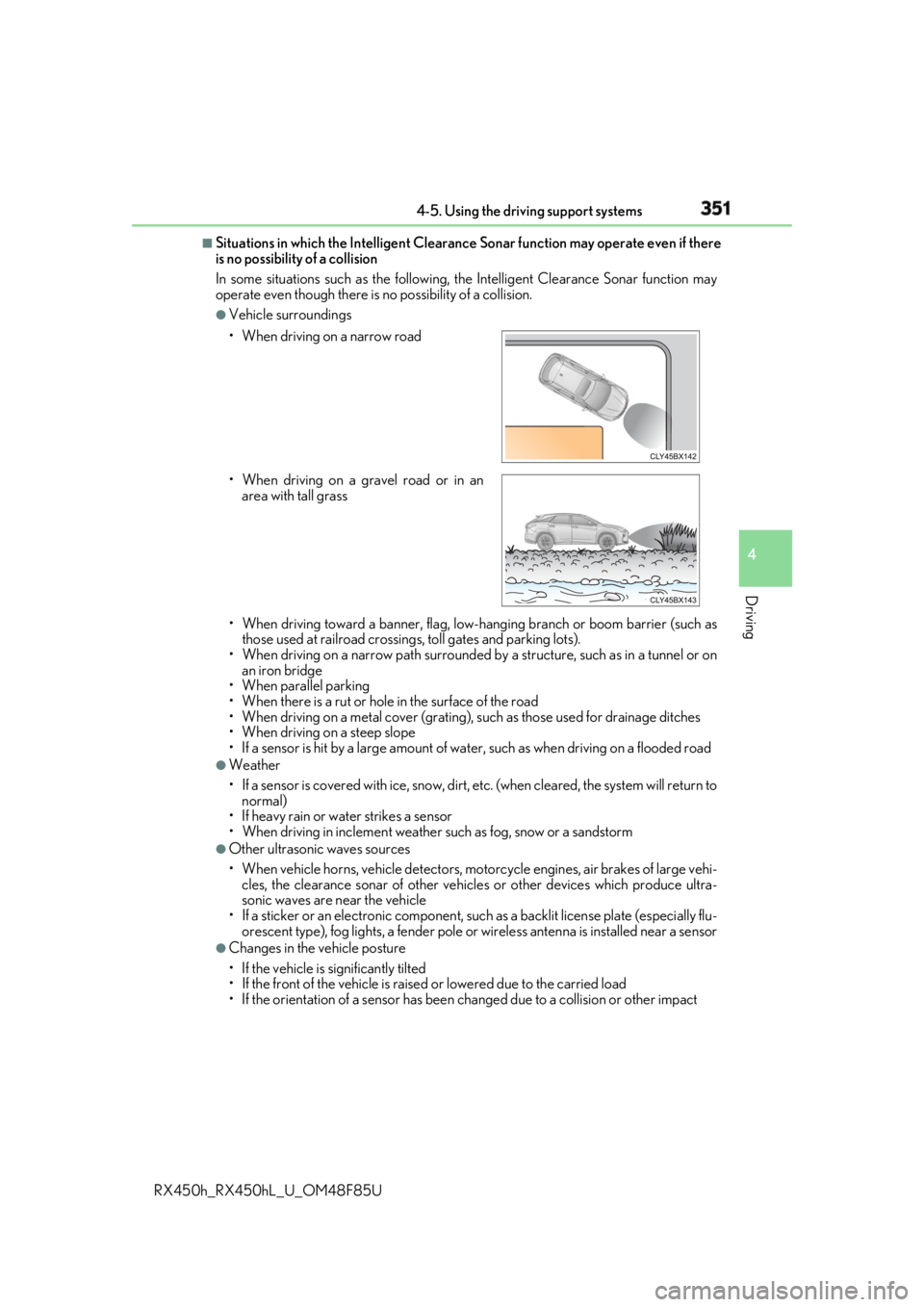
Situations in which the Intelligent Clearance Sonar function may operate even if there
is no possibility of a collision
In some situations such as the following, the Intelligent Clearanc e Sonar function may
operate even though there is no possibility of a collision. ●
Vehicle surroundings
• When driving toward a banner, flag, low- hanging branch or boom barrier (such as
those used at railroad crossing s, toll gates and parking lots).
• When driving on a narrow path surrounded by a structure, such as in a tunnel or on
an iron bridge
• When parallel parking
• When there is a rut or hole in the surface of the road
• When driving on a metal cover (grating), such as those used for drainage ditches
• When driving on a steep slope
• If a sensor is hit by a large amount of wa ter, such as when driving on a flooded road●
Weather
• If a sensor is covered with ice, snow, dirt, etc. (when cleared, the system will return to
normal)
• If heavy rain or water strikes a sensor
• When driving in inclemen t weather such as fog, snow or a sandstorm●
Other ultrasonic waves sources
• When vehicle horns, vehicle detectors, motorcycle engines, air brakes of large vehi-
cles, the clearance sonar of other vehicles or other devices which produce ultra-
sonic waves are near the vehicle
• If a sticker or an electronic component, su ch as a backlit license plate (especially flu-
orescent type), fog lights, a fender pole or wireless antenna is installed near a sensor●
Changes in the vehicle posture
• If the vehicle is significantly tilted
• If the front of the vehicle is raised or lowered due to the carried load
• If the orientation of a sens or has been changed due to a collision or other impact• When driving on a narrow road
• When driving on a gravel road or in an
area with tall grass
Page 352 of 792
352 4-5. Using the driving support systems
RX450h_RX450hL _U_OM48F85U■
If the Intelligent Clearance Sonar function operates unnecessarily such as at a railroad
crossing
Even in the event that the Intelligent Cleara nce Sonar function operates unnecessarily,
such as at a railroad crossing, brake cont rol will be canceled afte r approximately 2 sec-
onds, allowing you to proceed forward and leave the area, Brake control can also be
canceled by depressing the brake pedal. Depressing the accelerator pedal again will
allow you to proceed forward and leave the area. ■
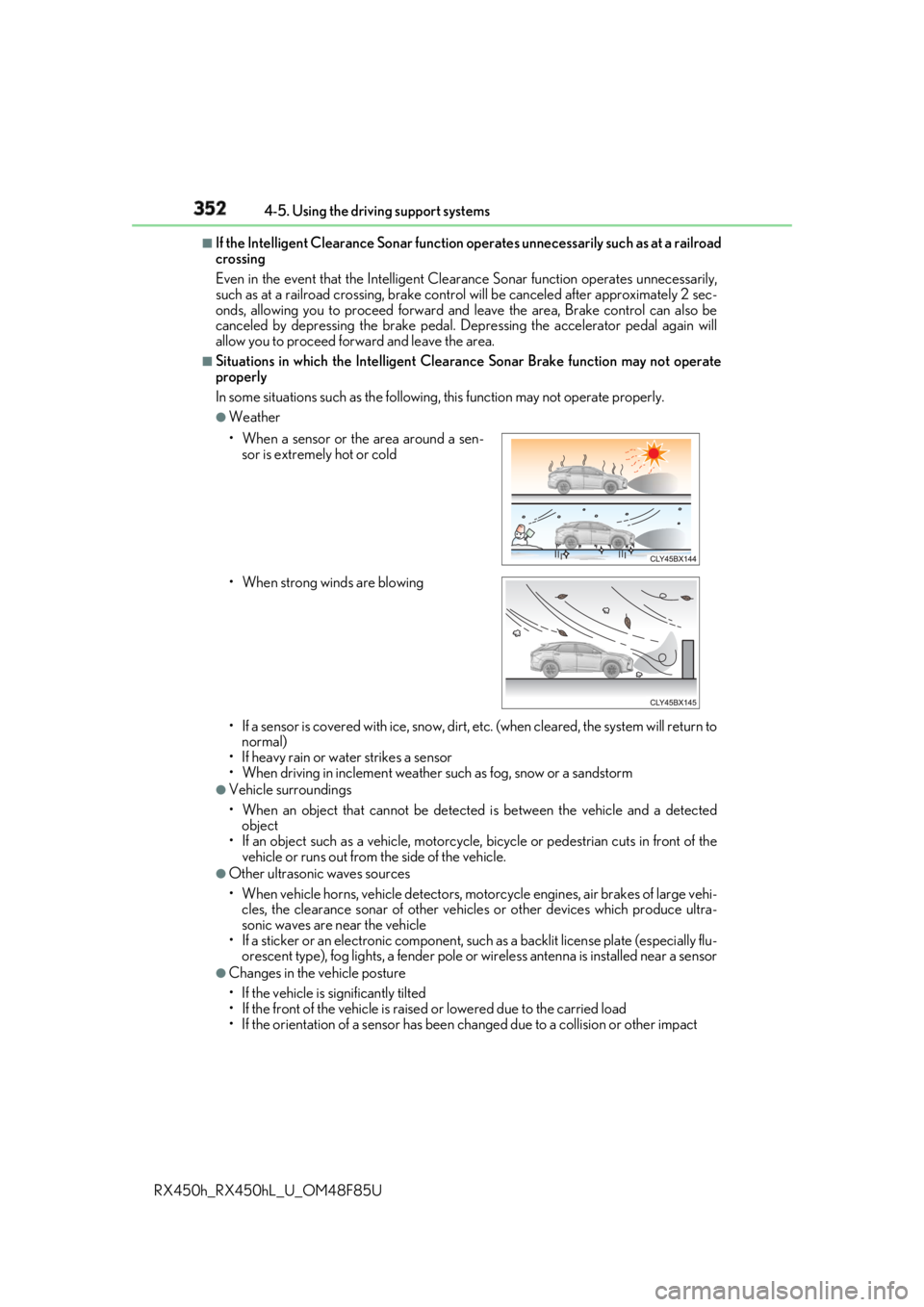
Situations in which the Intelligent Cleara nce Sonar Brake function may not operate
properly
In some situations such as the following , this function may not operate properly.●
Weather
• If a sensor is covered with ice, snow, dirt, etc. (when cleared, the system will return to
normal)
• If heavy rain or water strikes a sensor
• When driving in inclemen t weather such as fog, snow or a sandstorm●
Vehicle surroundings
• When an object that cannot be detected is between the vehicle and a detected
object
• If an object such as a vehicle, motorcycle, bicycle or pedestrian cuts in front of the
vehicle or runs out from the side of the vehicle. ●
Other ultrasonic waves sources
• When vehicle horns, vehicle detectors, motorcycle engines, air brakes of large vehi-
cles, the clearance sonar of other vehicles or other devices which produce ultra-
sonic waves are near the vehicle
• If a sticker or an electronic component, su ch as a backlit license plate (especially flu-
orescent type), fog lights, a fender pole or wireless antenna is installed near a sensor●
Changes in the vehicle posture
• If the vehicle is significantly tilted
• If the front of the vehicle is raised or lowered due to the carried load
• If the orientation of a sens or has been changed due to a collision or other impact• When a sensor or the area around a sen-
sor is extremely hot or cold
• When strong winds are blowing
Page 361 of 792

3614-5. Using the driving support systems
4
Driving
RX450h_RX450hL _U_OM48F85U■
Situations in which the Rear Cross Traffic Auto Brake function may not operate prop-
erly
In some situations such as the following , this function may not operate properly.●
Objects and vehicles which the radar sensors are not designed to detect
• Stationary objects
• Vehicles which are moving away from your vehicle
• Pedestrians, motorcycles, bicycles, etc.*
• Objects which are extremely close to a radar sensor
• Vehicles which are approaching from the right or left at the rear of the vehicle at a
traveling speed of less than approximately 5 mph (8 km/h)
• Vehicles which are approaching from the right or left at the rear of the vehicle at a
traveling speed of more than approximately 15 mph (24 km/h)
* : Depending on conditions, detection of a vehicle and/or object may occur.●
Situations in which the radar sensors may not be able to detect an object
• When a sensor or the area around a sensor is extremely hot or cold
• If the rear bumper is covere d with ice, snow, dirt, etc.
• If heavy rain or water strikes the vehicle
• When the detection area of a radar sensor is obstructed by an adjacent vehicle
• If the vehicle is significantly tilted
• If towing eyelets are installed
• If the suspension has been modified or tires of a size othe r than specified are
installed
• If the front of the vehicle is raised or lowered due to the carried load
• If a sticker or an electronic component, su ch as a backlit license plate (especially flu-
orescent type), fog lights, a fender pole or wireless antenna is installed near a radar
sensor
• If the orientation of a rada r sensor has been changed due to a collision or other
impact or removal and installation
• When multiple vehicles are approaching wi th only a small gap between each vehicle
• When a vehicle is approaching at high speed ●
Situations in which the radar sensor may not detect a vehicle
• When a vehicle approaches from the right
or left at the rear of the vehicle while you
are turning while backing up
• When turning while backing up
• When backing out of a shallow angle park-
ing spot