2018 LEXUS RX450h change time
[x] Cancel search: change timePage 116 of 792
116 2. Instrument cluster
RX450h_RX450hL _U_OM48F85UDisplays suggestions to the driver in the following situations. To select a response
to a displayed suggestion, use the meter control switches. The suggestion function can be turned on/off. (Customizable features: → P. 737)■
Suggestion to enable the power back door
If the power back door system is disabled (setting on set to off) and the
power back door switch on the instru ment panel is operated, a suggestion
message will be displayed asking if yo u wish to enable the power back door
system. To enable the power back door system, select “Yes”. After enabling the power back door syst em, press the power back door switch
again to open or close the power back door.■
Suggestion to turn off the headlights
If the headlights are left on for a certai n amount of time af ter the power switch
has been turned off, a su ggestion message will be displayed asking if you wish
to turn the headlights off. To turn the headlights off, select “Yes”.If a front door is opened after the power switch is turned off, this suggestion mes-
sage will not be displayed.■
Background color of the indicator/shift posi tion display area (except F SPORT models)
The background color of the indicator/shift po sition display area is changed according to
the driving mode as follows ( → P. 379):●
Eco drive mode: Blue ●
Sport mode: Red ■
G-force display (if equipped) ●
The G-force values may not be zero even when the vehicle is parked, such as when it is
parked on an incline. ●
Depending on the vehicle usage conditions, the brake fluid pressure display may not
reach its maximum reading even though the brake pedal is fully depressed. ●
If a 12-volt battery terminal is disconnect ed and reconnected, the steering amount dis-
play may be disabled temporarily. After driv ing the vehicle for a while, the display will
be enabled. ■
Suspension of the settings display ●
Some settings cannot be changed while driv ing. When changing settings, park the
vehicle in a safe place. ●
If a warning message is displa yed, operation of the settin gs display will be suspended.Suggestion function
Page 140 of 792
140 3-2. Opening, closing and locking the doors
RX450h_RX450hL _U_OM48F85U■
Switching the door unlock function
It is possible to set which doors the entry function unlock s using the wireless remote con-
trol.
Turn the power switch off.
When the indicator light on the key su rface is not on, press and hold , or
for approximately 5 seconds while pressing and holding .
The setting changes each time an operation is performed, as shown below. (When
changing the setting continuously, release the buttons, wait for at least 5 seconds, and
repeat step .)
To prevent unintended triggering of the alarm, unlock the doors using the wireless
remote control and open and close a door once after the settings have been changed. (If
a door is not opened within 60 seconds af ter is pressed, the doors will be locked
again and the alarm will automatically be set.)
In a case that the alarm is triggered, immediately stop the alarm. ( → P. 86)■
Impact detection door lock release system
In the event that the vehicle is subject to a strong impact, all the doors are unlocked.
Depending on the force of the impact or the type of accident, however, the system may
not operate. ■
Using the mechanical key
The doors can also be locked and unlocked with the mechanical key. ( → P. 692)■
Open door warning buzzer
If the vehicle speed reaches 3 mph (5 km/h), the master warning light flashes and a
buzzer sounds to indicate that door (s) or the hood in not fully closed.
The open door(s) or hood is displa yed on the multi-information display.1
2
2
Multi-information
display Unlocking function Beep
Holding the driver’s door handle
unlocks only the driver’s door.
Exterior: Beeps 3 times
Interior: Pings onceHolding any of the passenger
door handles unlocks all the
doors.
Holding a door handle unlocks
all the doors. Exterior: Beeps twice
Interior: Pings once
Page 146 of 792
146 3-2. Opening, closing and locking the doors
RX450h_RX450hL _U_OM48F85UThe power back door settings can be ch anged on the multi-information display.
( → P. 108)
The position at which the power back d oor will stop when opened automatically
can be changed.
When setting using the switch
Stop the power back door at the desired position. ( → P. 143, 145)
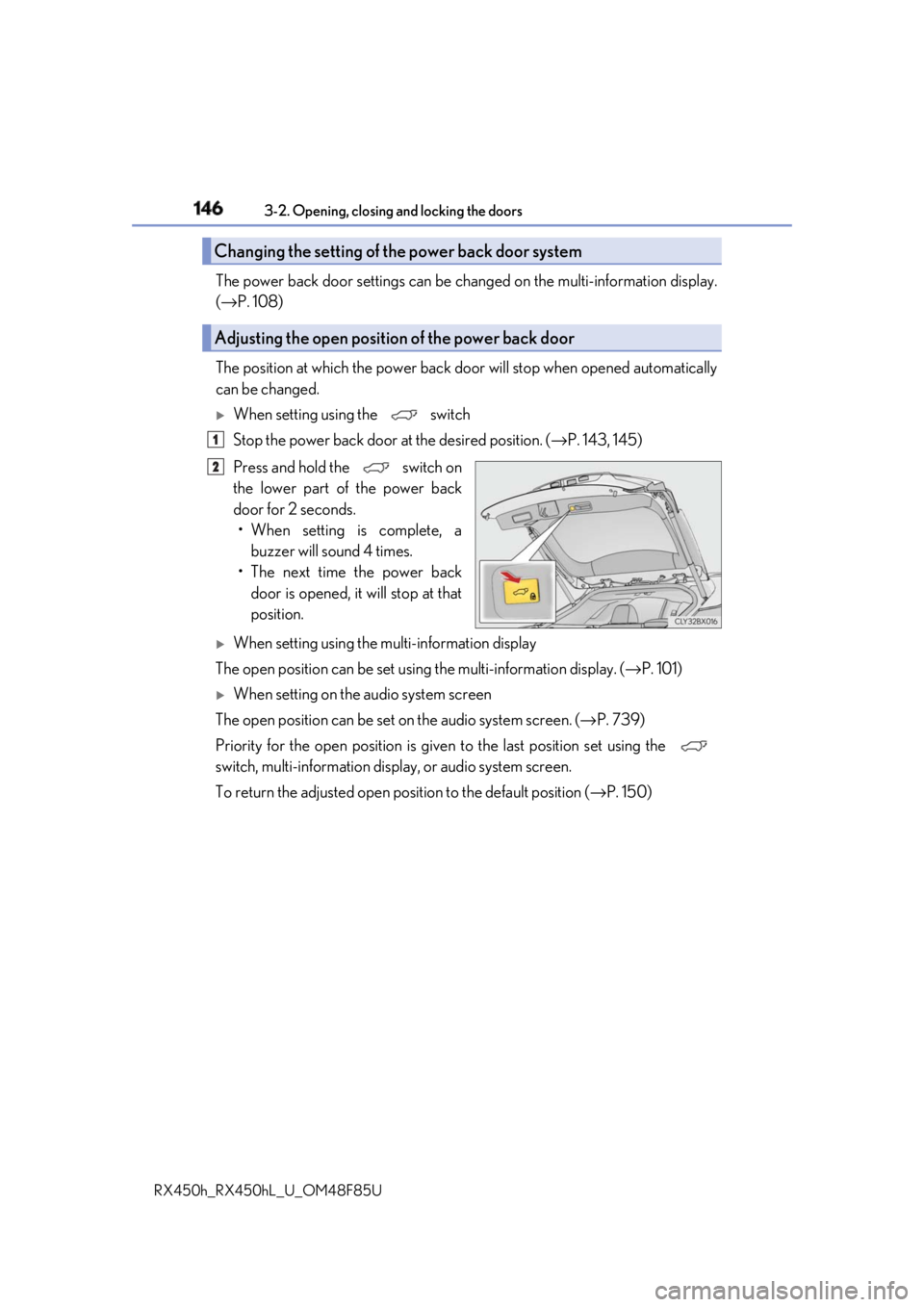
Press and hold the switch on
the lower part of the power back
door for 2 seconds.
• When setting is complete, a
buzzer will sound 4 times.
• The next time the power back
door is opened, it will stop at that
position.
When setting using the multi-information display
The open position can be set usin g the multi-information display. ( → P. 101)
When setting on the audio system screen
The open position can be set on the audio system screen. ( → P. 739)
Priority for the open position is give n to the last position set using the
switch, multi-information displa y, or audio system screen.
To return the adjusted open posi tion to the default position ( → P. 150)Changing the setting of the power back door system
Adjusting the open position of the power back door 1
2
Page 161 of 792

1613-2. Opening, closing and locking the doors
3
Operation of each component
RX450h_RX450hL _U_OM48F85U■
Note for the entry function ●
Even when the electronic key is within the effective range (detection areas), the system
may not operate properly in the following cases:
• The electronic key is too close to the window or outside door handle, near the
ground, or in a high place when the doors are locked or unlocked.
• The electronic key is near the ground or in a high place, or too close to the rear
bumper center when the back door is opened.
• The electronic key is on th e instrument panel, luggage co mpartment, floor, or in the
door pockets or glove box when the hybrid system is started or power switch modes
are changed. ●
Do not leave the electronic key on top of th e instrument panel or near the door pockets
when exiting the vehicle. Depending on the radio wave reception conditions, it may be
detected by the antenna outs ide the cabin and th e door will become lockable from the
outside, possibly trapping the electronic key inside the vehicle. ●
As long as the electronic key is within th e effective range, the doors may be locked or
unlocked by anyone. ●
Even if the electronic key is not inside the vehicle, it may be possible to start the hybrid
system if the electronic key is near the window. ●
The doors may unlock if a large amount of wa ter splashes on the d oor handle, such as in
the rain or in a car wash when the electronic key is within the effective range. (The door
will automatically be locked after approx imately 60 seconds if the doors are not
opened and closed.) ●
If the wireless remote control is used to lo ck the doors when the electronic key is near
the vehicle, there is a possibility that the d oor may not be unlocked by the entry func-
tion. (Use the wireless remote control to unlock the doors.) ●
Touching the door lock sensor while wearin g gloves may delay or prevent lock opera-
tion. Remove the gloves and touch the lock sensor again. ●
When the lock operation is performed using the lock sensor, recognition signals will be
shown up to two consecutive times. After this, no recognition signals will be given.
*●
If the door handle becomes wet while the el ectronic key is within the effective range,
the door may lock and unlock repeatedly. In that case, follow the following correction
procedures to wash the vehicle:
• Place the electronic key in a location 6 ft. (2 m) or more away from the vehicle. (Take
care to ensure that the key is not stolen.)
• Set the electronic key to battery-saving mode to disable the smart access system
with push-button start. ( → P. 160)●
If the electronic key is inside the vehicle and a door handle becomes wet during a car
wash, a message may be shown on the mult i-information display and a buzzer will
sound outside the vehicle. To turn off the alarm, lock all the doors. ●
The lock sensor may not work properly if it comes into contact with ice, snow, mud, etc.
Clean the lock sensor and attempt to operate it again. ●
A sudden approach to the effective range or door handle may prevent the doors from
being unlocked. In this case, return the door handle to the original position and check
that the doors unlock before pulling the door handle again.●
If there is another electronic key in the de tection area, it may take slightly longer to
unlock the doors after the door handle is gripped.
Page 194 of 792
194 3-4. Adjusting the steering wheel and mirrors
RX450h_RX450hL _U_OM48F85U■
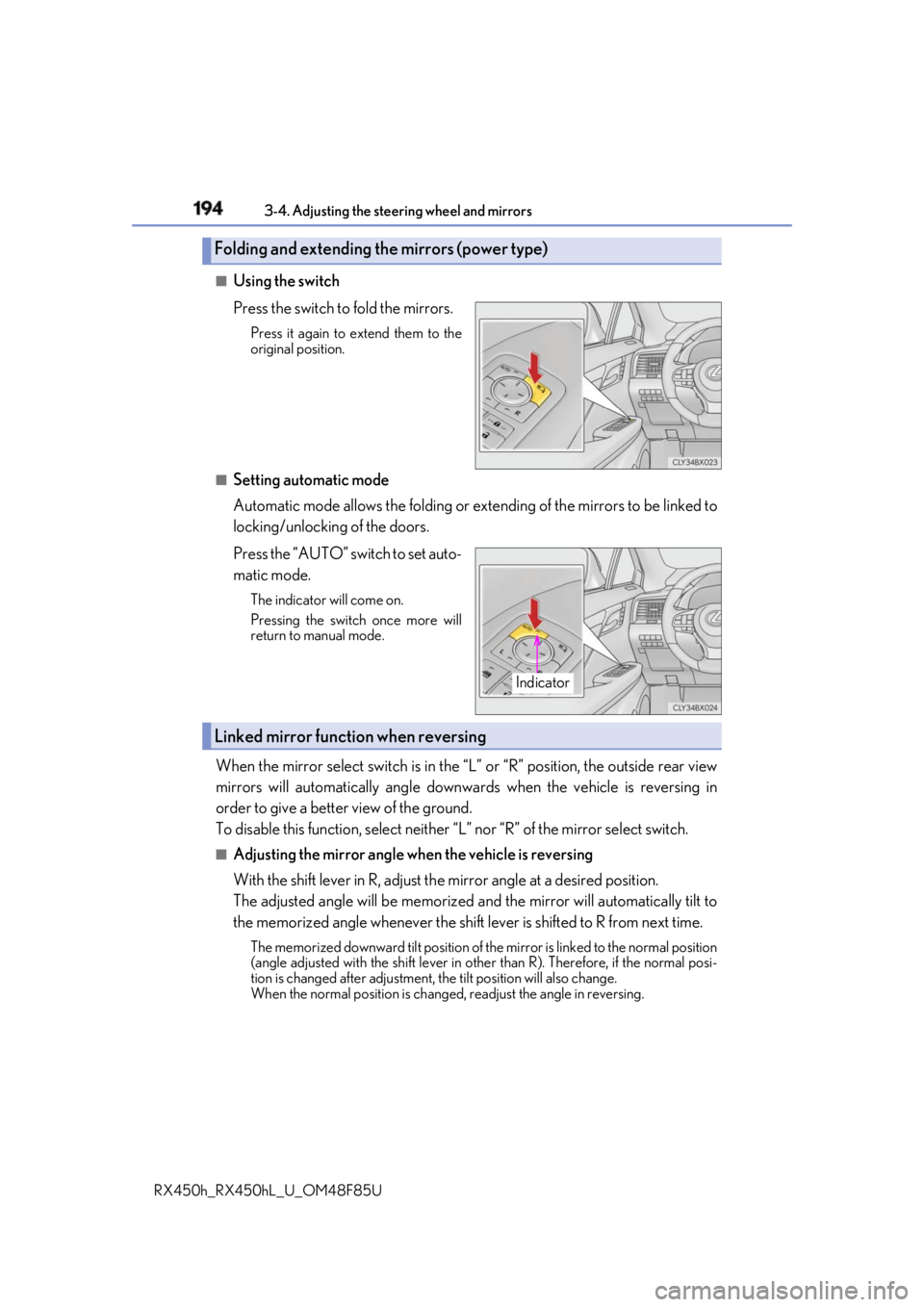
Using the switch
Press the switch to fold the mirrors. Press it again to extend them to the
original position.
■
Setting automatic mode
Automatic mode allows the folding or ex tending of the mirrors to be linked to
locking/unlocking of the doors.
Press the “AUTO” switch to set auto-
matic mode. The indicator will come on.
Pressing the switch once more will
return to manual mode.
When the mirror select switch is in the “L” or “R” position, the outside rear view
mirrors will automatically angle downwa rds when the vehicle is reversing in
order to give a better view of the ground.
To disable this function, select neither “L” nor “R” of the mirror select switch.■
Adjusting the mirror angle when the vehicle is reversing
With the shift lever in R, adjust th e mirror angle at a desired position.
The adjusted angle will be memorized and the mirror will automatically tilt to
the memorized angle whenever the shift lever is shifted to R from next time. The memorized downward tilt position of th e mirror is linked to the normal position
(angle adjusted with the shif t lever in other than R). Ther efore, if the normal posi-
tion is changed after adjustment, the tilt position will also change.
When the normal position is chang ed, readjust the angle in reversing.Folding and extending the mirrors (power type)
Indicator
Linked mirror function when reversing
Page 219 of 792
2194-1. Before driving
4
Driving
RX450h_RX450hL _U_OM48F85UNOTICE ■
When driving the vehicle ●
Do not depress the accelerator and brake pedals at the same time during driving, as
this may restrain driving torque. ●
Do not use the accelerator pedal or depre ss the accelerator and brake pedals at the
same time to hold the vehicle on a hill. ■
When parking the vehicle
Always set the parking brake and shift the shift lever to P. Failure to do so may cause the
vehicle to move or the vehicle may accelerate suddenly if the accelerator pedal is acci-
dentally depressed. ■
Avoiding damage to vehicle parts ●
Do not turn the steering wheel fully in either direction and hold it there for an
extended period of time.
Doing so may damage the power steering motor. ●
When driving over bumps on the road, drive as slowly as possible to avoid damaging
the wheels, underside of the vehicle, etc. ■
If you get a flat tire while driving
A flat or damaged tire may cause the following situations . Hold the steering wheel
firmly and gradually depress the brake pedal to slow down the vehicle. ●
It may be difficult to control your vehicle. ●
The vehicle will make abnormal sounds or vibrations. ●
The vehicle will lean abnormally.
Information on what to do in case of a flat tire ( → P. 673)■
When encountering flooded roads
Do not drive on a road that has flooded after heavy rain, etc. Doing so may cause the
following serious damage to the vehicle: ●
Engine stalling ●
Short in electrical components ●
Engine damage caused by water immersion
In the event that you drive on a flooded road and the vehicle is flooded, be sure to have
your Lexus dealer check the following: ●
Brake function ●
Changes in quantity and quality of oil and fluid used for the engine, hybrid transmis-
sion, rear differential, etc. ●
Lubricant condition for the bearings and su spension joints (where possible), and the
function of all joints, bearings, etc.
Page 240 of 792
240 4-2. Driving procedures
RX450h_RX450hL _U_OM48F85UStop the vehicle completely.
Set the parking brake ( → P. 253), and shift the shift lever to P.
Press the power switch.
Release the brake pedal and check that the display on the meters is off.
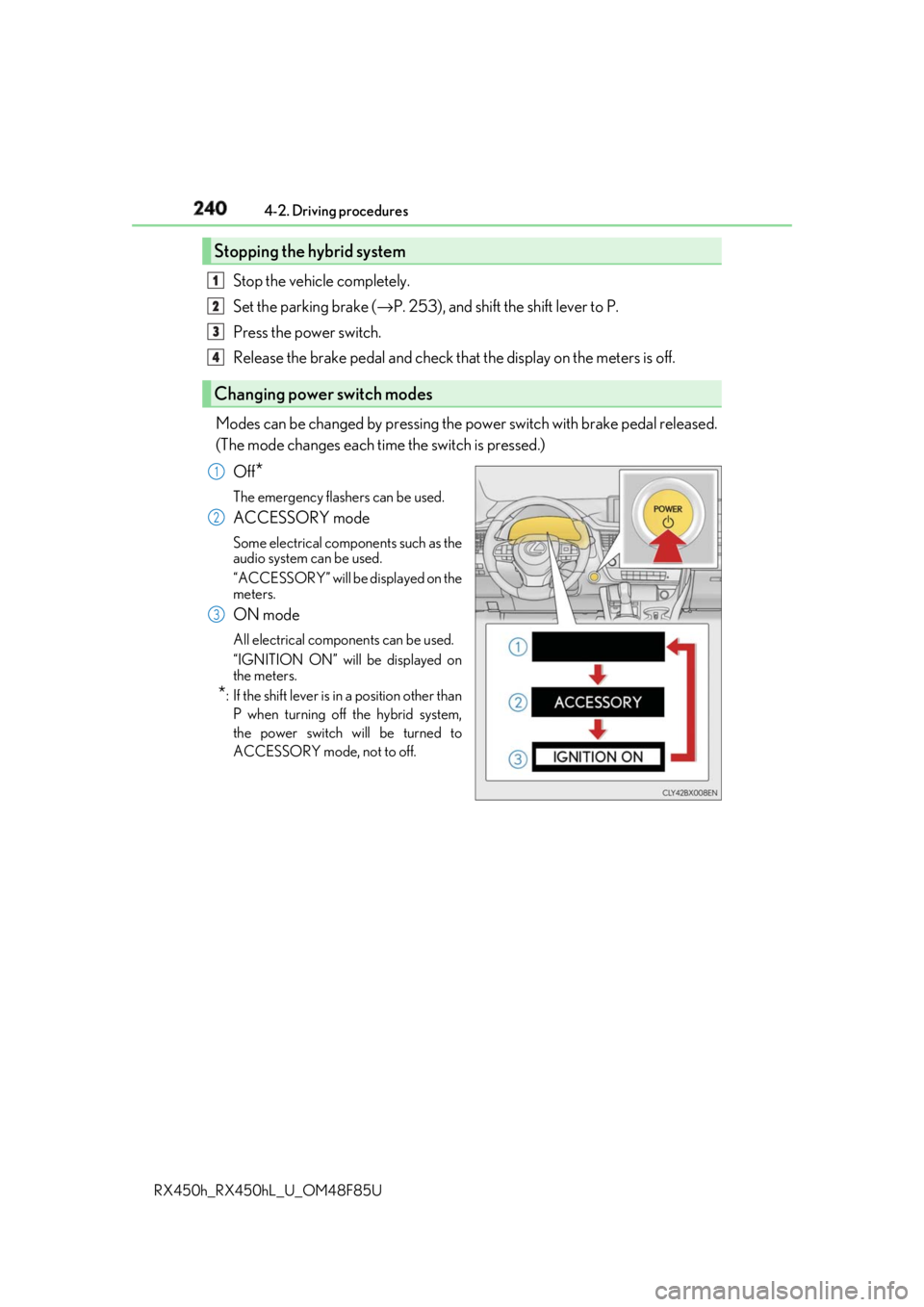
Modes can be changed by pressing the power switch with brake pedal released.
(The mode changes each time the switch is pressed.)
Off
* The emergency flashers can be used.
ACCESSORY mode Some electrical components such as the
audio system can be used.
“ACCESSORY” will be displayed on the
meters.
ON mode All electrical components can be used.
“IGNITION ON” will be displayed on
the meters.
* : If the shift le ver is in a position other than
P when turning off the hybrid system,
the power switch will be turned to
ACCESSORY mode, not to off.Stopping the hybrid system
Changing power switch modes 1
2
3
4
1
2
3
Page 242 of 792

242 4-2. Driving procedures
RX450h_RX450hL _U_OM48F85U■
Steering lock
After turning the power switch off and openin g and closing the doors, the steering wheel
will be locked due to the steering lock func tion. Operating the power switch again auto-
matically cancels the steering lock. ■
When the steering lock cannot be released
■
Steering lock motor overheating prevention
To prevent the steering lock motor from overheating, operation of the motor may be sus-
pended if the hybrid system is turned on an d off repeatedly in a short period of time. In
this case, refrain from operating the hybrid system. Afte r about 10 seconds, the steering
lock motor will resume functioning. ■
When “Access System with Elec. Key Malf unction See Owner’s Manual” is displayed
on the multi-information display
The system may be malfunctio ning. Have the vehicle inspected by your Lexus dealer
immediately. ■
If the “READY” indicator does not come on
In the event that the “READY” indicator does not come on even after performing the
proper procedures for starting the vehicl e, contact your Lexus dealer immediately.■
If the hybrid system is malfunctioning
→ P. 79 ■
If the electronic key battery is depleted
→ P. 630 ■
Operation of the power switch ●
If the switch is not pressed shortly and firm ly, the power switch mode may not change or
the hybrid system may not start. ●
If attempting to restart the hybrid system immediately after turning the power switch off,
the hybrid system may not start in some cases. After turning the power switch off,
please wait a few seco nds before restarting the hybrid system.■
If the smart access system wi th push-button start has been deactivated by a customized
setting
→ P. 692“Steering Wheel Lock Pr ess Power Switch while
Turning Wheel” will be displayed on the multi-
information display.
Check that the shift lever is in P. Press the power
switch shortly and firmly while turning the steer-
ing wheel left and right.