4915-12. Other function
5
Lexus Display Audio system
RX450h_RX450hL _U_OM48F85U■
USB memory functions
→ P. 445 ■
USB memory ●
Compatible devices
USB memory device that can be used for JPEG display.●
Compatible device formats
The following device format can be used:
• USB communication format: USB2.0 FS (480 Mbps)
• File system format: FAT16/32 (Windows)
• Correspondence class: Mass storage class●
JPEG file compatibility
• Compatible image size: Maximum 10MB
• Compatible pixel size: Maximum 10,000,000 pixels
NOTICE ■
To prevent damage to the USB me mory device or its terminals
→ P. 447
Page 493 of 792
4935-12. Other function
5
Lexus Display Audio system
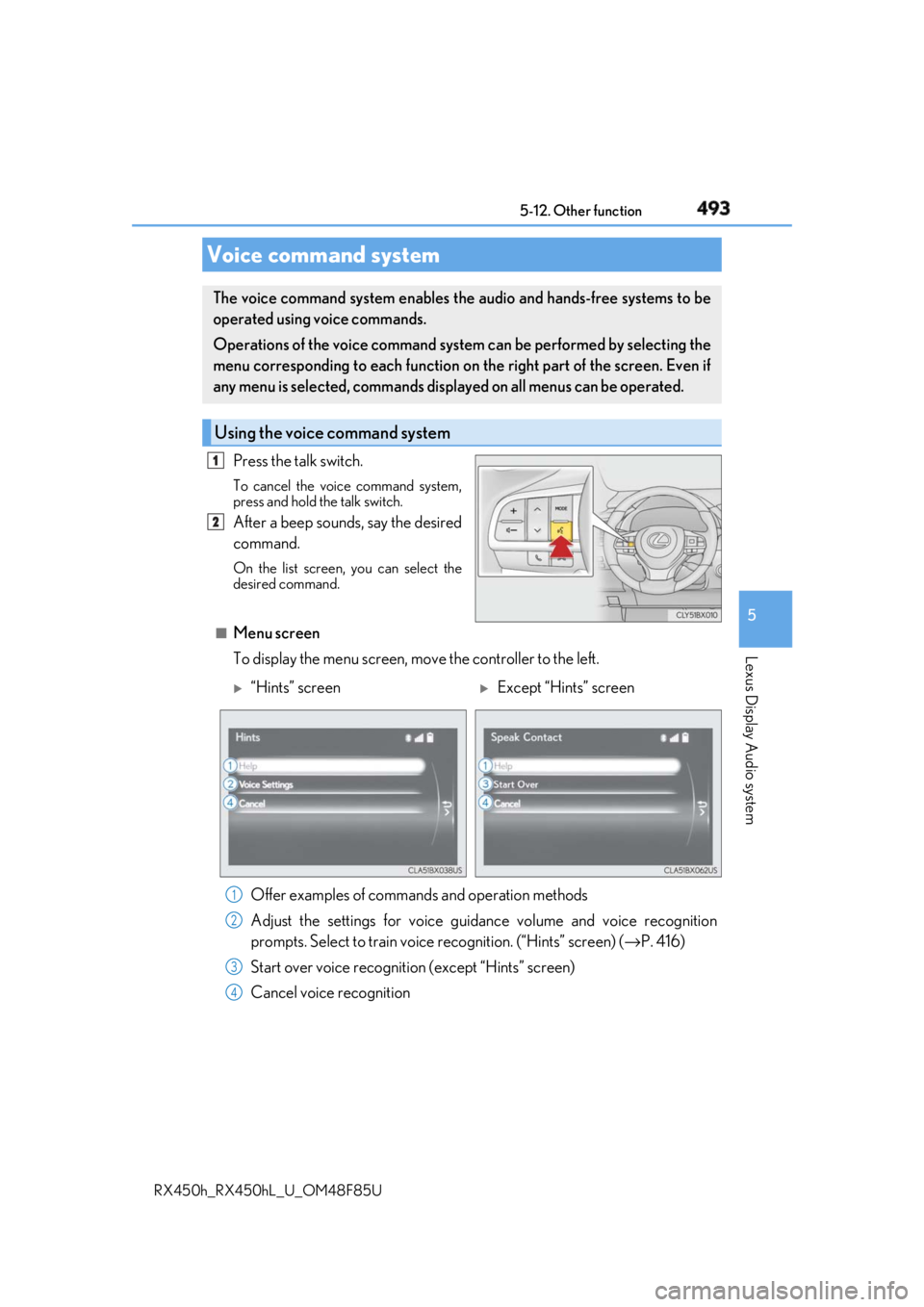
RX450h_RX450hL _U_OM48F85UPress the talk switch. To cancel the voice command system,
press and hold the talk switch.
After a beep sounds, say the desired
command. On the list screen, you can select the
desired command.
■
Menu screen
To display the menu screen, m ove the controller to the left.Voice command system The voice command system enables the audio and hands-free systems to be
operated using voice commands.
Operations of the voice command system can be performed by selecting the
menu corresponding to each function on the right part of the screen. Even if
any menu is selected, commands displayed on all menus can be operated.
Using the voice command system 1
2
“Hints” screen
Except “Hints” screen
Offer examples of commands and operation methods
Adjust the settings for voice guidance volume and voice recognition
prompts. Select to train voice recognition. (“Hints” screen) ( → P. 416)
Start over voice recognition (except “Hints” screen)
Cancel voice recognition 1
2
3
4
Page 495 of 792
4955-12. Other function
5
Lexus Display Audio system
RX450h_RX450hL _U_OM48F85U
Page 497 of 792
4975-12. Other function
5
Lexus Display Audio system
RX450h_RX450hL _U_OM48F85U
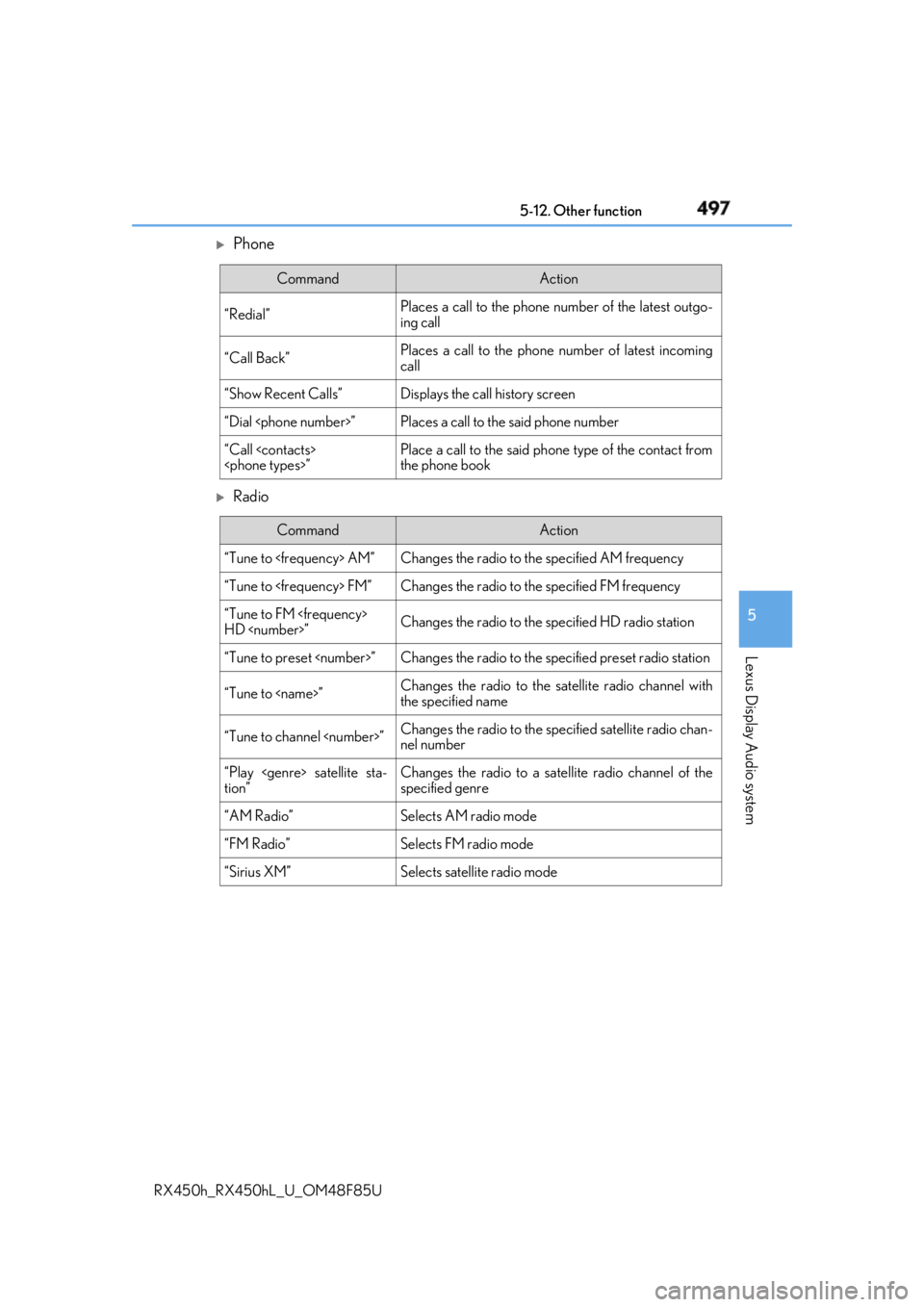
Phone
Radio Command Action
“Redial” Places a call to the phone number of the latest outgo-
ing call
“Call Back” Places a call to the phone number of latest incoming
call
“Show Recent Calls” Displays the call history screen
“Dial ” Places a call to the said phone number
“Call ” Place a call to the said phone type of the contact from
the phone book
Command Action
“Tune to AM” Changes the radio to the specified AM frequency
“Tune to FM” Changes the radio to the specified FM frequency
“Tune to FM
HD ” Changes the radio to the specified HD radio station
“Tune to preset ” Changes the radio to the specified preset radio station
“Tune to ” Changes the radio to the satellite radio channel with
the specified name
“Tune to channel ” Changes the radio to the specified satellite radio chan-
nel number
“Play satellite sta-
tion” Changes the radio to a satellite radio channel of the
specified genre
“AM Radio” Selects AM radio mode
“FM Radio” Selects FM radio mode
“Sirius XM” Selects satellit e radio mode
Page 498 of 792
498 5-12. Other function
RX450h_RX450hL _U_OM48F85U
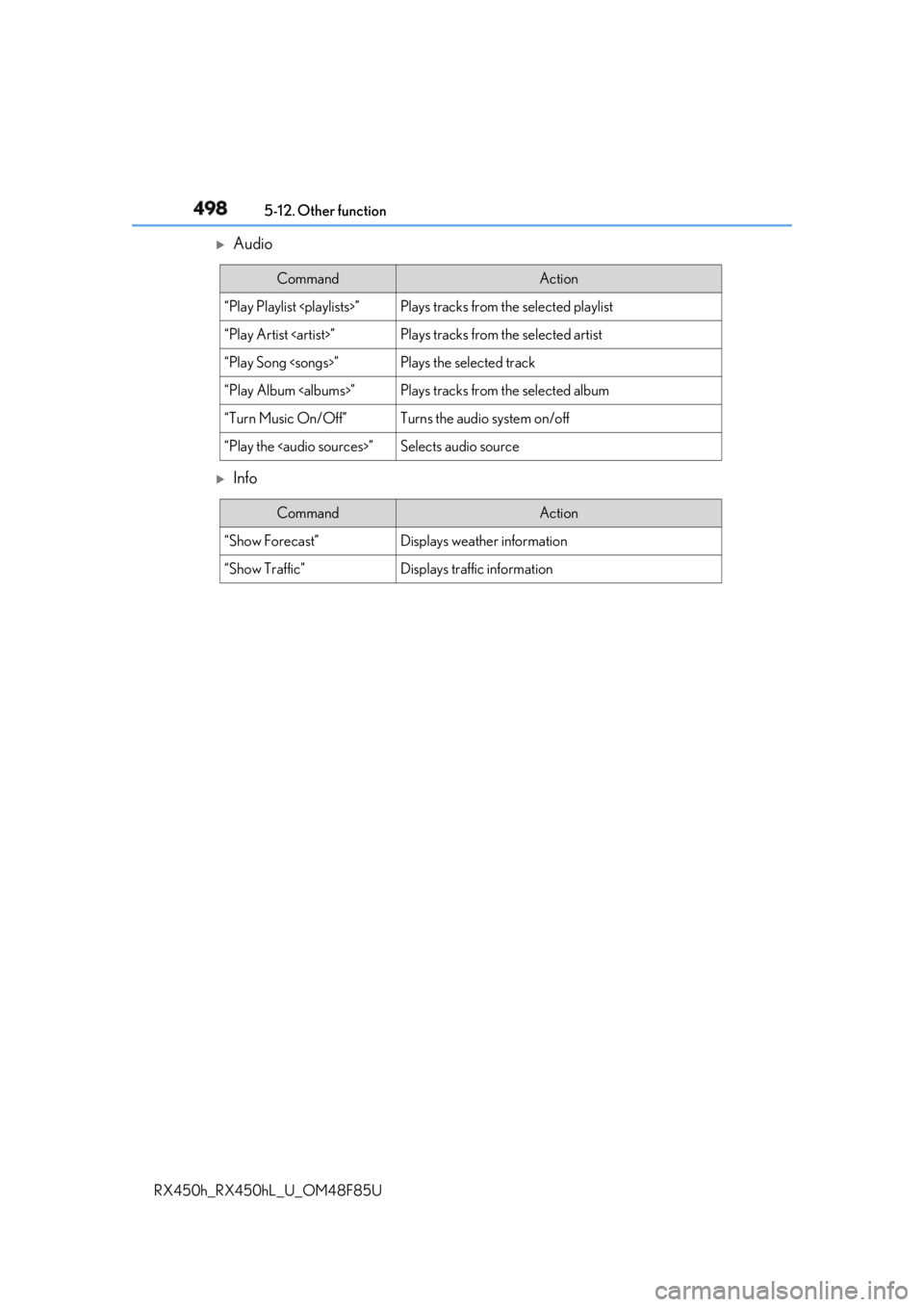
Audio
Info Command Action
“Play Playlist ” Plays tracks from the selected playlist
“Play Artist ” Plays tracks from the selected artist
“Play Song ” Plays the selected track
“Play Album ” Plays tracks from the selected album
“Turn Music On/Off” Turns the audio system on/off
“Play the
Page 504 of 792
504 6-1. Basic operation of the Remote Touch screen
RX450h_RX450hL _U_OM48F85U■
Full screen display
The following functions can be displayed full screen:
• Initial screen
•“Menu” screen ( → P. 503)
• Map screen
**: Refer to the “NAVIGATION SYSTEM OWNER’S MANUAL”.■
Split-screen display
Different information can be displayed on the left and right of the screen. For
example, audio screen can be displa yed and operated while the fuel con-
sumption information screen is being disp layed. The large screen on the left of
the display is called the main display, and the small screen to the right is called
the side display.12.3-inch display ∗
∗ : If equipped12.3-inch display overview
Page 505 of 792
5056-1. Basic operation of the Remote Touch screen
6
Interior features
RX450h_RX450hL _U_OM48F85U■
Selecting the operation screen
When selecting the main display, move the Remote Touch knob to the left.
When selecting the side display, move the Remote Touch knob to the right. ■
Main display
For details about the functions and operat ion of the main display, refer to the
respective section and “NAVIG ATION SYSTEM OWNER’S MANUAL”.■
Side display
Basic screens
To change the screen displayed on the side display, use the screen buttons on
the right side of the display.
Navigation system
*Audio
* Phone
* Vehicle information ( → P. 129)
Air conditioning system
( → P. 510)
Interruption screens
Each of the following screens is displayed automatically in accordance with
conditions.
• Intuitive parking assist ( → P. 333)
•Phone
*• Destination Assist
*•Driving mode ( → P. 379)
* : Refer to the “NAVIGATION SYSTEM OWNER’S MANUAL”.Split-screen display operation
1
2
3
4
5
Page 507 of 792
5076-2. Using the air conditioning system and defogger
RX450h_RX450hL _U_OM48F85U 6
Interior features
RX450h
RX450hLFront automatic air conditioning system Air outlets and fan speed are automati cally adjusted according to the tem-
perature setting.
Vehicles with a Lexus Display Audio sy stem: Press the “MENU” button on the
Lexus Display Audio controller, then sele ct “Climate” to display the air condi-
tioning control screen.
For details on the Lexus Display Audio controller, refer to “Lexus Display
Audio controller” on P. 402.
Vehicles with a navigation system: Press the “MENU” button on the Remote
Touch, then select to display th e air conditioning control screen.
Vehicles with a navigation system (12.3 -inch display): The air conditioning sys-
tem can be displayed and operat ed on the side display. ( → P. 505)
For details on the Remote Touch, refer to the “NAVIGATION SYSTEM
OWNER’S MANUAL”.
Control panel