2018 LEXUS RC300 antenna
[x] Cancel search: antennaPage 156 of 636

156 3-2. Opening, closing and locking the doors and trunk
RC350_RC300 AWD_RC3 00_RC F_U(OM24748U)●
Locks and unlocks the doors ( P. 145)●
Opens the trunk ( P. 151)●
Starts the engine ( P. 207)■
Antenna location
■
Effective range (areas within which the electronic key is detected)Smart access system with push-button start The following operations can be perfor med simply by carrying the electronic
key (including the card key) on your person, for example in your pocket. The
driver should always carry the electronic key.
Antennas outside the cabin
Antennas inside the cabin
Antenna inside the trunk
Antenna outside the trunk
When locking or unlocking the doors
The system can be operated when the elec-
tronic key is within about 2.3 ft. (0.7 m) of
an outside door handle. (Only the doors
detecting the key can be operated.)
When opening the trunk
The system can be operated when the elec-
tronic key is within about 2.3 ft. (0.7 m) of
the trunk release button.
When starting the engine or changing engine switch modes
The system can be operated when the electronic key is inside the vehicle. 1
2
3
4
Page 159 of 636

1593-2. Opening, closing and locking the doors and trunk
3
Operation of each component
RC350_RC300 AWD_RC3 00_RC F_U(OM24748U)■
Note for the entry function ●
Even when the electronic key is within the effective range (detection areas), the system
may not operate properly in the following cases:
• The electronic key is too close to the window or outside door handle, near the
ground, or in a high place when the doors are locked or unlocked.
• The electronic key is near the ground or in a high place, or too close to the rear
bumper center when the trunk is opened.
• The electronic key is on th e instrument panel, rear pack age tray or floor, or in the
door pockets or glove box when the engine is started or engine switch modes are
changed. ●
Do not leave the electronic key on top of th e instrument panel or near the door pockets
when exiting the vehicle. Depending on the radio wave reception conditions, it may be
detected by the antenna outside the cabin an d the doors will become lockable from the
outside, possibly trapping the electronic key inside the vehicle. ●
As long as the electronic key is within th e effective range, the doors may be locked or
unlocked by anyone. However, only the door s detecting the electronic key can be used
to unlock the vehicle. ●
Even if the electronic key is not inside the vehicle, it may be possible to start the engine
if the electronic key is near the window. ●
The doors may unlock or lock if a large amou nt of water splashes on the door handle,
such as in the rain or in a car wash, when th e electronic key is with in the effective range.
(The doors will automatically be locked af ter approximately 60 seconds if the doors
are not opened and closed.) ●
If the wireless remote control is used to lo ck the doors when the electronic key is near
the vehicle, there is a possibility that the d oor may not be unlocked by the entry func-
tion. (Use the wireless remote control to unlock the doors.) ●
Touching the door lock or unlock sensor while wearing gloves may prevent lock or
unlock operation. ●
When the lock operation is performed using the lock sensor, recognition signals will be
shown up to two consecutive times. After this, no recognition signals will be given.●
If the door handle becomes wet while the el ectronic key is within the effective range,
the door may lock and unlock repeatedly. In this case, follow th e following correction
procedures to wash the vehicle:
• Place the electronic key in a location 6 ft. (2 m) or more away from the vehicle. (Take
care to ensure that the key is not stolen.)
• Set the electronic key to battery-saving mode to disable the smart access system
with push-button start. ( P. 158)●
If the electronic key is inside the vehicle and a door handle becomes wet during a car
wash, a message may be shown on the mult i-information display and a buzzer will
sound outside the vehicle. To turn of f the alarm, lock both side doors.●
The lock sensor may not work properly if it comes into contact with ice, snow, mud, etc.
Clean the lock sensor and attempt to operate it again. ●
A sudden handle operation or a handle operation immediately after entering the effec-
tive range may prevent the doors from bein g unlocked. Touch the door unlock sensor
and check that the doors are unlocked before pulling the door handle again.●
Unlocking the vehicle may take more time if another electronic key is within the effec-
tive range.
Page 160 of 636

160 3-2. Opening, closing and locking the doors and trunk
RC350_RC300 AWD_RC3 00_RC F_U(OM24748U)■
When the vehicle is not driven for extended periods ●
To prevent theft of the vehicle, do not leave the electronic key within 6 ft. (2 m) of the
vehicle. ●
The smart access system wi th push-button start can be deactivated in advance.
( P. 569)■
To operate the system properly ●
Make sure to carry the electr onic key when operating the system. Do not get the elec-
tronic key too close to the vehicle when operating the system from the outside of the
vehicle.
Depending on the position and holding condit ion of the electronic key, the key may not
be detected correctly and the system may no t operate properly. (The alarm may go off
accidentally, or the door lock prev ention function may not operate.)●
Do not leave the electronic key inside the trunk.
The key confinement prevention function ma y not operate, depending on the location
of the key (close to a spare tire [if equipped], the inside edge of the trunk), conditions
(inside a metal bag, close to metallic obje cts) and the radio waves in the surrounding
area. ( P. 153)■
If the smart access system with push-button start does not operate properly ●
Locking and unlocking the d oors and opening the trunk: P. 518●
Starting the engine: P. 520■
Customization
Settings (e. g. smart access system with push-button start) can be changed.
(Customizable features: P. 569)■
If the smart access system with push-button start has been deactivated in a customized
setting ●
Locking and unlocking the d oors and opening the trunk:
Use the wireless remote cont rol or mechanical key. ( P. 145, 151, 518)●
Starting the engine and changing engine switch modes: P. 520●
Stopping the engine: P. 207
WARNING ■
Caution regarding interference with electronic devices●
People with implantable cardiac pacema kers, cardiac resynchronization therapy-
pacemakers or implantable cardioverter de fibrillators should keep away from the
smart access system with push-button start antennas. ( P. 156)
The radio waves may affect the operation of such devices. If necessary, the entry
function can be disabled. Ask your Lexus dealer for details, such as the frequency of
radio waves and timing of the emitted radio waves. Then, consult your doctor to see if
you should disable the entry function. ●
Users of any electrical medical device ot her than implantable cardiac pacemakers,
cardiac resynchronization th erapy-pacemakers or implantable cardioverter defibril-
lators should consult the manufacturer of the device for information about its opera-
tion under the influence of radio waves.
Radio waves could have unexpected effects on the operation of such medical
devices.
Ask your Lexus dealer for details on disabling the entry function.
Page 288 of 636

288 4-5. Using the driving support systems
RC350_RC300 AWD_RC3 00_RC F_U(OM24748U)WARNING ■
When using the intuitive parking assist
Observe the following precautions.
Failing to do so may result in the vehicle be ing unable to be driv en safely and possibly
cause an accident. ●
Do not use the sensor at speeds in excess of 6 mph (10 km/h). ●
The sensors’ detection areas and reaction ti mes are limited. When moving forward or
reversing, check the areas surrounding the vehicle (especially th e sides of the vehi-
cle) for safety, and drive slowly, using the brake to control the vehicle’s speed. ●
Do not install accessories within the sensors’ detection areas.■
Limitations of the sensors ●
RC350/RC300: The detection areas of the sensors are limited to the areas around
the vehicle’s front and rear bumpers. ●
RC F: The detection areas of the sensors are limited to the areas around the vehicle’s
front corners and the rear bumpers. ●
Certain vehicle conditions and surrounding environments, such as the following, may
affect the ability of th e sensors to correctly detect obje cts. Pay particul ar attention in
the following situations. Failure to do so may result in the vehicle being driven
unsafely, possibly leading to an accident.
• When there is dirt, snow or ice on a se nsor (Cleaning the sensor will resolve this
problem.)
• When the sensor is frozen (Thawing the area will resolve this problem.)
In especially cold weather, if a sensor is frozen the screen may show an abnormal
display, or objects may not be detected
• When a sensor is covered in any way
• When the vehicle is leaning considerably to one side
• When driving on an extremely bump y road, incline, gravel, or grass
• When the vicinity of the vehicle is noisy due to vehicle horns, motorcycle engines,
air brakes of large vehicles, or other loud noises producing ultrasonic waves
• When there is another vehicle equipped with parking assist sensor in the vicinity
• When the sensor is coated with a sheet of spray or heavy rain
• When the vehicle is equipped with a fender pole or wireless antenna
• When a towing eyelet is installed
• When a bumper or sensor receives a strong impact
• When the vehicle is approaching a tall or curved curb
• When driving in harsh sunlig ht or intense cold weather
• When an object is directly under a bumper
• When objects become too close to the sensors
• When a non-genuine Lexus suspension (lowered suspension, etc.) is installed
In addition to the situations above, there are instances in which, because of their
shape, signs and other objects may be judged by the sensor to be closer than they
are.
Page 362 of 636
362 5-4. Using the other interior features
RC350_RC300 AWD_RC3 00_RC F_U(OM24748U)■
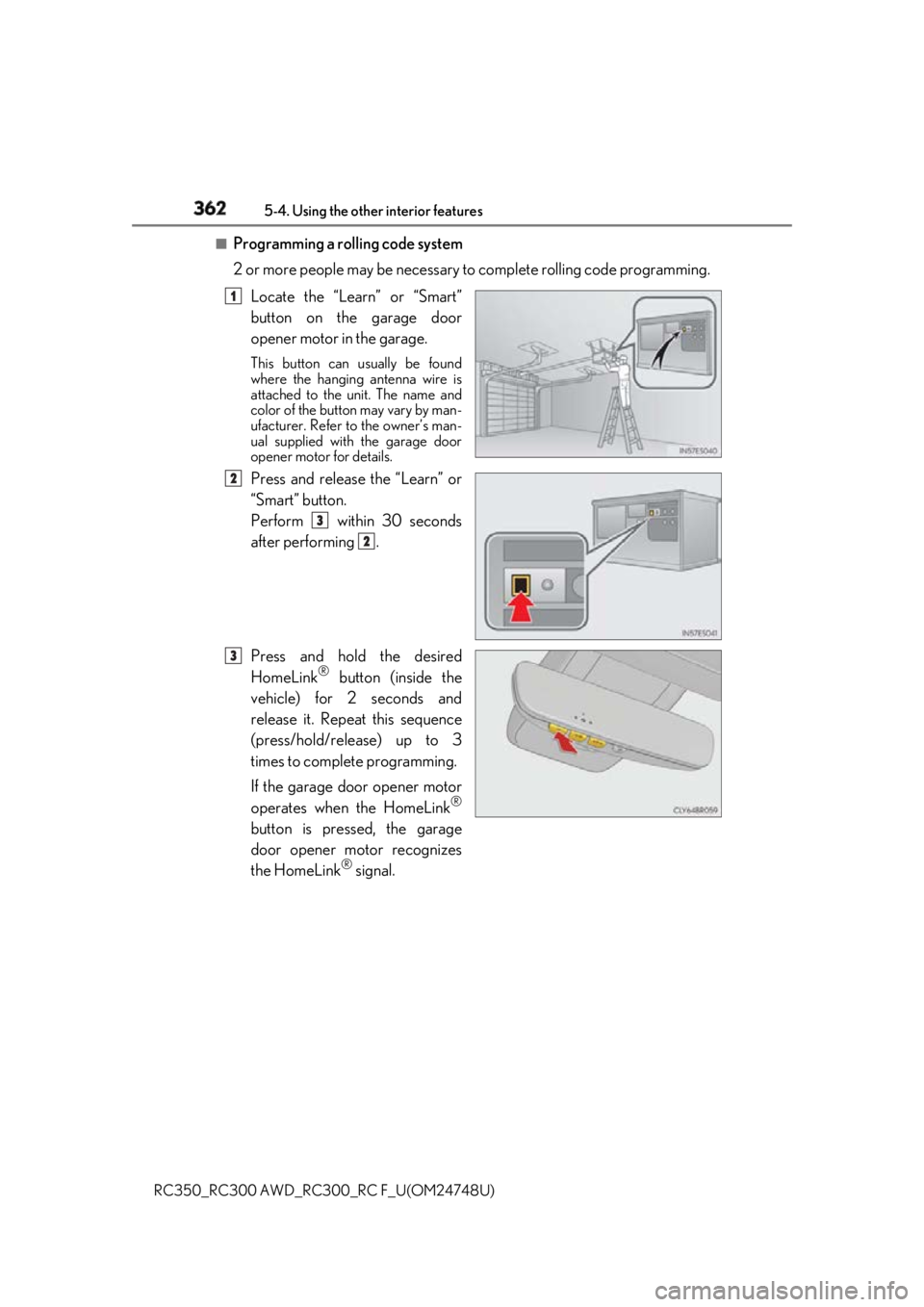
Programming a rolling code system
2 or more people may be necessary to complete rolling code programming.
Locate the “Learn” or “Smart”
button on the garage door
opener motor in the garage. This button can usually be found
where the hanging antenna wire is
attached to the unit. The name and
color of the button may vary by man-
ufacturer. Refer to the owner’s man-
ual supplied with the garage door
opener motor for details.
Press and release the “Learn” or
“Smart” button.
Perform within 30 seconds
after performing .
Press and hold the desired
HomeLink ®
button (inside the
vehicle) for 2 seconds and
release it. Repeat this sequence
(press/hold/release) up to 3
times to complete programming.
If the garage door opener motor
operates when the HomeLink ®
button is pressed, the garage
door opener motor recognizes
the HomeLink ®
signal. 1
2
3
2
3
Page 383 of 636
3836-1. Maintenance and care
6
Maintenance and care
RC350_RC300 AWD_RC3 00_RC F_U(OM24748U)NOTICE ■
Cleaning detergents ●
Do not use the following liquids, as they ma y discolor the vehicle interior or cause
streaks or damage to painted surfaces:
• Center Display: Organic substances such as benzine or gasoline, alkaline solu-
tions, and alcohol
• Seats: Alkaline solutions, or ganic substances such as thinner or benzine, and alco-
hol
• Other parts: Organic substances such as benzine or gasoline , alkaline or acidic
solutions, dye, and bleach ●
Do not use polish wax or polis h cleaner. The instrument pane l’s or other interior part’s
painted surface may be damaged. ■
Preventing damage to leather surfaces
Observe the following precautions to avoid damage to and deterioration of leather
surfaces: ●
Remove any dust or dirt from leather surfaces immediately.●
Do not expose the vehicle to direct sunlight for extended periods of time. Park the
vehicle in the shade, especially during summer. ●
Do not place items made of vinyl, plastic, or containing wax on the upholstery, as they
may stick to the leather su rface if the vehicle interior heats up significantly.■
Water on the floor
Do not wash the vehicle floor with water.
Vehicle systems such as the audio system ma y be damaged if wate r comes into contact
with electrical components such as the au dio system above or un der the floor of the
vehicle. Water may also cause the body to rust. ■
When cleaning the inside of the windshield
Do not allow glass cleaner to contact the lens. Also, do not touch the lens. ( P. 247)■
Cleaning the inside of the rear window ●
Do not use glass cleaner to clean the rear window, as this may cause damage to the
rear window defogger heater wires or antenna. Use a cloth dampened with luke-
warm water to gently wipe the window clean. Wipe th e window in strokes running
parallel to the heater wires or antenna. ●
Be careful not to scratch or damage the heater wires or antenna.
Page 617 of 636

617Alphabetical index
RC350_RC300 AWD_RC3 00_RC F_U(OM24748U)Alarm ............................................................ 80
Anchor brackets ...................................... 60
Antennas (smart access system
with push-button start) ......................156
Anti-lock Brake System (ABS).........312
Warning light .......................................453
Approach warning............................... 275
Armrest .................................................... 356
ASC
(Active Sound Control)....... 223, 224
Assist grip ................................................358
Audio system
* Automatic headlight leveling
system .....................................................227
Warning light .......................................454
Automatic High Beam ....................... 228
Automatic light control system....... 225
Automatic transmission .......................213
If the shift lever
cannot be shifted from P ............. 219
M mode ................................................... 216
Paddle shift switches ............... 215, 216
Average fuel
economy .............................136, 137, 138
Average vehicle speed ........................136 Back-up lights
Replacing light bulbs ....................... 434
Wattage .................................................553
Battery ...................................................... 408
Battery checking ............................... 408
If the vehicle battery
is discharged .................................... 522
Preparing and checking before
winter.................................................... 320
Warning light ....................................... 453
Blind Spot Monitor (BSM) ............... 290
Brake
Fluid .......................................................... 407
Parking brake .......................................222
Warning light ....................................... 453
Brake assist ............................................... 312
Break-in tips ............................................. 193
Brightness control
Instrument panel light
control.......................................... 94, 100
BSM (Blind Spot Monitor) ............... 290
BSM function ....................................... 293
RCTA function .................................... 297 B
* : Refer to the “NAVIGATIO N AND MULTIMEDIA SYSTEM
OWNER’S MANUAL”.
Page 630 of 636

630 Alphabetical index
RC350_RC300 AWD_RC3 00_RC F_U(OM24748U)Side mirrors ..............................................178
Adjusting and folding........................ 178
BSM (Blind spot monitor) ............ 290
Linked mirror function
when reversing ..................................179
Mirror position memory .................. 166
Side turn signal lights ............................ 221
Replacing light bulbs ........................439
Turn signal lever ................................... 221
Side windows .......................................... 182
Slip indicator........................................... 454
Smart access system
with push-button start .......................156
Antenna location ................................. 156
Entry functions ............................. 145, 151
Starting the engine ............................207
Snow mode ............................................... 214
Snow tires ................................................ 323
Spare tire.................................................. 489
Inflation pressure ............................... 548
Storage location ................................ 490 Spark plug ............................................... 544
Specifications......................................... 536
Speed indicator................................ 93, 99
Speedometer ......................................91, 96
Sport mode ...............................................301
Steering lock ............................................ 210
Column lock release .........................210
Steering wheel ........................................ 174
Adjustment.............................................. 174
Audio switches
* Heated steering wheel ................... 344
Power easy access system .............166
Steering wheel
position memory ..............................166
Stop lights
Replacing light bulbs ....................... 439
Storage feature ..................................... 350
Stuck
If the vehicle becomes stuck........ 532
Sun shade .................................................. 187
Sun visors................................................. 354