2018 LEXUS NX300h fog light
[x] Cancel search: fog lightPage 187 of 460

1874-3. Operating the lights and wipers
LEXUS NX300h Owners Manu-
al_USA_OM78212U 4
Driving and tail lights of oncoming and preceding
vehicles
• The movement and direction of oncom-
ing and preceding vehicles
• When a oncoming or preceding vehicle
only has operational lights on one side
• When a oncoming or preceding vehicle
is a two-wheeled vehicle
• The condition of the road (gradient,
curve, condition of th e road surface, etc.)
• The number of passengers and amount of
luggage●
High beam may be turned on or off when
unexpected by the driver.●
In the situations below, the system may
not be able to correctly detect the sur-
rounding brightness levels, and may flash
or expose nearby pedestrians to the high
beam. Therefore, you should consider
turning the high beams on or off manually
rather than relying on the Automatic
High Beam system.
• In bad weather (rain, snow, fog, sand-
storms, etc.)
• The windshield is obscured by fog, mist,
ice, dirt, etc.
• The windshield is cracked or damaged.
• The camera sensor is deformed or dirty.
• The camera sensor temperature is
extremely high.
• Surrounding brightness levels are equal
to those of headlights, tail lights or fog
lights.
• Vehicles ahead have headlights or tail
lights that are either switched off, dirty,
are changing color, or are not aimed
properly.
• When driving through an area of inter-
mittently changing brightness and dark-
ness.
• When frequently and repeatedly driving
ascending/descending roads, or roads
with rough, bumpy or uneven surfaces
(such as stone-paved roads, gravel
tracks, etc.).
• When frequently and repeatedly taking
curves or driving on a winding road.
• There is a highly re flective object ahead
of the vehicle, such as a sign or a mirror.
• The back of a vehicle ahead is highly
reflective, such as a container on a truck.
• The vehicle’s headlights are damaged or
dirty. • The vehicle is listing or titling, due to a flat
tire, a trailer being towed, etc.
• The driver believes that the high beam
may be causing problems or distress to
other drivers or pedestrians nearby.
WARNING■
Limitations of the Automatic High
Beam
Do not rely on the Automatic High
Beam. Always drive safely, taking care to
observe your surroundings and turning
high beam on or off manually if neces-
sary.
NOTICE■
Notes when using the Automatic
High Beam system
Observe the following to ensure that the
Automatic High Beam functions cor-
rectly. ●
Do not touch the camera sensor.
●
Do not subject the camera sensor to a
strong impact.
●
Do not disassemble the camera sen-
sor.
●
Do not spill liquids onto the camera
sensor.
●
Do not apply window tinting or stickers
to the camera sensor or the area of
windshield near the camera sensor.
●
Do not place items on the dashboard.
There is a possibility that the camera
sensor will mistake items reflected in
the windshield for streetlights, the
headlights of other vehicles, etc.
Page 189 of 460

1894-3. Operating the lights and wipers
LEXUS NX300h Owners Manu-
al_USA_OM78212U 4
Driving
1 Turns the fog lights off
2 Turns the fog lights on■
Fog lights can be used when
The headlights are on in low beam. The wiper operation is selected by
moving the lever as follows. ■
Intermittent windshield wipers with
interval adjuster (if equipped)
Type A
1 Off
2 Intermittent operation
3 Low speed operation
4 High speed operation
5 Temporary operationFog light switch When in difficult driving conditions,
such as in rain and fog, turn on the
front fog lights to secure front visi-
bility and turn on the rear fog lights
to notify following vehicles the exis-
tence of your vehicle.
Operating procedure
NOTICE
■
To prevent 12-volt battery discharge
Do not leave the lights on longer than
necessary when the hy brid system is off. Windshield wipers and
washer Operating the lever can switch
between automatic operation and
manual operation, or can use the
washer.
Operating the wiper lever
Page 200 of 460
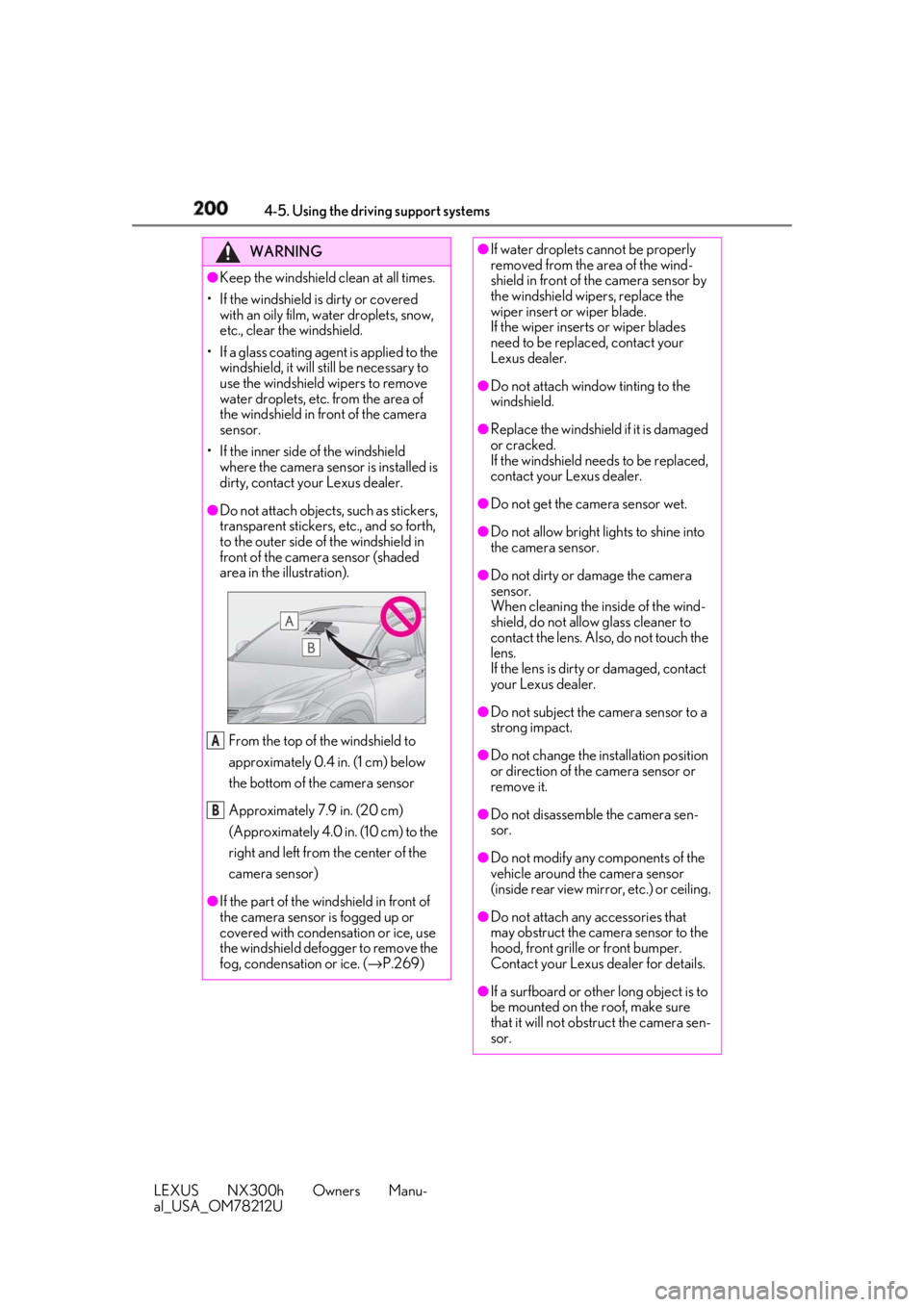
200 4-5. Using the driving support systems
LEXUS NX300h Owners Manu-
al_USA_OM78212U WARNING●
Keep the windshield clean at all times.
• If the windshield is dirty or covered
with an oily film, water droplets, snow,
etc., clear the windshield.
• If a glass coating agent is applied to the
windshield, it will still be necessary to
use the windshield wipers to remove
water droplets, etc. from the area of
the windshield in front of the camera
sensor.
• If the inner side of the windshield
where the camera sensor is installed is
dirty, contact your Lexus dealer.●
Do not attach objects, such as stickers,
transparent stickers, etc., and so forth,
to the outer side of the windshield in
front of the camera sensor (shaded
area in the illustration).
From the top of the windshield to
approximately 0.4 in. (1 cm) below
the bottom of the camera sensor
Approximately 7.9 in. (20 cm)
(Approximately 4.0 in. (10 cm) to the
right and left from the center of the
camera sensor)
●
If the part of the windshield in front of
the camera sensor is fogged up or
covered with condensation or ice, use
the windshield defogger to remove the
fog, condensation or ice. ( → P.269)A
B ●
If water droplets cannot be properly
removed from the area of the wind-
shield in front of the camera sensor by
the windshield wipers, replace the
wiper insert or wiper blade.
If the wiper inserts or wiper blades
need to be replaced, contact your
Lexus dealer. ●
Do not attach window tinting to the
windshield. ●
Replace the windshield if it is damaged
or cracked.
If the windshield ne eds to be replaced,
contact your Lexus dealer. ●
Do not get the camera sensor wet. ●
Do not allow bright lights to shine into
the camera sensor. ●
Do not dirty or damage the camera
sensor.
When cleaning the inside of the wind-
shield, do not allow glass cleaner to
contact the lens. Also, do not touch the
lens.
If the lens is dirty or damaged, contact
your Lexus dealer. ●
Do not subject the camera sensor to a
strong impact.
●
Do not change the installation position
or direction of the camera sensor or
remove it.
●
Do not disassemble the camera sen-
sor.
●
Do not modify any components of the
vehicle around the camera sensor
(inside rear view mirror, etc.) or ceiling.
●
Do not attach any accessories that
may obstruct the camera sensor to the
hood, front grille or front bumper.
Contact your Lexus dealer for details.
●
If a surfboard or other long object is to
be mounted on the roof, make sure
that it will not obstruct the camera sen-
sor.
Page 208 of 460

208 4-5. Using the driving support systems
LEXUS NX300h Owners Manu-
al_USA_OM78212U • When rapidly closing on an electric toll
gate barrier, parking area barrier, or
other barrier that opens and closes
• When using an automatic car wash
• When driving through or under objects
that may contact the vehicle, such as thick
grass, tree branches, or a banner
• When the vehicle is hit by water, snow,
dust, etc. from a vehicle ahead
• When driving through steam or smoke
• When there are patterns or paint on the
road or a wall that may be mistaken for a
vehicle or pedestrian
• When driving near an object that reflects
radio waves, such as a large truck or
guardrail
• When driving near a TV tower, broad-
casting station, electric power plant, or
other location where strong radio waves
or electrical noise may be present
■
Situations in which the system may not
operate properly
●
In some situations such as the following, a
vehicle may not be detected by the radar
sensor and camera sensor, preventing
the system from operating properly:
• If an oncoming vehicle is approaching
your vehicle
• If a vehicle ahead is a motorcycle or bicy-
cle
• When approaching the side or front of a
vehicle
• If a preceding vehicle has a small rear
end, such as an unloaded truck • If a preceding vehicle has a low rear end,
such as a low bed trailer
• If a vehicle ahead is carrying a load which
protrudes past its rear bumper
• If a vehicle ahead has extremely high
ground clearance
• If a vehicle ahead is irregularly shaped,
such as a tractor or side car
• If the sun or other light is shining directly
on a vehicle ahead
• If a vehicle cuts in front of your vehicle or
emerges from beside a vehicle
• If a vehicle ahead makes an abrupt
maneuver (such as sudden swerving,
acceleration or deceleration)
• When suddenly cutting behind a preced-
ing vehicle
• When a vehicle ahead is not directly in
front of your vehicle
• When driving in incl ement weather such
as heavy rain, fog, snow or a sandstorm
• When the vehicle is hit by water, snow,
dust, etc. from a vehicle ahead
• When driving through steam or smoke
• When driving in a place where the sur-
Page 210 of 460

210 4-5. Using the driving support systems
LEXUS NX300h Owners Manu-
al_USA_OM78212U with snow, etc.
• When the part of the windshield in front
of the camera sensor is fogged up or cov-
ered with condensation or ice (Defog-
ging the windshield: → P.269)
• If the camera sensor is obstructed, such
as when the hood is open or a sticker is
attached to the windshield near the cam-
era sensor●
If the PCS warning ligh t continues to flash
or remains illuminated or the warning
message does not disappear even
though the vehicle has returned to nor-
mal, the system may be malfunctioning.
Have the vehicle inspected by your Lexus
dealer immediately.■
If VSC is disabled●
If VSC is disabled ( → P.251), the pre-col-
lision brake assist and pre-collision brak-
ing functions are also disabled.●
The PCS warning light will turn on and
“VSC Turned Off Pre-Collision Brake
System Unavailable” will be displayed on
the multi-information display.
■
Lane departure alert function
When the system determines that the
vehicle might depart from its lane, a
warning is displayed on the multi-infor-
mation display, and either the warning
buzzer sounds or the steering wheel
vibrates to alert the driver. When the warning buzzer sounds or the
steering wheel vibrates, check the sur-
rounding road situation and carefully oper-
ate the steering wheel to move the vehicle
back to the center of the lane.LDA (Lane Departure Alert
with steering control) When driving on highways and
freeways with white (yellow) lines,
this function alerts the driver when
the vehicle might depart from its
lane and provides assistance by
operating the steering wheel to
keep the vehicle in its lane.
The LDA system recognizes visible
white (yellow) lines with the camera
sensor on the upper portion of the
front windshield.
Functions included in LDA sys-
tem
Page 212 of 460

212 4-5. Using the driving support systems
LEXUS NX300h Owners Manu-
al_USA_OM78212U Press the LDA switch to turn the LDA
system on. The LDA indicator illuminates and a mes-
sage is displayed on the multi-information
display.
Press the LDA switch again to turn the
LDA system off.
When the LDA system is turned on or off,
operation of the LDA system continues in WARNING■
Before using LDA system
Do not rely solely upon the LDA system.
The LDA system does not automatically
drive the vehicle or reduce the amount of
attention that must be paid to the area in
front of the vehicle. The driver must
always assume full responsibility for driv-
ing safely by paying careful attention to
the surrounding conditions and operat-
ing the steering wheel to correct the path
of the vehicle. Also, the driver must take
adequate breaks when fatigued, such as
from driving for a long period of time.
Failure to perform appropriate driving
operations and pay careful attention may
lead to an accident, resulting in death or
serious injury. ■
To avoid operating LDA system by
mistake
When not using the LDA system, use the
LDA switch to turn the system off. ■
Situations unsuitable for LDA system
Do not use the LDA system in the follow-
ing situations.
The system may not operate properly
and lead to an accident, resulting in
death or serious injury.
●
A spare tire, tire chains, etc. are
equipped.
●
When the tires have been excessively
worn, or when the tire inflation pres-
sure is low.
●
Tires which differ by structure, manu-
facturer, brand or tread pattern are
used.
●
Objects or patterns that could be mis-
taken for white (yellow) lines are pres-
ent on the side of th e road (guardrails,
curbs, reflective poles, etc.).
●
Vehicle is driven on a snow-covered
road.
●
White (yellow) lines are difficult to see
due to rain, snow, fog, dust, etc. ●
Asphalt repair marks, white (yellow)
line marks, etc. are present due to road
repair. ●
Vehicle is driven in a temporary lane or
restricted lane due to construction
work. ●
Vehicle is driven on a road surface
which is slippery due to rainy weather,
fallen snow, freezing, etc. ●
Vehicle is driven in traffic lanes other
than on highways and freeways. ●
Vehicle is driven in a construction
zone. ●
Vehicle is towing a trailer or another
vehicle. ■
Preventing LDA system malfunctions
and operations performed by mistake ●
Do not modify the headlights or place
stickers, etc. on the surface of the
lights. ●
Do not modify the suspension etc. If
the suspension etc. needs to be
replaced, contact your Lexus dealer. ●
Do not install or place anything on the
hood or grille. Also, do not install a
grille guard (bull bars, kangaroo bar,
etc.).
●
If your windshield needs repairs, con-
tact your Lexus dealer.
Turning LDA system on
Page 238 of 460

238 4-5. Using the driving support systems
LEXUS NX300h Owners Manu-
al_USA_OM78212U flooded road●
Influence from the weather
• Ice, snow, dirt, etc., has adhered to the
sensor (if removed, the system returns to
normal)
• Heavy rain or water strikes the vehicle
• In severe weather such as fog, snow or a
sand storm●
Influence from other sonic waves
• An ultrasonic wave source is nearby, such
as the horn or clearance sonar of another
vehicle, a vehicle detector, a motorcycle
engine or the air brake of a large vehicle
• Electronic components (such as a backlit
license plate (especially fluorescent
types), fog lights, a fender pole or a wire-
less antenna) are inst alled near the sen-
sors●
Changes in the vehicle
• The vehicle is tilted a large amount
• The height of the vehicle has drastically
changed due to the carried load (the
nose tilts up or down)
• The direction of the sensor has deviated
due to a collision or other impact■
Situations in which the system may not
operate normally
In the following situations, the system may
not operate normally. ●
Environmental influence
• There is an obstacle that cannot be
detected between the vehicle and
another obstacle that can be detected
• An obstacle such as another vehicle, a
motorcycle, a bicycle or a pedestrian cuts
in front of the vehicle or jumps out from
the side.●
Influence from the weather
• The area around the sensor is extremely
hot or cold
• The wind is strong • Ice, snow, dirt, etc., has adhered to the
sensor (if removed, the system returns to
normal)
• Heavy rain or water strikes the vehicle
• In severe weather such as fog, snow or a
sand storm ●
Influence from other sonic waves
• An ultrasonic wave source is nearby, such
as the horn or clearance sonar of another
vehicle, a vehicle detector, a motorcycle
engine or the air brake of a large vehicle
• Electronic components (such as a backlit
license plate (especially fluorescent
types), fog lights, a fe nder pole or a wire-
less antenna) are installed near the sen-
sors ●
Changes in the vehicle
• The vehicle is tilted a large amount
• The height of the vehicle has drastically
changed due to the carried load (the
nose tilts up or down)
• The direction of the sensor has deviated
due to a collision or other impact ■
When “Parking Support Brake Unavail-
able” is displayed on the multi-informa-
tion display and the PKSB OFF indicator
flashes ●
Ice, snow, dirt, etc., may have adhered to
the sensor. If this occurs, remove the ice,
snow, dirt, etc., from the sensor to return
the system to normal.
Also, a warning message may be dis-
played at low temperatures due to ice
forming on the sensor, and the sensor
may not detect obstacles. Once the ice
melts, the system wi ll return to normal.
●
If this message is shown even after
removing dirt from the sensor, or shown
when the sensor was not dirty to begin
with, have the vehicle inspected by your
Lexus dealer.
●
System initialization may not have been
Page 263 of 460

263
LEXUS NX300h Owners Manu-
al_USA_OM78212U 5 5
Interior features Interior features5-1. Remote Touch
Remote Touch ............................ 264
5-2. Using the air conditioning system
and defogger
Automatic air conditioning system
........................................................ 268
Heated steering wheel/seat heat-
ers/seat ventilators ................ 275
5-3. Using the interior lights
Interior lights list......................... 278
5-4. Using the storage features
List of storage features............. 281
Luggage compartment features
........................................................ 284
5-5. Using the other interior features
Other interior features ........... 288
Garage door opener............... 298
Compass....................................... 303
Lexus Enform Safety Connect
........................................................ 306
Lexus Enform Remote .............. 311
Lexus Enform Service Connect
......................................................... 312