Page 546 of 628
546
LX570_OM_OM60Q78U_(U) 7-2. Steps to take in an emergency
If the electronic key does not operate properly Use the mechanical key ( → P. 111) in
order to perform the following opera-
tions (driver’s door only):
Locks all the doors
Closes the windows and moon roof
*(turn and hold)
Unlocks the doors Turning the key rearward unlocks the
driver’s door. Turning the key once again
unlocks the other doors.
Opens the windows and moon roof
* (turn and hold)
* : These settings must be cust omized at your Lexus dealer.If communication between the electronic key and vehicle is interrupted
( → P. 134) or the electronic key ca nnot be used because the battery is
depleted, the smart access system with push-button start and wireless
remote control cannot be used. In such cases, the doors can be opened and
the engine can be started by following the procedure below.
Locking and unlocking the doors and key linked functions 1
2
3
4
Page 547 of 628

5477-2. Steps to take in an emergency
LX570_OM_OM60Q78U_(U) 7
When trouble arises Ensure that the shift lever is in P and depress the brake pedal.
Touch the Lexus emblem side of the
electronic key to the engine switch. When the electronic key is detected, a
buzzer sounds and the engine switch
will turn to IGNITION ON mode.
When the smart access system with
push-button start is deactivated in cus-
tomization setting, the engine switch will
turn to ACCESSORY mode.
Firmly depress the brake pedal and check that is shown on the
multi-information display.
Press the engine switch. In the event that the engine still cannot be started, contact your Lexus dealer.■
Stopping the engine
Shift the shift lever to P and press the engine switch as you normally do when stopping
the engine. ■
Replacing the key battery
As the above procedure is a temporary measure, it is recommended that the electronic
key battery be replaced immediately when the battery is depleted. ( → P. 503)■
Changing engine switch modes
Release the brake pedal and press the engine switch in step above. The engine does
not start and modes will be changed e ach time the switch is pressed. ( → P. 206)■
Alarm
Using the mechanical key to lock th e doors will not set the alarm system.
If a door is unlocked using the mechanical ke y when the alarm system is set, the alarm
may be triggered. ( → P. 77)■
When the electronic key does not work properly ●
Make sure that the smart access system wi th push-button start has not been deacti-
vated in the customization setting. If it is off, turn the function on.
(Customizable features: → P. 580)●
Check if battery-saving mode is set. If it is set, cancel the function. ( → P. 134)Starting the engine 1
2
3
4
3
Page 549 of 628
549
LX570_OM_OM60Q78U_(U) 7
When trouble arises 7-2. Steps to take in an emergency
If the vehicle battery is discharged If you have a set of jumper (or booster) cables and a second vehicle with a 12-volt
battery, you can jump start your Lexus following the steps below.
Confirm that the electronic key is
being carried.
When connecting the jumper (or
booster) cables, depending on the
situation, the alarm may activate and
doors locked. ( → P. 79)
Open the hood. Remove the engine compartment cover. ( → P. 474)
Connect the jumper cables.
Positive (+) battery terminal on your vehicle
Positive (+) battery termin al on the second vehicle
Negative (-) battery terminal on the second vehicle
Connect the jumper cable to ground on your vehicle as shown in the illus-
tration.The following procedures may be used to start the engine if the vehicle’s bat-
tery is discharged.
You can also call your Lexus dealer or qualified repair shop. 1
2
3
1
2
3
4
Page 559 of 628
LX570_OM_OM60Q78U_(U) 5598-1. Specifications
8
Vehicle specifications ■
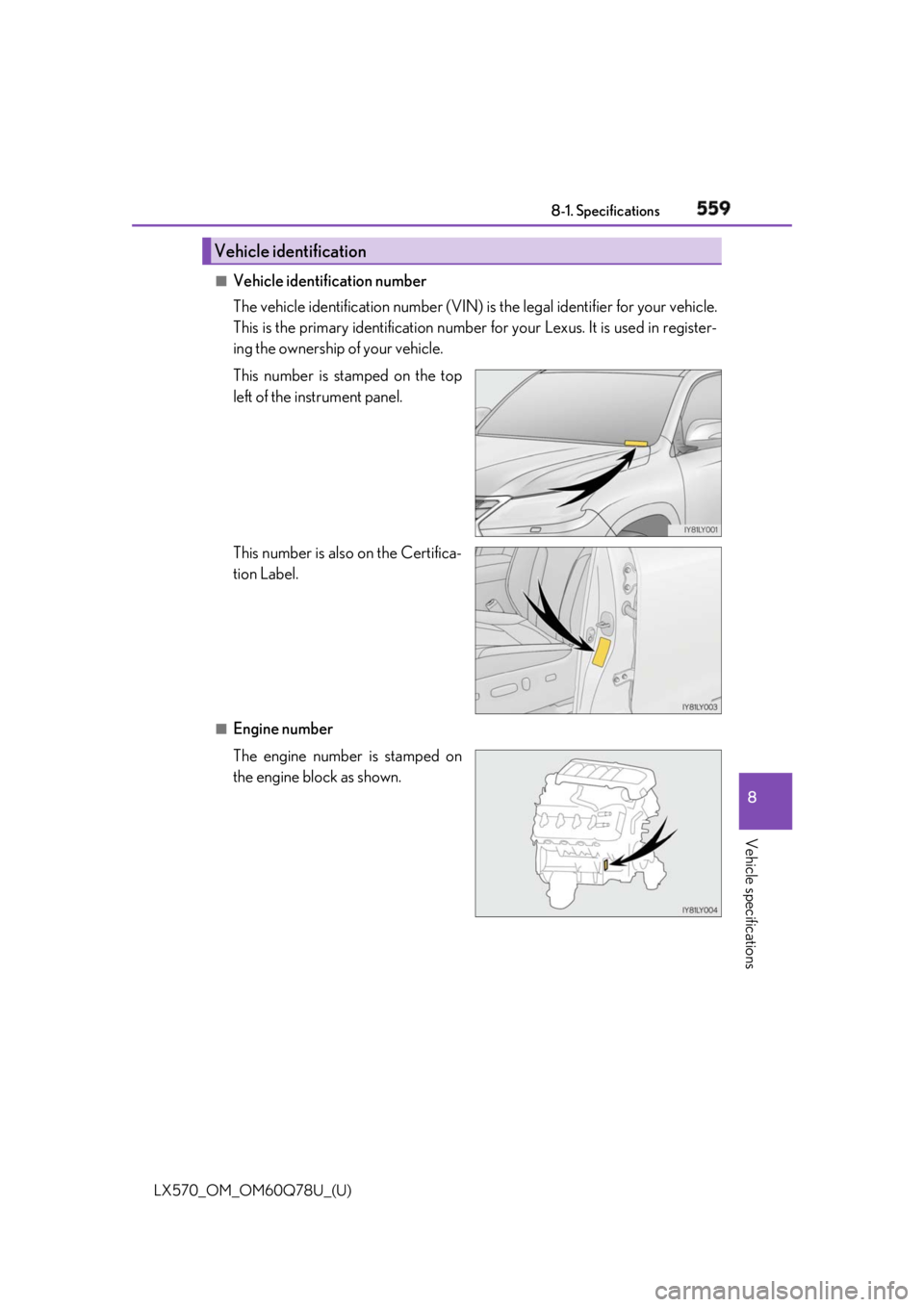
Vehicle identification number
The vehicle identification number (VIN) is the legal identifier for your vehicle.
This is the primary identification number fo r your Lexus. It is used in register-
ing the ownership of your vehicle.
This number is stamped on the top
left of the instrument panel.
This number is also on the Certifica-
tion Label.
■
Engine number
The engine number is stamped on
the engine block as shown.Vehicle identification
Page 563 of 628

LX570_OM_OM60Q78U_(U) 5638-1. Specifications
8
Vehicle specifications Your Lexus vehicle is filled with “Toyot a Genuine Differential Gear Oil” at the
factory.
Use Lexus approved “Toyota Ge nuine Differential Gear O il” or an equivalent of
matching quality to satisfy the above specification. Please contact your Lexus
dealer for further details.
The fluid capacity is the quantity of refe rence. If replacement is necessary, con-
tact your Lexus dealer.Differential Oil capacity
Front
Rear 2.01 qt. (1.90 L, 1.67 Imp.qt.)
4.44 qt. (4.20 L, 3.70 Imp.qt.)
Oil type and viscosity Toyota Genuine Differential Gear Oil LT 75W-85
GL-5 or equivalent
Automatic transmission Fluid capacity 10.7 qt. (10.1 L, 8.9 Imp.qt.)
Fluid type Toyota Genuine ATF WS
NOTICE ■
Automatic transmission fluid type
Using transmission fluid other than “Toyota Genuine ATF WS” may cause deterioration
in shift quality, locking up of your transm ission accompanied by vibration, and ulti-
mately damage the transmission of your vehicle.
Page 581 of 628

LX570_OM_OM60Q78U_(U) 5818-2. Customization
8
Vehicle specifications Some function settings are changed simultaneously with other functions being
customized. Contact your Lexu s dealer for further details.
Settings that can be changed using the Remote Touch screen
Settings that can be changed us ing the multi-information display
Settings that can be changed by your Lexus dealer Definition of symbols: O = Available, – =Not available■
Smart access system with push-button start ( → P. 132)
■
Wireless remote control ( → P. 110)Customizable features 1
2
3
Function Default setting Customized
setting
Smart access system with
push-button start On Off O — O
Smart door unlocking Driver’s door All the doors O — O 1 2 3
Function Default setting Customized
setting
Wireless remote control On Off — — O
Unlocking operation Driver’s door
unlocked in one
step, all doors
unlocked in two
steps All doors unlocked
in one step O — O
Power back door operation Push and hold One short push — — O
Push twice — — O
Off — — O
Alarm (panic mode) On Off — — O 1 2 3
Page 582 of 628

582
LX570_OM_OM60Q78U_(U) 8-2. Customization■
Smart access system with push-button start ( → P. 132) and wireless remote
control ( → P. 110)
■
Door lock ( → P. 115)Function Default setting Customized
setting
Operation signal (Emer-
gency flashers) On Off O — O
Adjust the volume of confir-
mation buzzer sounds
when the vehicle is locked
or unlocked 5 Off
O — O
1 to 7
Open door warning func-
tion (when locking the vehi-
cle) On Off — — O
Time elapsed before auto-
matic door lock function is
activated if door is not
opened after being
unlocked 60 seconds Off
O — O30 seconds
120 seconds 1 2 3
Function Default setting Customized
setting
Unlocking using a mechan-
ical key Driver’s door
unlocked in one
step, all doors
unlocked in two
steps All doors unlocked
in one step — — O
Automatic door lock Shifting the shift
lever to position
other than P Off
O — OVehicle speed is
approximately
12 mph (20 km/h)
or higher
Automatic door unlock Shifting the shift
lever to P Off
O — O
Driver’s door is
opened 1 2 3
Page 583 of 628

LX570_OM_OM60Q78U_(U) 5838-2. Customization
8
Vehicle specifications ■
Power back door ( → P. 122)
* 1
: In this case, the power back door operation using the wi reless remote control can also
be made only by pushing and holding.
* 2
: In this case, the power back door operation using the wi reless remote control can also
be made only by pushing twice.
* 3
: The back door can be opened using the wireless remote control after unlocking the
back door.■
Power windows ( → P. 165)
* : The settings of the moon roof are change d in conjunction with the settings of the
power windows. Function Default setting Customized
setting
Power back door switch
operation Push and hold One short push — — O
Operation signal Off On — — O
Back door opener switch
automatic open function On Off — — O
Wireless remote control
linked operation (one
motion) On
* 1
On (Push twice)
* 2
— — O
Off
* 1, 3 1 2 3
Function Default setting Customized
setting
Mechanical key linked
operation (close)
* Off On — — O
Mechanical key linked
operation (open)
* Off On — — O
Wireless remote control
linked operation (open)
* Off On — — O
Power windows open warn-
ing buzzer On Off — — O
Buzzer sounds if operated
using wireless remote con-
trol On Off — — O 1 2 3