2018 LEXUS LS500H cruise control
[x] Cancel search: cruise controlPage 252 of 528

252 4-5. Using the driving support systems
LS500h_OM_OM50F42U_(U) WARNING■
To avoid inadvertent dynamic radar
cruise control with full-speed range
activation
Switch the dynamic radar cruise control
with full-speed range setting to off, using
the cruise control main switch when not
in use. ■
Situations unsuitable for dynamic
radar cruise control with full-speed
range
Do not use dynamic radar cruise control
with full-speed range in any of the follow-
ing situations.
Doing so may result in inappropriate
speed control and could cause an acci-
dent resulting in death or serious injury. ●
Roads where there are pedestrians,
cyclists, etc.●
In heavy traffic●
On roads with sharp bends●
On winding roads●
On slippery roads, such as those cov-
ered with rain, ice or snow●
On steep downhills , or where there
are sudden changes between sharp up
and down gradients
Vehicle speed may exceed the set
speed when driving down a steep hill.
●
At entrances to freeways and highways
●
When weather conditions are bad
enough that they may prevent the sen-
sors from detectin g correctly (fog,
snow, sandstorm, heavy rain, etc.)
●
When there is rain, snow, etc. on the
front surface of the radar sensor or
camera sensor
●
In traffic conditions that require fre-
quent repeated acceleration and
deceleration
●
When an approach warning buzzer is
heard often
Page 254 of 528

254 4-5. Using the driving support systems
LS500h_OM_OM50F42U_(U) speedThe system accelerates until the set speed is re ached. The system then returns to constant
speed cruising.
1 Press the cruise control main switch
to activate the cruise control.Radar cruise control indicator will come on
and a message will be displayed on the
multi-information display.
Press the switch again to deactivate the
cruise control.
If the cruise control ma in switch is pressed
and held for 1.5 seconds or more, the sys-
tem turns on in constant speed control
mode. ( → P.257)
2 Accelerate or decelerate, with
accelerator pedal operation, to the
desired vehicle speed (at or above
approximately 30 mph [50 km/h])
and press the “-SET” switch to set
the speed.Cruise control “SET” indicator will come
on.
The vehicle speed at the moment the
switch is released becomes the set speed.
If the switch is operated while the vehicle
speed is below approximately 30 mph (50
km/h) and a preceding vehicle is present,
the set speed will be adjusted to approxi- mately 30 mph (50 km/h).
To change the set speed, operate the
“+RES” or “-SET” switch until the
desired set speed is displayed.
1 Increases the speed (Except when the vehicle has been
stopped by system control in vehi-
cle-to-vehicle distance control mode)
2 Decreases the speed
Fine adjustment: Press the switch.
Large adjustment: Press and hold the
switch to change the speed, and
release when the desired speed is
reached.
In the vehicle-to-vehicle distance con-
trol mode, the set speed will be Setting the vehicle speed (vehi-
cle-to-vehicle distance control
mode)
Adjusting the set speed
Page 256 of 528
256 4-5. Using the driving support systems
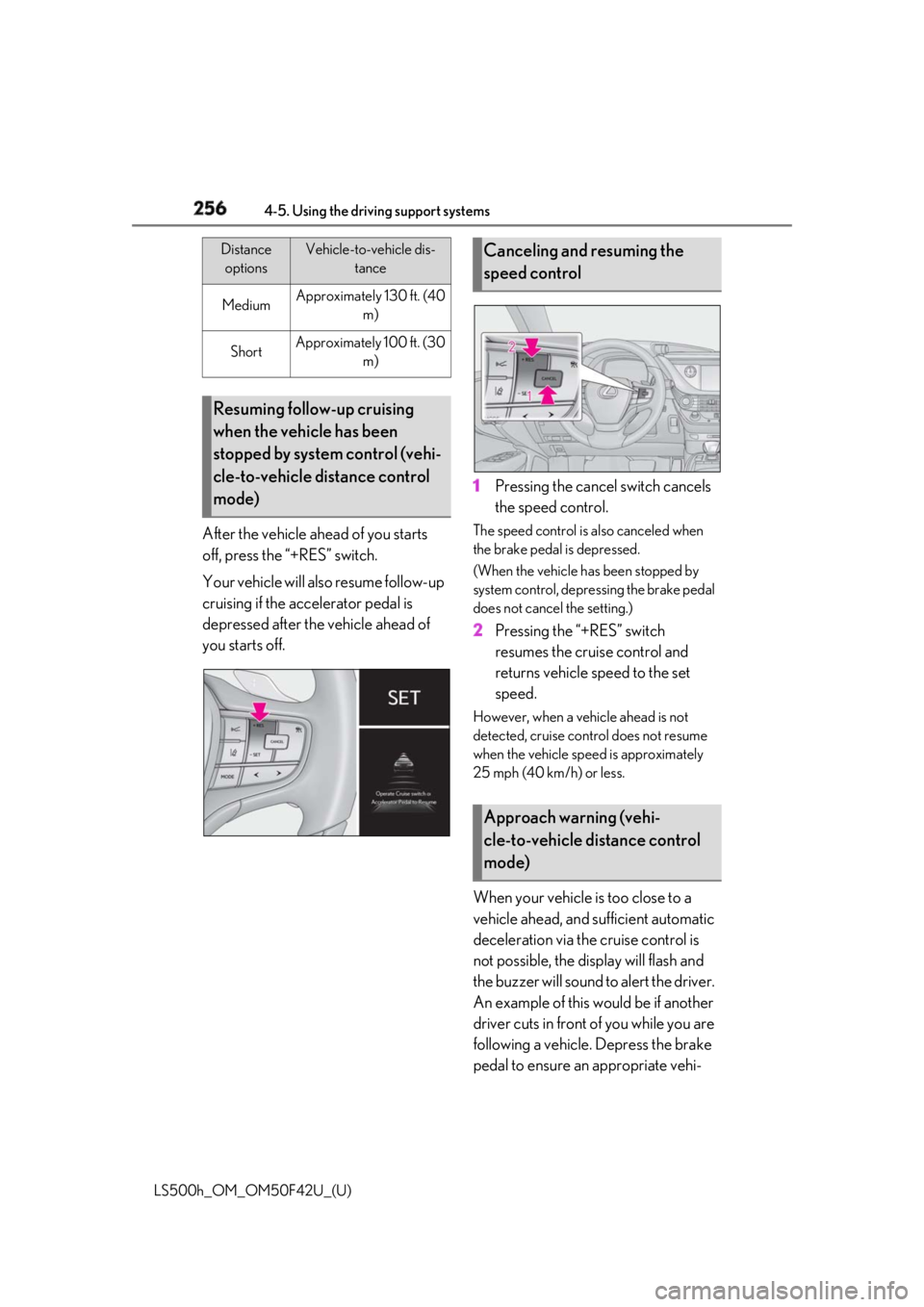
LS500h_OM_OM50F42U_(U) After the vehicle ahead of you starts
off, press the “+RES” switch.
Your vehicle will also resume follow-up
cruising if the accelerator pedal is
depressed after the vehicle ahead of
you starts off. 1 Pressing the cancel switch cancels
the speed control. The speed control is also canceled when
the brake pedal is depressed.
(When the vehicle has been stopped by
system control, depressing the brake pedal
does not cancel the setting.)
2 Pressing the “+RES” switch
resumes the cruise control and
returns vehicle speed to the set
speed. However, when a vehicle ahead is not
detected, cruise control does not resume
when the vehicle speed is approximately
25 mph (40 km/h) or less.
When your vehicle is too close to a
vehicle ahead, and sufficient automatic
deceleration via the cruise control is
not possible, the display will flash and
the buzzer will sound to alert the driver.
An example of this would be if another
driver cuts in front of you while you are
following a vehicle. Depress the brake
pedal to ensure an appropriate vehi-Medium Approximately 130 ft. (40
m)
Short Approximately 100 ft. (30
m)
Resuming follow-up cruising
when the vehicle has been
stopped by system control (vehi-
cle-to-vehicle distance control
mode) Distance
options Vehicle-to-vehicle dis-
tance
Canceling and resuming the
speed control
Approach warning (vehi-
cle-to-vehicle distance control
mode)
Page 257 of 528

2574-5. Using the driving support systems
LS500h_OM_OM50F42U_(U) 4
Driving cle-to-vehicle distance.
■
Warnings may not occur when
In the following instances, warnings
may not occur even when the vehi-
cle-to-vehicle distance is small.
When the speed of the preceding
vehicle matches or exceeds your
vehicle speed
When the preceding vehicle is trav-
eling at an extremely slow speed
Immediately after the cruise control
speed was set
When depressing the accelerator
pedal
When constant speed control mode is
selected, your vehicle will maintain a
set speed without controlling the vehi-
cle-to-vehicle distance. Select this
mode only when vehicle-to-vehicle dis-
tance control mode does not function
correctly due to a dirty radar sensor,
etc.
1 With the cruise control off, press
and hold the cruise control main
switch for 1.5 seconds or more. Immediately after the switch is pressed, the
radar cruise control indicator will come on.
Afterwards, it switches to the cruise con-
trol indicator.
Switching to constant speed control mode
is only possible when operating the switch
with the cruise control off.
2 Accelerate or decelerate, with
accelerator pedal operation, to the
desired vehicle speed (at or above
approximately 25 mph [40 km/h])
and press the “-SET” switch to set
the speed. Cruise control “SET” indicator will come
on.
The vehicle speed at the moment the
switch is released becomes the set speed.
Adjusting the speed setting: → P.254
Canceling and resuming the speed setting:
→ P.256
■
Dynamic radar cruise control with
full-speed range can be set when
●
The shift position is in D.
●
Range 4 or higher of D has been selected Selecting constant speed con-
trol mode
Page 258 of 528

258 4-5. Using the driving support systems
LS500h_OM_OM50F42U_(U) by using the paddle shift switch.●
Vehicle speed is at or above approxi-
mately 30 mph (50 km/h).
However, when a preceding vehicle is
detected, the dynamic radar cruise con-
trol with full-speed range can be set even
if the vehicle speed is below approxi-
mately 30 mph (50 km/h).■
Accelerating after setting the vehicle
speed
The vehicle can accelerate by operating the
accelerator pedal. After accelerating, the
set speed resumes. However, during vehi-
cle-to-vehicle distance control mode, the
vehicle speed may decrease below the set
speed in order to maintain the distance to
the preceding vehicle. ■
When the vehicle stops while follow-up
cruising●
Pressing the “+RES” switch while the
vehicle ahead stops w ill resume follow-up
cruising if the vehicle ahead starts off
within approximately 3 seconds after the
switch is pressed.●
If the vehicle ahead starts off within 3 sec-
onds after your vehicle stops, follow-up
cruising will be resumed.■
Automatic cancelation of vehi-
cle-to-vehicle distance control mode
Vehicle-to-vehicle dist ance control mode is
automatically canceled in the following situ-
ations. ●
Actual vehicle speed falls at or below
approximately 25 mph (40 km/h) when
there are no vehicles ahead.●
The preceding vehicle leaves the lane
when your vehicle is following at a vehicle
speed at or below approximately 25 mph
(40 km/h). Otherwise, the sensor cannot
properly detect the vehicle. (“CRUISE
NOT AVAILABLE No Preceding Vehi-
cles” is displayed on the multi-information
display.)
●
VSC is activated.
●
TRAC is activated for a period of time.
●
When the VSC or TRAC system is
turned off.
●
When snow mode is set. ●
The sensor cannot detect correctly
because it is covered in some way. ●
Pre-collision braking is activated. ●
The parking brake is operated. ●
The vehicle is stopped by system control
on a steep incline. ●
The following are detected when the
vehicle has been stopped by system con-
trol:
• The driver is not wearing a seat belt.
• The driver’s door is opened.
• The vehicle has been stopped for about 3
minutes.
If vehicle-to-vehicle distance control mode
is automatically canceled for any other rea-
son, there may be a malfunction in the sys-
tem. Contact your Lexus dealer. ■
Automatic cancelation of constant
speed control mode
Constant speed control mode is automati-
cally canceled in the following situations: ●
Actual vehicle speed is more than
approximately 10 mph (16 km/h) below
the set vehicle speed. ●
Actual vehicle speed falls below approxi-
mately 25 mph (40 km/h). ●
VSC is activated. ●
TRAC is activated for a period of time. ●
When the VSC or TRAC system is
turned off. ●
Pre-collision braking is activated.
If constant speed control mode is automati-
cally canceled for any other reason, there
may be a malfunction in the system. Con-
tact your Lexus dealer.
■
If “Radar Cruise Control Unavailable” is
shown on the multi-information display
The radar cruise control system cannot be
used temporarily. Use the system when it
becomes available again.
■
Brake system operation sound
When the brakes are operated in vehi-
cle-to-vehicle distance mode, a brake oper-
ating sound may be heard. This is not a
malfunction.
Page 259 of 528

2594-5. Using the driving support systems
LS500h_OM_OM50F42U_(U) 4
Driving ■
Warning messages and buzzers for
dynamic radar cruise control with
full-speed range
Warning messages and buzzers are used to
indicate a system malfunction or to inform
the driver of the need for caution while driv-
ing. If a warning message is shown on the
multi-information display, read the message
and follow the instructions. ■
When the sensor may not be correctly
detecting the vehicle ahead
In the case of the following and depending
on the conditions, operate the brake pedal
when deceleration of the system is insuffi-
cient or operate the accelerator pedal
when acceleration is required.
As the sensor may not be able to correctly
detect these types of vehicles, the approach
warning ( → P.256) may not be activated.●
Vehicles that cut in suddenly●
Vehicles traveling at low speeds●
Vehicles that are not moving in the same
lane●
Vehicles with small rear ends (trailers
with no load on board, etc.)
●
Motorcycles travelin g in the same lane●
When water or snow thrown up by the
surrounding vehicles hinders the detect-
ing of the sensor
●
When your vehicle is pointing upwards
(caused by a heavy load in the luggage
compartment, etc.) ●
Preceding vehicle has an extremely high
ground clearance
■
Conditions under which the vehi-
cle-to-vehicle dist ance control mode
may not function correctly
In the case of the following conditions,
operate the brake pedal (or accelerator
pedal, depending on the situation) as nec-
essary.
As the sensor may not be able to correctly
detect vehicles ahead, the system may not
operate properly. ●
When driving around a curve, on a nar-
row road, or on a bridge, in a tunnel, etc.,
where there are objects on the roadside
●
When steering wheel operation or your
position in the lane is unstable
●
When the vehicle ahead of you deceler-
ates suddenly
●
While the vehicle speed is decreasing to
the set speed after the vehicle acceler-
ates by depressing the accelerator pedal.
Page 440 of 528

440 7-2. Steps to take in an emergency
LS500h_OM_OM50F42U_(U) ■
If “Traction Battery Needs to be Pro-
tected Shift into P to Restart” is dis-
played
The remaining charge for the hybrid battery
(traction battery) is low, because the shift
position has been shifted to N for a long
period of time.
When moving the vehicle, shift the shift
position to P and restart the hybrid system. ■
If “Shift Is in N Release Accelerator
Before Shifting” is displayed
The accelerator pedal has been depressed
when the shift position is in N.
Release the accelerator pedal and shift the
shift position to D or R. ■
If “Depress Brake When Vehicle Is
Stopped Hybrid Syst em May Overheat”
is displayed
The message may be displayed when the
accelerator pedal is depressed to hold the
vehicle while the vehicle is stopped on an
incline, etc. The hybrid system may over-
heat. Release the accelerator pedal and
depress the brake pedal. ■
If “Auto Power Off to Conserve Battery”
is displayed
Power was turned off due to the automatic
power off function. Next time when starting
the hybrid system, operate the hybrid sys-
tem for approximately 5 minutes to
recharge the 12-volt battery. ■
If “Headlight System Malfunction Visit
Your Dealer” is displayed
The following systems may be malfunction-
ing. Have the vehicle inspected by your
Lexus dealer immediately.
●
The LED headlight system
●
AFS (Adaptive Front-lighting System)
●
The automatic headlight leveling system
●
AHB (Automatic High Beam)
■
If “Front Camera Unavailable” or “Front
Camera Unavailable Remove Debris
On Windshield” is displayed
The following systems may be suspended
until the problem shown in the message is
resolved. ( → P.219, 226, 433) ●
PCS (Pre-Collision system) ●
LTA (Lane Tracing Assist) (if equipped) ●
LKA (Lane Keeping Assist) (if equipped) ●
Dynamic radar cruise control with
full-speed range ●
RSA (Road Sign Assist) (if equipped) ●
AHB (Automatic High Beam) ■
If “Maintenance Required Soon” is dis-
played
Indicates that all maintenance according to
the driven distance on the maintenance
schedule *
should be performed soon.
Comes on approximately 4500 miles
(7200 km) after the message has been
reset. If necessary, perform maintenance.
Please reset the message after the mainte-
nance is performed. ( → P.378)*
: Refer to the separate “Scheduled Main-
tenance” or “Owner’s Manual Supple-
ment” for the main tenance interval
applicable to your vehicle. ■
If “Maintenance Required Visit Your
Dealer” is displayed
Indicates that all mainte nance is required to
correspond to the driven distance on the
maintenance schedule *
.
Comes on approximately 5000 miles
(8000 km) after the message has been
reset. (The indicator will not work properly
unless the message ha s been reset.) Per-
form the necessary maintenance. Please
reset the message after the maintenance is
performed. ( → P.378) *
: Refer to the separate “Scheduled Main-
tenance” or “Owner’s Manual Supple-
ment” for the main tenance interval
applicable to your vehicle.
■
If “Oil Maintenance Required Soon” is
displayed
Indicates that the engine oil should be
scheduled to be changed.
Check the engine oil an d change it if neces-
sary. After changing th e engine oil, make
sure to reset the message. ( → P.390)
Page 512 of 528

512 Alphabetical Index
LS500h_OM_OM50F42U_(U) C
Card key .......................................................... 104
Care
Aluminum wheels ...................................... 370
Exterior ........................................................... 370
Interior ............................................................. 373
Seat belts........................................................ 373
Cargo capacity...............................................166
Cargo net ....................................................... 348
Center Display ...............................................316
Chains ............................................................... 310
Child restraint system
Fixed with a LATCH system .................. 53
Fixed with a seat belt................................... 49
Front passenger occupa nt classification
system ............................................................. 40
Points to remember .................................... 45
Riding with children ..................................... 45
Types of child restraint system installation
method ........................................................... 46
Using an anchor bracket .......................... 55
Child safety
12-volt battery precautions ........ 394, 451
Airbag precautions...................................... 34
Child restraint system................................. 46
Heated steering wheel and seat heater
precautions................................................ 337
How your child should wear the seat belt
............................................................................ 25
Moon roof precautions ............................154
Power window lock switch.....................153
Power window precautions ...................152
Rear door child-protectors ....................... 111
Removed electronic key battery precau-
tions ................................................................. 414
Seat belt extender precautions ............. 25
Seat belt precautions .................................. 45
Trunk precautions .........................................112
Child-protectors...............................................111
Cleaning
Aluminum wheels ...................................... 370 Exterior............................................................370
Interior ............................................................. 373
Radar sensor ........................ 199, 200, 206
Seat belts ........................................................ 373
Clock ................................................. 77, 81, 353
Clock light ...................................................... 340
Coat hooks..................................................... 352
Coin holder .................................................... 345
Condenser .......................................................391
Console box .................................................. 346
Cooling system............................................. 390
Engine overheating...................................453
Hybrid system overheating ..................454
Cornering lights .............................................187
Cruise control
Dynamic radar cruise control with
full-speed range ..........................247, 250
Cup holders ................................................... 345
Current fuel consumption .......................... 88
Curtain shield airbags .................................. 29
Customizable features ............................... 481
D
Daytime running light system .................. 185
Defogger
Outside rear view mirrors..................... 324
Rear window ................................................ 324
Windshield .................................................... 324
Differential
Front differential oi l............. ...................... 465
Rear differential oil......... .......... ........... ...... 465
Dimension ...................................................... 460
Dinghy towing................................................. 167
Display
Center Display ............................................. 316
Dynamic radar cruise control with
full-speed range ..................................... 250
Energy monitor .............................................. 96
Head-up display............................................ 92
Intuitive parking assist ..............................266
LKA (Lane-Keeping Assist) ................. 243
LTA (Lane-Tracing Assist) ................... 234