2018 LEXUS LS500H child lock
[x] Cancel search: child lockPage 53 of 528

531-2. Child safety
LS500h_OM_OM50F42U_(U) 1
For safety and security
■
Child restraint LATCH anchors
LATCH anchors are provided for the
outboard rear seat. (Buttons displaying
the location of the anchors are
attached to the seats.)
■
Installation with LATCH system
Install the child restraint system in WARNING●
Do not allow children to play with the
seat belt. If the seat belt becomes
twisted around a child’s neck, it may
lead to choking or other serious inju-
ries that could result in death.
If this occurs and the buckle cannot be
unfastened, scissors should be used to
cut the belt.●
Ensure that the belt and plate are
securely locked and the seat belt is not
twisted.●
Shake the child restraint system left
and right, and forward and backward
to ensure that it has been securely
installed.●
After securing a child restraint system,
never adjust the seat.●
When a booster seat is installed,
always ensure that th e shoulder belt is
positioned across the center of the
child’s shoulder. The belt should be
kept away from the child’s neck, but
not so that it could fall off the child’s
shoulder.●
Follow all installation instructions pro-
vided by the child restraint system
manufacturer.
●
When securing some types of child
restraint systems in rear seats, it may
not be possible to properly use the
seat belts in position s next to the child
restraint without inte rfering with it or
affecting seat belt effectiveness. Be
sure your seat belt fits snugly across
your shoulder and low on your hips. If it
does not, or if it interferes with the
child restraint, move to a different posi-
tion. Failure to do so may result in
death or serious injury. ●
When installing a child restraint system
in the rear center se at, adjust both seat
cushions to the same position and
align both seatbacks at the same
angle. Otherwise, the child restraint
system cannot be securely restrained
and this may cause death or serious
injuries in the event of sudden braking,
sudden swerving or an accident. ■
When installing a booster seat
To prevent the belt from going into ALR
lock mode, do not fully extend the shoul-
der belt. ALR mode causes the belt to
tighten only. This could cause injury or
discomfort to the child. ( → P.26)■
Do not use a seat belt extender
If a seat belt extender is used when
installing a child restra int system, the seat
belt will not securely hold the child
restraint system, which could cause
death or serious injury to the child or
other passengers in the event of sudden
braking, sudden swerving or an accident.
Child restraint system fixed with
a child restraint LATCH anchor
Page 110 of 528

110 3-2. Opening, closing and locking the doors and trunk
LS500h_OM_OM50F42U_(U) ( → P.481)
■
Door lock switches (to
lock/unlock)
1 Locks all the doors
2 Unlocks all the doors ■
Inside lock buttons (to lock)
Push down the inside lock button to
lock the door.
■
Inside door handles (to unlock)
For the front doors
Pull the handle to unlock and open the
door. When the door is unlo cked, the inside lock
button will pop up.
For the rear doors
Pull the handle to unlock the door. Pull
the handle a second time to open the
door.WARNING■
To prevent an accident
Observe the following precautions while
driving the vehicle.
Failure to do so may result in a door
opening and an occupant throwing out of
the vehicle, resulting in death or serious
injury. ●
Ensure that all doors are properly
closed and locked.●
Do not pull the inside handle of the
doors while driving.
Be especially careful for the front doors,
as the doors may be opened even if the
inside lock buttons are in locked position. ●
Set the rear door ch ild-protector locks
when children are seated in the rear
seats.■
When opening or closing a door
Check the surroundings of the vehicle
such as whether the vehicle is on an
incline, whether ther e is enough space
for a door to open and whether a strong
wind is blowing. When opening or clos-
ing the door, hold the door handle tightly
to prepare for any unpredictable move-
ment.
■
Vehicle height co ntrol precautions
(vehicles with electronically modu-
lated air suspension)
In the following situations, make sure to
check the safety of the area around the
vehicle, as the vehicle height may change
and part of someone’s body may be
caught in the vehicle, possibly causing
injury or the vehicle may be damaged.
●
When opening a door
●
When unlocking the doors using the
smart access system with push-button
start Unlocking and locking the doors
from the inside
Page 111 of 528

1113-2. Opening, closing and locking the doors and trunk
LS500h_OM_OM50F42U_(U) 3
Before driving When the door is unlocked, the inside lock
button will pop up.
■
Locking the front doors from the outside
without a key
1 Push down the inside lock button.
2 Close the door.
The door cannot be locked if the power
switch is in ACCESSORY or ON mode, or
the electronic key is le ft inside the vehicle.
However, the key may not be detected cor-
rectly and the door may be locked. ■
Door closer
In the event that a door is left slightly open,
the door closer will automatically close it to
the fully closed position. ●
The door closer will operate regardless
of the power switch mode.●
The door closer will not function if the
door has been clos ed while pulling the
inside or outside door handle.●
The door can be opened by pulling the
inside or outside door handle, even when
the door closer is operating (except
when the lock button is in the lock posi-
tion or the child-protector lock is set).
●
A motor sound may be heard for several
seconds after the door closer closes the
door. This does not indicate a malfunc-
tion.
■
Open door warning buzzer
If a door or the trunk is not fully closed, a
buzzer will sound when the vehicle speed
reaches 3 mph (5 km/h).
The open door(s) or trunk is indicated on
the multi-information display. The door cannot be opened from
inside the vehicle when the lock is set.
1 Unlock WARNING■
Door closer
In the event that a d oor is left slightly
open, the door closer will automatically
close it to the fully closed position. It
takes several second s before the door
easy closer begins to operate.
If the child-protector lock is set, the door
closer will not stop during operation even
if an attempt is made to open the door
from inside the vehicle. Be careful not to
catch fingers or anything else in the door.
Failure to do so may result in serious
injury.
NOTICE■
To prevent door closer malfunction
Do not frequently repeat opening and
closing of doors, or apply excessive force
to a door while the door closer is operat-
ing.
Rear door child-protector lock
Page 112 of 528

112 3-2. Opening, closing and locking the doors and trunk
LS500h_OM_OM50F42U_(U) 2 LockThese locks can be set to prevent children
from opening the rear doors. Push down
on each rear door switch to lock both rear
doors.
The following functions can be set or
canceled: For instructions on customizing, refer to
P.481.
Automatic door locking and
unlocking systems Function Operation
Speed linked
door locking
function All doors are automati-
cally locked when vehi-
cle speed is
approximately 12 mph
(20 km/h) or higher.
Shift position
linked door lock-
ing function All doors are automati-
cally locked when the
shift position is shifted
to a position other than
P.
Shift position
linked door
unlocking func-
tion All doors are automati-
cally unlocked when
the shift position is
shifted to P.
Driver’s door
linked door
unlocking func-
tion All doors are automati-
cally unlocked when
driver’s door is opened
within approximately
45 seconds after turn-
ing the power switch
off. Trunk The trunk can be opened using the
trunk opener switch, entry function
or wireless remote control.
The trunk can be closed using the
trunk closer. WARNING
Observe the following precautions.
Failure to do so may result in death or
serious injury. ■
Before driving ●
Make sure that the trunk lid is fully
closed. If the trunk lid is not fully
closed, it may open unexpectedly
while driving and hit near-by objects or
luggage in the trunk may be thrown
out, causing an accident. ●
Do not allow children to play in the
trunk.
If a child is accident ally locked in the
trunk, they could suffer from heat
exhaustion, suffocation or other inju-
ries. ●
Do not allow a child to open or close
the trunk lid.
Doing so may cause the trunk lid to
open unexpectedly, or cause the
child’s hands, head, or neck to be
caught by the closing trunk lid.
■
Important points while driving
Never let anyone sit in the trunk. In the
event of sudden braking or a collision,
they are susceptible to death or serious
injury.
■
Using the trunk
Observe the following precautions.
Failure to do so may cause parts of the
body to be caught, resulting in serious
injury.
Page 152 of 528

152 3-5. Opening, closing the windows and moon roof
LS500h_OM_OM50F42U_(U) hold it there for approximately 4 sec-
onds or more.
6 Pull and hold the power window switch
in the one-touch closing direction
again. After the side window is com-
pletely closed, continue holding the
switch for a further 1 second or more.
If you release the switch while the window is
moving, start again from the beginning.
If the window reverses and cannot be fully
closed or opened, have the vehicle
inspected by your Lexus dealer. ■
Door lock linked window operation●
The power windows can be opened and
closed using the mechanical key. *
( → P.446)●
The power windows can be opened using
the wireless remote control. *
( → P.108)*
: These settings must be customized at
your Lexus dealer.■
Power windows open warning buzzer
A buzzer sounds and a message is shown
on the multi-information display in the
instrument cluster when the power switch is
turned off and the driver’s door is opened
with the power windows open. ■
Customization
Some functions can be customized.
( → P.481)
WARNING
Observe the following precautions.
Failure to do so may result in death or
serious injury.
■
Closing the windows
●
The driver is responsible for all the
power window operations, including
the operation for the passengers. In
order to prevent accidental operation,
especially by a child, do not let a child
operate the power windows. It is possi-
ble for children an d other passengers
to have body parts caught in the power
window. Also, when riding with a child,
it is recommended to use the window
lock switch. ( → P.153) ●
Check to make sure that all passen-
gers do not have any part of their body
in a position where it could be caught
when a window is being operated.
●
When using the wireless remote con-
trol or mechanical key and operating
the power windows, operate the
power window after checking to make
sure that there is no possibility of any
passenger having any of their body
parts caught in the window. Also do
not let a child operate window by the
wireless remote control or mechanical
key. It is possible for children and other
passengers to get caught in the power
window. ●
When exiting the vehicle, turn the
power switch off, carry the key and exit
the vehicle along with the child. There
may be accidental operation, due to
mischief, etc., that may possibly lead to
an accident.
■
Jam protection function ●
Never use any part of your body to
intentionally activa te the jam protec-
tion function.
●
The jam protection function may not
work if something gets jammed just
before the window is fully closed. Be
careful not to get any part of your body
jammed in the window.
■
Catch protection function
●
Never use any part of your body or
clothing to intentionally activate the
catch protection function.
Page 153 of 528

1533-5. Opening, closing the windows and moon roof
LS500h_OM_OM50F42U_(U) 3
Before driving This function can be used to prevent
children from accidentally opening or
closing a passenger window.
Press the switch. The indicator will come on and the pas-
senger windows will be locked.
The passenger wind ows can still be
opened and closed using the driver’s
switch even if the lock switch is on.
■
The power windows can be operated
when
The power switch is in ON mode.
■
When the 12-volt battery is discon-
nected
The window lock switch is disabled. If nec-
essary, press the window lock switch after
reconnecting the 12-volt battery. ■
Opening and closing
1 Opens the moon roof *
The moon roof tilts up and then fully opens.
2 Closes the moon roof **
: Lightly press either side of the moon roof
switch to stop the moon roof partway. ■
Tilting up and down
1 Tilts the moon roof up *
2 Tilts the moon roof down **
: Lightly press either side of the moon roof
switch to stop the moon roof partway.WARNING●
The catch protection function may not
work if something gets caught just
before the window is fully opened. Be
careful not to get any part of your body
or closing caught in the window.
Preventing accidental operation
(window lock switch) A Moon roof Use the overhead switches to open
and close the moon roof and tilt it
up and down.
Operating the moon roof
Page 446 of 528
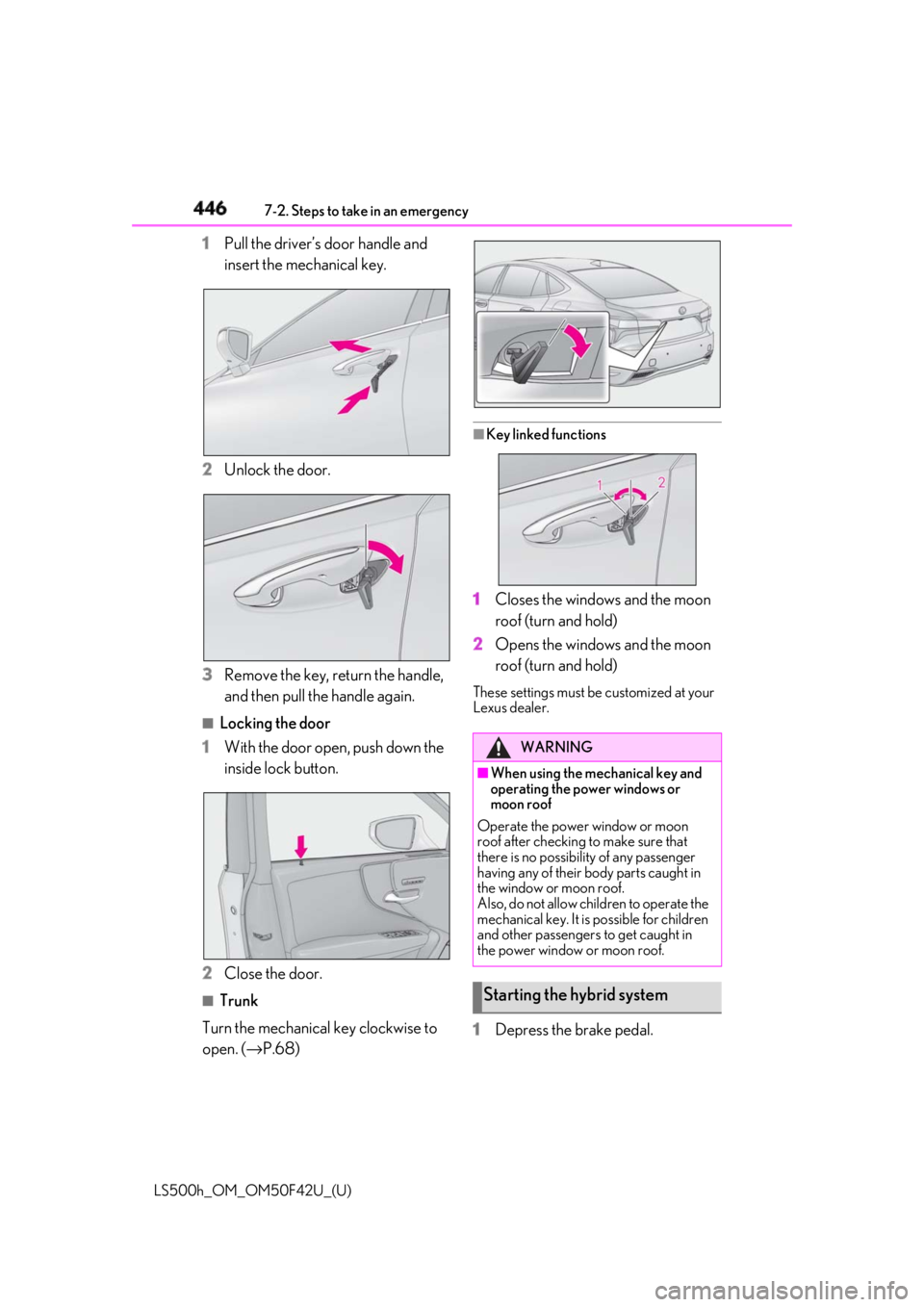
446 7-2. Steps to take in an emergency
LS500h_OM_OM50F42U_(U) 1 Pull the driver’s door handle and
insert the mechanical key.
2 Unlock the door.
3 Remove the key, return the handle,
and then pull the handle again. ■
Locking the door
1 With the door open, push down the
inside lock button.
2 Close the door. ■
Trunk
Turn the mechanical key clockwise to
open. ( → P.68) ■
Key linked functions
1 Closes the windows and the moon
roof (turn and hold)
2 Opens the windows and the moon
roof (turn and hold) These settings must be customized at your
Lexus dealer.
1 Depress the brake pedal. WARNING■
When using the mechanical key and
operating the power windows or
moon roof
Operate the power window or moon
roof after checking to make sure that
there is no possibility of any passenger
having any of their body parts caught in
the window or moon roof.
Also, do not allow children to operate the
mechanical key. It is possible for children
and other passengers to get caught in
the power window or moon roof.
Starting the hybrid system
Page 508 of 528

508 What to do if... (Troubleshooting)
LS500h_OM_OM50F42U_(U) 1-1.What to do if... (Troubleshooting)
What to do if... (Troubleshooting) If you lose your mechanical keys,
new genuine mechanical keys can
be made by your Lexus dealer.
( → P.444)
If you lose your electronic keys, the
risk of vehicle theft increases signifi-
cantly. Contact your Lexus dealer
immediately. ( → P.444)
Is the electronic key battery weak or
depleted? ( → P.413)
Is the power switch in ON mode? When locking the doors, turn the power
switch off. ( →
P.170 )
Is the electronic key left inside the
vehicle? When locking the doors, make sure that
you have the electronic key on your per-
son.
The function may not operate prop-
erly due to the condition of the radio
wave. ( → P.120) Is the child-protector lock set? The rear door cannot be opened from
inside the vehicle when the lock is set.
Open the rear door from outside and then
unlock the child-protector lock. ( →
P.111 )
The function to prevent the elec-
tronic key from being left inside the
trunk will operate and you can open
the trunk as usual. Take the key out
from the trunk. ( → P.116)
Did you press the power switch
while firmly depressing the brake
pedal? ( → P.168)
Is the electronic key anywhere
detectable inside the vehicle?
( → P.119)
Is the steering wheel unlocked?
( → P.169)
Is the electronic key battery weak or
depleted? In this case, the hy brid system can be
started in a temporary way. ( →
P.446 )
Is the 12-volt battery discharged? If you have a problem, check the
following before contacting your
Lexus dealer.
The doors cannot be locked,
unlocked, opened or closed You lose your keys
The doors cannot be locked or
unlocked The rear door cannot be opened
The trunk lid is closed with the
electronic key left inside
If you think something is wrong The hybrid system does not start