2018 LEXUS LS500 257
[x] Cancel search: 257Page 3 of 514

3TABLE OF CONTENTS
LS500_OM_OM50F54U_(U) 1
2
3
4
5
6
7
8
94-2. Driving procedures
Engine (ignition) switch .............. 160
Automatic transmission.............. 163
Turn signal lever............................. 169
Parking brake ................................. 170
Brake Hold....................................... 173
4-3. Operating the lights and wipers
Headlight switch ............................ 175
AHB (Automatic High Beam)
............................................................ 178
Windshield wipers and washer
............................................................ 180
4-4. Refueling
Opening the fuel tank cap......... 185
4-5. Using the driving support systems
Lexus Safety System+A.............. 187
Lexus Safety System+ ................. 194
PCS (Pre-Collision System) (vehi-
cles with Lexus Safety System+A)
........................................................... 200
PCS (Pre-Collision System) (vehi-
cles with Lexus Safety System+)
............................................................ 210
FCTA (Front Cross Traffic Alert)
............................................................ 218
LTA (Lane Tracing Assist)......... 221
LKA (Lane-Keeping Assist) ..... 231
RSA (Road Sign Assist) ............. 238
Dynamic radar crui se control with
full-speed range.......................... 241
BSM (Blind Spot Monitor) ........ 251
PKSA (Parking Support Alert)
........................................................... 256
Intuitive parking assist ................ 257
RCTA (Rear cross traffic alert)
function .......................................... 264 RCD (Rear Camera Detection)
function.......................................... 268
PKSB (Parking Support Brake)
............................................................ 271
Parking Support Brake function
(static objects) ............................. 277
Parking Support Brake function
(rear-crossing vehicles) ......... 282
Parking Support Brake function
(rear pedestrians) ..................... 286
Driving mode select switch ..... 289
Electronically modulated air sus-
pension ............................................ 291
Driving assist systems ................ 294
4-6. Driving tips
Winter driving tips ....................... 299
5-1. Remote Touch/Display
Remote Touch............................... 304
Center Display.............................. 306
Rear Multi Operation Panel ... 308
5-2. Lexus Climate Concierge
Lexus Climate Concierge........... 311
5-3. Using the air conditioning system
and defogger
Front automatic air conditioning
system ............................................. 313
Rear air conditioning system... 323
Heated steering wheel/seat heat-
ers/seat ventilators
......
............. 326
5-4. Using the interior lights
Interior lights list ........................... 330
5-5. Using the storage features
List of storag e features .............. 334
Trunk features ............................... 3395
Interior features
Page 86 of 514

86 2-1. Instrument cluster
LS500_OM_OM50F54U_(U) Displays the operational status of the
following systems:
LTA (Lane Tracing Assist) (if
equipped) ( → P.221)
LKA (Lane-Keeping Assist) (if
equipped) ( → P.231)
Dynamic radar cruise control with
full-speed range ( → P.241)Details of content displayed on the
head-up display may differ from that dis-
played on the multi-information display. For
details, refer to the explanation of each sys-
tem.
Pop-up displays for the following sys-
tems will be displayed when necessary. ■
Driving support systems
Displays a warning/suggestion/advice
message or the operating state of a rel-
evant system.
PCS (Pre-Collision System)
( → P.200, 210)
FCTA (Front Cross Traffic Alert) (if
equipped) ( → P.218)
Intuitive parking assist (if equipped)
( → P.257)
Parking Support Brake function (for
static objects) (if equipped)
( → P.277)
Brake Override System ( → P.151)
Drive-Start Control ( → P.151)
Details of content displayed on the head-up display may differ from that dis-
played on the multi-information display. For
details, refer to the explanation of each sys-
tem. ■
/ icons
These icons are linked to the
multi-information display
: Master warning icon Displayed when a warn ing message is dis-
played on the multi-information display.
( → P.428)
: Information icon Displayed when a suggestion pop-up dis-
play ( → P.82) or advice pop-up display is
displayed on the multi-information display. ■
Warning message
Some warning messages are displayed
when necessary, according to certain
conditions. Details of content displayed on the
head-up display may differ from that dis-
played on the multi-information display. ■
Audio system operation status
Displayed when an audio remote con-
trol switch on the steering wheel is
operated. ■
Hands-free system status
Displayed when the hands-free system
is operated. ■
When a pop-up display is displayed
When a pop-up display is displayed, a cur-
rent display may no long er be displayed. In
this case, the display will return after the
pop-up display disappears.Driving support system display
area
Pop-up display
Page 149 of 514
149
LS500_OM_OM50F54U_(U) 4 4
Driving Driving .
4-1. Before driving
Driving the vehicle ..................... 150
Cargo and luggage ................... 156
Vehicle load limits ...................... 158
Trailer towing ............................... 159
Dinghy towing ............................. 159
4-2. Driving procedures
Engine (ignition) switch ........... 160
Automatic transmission........... 163
Turn signal lever.......................... 169
Parking brake .............................. 170
Brake Hold.................................... 173
4-3. Operating the lights and wipers
Headlight switch ......................... 175
AHB (Automatic High Beam)
......................................................... 178
Windshield wipers and washer
......................................................... 180
4-4. Refueling
Opening the fuel tank cap...... 185
4-5. Using the driving support sys-
tems
Lexus Safety System+A........... 187
Lexus Safety System+ .............. 194
PCS (Pre-Collision System) (vehi-
cles with Lexus Safety Sys-
tem+A) ....................................... 200
PCS (Pre-Collision System) (vehi-
cles with Lexus Safety System+)
......................................................... 210 FCTA (Front Cross Traffic Alert)
........................................................ 218
LTA (Lane Tracing Assist) ...... 221
LKA (Lane-Keeping Assist)
........................................................ 231
RSA (Road Sign Assist).......... 238
Dynamic radar cruise control with
full-speed range........................ 241
BSM (Blind Spot Monitor) ..... 251
PKSA (Parking Support Alert)
....................................................... 256
Intuitive parking assist ............. 257
RCTA (Rear cross traffic alert)
function....................................... 264
RCD (Rear Camera Detection)
function....................................... 268
PKSB (Parking Support Brake)
......................................................... 271
Parking Support Brake function
(static objects) ......................... 277
Parking Support Brake function
(rear-crossing vehicles) ...... 282
Parking Support Brake function
(rear pedestrians) .................. 286
Driving mode select switch .. 289
Electronically modulated air sus-
pension ........................................ 291
Driving assist systems.............. 294
4-6. Driving tips
Winter driving tips .................... 299
Page 256 of 514

256 4-5. Using the driving support systems
LS500_OM_OM50F54U_(U) rounding area
• When the distance between your vehicle
and a guardrail, wall, etc. that enters the
detection area is short
• When driving up an d down consecutive
steep inclines, such as hills, dips in the
road, etc.
• When vehicle lanes are narrow, or when
driving on the edge of a lane, and a vehi-
cle traveling in a lane other than the adja-
cent lanes enters the detection area
• When driving on roads with sharp bends,
consecutive curves, or uneven surfaces
• When the tires are slipping or spinning
• When the distance between your vehicle
and a following vehicle is short
• When an accessory (such as a bicycle
carrier) is installed to the rear of the vehi-
cle *
: If equipped
■
Intuitive parking assist (if
equipped)
Ultrasonic sensors are used to detect
static objects in the detection area
when driving at a low speed or backing
up. ( → P.257) ■
RCTA (Rear Cross Traffic Alert)
function (if equipped)
Radar sensors are used to detect
approaching vehicles in the detection
areas behind the vehicle when backing
up. ( → P.264) ■
RCD (Rear camera detection)
function (if equipped)
A rear camera sensor is used to detect
pedestrians in the detection area
behind the vehicle when backing up.
( → P.268)PKSA (Parking Support
Alert) *
The Parking Support Alert system
consists of the following functions
that operate when driving at a low
speed or backing up, such as when
parking. When the system deter-
mines that a collision with a
detected object, such as a wall, or
pedestrian is high, a warning oper-
ates to urge the driver to take eva-
sive action.
PKSA (Parking Support Alert)
system
Page 257 of 514
2574-5. Using the driving support systems
LS500_OM_OM50F54U_(U) 4
Driving ■
Adjusting the buzzer volume
The buzzer volume can be adjusted on
the multi-information display. The vol-
ume of buzzers for the intuitive parking
assist, RCTA function and RCD func-
tion will be adjusted simultaneously.
Use the meter control switches to
change settings. ( → P.77)
1 Press or to select .
2 Press or to select “PKSA”
and then press .
3 Press or to select and
then press .Each time the switch is pressed, the volume
level will change between 1, 2, and 3. ■
Muting a buzzer
A mute button will be displayed on the
multi-information display when an
object or pedestrian is detected. To
mute the buzzer, press .
The buzzers for the intuitive parking
assist, RCTA function and RCD func-
tion will be muted simultaneously.
Mute will be canceled automatically in
the following situations:
When the shift position is changed.
When the operating function is tem-
porarily canceled.
When the operating function is dis-
abled manually.
When the engine switch is turned
off. *
: If equipped
■
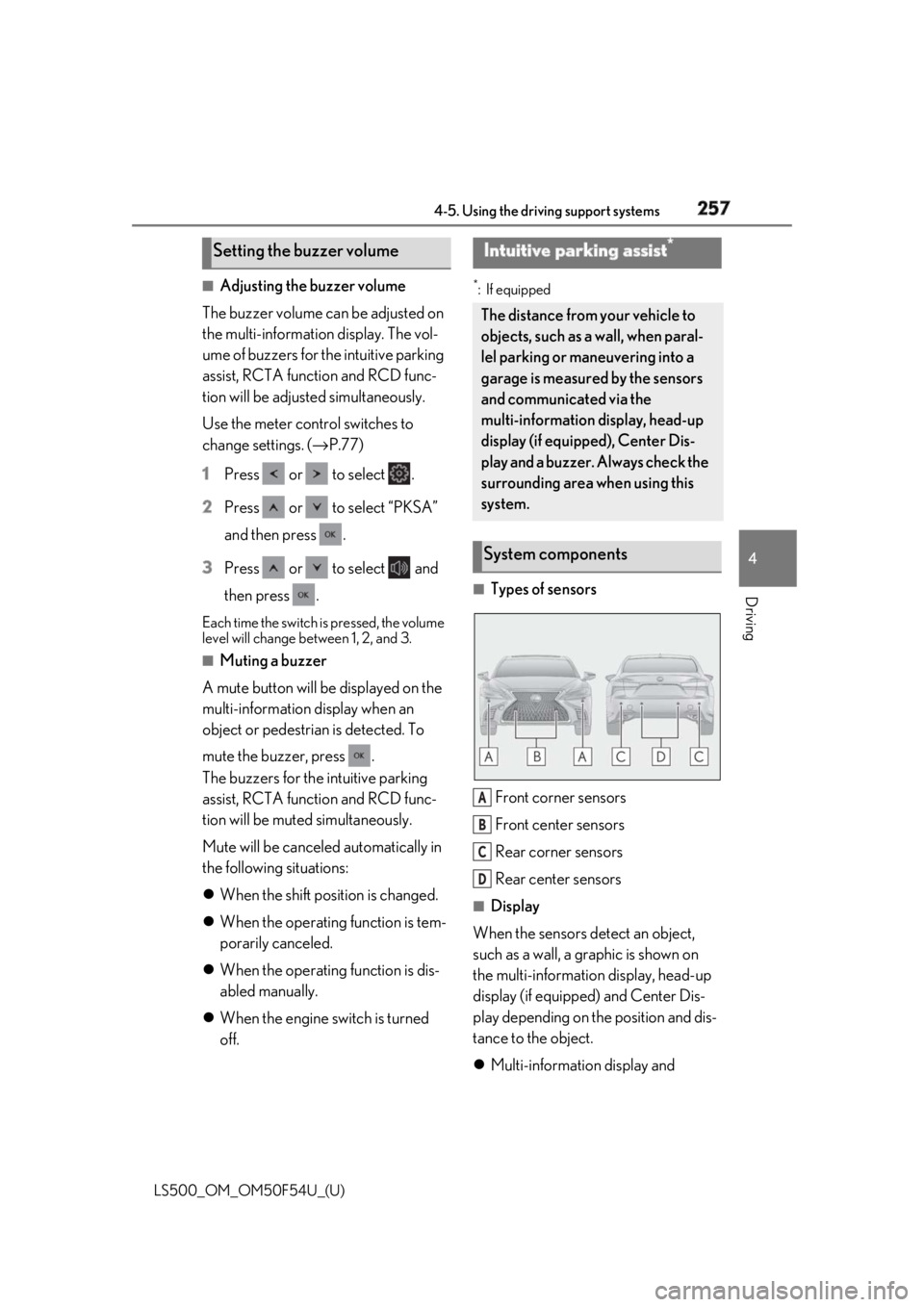
Types of sensors
Front corner sensors
Front center sensors
Rear corner sensors
Rear center sensors ■
Display
When the sensors detect an object,
such as a wall, a graphic is shown on
the multi-information display, head-up
display (if equipped) and Center Dis-
play depending on the position and dis-
tance to the object.
Multi-information display and Setting the buzzer volume Intuitive parking assist *
The distance from your vehicle to
objects, such as a wall, when paral-
lel parking or maneuvering into a
garage is measured by the sensors
and communicated via the
multi-information display, head-up
display (if equipped), Center Dis-
play and a buzzer. Always check the
surrounding area when using this
system.
System components
A
B
C
D
Page 260 of 514

260 4-5. Using the driving support systems
LS500_OM_OM50F54U_(U) ●
A shift position other than P is selected.■
Setting the buzzer volume
The buzzer volume can be adjusted on the
multi-information display. ( → P.257)■
If “Parking Assist Unavailable Clean
Parking Assist Sensor” is displayed on
the multi-inform ation display
A sensor may be covered with ice, snow,
dirt, etc. Remove the ice, snow, dirt, etc.,
from the sensor to return the system to nor-
mal.
Also, due to ice forming on a sensor at low
temperatures, a warning message may be
displayed or the sensor may not be able to
detect an object. Once the ice melts, the
system will return to normal. ■
Sensor detectio n information●
The following situations may occur
during use.
• Depending on the shape of the object
and other factors, the detection distance
may shorten, or detection may be impos-
sible.
• There will be a short delay between
object detection and display. Even at low
speeds, there is a possibility that the
object will come within the sensor’s
detection areas before the display is
shown and the warning beep sounds.
• It might be difficult to hear the buzzer due
to the volume of the audio system or air
flow noise of the air conditioning system.■
Conditions under which the function
may not function correctly
Certain vehicle conditions and the sur-
rounding environment may affect the ability
of a sensor to correctly detect objects. Par-
ticular instances where this may occur are
listed below.
●
There is dirt, snow or ice on a sensor.
(Cleaning the sensors will resolve this
problem.)
●
A sensor is frozen. (Thawing the area will
resolve this problem.)
In especially cold weather, if a sensor is
frozen the sensor display may be dis-
played abnormally, or objects, such as a
wall, may not be detected.
●
A sensor is covered in any way. ●
When a sensor or the area around a sen-
sor is extremely hot or cold. ●
On an extremely bumpy road, on an
incline, on gravel, or on grass. ●
The vicinity of the vehicle is noisy due to
vehicle horns, motorcycle engines, air
brakes of large vehicles, or other loud
noises producing ultrasonic waves. ●
There is another vehicle equipped with
parking assist sensors in the vicinity. ●
A sensor is coated with a sheet of spray
or heavy rain. ●
If a sensor is hit by a large amount of
water, such as when driving on a flooded
road. ●
If the vehicle is significantly tilted. ●
The vehicle is approaching a tall or
curved curb. ●
If objects draw too close to the sensor. ■
Objects which may not be properly
detected
The shape of the object may prevent the
sensor from detectin g it. Pay particular
attention to the following objects: ●
Wires, fences, ropes, etc. ●
Cotton, snow and other materials that
absorb sound waves ●
Sharply-angled objects ●
Low objects ●
Tall objects with upper sections project-
ing outwards in the direction of your vehi-
cle
People may not be de tected if they are
wearing certain types of clothing.
Page 263 of 514

2634-5. Using the driving support systems
LS500_OM_OM50F54U_(U) 4
Driving *1
: Automatic buzzer mute function is disabled. ( → P.263)*2
: The distance segments will blink slowly.
Approximate distance to object: Less than 0.5 ft. (15 cm) *1
*1
: Automatic buzzer mute function is disabled. ( → P.263)*2
: The distance segmen ts will blink rapidly.■
Buzzer operation and distance to
an object
A buzzer sounds when the sensors are
operating.
The buzzer beeps faster as the vehi-
cle approaches an object. When the
vehicle comes within the following
distance of the object, the buzzer
sounds continuously: Approximately 1.0 ft. (30 cm)
When 2 or more objects are
detected simultaneously, the buzzer
sounds for the nearest object. If one
or more objects come within
approximately 1.0 ft. (30 cm) of the
vehicle, the buzzer will repeat a long
tone, followed by fast beeps.
Automatic buzzer mute function:
After a buzzer begins sounding, if
the distance between the vehicle and the detected object does not
become shorter, the buzzer will be
muted automatically. (However, if
the distance between the vehicle
and object is 1.0 ft. (30 cm) or less,
this function will not operate.)
The buzzer sounds volume can be
adjusted. ( → P.257)Multi-information display *2
Center Display *2
Head-up display
Multi-information display *2
Center Display *2
Head-up display
Page 266 of 514

266 4-5. Using the driving support systems
LS500_OM_OM50F54U_(U) itor) (if equipped): Vehicles are
approaching from both sides of the
vehicle ■
RCTA function detection areas
The areas that vehicles can be detected in are outlined below.
The buzzer can alert the driver of
faster vehicles approaching from far-
ther away.
Example:
■
The RCTA function is operational when
The RCTA function operates when all of the
following conditions are met:
●
The engine switch is in IGNITION ON
mode.
●
The RCTA function is on.
●
The shift position is in R.
●
The vehicle speed is less than approxi- mately 5 mph (8 km/h). ●
The approaching vehicle speed is
between approximately 5 mph (8 km/h)
and 18 mph (28 km/h). ■
Setting the buzzer volume
The buzzer volume can be adjusted on the
multi-information display. ( → P.257)■
Conditions under which the RCTA func-
tion will not detect a vehicle
The RCTA function is not designed to
detect the following types of vehicles and/or
objects:
●
Vehicles approaching from directly
behind
●
Vehicles backing up in a parking space
next to your vehicle
●
Vehicles that the sensors cannot detect
due to obstructionsApproaching vehi-
cle speed Approximate
alert distance
18 mph (28 km/h)
(fast) 65 ft. (20 m)
5 mph (8 km/h)
(slow) 18 ft. (5.5 m) A