Page 384 of 514
384 6-3. Do-it-yourself maintenance
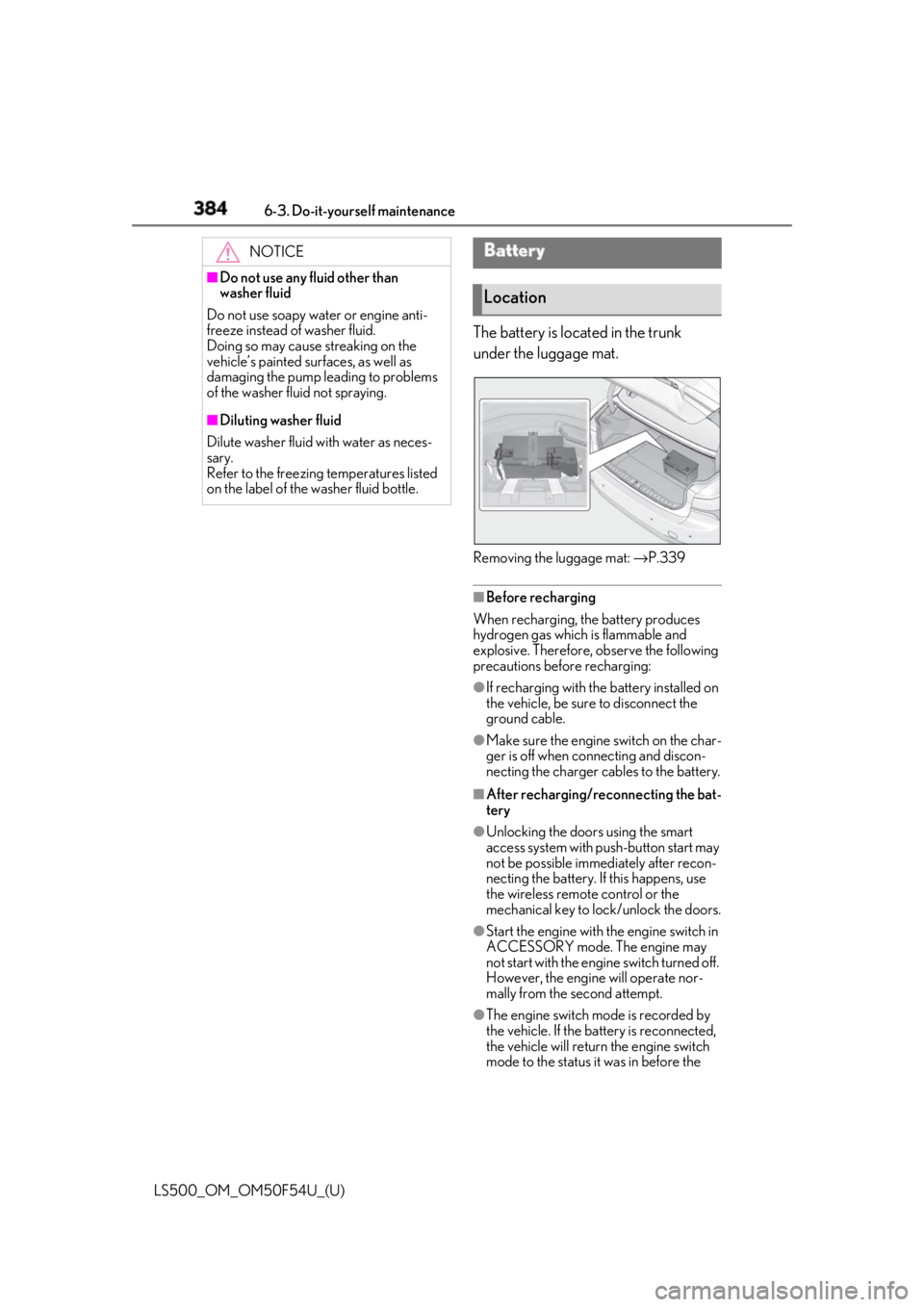
LS500_OM_OM50F54U_(U) The battery is located in the trunk
under the luggage mat.
Removing the luggage mat: → P.339
■
Before recharging
When recharging, the battery produces
hydrogen gas which is flammable and
explosive. Therefore, observe the following
precautions before recharging: ●
If recharging with the battery installed on
the vehicle, be sure to disconnect the
ground cable. ●
Make sure the engine switch on the char-
ger is off when connecting and discon-
necting the charger cables to the battery. ■
After recharging/reconnecting the bat-
tery ●
Unlocking the doors using the smart
access system with pu sh-button start may
not be possible immediately after recon-
necting the battery. If this happens, use
the wireless remote control or the
mechanical key to lo ck/unlock the doors.
●
Start the engine with the engine switch in
ACCESSORY mode. The engine may
not start with the engine switch turned off.
However, the engine will operate nor-
mally from the second attempt.
●
The engine switch mode is recorded by
the vehicle. If the battery is reconnected,
the vehicle will return the engine switch
mode to the status it was in before the NOTICE■
Do not use any fluid other than
washer fluid
Do not use soapy water or engine anti-
freeze instead of washer fluid.
Doing so may cause streaking on the
vehicle’s painted surfaces, as well as
damaging the pump leading to problems
of the washer fluid not spraying. ■
Diluting washer fluid
Dilute washer fluid with water as neces-
sary.
Refer to the freezing temperatures listed
on the label of the washer fluid bottle. Battery
Location
Page 397 of 514
3976-3. Do-it-yourself maintenance
LS500_OM_OM50F54U_(U) 6
Maintenance and care
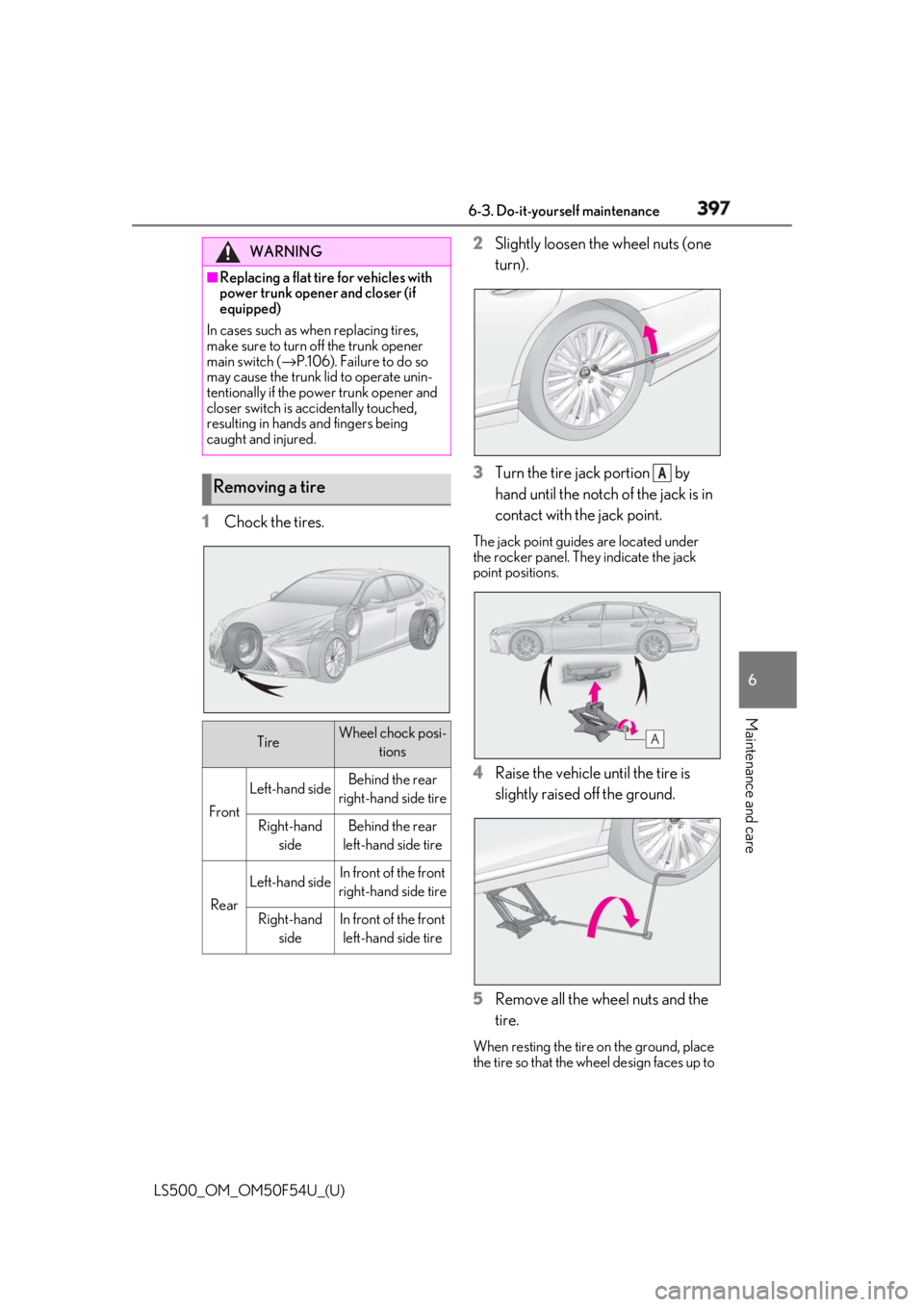
1 Chock the tires. 2 Slightly loosen the wheel nuts (one
turn).
3 Turn the tire jack portion by
hand until the notch of the jack is in
contact with the jack point. The jack point guides are located under
the rocker panel. They indicate the jack
point positions.
4 Raise the vehicle until the tire is
slightly raised off the ground.
5 Remove all the wheel nuts and the
tire. When resting the tire on the ground, place
the tire so that the wheel design faces up to WARNING■
Replacing a flat tire for vehicles with
power trunk opener and closer (if
equipped)
In cases such as when replacing tires,
make sure to turn off the trunk opener
main switch ( → P.106). Failure to do so
may cause the trunk lid to operate unin-
tentionally if the power trunk opener and
closer switch is accidentally touched,
resulting in hands and fingers being
caught and injured.
Removing a tire
Tire Wheel chock posi-
tions
Front Left-hand side Behind the rear
right-hand side tire
Right-hand
side Behind the rear
left-hand side tire
Rear Left-hand side In front of the front
right-hand side tire
Right-hand
side In front of the front
left-hand side tire A
Page 405 of 514
4056-3. Do-it-yourself maintenance
LS500_OM_OM50F54U_(U) 6
Maintenance and care 1 Turn the engine switch off.
2 Open the fuse box cover.
Engine compartment: type A fuse
box Remove the service cover ( → P.379) and
push the tabs in and lift the lid off.
Engine compartment: type B fuse
box Remove the engine compartment cover
( → P.378) and push the ta bs in and lift the
lid off.
Driver’s side instrument panel Push the tab in and remove the lid.
Make sure to push the tab in during
removal or installation.
Passenger’s side instrument panel Push the tab in and remove the lid.
Make sure to push the tab in during
removal or installation.
Trunk Remove the luggage mat. ( → P.339)
Push the tab in and lift the lid off.Checking and replacing
fuses If any of the electrical components
do not operate, a fuse may have
blown. If this happens, check and
replace the fuses as necessary.
Checking and replacing fuses
Page 435 of 514
4357-2. Steps to take in an emergency
LS500_OM_OM50F54U_(U) 7
When trouble arises
Remove the cover inside the trunk and
pull the lever.If you lose your keys New genuine mechanical keys can
be made by your Lexus dealer using
another mechanical key and the
key number stamped on your key
number plate.
Keep the plate in a safe place such
as your wallet, not in the vehicle. NOTICE■
When an electronic key is lost
If the electronic key remains lost, the risk
of vehicle theft increases significantly.
Visit your Lexus deal er immediately with
all remaining electronic keys and the
card key (if equipped) that were pro-
vided with your vehicle. If the fuel filler door cannot
be opened If the fuel filler door opener switch
cannot be operated, contact your
Lexus dealer to service the vehicle.
In case where refueling is urgently
necessary, the following procedure
can be used to open the fuel filler
door.
Opening the fuel filler door
Page 436 of 514

436 7-2. Steps to take in an emergency
LS500_OM_OM50F54U_(U) ■
When the electronic key does not work
properly●
Make sure that the smart access system
with push-button start has not been dis-
abled at your Lexus dealer. If it has been
disabled, re-enable it.●
Check if battery-saving mode is set. If it is
set, cancel the function. ( → P.108)
■
Unlocking the door
Use the mechanical key ( → P.94) in
order to perform the following opera-
tions: 1 Pull the driver’s door handle and
insert the mechanical key.
2 Unlock the door.
3 Remove the key, return the handle,
and then pull the handle again. ■
Locking the door
1 With the door open, push down the
inside lock button.
2 Close the door. ■
Trunk
Turn the mechanical key clockwise to
open. ( → P.60)If the electronic key does not
operate properly If communication between the
electronic key and vehicle is inter-
rupted ( → P.108) or the electronic
key cannot be used because the
battery is depleted, the smart
access system with push-button
start and wireless remote control
cannot be used. In such cases, the
doors and trunk can be opened and
the engine can be started by follow-
ing the procedure below.
NOTICE■
In case of a smart access system with
push-button start malfunction or
other key-related problems
Take your vehicle with all the electronic
keys provided with your vehicle to your
Lexus dealer.
Locking and unlocking the
doors, unlocking the trunk
Page 438 of 514
438 7-2. Steps to take in an emergency
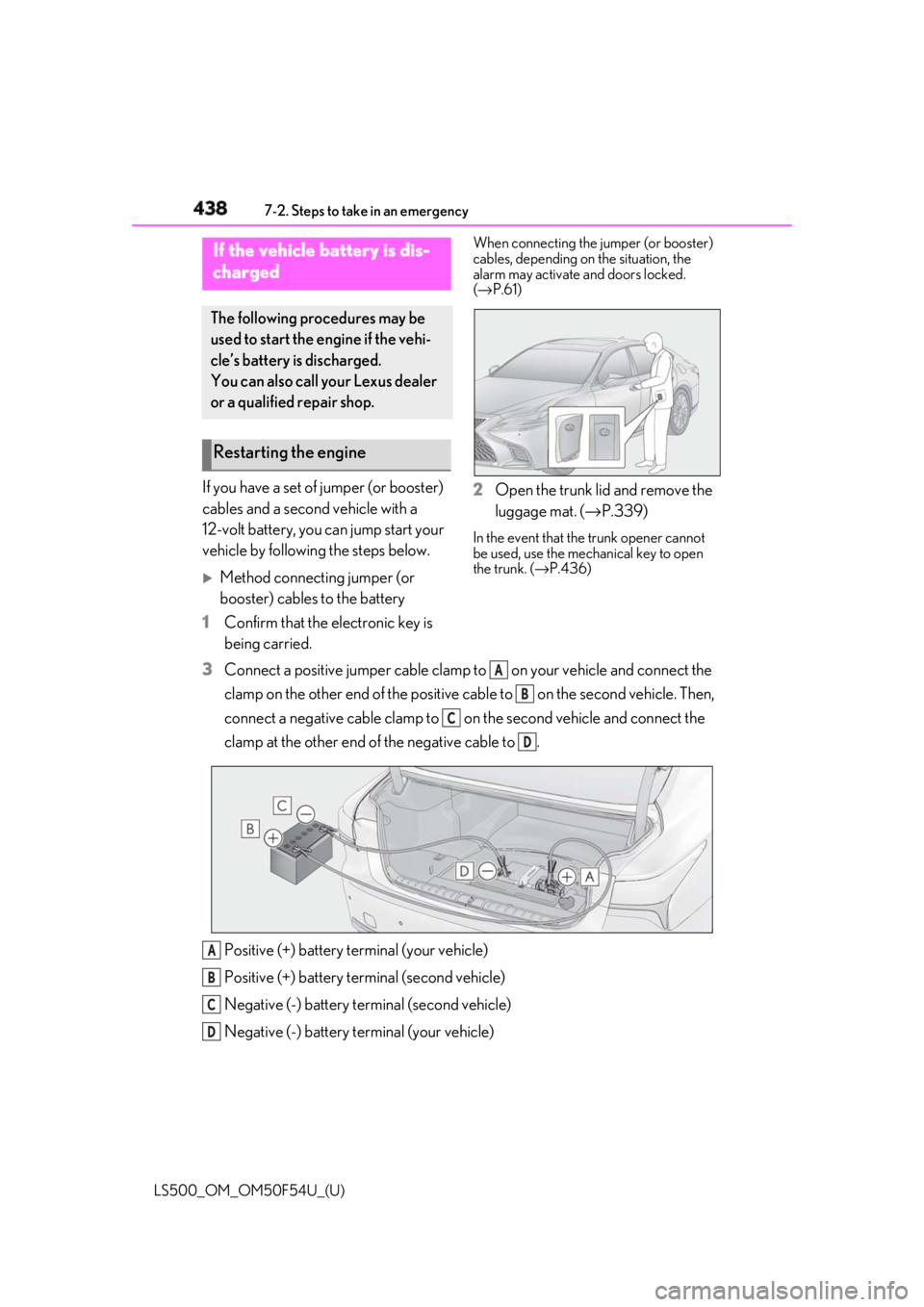
LS500_OM_OM50F54U_(U) If you have a set of jumper (or booster)
cables and a second vehicle with a
12-volt battery, you can jump start your
vehicle by following the steps below.
Method connecting jumper (or
booster) cables to the battery
1 Confirm that the electronic key is
being carried. When connecting the jumper (or booster)
cables, depending on the situation, the
alarm may activate and doors locked.
( → P.61)
2 Open the trunk lid and remove the
luggage mat. ( → P.339)In the event that the trunk opener cannot
be used, use the mechanical key to open
the trunk. ( → P.436)
3 Connect a positive jumper cable clamp to on your vehicle and connect the
clamp on the other end of the positive cab le to on the second vehicle. Then,
connect a negative cable clamp to on the second vehicle and connect the
clamp at the other end of the negative cable to .
Positive (+) battery terminal (your vehicle)
Positive (+) battery terminal (second vehicle)
Negative (-) battery terminal (second vehicle)
Negative (-) battery terminal (your vehicle)If the vehicle battery is dis-
charged The following procedures may be
used to start the engine if the vehi-
cle’s battery is discharged.
You can also call your Lexus dealer
or a qualified repair shop.
Restarting the engine
A
B
C
D
A
B
C
D
Page 473 of 514
4718-2. Customization
LS500_OM_OM50F54U_(U) 8
Vehicle specifications *
:If equipped ■
Door lock ( → P.96, 100, 436)Route guidance to destina-
tion/street name *
On Off — O — —
Driving support system dis-
play On Off — O — —
Compass *
On Off — O — —
Audio system operation sta-
tus On Off — O — —
Function Default setting Customized set-
ting
Unlocking using a mechani-
cal key Driver’s door
unlocked in one
step, all doors
unlocked in two
step All doors
unlocked in one
step — — — O
Automatic door locking func-
tion Shift position
linked door lock-
ing operation Off
O — — OSpeed linked
door locking
operation
Automatic door unlocking
function Shift position
linked door
unlocking opera-
tion Off
O — — ODriver’s door
linked door
unlocking opera-
tion
Locking/unlocking of the
trunk when all doors are
locked/unlocked On Off — — — OFunction Default setting Customized set-
ting A B C D
A B C D
Page 475 of 514
4738-2. Customization
LS500_OM_OM50F54U_(U) 8
Vehicle specifications ■
Trunk ( → P.100)*
:If equipped ■
Front seats ( → P.116)*
:If equipped
■
Power rear seats *
( → P.123)Trunk unlocking operation Press and hold
(short) One short press
— — — OPush twice
Press and hold
(long)
Off
Theft deterrent panic mode On Off — — — O
Reservation lock On Off O — — O
Function Default setting Customized set-
ting
Hands Free Power Trunk Lid
(kick sensor) *
On Off — O — —
Function Default setting Customized set-
ting
Driver’s seat position linked
head restraint height opera-
tion *
Off On — — — O
Function Default setting Customized set-
ting
Automatic rear seat opera-
tion (door-linked rear seat
return function and
shift-linked rear seat reclining
function) On Off — — O —Function Default setting Customized set-
ting A B C D
A B C D
A B C D
A B C D