2018 LEXUS LS500 park assist
[x] Cancel search: park assistPage 150 of 514

150 4-1. Before driving
LS500_OM_OM50F54U_(U) 4-1.Before driving
■
Starting the engine
→ P.160 ■
Driving
1 With the brake pedal depressed,
shift the shift position to D.
( → P.163)Check that the shift position indicator
shows D.
2 If the parking brake is in manual
mode, release the parking brake.
( → P.170)
3 Gradually release the brake pedal
and gently depress the accelerator
pedal to accelerate the vehicle. ■
Stopping
1 With the shift position in D, depress
the brake pedal.
2 If necessary, set the parking brake.If the vehicle is to be stopped for an
extended period of time, shift the shift posi-
tion to P. ( → P.166)
■
Parking the vehicle
1 With the shift position in D, depress
the brake pedal to stop the vehicle
completely.
2 If the parking brake is in manual
mode, set the parking brake.
( → P.170)
3 Shift the shift position to P.
( → P.166) 4 Press the engine switch to stop the
engine.
5 Slowly release the brake pedal.
6 Lock the door, making sure that you
have the electronic key on your
person. If parking on a hill, block the wheels as
needed. ■
Starting off on a steep uphill
1 Make sure that the parking brake is
set and shift the shift position to D. Hill-start assist control will operate.
( → P.294)
2 Gently depress the accelerator
pedal.
3 Release the parking brake. ■
Driving in the rain ●
Drive carefully when it is raining, because
visibility will be reduced, the windows
may become fogged-up, and the road
will be slippery. ●
Drive carefully when it starts to rain,
because the road surface will be espe-
cially slippery. ●
Refrain from high speeds when driving on
an expressway in the rain, because there
may be a layer of wa ter between the tires
and the road surface, preventing the
steering and brakes from operating prop-
erly.
■
Engine speed while driving
In the following conditions, the engine
speed may become high while driving. This
is due to automatic up-shifting control or
down-shifting implementation to meet driv-
ing conditions. It does not indicate sudden
acceleration.
●
The vehicle is judged to be driving uphill
or downhill
●
When the accelerato r pedal is released
●
When the brake pedal is depressedDriving the vehicle The following procedures should be
observed to ensure safe driving:
Driving procedure
Page 155 of 514

1554-1. Before driving
LS500_OM_OM50F54U_(U) 4
Driving WARNING●
Vehicles with Lexus Safety System+A:
If the electronically controlled brake
system does not operate, do not follow
other vehicles closely and avoid hills or
sharp turns that require braking.
In this case, braking is still possible, but
the brake pedal should be depressed
more firmly than usual. Also, the brak-
ing distance will increase. Have your
brakes fixed immediately.●
Vehicles without Lexus Safety Sys-
tem+A: Do not pump the brake pedal
if the engine stalls.
Each push on the brake pedal uses up
the reserve for the power-assisted
brakes.●
Vehicles without Lexus Safety Sys-
tem+A: The brake system consists of 2
individual hydraulic systems; if one of
the systems fails, the other will still
operate. In this case, the brake pedal
should be depressed more firmly than
usual and the braking distance will
increase. Have your brakes fixed
immediately.●
Vehicles with Lexus Safety System+A:
The brake system consists of 2 or more
individual hydraulic systems; if one of
the systems fails, the other(s) will still
operate. In this case, the brake pedal
should be depressed more firmly than
usual and the braking distance will
increase. Have your brakes fixed
immediately.
■
If the vehicle becomes stuck
Do not spin the wheels excessively when
a driven wheel is up in the air, or the vehi-
cle is stuck in sand, mud, etc. This may
damage the driveline components or
propel the vehicle forward or backward,
causing an accident. NOTICE■
When driving the vehicle ●
Do not depress the accelerator and
brake pedals at the same time during
driving, as this may restrain the engine
output. ●
Do not use the accelerator pedal or
depress the accelerator and brake
pedals at the same time to hold the
vehicle on a hill. ■
When parking the vehicle
Always set the parking brake, and shift
the shift position to P. Failure to do so
may cause the vehicle to move or the
vehicle may accelerate suddenly if the
accelerator pedal is accidentally
depressed. ■
Avoiding damage to vehicle parts ●
Do not turn the steering wheel fully in
either direction and hold it there for an
extended period of time.
Doing so may damage the power
steering motor. ●
When driving over bumps in the road,
drive as slowly as possible to avoid
damaging the wheels, underside of the
vehicle, etc.
●
Make sure to idle the engine immedi-
ately after high-load driving. Stop the
engine only after the turbocharger has
cooled down.
Failure to do so may cause damage to
the turbocharger.
■
If you get a flat tire while driving
A flat or damaged tire may cause the fol-
lowing situations. Hold the steering
wheel firmly and gradually depress the
brake pedal to slow down the vehicle.
●
It may be difficult to control your vehi-
cle.
●
The vehicle will make abnormal
sounds or vibrations.
●
The vehicle will lean abnormally.
Page 187 of 514

1874-5. Using the driving support systems
LS500_OM_OM50F54U_(U) 4
Driving 4-5.Using the driving support systems
*
:If equipped
■
PCS (Pre-Collision System) (vehi-
cles with Lexus Safety System+A)
→ P.200 ■
FCTA (Front Cross Traffic Alert)
→ P.218 ■
LTA (Lane Tracing Assist)
→ P.221 ■
AHB (Automatic High Beam)
→ P.178 ■
RSA (Road Sign Assist)
→ P.238 ■
Dynamic radar cruise control with
full-speed range
→ P.241 The pre-collision system is equipped
with a sophisticated computer that will
record certain data, such as:
• Accelerator status
•Brake status
• Vehicle speed
• Operation status of the pre-collision
system functions
• Information (such as the distance
and relative speed between your
vehicle and the vehicle ahead or
other objects)
• Images from the camera sensor
(available only in situations when
sudden inputs occur while driving
[sudden acceleration, etc.], the
pre-collision braking function or the
pre-collision brake assist function
was operating, the Parking Support
Brake function [static objects] was
operating, or your vehicle was
involved in a collision)
The pre-collision system does not Lexus Safety System+A *
The Lexus Safety System+A con-
sists of the following drive assist sys-
tems and contributes to a safe and
comfortable driving experience:
Drive assist systems of Lexus
Safety System+A WARNING■
Lexus Safety System+A
The Lexus Safety System+A is designed
to operate under the assumption that the
driver will drive safely , and is designed to
help reduce the impact to the occupants
and the vehicle in the case of a collision
or assist the driver in normal driving con-
ditions.
As there is a limit to the degree of recog-
nition accuracy and control performance
that this system can provide, do not
overly rely on this system. The driver is
always responsible for paying attention
to the vehicle’s surroundings and driving
safely.
Vehicle data recording
Page 208 of 514

208 4-5. Using the driving support systems
LS500_OM_OM50F54U_(U) • If a vehicle ahead is irregularly shaped,
such as a tractor or side car
• If the sun or other light is shining directly
on a vehicle or guardrail ahead
• If a vehicle cuts in front of your vehicle or
emerges from beside a vehicle
• If a vehicle ahead makes an abrupt
maneuver (such as sudden swerving,
acceleration or deceleration)
• When suddenly cutting behind a preced-
ing vehicle
• When a vehicle ahead is not directly in
front of your vehicle
• When driving in incl ement weather such
as heavy rain, fog, snow or a sandstorm
• When the vehicle is hit by water, snow,
dust, etc. from a vehicle ahead
• When driving through steam or smoke
• When driving in a place where the sur-
rounding brightness changes suddenly,
such as at the entrance or exit of a tunnel
• When a very bright light, such as the sun
or the headlights of oncoming traffic,
shines directly in to the camera sensor
• When driving in a lo cation where there
are many objects which reflect radar,
such as a tunnel or parking garage
• When driving at night or in a tunnel with
the headlights off
• When the surrounding area is dim, such
as at dawn or dusk, or while at night or in
a tunnel
• After the engine has started the vehicle
has not been driven for a certain amount
of time • While making a left/r ight turn and for a
few seconds after making a left/right turn
• While driving on a curve and for a few
seconds after driving on a curve
• If your vehicle is skidding
• If the front of the vehicle is raised or low-
ered
• If the wheels are misaligned
• If a wiper blade is blocking the camera
sensor
• The vehicle is wobbling.
• The vehicle is being driven at extremely
high speeds.
• When driving on a hill
• If a sensor is misaligned
• If the headlights are misaligned
• When approaching a guardrail at a wide
or narrow angle
• When a vehicle approaches your vehicle
from the front left or right side while your
vehicle is entering an intersection with
poor visibility
• When a vehicle approaches your vehicle
from the rear left or right side
• When a vehicle approaches the side of
your vehicle at a shallow angle
• When driving on a road with a grade that
changes sharply (sha rp incline/decline)●
In some situations, such as the following,
the sensors may not detect the lane lines
or a safe space the vehicle can be steered
into, preventing the active steering assist
from operating properly:
• When the white (yellow) lane lines are
difficult to see, such as when they are
faint, diverging/merging, or a shadow is
cast upon them
• When the lane is more wide or narrow
than normal
• When there is a light and dark pattern on
the road surface, such as due to road
repairs
• If the system determines that a collision
can be avoided by only using the brakes
Page 256 of 514

256 4-5. Using the driving support systems
LS500_OM_OM50F54U_(U) rounding area
• When the distance between your vehicle
and a guardrail, wall, etc. that enters the
detection area is short
• When driving up an d down consecutive
steep inclines, such as hills, dips in the
road, etc.
• When vehicle lanes are narrow, or when
driving on the edge of a lane, and a vehi-
cle traveling in a lane other than the adja-
cent lanes enters the detection area
• When driving on roads with sharp bends,
consecutive curves, or uneven surfaces
• When the tires are slipping or spinning
• When the distance between your vehicle
and a following vehicle is short
• When an accessory (such as a bicycle
carrier) is installed to the rear of the vehi-
cle *
: If equipped
■
Intuitive parking assist (if
equipped)
Ultrasonic sensors are used to detect
static objects in the detection area
when driving at a low speed or backing
up. ( → P.257) ■
RCTA (Rear Cross Traffic Alert)
function (if equipped)
Radar sensors are used to detect
approaching vehicles in the detection
areas behind the vehicle when backing
up. ( → P.264) ■
RCD (Rear camera detection)
function (if equipped)
A rear camera sensor is used to detect
pedestrians in the detection area
behind the vehicle when backing up.
( → P.268)PKSA (Parking Support
Alert) *
The Parking Support Alert system
consists of the following functions
that operate when driving at a low
speed or backing up, such as when
parking. When the system deter-
mines that a collision with a
detected object, such as a wall, or
pedestrian is high, a warning oper-
ates to urge the driver to take eva-
sive action.
PKSA (Parking Support Alert)
system
Page 257 of 514
2574-5. Using the driving support systems
LS500_OM_OM50F54U_(U) 4
Driving ■
Adjusting the buzzer volume
The buzzer volume can be adjusted on
the multi-information display. The vol-
ume of buzzers for the intuitive parking
assist, RCTA function and RCD func-
tion will be adjusted simultaneously.
Use the meter control switches to
change settings. ( → P.77)
1 Press or to select .
2 Press or to select “PKSA”
and then press .
3 Press or to select and
then press .Each time the switch is pressed, the volume
level will change between 1, 2, and 3. ■
Muting a buzzer
A mute button will be displayed on the
multi-information display when an
object or pedestrian is detected. To
mute the buzzer, press .
The buzzers for the intuitive parking
assist, RCTA function and RCD func-
tion will be muted simultaneously.
Mute will be canceled automatically in
the following situations:
When the shift position is changed.
When the operating function is tem-
porarily canceled.
When the operating function is dis-
abled manually.
When the engine switch is turned
off. *
: If equipped
■
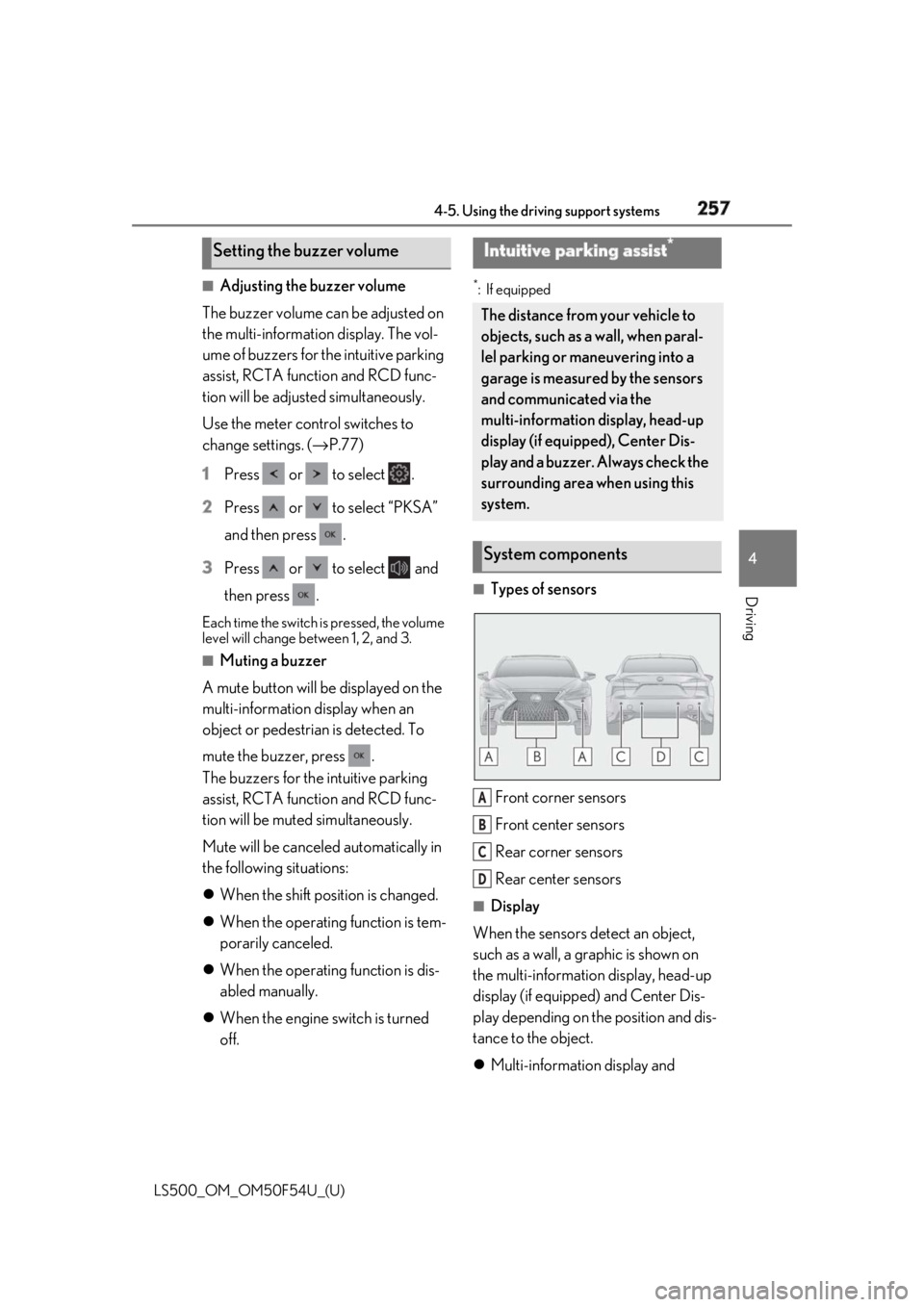
Types of sensors
Front corner sensors
Front center sensors
Rear corner sensors
Rear center sensors ■
Display
When the sensors detect an object,
such as a wall, a graphic is shown on
the multi-information display, head-up
display (if equipped) and Center Dis-
play depending on the position and dis-
tance to the object.
Multi-information display and Setting the buzzer volume Intuitive parking assist *
The distance from your vehicle to
objects, such as a wall, when paral-
lel parking or maneuvering into a
garage is measured by the sensors
and communicated via the
multi-information display, head-up
display (if equipped), Center Dis-
play and a buzzer. Always check the
surrounding area when using this
system.
System components
A
B
C
D
Page 258 of 514

258 4-5. Using the driving support systems
LS500_OM_OM50F54U_(U) head-up display
Front corner sensor detection
Front center sensor detection
Rear corner sensor detection
Rear center sensor detection
Center Display A graphic is shown when the Lexus park-
ing assist monitor (if equipped) is dis-
played.
A simplified image is displayed on the
Center Display when an object is detected.
• When the R shift position is selected
• When the N, M or D shift position is
selected (vehicle moving forward) When an object is detected, a graphic will
be displayed on the panoramic view moni-
tor (if equipped).
Use the meter control switches to
enable/disable the Lexus parking
assist-sensor. ( → P.77)
1 Press or to select .
2 Press or to select “PKSA”
and then press .
3 Press or to select and
then press .
When the intuitive parking assist func-
tion is disabled, th e intuitive parking
assist OFF indicator ( → P.64) illumi-
nates on the multi-information display.
To re-enable the system when it was A
B
C
D
Turning intuitive parking assist
on/off
Page 259 of 514

2594-5. Using the driving support systems
LS500_OM_OM50F54U_(U) 4
Driving disabled, select on the multi-infor-
mation display, select and then On.
If disabled using this method, the sys-
tem will not be re-enabled by turning
the engine switch off and then to IGNI-
TION ON mode.
■
The system can be operated when
●
The engine switch is in IGNITION ON
mode.
●
Intuitive parking assist function is on.
●
The vehicle speed is less than about 6
mph (10 km/h).WARNING■
When using the intuitive parking
assist
Observe the following precautions.
Failing to do so may result in the vehicle
being unable to be driven safely and pos-
sibly cause an accident. ●
Do not use the sensor at speeds in
excess of 6 mph (10 km/h).●
The sensors’ detection areas and reac-
tion times are limited. When moving
forward or reversing, check the areas
surrounding the vehicle (especially the
sides of the vehicle) for safety, and
drive slowly, using the brake to control
the vehicle’s speed.●
Do not install accessories within the
sensors’ detection areas.●
The area directly under the bumpers is
not detected.
■
When to disable the function
In the following situations, disable the
function as it may operate even though
there is no possibility of a collision. ●
The vehicle is equipped with a fender
pole or wireless antenna.
●
The front or rear bu mper or a sensor
receives a strong impact.
●
A non-genuine Lexus suspension
(lowered suspension, etc.) is installed.
●
Towing eyelets are installed.
●
A backlit licence pl ate is installed. ■
When using intuitive parking assist
In the following situations, the system
may not function correctly due to a sen-
sor malfunction, etc. Have the vehicle
checked by your Lexus dealer. ●
The intuitive parking assist operation
display flashes or shows continuously,
and a buzzer sounds when no objects
are detected. ●
If the area around a sensor collides
with something, or is subjected to
strong impact. ●
If the bumper or grille collides with
something. ●
If the display flashes or is displayed
continuously and a buzzer does not
sound, except when the mute function
has been turned on. ●
If a display error oc curs, first check the
sensor.
If the error occurs even when there is
no ice, snow or mud on the sensor, it is
likely that the sensor is malfunctioning.■
Notes when washing the vehicle
Do not apply intensive bursts of water or
steam to the sensor area.
Doing so may result in the sensor mal-
functioning.
●
When using a high pressure washer to
wash the vehicle, do not spray the sen-
sors directly, as doing so may cause a
sensor to malfunction.
●
When using steam to clean the vehicle,
do not direct steam too close to the
sensors as doing so may cause a sen-
sor to malfunction.