Page 232 of 602
230
GS350_300_GS F_OM_OM30G34U_(U)4-4. Refueling
■When the fuel filler door cannot be opened
by pressing the rearward of the fuel filler
door
After refueling, turn the fuel tank cap
until you hear a click. Once the cap
is released, it will turn slightly in the
opposite direction.
Close the fuel filler door, and press
the center of the rear edge of the
fuel filler door until you hear a click.
When you lock the doors, the fuel filler
door will lock also.
Remove the cover inside the trunk and pull the
lever.
Closing the fuel tank cap
1
2
Page 233 of 602
GS350_300_GS F_OM_OM30G34U_(U)
2314-4. Refueling
4
Driving
■Fuel filler door lock condition
The fuel filler door may not be locked even when the vehicle’ s doors are locked in the fol-
lowing conditions:
●When operating the door lock button inside the vehicle
●When the automatic door lock ing system is operated (→P. 140)
●When the fuel filler door is closed after the vehicle’s doors are locked
WARNING
■When replacing the fuel tank cap
Do not use anything but a genuine Lexus fuel tank cap designed for your vehicle. Doing
so may cause a fire or other incident whic h may result in death or serious injury.
Page 275 of 602
273
GS350_300_GS F_OM_OM30G34U_(U)4-5. Using the driving support systems
4
Driving
Driving mode select switch
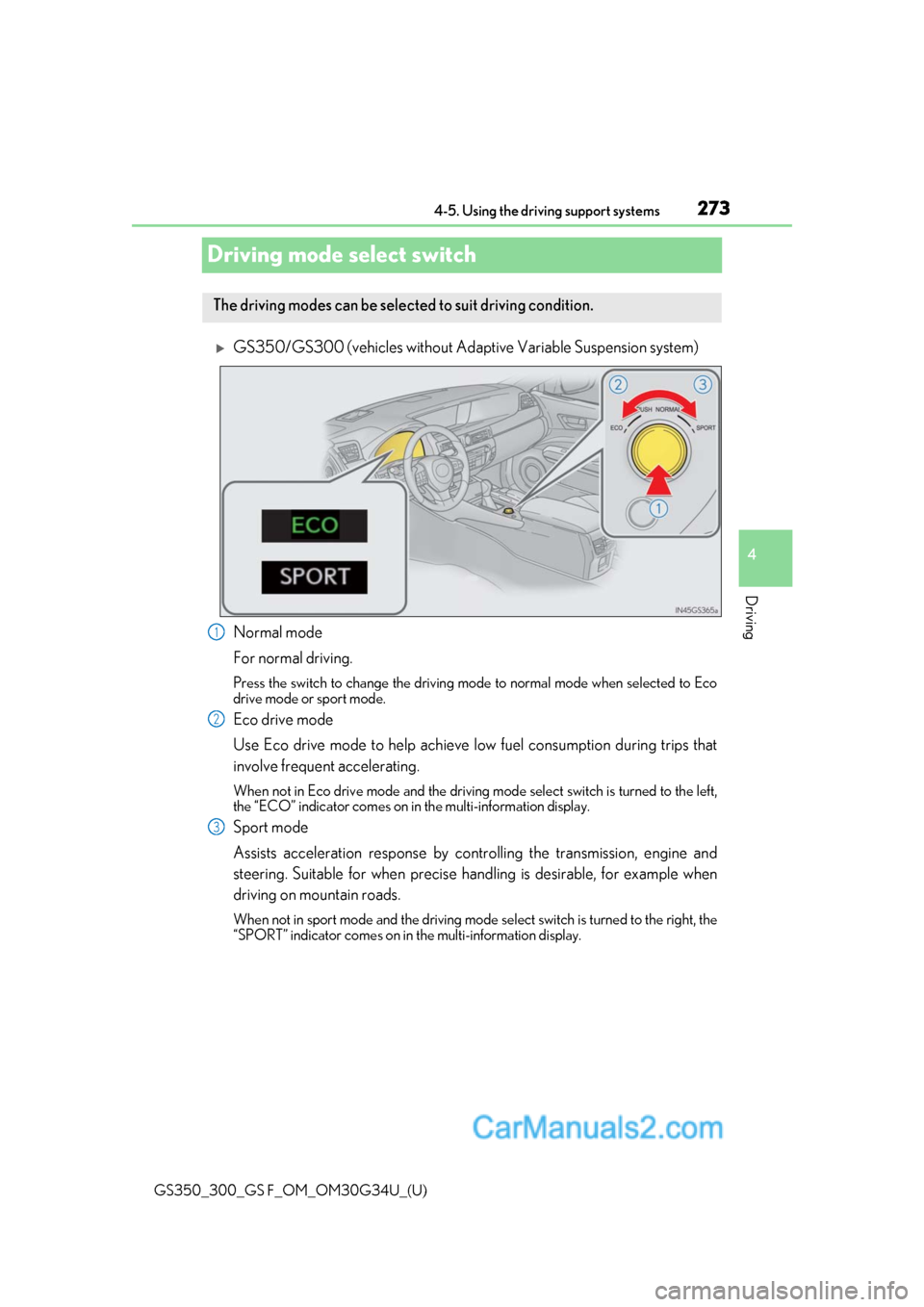
GS350/GS300 (vehicles without Adaptive Variable Suspension system)
Normal mode
For normal driving.
Press the switch to change the driving mode
to normal mode when selected to Eco
drive mode or sport mode.
Eco drive mode
Use Eco drive mode to help achieve low fuel consumption during trips that
involve frequent accelerating.
When not in Eco drive mode and the driving mode select switch is turned to the left,
the “ECO” indicator comes on in the multi-information display.
Sport mode
Assists acceleration response by cont rolling the transmission, engine and
steering. Suitable for when precise ha ndling is desirable, for example when
driving on mountain roads.
When not in sport mode and the driving mode select switch is turned to the right, the
“SPORT” indicator comes on in the multi-information display.
The driving modes can be selected to suit driving condition.
1
2
3
Page 276 of 602

274
GS350_300_GS F_OM_OM30G34U_(U)4-5. Using the driving support systems
GS350/GS300 (vehicles with Adapti
ve Variable Suspension system)
Normal mode/Customized mode
Normal mode and customized mode ar e selected by pressing the driving
mode select switch. Each time the switch is pressed, the driving mode
changes between normal mode and customized mode. When customized
mode is selected, the “Customize” or “CUSTOMIZE” indicator will be illumi-
nated.
Press the switch to change the driving mode to normal mode when selected to Eco
drive mode or sport mode.
• Normal mode
For normal driving.
• Customized mode
Allows you to drive with the power train, chassis and air conditioning sys-
tem functions set to your preferred settings.
Customized mode settings can only be changed on the drive mode cus-
tomization display of the Remote Touch screen. ( →P. 555)
Eco drive mode
Use Eco drive mode to help achieve low fuel consumption during trips that
involve frequent accelerating.
When not in Eco drive mode and the driving mode select switch is turned to the left,
the “ECO” or “ECO MODE” indicator come s on in the multi-information display.
Except
F SPORT models
F SPORT models
1
2
Page 278 of 602

276
GS350_300_GS F_OM_OM30G34U_(U)4-5. Using the driving support systems
GS F
Normal mode/Customized mode
Normal mode and customized mode ar
e selected by pressing the driving
mode select switch. Each time the switch is pressed, the driving mode
changes between normal mode and customized mode. When customized
mode is selected, the “CUSTOMIZE” indicator will be illuminated.
Press the switch to change the driving mode to normal mode when Eco drive mode or
sport mode is selected. The normal mo de indicator comes on in the meter.
• Normal mode
For normal driving.
• Customized mode
Allows you to drive with the power train, chassis and air conditioning sys-
tem functions set to your preferred settings.
Customized mode settings can only be changed on the drive mode cus-
tomization display of the Remote Touch screen. ( →P. 555)
Eco drive mode
Use Eco drive mode to help achieve low fuel consumption during trips that
involve frequent accelerating.
When not in Eco drive mode, if the driving mode select switch is turned to the left, the
Eco drive mode indicator comes on in the meter.
1
2
Page 279 of 602

GS350_300_GS F_OM_OM30G34U_(U)
2774-5. Using the driving support systems
4
Driving
Sport mode•SPORT S mode
Assists acceleration response by co ntrolling the transmission and engine.
When not in SPORT S mode, if the driving mode select switch is turned to the
right, the “SPORT S” indicator comes on in the meter.
•SPORT S+ mode
Provides earlier downshift timing than SPORT S mode in order to maintain
a high engine speed and provides faster gear changes. This mode also
changes the steering feel, suspension control and VDIM control, making it
suitable for powerful sporty driving.
When in SPORT S mode, if the driving mode select switch is turned to the right,
the “SPORT S+” indicator comes on in the meter.
■Operation of the air conditioning system in Eco drive mode
Eco drive mode controls the heating/cooling operations and fan speed of the air condi-
tioning system to enhance fuel efficiency. To improve air conditioning performance, per-
form the following operations:
●Turn off eco air conditioning mode ( →P. 310)
●Adjust the fan speed ( →P. 309)
●Turn off Eco drive mode
■Automatic operation of the seat heater during Eco drive mode
Eco drive mode controls the heating operatio n and fan speed of the air conditioning sys-
tem to enhance fuel efficiency. If the driving mode select switch is switched to Eco drive
mode in cold temperatures, the seat heater will be automatically operated to assist heat-
ing performance.
■Automatic deactivation of sport mode and customized mode
If the engine switch is turned off after dr iving in sport mode or customized mode, the
drive mode will be changed to normal mode.
■Driving mode pop-up display (12.3-inch display only)
When the driving mode is changed, the sele cted driving mode will be temporarily dis-
played on the side display. ( →P. 306)
3
Page 308 of 602
3065-1. Remote Touch screen
GS350_300_GS F_OM_OM30G34U_(U)
*1: Refer to the “NAVIGATION AND MULTIMEDIA SYSTEM OWNER’S MANUAL”.
*2: If equipped
■Full screen display
The following functions can be displayed full screen:
*: Refer to the “NAVIGATION AND MULTIMEDIA SYSTEM OWNER’S MAN- UAL”.
■Split-screen display
Different information can be displayed on the left and right of the screen. For
example, air conditioning system scre en can be displayed and operated while
the fuel consumption information screen is being displayed. The large screen
on the left of the display is called the main display, and the small screen to the
right is called the side display.
Select to display the “Setup” screen.*1
“Display”Select to adjust the contrast and brightness of the screens, turn the
screen off, etc.
*1
12.3-inch display operation
SwitchFunction
●Initial screen*
●“Menu” screen ( →P. 305)
●Map screen*
Page 312 of 602

310
GS350_300_GS F_OM_OM30G34U_(U)5-2. Using the air conditio
ning system and defogger
Adjust the left-hand side temperature setting
Select the air flow to the feet an d operate the windshield defogger
Adjust the fan speed setting
Select the air flow mode
* (the front seats)
Function on/off indicators on the option control screen
Display the option control screen ( →P. 311)
Adjust the right-hand side temperature setting
Set eco air conditioning mode ( →P. 317)
Air conditioning and heater output is limited to prioritize fuel economy.
Adjust the temperature for the driver ’s and front passenger’s seats sepa-
rately (DUAL mode) ( →P. 309)
Set cooling and dehumidification function on/off
Select to set automatic mode on/off
Select the air flow mode
* (the left-hand side)
Select the air flow mode
* (the right-hand side)
Display the rear air conditioning operation screen ( →P. 312)
Adjust the temperature for the driver ’s, front passenger’s and rear seats
( → P. 319) separately (3-ZONE mode) ( →P. 309)
To adjust or select settings, move the Remote Touch knob to select the
screen button, and then press the Re mote Touch knob or the “ENTER” but-
ton of Remote Touch to enter the selected function.
Control screen
Without rear air conditioning systemWith rear air conditioning system
1
2
3
4
5
6
7
8
9
10
11
12
13
14
15