2018 Lexus GS300 ignition
[x] Cancel search: ignitionPage 126 of 602

126
GS350_300_GS F_OM_OM30G34U_(U)2. Instrument cluster
■Head-up display
●The head-up display may seem dark and hard
to see when viewed through sunglasses,
especially polarized sunglasses.
Adjust the brightness of the head-up display or remove your sunglasses.
●When the head-up display is turned off, it will remain off even if the engine switch is
turned to IGNITION ON mode after th e engine switch has been turned off.
●The startup image will be displayed on the he ad-up display after the engine switch has
been turned to IGNITION ON mode while the head-up display switch is set to on.
■Head-up rev indicator
●The head-up display is linked to the rev indicator in the meter.
●Whether or not to display the rev indicator in the head-up display, as well as display tim-
ing, can be changed through the settings for the rev indicator in the meter. (→P. 117)
■When the battery is disconnected
The customize settings of the head-up display will be reset.
■Head-up display automatic position adjustment
If the display position is recorded into memory, the head-up display will be automatically
adjusted to the desired position. ( →P. 160)
WARNING
■Before using the head-up display
Check that the position and brightness of th e head-up display image does not interfere
with safe driving. Incorrect adjustment of the image’s position or brightness may
obstruct the driver’s view and lead to an a ccident, resulting in death or serious injury.
NOTICE
■To prevent damage to components
●Do not touch the inside of the head-up disp lay projector or thrust sharp edges or the
like into the projector.
Doing so could cause mechanical malfunctions.
●Do not place any drinks near the head-up dis-
play projector. If the projector gets wet, elec-
trical malfunctions may result.
●Do not place anything on or put stickers onto
the head-up display projector.
Doing so could interrupt head-up display
indications.
Page 141 of 602
GS350_300_GS F_OM_OM30G34U_(U)
1393-2. Opening, closing and locking the doors and trunk
3
Operation of each component
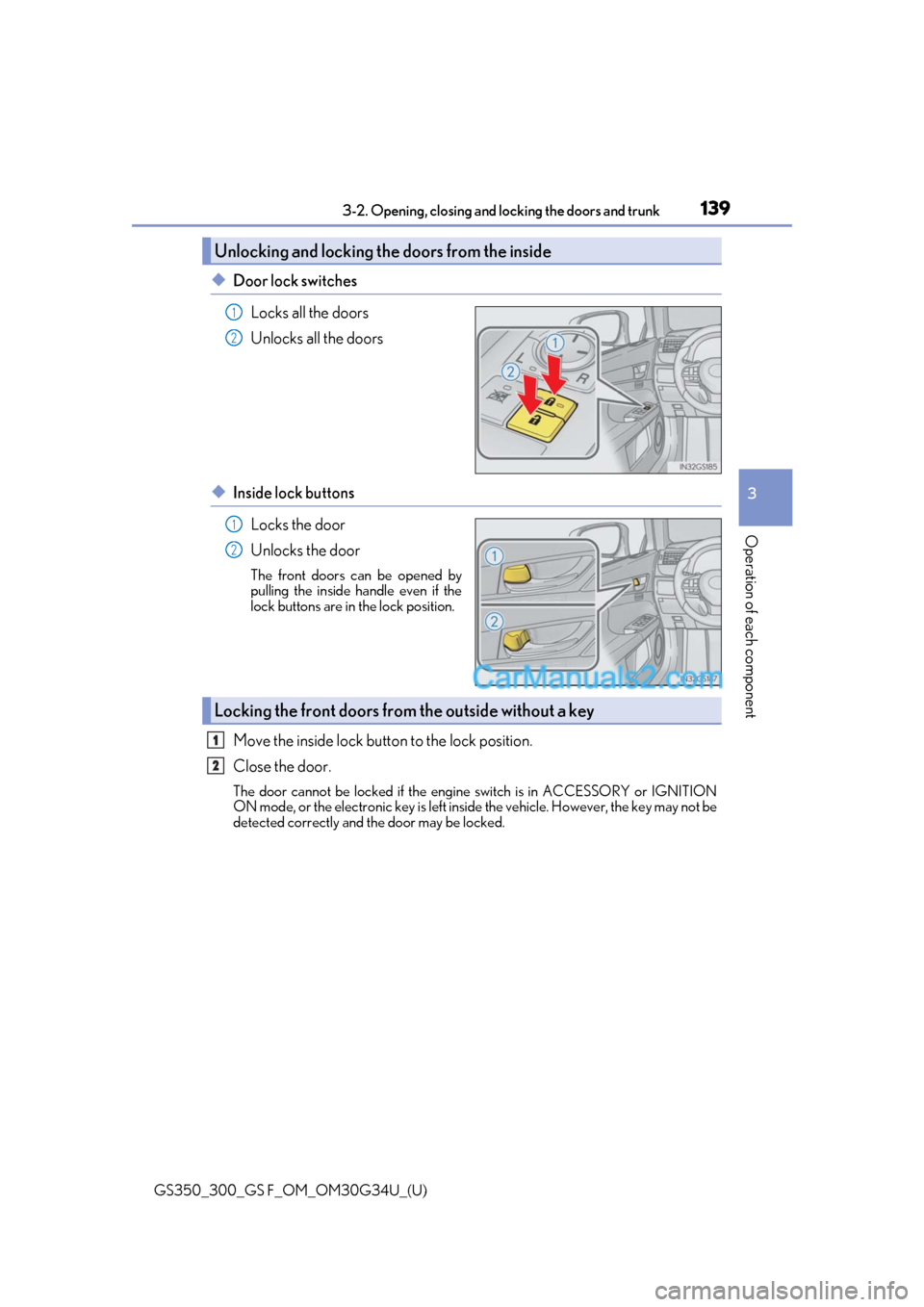
◆Door lock switches
Locks all the doors
Unlocks all the doors
◆Inside lock buttonsLocks the door
Unlocks the door
The front doors can be opened by
pulling the inside handle even if the
lock buttons are in the lock position.
Move the inside lock button to the lock position.
Close the door.
The door cannot be locked if the engine switch is in ACCESSORY or IGNITION
ON mode, or the electronic key is left inside the vehicle. However, the key may not be
detected correctly and the door may be locked.
Unlocking and locking the doors from the inside
1
2
1
2
Locking the front doors from the outside without a key
1
2
Page 150 of 602

148
GS350_300_GS F_OM_OM30G34U_(U)3-2. Opening, closing and
locking the doors and trunk
WARNING
■Trunk easy closer
■Power trunk opener and closer (If equipped)
Observe the following precautions when operating the power trunk opener and closer.
Failure to do so may cause serious injury.
●Check the safety of the surrounding area to make sure there are no obstacles or any-
thing that could cause any of yo ur belongings to get caught.
●If anyone is in the vicinity, make sure they are safe and let them know that the trunk is
about to open or close.
●If the trunk closer switch is pressed while the trunk lid is opening during automatic
operation, the trunk lid stops opening. Take extra care when on an incline, as the trunk
lid may open or close suddenly.
●On an incline, the trunk lid may suddenly sh ut after it opens automatically. Make sure
the trunk lid is fully open and secure before using the trunk.
●In the following situations, the power trun k opener and closer may detect an abnor-
mality and automatic operation may be stoppe d. In this case, the trunk lid has to be
operated manually. Take extra care in this situation, as the stopped trunk lid may sud-
denly shut, causing an accident.
• When the trunk lid contacts an obstacle
• When the battery voltage suddenly drops, such as when the engine switch is turned to IGNITION ON mode or the engine is started during automatic opera-
tion
●Do not attach any accessories other than genuine Lexus parts to the trunk lid. The
power trunk opener and closer may not operate, causing itself to malfunction, or the
trunk lid may suddenly shut again after it is opened.
■Jam protection function (vehicles with power trunk opener and closer)
Observe the following precautions.
Failure to do so may cause serious injury.
●Never use any part of your body to intentionally activate the jam protection function.
●The jam protection function may not work if something gets caught just before the
trunk lid fully closes. Be careful not to catc h fingers or anything else in the trunk lid.
●The jam protection function may not work depending on the shape of the object that
is caught. Be careful not to catch fingers or anything else.
In the event that the trunk lid is left slightly open,
the trunk easy closer will automatically close it
to the fully closed position. It takes several sec-
onds before the trunk easy closer begins to
operate. Be careful not to catch fingers or any-
thing else in the trunk lid, as this may cause
bone fractures or other serious injuries.
Page 162 of 602
160
GS350_300_GS F_OM_OM30G34U_(U)3-3. Adjusting the seats
Driving position memory
The seat and steering wheel are automati
cally adjusted to allow the driver or
front passenger to enter an d exit the vehicle easily.
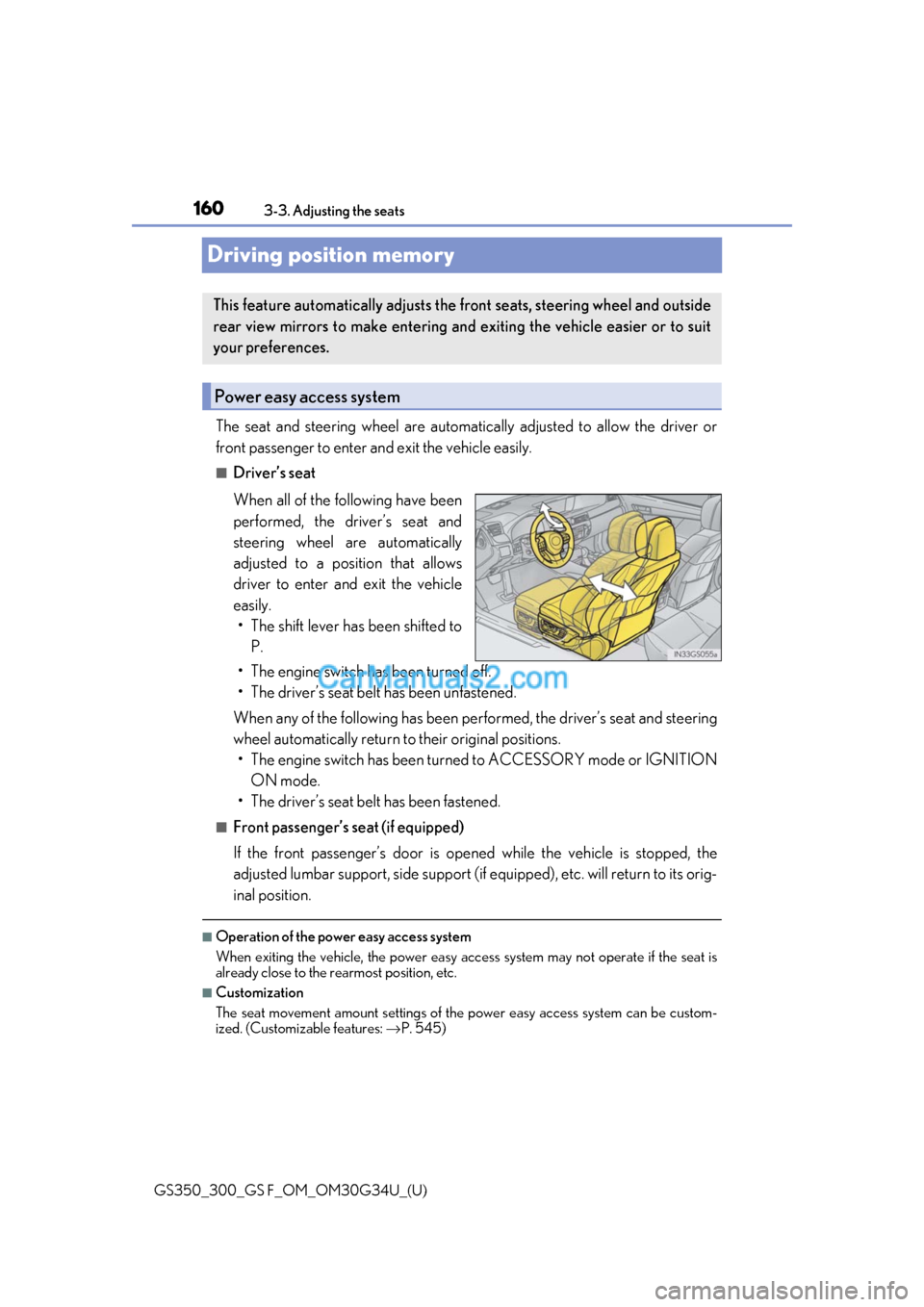
■Driver’s seat
When all of the following have been
performed, the driver’s seat and
steering wheel are automatically
adjusted to a position that allows
driver to enter and exit the vehicle
easily. • The shift lever has been shifted to P.
• The engine switch has been turned off.
• The driver’s seat belt has been unfastened.
When any of the following has been perf ormed, the driver’s seat and steering
wheel automatically return to their original positions. • The engine switch has been turned to ACCESSORY mode or IGNITION ON mode.
• The driver’s seat belt has been fastened.
■Front passenger’s seat (if equipped)
If the front passenger’s door is open ed while the vehicle is stopped, the
adjusted lumbar support, side support (if equipped), etc. will return to its orig-
inal position.
■Operation of the power easy access system
When exiting the vehicle, the power easy ac cess system may not operate if the seat is
already close to the rearmost position, etc.
■Customization
The seat movement amount settings of th e power easy access system can be custom-
ized. (Customizable features: →P. 545)
This feature automatically adjusts the front seats, steering wheel and outside
rear view mirrors to make entering and exiting the vehicle easier or to suit
your preferences.
Power easy access system
Page 163 of 602

GS350_300_GS F_OM_OM30G34U_(U)
1613-3. Adjusting the seats
3
Operation of each component
Your preferred driving position (the position of the driver’s seat, steering wheel,
outside rear view mirrors and HUD [head-up display] [if equipped]) can be
recorded and recalled by pressing a button.
Three different driving positions can be recorded into memory.
■Recording procedure
Check that the shift lever is in P.
Turn the engine switch to IGNITION ON mode.
Adjust the driver’s seat, steering wh eel, outside rear view mirrors and HUD
(head-up display) (if equipped) to the desired positions.
While pressing the “SET” button,
or within 3 seconds after the
“SET” button is pressed, press
button “1”, “2” or “3” until the
buzzer sounds.
If the selected button has already
been preset, the previously recorded
position will be overwritten.
Vehicles with the driving position me mory for the front passenger’s seat: To
record the position of the front passenger’s seat, adjust the front passenger’s
seat to the desired position and perfor m step using the buttons on the front
passenger’s side.
■Recall procedure
Check that the shift lever is in P.
Turn the engine switch to IGNITION ON mode.
Press one of the buttons for the
driving position you want to recall
until the buzzer sounds.
Driving position memory
1
2
3
4
4
1
2
3
Page 164 of 602

162
GS350_300_GS F_OM_OM30G34U_(U)3-3. Adjusting the seats
■To stop the position recall operation part-way through
Perform any of the following:
●Press the “SET” button.
●Press button “1”, “2” or “3”.
●Operate any of the seat adjustment switches (only cancels seat position recall).
●Operate the tilt and telescopic steering control switch
(only cancels steering wheel
position recall).
●Operate the head-up display position adjustment switch (if equipped) (only cancels
head-up display position recall).
■Seat positions that can be memorized ( →P. 158)
Vehicles without seatback si de support adjustment switch
The adjusted positions other than the position adjusted by lumbar support switch can be
recorded.
Vehicles with seatback side support adjustment switch
All adjusted positions can be recorded.
■Operating the driving position memory after turning the engine switch off
Driver’s seat:
Recorded seat positions can be activated up to 180 seconds after the driver’s door is
opened and another 60 seconds after it is closed again.
Front passenger’s seat:
Recorded seat positions can be activated up to 180 seconds after the front passenger’s
door is opened.
■In order to correctly use the dr iving position memory function
If a seat position is already in the furthest po ssible position and the seat is operated in the
same direction, the recorded position may be slightly different when it is recalled.
Each electronic key (including a card key) can be registered to recall your pre-
ferred driving position.
■Registering procedure
Record your driving position to button “1”, “2” or “3” before performing the
following:
Carry only the key you want to regist er, and then close the driver’s door.
If 2 or more keys are in the vehicle, the driving position cannot be recorded
properly.
Check that the shift lever is in P.
Turn the engine switch to IGNITION ON mode.
Recall the driving position that you want to record.
Memory recall function (driver’s side only)
1
2
3
Page 165 of 602
GS350_300_GS F_OM_OM30G34U_(U)
1633-3. Adjusting the seats
3
Operation of each component
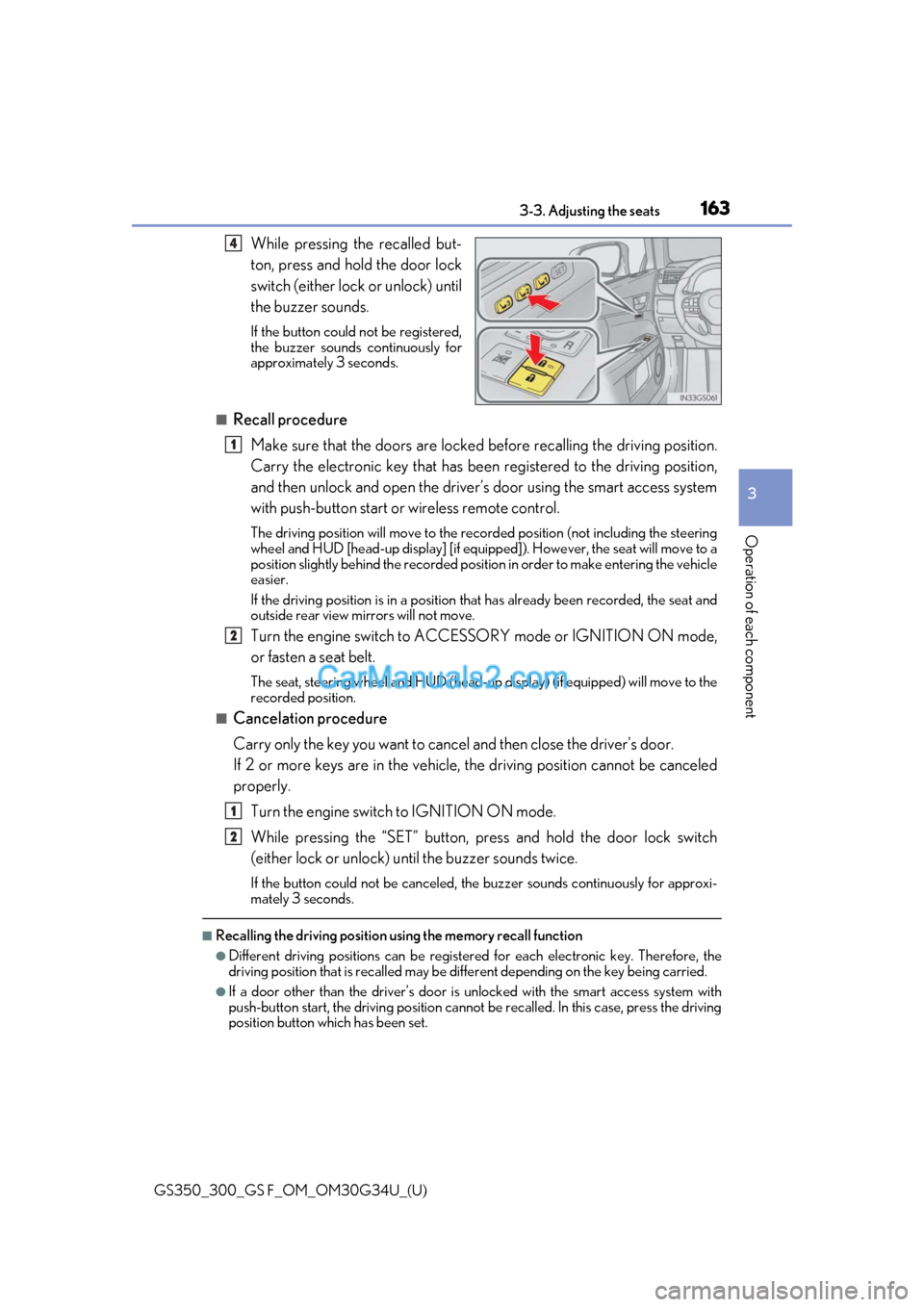
While pressing the recalled but-
ton, press and hold the door lock
switch (either lock or unlock) until
the buzzer sounds.
If the button could not be registered,
the buzzer sounds continuously for
approximately 3 seconds.
■Recall procedureMake sure that the doors are locked before recalling the driving position.
Carry the electronic key that has been registered to the driving position,
and then unlock and open the driver’s door using the smart access system
with push-button start or wireless remote control.
The driving position will move to the recorded position (not including the steering
wheel and HUD [head-up display] [if equipp ed]). However, the seat will move to a
position slightly behind the recorded positi on in order to make entering the vehicle
easier.
If the driving position is in a position th at has already been recorded, the seat and
outside rear view mirrors will not move.
Turn the engine switch to ACCESS ORY mode or IGNITION ON mode,
or fasten a seat belt.
The seat, steering wheel and HUD (head-up display) (if equipped) will move to the
recorded position.
■Cancelation procedure
Carry only the key you want to cance l and then close the driver’s door.
If 2 or more keys are in the vehicle, the driving position cannot be canceled
properly.
Turn the engine switch to IGNITION ON mode.
While pressing the “SET” button, pr ess and hold the door lock switch
(either lock or unlock) un til the buzzer sounds twice.
If the button could not be canceled, the buzzer sounds continuously for approxi-
mately 3 seconds.
■Recalling the driving position using the memory recall function
●Different driving positions can be registered for each electronic key. Therefore, the
driving position that is recalled may be di fferent depending on the key being carried.
●If a door other than the driver’s door is unlocked with the smart access system with
push-button start, the driving position cannot be recalled. In this case, press the driving
position button which has been set.
4
1
2
1
2
Page 170 of 602

1683-4. Adjusting the steering wheel and mirrors
GS350_300_GS F_OM_OM30G34U_(U)
Steering wheel
Operating the switch moves the steering wheel in the following directions: Up
Down
Toward the driver
Away from the driver
To sound the horn, press on or close to
the mark.
■The steering wheel can be adjusted when
The engine switch is in ACCESSORY or IGNITION ON mode
*.
*: If the driver’s seat belt is fastened, the steering wheel can be adjusted regardless of engine switch mode.
■Automatic adjustment of the steering position
A desired steering position ca n be entered to memory and recalled automatically by the
driving position memory system. (→ P. 160)
■Power easy access system
The steering wheel and driver’s seat move in accordance with engine switch mode and
the driver’s seat belt condition. ( →P. 160)
Adjustment procedure
1
2
3
4
Horn
WARNING
Do not adjust the steeri ng wheel while driving.
Doing so may cause the driver to mishandle the vehicle and cause an accident, result-
ing in death or serious injury.