2018 KIA STINGER change time
[x] Cancel search: change timePage 268 of 551
515
Driving your vehicle
In manual mode, downshifts aremade automatically when the vehi-
cle slows down. When the vehicle
stops, 1st gear is automatically
selected.
In manual mode, when the engine rpm approaches the red zone shift
points are varied to upshift auto-
matically.
To maintain the required levels of vehicle performance and safety,
the system may not execute cer-
tain gearshifts when the shift lever
is operated.
When driving on a slippery road, push the shift lever forward into the
+(up) position. This causes the
transmission to shift into the 2nd
gear which is better for smooth
driving on a slippery road. Push
the shift lever to the -(down) side to
shift back to the 1st gear.Paddle shifter (if equipped)
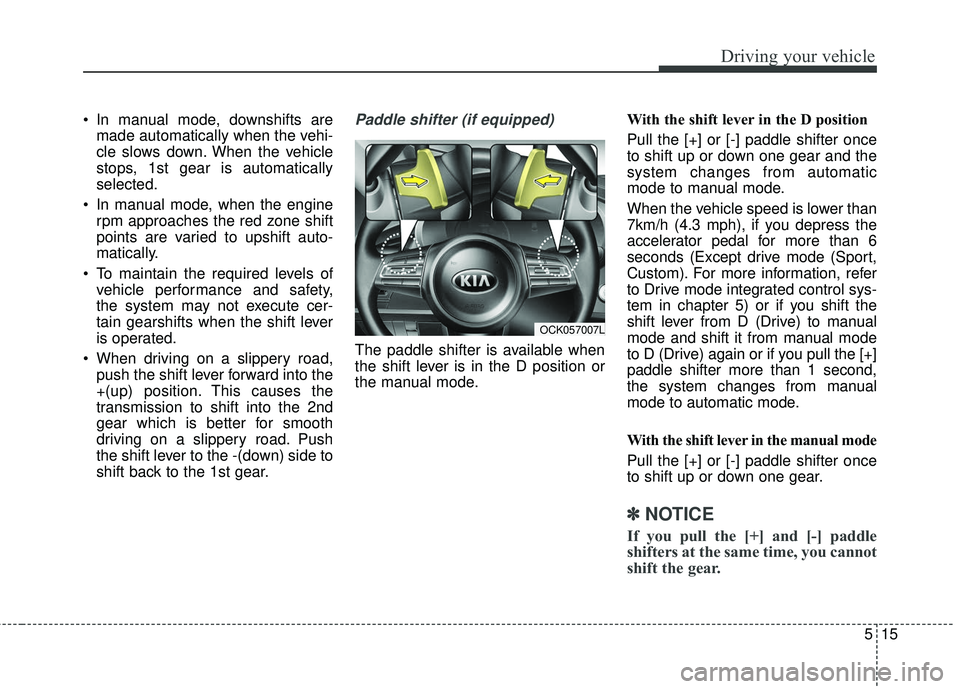
The paddle shifter is available when
the shift lever is in the D position or
the manual mode. With the shift lever in the D position
Pull the [+] or [-] paddle shifter once
to shift up or down one gear and the
system changes from automatic
mode to manual mode.
When the vehicle speed is lower than
7km/h (4.3 mph), if you depress the
accelerator pedal for more than 6
seconds (Except drive mode (Sport,
Custom). For more information, refer
to Drive mode integrated control sys-
tem in chapter 5) or if you shift the
shift lever from D (Drive) to manual
mode and shift it from manual mode
to D (Drive) again or if you pull the [+]
paddle shifter more than 1 second,
the system changes from manual
mode to automatic mode.
With the shift lever in the manual mode
Pull the [+] or [-] paddle shifter once
to shift up or down one gear.
✽ ✽
NOTICE
If you pull the [+] and [-] paddle
shifters at the same time, you cannot
shift the gear.
OCK057007L
Page 276 of 551
![KIA STINGER 2018 Owners Manual 523
Driving your vehicle
To turn off the engine, re-press the
engine start/stop button to the ON
position, press the [P] button, and
press the engine start/stop button to
the OFF position.
When eithe](/manual-img/2/40391/w960_40391-275.png "KIA STINGER 2018 Owners Manual 523
Driving your vehicle
To turn off the engine, re-press the
engine start/stop button to the ON
position, press the [P] button, and
press the engine start/stop button to
the OFF position.
When eithe")
523
Driving your vehicle
To turn off the engine, re-press the
engine start/stop button to the ON
position, press the [P] button, and
press the engine start/stop button to
the OFF position.
When either the driver's door or the
front passenger's door is opened
with the engine start/stop button in
the ACC position and the shift lever
in N (Neutral) position, the engine is
automatically turned OFF and the
transmission automatically changes
to the P (Park) position.D (Drive)
This is the normal driving position. The
transmission will automatically shift
through a 8-gear sequence, providing
the best fuel economy and power.
WARNING
To avoid inadvertent vehiclemovement, do not shift into
gear unless your foot is firmly
on the brake pedal.
D not permit your vehicle to idle in the N (Neutral) position
for an extended period of
time as this will preclude the
wheels and the transmission
from engaging. While parking
the vehicle with the engine
running, depress the brake
pedal, shift the vehicle to the
P (Park) position and apply
the parking brake.
Do not drive with the shift lever in N (Neutral). The
engine brake will not work
and may lead to an accident.
OCK057013N
OCK057014N
■ R (Reverse) → D (Drive)
■P (Park), N (Neutral) →D (Drive)
Unlock Button
Unlock Button
Page 278 of 551
525
Driving your vehicle
✽ ✽NOTICE
After the ignition switch has been
turned off, the electronic parking
brake cannot be disengaged.
Paddle shifter (Manual mode)
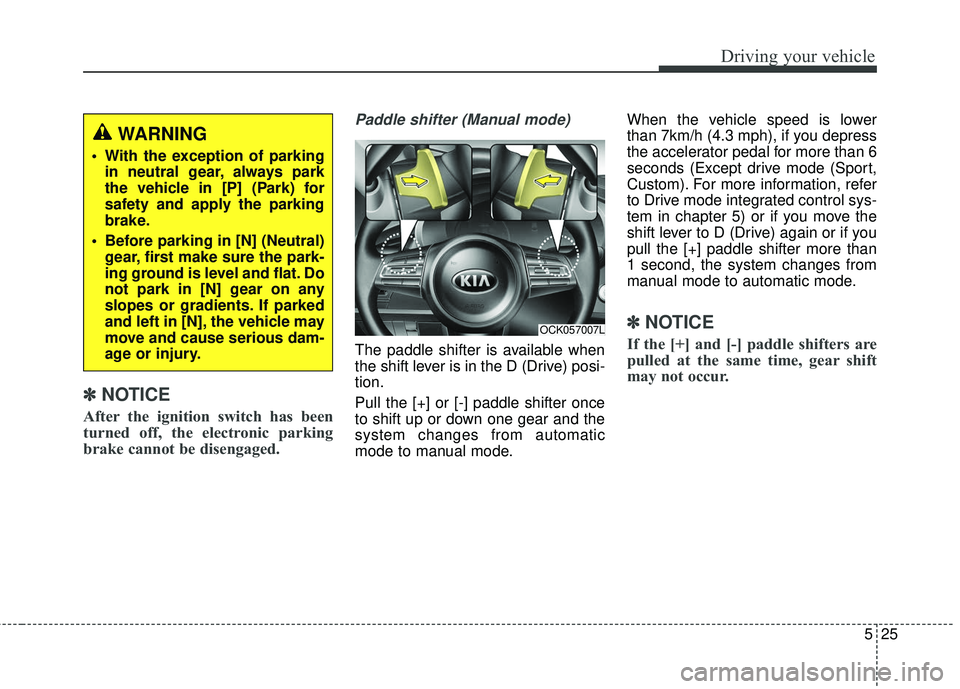
The paddle shifter is available when
the shift lever is in the D (Drive) posi-
tion.
Pull the [+] or [-] paddle shifter once
to shift up or down one gear and the
system changes from automatic
mode to manual mode. When the vehicle speed is lower
than 7km/h (4.3 mph), if you depress
the accelerator pedal for more than 6
seconds (Except drive mode (Sport,
Custom). For more information, refer
to Drive mode integrated control sys-
tem in chapter 5) or if you move the
shift lever to D (Drive) again or if you
pull the [+] paddle shifter more than
1 second, the system changes from
manual mode to automatic mode.
✽ ✽
NOTICE
If the [+] and [-] paddle shifters are
pulled at the same time, gear shift
may not occur.
OCK057007L
WARNING
With the exception of parking
in neutral gear, always park
the vehicle in [P] (Park) for
safety and apply the parking
brake.
Before parking in [N] (Neutral) gear, first make sure the park-
ing ground is level and flat. Do
not park in [N] gear on any
slopes or gradients. If parked
and left in [N], the vehicle may
move and cause serious dam-
age or injury.
Page 280 of 551

527
Driving your vehicle
✽ ✽NOTICE
In situations the gear needs to be
changed from P (Park) to N
(Neutral) when the engine start/stop
button is in the OFF position, refer
to step 4.
The actuators work to shift the gear
in the N (Neutral) or P (Parking)
and make normal mechanical
sound.
Parking
Always come to a complete stop and
continue to depress the brake pedal.
Move the shift lever into the P (Park)
position, apply the parking brake,
and place the engine start/stop but-
ton in the OFF position. Take the Key
with you when exiting the vehicle.
LCD display messages
Shifter Malfunction
The warning message appears on
the LCD display, when the transmis-
sion or the shift lever does not prop-
erly operate in the P (Park) position.
In this case, we recommend you to
immediately have the vehicle
inspected by an authorized Kia deal-
er.
WARNING
Do not depress the accelera-
tor pedal While sitting in the
vehicle with the engine run-
ning. Depressing the acceler-
ator pedal for a long period of
time may cause the engine or
exhaust system to overheat
and start a fire.
The exhaust gas and the exhaust system are very hot .
Keep away from the exhaust
system components. Do not
stop or park over flammable
materials, such as dry grass,
paper or leaves. They may
ignite and cause a fire.
OCK057143L
Page 305 of 551

Driving your vehicle
52
5
✽ ✽
NOTICE
• The following are conditions when
the Auto Hold will not engage
(Auto Hold light will not turn
green and the Auto Hold system
remains in stand by):
- The driver's seat belt is unfas-tened and driver's door is opened
- The engine hood is opened
- The shift lever is in P (Park) or R (Reverse)
- The EPB is applied
• For your safety, the Auto Hold automatically switches to EPB
under any of the following condi-
tions (Auto Hold light remains
white and the EPB automatically
applies):
- The driver's seat belt is unfas-tened and driver's door is opened
- The engine hood is opened
- The vehicle is in a standstill for more than 10 minutes
- The vehicle is standing on a steep slope
- The vehicle moved several times (Continued)(Continued)
In these cases, the brake warning
light comes on, the AUTO HOLD
indicator changes from green to
white, and a warning sounds and a
message will appear to inform you
that EPB has been automatically
engaged. Before driving off again,
press foot brake pedal, check the
surrounding area near your vehi-
cle and release parking brake
manually with the EPB switch.
• If the AUTO HOLD indicator lights up yellow, the Auto Hold is
not working properly. Take your
vehicle to an authorized Kia deal-
er and have the system checked.
If there is a malfunction with the dri-
ver’s door, engine hood open detec-
tion system, the Auto Hold may not
work properly.
Take your vehicle to an authorized Kia
dealer and have the system checked.
✽ ✽ NOTICE
A click or electric brake motor
whine sound may be heard while
operating or releasing the EPB, but
these conditions are normal and
indicate that the EPB is functioning
properly.
WARNING
To reduce the risk of an acci-
dent, do not activate Auto Hold
while driving downhill, backing
up or parking your vehicle.
Page 318 of 551
565
Driving your vehicle
The warning light illumi-
nates on the LCD display,
when you cancel the FCA
system. The driver can
monitor the FCA ON/OFF status on
the LCD display. Also, the warning
light illuminates when the
ESC(Electronic Stability Control) is
turned off (Traction & Stability control
disabled.). When the warning light
remains ON with the FCA activated,
have the system checked by an
authorized Kia dealer.
The driver can select the initial warn-
ing activation time in the User
Settings in the instrument cluster
LCD display. The options for the ini-
tial Forward Collision Warning
include the following:
selected, the initial
Forward Collision Warning
is activated earlier than
normal. This setting maxi-
mizes the amount of dis-
tance between the vehicle
or pedestrian ahead before
the initial warning occurs. If
the ‘EARLY’ condition feels
too sensitive, change it into
‘NORMAL’. When the vehi-
cle ahead suddenly stops,
the warning may seem to
activate later even if the
‘EARLY’ condition was
selected.
selected, the initial
Forward Collision
Warning is activated nor-
mally. This setting allows
for a nominal amount of
distance between the
vehicle or pedestrian
ahead before the initial
warning occurs.
selected, the initial Forward
Collision Warning is activat-
ed later than normal. This
setting reduces the amount
of distance between the
vehicle or pedestrian ahead
before the initial warning
occurs. Select this condition
only when traffic is light,
and you are driving slowly.
Page 333 of 551
Driving your vehicle
80
5
To decrease the cruising
speed:
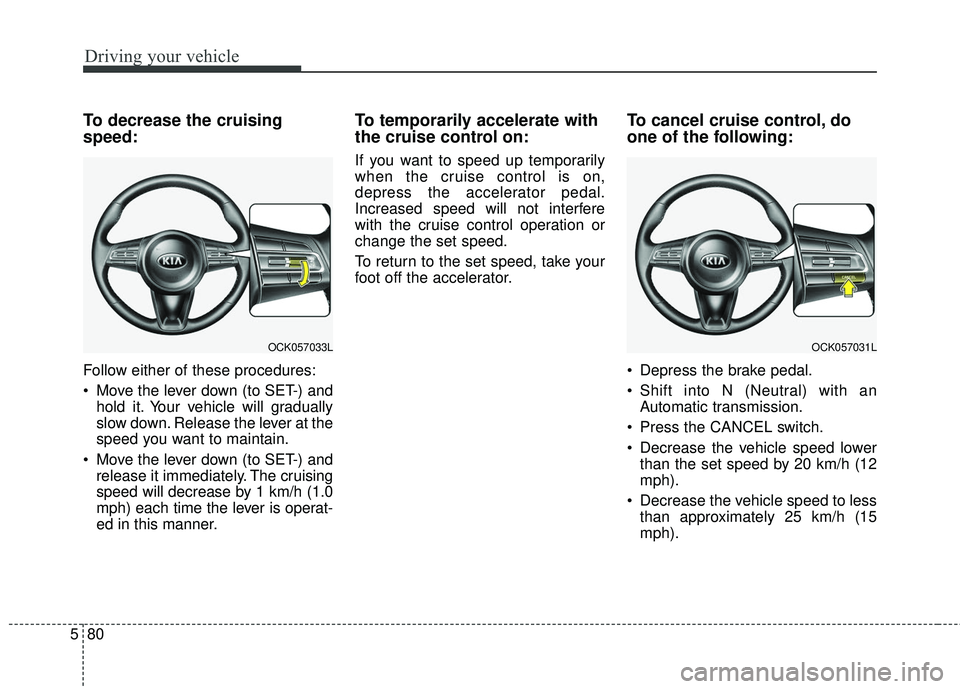
Follow either of these procedures:
Move the lever down (to SET-) and
hold it. Your vehicle will gradually
slow down. Release the lever at the
speed you want to maintain.
Move the lever down (to SET-) and release it immediately. The cruising
speed will decrease by 1 km/h (1.0
mph) each time the lever is operat-
ed in this manner.
To temporarily accelerate with
the cruise control on:
If you want to speed up temporarily
when the cruise control is on,
depress the accelerator pedal.
Increased speed will not interfere
with the cruise control operation or
change the set speed.
To return to the set speed, take your
foot off the accelerator.
To cancel cruise control, do
one of the following:
Depress the brake pedal.
Shift into N (Neutral) with an Automatic transmission.
Press the CANCEL switch.
Decrease the vehicle speed lower than the set speed by 20 km/h (12
mph).
Decrease the vehicle speed to less than approximately 25 km/h (15
mph).
OCK057033LOCK057031L
Page 339 of 551

Driving your vehicle
86
5
To temporarily accelerate with the
cruise control on:
If you want to speed up temporarily
when the cruise control is on,
depress the accelerator pedal.
Increased speed will not interfere
with cruise control operation or
change the set speed.
To return to the set speed, take your
foot off the accelerator.
If you move the lever down (to SET-)
at increased speed, the cruising
speed will be set again.
✽ ✽ NOTICE
Be careful when accelerating tem-
porarily, because the speed is not
regulated automatically at this time
even if there is a vehicle in front of
you.
Smart cruise control system will
be temporarily canceled when:
Cancelled manually
The smart cruise control systemis
temporarily canceled when the brake
pedal is depressed or the CANCEL
button is pressed. The speed and
vehicle to vehicle distance indicator
on the cluster will disappear and the
CRUISE indicator is illuminated con-
tinuously. Cancelled automatically
The driver's door is opened.
The shift lever is shifted to N
(Neutral), R (Reverse) or P (Parking).
The EPB (electronic parking brake) is applied.
The vehicle speed is over 210 km/h (130 mph)
The ESC, ABS or TCS is operating.
The ESC is turned off.
The sensor or the cover is dirty or blocked with foreign matter.
When the vehicle is stopped for over 5 minutes.
The driver starts driving by pushing the lever up (RES +) or down
(SET -) or depressing the acceler-
ator pedal approximately 3 sec-
onds after the vehicle is stopped by
the smart cruise control
systemSystem with no other vehi-
cle ahead or a vehicle stopped far
away in front.
The engine speed is in dangerous range.
OCK057035N