Page 218 of 551
4131
Features of your vehicle
If you want to defrost and defog the
front windshield, refer to “Windshield
defrosting and defogging” in this sec-
tion.
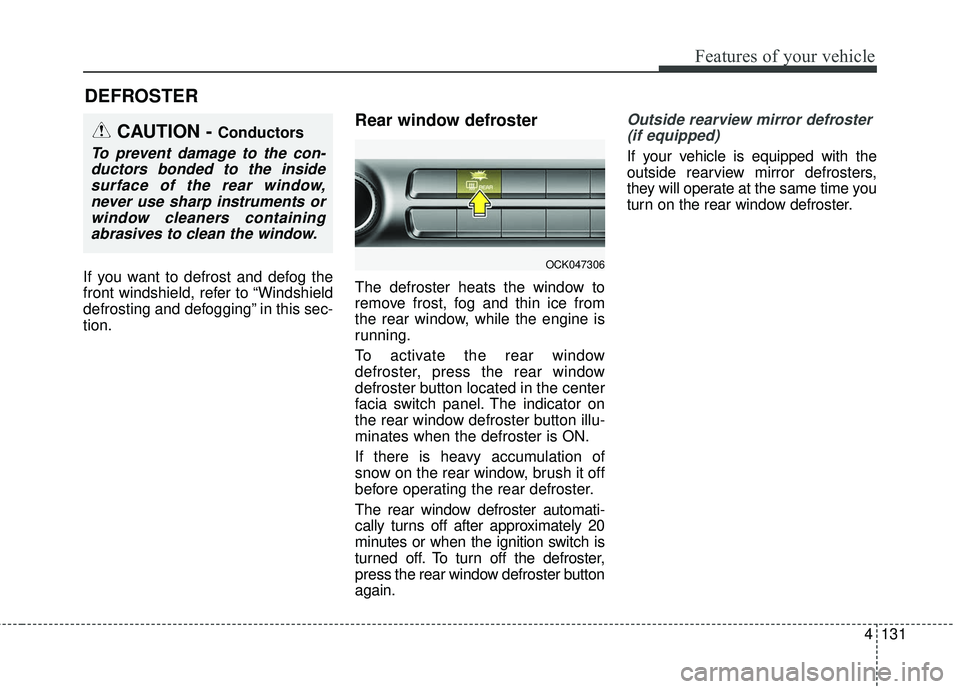
Rear window defroster
The defroster heats the window to
remove frost, fog and thin ice from
the rear window, while the engine is
running.
To activate the rear window
defroster, press the rear window
defroster button located in the center
facia switch panel. The indicator on
the rear window defroster button illu-
minates when the defroster is ON.
If there is heavy accumulation of
snow on the rear window, brush it off
before operating the rear defroster.
The rear window defroster automati-
cally turns off after approximately 20
minutes or when the ignition switch is
turned off. To turn off the defroster,
press the rear window defroster button
again.
Outside rearview mirror defroster (if equipped)
If your vehicle is equipped with the
outside rearview mirror defrosters,
they will operate at the same time you
turn on the rear window defroster.
DEFROSTER
CAUTION - Conductors
To prevent damage to the con-ductors bonded to the insidesurface of the rear window,never use sharp instruments orwindow cleaners containingabrasives to clean the window.
OCK047306
Page 219 of 551
Features of your vehicle
132
4
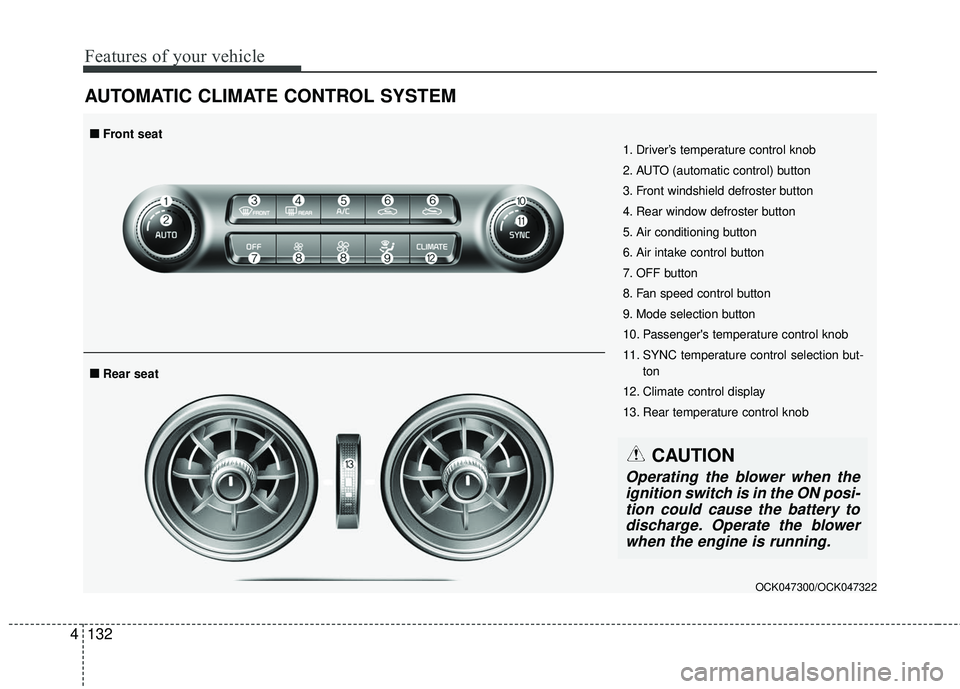
AUTOMATIC CLIMATE CONTROL SYSTEM
OCK047300/OCK047322
1. Driver’s temperature control knob
2. AUTO (automatic control) button
3. Front windshield defroster button
4. Rear window defroster button
5. Air conditioning button
6. Air intake control button
7. OFF button
8. Fan speed control button
9. Mode selection button
10. Passenger's temperature control knob
11. SYNC temperature control selection but-
ton
12. Climate control display
13. Rear temperature control knob
■ ■ Rear seat
■ ■Front seat
CAUTION
Operating the blower when the
ignition switch is in the ON posi-tion could cause the battery todischarge. Operate the blowerwhen the engine is running.
Page 228 of 551
4141
Features of your vehicle
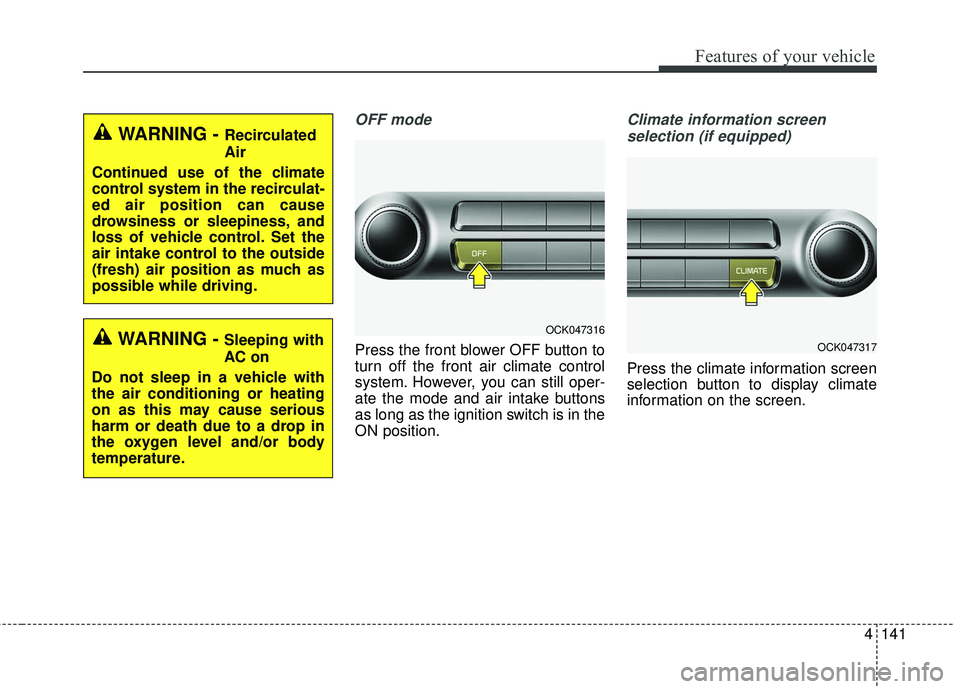
OFF mode
Press the front blower OFF button to
turn off the front air climate control
system. However, you can still oper-
ate the mode and air intake buttons
as long as the ignition switch is in the
ON position.
Climate information screen selection (if equipped)
Press the climate information screen
selection button to display climate
information on the screen.
OCK047317
WARNING - Recirculated
Air
Continued use of the climate
control system in the recirculat-
ed air position can cause
drowsiness or sleepiness, and
loss of vehicle control. Set the
air intake control to the outside
(fresh) air position as much as
possible while driving.
WARNING - Sleeping with
AC on
Do not sleep in a vehicle with
the air conditioning or heating
on as this may cause serious
harm or death due to a drop in
the oxygen level and/or body
temperature.OCK047316
Page 235 of 551
Features of your vehicle
148
4
Automatic climate control system
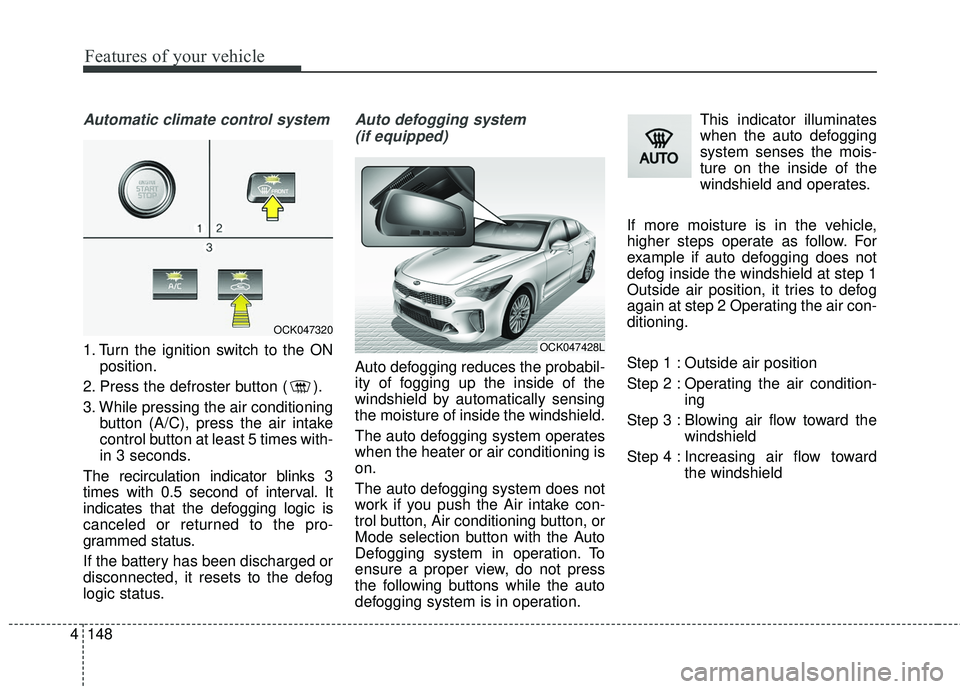
1. Turn the ignition switch to the ON
position.
2. Press the defroster button ( ).
3. While pressing the air conditioning button (A/C), press the air intake
control button at least 5 times with-
in 3 seconds.
The recirculation indicator blinks 3
times with 0.5 second of interval. It
indicates that the defogging logic is
canceled or returned to the pro-
grammed status.
If the battery has been discharged or
disconnected, it resets to the defog
logic status.
Auto defogging system (if equipped)
Auto defogging reduces the probabil-
ity of fogging up the inside of the
windshield by automatically sensing
the moisture of inside the windshield.
The auto defogging system operates
when the heater or air conditioning is
on.
The auto defogging system does not
work if you push the Air intake con-
trol button, Air conditioning button, or
Mode selection button with the Auto
Defogging system in operation. To
ensure a proper view, do not press
the following buttons while the auto
defogging system is in operation. This indicator illuminates
when the auto defogging
system senses the mois-
ture on the inside of the
windshield and operates.
If more moisture is in the vehicle,
higher steps operate as follow. For
example if auto defogging does not
defog inside the windshield at step 1
Outside air position, it tries to defog
again at step 2 Operating the air con-
ditioning.
Step 1 : Outside air position
Step 2 : Operating the air condition- ing
Step 3 : Blowing air flow toward the windshield
Step 4 : Increasing air flow toward the windshield
OCK047320
OCK047428L
Page 240 of 551
4153
Features of your vehicle
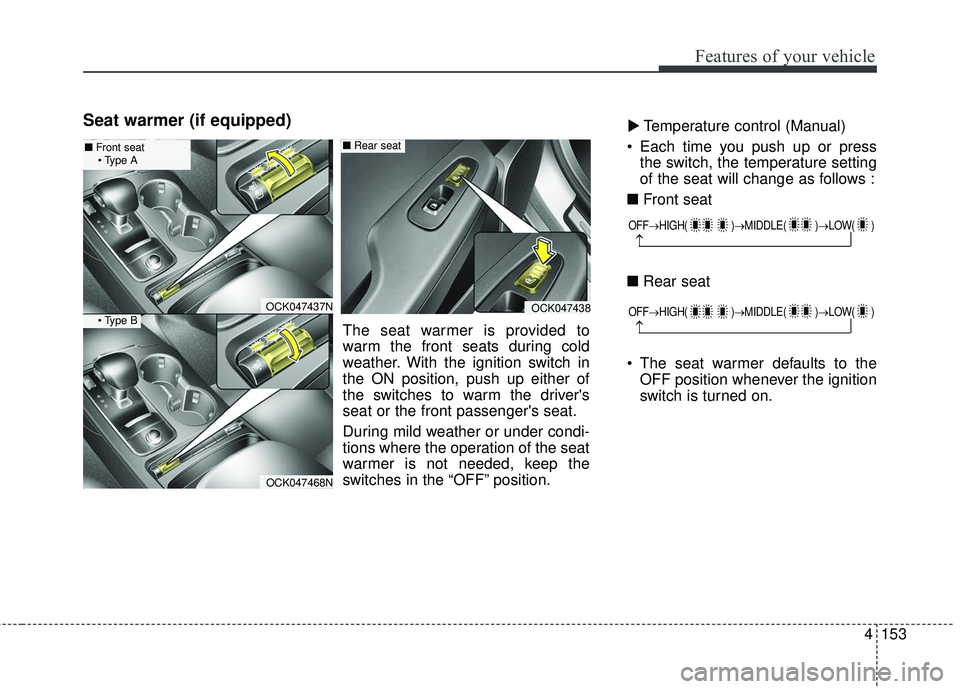
Seat warmer (if equipped)Temperature control (Manual)
Each time you push up or press the switch, the temperature setting
of the seat will change as follows :
■ Front seat
■ Rear seat
The seat warmer defaults to the OFF position whenever the ignition
switch is turned on.▼
OFF→ HIGH( )→ MIDDLE( )→LOW( )
→
OFF→HIGH( )→ MIDDLE( )→LOW( )
→
OCK047437N
OCK047468N
OCK047438
The seat warmer is provided to
warm the front seats during cold
weather. With the ignition switch in
the ON position, push up either of
the switches to warm the driver's
seat or the front passenger's seat.
During mild weather or under condi-
tions where the operation of the seat
warmer is not needed, keep the
switches in the “OFF” position.
■Rear seat■Front seat
Page 242 of 551
4155
Features of your vehicle
The seat warmer (with air ventila-tion) defaults to the OFF position
whenever the ignition switch is
turned on.Sunvisor
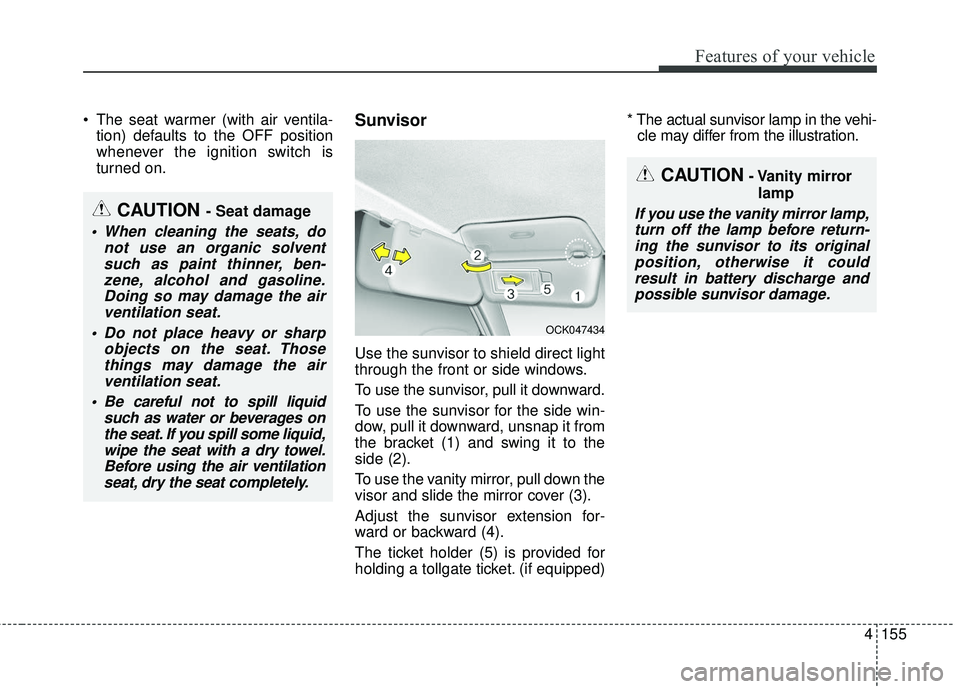
Use the sunvisor to shield direct light
through the front or side windows.
To use the sunvisor, pull it downward.
To use the sunvisor for the side win-
dow, pull it downward, unsnap it from
the bracket (1) and swing it to the
side (2).
To use the vanity mirror, pull down the
visor and slide the mirror cover (3).
Adjust the sunvisor extension for-
ward or backward (4).
The ticket holder (5) is provided for
holding a tollgate ticket. (if equipped) * The actual sunvisor lamp in the vehi-
cle may differ from the illustration.
CAUTION- Vanity mirror
lamp
If you use the vanity mirror lamp,turn off the lamp before return-ing the sunvisor to its originalposition, otherwise it couldresult in battery discharge andpossible sunvisor damage.CAUTION - Seat damage
When cleaning the seats, do not use an organic solventsuch as paint thinner, ben-zene, alcohol and gasoline.Doing so may damage the airventilation seat.
Do not place heavy or sharp objects on the seat. Thosethings may damage the airventilation seat.
Be careful not to spill liquid such as water or beverages onthe seat. If you spill some liquid,wipe the seat with a dry towel.Before using the air ventilationseat, dry the seat completely.
OCK047434
Page 244 of 551

4157
Features of your vehicle
USB charger (if equipped)
The USB charger is designed to
recharge devices using a USB cable.
The electrical devices can be
recharged when the Engine Start/Stop
button is in ACC/ON/START position.
The battery charging state may be
monitored on the electrical device.
Disconnect the USB cable from the
USB port after use. Some devices are not supported
for fast charging but will be
charged with normal speed.
Use the USB charger when the engine is running to prevent bat-
tery discharge.
Only devices that fits the USB port can be used.
The USB charger can be used only for battery charging purposes.
Battery chargers cannot be charged.
Wireless smart phone charg-
ing system (if equipped)
A wireless smart phone charging
system located in front of the center
console
Firmly close all doors, and turn the
ignition to ACC or IGN ON. To start
wireless charging, place the smart
phone equipped with wireless charg-
ing function on the wireless charging
pad.
For best wireless charging results,
place the smart phone on the center
of the charging pad.
OCK047461
OCK047440N
Page 247 of 551
Features of your vehicle
160
4
(Continued)
The wireless charging may not function properly whenthere is a heavy accessorycover on the smart phone.
The wireless charging will stop when the smart key ismoved out of the vehicle withthe ignition in ON.
Charging may be temporarily interrupted when smart keydetection is activated. (whenturning on ignition, opening orclosing the doors)
The wireless charging will stop when the vehicle isturned OFF.
The wireless charging will stop when the smart phone isnot in complete contact withthe wireless charging pad.
Items equipped with magnetic components such as creditcard, telephone card, bank-book, any transportation ticketand such may become dam-aged during wireless charging.
(Continued)(Continued) Place the smart phone on the center of the charge pad forbest results. The smart phonemay not charge when placednear the rim of the chargingpad. When the smart phonedoes get charged, it may heatup excessively.
For smart phones without built-in wireless charging sys-tem, an appropriate accessoryhas to be equipped.
Cellphones that are not certi- fied for wireless smart phonecharging standards (QI) maynot be able to charge.
Self-protection features in some smart phones couldslow down or stop charging.
In some cases, the wireless charging indicator could notturn green even when thephone is fully charged.
(Continued)(Continued) Smart phones of some manu- facturers may display mes-sages on weak current. This isdue to the particular charac-teristic of the smart phoneand does not imply a malfunc-tion on wireless chargingfunction.
The indicator light of some manufacturers’ smart phonesmay still be yellow after thesmart phone is fully charged.This is due to the particularcharacteristic of the smartphone and not a malfunctionof the wireless charging.
When any smart phone with- out a wireless charging func-tion or a metallic object isplaced on the charging pad, asmall noise may sound. Thissmall sound is due to the vehi-cle discerning compatibility ofthe object placed on thecharging pad. It does notaffect your vehicle or thesmart phone in any way.