2018 KIA SPORTAGE trip computer
[x] Cancel search: trip computerPage 88 of 605

Mirrors . . . . . . . . . . . . . . . . . . . . . . . . . . . . . . . . . . 4-58\
• Inside rearview mirror . . . . . . . . . . . . . . . . . . . . . . . . 4-58
• Outside rearview mirror . . . . . . . . . . . . . . . . . . . . . . 4-65
Instrument cluster . . . . . . . . . . . . . . . . . . . . . . . . . 4-68
• Instrument Cluster Control . . . . . . . . . . . . . . . . . . . . 4-69
• LCD Display Control . . . . . . . . . . . . . . . . . . . . . . . . . 4-69
• Gauges . . . . . . . . . . . . . . . . . . . . . . . . . . . . . . . . . . . . \
. 4-70
• Transaxle Shift Indicator . . . . . . . . . . . . . . . . . . . . . . 4-73
LCD Display . . . . . . . . . . . . . . . . . . . . . . . . . . . . . . 4-74
• LCD Modes . . . . . . . . . . . . . . . . . . . . . . . . . . . . . . . . . 4-74
• Service Mode . . . . . . . . . . . . . . . . . . . . . . . . . . . . . . . . 4-75
• User Settings Mode . . . . . . . . . . . . . . . . . . . . . . . . . . . 4-77
Trip modes (Trip computer) . . . . . . . . . . . . . . . . . 4-83
• Trip Modes . . . . . . . . . . . . . . . . . . . . . . . . . . . . . . . . . . 4-83\
• Fuel Economy . . . . . . . . . . . . . . . . . . . . . . . . . . . . . . . 4-83
• Trip A/B . . . . . . . . . . . . . . . . . . . . . . . . . . . . . . . . . . . . \
4-85
• Digital speedometer . . . . . . . . . . . . . . . . . . . . . . . . . . . 4-86
• One time driving information mode . . . . . . . . . . . . . 4-86
• Turn By Turn Mode . . . . . . . . . . . . . . . . . . . . . . . . . . 4-87
• LDWS Mode . . . . . . . . . . . . . . . . . . . . . . . . . . . . . . . . 4-87
• A/V Mode . . . . . . . . . . . . . . . . . . . . . . . . . . . . . . . . . . . 4-\
87
• Warning Messages . . . . . . . . . . . . . . . . . . . . . . . . . . . . 4-88
Warning and indicator lights . . . . . . . . . . . . . . . . 4-96
• Warning lights . . . . . . . . . . . . . . . . . . . . . . . . . . . . . . . 4-96
• Indicator Lights . . . . . . . . . . . . . . . . . . . . . . . . . . . . . 4-103
Rear parking assist system . . . . . . . . . . . . . . . . . 4-108
• Operation of the rear parking assist system . . . . . . 4-108
• Non-operational conditions of rear parking assist system . . . . . . . . . . . . . . . . . . . 4-109
• Rear parking assist system precautions . . . . . . . . . 4-110
• Self-diagnosis . . . . . . . . . . . . . . . . . . . . . . . . . . . . . . . 4-111
Parking assist system) . . . . . . . . . . . . . . . . . . . . . 4-112
• Operation of the parking assist system . . . . . . . . . . 4-112
• Non-operational conditions of parking assist system. . 4-114
• Self-diagnosis . . . . . . . . . . . . . . . . . . . . . . . . . . . . . . . 4-116
Rearview camera . . . . . . . . . . . . . . . . . . . . . . . . . 4-117
Lighting . . . . . . . . . . . . . . . . . . . . . . . . . . . . . . . . . 4-118
• Battery saver function . . . . . . . . . . . . . . . . . . . . . . . . 4-118
• Daytime running light . . . . . . . . . . . . . . . . . . . . . . . . 4-118
• Lighting control . . . . . . . . . . . . . . . . . . . . . . . . . . . . . 4-118
• High beam operation. . . . . . . . . . . . . . . . . . . . . . . . . 4-120
• High Beam Assist . . . . . . . . . . . . . . . . . . . . . . . . . . . . 4-121
• Turn signals and lane change signals . . . . . . . . . . . 4-123
• Front fog light . . . . . . . . . . . . . . . . . . . . . . . . . . . . . . 4-123
• Check headlight . . . . . . . . . . . . . . . . . . . . . . . . . . . . 4-124
• AFLS (Adaptive Front Lighting System) . . . . . . . . 4-124
Wipers and washers . . . . . . . . . . . . . . . . . . . . . . . 4-125
• Windshield wipers . . . . . . . . . . . . . . . . . . . . . . . . . . 4-125
• Front windshield washers . . . . . . . . . . . . . . . . . . . . . 4-126
• Rear window wiper and washer switch. . . . . . . . . . 4-127
4
Page 160 of 605
Features of your vehicle
74
4
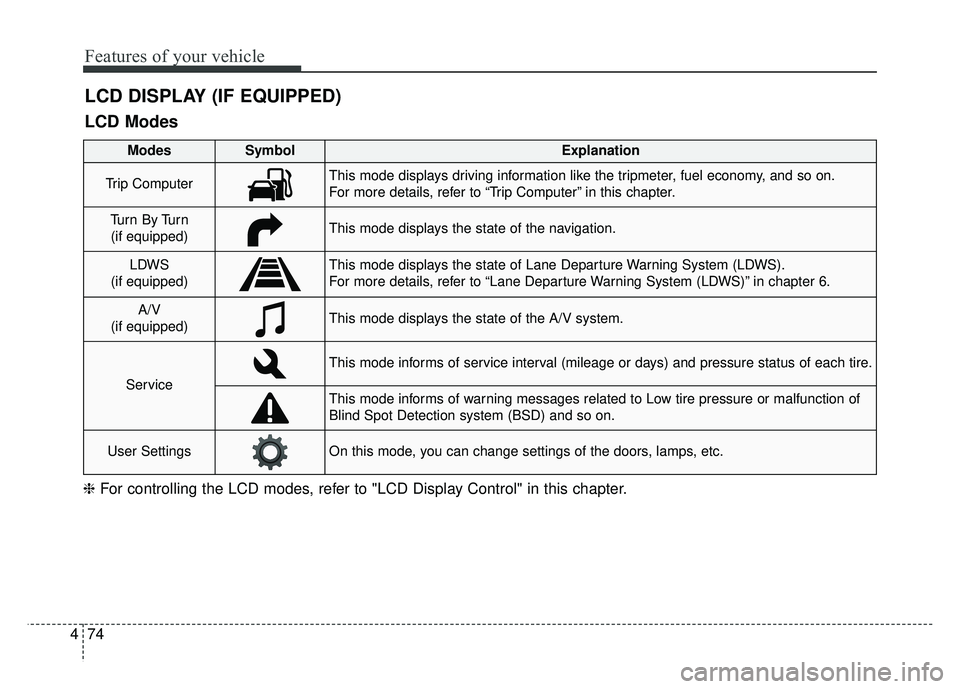
LCD DISPLAY (IF EQUIPPED)
❈ For controlling the LCD modes, refer to "LCD Display Control" in this chapter.
LCD Modes
Modes SymbolExplanation
Trip ComputerThis mode displays driving information like the tripmeter, fuel economy, and so on.
For more details, refer to “Trip Computer” in this chapter.
Tu r n B y Tu r n
(if equipped)This mode displays the state of the navigation.
LDWS
(if equipped)This mode displays the state of Lane Departure Warning System (LDWS).
For more details, refer to “Lane Departure Warning System (LDWS)” in chapter 6.
A/V
(if equipped)This mode displays the state of the A/V system.
Service
This mode informs of service interval (mileage or days) and pressure status of each tire.
This mode informs of warning messages related to Low tire pressure or malfunction of
Blind Spot Detection system (BSD) and so on.
User SettingsOn this mode, you can change settings of the doors, lamps, etc.
Page 169 of 605
483
Features of your vehicle
The trip computer is a microcomput-
er-controlled driver information sys-
tem that displays information related
to driving.
✽ ✽NOTICE
Some driving information stored in
the trip computer (for example
Average Vehicle Speed) resets if the
battery is disconnected.
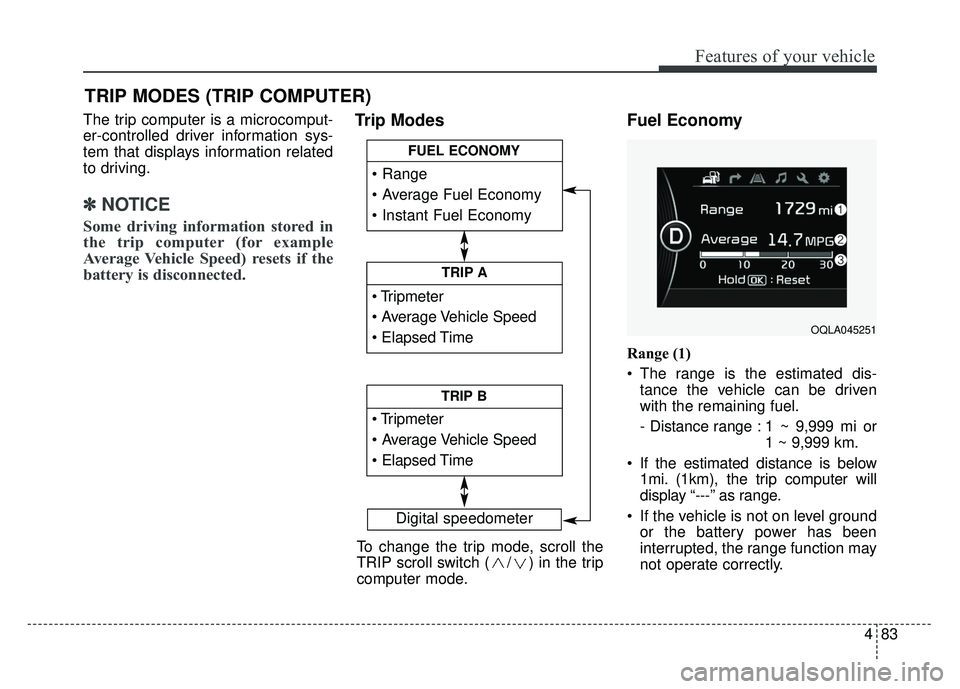
Trip Modes Fuel Economy
Range (1)
The range is the estimated dis-
tance the vehicle can be driven
with the remaining fuel.
- Distance range : 1 ~ 9,999 mi or 1 ~ 9,999 km.
If the estimated distance is below 1mi. (1km), the trip computer will
display “---” as range.
If the vehicle is not on level ground or the battery power has been
interrupted, the range function may
not operate correctly.
TRIP MODES (TRIP COMPUTER)
Digital speedometer
To change the trip mode, scroll the
TRIP scroll switch ( / ) in the trip
computer mode.
TRIP A
TRIP B
FUEL ECONOMY
OQLA045251
Page 170 of 605
Features of your vehicle
84
4
The range may differ from the actu-
al driving distance as it is an esti-
mate of the available driving dis-
tance.
The trip computer may not register additional fuel if less than 1.6 gal-
lons(6 liters) of fuel are added to
the vehicle.
The fuel economy and range may vary significantly based on driving
conditions, driving habits, and con-
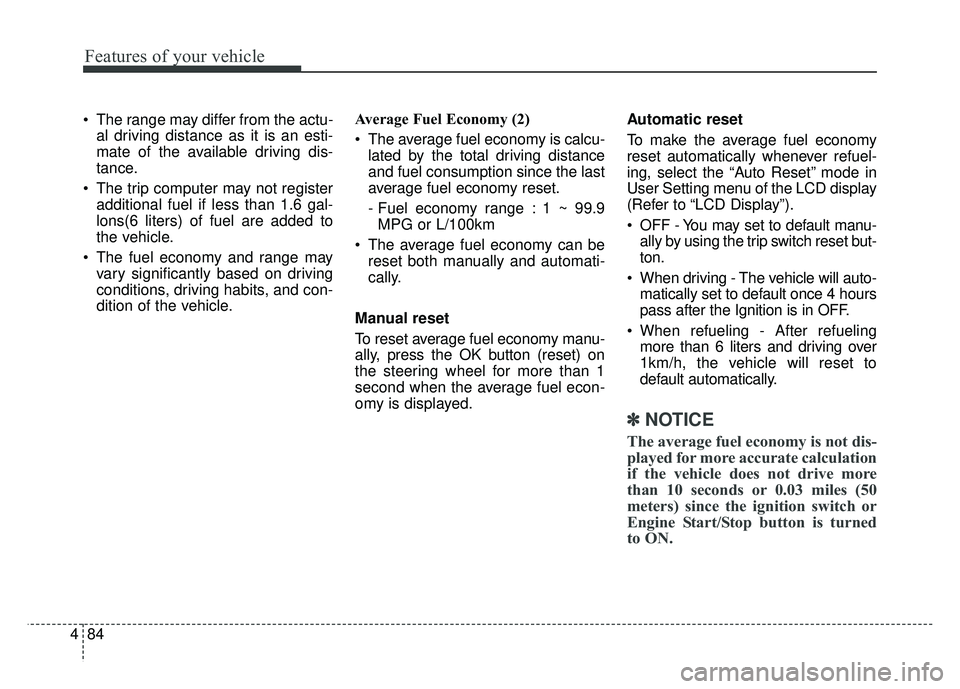
dition of the vehicle. Average Fuel Economy (2)
The average fuel economy is calcu-
lated by the total driving distance
and fuel consumption since the last
average fuel economy reset.
- Fuel economy range : 1 ~ 99.9MPG or L/100km
The average fuel economy can be reset both manually and automati-
cally.
Manual reset
To reset average fuel economy manu-
ally, press the OK button (reset) on
the steering wheel for more than 1
second when the average fuel econ-
omy is displayed. Automatic reset
To make the average fuel economy
reset automatically whenever refuel-
ing, select the “Auto Reset” mode in
User Setting menu of the LCD display
(Refer to “LCD Display”).
OFF - You may set to default manu-
ally by using the trip switch reset but-
ton.
When driving - The vehicle will auto- matically set to default once 4 hours
pass after the Ignition is in OFF.
When refueling - After refueling more than 6 liters and driving over
1km/h, the vehicle will reset to
default automatically.
✽ ✽ NOTICE
The average fuel economy is not dis-
played for more accurate calculation
if the vehicle does not drive more
than 10 seconds or 0.03 miles (50
meters) since the ignition switch or
Engine Start/Stop button is turned
to ON.
Page 180 of 605
Features of your vehicle
94
4
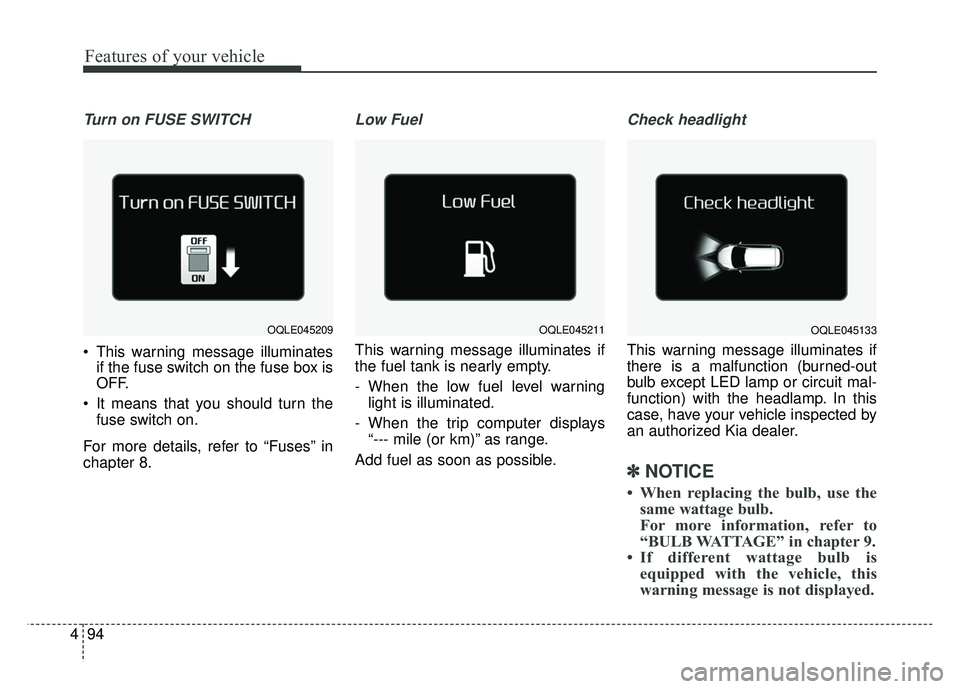
Turn on FUSE SWITCH
This warning message illuminates
if the fuse switch on the fuse box is
OFF.
It means that you should turn the fuse switch on.
For more details, refer to “Fuses” in
chapter 8.
Low Fuel
This warning message illuminates if
the fuel tank is nearly empty.
- When the low fuel level warning light is illuminated.
- When the trip computer displays “--- mile (or km)” as range.
Add fuel as soon as possible.
Check headlight
This warning message illuminates if
there is a malfunction (burned-out
bulb except LED lamp or circuit mal-
function) with the headlamp. In this
case, have your vehicle inspected by
an authorized Kia dealer.
✽ ✽ NOTICE
• When replacing the bulb, use the
same wattage bulb.
For more information, refer to
“BULB WATTAGE” in chapter 9.
• If different wattage bulb is equipped with the vehicle, this
warning message is not displayed.
OQLE045209OQLE045211OQLE045133
Page 514 of 605
Maintenance
44
8
When recharging the battery,
observe the following precautions:
The battery must be removed from
the vehicle and placed in an area
with good ventilation.
Do not allow cigarettes, sparks, or flame near the battery.
Watch the battery during charging, and stop or reduce the charging
rate if the battery cells begin
gassing (boiling) violently or if the
temperature of the electrolyte of
any cell exceeds 120°F (49°C).
Wear eye protection when check- ing the battery during charging.
Disconnect the battery charger in the following order.
1. Turn off the battery charger main switch.
2. Unhook the negative clamp from the negative battery terminal.
3. Unhook the positive clamp from the positive battery terminal. Before performing maintenance or
recharging the battery, turn off all
accessories and stop the engine.
The negative battery cable must be removed first and installed last
when the battery is disconnected.Reset items
Items should be reset after the bat-
tery has been discharged or the bat-
tery has been disconnected.
Auto up/down window (See chapter 4)
Sunroof (See chapter 4)
Trip computer (See chapter 4)
Climate control system (See chapter 4)
Driver position memory system (See chapter 3)
Audio (See chapter 5)
Page 598 of 605
Index
8I
Trip computer..............................................................4-83
Trip modes ..................................................................4-83
Fuel Economy ............................................................4-83
Trip A/B ......................................................................4-\
85
One time driving information mode ..........................4-86
Turn By Turn Mode ....................................................4-87
A/V Mode ..................................................................4-87
LDWS Mode ..............................................................4-87
Warning and Indicator lights ......................................4-96
Warning lights ............................................................4-96
Indicator Lights ........................................................4-103
Instrument panel overview ..............................................2-5
Interior care....................................................................8-98\
Interior features............................................................4-164 Cup holder ................................................................4-164
Bottle holder ............................................................4-164
Seat warmer ..............................................................4-165
Air ventilation seat ....................................................4-166
Sunvisor ....................................................................4-16\
6
USB charger ..............................................................4-168
Power outlet ..............................................................4-167
Clothes hanger ..........................................................4-172
Floor mat anchor(s) ..................................................4-172
Wireless smart phone charging system ....................4-169
Luggage net holder ..................................................4-173
Cargo security screen ..............................................4-174
Interior lamp AUTO turn off function ........................4-129
Interior light ................................................................4-129 Interior lamp AUTO turn off function ......................4-129
Map lamp ..................................................................4-130
Room lamp ................................................................4-129
Liftgate room lamp ..................................................4-131
Glove box lamp ........................................................4-131
Vanity mirror lamp ....................................................4-131
Interior overview..............................................................2-4
Jack and tools ................................................................7-15
Jump starting....................................................................7-5
Key operations(folding key) ............................................4-5
Key positions ..................................................................6-6 Illuminated ignition switch ..........................................6-6
Ignition switch position ................................................6-6
Starting the engine ........................................................6-7
Label Air bag warning label ................................................3-70
Tire sidewall labeling ..................................................8-50
Vehicle certification label ..........................................9-10
J
K
L
Page 603 of 605

I13
Index
Luggage box.............................................................\
.4-162
Two types of luggage board use ..............................4-163
Sunglass holder ............................................................4-162
Sunroof open warning ..................................................4-49
Sunshade ........................................................................\
4-49
Sunvisor ......................................................................4-\
166
Tachometer ....................................................................4-70\
Tail lamp (inside) bulb replacement ..............................8-86
Tailgate room lamp bulb replacement ..........................8-92
Theft-alarm stage ..........................................................4-20
Theft-alarm system ........................................................4-19 Armed stage ................................................................4-19
Theft-alarm stage ........................................................4-20
Disarmed stage ............................................................4-20
Tilt and telescopic steering ............................................4-55
Tilting the sunroof ........................................................4-52
Tir mobility kit(TMK) .......................................................... Components of the TireMobility Kit ..........................7-26
Using the Tire Mobility Kit ........................................7-27
Tire chains......................................................................6-\
91
Tire pressure monitoring system ....................................7-8
Tire replacement ............................................................8-49
Tire rotation ..................................................................8-47
Tire specification and pressure label ............................9-11
Tires and wheels ............................................................8-45 Tire care ......................................................................8-\
45
Recommended cold tire inflation pressures................8-45
Tire pressure................................................................8-46
Checking tire inflation pressure ..................................8-46
Tire rotation ................................................................8-47
Wheel alignment and tire balance ..............................8-48
Tire replacement ........................................................8-49
Wheel replacement ....................................................8-50
Tire traction ................................................................8-50
Tire maintenance ........................................................8-50
Tire sidewall labeling ................................................8-50
All season tires ..........................................................8-57
Summer tires ..............................................................8-57
Snow tires....................................................................8-57\
Tire chains ..................................................................8-57
Radial-ply tires ............................................................8-58
Low aspect ratio tire ..................................................8-58
Tires and wheels ..............................................................9-4
Toll free consumer assistance ........................................9-12
Towing ........................................................................\
..7-32 Removable towing hook ............................................7-33
Emergency towing ......................................................7-34
Trailer Towing................................................................6-94
Transaxle - Automatic transaxle ....................................6-13
Transaxle shift indicator ................................................4-73
Trip A/B ........................................................................\
4-85
Trip computer ................................................................4-83
Trip interruption ............................................................9-13
T