Page 8 of 496
3
The vehicle is composed of a highvoltage battery that drives the
motor and air-conditioner, and an
auxiliary battery (12 V) that drives
the lamps, wipers, and audio sys-
tem.
The auxiliary battery is automati- cally charged when the vehicle is
in the ready ( ) mode or the high
voltage battery is being charged.
REVIEW OF ELECTRIC VEHICLE
Battery Information
Page 9 of 496
4
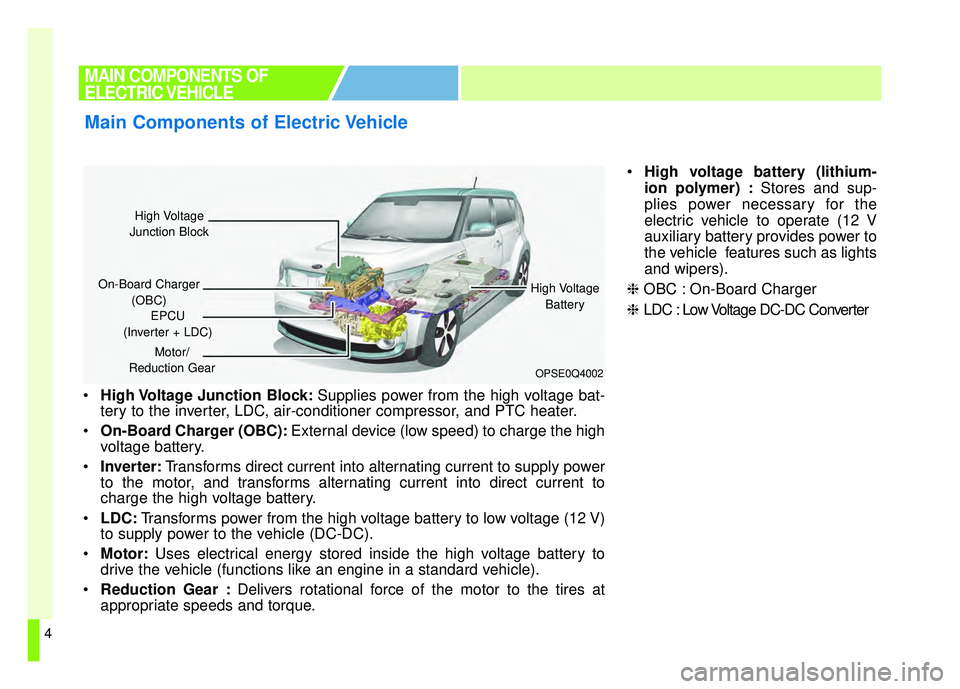
High Voltage Junction Block: Supplies power from the high voltage bat-
tery to the inverter, LDC, air-conditioner compressor, and PTC heater.
On-Board Charger (OBC): External device (low speed) to charge the high
voltage battery.
Inverter: Transforms direct current into alternating current to supply power
to the motor, and transforms alternating current into direct current to
charge the high voltage battery.
LDC: Transforms power from the high voltage battery to low voltage (12 V)
to supply power to the vehicle (DC-DC).
Motor: Uses electrical energy stored inside the high voltage battery to
drive the vehicle (functions like an engine in a standard vehicle).
Reduction Gear : Delivers rotational force of the motor to the tires at
appropriate speeds and torque.
High voltage battery (lithium-
ion polymer) : Stores and sup-
plies power necessary for the
electric vehicle to operate (12 V
auxiliary battery provides power to
the vehicle features such as lights
and wipers).
❈ OBC : On-Board Charger
❈ LDC : Low Voltage DC-DC Converter
MAIN COMPONENTS OF
ELECTRIC VEHICLE
Main Components of Electric Vehicle
OPSE0Q4002
High Voltage
Junction Block
On-Board Charger (OBC) High Voltage
Battery
EPCU
(Inverter + LDC)
Motor/
Reduction Gear
Page 20 of 496
15
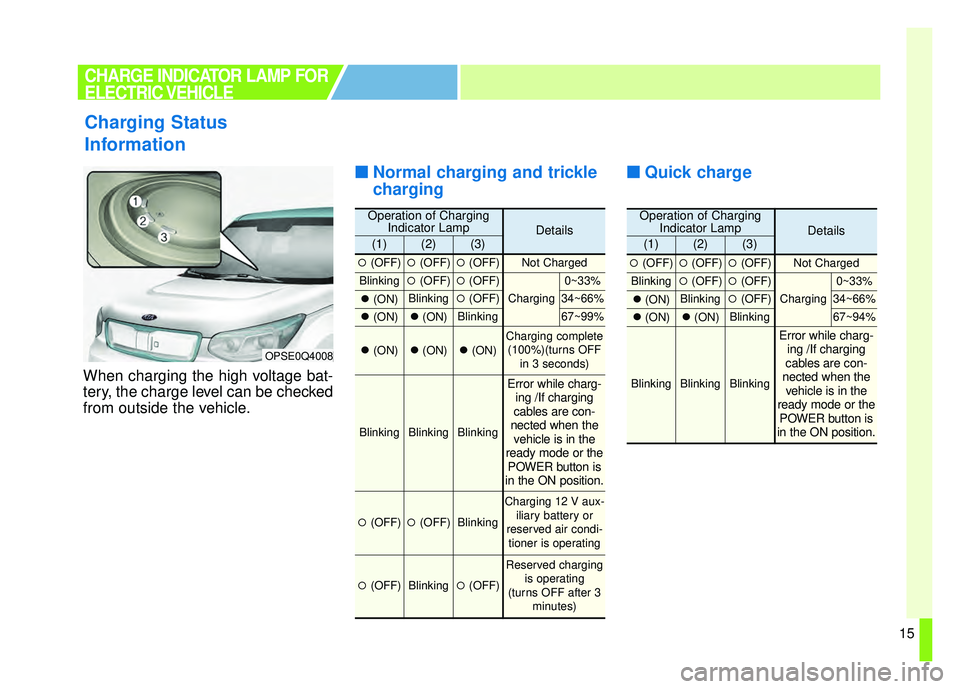
When charging the high voltage bat-
tery, the charge level can be checked
from outside the vehicle.
■ ■Normal charging and trickle
charging ■ ■
Quick charge
Charging Status
Information
OPSE0Q4008
CHARGE INDICATOR LAMP FOR
ELECTRIC VEHICLE
Operation of Charging
Indicator LampDetails(1)(2)(3)
�(OFF)�(OFF)�(OFF)Not Charged
Blinking�(OFF)�(OFF)
Charging
0~33%
�(ON)Blinking�(OFF)34~66%
�(ON)�(ON)Blinking67~99%
�(ON)�(ON)�(ON)Charging complete
(100%)(turns OFF in 3 seconds)
BlinkingBlinkingBlinking
Error while charg-ing /If charging
cables are con-
nected when the vehicle is in the
ready mode or the POWER button is
in the ON position.
�(OFF)�(OFF)Blinking
Charging 12 V aux-
iliary battery or
reserved air condi- tioner is operating
�(OFF)Blinking�(OFF)
Reserved charging is operating
(turns OFF after 3 minutes)
Operation of ChargingIndicator LampDetails(1)(2)(3)
�(OFF)�(OFF)�(OFF)Not Charged
Blinking�(OFF)�(OFF)
Charging
0~33%
�(ON)Blinking�(OFF)34~66%
�(ON)�(ON)Blinking67~94%
BlinkingBlinkingBlinking
Error while charg-
ing /If charging
cables are con-
nected when the vehicle is in the
ready mode or the POWER button is
in the ON position.
Page 31 of 496
26
■
■Emergency Release of the
Charging connector lock
system
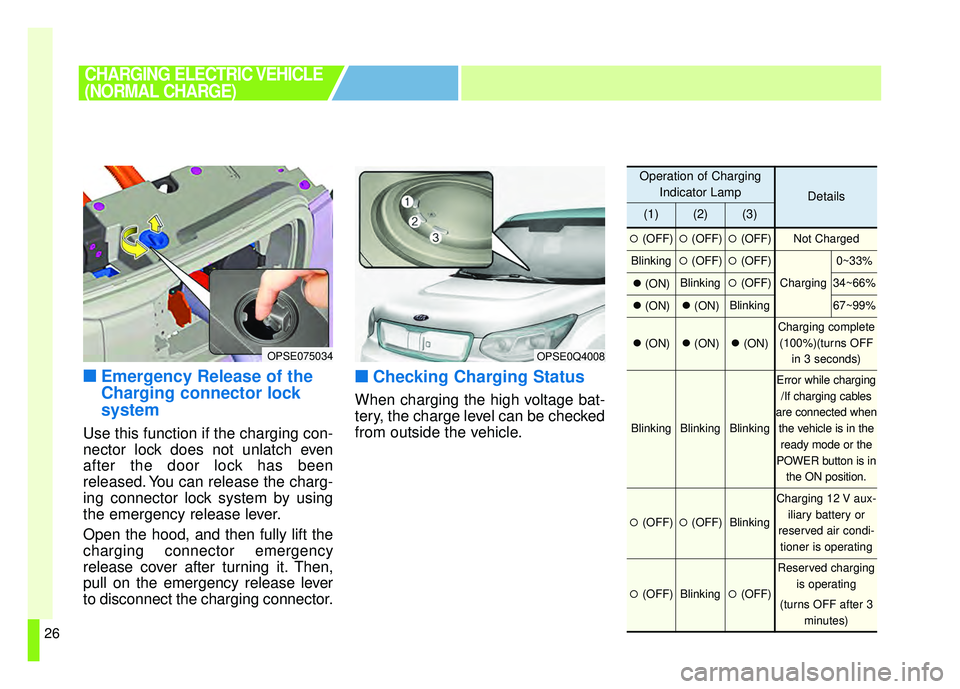
Use this function if the charging con-
nector lock does not unlatch even
after the door lock has been
released. You can release the charg-
ing connector lock system by using
the emergency release lever.
Open the hood, and then fully lift the
charging connector emergency
release cover after turning it. Then,
pull on the emergency release lever
to disconnect the charging connector.
■ ■Checking Charging Status
When charging the high voltage bat-
tery, the charge level can be checked
from outside the vehicle.
CHARGING ELECTRIC VEHICLE
(NORMAL CHARGE)
OPSE0Q4008
Operation of Charging
Indicator Lamp
Details
(1)(2)(3)
�(OFF)�(OFF)�(OFF)Not Charged
Blinking�(OFF)�(OFF)
Charging
0~33%
�(ON)Blinking�(OFF)34~66%
�(ON)�(ON)Blinking67~99%
�(ON)�(ON)�(ON)
Charging complete
(100%)(turns OFF in 3 seconds)
BlinkingBlinkingBlinking
Error while charging/If charging cables
are connected when the vehicle is in theready mode or the
POWER button is in the ON position.
�(OFF)�(OFF)Blinking
Charging 12 V aux- iliary battery or
reserved air condi- tioner is operating
�(OFF)Blinking�(OFF)
Reserved charging is operating
(turns OFF after 3 minutes)
OPSE075034
Page 44 of 496
39
■
■Emergency Release of the
Charging connector lock
system
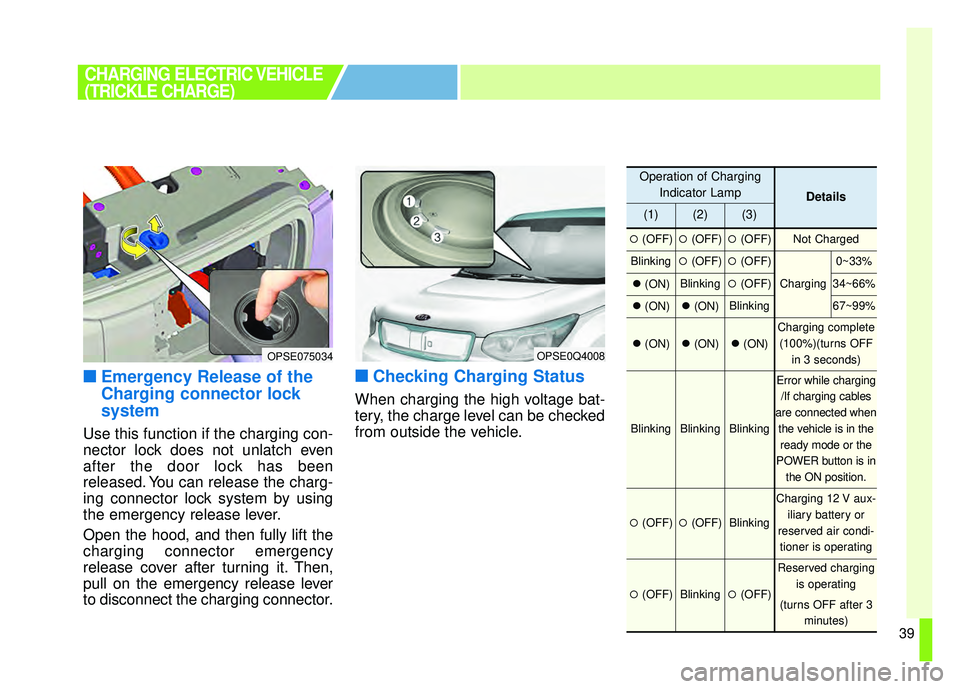
Use this function if the charging con-
nector lock does not unlatch even
after the door lock has been
released. You can release the charg-
ing connector lock system by using
the emergency release lever.
Open the hood, and then fully lift the
charging connector emergency
release cover after turning it. Then,
pull on the emergency release lever
to disconnect the charging connector.
■ ■Checking Charging Status
When charging the high voltage bat-
tery, the charge level can be checked
from outside the vehicle.
CHARGING ELECTRIC VEHICLE
(TRICKLE CHARGE)
OPSE0Q4008
Operation of Charging
Indicator Lamp
Details
(1)(2)(3)
�(OFF)�(OFF)�(OFF)Not Charged
Blinking�(OFF)�(OFF)
Charging
0~33%
�(ON)Blinking�(OFF)34~66%
�(ON)�(ON)Blinking67~99%
�(ON)�(ON)�(ON)
Charging complete
(100%)(turns OFF in 3 seconds)
BlinkingBlinkingBlinking
Error while charging/If charging cables
are connected when the vehicle is in theready mode or the
POWER button is in the ON position.
�(OFF)�(OFF)Blinking
Charging 12 V aux- iliary battery or
reserved air condi- tioner is operating
�(OFF)Blinking�(OFF)
Reserved charging is operating
(turns OFF after 3 minutes)
OPSE075034
Page 61 of 496
56
When a vehicle accident occurs,
move the vehicle to a safe place, turn
OFF the vehicle and remove the aux-
iliary battery (12 V) terminal to pre-
vent high voltage electricity from
flowing. Remove the auxiliary battery
(12 V) terminal and turn it OFF.When you suspect leakage of inflam-
mable gas and other harmful gases,
open the windows and evacuate to a
safe place. If any leaked fluid comes
in contact with your eyes or skin,
immediately clean the affected area
thoroughly with tap water or saline
solution and have doctors inspect it
as soon as possible.
SAFETY PRECAUTIONS FOR
ELECTRIC VEHICLE
Responding to Vehicle Accidents in your
Electric Vehicle
WARNING- Exposed
Wires & Electrical
Components
Do not touch electric wires that
may become exposed from
inside or outside the vehicle,
high voltage electric wires
(orange), connectors and all
electric components and
devices. Doing so may result in
electric shock and lead to
injuries.
WARNING- Damaged battery
Do not touch harmful gas and
electrolytes which may leak if
the high voltage battery is dam-
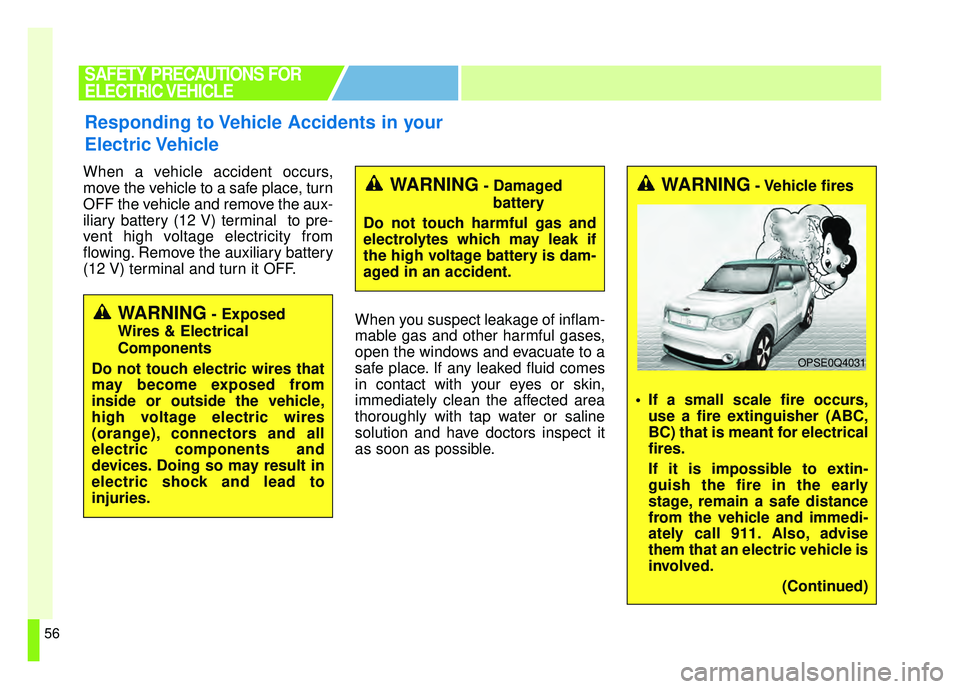
aged in an accident.WARNING- Vehicle fires
If a small scale fire occurs, use a fire extinguisher (ABC,
BC) that is meant for electrical
fires.
If it is impossible to extin-
guish the fire in the early
stage, remain a safe distance
from the vehicle and immedi-
ately call 911. Also, advise
them that an electric vehicle is
involved.
(Continued)
OPSE0Q4031
Page 260 of 496
4129
Features of your vehicle
When reinstalling your roof anten-na pole, it is important that it is fully
tightened to ensure proper recep-
tion.
When cargo is loaded on the roof rack, do not place the cargo near
the antenna pole to ensure proper
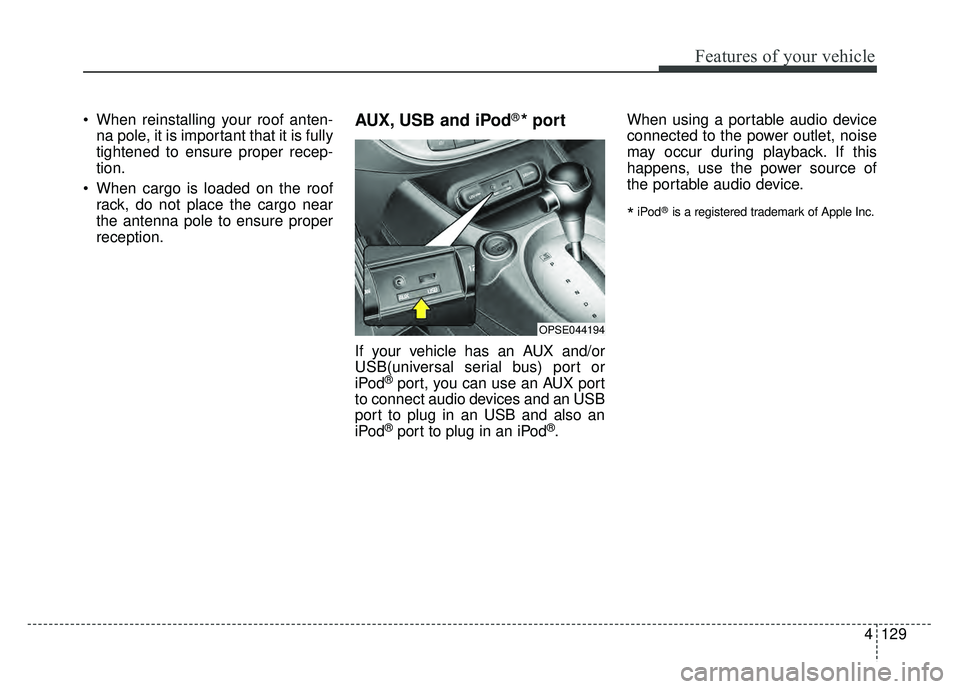
reception.AUX, USB and iPod®* port
If your vehicle has an AUX and/or
USB(universal serial bus) port or
iPod
®port, you can use an AUX port
to connect audio devices and an USB
port to plug in an USB and also an
iPod
®port to plug in an iPod®. When using a portable audio device
connected to the power outlet, noise
may occur during playback. If this
happens, use the power source of
the portable audio device.
*iPod®is a registered trademark of Apple Inc.
OPSE044194
Page 273 of 496
142
4
Features of your vehicle
Feature of Your Audio
Head unit
❈ The actual image in the vehicle
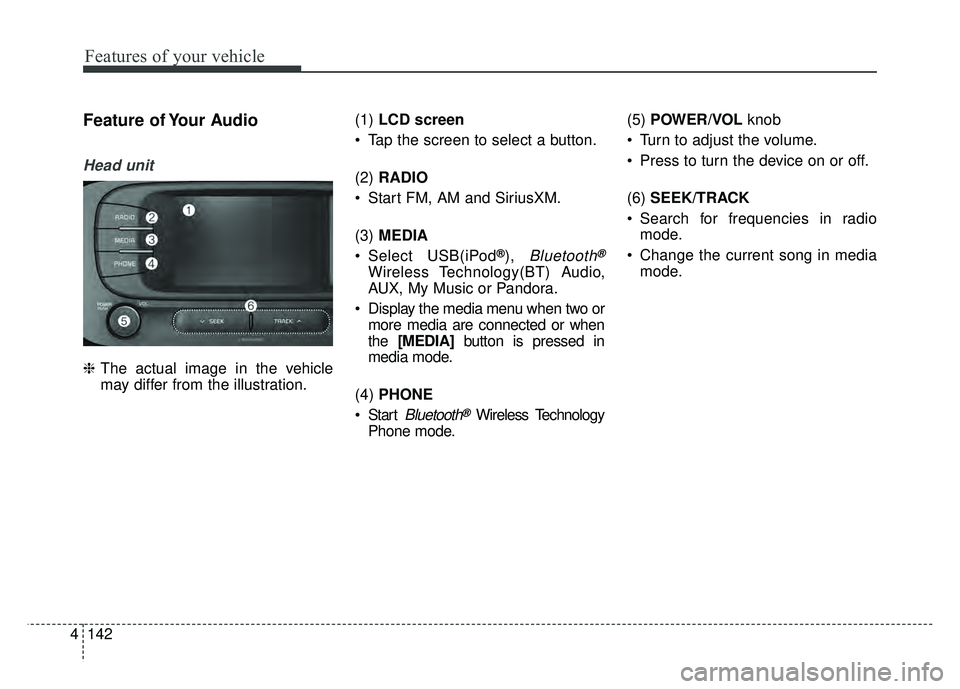
may differ from the illustration. (1)
LCD screen
Tap the screen to select a button.
(2) RADIO
Start FM, AM and SiriusXM.
(3) MEDIA
Select USB(iPod
®),Bluetooth®
Wireless Technology(BT) Audio,
AUX, My Music or Pandora.
Display the media menu when two or more media are connected or when
the [MEDIA] button is pressed in
media mode.
(4) PHONE
Start
Bluetooth®Wireless Technology
Phone mode. (5)
POWER/VOL knob
Turn to adjust the volume.
Press to turn the device on or off.
(6) SEEK/TRACK
Search for frequencies in radio mode.
Change the current song in media mode.