Page 318 of 536

Driving your vehicle
48
5
Good braking practices
Check to be sure the parking brake
is not engaged and the parking
brake indicator light is out before
driving away.
Driving through water may get the brakes wet. They can also get wet
when the vehicle is washed. Wet
brakes can be dangerous! Your
vehicle will not stop as quickly if the
brakes are wet. Wet brakes may
cause the vehicle to pull to one
side.
To dry the brakes, apply the brakes
lightly until the braking action
returns to normal, taking care to
keep the vehicle under control at
all times. If the braking action does
not return to normal, stop as soon
as it is safe to do so and call an
authorized Kia dealer for assis-
tance. Don't coast down hills with the
vehicle out of gear. This is extreme-
ly hazardous. Keep the vehicle in
gear at all times, use the brakes to
slow down, then shift to a lower
gear so that engine braking will
help you maintain a safe speed.
Don't "ride" the brake pedal. Resting your foot on the brake
pedal while driving can be danger-
ous because the brakes might
overheat and lose their effective-
ness. It also increases the wear of
the brake components.
If a tire goes flat while you are driv- ing, apply the brakes gently and
keep the vehicle pointed straight
ahead while you slow down. When
you are moving slowly enough for it
to be safe to do so, pull off the road
and stop in a safe place. If your vehicle is equipped with an
automatic transaxle, don't let your
vehicle creep forward. To avoid
creeping forward, keep your foot
firmly on the brake pedal when the
vehicle is stopped.
Be cautious when parking on a hill. Firmly engage the parking brake
and place the shift lever in P (auto-
matic transaxle). If your vehicle is
facing downhill, turn the front
wheels into the curb to help keep
the vehicle from rolling. If your vehi-
cle is facing uphill, turn the front
wheels away from the curb to help
keep the vehicle from rolling. If
there is no curb or if it is required
by other conditions to keep the
vehicle from rolling, block the
wheels.
Page 319 of 536
549
Driving your vehicle
Under some conditions your park-ing brake can freeze in the
engaged position. This is most like-
ly to happen when there is an
accumulation of snow or ice
around or near the rear brakes or if
the brakes are wet. If there is a risk
that the parking brake may freeze,
apply it only temporarily while you
put the shift lever in P (automatic
transaxle) and block the rear
wheels so the vehicle cannot roll.
Then release the parking brake.
Do not hold the vehicle on the upgrade with the accelerator
pedal. This can cause the transaxle
to overheat. Always use the brake
pedal or parking brake.
Page 322 of 536

Driving your vehicle
52
5
Prerequisite for activation
The AEB will activate when the AEB
is selected on the LCD display, and
when the following prerequisites are
satisfied:
- The ESC (Electronic Stability
Control) is activated.
- The driving speed is over 6 mph. (The AEB only works within a cer-
tain range of vehicle speeds)
- When the AEB recognizes a vehi- cle or the pedestrian in front. (The
AEB may not recognize every
obstacle or provide warnings and
braking in every situation, so do
not rely on the AEB to stop the
vehicle in instances where the driv-
er sees an obstacle and has the
ability to apply the brakes) The AEB automatically activates
when you turn the vehicle on.
The driver can deactivate the AEB
by canceling it the system setting on
the LCD display.
Even when the Autonomous Emergency Braking (AEB) may be
set to "Use AEB" setting, if the
Traction Control System (TCS) or
Electronic Stability Control (ESC)
features are deselected, AEB func-
tion will be turned off automatically.
In this case, the AEB feature can-
not be turned on manually as well.
AEB warning message and
system control
Warning text may appear or warning
sound may sound when the vehicle in
front brakes suddenly or the distance
with the vehicle in front is short. Also,
the brake system will control the
brakes depending on the collision
possibility.
Depending on the vehicle condition
and traffic conditions in front of the
vehicle, some warning features may
activate or not activate at all.
WARNING
Set or cancel AEB with control-
ling switches on steering wheel
after stopping the vehicle in the
safe place for your safety.
Do not attempt to set or cancel
the AEB while your vehicle is
moving.
Page 324 of 536

Driving your vehicle
54
5
Brake operation
In an urgent situation, the braking
system enters into the ready status
for prompt reaction against the dri-
ver’s depressing the brake pedal.
The AEB provides additional brak- ing power for optimum braking per-
formance, when the driver
depresses the brake pedal.
The braking control is automatical- ly deactivated, when the driver
sharply depresses the brake pedal,
or when the driver abruptly turns
the steering wheel.
The braking control is automatical- ly canceled, when risk factors dis-
appear.
The driver should always exercise
caution when operating the vehicle,
even though there is no warning
message or warning alarm.
✽ ✽ NOTICE
The AEB operates in accordance
with the risk levels, such as the dis-
tance from the vehicle/passer-by in
front, the speed of the vehicle/pass-
er-by in front, and the driver's vehi-
cle operation. Do not drive danger-
ously in order to activate to system.
Sensor to detect the distance
from the vehicle in front
(front radar)
The sensor cannot maintain proper
distance from the vehicle in front
when the sensor lens is obscured by
foreign substances, such as snow
and rain, which will adversely affect
performance. It may even temporarily
cancel the AEB. Always keep the sen-
sor clean.
WARNING
The AEB cannot avoid all colli-
sions. The AEB might not com-
pletely stop the vehicle before
collision, due to ambient weath-
er and road conditions. The
driver has the responsibility to
drive safely and control the
vehicle.
OUM054054L
Page 329 of 536

559
Driving your vehicle
When a vehicle in front of you
changes lanes suddenly to avoid a
stopped vehicle up ahead, your AEB
may not recognize the stopped vehi-
cle ahead. Always be attentive to
driving conditions.- Recognizing the vehicle
When the vehicle in front has heavy
loading extended rearward, or when
the vehicle in front has higher ground
clearance, the AEB may not recog-
nize the nearest hazard
Recognizing pedestrians
- The pedestrian is not fully captured
by the camera sensor, or the
pedestrian does not walk in the
upright position.
- The pedestrian moves very fast.
- The pedestrian abruptly appears in front.
- The pedestrian wears clothes sim- ilar in color to the background.
- Conditions outside are too bright or too dark.
- The vehicle drives at night or in the darkness.
- There is an item similar in shape to a person standing.
- The pedestrian is small.
- The pedestrian is using a mobility assistance device, such as a
wheelchair or scooter.
- The pedestrian blends in with their surroundings.
- Sensor recognition is limited by rain, snow, fog, etc.
- There is a group of pedestrians.
OUM054046LOUM054048L
Page 332 of 536
Driving your vehicle
62
5
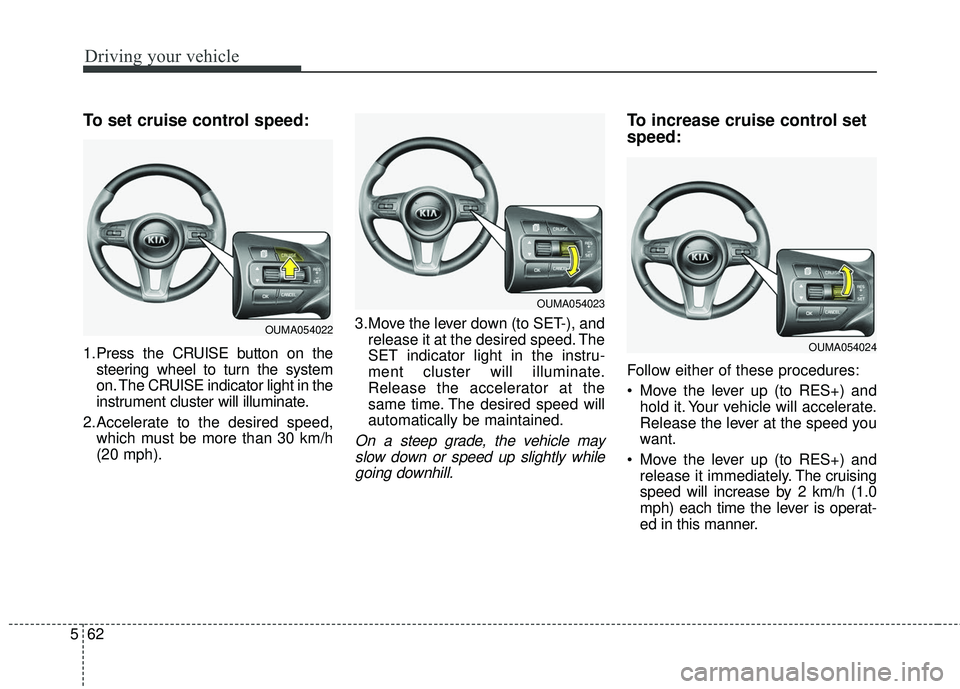
To set cruise control speed:
1.Press the CRUISE button on the
steering wheel to turn the system
on. The CRUISE indicator light in the
instrument cluster will illuminate.
2.Accelerate to the desired speed, which must be more than 30 km/h
(20 mph). 3.Move the lever down (to SET-), and
release it at the desired speed. The
SET indicator light in the instru-
ment cluster will illuminate.
Release the accelerator at the
same time. The desired speed will
automatically be maintained.
On a steep grade, the vehicle mayslow down or speed up slightly whilegoing downhill.
To increase cruise control set
speed:
Follow either of these procedures:
Move the lever up (to RES+) and hold it. Your vehicle will accelerate.
Release the lever at the speed you
want.
Move the lever up (to RES+) and release it immediately. The cruising
speed will increase by 2 km/h (1.0
mph) each time the lever is operat-
ed in this manner.
OUMA054022
OUMA054023
OUMA054024
Page 352 of 536

Driving your vehicle
82
5
When Active ECO is activated:
The acceleration may slightly be
reduced even though you depress
the accelerator fully.
The air conditioner performance may be limited
The shift pattern of the automatic transaxle may change.
The engine noise may get louder.
The above situations are normal
conditions when the Active Eco
System is activated to improve fuel
efficiency. Limitation of Active ECO opera-
tion:
If the following conditions occur while
Active ECO is operating, the system
operation is limited even though
there is no change in the ECO indi-
cator.
When the coolant temperature is
low:
The system will be limited until
engine performance becomes nor-
mal.
When driving up a hill: The system will be limited to gain
power when driving uphill because
the engine torque is restricted.
When using manual mode: The system will be limited accord-
ing to the shift location.
When the accelerator pedal is deeply depressed for a few sec-
onds:
The system will be limited, judging
that the driver wants to speed up.SPORT mode
SPORT mode focuses on
dynamic driving by auto-
matically adjusting the
steering wheel, engine
and transaxle system.
button is pressed and
the SPORT mode is
selected, the SPORT
indicator (yellow) will illu-
minate.
is activated, and the
engine start/stop button
is turned off and on it will
change to NORMAL
mode. To turn on the
SPORT mode press
DRIVE MODE button
again.
SPORT
Page 362 of 536
Driving your vehicle
92
5
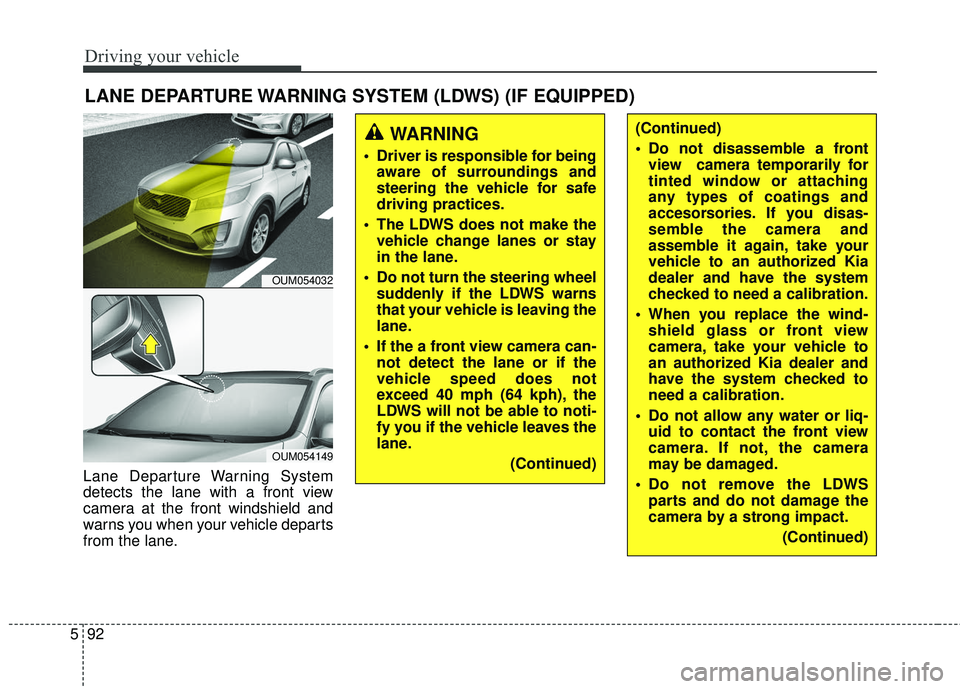
LANE DEPARTURE WARNING SYSTEM (LDWS) (IF EQUIPPED)
Lane Departure Warning System
detects the lane with a front view
camera at the front windshield and
warns you when your vehicle departs
from the lane.
OUM054032
OUM054149
WARNING
Driver is responsible for being
aware of surroundings and
steering the vehicle for safe
driving practices.
The LDWS does not make the vehicle change lanes or stay
in the lane.
Do not turn the steering wheel suddenly if the LDWS warns
that your vehicle is leaving the
lane.
If the a front view camera can- not detect the lane or if the
vehicle speed does not
exceed 40 mph (64 kph), the
LDWS will not be able to noti-
fy you if the vehicle leaves the
lane.
(Continued)
(Continued)
Do not disassemble a frontview camera temporarily for
tinted window or attaching
any types of coatings and
accesorsories. If you disas-
semble the camera and
assemble it again, take your
vehicle to an authorized Kia
dealer and have the system
checked to need a calibration.
When you replace the wind- shield glass or front view
camera, take your vehicle to
an authorized Kia dealer and
have the system checked to
need a calibration.
Do not allow any water or liq- uid to contact the front view
camera. If not, the camera
may be damaged.
Do not remove the LDWS parts and do not damage the
camera by a strong impact.
(Continued)