Page 338 of 536

Driving your vehicle
68
5
Cancelled automatically
The driver's door is opened.
The shift lever is shifted to N
(Neutral), R (Reverse) or
P(Parking).
The EPB (electronic parking brake) is applied.
The vehicle speed is over 190 km/h (120 mph)
The ESC, ABS or TCS is operating.
The ESC is turned off.
The AEB is activated.
The sensor is obscured by foreign matter such as mud or snow.
When the vehicle is stopped for over 5 minutes.
The driver starts driving by pushing the lever up (RES +) or down
(SET -) or depressing the acceler-
ator pedal approximately 3 sec-
onds after the vehicle is stopped by
the Advanced Smart Cruise
Control System with no other vehi-
cle ahead or a vehicle stopped far
away in front. The engine speed is over 7000
RPM.
The ASCC system has malfunc- tioned.
The accelerator pedal is continu- ously depressed for more than 5
minutes.
Each of these actions will cancel
the ASCC operation. (The set
speed and vehicle-to-vehicle dis-
tance on the LCD display will go
off.)
If the ASCC is cancelled automati-
cally, the ASCC will not resume
even though the RES+ or SET-
lever is moved. Also, the EPB
(electronic parking brake) will be
applied when the vehicle is
stopped.
If the ASCC is cancelled by a reason
not mentioned, have the system
checked by an authorized Kia dealer. If the system is automatically can-
celled, the warning chime will sound
and a message will appear for a few
seconds.
You must adjust the vehicle speed by
depressing the accelerator or brake
pedal according to the road condition
ahead and driving condition.
Always check the road conditions.
Do not rely on the warning chime.
OUM054164L
Page 339 of 536
569
Driving your vehicle
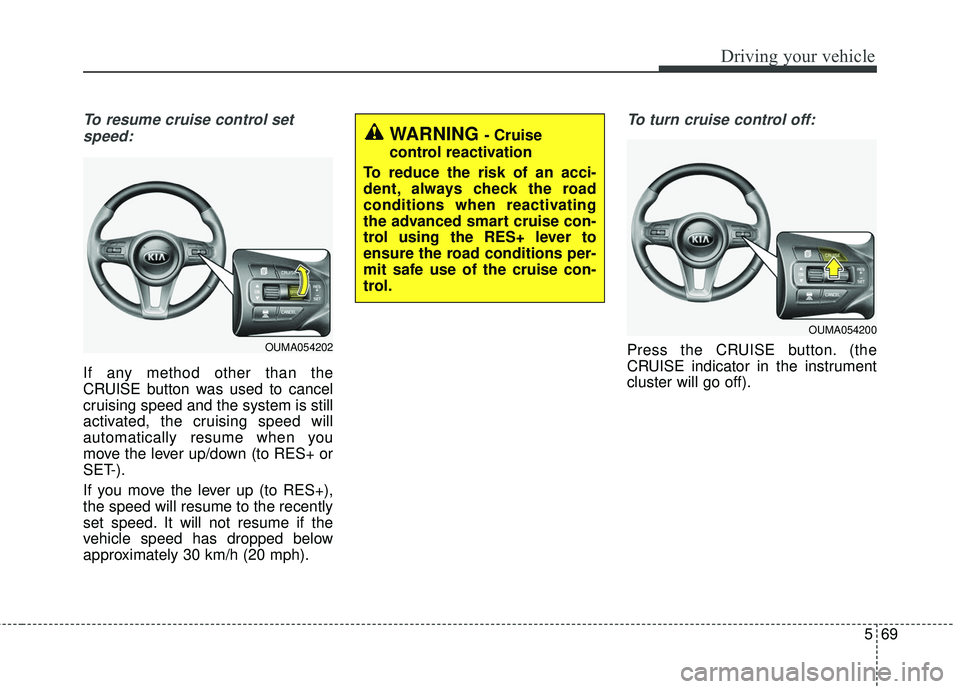
To resume cruise control setspeed:
If any method other than the
CRUISE button was used to cancel
cruising speed and the system is still
activated, the cruising speed will
automatically resume when you
move the lever up/down (to RES+ or
SET-).
If you move the lever up (to RES+),
the speed will resume to the recently
set speed. It will not resume if the
vehicle speed has dropped below
approximately 30 km/h (20 mph).
To turn cruise control off:
Press the CRUISE button. (the
CRUISE indicator in the instrument
cluster will go off).
WARNING - Cruise
control reactivation
To reduce the risk of an acci-
dent, always check the road
conditions when reactivating
the advanced smart cruise con-
trol using the RES+ lever to
ensure the road conditions per-
mit safe use of the cruise con-
trol.
OUMA054202
OUMA054200
Page 343 of 536
573
Driving your vehicle
Radar to detect distance to thevehicle ahead
The sensor detects distance to the
vehicle ahead.
If the sensor is covered with dirt or
other foreign matter, the vehicle to
vehicle distance control may not
operate correctly.
Always keep the sensor clean. Radar check message
If the radar or cover is dirty or
obscured with foreign matter such as
snow, this message will appear. In
this case, the system may not func-
tion temporarily, but it does not indi-
cate a malfunction of the Advanced
Smart Cruise Control System. Clean
the radar or cover by using a soft
cloth.ASCC (Advanced Smart Cruise
Control) malfunction message
The message will appear when the
vehicle to vehicle distance control
system is not functioning normally.
Take your vehicle to an authorized
Kia dealer and have the system
checked.
OUM054054L
OUMA057226
OUM054187L
Page 344 of 536

Driving your vehicle
74
5
Always keep the sensor and
bumper clean.
Use only a genuine Kia sensor cover for your vehicle.
Do not install accessories around the sensor and do not replace the
bumper by yourself. It may interfere
with the sensor performance.
Impact damage to the sensor or sensor area may cause the sensor
to move slightly off position and
result in the ASCC not operating
correctly. If this occurs, have your
vehicle checked by an authorized
Kia dealer as soon as possible.To adjust the sensitivity of
Advanced Smart Cruise
Control
The sensitivity of vehicle speed
when following the front vehicle to
maintain the set distance can be
adjusted. Go to the User Settings
Mode (Driving Assist) and select
SCC (Smart Cruise Control). You
may select one of the three stages
you prefer.
Slow:
Vehicle speed following the front
vehicle to maintain the set distance
is slower than normal speed. Normal:
Vehicle speed following the front
vehicle to maintain the set distance
is normal
Fast: Vehicle speed following the front
vehicle to maintain the set distance
is faster than normal speed.
✽ ✽ NOTICE
The system remembers the last
selected mode.
CAUTION - Sensor
Damage
To prevent sensor cover dam-age from occurring, wash thecar with a soft cloth.
OUM054157L
Page 345 of 536
575
Driving your vehicle
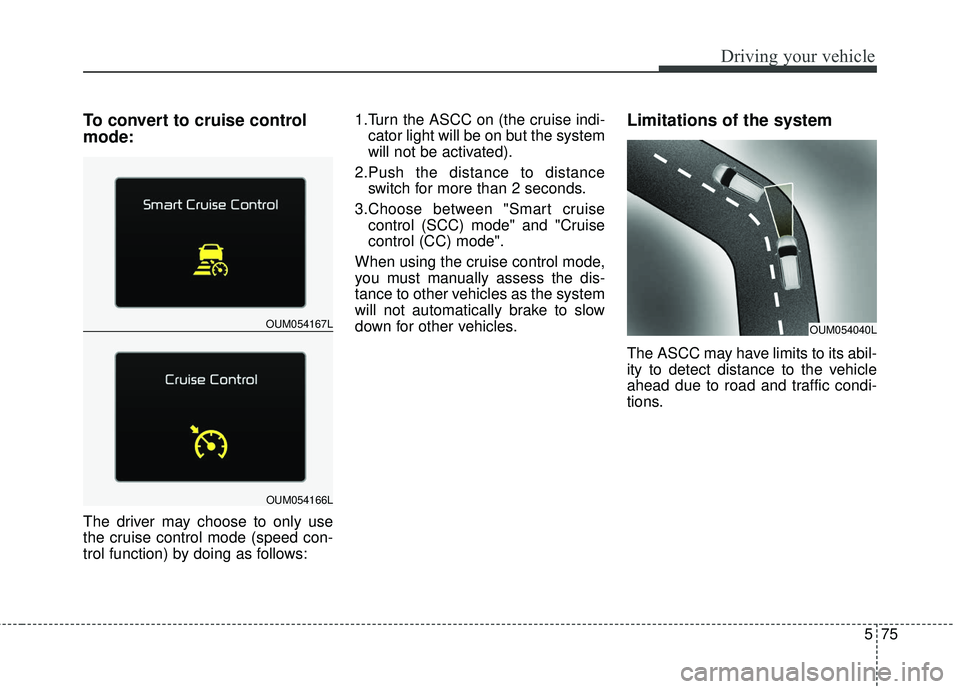
To convert to cruise control
mode:
The driver may choose to only use
the cruise control mode (speed con-
trol function) by doing as follows:1.Turn the ASCC on (the cruise indi-
cator light will be on but the system
will not be activated).
2.Push the distance to distance switch for more than 2 seconds.
3.Choose between "Smart cruise control (SCC) mode" and "Cruise
control (CC) mode".
When using the cruise control mode,
you must manually assess the dis-
tance to other vehicles as the system
will not automatically brake to slow
down for other vehicles.
Limitations of the system
The ASCC may have limits to its abil-
ity to detect distance to the vehicle
ahead due to road and traffic condi-
tions.
OUM054167L
OUM054166L
OUM054040L
Page 484 of 536

773
Maintenance
DescriptionFuse ratingProtected component
A/CON (RR) 15AICM Relay Box (Rear Blower Motor Relay)
SUNROOF 2 20ASunroof Control Module (Roller)
SUNROOF 1 20ASunroof Control Module (Glass)
CLUSTER 10AInstrument Cluster
GATEWAY10AGateway (MCU IG1)
IMMO.10ASmart Key Control Module, Immobilizer Module
IG1 15AE/R Junction Block (Fuse - MDPS 3, TCU 1), PCB Block (Fuse - ABS 3, SENSOR 6, ECU 1, CRUISE)
MULTIMEDIA 15AUSB Charger, Audio, A/V & Navigation Head Unit, Telematics Unit
MEMORY 2 10AInstrument Cluster, Data Link Connector, A/C Control Module, Rear A/C Control Module, Clock Spring,
MUT, Electro Chromic Mirror, Driver/Passenger Door Module, Passenger Power Window Switch, Driver IMS
Control Module
DOOR LOCK 20ADoor Lock Relay, Door Unlock Relay, Tail Gate Relay, DRIVER/PASSENGER/RL/RR DOOR MODULE
SMART KEY 2 10AStart/Stop Button Switch, Smart Key Control Module, Immobilizer Module
AEB10AAEB Unit
WASHER 15ABCM, Multifunction Switch
MDPS 7.5AMDPS UNIT(COLUMN TYPE), Steering Angle Sensor
Page 490 of 536
779
Maintenance
DescriptionFuse ratingProtected component
ABS 3 7.5AESC Control Module, Multipurpose Check Connector
ECU 1 10APCM, [G6DH] IDB (Injector Driver Box)
IG 2 40ARLY. 4 (Start Relay), PDM (IG2) Relay, Ignition Switch
POWER
OUTLET 1 20AFront Power Outlet & Cigarette Lighter
SENSOR 6 7.5A[G4KH] Brake Vacuum Switch, Vacuum Pump
POWER
OUTLET 2 20AFront Power Outlet
CRUISE 7.5ASmart Cruise Control Radar
ECU 4 20A[G4KJ/G4KH] PCM (E-CVVT Relay)
WIPER 25AWiper Low Relay
DEICER 15AFront Deicer Relay
ECU 5 20A[G4KJ/G4KH] PCM (E-CVVT Relay)
IG 1 40APDM (IG1) Relay, PDM (ACC) Relay, Ignition Switch
SENSOR 4 10A[G4KJ/G4KH] Oxygen Sensor (Up/Down)
[G6DH] PCM, Oxygen Sensor #1/#2/#3/#4
SENSOR 5 15A[G4KJ/G4KH]PCM
[G6DH] IDB (Injector Driver Box)
Page 528 of 536

Index
2I
Advanced smart cruise control system (ASCC) . . . . . . 5-65Limitations of the system . . . . . . . . . . . . . . . . . . . . . 5-75
Speed setting (ASCC) . . . . . . . . . . . . . . . . . . . . . . . 5-66
To adjust the sensitivity of advanced smartcruise control . . . . . . . . . . . . . . . . . . . . . . . . . . . . . 5-74
To convert to cruise control mode . . . . . . . . . . . . . . 5-75
Vehicle to vehicle distance setting (ASCC) . . . . . . . 5-70
Air bag - advanced supplemental restraint system . . . 3-44 Air bag warning label. . . . . . . . . . . . . . . . . . . . . . . . 3-68
Air bag warning light . . . . . . . . . . . . . . . . . . . . . . . . 3-47
Curtain air bag . . . . . . . . . . . . . . . . . . . . . . . . . . . . . 3-61
Do not install a child restraint on the frontpassenger’s seat . . . . . . . . . . . . . . . . . . . . . . . . . . . 3-47
Driver's and passenger's front air bag . . . . . . . . . . . 3-57
How does the air bag system operate . . . . . . . . . . . 3-45
Inflation and non-inflation conditions of the air bag . . 3-62
Occupant Detection System (ODS) . . . . . . . . . . . . . 3-51
Side air bag. . . . . . . . . . . . . . . . . . . . . . . . . . . . . . . . 3-59
SRS Care . . . . . . . . . . . . . . . . . . . . . . . . . . . . . . . . . 3-67
SRS components and functions . . . . . . . . . . . . . . . . 3-48
Air cleaner . . . . . . . . . . . . . . . . . . . . . . . . . . . . . . . . . . 7-42\
Filter replacement. . . . . . . . . . . . . . . . . . . . . . . . . . . 7-42
Air conditioning system . . . . . . . . . . . . . . . . . . . . . . . . . 8-6
All wheel drive (AWD) . . . . . . . . . . . . . . . . . . . . . . . . 5-20 All wheel drive (AWD) transfer mode selection . . . 5-22
For safe all wheel drive operation . . . . . . . . . . . . . . 5-23
Tight corner brake effect . . . . . . . . . . . . . . . . . . . . . 5-21 Appearance care . . . . . . . . . . . . . . . . . . . . . . . . . . . . . . 7-91
Exterior care . . . . . . . . . . . . . . . . . . . . . . . . . . . . . . . 7-91
Interior care . . . . . . . . . . . . . . . . . . . . . . . . . . . . . . . 7-98
Autonomous emergency braking (AEB)/ Forward collision warning (FCW). . . . . . . . . . . . . 5-50
AEB warning message and system control . . . . . . . 5-52
Brake operation . . . . . . . . . . . . . . . . . . . . . . . . . . . . 5-54
Limitation of the system . . . . . . . . . . . . . . . . . . . . . 5-56
Recognizing pedestrians. . . . . . . . . . . . . . . . . . . . . . 5-59
Sensor to detect the distance from the vehicle in front (front radar) . . . . . . . . . . . . . . . . . . . . . . . . 5-54
System malfunction . . . . . . . . . . . . . . . . . . . . . . . . . 5-55
System setting and activation. . . . . . . . . . . . . . . . . . 5-50
Audio system . . . . . . . . . . . . . . . . . . . . . . . . . . . . . . . 4-174 Antenna . . . . . . . . . . . . . . . . . . . . . . . . . . . . . . . . . 4-174
AUX, USB and iPod
®port . . . . . . . . . . . . . . . . . . 4-176
How vehicle audio works. . . . . . . . . . . . . . . . . . . . 4-177
Steering wheel remote controller . . . . . . . . . . . . . . 4-175
Using iPod
®device . . . . . . . . . . . . . . . . . . . . . . . . 4-182
Using the USB device . . . . . . . . . . . . . . . . . . . . . . 4-181
Automatic climate control system . . . . . . . . . . . . . . . 4-141 3rd row air conditioning. . . . . . . . . . . . . . . . . . . . . 4-150
Automatic heating and air conditioning. . . . . . . . . 4-143
Checking the amount of air conditionerrefrigerant and compressor lubricant . . . . . . . . . . 4-154
Climate control air filter. . . . . . . . . . . . . . . . . . . . . 4-153
Manual heating and air conditioning . . . . . . . . . . . 4-144
A

![KIA SORENTO 2018 Owners Manual 779
Maintenance
DescriptionFuse ratingProtected component
ABS 3 7.5AESC Control Module, Multipurpose Check Connector
ECU 1 10APCM, [G6DH] IDB (Injector Driver Box)
IG 2 40ARLY. 4 (Start Relay), PDM](/manual-img/2/40477/w960_40477-489.png "KIA SORENTO 2018 Owners Manual 779
Maintenance
DescriptionFuse ratingProtected component
ABS 3 7.5AESC Control Module, Multipurpose Check Connector
ECU 1 10APCM, [G6DH] IDB (Injector Driver Box)
IG 2 40ARLY. 4 (Start Relay), PDM")