Page 386 of 586

Driving your vehicle
42
5
- Driving on a curve
The performance of the AEB system
may be limited when driving on a
curved road.
In certain instances on a curved
road, the AEB system may activate
prematurely.
Also, in certain instances the front
radar sensor or camera recognition
system may not detect the vehicle
traveling on a curved road.
In these cases, the driver must main-
tain a safe braking distance, and if
necessary, depress the brake pedal
to reduce your driving speed in order
to maintain a safe distance. - Driving on a slope
The performance of the AEB
decreases while driving upward or
downward on a slope, not recogniz-
ing the vehicle in front in the same
lane. It may unnecessarily produce
the warning message and the warn-
ing alarm, or it may not produce the
warning message and the warning
alarm at all.
When the AEB suddenly recognizes
the vehicle in front while passing
over a slope, you may experience
sharp deceleration.Always keep your eyes forward while
driving upward or downward on a
slope, and, if necessary, depress the
brake pedal to reduce your driving
speed in order to maintain distance.
OYP054143NOYP054145N
Page 388 of 586

Driving your vehicle
44
5
Detecting pedestrians
The sensor may be limited when:
- The pedestrian is not fully detected
by the camera recognition system,
for example, if the pedestrian is
leaning over or is not fully walking
upright.
- The pedestrian is moving very quickly or appears abruptly in the
camera detection area.
The pedestrian is wearing clothing
that easily blends into the back-
ground, making it difficult to be
detected by the camera recogni-
tion system.
- The outside lighting is too bright (e.g. when driving in bright sunlight
or in sun glare) or too dark (e.g.
when driving on a dark rural road
at night).
- It is difficult to detect and distin- guish the pedestrian from other
objects in the surroundings, for
example, when there is a group of
pedestrians or a large crowd.
✽ ✽ NOTICE
In some instances, the AEB system
may be cancelled when subjected to
electromagnetic interference.WARNING- AEB and
Towing
Cancel the AEB in the User
Settings on the LCD display,
before towing another vehicle.
While towing, the brake applica-
tion may adversely affect your
vehicle safety.
WARNING- Testing the AEB
The AEB does not operate in
certain situations. Never test-
operate the AEB against a per-
son or an object as such action
may cause a severe injury or
even death.
Page 390 of 586
Driving your vehicle
46
5
The cruise control system allows you
to program the vehicle to maintain a
constant speed without depressing
the accelerator pedal.
This system is designed to function
above approximately 40 km/h (25
mph).
If the cruise control is left on,
(CRUISE indicator light in the instru-
ment cluster illuminated) the cruise
control can be switched on acciden-
tally. Keep the cruise control system
off (CRUISE indicator light OFF)
when the cruise control is not in use,
to avoid inadvertently setting a
speed.
Use the cruise control system only
when traveling on open highways in
good weather.
Do not use the cruise control when
driving in heavy or varying traffic, or
on slippery (rainy, icy or snow-cov-
ered) or winding roads or over 6%
up-hill or down-hill roads.✽ ✽
NOTICE
• During normal cruise control
operation, when the SET switch is
activated or reactivated after
applying the brakes, the cruise
control will energize after approx-
imately 3 seconds. This delay is
normal.
• To activate cruise control, depress the brake pedal at least once after
turning the ignition switch to the
ON position or starting the engine.
This is to check if the brake switch
which is important part to cancel
cruise control is in normal condi-
tion.
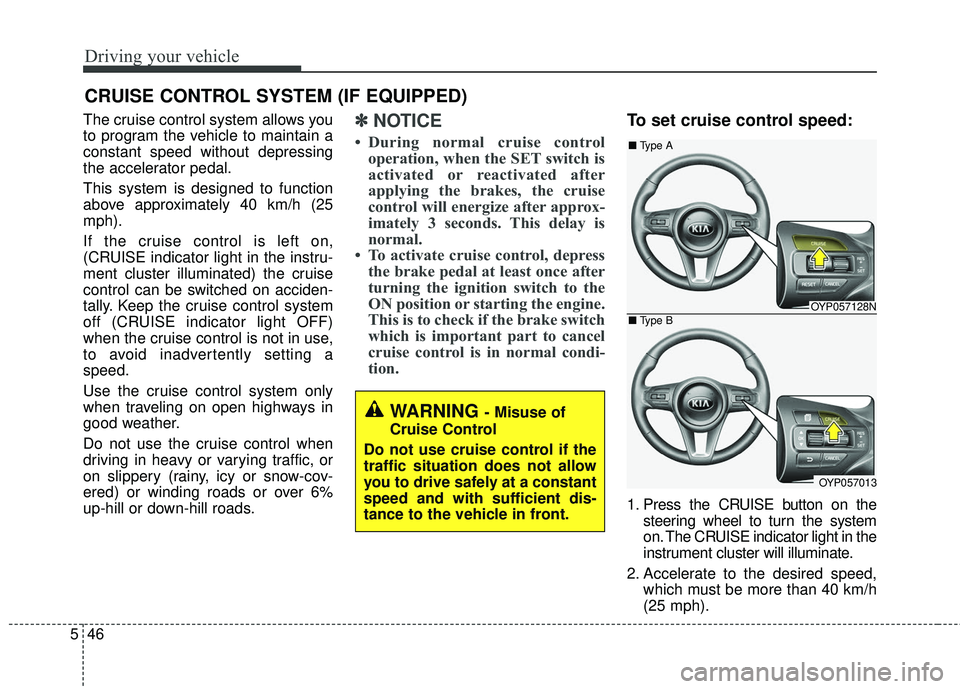
To set cruise control speed:
1. Press the CRUISE button on the
steering wheel to turn the system
on. The CRUISE indicator light in the
instrument cluster will illuminate.
2. Accelerate to the desired speed, which must be more than 40 km/h
(25 mph).
CRUISE CONTROL SYSTEM (IF EQUIPPED)
WARNING - Misuse of
Cruise Control
Do not use cruise control if the
traffic situation does not allow
you to drive safely at a constant
speed and with sufficient dis-
tance to the vehicle in front.
OYP057128N
OYP057013
■ Type A
■ Type B
Page 394 of 586
Driving your vehicle
50
5
SMART CRUISE CONTROL SYSTEM (SCC) (IF EQUIPPED)
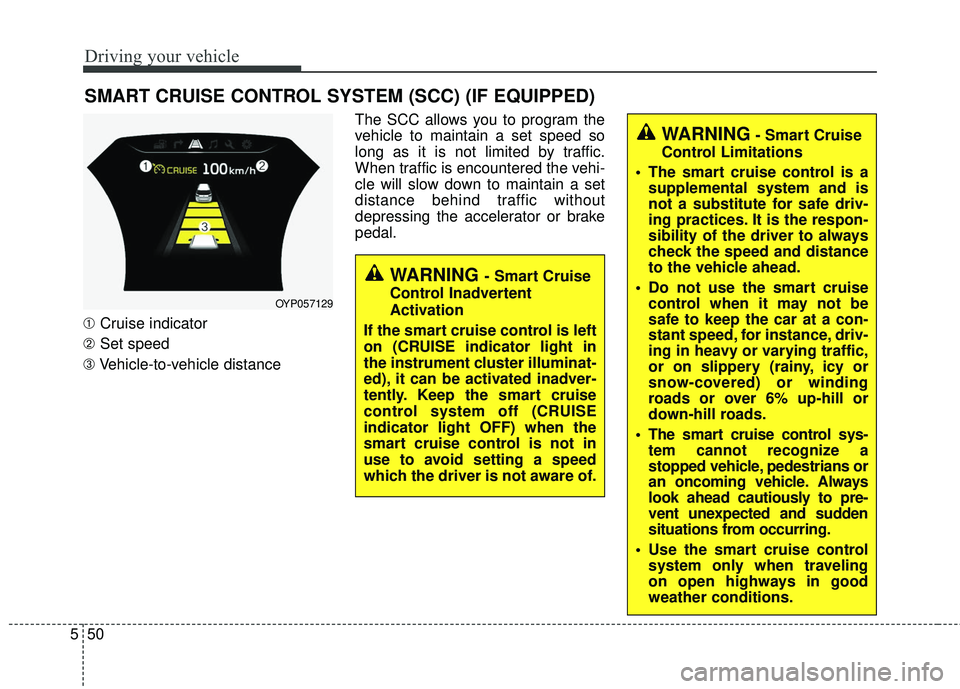
➀ Cruise indicator
➁ Set speed
➂ Vehicle-to-vehicle distance The SCC allows you to program the
vehicle to maintain a set speed so
long as it is not limited by traffic.
When traffic is encountered the vehi-
cle will slow down to maintain a set
distance behind traffic without
depressing the accelerator or brake
pedal.
WARNING - Smart Cruise
Control Inadvertent
Activation
If the smart cruise control is left
on (CRUISE indicator light in
the instrument cluster illuminat-
ed), it can be activated inadver-
tently. Keep the smart cruise
control system off (CRUISE
indicator light OFF) when the
smart cruise control is not in
use to avoid setting a speed
which the driver is not aware of.
WARNING- Smart Cruise
Control Limitations
The smart cruise control is a supplemental system and is
not a substitute for safe driv-
ing practices. It is the respon-
sibility of the driver to always
check the speed and distance
to the vehicle ahead.
Do not use the smart cruise control when it may not be
safe to keep the car at a con-
stant speed, for instance, driv-
ing in heavy or varying traffic,
or on slippery (rainy, icy or
snow-covered) or winding
roads or over 6% up-hill or
down-hill roads.
The smart cruise control sys- tem cannot recognize a
stopped vehicle, pedestrians or
an oncoming vehicle. Always
look ahead cautiously to pre-
vent unexpected and sudden
situations from occurring.
Use the smart cruise control system only when traveling
on open highways in good
weather conditions.
OYP057129
Page 397 of 586

553
Driving your vehicle
Cancelled automatically
The driver's door is opened.
The shift lever is shifted to N(Neutral), R (Reverse) or
P(Parking).
The vehicle speed is over 190 km/h (120 mph )
The ESC, ABS or TCS is operat- ing.
The ESC is turned off.
The sensor or the cover is dirty or blocked with foreign matter.
The engine speed is over 7000 RPM.
The SCC system has malfunc- tioned.
Decreasing the vehicle speed to less than approximately 10 km/h (5
mph). The accelerator pedal is continu-
ously depressed for more than 5
minute.
The AEB is activated.
Each of these actions will cancel
the SCC operation. (the SET indi-
cator, set speed and vehicle to
vehicle distance on the LCD dis-
play will go off.)
In a condition the SCC is cancelled
automatically, the SCC will not
resume even though the RES+ or
SET- lever is moved.
If the SCC is cancelled by other than
the reasons mentioned, have the
system checked by an authorized
Kia dealer. If the system is automatically can-
celled, the warning chime will sound
and a message will appear for a few
seconds.
You must adjust the vehicle speed by
depressing the accelerator or brake
pedal according to the road condition
ahead and driving condition.
Always check the road conditions.
Do not rely on the warning chime.
OYP054135N
Page 398 of 586

Driving your vehicle
54
5
To resume cruise control set
speed:
If any method other than the
CRUISE button was used to cancel
cruising speed and the system is still
activated, the cruising speed will
automatically resume when you
move the lever up/down (to RES+ or
SET-).
If you move the lever up (to RES+),
the speed will resume to the recently
set speed. It will not resume, however, if the
vehicle speed has dropped below
approximately 10 km/h (5 mph) when
the sensor detects the vehicle ahead
or if the vehicle speed has dropped
below approximately 30 km/h
(20mph) when there is no vehicle in
front of your vehicle.
To turn cruise control off:
Press the CRUISE button. (the
CRUISE indicator light in the instru-
ment cluster will go off).
WARNING - Cruise
control reactivation
To reduce the risk of an acci-
dent, always check the road
conditions when reactivating
the smart cruise control using
the RES+ lever to ensure the
road conditions permit safe use
of the cruise control.
OYP057132N
OYP057130N
Page 399 of 586
555
Driving your vehicle
Vehicle to vehicle distance
setting (SCC)
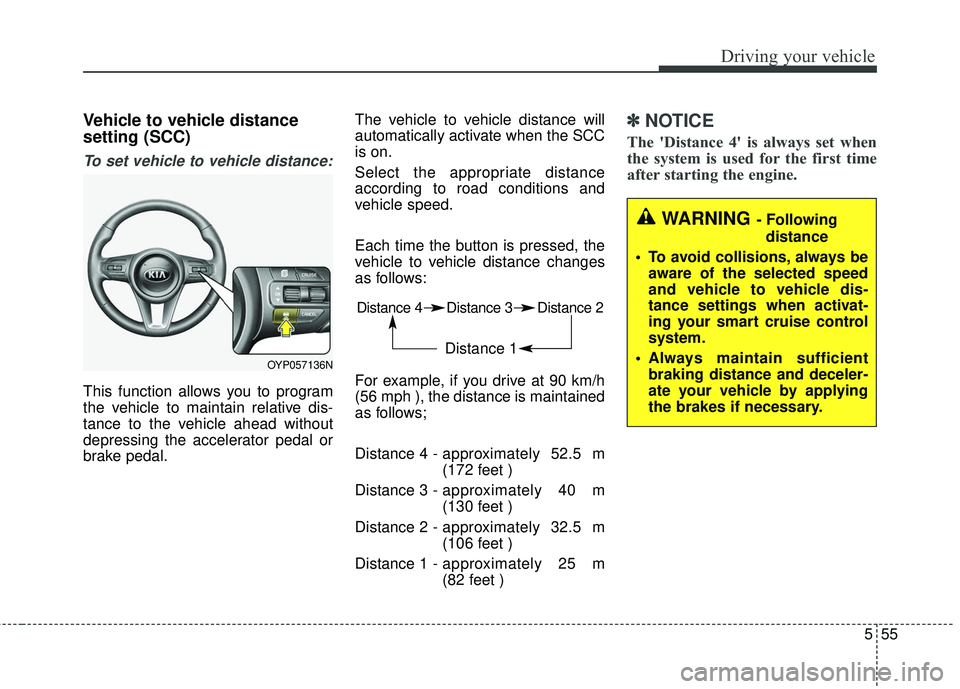
To set vehicle to vehicle distance:
This function allows you to program
the vehicle to maintain relative dis-
tance to the vehicle ahead without
depressing the accelerator pedal or
brake pedal.The vehicle to vehicle distance will
automatically activate when the SCC
is on.
Select the appropriate distance
according to road conditions and
vehicle speed.
Each time the button is pressed, the
vehicle to vehicle distance changes
as follows:
For example, if you drive at 90 km/h
(56 mph ), the distance is maintained
as follows;
Distance 4 -
approximately 52.5 m
(172 feet )
Distance 3 - approximately 40 m
(130 feet )
Distance 2 - approximately 32.5 m
(106 feet )
Distance 1 - approximately 25 m
(82 feet )
✽ ✽
NOTICE
The 'Distance 4' is always set when
the system is used for the first time
after starting the engine.
Distance 4 Distance 3 Distance 2
Distance 1
WARNING - Following
distance
To avoid collisions, always be aware of the selected speed
and vehicle to vehicle dis-
tance settings when activat-
ing your smart cruise control
system.
Always maintain sufficient braking distance and deceler-
ate your vehicle by applying
the brakes if necessary.
OYP057136N
Page 401 of 586

557
Driving your vehicle
The warning chime sounds andLCD display blinks if it is hard to
maintain the selected distance to
the vehicle ahead.
If the warning chime sounds, actively adjust the vehicle speed by
depressing the brake pedal
according to the road condition
ahead and driving condition.
Even if the warning chime is not activated, always pay attention to
the driving conditions to prevent
dangerous situations from occur-
ring. If the vehicle ahead (vehicle speed:
less than 30 km/h (20 mph)) moves
to the next lane, the warning chime
will sound and a message will
appear.
If a vehicle enters into your lane
moving less than the designated
speed, you can adjust your vehicle
speed by depressing the brake
pedal.Sensor to detect distance to the
vehicle ahead
The sensor detects distance to the
vehicle ahead.
If the sensor is covered with dirt or
other foreign matter, the vehicle to
vehicle distance control may not
operate correctly.
Always keep the sensor clean.
OUMA057169
OYP054140N