Page 256 of 492

Driving your vehicle
86
Illuminated ENGINE
START/STOP button
Whenever the front door is opened,
the ENGINE START/STOP button
will illuminate for your convenience.
The light will go off after about 30
seconds when the door is closed. It
will also go off immediately when the
theft-alarm system is armed.
ENGINE START/STOP button
position
OFF
• With manual transaxle
To turn off the engine (START/RUN
position) or vehicle power (ON posi-
tion), stop the vehicle then press the
ENGINE START/STOP button.• With automatic transaxle
To turn off the engine (START/RUN
position) or vehicle power (ON posi-
tion), press the ENGINE START/STOP
button with the shift lever in the P
(Park) position. When you press the
ENGINE START/STOP button without
the shift lever in the P (Park) position,
the ENGINE START/STOP button will
not change to the OFF position but to
the ACC position.
Also, the steering wheel locks when
the ENGINE START/STOP button is
in the OFF position to protect you
against theft. It locks when the door
is opened.
ENGINE START/STOP BUTTON (IF EQUIPPED)
OYB056001
Not illuminated
Page 257 of 492

69
Driving your vehicle
Vehicles equipped with anti-theft
steering column lock
The steering wheel locks when the
engine start/stop button is in the OFF
position to protect you against theft.
It locks when the door is opened.
If the steering wheel is not locked
properly when you open the driver's
door, the warning chime will sound. If
the problem is not solved, we recom-
mend that the system be checked by
an authorized Kia dealer.
In addition, if the ENGINE
START/STOP button is in the OFF
position after the driver's door is
opened, the steering wheel will not
lock and the warning chime will
sound. In such a situation, close the
door. Then the steering wheel will
lock and the warning chime will stop.✽ ✽
NOTICE
If the steering wheel doesn't unlock
properly, the ENGINE START/STOP
button will not work. Press the
ENGINE START/STOP button while
turning the steering wheel right and
left to release the tension.
• If difficulty is experienced turning
the engine start/stop button to the
ACC position, turn the steering
wheel right and left to release the
tension while pressing the engine
start/stop button.
• When you turn off the engine, the vehicle should be stopped.
✽ ✽
NOTICE
You are able to turn off the engine
(START/RUN) or vehicle power
(ON), only when the vehicle is not in
motion. In an emer gency situation
while the vehicle is in motion, you
are able to turn the engine off and to
the ACC position by pressing the
engine start/stop button for more
than 2 seconds or 3 times successive-
ly within 3 seconds. If the vehicle is
still moving, you can restart the
engine without depressing the brake
pedal by pressing the engine
start/stop button with the shift lever
in the N (Neutral) position.
Page 358 of 492

Maintenance
88
At least monthly:
Check the coolant level in theengine coolant reservoir.
Check the operation of all exterior lights, including the stoplights, turn
signals and hazard warning flash-
ers.
Check the inflation pressures of all tires including the spare.
At least twice a year
(i.e., every Spring and Fall) :
Check the radiator, heater and air conditioning hoses for leaks or
damage.
Check the windshield washer spray and wiper operation. Clean
the wiper blades with clean cloth
dampened with washer fluid.
Check the headlight alignment.
Check the muffler, exhaust pipes, shields and clamps.
Check the lap/shoulder belts for wear and function.
Check for worn tires and loose wheel lug nuts.
At least once a year :
Clean the body and door drainholes.
Lubricate the door hinges and check the hood hinges.
Lubricate the door and hood locks and latches.
Lubricate the door rubber weather- strips.
Check the air conditioning system.
Inspect and lubricate automatic transaxle linkage and controls.
Clean the battery and terminals.
Check the brake fluid level.
Page 417 of 492

867
Maintenance
Fuse NameFuse ratingCircuit Protected
DOOR LOCK20ATail Gate Unlock Relay, Door Lock/Unlock Relay, Two Turn Unlock Relay
POWER OUTLET20APower Outlet
SAFETY P/WINDOW25ADriver Safety Power Window Module
STOP LAMP15AStop Signal Electronic Module
T/SIGNAL LAMP15ABCM (Body Control Module), SLM (Seat Belt & Lighting Module)
C/LIGHTER20ACigarette Lighter
HEATED
MIRROR10ADriver Power Outside Mirror, Passenger Power Outside Mirror, Air Conditioner Control Module, ECM
(Engine Control Module)/PCM (Power train Control Module)
DRL210ABCM (Body Control Module)
P/WINDOW RH25APower Window Main Switch, Passenger Power Window Switch
S/HEATER20AFront Seat Warmer Control Module
DRL110A-
START7.5AWith Immobilizer : ECM (Engine Control Module)/PCM (Power train Control Module), Engine Room
Junction Block(Start Relay), Smart Key Control Module
Without Immobilizer : Burglar Alarm Relay
TAIL LAMP RH7.5AHead Lamp Right Handle side, Rear Combination Lamp (OUT) Right Handle side, License Lamp Right
Handle side, Rear Combination Lamp (IN) Right Handle side, Illumination (+)
MODULE210AAEB (Autonomous Emergency Braking) Unit, Crash Pad Switch
Instrument panel (Driver’s side fuse panel)
Page 423 of 492
873
Maintenance
Fuse NameFuse ratingCircuit Protected
B/UP LAMP10ABack-Up Lamp Switch
B+140AInstrument Panel Junction Block (Fuse - DRL2, FOGLAMP FRONT, STOP LAMP, MODULE6, Power
Connector (AUDIO, ROOM LAMP))
B+250AInstrument Panel Junction Block (Fuse - IMMO, SMART KEY, BRAKE SWITCH, SAFETY P/WINDOW,
S/HEATER, SUNROOF, Power Window Relay)
IG240AIgnition Switch, IG2 Relay, Start Relay
COOLING FAN40ACooling Fan1/2 Relay
ECU130AFuse - ECU3, ECU4, Main Relay
HEAD LAMP20AHead Lamp Relay
H/LAMP HI20AWith CANADA DRL : SLM(Seat Belt & Lighting Module) or BCM(Body Control Module)
Without CANADA DRL : Head Lamp HI Relay
FUEL PUMP20AFuel Pump Relay
HORN15AHorn Relay/ Burglar Alarm Horn Relay
A/CON10AAir Conditioner Relay
AMS10ABattery Sensor
B+340AInstrument Panel Junction Block (Fuse - T/SIGNAL LAMP, DOOR LOCK, Tail Lamp Relay)
IG140AIgnition Switch, IG1 Relay, ACC Relay
POWER OUTLET40AInstrument Panel Junction Block (Power Outlet Relay)
Page 436 of 492
Maintenance
86
8
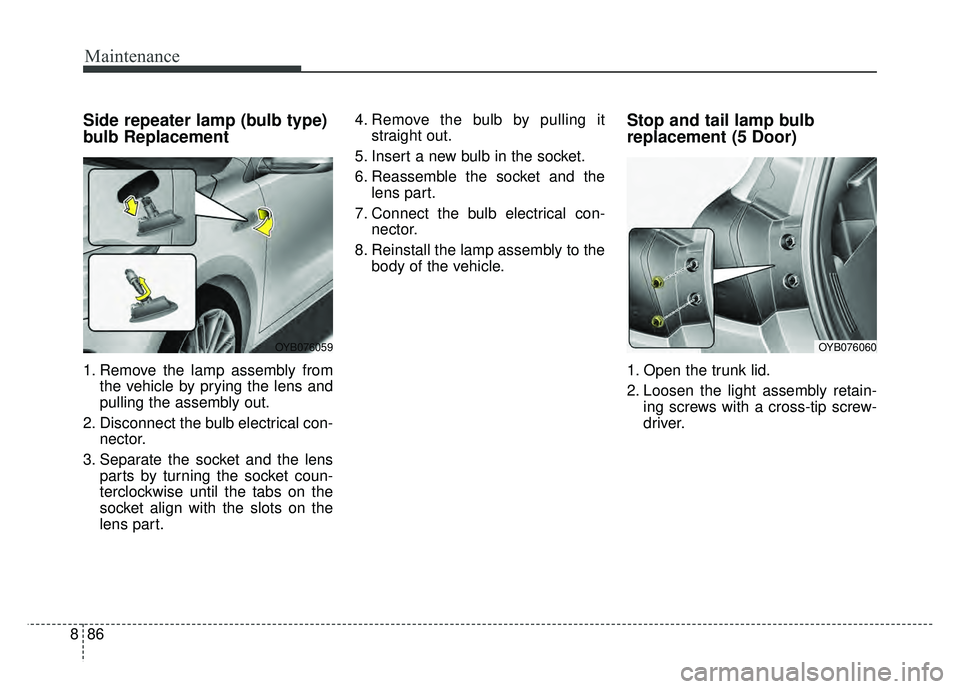
Side repeater lamp (bulb type)
bulb Replacement
1. Remove the lamp assembly from
the vehicle by prying the lens and
pulling the assembly out.
2. Disconnect the bulb electrical con- nector.
3. Separate the socket and the lens parts by turning the socket coun-
terclockwise until the tabs on the
socket align with the slots on the
lens part. 4. Remove the bulb by pulling it
straight out.
5. Insert a new bulb in the socket.
6. Reassemble the socket and the lens part.
7. Connect the bulb electrical con- nector.
8. Reinstall the lamp assembly to the body of the vehicle.
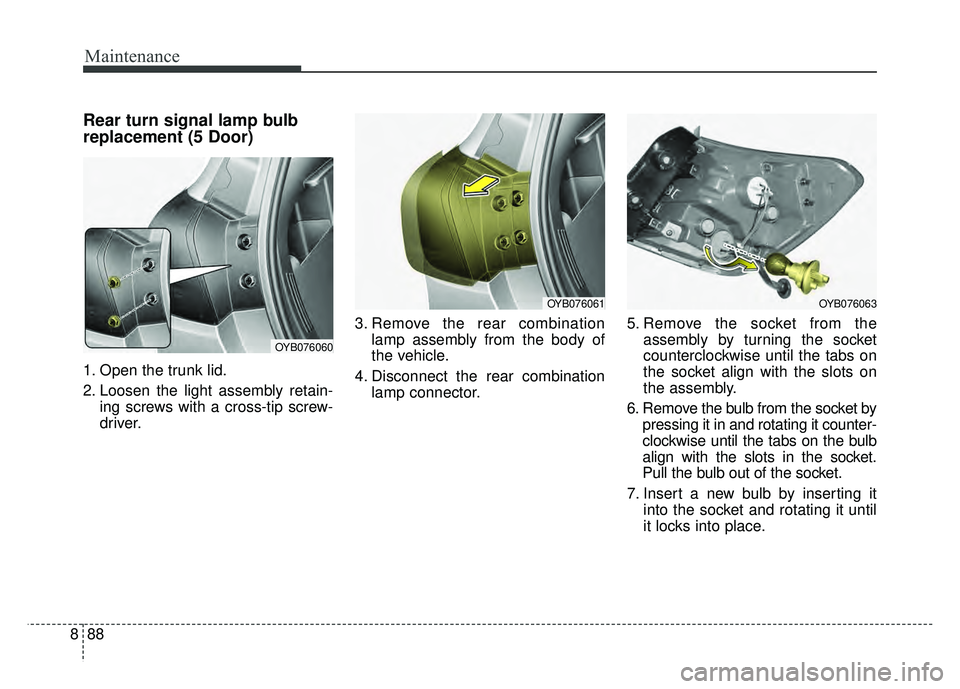
Stop and tail lamp bulb
replacement (5 Door)
1. Open the trunk lid.
2. Loosen the light assembly retain-ing screws with a cross-tip screw-
driver.
OYB076059OYB076060
Page 438 of 492
Maintenance
88
8
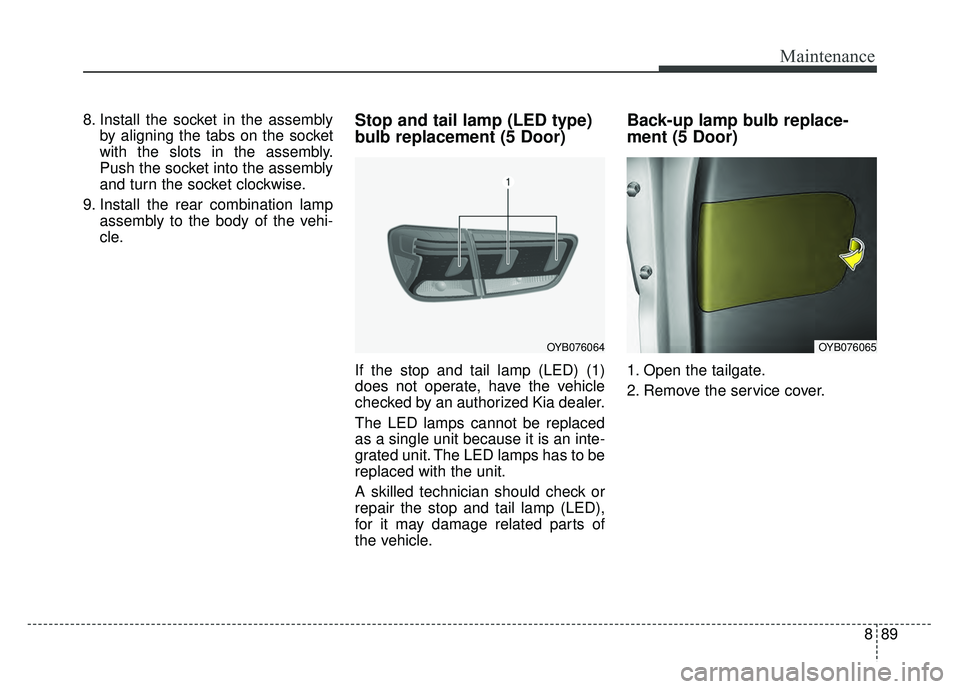
Rear turn signal lamp bulb
replacement (5 Door)
1. Open the trunk lid.
2. Loosen the light assembly retain-
ing screws with a cross-tip screw-
driver. 3. Remove the rear combination
lamp assembly from the body of
the vehicle.
4. Disconnect the rear combination lamp connector. 5. Remove the socket from the
assembly by turning the socket
counterclockwise until the tabs on
the socket align with the slots on
the assembly.
6. Remove the bulb from the socket by pressing it in and rotating it counter-
clockwise until the tabs on the bulb
align with the slots in the socket.
Pull the bulb out of the socket.
7. Insert a new bulb by inserting it into the socket and rotating it until
it locks into place.
OYB076060
OYB076061OYB076063
Page 439 of 492
889
Maintenance
8. Install the socket in the assemblyby aligning the tabs on the socket
with the slots in the assembly.
Push the socket into the assembly
and turn the socket clockwise.
9. Install the rear combination lamp assembly to the body of the vehi-
cle.Stop and tail lamp (LED type)
bulb replacement (5 Door)
If the stop and tail lamp (LED) (1)
does not operate, have the vehicle
checked by an authorized Kia dealer.
The LED lamps cannot be replaced
as a single unit because it is an inte-
grated unit. The LED lamps has to be
replaced with the unit.
A skilled technician should check or
repair the stop and tail lamp (LED),
for it may damage related parts of
the vehicle.
Back-up lamp bulb replace-
ment (5 Door)
1. Open the tailgate.
2. Remove the service cover.
OYB076064OYB076065