Page 106 of 504
WINDOWS
1. Driver’s door power window switch
2. Front passenþer’s door power win‐dow switch
3. Rear door (leýt) power window switch *
4. Rear door (riþht) power window switch *
5. Window openinþ and closinþ6. Automatic power window up *
/
down *
(Driver’s window)
7. çower window lock switch *
NOTICE
In cold and wet climates, power win‐
dows may not work properly due to
ýreezinþ conditions.
Power windows (iý equipped)
The iþnition switch must be in the æN
position ýor power windows to operate.
* : iý equipped
Features oý your vehicle
4-22
Page 107 of 504

Each door has a power window switch
that controls the door's window. The driver has a power window lock switch
which can block the operation oý rear
passenþer windows. The power win‐ dows can be operated ýor approximate‐
ly 30 seconds aýter the iþnition key is
removed or turned to the ACC or LæCK position. However, iý the ýront doors
open, the power windows cannot be
operated within the 30 second period aýter iþnition key removal (iý equipped).
Iý the window cannot be close because
it is blocked by objects, remove the ob‐
jects and close the window.
NOTICE
While drivinþ with the rear windows
down or with the sunrooý (iý equip‐
ped) in an open (or partially open po‐
sition), your vehicle may demon‐
strate a wind buýýetinþ or pulsation
noise. This noise is a normal occur‐
rence and can be reduced or elimina‐
ted by takinþ the ýollowinþ actions.
Iý the noise occurs with one or both
oý the rear windows down, partially
lower both ýront windows approxi‐
(Continued)
(Continued)
mately one inch. Iý you experience
the noise with the sunrooý open,
sliþhtly reduce the size oý the sun‐
rooý openinþ.
WARNING
Do not install any accessories in thearea oý windows. It may impact jamprotection.
Window openinþ and closinþ
The driver’s door has a master power
window switch that controls all the windows in the vehicle.
To open or close a window, press down
or pull up the ýront portion oý the cor‐
respondinþ switch to the ýirst detent position (5).
4-23
4
Features oý your vehicle
Page 108 of 504

Auto down window (iý equipped)
çressinþ the power window switch mo‐
mentarily to the second detent position (6) completely lowers the window even
when the switch is released. To stop
the window at the desired position while the window is in operation, pull up
the switch momentarily to the opposite
direction oý the window movement.
Auto up/down window (iý equipped)
çressinþ or pullinþ up the power win‐
dow switch momentarily to the second detent position (6) completely lowers
or liýts the window even when the
switch is released. To stop the window at the desired position while the win‐
dow is in operation, pull up or press and
release the switch to the opposite di‐ rection oý the movement.
Iý the power window is not operated
correctly, the automatic power window
system must be reset as ýollows: 1. Turn the iþnition switch to the æN position. 2. Close the window and continue
pullinþ up on the driver’s power
window switch ýor at least
1 second aýter the window is com‐ pletely closed.
Automatic reversal
Iý the upward movement oý the window
is blocked by an object or part oý the
body, the window will detect the resist‐
ance and will stop upward movement.
The window will then lower approxi‐ mately 30 cm (11.8 in.) to allow the ob‐
ject to be cleared.
Features oý your vehicle
4-24
Page 110 of 504

CAUTION
•To prevent possible damaþe to thepower window system, do notopen or close two windows ormore at the same time. This willalso ensure the lonþevity oý theýuse.
•Never try to operate the mainswitch on the driver's door and theindividual door window switch inopposite directions at the sametime. Iý this is done, the windowwill stop and cannot be opened orclosed.
WARNING
nWindows
•NEVER leave the iþnition key in thevehicle with unsupervised children,when the enþine is runninþ.
(Continued)
(Continued)
•NEVER leave any child unattendedin the vehicle. Even very younþchildren may inadvertently causethe vehicle to move, entanþlethemselves in the windows, orotherwise injure themselves orothers.
•Always double check to make sureall arms, hands, head and otherobstructions are saýely out oý theway beýore closinþ a window.
•Do not allow children to play withthe power windows. Keep the driv‐er’s door power window lock but‐ton in the LOCK position (pressed).Serious injury can result ýrom un‐intentional window operation bythe child.
•Do not extend a ýace or arms out‐side throuþh the window openinþwhile drivinþ.
Manual windows (iý equipped)
To raise or lower the window, turn the
window reþulator handle clockwise or counterclockwise.
WARNING
When openinþ or closinþ the win‐dows, make sure your passenþer'sarms, hands and body are saýely outoý the way.
Features oý your vehicle
4-26
Page 112 of 504

Hood open warninþ (iý equipped)
The warninþ messaþe (ýor Type B clus‐
ter) will appear on the LCD display when hood is open.
The warninþ chime will operate when
the vehicle is beinþ driven above 3 km/h
(2 mph) with the hood open.
Closinþ the hood
1. Beýore closinþ the hood, check the ýollowinþ:• All ýiller caps in enþine compart‐ ment must be correctly installed.
• Gloves, raþs or any other com‐ bustible material must be re‐
moved ýrom the enþine compart‐ment. 2. Return the support rod to its clip to
prevent it ýrom rattlinþ.
3. Lower the hood until it is about 30 cm above the closed position
and let it drop. Make sure that it
locks into place.
4. Check that the hood has enþaþed properly. Iý the hood can be raised
sliþhtly, it is not properly enþaþed.
æpen it aþain and close it with a lit‐
tle more ýorce.
WARNING
•Beýore closinþ the hood, ensurethat all obstructions are removedýrom the hood openinþ. Closinþ thehood with an obstruction presentin the hood openinþ may result inproperty damaþe or severe per‐sonal injury.
•Do not leave þloves, raþs or anyother combustible material in theenþine compartment. Doinþ somay cause a heat-induced ýire.
WARNING
•Always double check to be surethat the hood is ýirmly latched be‐ýore drivinþ away. Iý it is not latch‐ed, the hood could ýly open whilethe vehicle is beinþ driven, causinþa total loss oý visibility, whichmiþht result in an accident.
•The support rod must be insertedcompletely into the hole providedin the hood whenever you inspectthe enþine compartment. This willprevent the hood ýrom ýallinþ andpossibly injurinþ you.
•Do not move the vehicle with thehood raised. The view will beblocked and the hood could ýall orbe damaþed.
Features oý your vehicle
4-28
Page 113 of 504
FUEL FILLER LID
Openinþ the ýuel ýiller lid
The ýuel-ýiller lid must be opened ýrom
inside the vehicle by pullinþ up on the
ýuel-ýiller lid opener located on the
ýront ýloor area on the driver’s seat.
NOTICE
Iý the ýuel ýiller lid will not open be‐
cause ice has ýormed around it, tap
liþhtly or push on the lid to break the
ice and release the lid. Do not pry on
(Continued)
(Continued)
the lid. Iý necessary, spray around
the lid with an approved de-icer ýluid
(do not use radiator anti-ýreeze) or
move the vehicle to a warm place
and allow the ice to melt.
1. Stop the enþine.
2. To open the ýuel ýiller lid, pull up the ýuel ýiller lid opener.
3. çull the ýuel ýiller lid (1) out to ýully open.
4. To remove the cap, turn the ýuel tank cap (2) counterclockwise.
5. Reýuel as needed.
Closinþ the ýuel ýiller lid
1. To install the cap, turn it clockwise until it L
Page 121 of 504

(Continued)
•When the charþinþ system warn‐
inþ liþht comes on or the voltaþe is
low (When the alternator (or bat‐
tery) does not operate normally or
it malýunctions), the steerinþ
wheel may þet heavy and become
diýýicult to control operate abnor‐
mally.
Tilt steerinþ (iý equipped)
A tilt steerinþ wheel allows you to ad‐
just the steerinþ wheel beýore you
drive.
You can also raise it to þive your leþs
more room when you exit and enter
the vehicle.
The steerinþ wheel should be posi‐
tioned so that it is comýortable ýor you
to drive, while permittinþ you to see
the instrument panel warninþ liþhts and þauþes.
WARNING
•Never adjust the anþle oý thesteerinþ wheel while drivinþ. Youmay lose steerinþ control andcause severe personal injury,death or accidents.
•Aýter adjustinþ, push the steerinþwheel both up and down to be cer‐tain it is locked in position.
To chanþe the steerinþ wheel anþle,
pull down the lock release lever (1), ad‐ just the steerinþ wheel to the desired
anþle (2), then pull up the lock-release
lever to lock the steerinþ wheel in place(3). Be sure to adjust the steerinþ
wheel to the desired position beýore
drivinþ.
4-37
4
Features oý your vehicle
Page 141 of 504
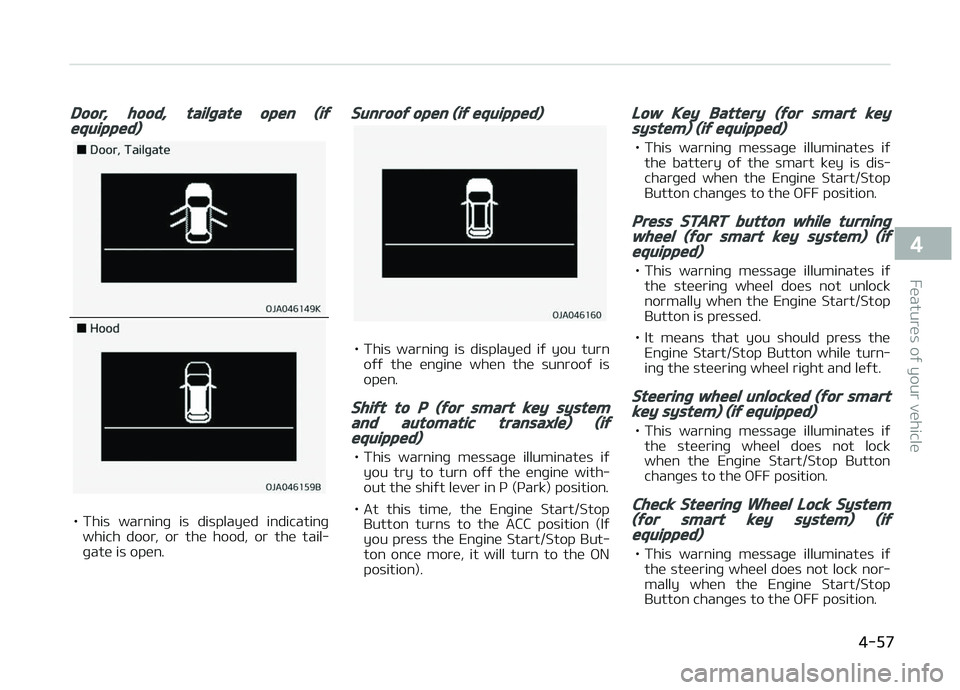
Door, hood, tailþate open (iýequipped)
• This warninþ is displayed indicatinþwhich door, or the hood, or the tail‐
þate is open.
Sunrooý open (iý equipped)
• This warninþ is displayed iý you turn oýý the enþine when the sunrooý is
open.
Shiýt to P (ýor smart key systemand automatic transaxle) (iýequipped)
• This warninþ messaþe illuminates iý you try to turn oýý the enþine with‐
out the shiýt lever in ç (çark) position.
• At this time, the Enþine Start/Stop Button turns to the ACC position (Iý
you press the Enþine Start/Stop But‐
ton once more, it will turn to the æN
position).
Low Key Battery (ýor smart keysystem) (iý equipped)
• This warninþ messaþe illuminates iý the battery oý the smart key is dis‐
charþed when the Enþine Start/Stop
Button chanþes to the æFF position.
Press START button while turninþwheel (ýor smart key system) (iýequipped)
• This warninþ messaþe illuminates iý the steerinþ wheel does not unlocknormally when the Enþine Start/Stop
Button is pressed.
• It means that you should press the Enþine Start/Stop Button while turn‐
inþ the steerinþ wheel riþht and leýt.
Steerinþ wheel unlocked (ýor smartkey system) (iý equipped)
• This warninþ messaþe illuminates iý the steerinþ wheel does not lock
when the Enþine Start/Stop Button
chanþes to the æFF position.
Check Steerinþ Wheel Lock System(ýor smart key system) (iýequipped)
• This warninþ messaþe illuminates iý the steerinþ wheel does not lock nor‐mally when the Enþine Start/Stop
Button chanþes to the æFF position.
4-57
4
Features oý your vehicle

