Page 9 of 616

H3
PHEV (PLUG-IN ELECTRIC VEHICLE) SYSTEM
The Kia Plug-in Hybrid Electric Vehicle (PHEV) shares the characteristics of both a conventional hybrid electric vehi-
cle and an all-electric vehicle.
When used as a conventional hybrid electric vehicle, the HEV computer selectively operates between the engine and
the electric motor or even both at the same time.
When it is operating in the electric vehicle mode, the vehicle is driven only using the electric motor over a certain dis-
tance until the hybrid battery becomes low. The driving distance in EV mode depends on customer driving style and road
conditions. Aggressive driving maneuvers may at times temporarily enable the engine to operate for maximum power.
The hybrid battery can be fully charged by connecting a plug to an external electric power source.
The engine can be turned on due to factors such as heater usage and a frequent operation of the accelerator pedal
by a driver in CD mode.
ODEP057141L
Electric Vehicle ModeStart up/Low speedAcceleration High speedDecelerationExternal charging
Electric motor
CD (Charge Depleting) Mode
CS (Charge Sustaining) Mode
Charging
MotorEngine+MotorEngine+Motor
or MotorChargingBattery charging
6
Page 12 of 616

H6
When the Charging Connector
is Locked
LOCK mode (button indicator off) :The connector locks when the
charging connector is plugged into
the charging inlet. The connector is
locked until all doors are unlocked
by the driver. This mode can be used
to prevent charging cable theft.
- If the charging connector isunlocked when all doors are
unlocked, but the charging cable
is not disconnected within 10 sec-
onds, the connector will be auto-
matically locked again.
- If the charging connector is unlocked when all doors are
unlocked, but all doors are locked
again, immediately, the connector
will be automatically locked again. AUTO mode (button indicator on) :
The connector locks when charg-
ing starts. The connector unlocks
when charging is complete. This
mode can be used when charging
in a public charging station. ❈ ❈
Charging connector
AUTO/LOCK mode
When the charging connector is
plugged into the charging inlet, the
connector lock timing varies with the
modes selected by pressing the but-
ton.
LOCK mode : The connector locks automatically when the charging
connector is connected normally.
AUTO mode : The connector locks when charging and automatically
unlocks when charging is complet-
ed.
❈ For more details, refer to the
“Charging connector AUTO/LOCK
mode”.
CHARGING THE PLUG-IN HYBRID VEHICLE (CONT.)
LOCKAUTO
Before chargingOX
While chargingOO
Finished chargingOX
Page 13 of 616
H7
❈Locking/unlocking the charging
door
The charging door lock/unlock func-
tion works only when the following
conditions are satisfied with the
charging door closed.
If the unlock function does not work,
use the emergency charging door
unlock method to unlock the charg-
ing door. (For more details, refer to
the “Unlock charging door in emer-
gency”)
1. Conditions for lock : − −
When locking doors from out-
side the vehicle with the charg-
ing door closed.
➀ : When locking the driver’s door
using a mechanical key
➁ : When locking doors using a
smart key
➂ : When pressing the door
lock/unlock button on the front
door outside handle while the
smart key is detected and
doors are unlocked 2. Conditions for unlock :
− −
When unlocking doors from out-
side the vehicle with the charg-
ing door closed.
➀ : When unlocking the driver’s
door using a mechanical key
➁ : When unlocking doors using a
smart key
➂ : When pressing the door
lock/unlock button on the front
door outside handle while the
smart key is detected and
doors are lockedScheduled Charging
(if equipped)
You can set reserved charging using the AVN.
Refer to the AVN for detailed infor
mation about setting reserved
charging.
Scheduled charging can only be done when using a normal charger
or the portable charging cable
(ICCB: In-Cable Control Box).
❈ AVN : Audio, Video, Navigation
Page 18 of 616
H12
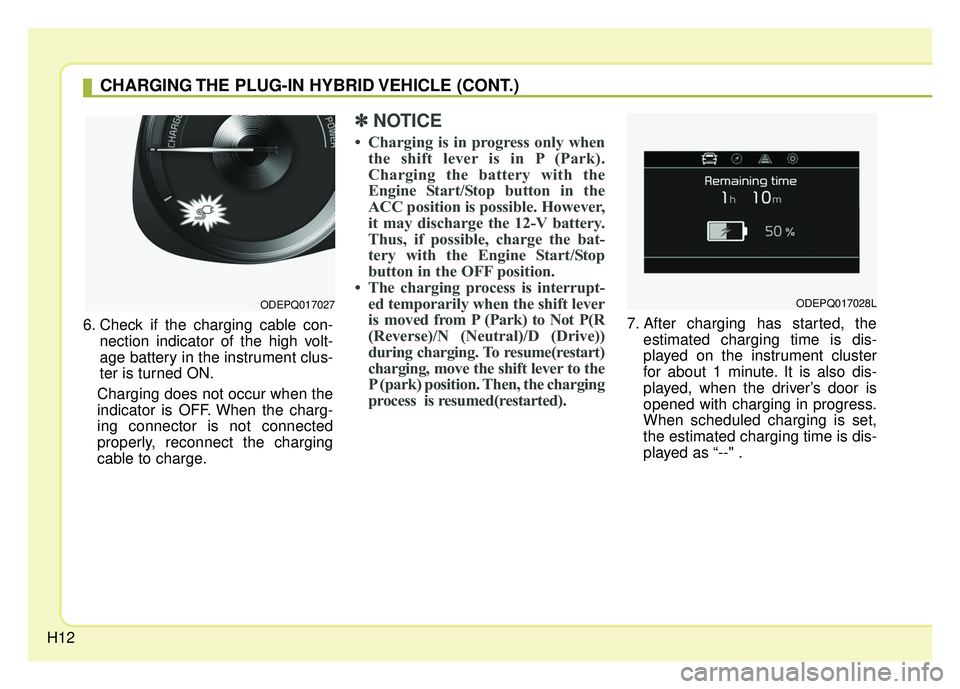
6. Check if the charging cable con-nection indicator of the high volt-
age battery in the instrument clus-
ter is turned ON.
Charging does not occur when the
indicator is OFF. When the charg-
ing connector is not connected
properly, reconnect the charging
cable to charge.
✽ ✽ NOTICE
• Charging is in progress only when
the shift lever is in P (Park).
Charging the battery with the
Engine Start/Stop button in the
ACC position is possible. However,
it may discharge the 12-V battery.
Thus, if possible, charge the bat-
tery with the Engine Start/Stop
button in the OFF position.
• The charging process is interrupt- ed temporarily when the shift lever
is moved from P (Park) to Not P(R
(Reverse)/N (Neutral)/D (Drive))
during charging. To resume(restart)
charging, move the shift lever to the
P (park) position. Then, the charging
process is resumed(restarted).
7. After charging has started, the
estimated charging time is dis-
played on the instrument cluster
for about 1 minute. It is also dis-
played, when the driver’s door is
opened with charging in progress.
When scheduled charging is set,
the estimated charging time is dis-
played as “--" .
ODEPQ017027
CHARGING THE PLUG-IN HYBRID VEHICLE (CONT.)
ODEPQ017028L
Page 24 of 616

H18
✽
✽NOTICE
• The charging is in progress only
with the shift lever is in P (Park).
Charging the battery with the
Engine Start/Stop button in the
ACC position is possible. However,
it may discharge the 12-V battery.
Thus, if possible, charge the bat-
tery with the Engine Start/Stop
button in the OFF position.
• Moving the shift lever from P (Park) to R (Reverse)/N(Neutral)/D
(Drive) stops the charging process.
To restart the charging process,
move the shift lever to P (Park),
press the Engine Start/Stop button
to the OFF position, and discon-
nect the charging cable. Then,
connect the charging cable and
restart the vehicle again.
10. After charging has started, the
estimated charging time is dis-
played on the instrument cluster
for about 1 minute. It is also dis-
played, when the driver’s door is
opened with charging in progress.
When scheduled charging is set,
the estimated charging time is dis-
played as "--".
Unlock Connector in Emergency
If the charging connector does not
unlock for some reason, open the
hood and slightly pull the emergency
cable as shown above. The charging
door will then open.
If a charging door is not opened
immediately with emergency cable in
operation, press a charging door
lightly and pull emergency cable
again.
ODEPQ017028L
ODEPQ017029
CHARGING THE PLUG-IN HYBRID VEHICLE (CONT.)
Page 33 of 616

H27
Coasting guide (if equipped)
A chime will sound and the coasting
guide indicator will blink four times to
inform the driver when to take the
foot off from the accelerator by antic-
ipating a decelerating event* based
on the analysis of driving routes and
road conditions of the navigation. It
encourages the driver to remove foot
from accelerator pedal and allow
coasting down the road with EV
motor only. This helps prevent
unnecessary fuel consumption and
increases fuel efficiency.
❈Example of a deceleration event is
going down an extended hill, slow-
ing down approaching a toll booth,
and approaching reduced speed
zones.
Press the Engine Start/Stop button
and put the shift lever in P(Park). In
the User Settings Mode, select
Driving Assist, Coasting Guide, and
then On to turn on the system.
Cancel the selection of coasting
guide to turn off the system. For the
explanation of the system, press and
hold the [OK] button.
To activate the system, take the fol-
lowing procedures. Enter your desti-
nation information on the navigation
and select the driving route. Then,
satisfy the following.
- The driving speed should be
between 37 mph (60 km/h) and 99
mph (160 km/h).
❈ The operating speed may vary due
to difference between instrument
cluster and navigation effected by
tire inflation level.
✽ ✽ NOTICE
Coasting guide is only a supplemen-
tal system to assist with fuel-efficient
driving. Thus, the operating condi-
tions may be different in accordance
with traffic/road conditions (i.e.
driving in a traffic jam, driving on a
slope, driving on a curve). Thus,
take the actual driving conditions
into consideration, such as distances
from the vehicles ahead/ behind,
while referring to the coasting guide
system as guidance.
Page 37 of 616
H31
Kia hybrid system notifies the drivers
of energy flow in various operating
modes. Eleven Modes show drivers
the current operating condition.
Vehicle Stop
The mode means the vehicle at stop.
(There is no energy flow.)
EV Propulsion
Electric power is used to move the
vehicle.
(Battery \bWheel)
Power Assist
Electric and Engine power are used
to move the vehicle.
(Battery & Engine \b Wheel)
Engine Only Propulsion
Engine power is used to move the
vehicle.
(Engine \bWheel)
Engine Generation
Vehicle is stopped with the Engine
charging the hybrid battery.
(Engine \bBattery)
HYBRID ENERGY FLOW
ODE046123N
ODE046124N
ODE046121N
ODE046122NODE046120N
Page 39 of 616
H33
Kia hybrid system notifies the drivers
of energy flow in various operating
modes. Eleven Modes show drivers
the current operating condition.
Vehicle Stop
The mode means the vehicle at stop.
(There is no energy flow.)
EV Propulsion
Electric power is used to move the
vehicle.
(Battery \bWheel)
Power Assist
Electric and Engine power are used
to move the vehicle.
(Battery & Engine \b Wheel)
Engine Only Propulsion
Engine power is used to move the
vehicle.
(Engine \bWheel)
Engine Generation
Vehicle is stopped with the Engine
charging the hybrid battery.
(Engine \bBattery)
PLUG-IN HYBRID ENERGY FLOW
ODEP047202N
ODEP047203N
ODEP047204N
ODEP047205NODEP047201N

