2018 KIA NIRO phone
[x] Cancel search: phonePage 327 of 616
![KIA NIRO 2018 Owners Manual Audio system
528
Connecting Bluetooth®Wireless
Technology devices
If there are no connected devices
Press the [PHONE] button on the
audio system or the [CALL] button in
the steering wheel remote cont](/manual-img/2/54817/w960_54817-326.png "KIA NIRO 2018 Owners Manual Audio system
528
Connecting Bluetooth®Wireless
Technology devices
If there are no connected devices
Press the [PHONE] button on the
audio system or the [CALL] button in
the steering wheel remote cont")
Audio system
528
Connecting Bluetooth®Wireless
Technology devices
If there are no connected devices
Press the [PHONE] button on the
audio system or the [CALL] button in
the steering wheel remote control ➟
List of paired
Bluetooth®Wireless
Technology devices ➟Select the
desired
Bluetooth®Wireless Technology
device from the list ➟ Connect
Bluetooth®
Wireless Technology. If there are connected devices
Press the [PHONE]
button on the
audio system ➟ Select [Settings] ➟
Select [Connections] ➟Select
Bluetooth®Wireless Technology device
to connect ➟ Select [Connect] ➟
Connect
Bluetooth®Wireless Technology.
✽ ✽ NOTICE
• Only one Bluetooth®Wireless
Technology device can be connected
at a time.
• When a Bluetooth
®Wireless
Technology device is connected,
other devices cannot be paired.
Accepting/rejecting phone calls
Receiving phone calls with
Bluetooth®Wireless Technology con-
nected.
(1) Caller name: If the caller number is in your contacts, the correspon-
ding name is displayed.
(2) Incoming phone number: Incoming phone number is displayed.
(3) Accept: Accept call.
(4) Reject: Reject call.
Page 328 of 616
Audio system
29
5
✽
✽
NOTICE
• When the incoming call screen is
displayed, audio mode and the set-
tings screen cannot be shown.
Only call volume control is sup-
ported.
• Some Bluetooth
®Wireless Technology
devices may not support the call
reject function.
• Some Bluetooth
®Wireless Technology
devices may not support the phone
number display function.
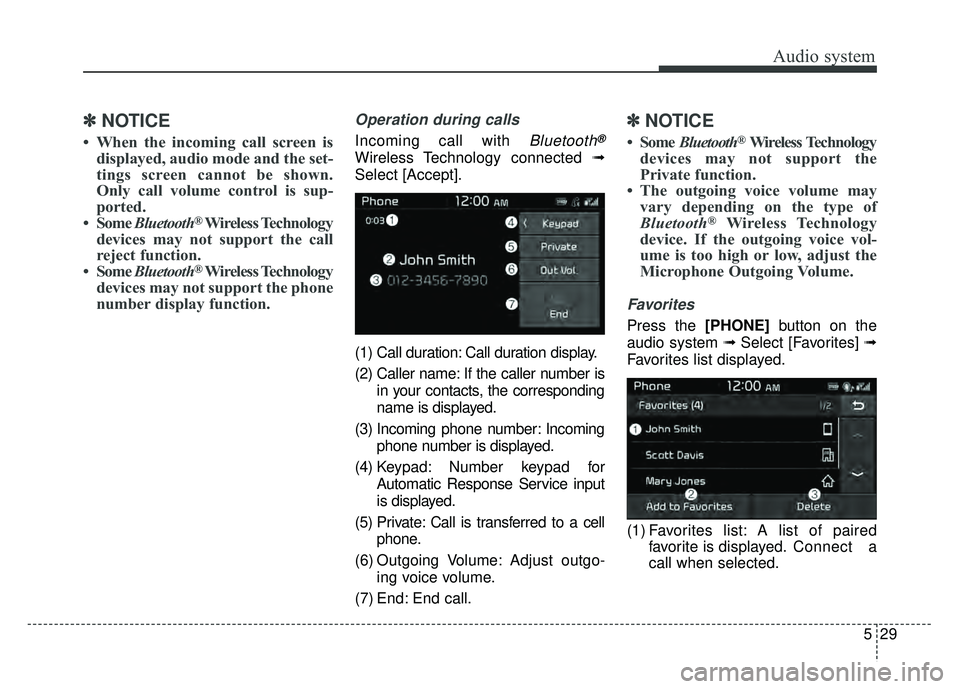
Operation during calls
Incoming call with Bluetooth®
Wireless Technology connected ➟
Select [Accept].
(1) Call duration: Call duration display.
(2) Caller name: If the caller number is in your contacts, the corresponding
name is displayed.
(3) Incoming phone number: Incoming phone number is displayed.
(4) Keypad: Number keypad for Automatic Response Service input
is displayed.
(5) Private: Call is transferred to a cell phone.
(6) Outgoing Volume: Adjust outgo- ing voice volume.
(7) End: End call.
✽ ✽ NOTICE
• Some Bluetooth®Wireless Technology
devices may not support the
Private function.
• The outgoing voice volume may vary depending on the type of
Bluetooth
®Wireless Technology
device. If the outgoing voice vol-
ume is too high or low, adjust the
Microphone Outgoing Volume.
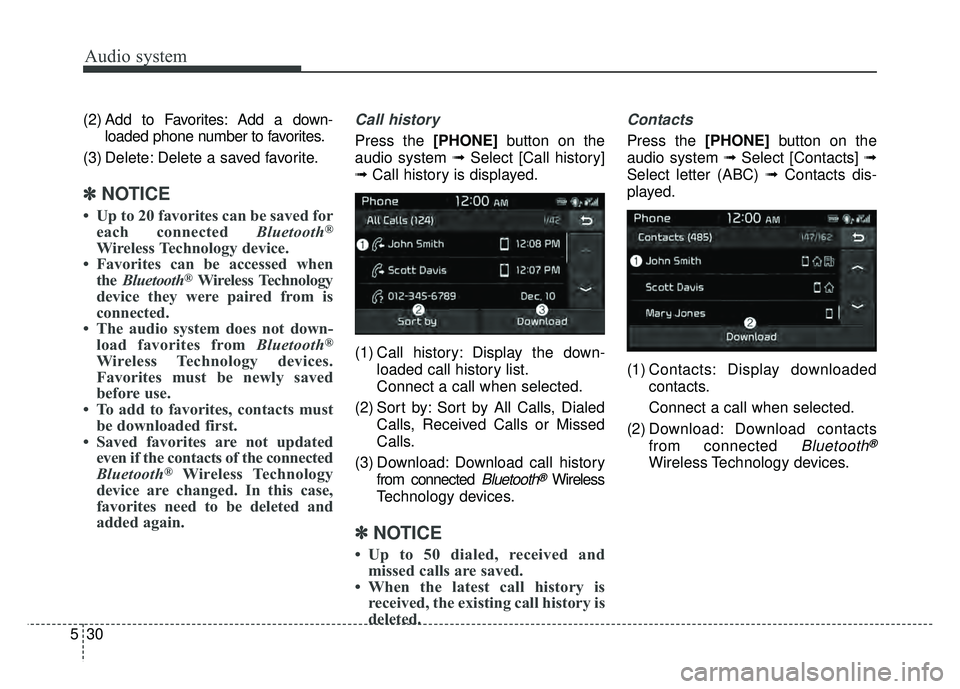
Favorites
Press the [PHONE] button on the
audio system ➟ Select [Favorites] ➟
Favorites list displayed.
(1) Favorites list: A list of paired favorite is displayed. Connect a
call when selected.
Page 329 of 616
Audio system
530(2) Add to Favorites: Add a down-
loaded phone number to favorites.
(3) Delete: Delete a saved favorite.
✽
✽ NOTICE
• Up to 20 favorites can be saved for
each connected Bluetooth®
Wireless Technology device.
• Favorites can be accessed when the Bluetooth
®Wireless Technology
device they were paired from is
connected.
• The audio system does not down- load favorites from Bluetooth
®
Wireless Technology devices.
Favorites must be newly saved
before use.
• To add to favorites, contacts must be downloaded first.
• Saved favorites are not updated even if the contacts of the connected
Bluetooth
®Wireless Technology
device are changed. In this case,
favorites need to be deleted and
added again.
Call history
Press the [PHONE] button on the
audio system ➟ Select [Call history]
➟ Call history is displayed.
(1) Call history: Display the down- loaded call history list.
Connect a call when selected.
(2) Sort by: Sort by All Calls, Dialed Calls, Received Calls or Missed
Calls.
(3) Download: Download call history from connected
Bluetooth®Wireless
Technology devices.
✽ ✽ NOTICE
• Up to 50 dialed, received and
missed calls are saved.
• When the latest call history is received, the existing call history is
deleted.
Contacts
Press the [PHONE] button on the
audio system ➟ Select [Contacts] ➟
Select letter (ABC) ➟ Contacts dis-
played.
(1) Contacts: Display downloaded contacts.
Connect a call when selected.
(2) Download: Download contacts from connected
Bluetooth®
Wireless Technology devices.
Page 330 of 616
Audio system
31
5
✽
✽
NOTICE
• Only supported contacts format
can be downloaded and displayed
from the Bluetooth
®Wireless
Technology device, contacts from
some applications will not be
included.
• Up to 2,000 contacts can be saved.
• In some cases, additional confir- mation from your Bluetooth
®
Wireless Technology device is nec-
essary when downloading con-
tacts. If downloading of contacts
unsuccessful, consult your
Bluetooth
®Wireless Technology
device’s settings or the audio
screen to approve the download.
• Contacts without phone numbers are not displayed.
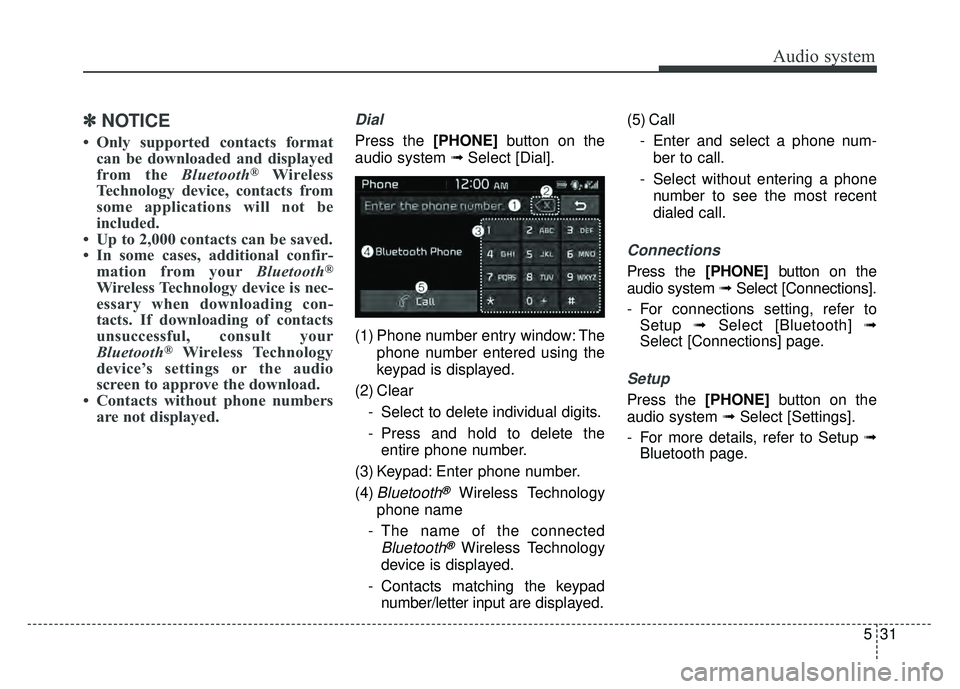
Dial
Press the [PHONE] button on the
audio system ➟ Select [Dial].
(1) Phone number entry window: The phone number entered using the
keypad is displayed.
(2) Clear - Select to delete individual digits.
- Press and hold to delete theentire phone number.
(3) Keypad: Enter phone number.
(4)
Bluetooth®Wireless Technology
phone name
- The name of the connected
Bluetooth®Wireless Technology
device is displayed.
- Contacts matching the keypad number/letter input are displayed.(5) Call
- Enter and select a phone num-ber to call.
- Select without entering a phone number to see the most recent
dialed call.
Connections
Press the [PHONE] button on the
audio system ➟ Select [Connections].
- For connections setting, refer to Setup ➟Select [Bluetooth] ➟
Select [Connections] page.
Setup
Press the [PHONE] button on the
audio system ➟ Select [Settings].
- For more details, refer to Setup ➟ Bluetooth page.
Page 537 of 616

Maintenance
68
8
✽
✽
NOTICE
The electronic system may not func-
tion correctly even when the engine
compartment and internal fuse
box’s individual fuses are not dis-
connected. In such case the cause of
the problem may be disconnection
of the main fuse (BFT type), which is
located inside the positive battery
terminal (+) cap.
Since the main fuse is designed more
intricately than other parts, have the
vehicle checked by an authorized
Kia dealer.
✽ ✽NOTICE- Remodeling
Prohibited
Do not rewire your vehicle in any
way as doing so may affect the per-
formance of several safety features
in your vehicle. Rewiring your vehi-
cle may also void your warranty and
cause you to be responsible for any
subsequent vehicle damage which
may result.
CAUTION
Visually inspect the battery capto ensure it is securely closed.If the battery cap is not securelyclosed, moisture may enter thesystem and damage the electri-cal components.
WARNING- Random
wiring prohibited when
retrofitting equipment
Use of random wiring in the
vehicle might cause danger due
to failure and damage of the
vehicle’s performance.
Using random wires especially
when retrofitting AVN or theft
alarm system, remote engine
control, car phone or radio
might damage the vehicle or
cause fire.
Page 603 of 616

Index
2I
AC inverter . . . . . . . . . . . . . . . . . . . . . . . . . . . . . . . . . 4-157
Air bag warning label . . . . . . . . . . . . . . . . . . . . . . . . . . 3-67
Air bag warning light . . . . . . . . . . . . . . . . . . . . . . . . . . 3-45
Air bags. . . . . . . . . . . . . . . . . . . . . . . . . . . . . . . . . . . . \
. 3-42Operation . . . . . . . . . . . . . . . . . . . . . . . . . . . . . . . . . 3-43
Air bag warning light . . . . . . . . . . . . . . . . . . . . . . . . 3-45
SRS components and functions . . . . . . . . . . . . . . . . 3-46
Occupant Detection System . . . . . . . . . . . . . . . . . . . 3-49
Driver's and passenger's front air bag . . . . . . . . . . . 3-57
Side air bag. . . . . . . . . . . . . . . . . . . . . . . . . . . . . . . . 3-60
Curtain air bag . . . . . . . . . . . . . . . . . . . . . . . . . . . . . 3-62
Inflation conditions . . . . . . . . . . . . . . . . . . . . . . . . . 3-64
Non-inflation conditions . . . . . . . . . . . . . . . . . . . . . 3-65
SRS Care . . . . . . . . . . . . . . . . . . . . . . . . . . . . . . . . . 3-66
Air bag warning label. . . . . . . . . . . . . . . . . . . . . . . . 3-67
Air cleaner . . . . . . . . . . . . . . . . . . . . . . . . . . . . . . . . . . 8-38\
Filter replacement. . . . . . . . . . . . . . . . . . . . . . . . . . . 8-38
Air conditioner compressor label . . . . . . . . . . . . . . . . . 9-10
Air conditioning system lubricants. . . . . . . . . . . . . . . . . 9-6
Air ventilation seat . . . . . . . . . . . . . . . . . . . . . . . . . . . 4-154
Anti-lock brake system (ABS) . . . . . . . . . . . . . . . . . . . 6-27
Appearance care . . . . . . . . . . . . . . . . . . . . . . . . . . . . . 8-105 Exterior care . . . . . . . . . . . . . . . . . . . . . . . . . . . . . . 8-105
Interior care . . . . . . . . . . . . . . . . . . . . . . . . . . . . . . 8-110
Armed stage . . . . . . . . . . . . . . . . . . . . . . . . . . . . . . . . . 4-17
Armrest (Rear) . . . . . . . . . . . . . . . . . . . . . . . . . . . . . . . 3-15 Assist Emergency Braking (AEB) . . . . . . . . . . . . . . . . 6-36
System setting and activation . . . . . . . . . . . . . . . . . . 6-36
AEB warning message and system control . . . . . . . 6-39
Brake operation . . . . . . . . . . . . . . . . . . . . . . . . . . . . 6-40
Sensor to detect the distance from the vehicle in front (Front radar) . . . . . . . . . . . . . . . . . . . . . . . . . . . . . . 6-41
System malfunction . . . . . . . . . . . . . . . . . . . . . . . . . 6-42
Limitation of the system . . . . . . . . . . . . . . . . . . . . . 6-43
Audio (With Touch Screen) . . . . . . . . . . . . . . . . . . . . . . 5-5 Feature of Your Audio . . . . . . . . . . . . . . . . . . . . . . . . 5-6
Radio Mode . . . . . . . . . . . . . . . . . . . . . . . . . . . . . . . 5-10
Media Mode . . . . . . . . . . . . . . . . . . . . . . . . . . . . . . . 5-11
Phone Mode . . . . . . . . . . . . . . . . . . . . . . . . . . . . . . . 5-24
Setup Mode . . . . . . . . . . . . . . . . . . . . . . . . . . . . . . . 5-32
Audio system . . . . . . . . . . . . . . . . . . . . . . . . . . . . . . . . . 5-2 Antenna . . . . . . . . . . . . . . . . . . . . . . . . . . . . . . . . . . . 5-\
2
Aux, USB port . . . . . . . . . . . . . . . . . . . . . . . . . . . . . . 5-3
Auto defogging system . . . . . . . . . . . . . . . . . . . . . . . . 4-147
Auto light . . . . . . . . . . . . . . . . . . . . . . . . . . . . . . . . . . 4-11\
8
Automatic climate control system . . . . . . . . . . . . . . . 4-130 Automatic heating and air conditioning. . . . . . . . . 4-131
Sunroof inside air recirculation . . . . . . . . . . . . . . . 4-140
System operation . . . . . . . . . . . . . . . . . . . . . . . . . . 4-140
Climate control air filter. . . . . . . . . . . . . . . . . . . . . 4-142
Checking the amount of air conditioner refrigerant and compressor lubricant . . . . . . . . . . . . . . . . . . . . . . 4-143
Air Conditioning refrigerant label . . . . . . . . . . . . . 4-144
A
Page 609 of 616

Index
8I
Interior care. . . . . . . . . . . . . . . . . . . . . . . . . . . . . . . . . 8-110
Interior features. . . . . . . . . . . . . . . . . . . . . . . . . . . . . . 4-152Cup holder . . . . . . . . . . . . . . . . . . . . . . . . . . . . . . . 4-152
Seat warmer . . . . . . . . . . . . . . . . . . . . . . . . . . . . . . 4-152
Air ventilation seat . . . . . . . . . . . . . . . . . . . . . . . . . 4-154
Sunvisor . . . . . . . . . . . . . . . . . . . . . . . . . . . . . . . . . 4-155
Power outlet . . . . . . . . . . . . . . . . . . . . . . . . . . . . . . 4-155
USB charger . . . . . . . . . . . . . . . . . . . . . . . . . . . . . . 4-156
AC inverter . . . . . . . . . . . . . . . . . . . . . . . . . . . . . . . 4-157
Wireless smart phone charging system . . . . . . . . . 4-158
Clothes hanger . . . . . . . . . . . . . . . . . . . . . . . . . . . . 4-161
Floor mat anchor(s) . . . . . . . . . . . . . . . . . . . . . . . . 4-162
Luggage net holder. . . . . . . . . . . . . . . . . . . . . . . . . 4-163
Cargo security screen . . . . . . . . . . . . . . . . . . . . . . . 4-163
Interior lamp AUTO turn off function . . . . . . . . . . . . 4-125
Interior light . . . . . . . . . . . . . . . . . . . . . . . . . . . . . . . . 4-125 Interior lamp AUTO turn off function . . . . . . . . . . 4-125
Room lamp . . . . . . . . . . . . . . . . . . . . . . . . . . . . . . . 4-125
Map lamp . . . . . . . . . . . . . . . . . . . . . . . . . . . . . . . . 4-126
Liftgate room lamp. . . . . . . . . . . . . . . . . . . . . . . . . 4-127
Vanity mirror lamp . . . . . . . . . . . . . . . . . . . . . . . . . 4-127
Interior overview. . . . . . . . . . . . . . . . . . . . . . . . . . . . . . . 2-4
Jump starting. . . . . . . . . . . . . . . . . . . . . . . . . . . . . . . . . . 7-7 Key operations . . . . . . . . . . . . . . . . . . . . . . . . . . . . . . . . 4-4
Key positions . . . . . . . . . . . . . . . . . . . . . . . . . . . . . . . . . 6-6
Illuminated ignition switch . . . . . . . . . . . . . . . . . . . . 6-6
Ignition switch position . . . . . . . . . . . . . . . . . . . . . . . 6-6
Starting the hybrid system . . . . . . . . . . . . . . . . . . . . . 6-7
Label Air bag warning label. . . . . . . . . . . . . . . . . . . . . . . . 3-67
Tire sidewall labeling . . . . . . . . . . . . . . . . . . . . . . . . 8-53
Tire specification and pressure label . . . . . . . . . . . . 9-10
Air conditioner compressor label . . . . . . . . . . . . . . . 9-10
Refrigerant label . . . . . . . . . . . . . . . . . . . . . . . . . . . . 9-11
Vehicle certification label. . . . . . . . . . . . . . . . . . . . . . 9-9
Lane Keeping Assist System (LKAS) . . . . . . . . . . . . . 6-74 LKAS operation . . . . . . . . . . . . . . . . . . . . . . . . . . . . 6-75
Driver's attention . . . . . . . . . . . . . . . . . . . . . . . . . . . 6-77
Warning light and message . . . . . . . . . . . . . . . . . . . 6-78
LKAS function change. . . . . . . . . . . . . . . . . . . . . . . 6-81
LCD modes . . . . . . . . . . . . . . . . . . . . . . . . . . . . . . . . . . 4-77\
LCD windows . . . . . . . . . . . . . . . . . . . . . . . . . . . . . . . . 4-64 Over view . . . . . . . . . . . . . . . . . . . . . . . . . . . . . . . . . 4-64
Trip information (Trip computer, for Hybrid) . . . . . 4-64
Trip information (Trip computer, for Plug-in Hybrid). 4-71
Warning messages . . . . . . . . . . . . . . . . . . . . . . . . . . 4-71
J
K
L
Page 615 of 616
Index
14I
Vanity mirror lamp . . . . . . . . . . . . . . . . . . . . . . . . . . . 4-127
Vanity mirror lamp bulb replacement . . . . . . . . . . . . . 8-102
Vehicle break-in process . . . . . . . . . . . . . . . . . . . . . . . . . 1-5
Vehicle certification label . . . . . . . . . . . . . . . . . . . . . . . . 9-9
Vehicle data collection and event data recorders . . . . . . 1-6
Vehicle identification number (VIN) . . . . . . . . . . . . . . . 9-9
Vehicle load limit . . . . . . . . . . . . . . . . . . . . . . . . . . . . . 6-98Certification label . . . . . . . . . . . . . . . . . . . . . . . . . . 6-101
Tire and loading information label. . . . . . . . . . . . . . 6-98
Vehicle stability management (VSM) . . . . . . . . . . . . . 6-32
Vehicle weight . . . . . . . . . . . . . . . . . . . . . . . . . . . . . . 6-102
Warning and Indicator lights . . . . . . . . . . . . . . . . . . . . 4-94
Warning lights . . . . . . . . . . . . . . . . . . . . . . . . . . . . . . . . 4-94
Warning messages. . . . . . . . . . . . . . . . . . . . . . . . . . . . . 4-71
Washer fluid . . . . . . . . . . . . . . . . . . . . . . . . . . . . . . . . . 8-36 Checking the washer fluid level . . . . . . . . . . . . . . . . 8-36
Welcome system . . . . . . . . . . . . . . . . . . . . . . . . . . . . . 4-128
Wheel alignment and tire balance . . . . . . . . . . . . . . . . 8-51
Wheel replacement . . . . . . . . . . . . . . . . . . . . . . . . . . . . 8-52
Windows . . . . . . . . . . . . . . . . . . . . . . . . . . . . . . . . . . . . \
4-27 Power window lock button. . . . . . . . . . . . . . . . . . . . 4-30
Windshield defrosting and defogging. . . . . . . . . . . . . 4-145
Windshield washers . . . . . . . . . . . . . . . . . . . . . . . . . . 4-122 Windshield wipers . . . . . . . . . . . . . . . . . . . . . . . . . . . 4-121
Winter driving . . . . . . . . . . . . . . . . . . . . . . . . . . . . . . . . 6-94
Snow tires . . . . . . . . . . . . . . . . . . . . . . . . . . . . . . . . . 6-94
Tire chains . . . . . . . . . . . . . . . . . . . . . . . . . . . . . . . . 6-95
Wiper blades . . . . . . . . . . . . . . . . . . . . . . . . . . . . . . . . . 8-42 Blade inspection . . . . . . . . . . . . . . . . . . . . . . . . . . . . 8-42
Blade replacement . . . . . . . . . . . . . . . . . . . . . . . . . . 8-42
Wipers and washers . . . . . . . . . . . . . . . . . . . . . . . . . . 4-121 Windshield wipers . . . . . . . . . . . . . . . . . . . . . . . . . 4-121
Windshield washers . . . . . . . . . . . . . . . . . . . . . . . . 4-122
Rear window wiper and washer . . . . . . . . . . . . . . . 4-123
Wireless smart phone charging system . . . . . . . . . . . 4-158
W
V