Page 277 of 584
![KIA FORTE 2018 Owners Manual 4 202
Features of your vehicle
With the Phone Button
Press the [SETUP]button
�Select
[Phone].
Pair Phone
The following steps are the same as
those described in the section
“Pairing on the Steering](/manual-img/2/40397/w960_40397-276.png "KIA FORTE 2018 Owners Manual 4 202
Features of your vehicle
With the Phone Button
Press the [SETUP]button
�Select
[Phone].
Pair Phone
The following steps are the same as
those described in the section
“Pairing on the Steering")
4 202
Features of your vehicle
With the Phone Button
Press the [SETUP]button
�Select
[Phone].
Pair Phone
The following steps are the same as
those described in the section
“Pairing on the Steering wheel con-
trols” on the previous page.
Bluetooth®Wireless Technology
features supported within the vehi-
cle are as follows. Some features
may not be supported depending
on your
Bluetooth®Wireless
Technology device.
- Outgoing/Incoming Handsfree calls
- Operations during a call (Switch to Private, Switch to call waiting,
MIC on/off)
- Downloading Call History
- Downloading Mobile Contacts
-
Bluetooth®Wireless Technology
device auto connection
- Bluetooth
®Audio Streaming
Up to five
Bluetooth®Wireless
Technology devices can be paired
to the Car Handsfree system.
Only one
Bluetooth®Wireless
Technology device can be con-
nected at a time. Other devices cannot be paired
while a
Bluetooth®Wireless
Technology device is connected.
Only
Bluetooth®Wireless Technology
Handsfree and Bluetooth®audio
related features are supported.
Bluetooth
®related operations are
possible only within devices that
support Handsfree or audio fea-
tures, such as a
Bluetooth®
Wireless Technology mobile phone
or a Bluetooth®audio device.
If a connected
Bluetooth®Wireless
Technology device becomes dis-
connected due to being out of
communication range, turning the
device OFF, or a
Bluetooth®
Wireless Technology communica-
tion error, corresponding
Bluetooth®
Wireless Technology devices are
automatically searched and recon-
nected.
Page 278 of 584
203
4
Features of your vehicle
If the system becomes unstable
due to communication errors
between the car Handsfree and the
Bluetooth®Wireless Technology
device, reset the device by turning
off and back on again. Upon reset-
ting
Bluetooth®Wireless Technology
device, the system will be restored.
After pairing is complete, a con- tacts download request is sent
once to the mobile phone. Some
mobile phones may require confir-
mation upon receiving a download
request, ensure your mobile phone
accepts the connection. Refer to
your phones user’s manual for
additional information regarding
phone pairing and connections. Phone List
Press the [SETUP]
button
�Select
[Phone] �Select [Phone List].
1) Connected Phone: Device that is currently connected.
2) Paired Phone: Device that is paired but not connected. Connecting a Device
From the paired phone list, select the
device you want to connect and
select [Connect].
Page 281 of 584

4 206
Features of your vehicle
1) Connect/Disconnect Phone: Connect/Disconnects currently selected
phone.
2) Change Priority: Sets currently selected phone to highest connec-
tion priority.
3) Delete: Deletes the currently selected phone.
4) Return: Moves to the previous screen.
To learn more about whether your mobile phone supports contact
downloads, refer to your mobile
phone user’s manual.
The contacts for only the connect- ed phone can be downloaded. Downloading Contacts
Press the [SETUP]
button�Select
[Phone] �Select [Contacts Download].
As the contacts are downloaded
from the mobile phone, a download
progress bar is displayed.
Upon downloading phone con- tacts, the previous corresponding
data is deleted.
This feature may not be supported in some mobile phones.
Voice Recognition may not operate while contacts are being down-
loaded. Outgoing Volume
Press the [SETUP]
button
�Select
[Phone] �Select [Outgoing Volume].
Use
TUNEknob to adjust the outgo-
ing volume level.
While on a call, the volume can be
changed by using the [SEEK/TRACK]
button.
Page 282 of 584
207
4
Features of your vehicle
Turning Bluetooth System Off
Press the [SETUP]
button
�Select
[Phone] �Select [Bluetooth System
Off].
Once
Bluetooth®Wireless Technology
is turned off,
Bluetooth®Wireless
Technology related features will not
be supported within the audio sys-
tem.
To turn
Bluetooth®Wireless Technology
back on, go to [SETUP] button
�
[Phone] and select “Yes”.
With the System Button
Press the [SETUP]button
�Select
[System]. Memory Information
Displays currently used memory and
total system memory.
Select [Memory Information]
�[OK].
The currently used memory is dis-
played on the left side while the total
system memory is displayed on the
right side.
Page 286 of 584

211
4
Features of your vehicle
Feature of Your Audio
Head unit
❈
The actual features in the vehicle
may differ from the illustration.
(1) EJECT
Ejects the disc. (2)
RADIO
Changes to FM/AM/SiriusXM mode.
Each time the button is pressed, the mode is changed in the order
of FM1 ➟ FM2 ➟AM ➟SAT1 ➟
SAT2 ➟SAT3.
(3) MEDIA
Changes to CD/USB(iPod
®)/AUX/
My Music/Bluetooth®Audio mode.
Each time the button is pressed, the mode is changed in the order
of CD ➟ USB(iPod
®) ➟ AUX ➟My
Music ➟BT(Bluetooth®) Audio.
(4) PHONE
Changes to Phone mode.
When a phone is not connected, the connection screen is displayed.
(5) POWER/VOL knob
Power knob: Press to turn power on/off.
Volume knob: Turn left/right to con- trol volume. (6)
SEEK/TRACK
When pressed briefly - Radio mode: Plays previous/next frequency.
- Media (CD/USB/iPod
®/My Music)
modes: Changes the track,
Song(file).
When pressed and held - Radio mode: Continuouslychanges the frequency. Upon
release, plays the current fre-
quency.
- Media(CD/USB/iPod
®/My Music)
modes: Rewinds or fast forwards
the track or file.
- During a Handsfree call, controls the call volume.
Page 287 of 584
4 212
Features of your vehicle
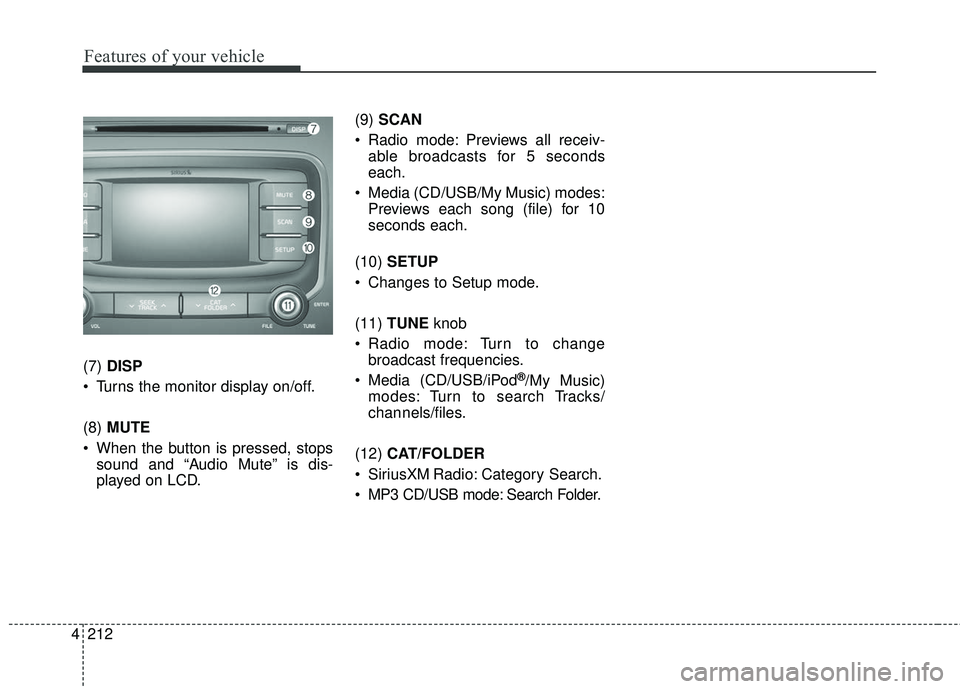
(7) DISP
Turns the monitor display on/off.
(8) MUTE
When the button is pressed, stops sound and “Audio Mute” is dis-
played on LCD. (9)
SCAN
Radio mode: Previews all receiv- able broadcasts for 5 seconds
each.
Media (CD/USB/My Music) modes: Previews each song (file) for 10
seconds each.
(10) SETUP
Changes to Setup mode.
(11) TUNE knob
Radio mode: Turn to change broadcast frequencies.
Media (CD/USB/iPod®/My Music)
modes: Turn to search Tracks/
chan nels/files.
(12) CAT/FOLDER
SiriusXM Radio: Category Search.
MP3 CD/USB mode: Search Folder.
Page 289 of 584

4 214
Features of your vehicle
✽ ✽NOTICE - Using the USB
Devices
• Connect the USB device after turning on the engine. The USB
device may become damaged if it
is already connected when the
ignition is turned on. The USB
device may not operate properly if
the car ignition is turned on or off
with the USB device connected.
• Be careful for static electricity when connecting/disconnecting
USB devices.
• Encoded MP3 Players will not be recognized when connected as an
external device.
• When connecting an external USB device, the vehicle's audio system
may not recognize the USB
depending on what firmware is
used by USB device or what files
are on the USB.
• Only products formatted with byte/sectors under 64Kbyte will be
recognized.
• This device recognizes USB devices formatted in FAT 12/16/32
file formats. This device does not
recognize files in NTFS file for-
mat. (Continued)(Continued)
• Some USB devices may not be sup-
ported due to compatibility issues.
• Avoid contact between the USB connector and bodily parts or for-
eign objects.
• Repeated connecting/disconnect- ing of USB devices within short
periods of time may result in prod-
uct malfunction.
• A strange noise may occur when disconnecting the USB.
• Make sure to connect/disconnect external USB devices with the
audio power turned off.
• The amount of time required to recognize the USB device may dif-
fer depending on the type, size or
file formats stored on the USB.
Such differences in time are not
indications of malfunctions.
• The vehicle audio system only sup- ports USB devices designed to
play music files.
• USB images and videos are not supported. (Continued)(Continued)
• Do not use the USB I/F to charge
batteries or USB accessories that
generate heat. Doing so may lead
to worsened performance or dam-
age to the audio system.
• The audio system may not recog- nize the USB device if separately
purchased USB hubs and exten-
sion cables are being used.
Connect the USB device directly
with the USB port of the vehicle.
• When using mass storage USB devices with separate logical
drives, only files saved to the root
drive can be played.
• Files may not properly operate if application programs are installed
on the USBs.
• The audio system may not operate normally if MP3 Players, cellular
phones, digital cameras, or other
electronic devices (USB devices
not recognized as portable disk
drives) are connected with the
audio system. (Continued)
Page 291 of 584

4 216
Features of your vehicle
✽ ✽NOTICE - Using an iPod®
• iPod®is a registered trademark of
Apple Inc.
• In order to use the iPod
®with
your vehicle's audio system, you
must use a dedicated iPod
®cable.
(the cable that is supplied when
purchasing iPod
®/iPhone®prod-
ucts)
• If the iPod
®is connected to the
vehicle while it is playing, a high
pitch sound could occur for
approximately 1-2 seconds imme-
diately after connecting. If possi-
ble, connect the iPod
®to the vehi-
cle with the iPod®stopped/paused.
• When the vehicle ignition is set to ACC or ON, connecting the iPod
®
through the iPod®cable will
charge the iPod®through the car
audio system.
• When connecting with the iPod
®
cable, make sure to fully insert the
jack to prevent communication
interference. (Continued)(Continued)
• When the EQ features of an exter-
nal device, such as the iPod
®, and
the audio system are both active,
EQ effects could overlap and
cause sound deterioration and dis-
tortion. Whenever possible, turn
off the EQ feature within the
external device when it is connect-
ed to the audio system.
• Noise may occur when an iPod
®or
AUX device is connected. When
such devices are not being used,
disconnect the device for storage.
• When the iPod
®or AUX device
power is connected to the power
jack, playing the external device
may result in noise. In such cases,
disconnect the power connection
before use.
• Skipping or improper operation may occur depending on the char-
acteristics of your iPod
®/iPhone®
device. (Continued)(Continued)
• If your iPhone
®is connected to
both the Bluetooth®Wireless
Technology and USB, the sound
may not be properly played. In
your iPhone
®, select the Dock con-
nector or Bluetooth®Wireless
Technology to change the sound
output (source).
• iPod
®mode cannot be operated
when the iPod®cannot be recog-
nized due to versions that do not
support communication protocols.
• For fifth generation iPod
®Nano
devices, the iPod®may not be rec-
ognized when the battery level is
low. Please charge the iPod
®for
use.
• The search/play orders shown within the iPod
®device may differ
from the orders shown within the
audio system.
• If the iPod
®malfunctions due to
an iPod®device defect, reset the
iPod®and try again. (To learn
more, refer to your iPod®manual)
(Continued)