Page 213 of 723

4117
Features of your vehicle
Battery saver function
The purpose of this feature is toprevent the battery from being dis-
charged. The system automatically
turns off the parking lights when
the driver removes the ignition key
(Smart key : turns off the engine)
and opens the driver- side door.
With this feature, the parking lights will be turned off automatically if
the driver parks on the side of roadat night.
If necessary, to keep the lights on
when the ignition key is removed,
perform the following :
1) Open the driver-side door.
2) Turn the parking lights OFF and ON again using the light switch
on the steering column. Headlamp delay function (if equipped) The headlamps (and/or taillights)
remain on for same minutes (5 min-
utes) after the ignition key is removed
or turned to the ACC or LOCK posi-
tion. However, if the driver’s door isopened and closed, the headlights
are turned off after 15 seconds.
The headlights can be turned off by
pressing the lock button on the trans-
mitter or smart key twice or turning
off the light switch from the headlight
or Auto light position.
You can activate or deactivate the
headlamp delay function. Refer to
“User setting” in this chapter.
LIGHTING CAUTION
If the driver gets out of the vehi-
cle through other doors (exceptdriver’s door), the battery saverfunction does not operate and the headlamp delay functiondoes not turn off automatically.Therefore, it causes the battery to be discharged. In this case,make sure to turn off the lampbefore getting out of the vehicle.
Page 214 of 723

Features of your vehicle
118
4
Headlight (Headlamp) welcome function (if equipped)
When the headlight switch is in the
ON or AUTO position and all doors
(and tailgate) are closed and locked,
if you press the door unlock button
on the transmitter or smart key, the
headlights will come on for about 15
seconds.
If the headlight switch is in the AUTO position, the function can only oper-ate at night.
At this time, if you press the door
unlock button again or door lock but-
ton on the transmitter or smart key,
the headlights will turn off immedi-
ately.
You can activate or deactivate the
headlamp welcome fuction. Refer to
“User setting” in this chapter. Static bending light (if equipped)
Whilst driving the corner, for your
sight and safety, the static bending
light turns on automatically. The sys-
tem will operate automatically as fol-
lows:
When vehicle speed is under
10km/h and steering wheel angle
approximately 80 degrees.
When vehicle speed is over 10km/h and steering wheel angle
approximately 35 degrees.
When the vehicle is at a standstill.
When moving rearwards with one of the above conditions satisfied the lights will light up the oppositedirection. Daytime running light (if equipped)
Daytime Running Lights (DRL) can
make it easier for others to see the
front of your vehicle during the day.
DRL can be helpful in many different
driving conditions, and it is especially
helpful after dawn and before sunset.
The DRL system turns OFF when:
1. The headlight switch is ON.
2. The engine is OFF.
3. The fog light is ON.
4. Engaging the Parking Brake.
Page 218 of 723
Features of your vehicle
122
4
The high-beam indicator will light
when the headlight high beams are
switched on.
To prevent the battery from being discharged, do not leave the lights
on for a prolonged time whilst the
engine is not running.Flashing headlights
Pull the lever towards you. It will
return to the normal position when
released. The headlight switch doesnot need to be on to use this flashing
feature. Turn signals and lane change signals
The ignition switch must be on for the
turn signals to function. To turn on
the turn signals, move the lever up or
down (A). Green arrow indicators on
the instrument panel indicate which
turn signal is operating.
ORP042120
ORP042120R
■
Type A
■Type BORP042121
ORP042121R
■Type A
■Type B
WARNING
Do not use high beam when
there are other vehicles. Usinghigh beam could obstruct theother driver's vision.
Page 227 of 723

4131
Features of your vehicle
When the operation of the passen-
ger’s side wiper blade is limited by
accumulated snow on the cowl top
cover, operating angle of the driver’s
side wiper blade will be reduced to
avoid collision between the wiper
blades. Operating under a reduced
angle, the driver's side blade stop
position will be different.
✽✽NOTICE
If you do not remove the snow
and/or ice before using the wiper
and washer, it may damage the
wiper and washer system.
Windscreen washers (front) In the O (Off) position, pull the lever
gently toward you to spray washer
fluid on the windscreen and to run
the wipers 1-3 cycles. Use this function when the wind-
screen is dirty.
The spray and wiper operation will
continue until you release the lever.
If the washer does not work, check
the washer fluid level. If the fluid level
is not sufficient, you will need to add
appropriate non-abrasive windscreen
washer fluid to the washer reservoir.
The reservoir filler neck is located in
the front of the engine compartment
on the driver side.
CAUTION
To prevent possible damage to
the washer pump, do not oper-ate the washer when the fluid reservoir is empty.
ORP072064R
Reduced angle (Driver’s side Wiper)
Normal angle
(Driver’s side Wiper)
Accumulated SnowCowl Top Cover
ORP046128L
ORP046352L
ORP046352R
■ Type B
■
Type A
■ Type C
Page 228 of 723

Features of your vehicle
132
4
Headlight washer (if equipped)
If your vehicle is equipped with the
headlight washer it will operate at the
same time when you operate the
windscreen washer. It will operate
when the headlight switch is in thefirst or second position and the igni-
tion switch or engine start/stop but-ton is in the ON position.
The washer fluid will be sprayed on
to the headlights.
✽✽
NOTICE
Check the headlight washers peri- odically to confirm that the wash-
er fluid is being sprayed properly
onto the headlight lenses.
The headlight washer can be oper- ated 15 minutes after being oper-
ated last time.
ORP046193L
WARNING
Do not use the washer in freez-
ing temperatures without firstwarming the windscreen with
the defrosters; the washer solu-
tion could freeze on the wind-
screen and obscure your vision.
CAUTION
To prevent possible damage to the wipers or windscreen,do not operate the wiperswhen the windscreen is dry.
To prevent damage to the wiper blades, do not use petrol,kerosene, paint thinner, or other solvents on or near them.
To prevent damage to the wiper arms and other compo-nents, do not attempt to movethe wipers manually.
To prevent possible damage to the wipers and washer sys-tem, use anti-freezing washerfluids in the winter season orcold weather.
Page 230 of 723
Features of your vehicle
134
4
Interior lamp AUTO cut
When all entrances are closed, if
you lock the vehicle by using the
transmitter or the smart key, all
interior lamp will be off after a few
seconds.
If you do not operate anything in the vehicle after turning off the
engine, the lights will turn off after
20 minutes. Map lamp
Press the lens (1) to turn the map
lamp on or off.
(2) : The lamps are off even if a
door is opened.
INTERIOR LIGHT
CAUTION
Do not use the interior lights for
extended periods when theengine is not running.
It may cause battery discharge.
WARNING
Do not use the interior lights when driving in the dark.Accidents could happen
because the view may be
obscured by interior lights.
ORP042131
ORP042132Q
■ Type A
■Type B
Page 234 of 723
Features of your vehicle
138
4
✽✽
NOTICE
If you want to defrost and defog the
front windscreen, refer to
“Windscreen Defrosting and
Defogging” in this chapter.
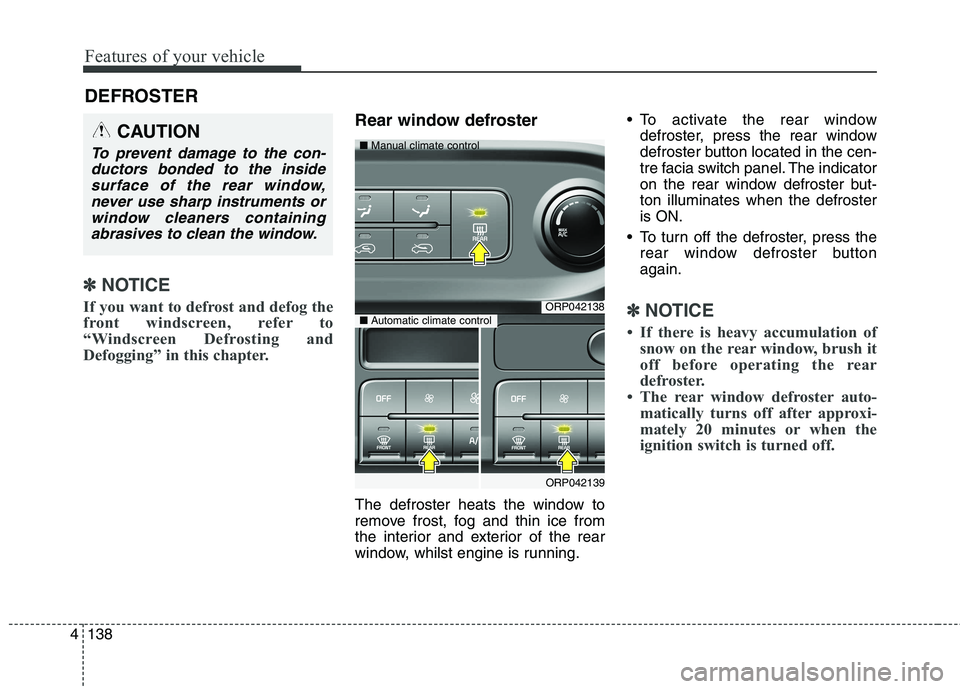
Rear window defroster
The defroster heats the window to
remove frost, fog and thin ice from
the interior and exterior of the rear
window, whilst engine is running. To activate the rear window
defroster, press the rear window
defroster button located in the cen-
tre facia switch panel. The indicator
on the rear window defroster but-ton illuminates when the defrosteris ON.
To turn off the defroster, press the rear window defroster buttonagain.
✽✽ NOTICE
If there is heavy accumulation of snow on the rear window, brush it
off before operating the rear
defroster.
The rear window defroster auto- matically turns off after approxi-
mately 20 minutes or when the
ignition switch is turned off.
DEFROSTER
CAUTION
To prevent damage to the con-
ductors bonded to the insidesurface of the rear window, never use sharp instruments orwindow cleaners containingabrasives to clean the window.
ORP042138
ORP042139
■
Manual climate control
■Automatic climate control
Page 236 of 723
Features of your vehicle
140
4
MANUAL CLIMATE CONTROL SYSTEM (IF EQUIPPED)
ORP046140R
1. Fan speed control knob
2. Air conditioning button
3. Rear window defroster button
4. Mode selection button
5. Air intake control button
6. Temperature control knob
7. Front windscreen defroster button
CAUTION
Operating the blower when the
ignition switch is in the ON posi-tion could cause the battery todischarge. Operate the blower when the engine is running.


