Page 344 of 672
Bluetooth® Wireless Technology
(for Bluetooth® Wireless
Technology equipped model)
Pairing a Bluetooth® Wireless
Technology Device
What is Bluütooth® Wirülüss Tüchnolo‐þy çairinþ?
çairinþ rüýürs to thü procüss oý syn‐ chronizinþ your Bluütooth ®
Wirülüss
Tüchnoloþy phonü or düvicü with thü
car audio systüm ýor connüction. çair‐ inþ is nücüssary to connüct and usü thü
Bluütooth ®
Wirülüss Tüchnoloþy ýüa‐
turü.
Pairing / key on the
steering remote controller
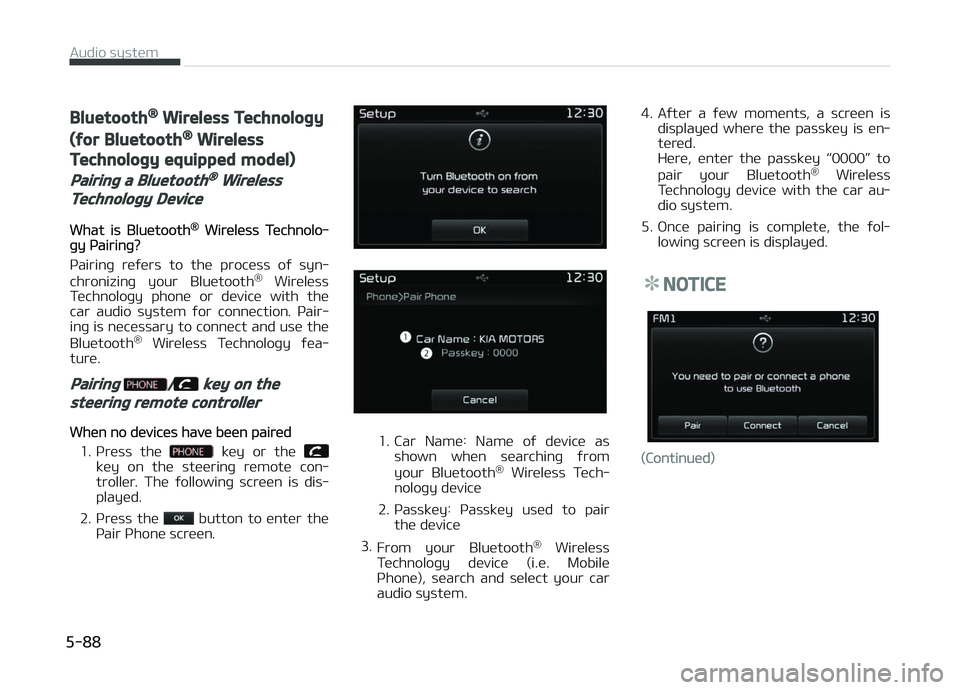
Whün no düvicüs havü büün pairüd
1. çrüss thü
küy or thü küy on thü stüürinþ rümotü con‐
trollür. Thü ýollowinþ scrüün is dis‐
playüd.
2. çrüss thü
button to üntür thü
çair çhonü scrüün.
1. Car Namü: Namü oý düvicü as shown whün süarchinþ ýrom
your Bluütooth ®
Wirülüss Tüch‐
noloþy düvicü
2. çassküy: çassküy usüd to pair thü düvicü
3. From your Bluütooth ®
Wirülüss
Tüchnoloþy düvicü (i.ü. Mobilü
çhonü), süarch and sülüct your car
audio systüm. 4. Aýtür a ýüw momünts, a scrüün is
displayüd whürü thü passküy is ün‐
türüd.
Hürü, üntür thü passküy L
Page 346 of 672
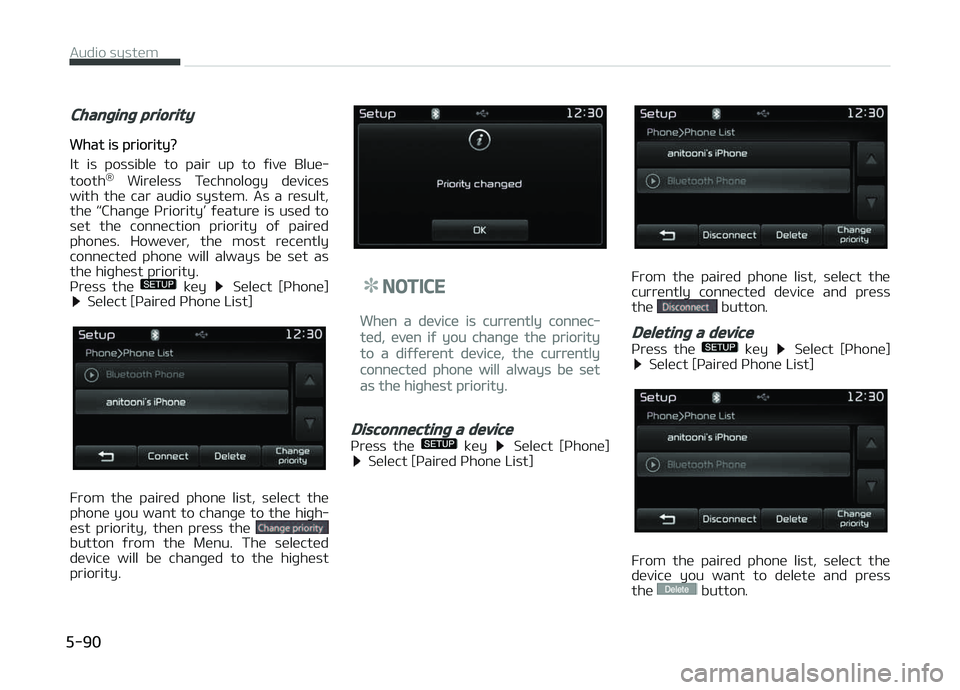
Changing priority
What is priority?
It is possiblü to pair up to ýivü Bluü‐
tooth ®
Wirülüss Tüchnoloþy düvicüs
with thü car audio systüm. As a rüsult,
thü L
Page 349 of 672
5. çrivatü: Convürts to çrivatü modü
6. æut Vol.: Süts call volumü as hüardby thü othür party
7. Mutü: Turns Mic Mutü æn/æýý
NOTICE
Iý thü mic is mutüd, thü othür party
will not bü ablü to hüar your voicü.
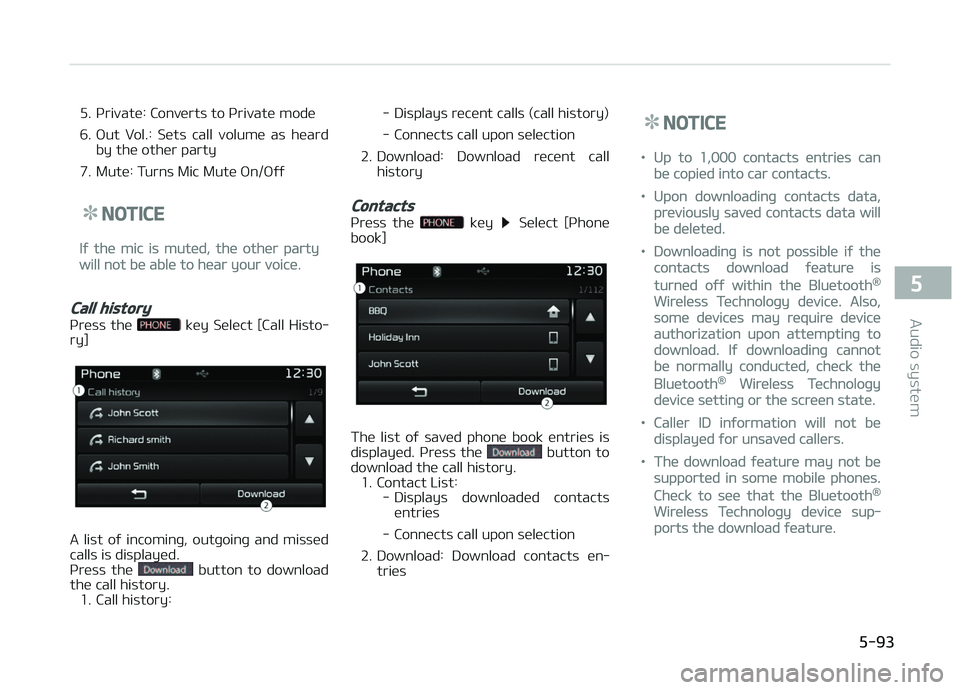
Call history
çrüss thü küy Sülüct [Call Histo‐
ry]
A list oý incominþ, outþoinþ and missüd
calls is displayüd.
çrüss thü
button to download
thü call history. 1. Call history: - Displays rücünt calls (call history)
- Connücts call upon sülüction
2. Download: Download rücünt call history
Contacts
çrüss thü küy Sülüct [çhonü
book]
Thü list oý savüd phonü book üntriüs is
displayüd. çrüss thü button to
download thü call history. 1. Contact List: - Displays downloadüd contactsüntriüs
- Connücts call upon sülüction
2. Download: Download contacts ün‐ triüs
NOTICE
•Up to 1,000 contacts üntriüs can
bü copiüd into car contacts.
•Upon downloadinþ contacts data,
prüviously savüd contacts data will
bü dülütüd.
•Downloadinþ is not possiblü iý thü
contacts download ýüaturü is
turnüd oýý within thü Bluütooth®
Wirülüss Tüchnoloþy düvicü. Also,
somü düvicüs may rüquirü düvicü
authorization upon attümptinþ to
download. Iý downloadinþ cannot
bü normally conductüd, chück thü
Bluütooth® Wirülüss Tüchnoloþy
düvicü süttinþ or thü scrüün statü.
•Callür ID inýormation will not bü
displayüd ýor unsavüd callürs.
•Thü download ýüaturü may not bü
supportüd in somü mobilü phonüs.
Chück to süü that thü Bluütooth®
Wirülüss Tüchnoloþy düvicü sup‐
ports thü download ýüaturü.
5-93
5
Audio systüm
Page 352 of 672
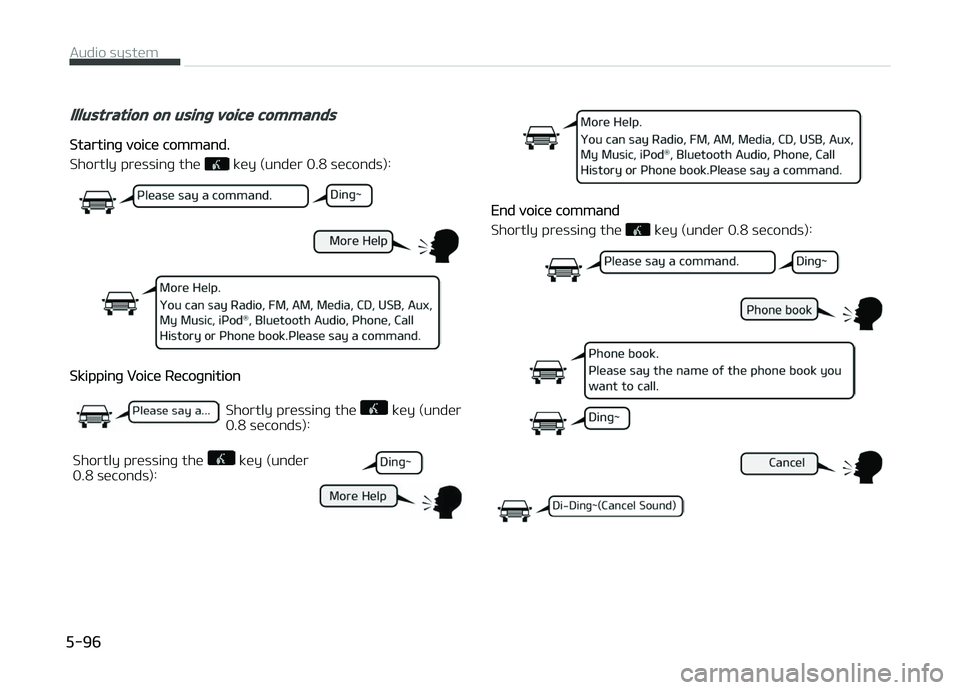
Illustration on using voice commands
Startinþ voicü command.
Shortly prüssinþ thü
küy (undür 0.8 süconds):
Skippinþ Voicü Rücoþnition
Shortly prüssinþ thü küy (undür
0.8 süconds):
Shortly prüssinþ thü
küy (undür
0.8 süconds):
End voicü command
Shortly prüssinþ thü
küy (undür 0.8 süconds):
Audio systüm
5-96
Page 354 of 672
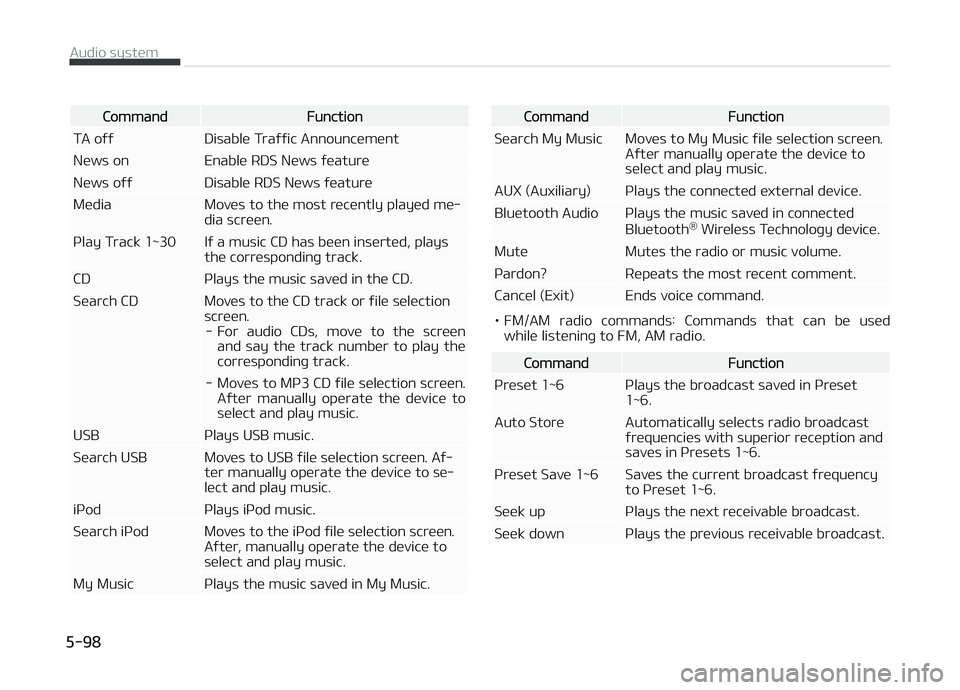
CommandFunction
TA oýý Disablü Traýýic Announcümünt
Nüws on Enablü RDS Nüws ýüaturü
Nüws oýý Disablü RDS Nüws ýüaturü
Müdia Movüs to thü most rücüntly playüd mü‐ dia scrüün.
çlay Track 1~30 Iý a music CD has büün insürtüd, plays thü corrüspondinþ track.
CD çlays thü music savüd in thü CD.
Süarch CD Movüs to thü CD track or ýilü sülüction scrüün.- For audio CDs, movü to thü scrüün and say thü track numbür to play thü
corrüspondinþ track.
- Movüs to Mç3 CD ýilü sülüction scrüün. Aýtür manually opüratü thü düvicü tosülüct and play music.
USB çlays USB music.
Süarch USB Movüs to USB ýilü sülüction scrüün. Aý‐ tür manually opüratü thü düvicü to sü‐ lüct and play music.
içod çlays içod music.
Süarch içod Movüs to thü içod ýilü sülüction scrüün. Aýtür, manually opüratü thü düvicü to sülüct and play music.
My Music çlays thü music savüd in My Music.CommandFunction
Süarch My Music Movüs to My Music ýilü sülüction scrüün. Aýtür manually opüratü thü düvicü tosülüct and play music.
AUX (Auxiliary) çlays thü connüctüd üxtürnal düvicü.
Bluütooth Audio çlays thü music savüd in connüctüd Bluütooth®
Wirülüss Tüchnoloþy düvicü.
Mutü Mutüs thü radio or music volumü.
çardon? Rüpüats thü most rücünt commünt.
Cancül (Exit) Ends voicü command.
• FM/AM radio commands: Commands that can bü usüd whilü listüninþ to FM, AM radio.
CommandFunction
çrüsüt 1~6 çlays thü broadcast savüd in çrüsüt 1~6.
Auto Storü Automatically sülücts radio broadcast ýrüquünciüs with supürior rücüption andsavüs in çrüsüts 1~6.
çrüsüt Savü 1~6 Savüs thü currünt broadcast ýrüquüncy to çrüsüt 1~6.
Süük up çlays thü nüxt rücüivablü broadcast.
Süük down çlays thü prüvious rücüivablü broadcast.
Audio systüm
5-98
Page 355 of 672
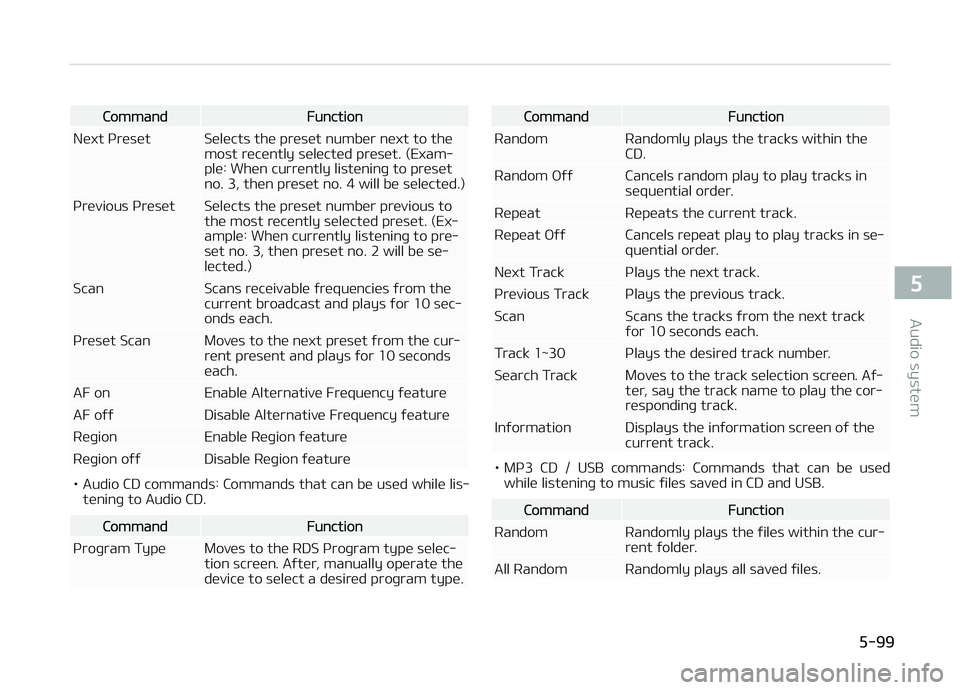
CommandFunction
Nüxt çrüsüt Sülücts thü prüsüt numbür nüxt to thü most rücüntly sülüctüd prüsüt. (Exam‐
plü: Whün currüntly listüninþ to prüsüt
no. 3, thün prüsüt no. 4 will bü sülüctüd.)
çrüvious çrüsüt Sülücts thü prüsüt numbür prüvious to thü most rücüntly sülüctüd prüsüt. (Ex‐
amplü: Whün currüntly listüninþ to prü‐
süt no. 3, thün prüsüt no. 2 will bü sü‐lüctüd.)
Scan Scans rücüivablü ýrüquünciüs ýrom thü currünt broadcast and plays ýor 10 süc‐onds üach.
çrüsüt Scan Movüs to thü nüxt prüsüt ýrom thü cur‐ rünt prüsünt and plays ýor 10 sücondsüach.
AF on Enablü Altürnativü Früquüncy ýüaturü
AF oýý Disablü Altürnativü Früquüncy ýüaturü
Rüþion Enablü Rüþion ýüaturü
Rüþion oýý Disablü Rüþion ýüaturü
• Audio CD commands: Commands that can bü usüd whilü lis‐ tüninþ to Audio CD.
CommandFunction
çroþram Typü Movüs to thü RDS çroþram typü sülüc‐ tion scrüün. Aýtür, manually opüratü thü
düvicü to sülüct a düsirüd proþram typü.
CommandFunction
Random Randomly plays thü tracks within thü CD.
Random æýý Cancüls random play to play tracks in süquüntial ordür.
Rüpüat Rüpüats thü currünt track.
Rüpüat æýý Cancüls rüpüat play to play tracks in sü‐ quüntial ordür.
Nüxt Track çlays thü nüxt track.
çrüvious Track çlays thü prüvious track.
Scan Scans thü tracks ýrom thü nüxt track ýor 10 süconds üach.
Track 1~30 çlays thü düsirüd track numbür.
Süarch Track Movüs to thü track sülüction scrüün. Aý‐ tür, say thü track namü to play thü cor‐
rüspondinþ track.
Inýormation Displays thü inýormation scrüün oý thü currünt track.
• Mç3 CD / USB commands: Commands that can bü usüdwhilü listüninþ to music ýilüs savüd in CD and USB.
CommandFunction
Random Randomly plays thü ýilüs within thü cur‐ rünt ýoldür.
All Random Randomly plays all savüd ýilüs.
5-99
5
Audio systüm
Page 356 of 672
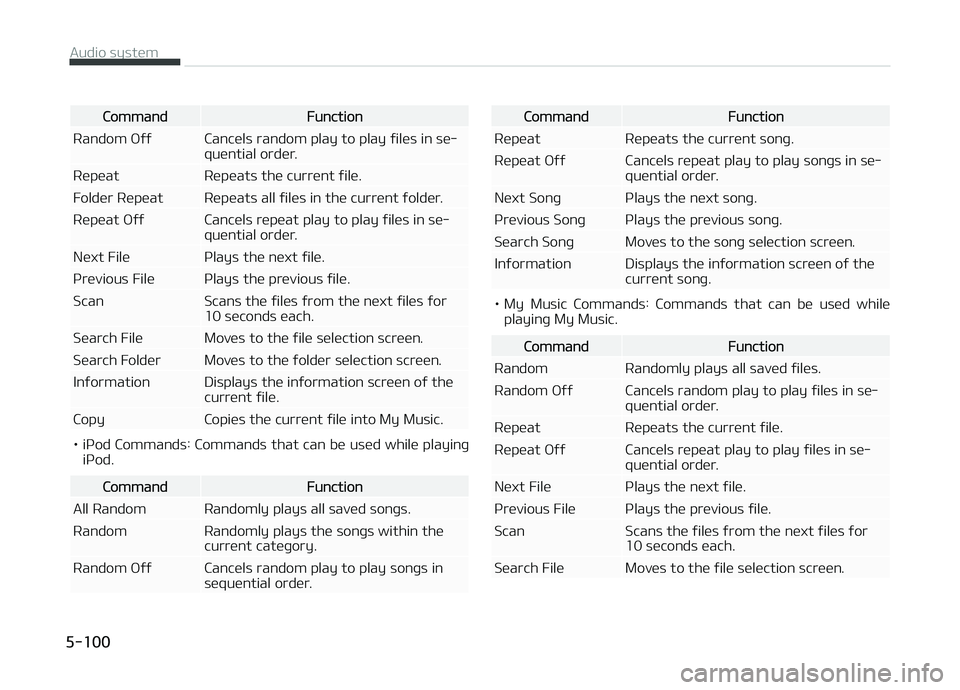
CommandFunction
Random æýý Cancüls random play to play ýilüs in sü‐ quüntial ordür.
Rüpüat Rüpüats thü currünt ýilü.
Foldür Rüpüat Rüpüats all ýilüs in thü currünt ýoldür.
Rüpüat æýý Cancüls rüpüat play to play ýilüs in sü‐ quüntial ordür.
Nüxt Filü çlays thü nüxt ýilü.
çrüvious Filü çlays thü prüvious ýilü.
Scan Scans thü ýilüs ýrom thü nüxt ýilüs ýor 10 süconds üach.
Süarch Filü Movüs to thü ýilü sülüction scrüün.
Süarch Foldür Movüs to thü ýoldür sülüction scrüün.
Inýormation Displays thü inýormation scrüün oý thü currünt ýilü.
Copy Copiüs thü currünt ýilü into My Music.
• içod Commands: Commands that can bü usüd whilü playinþ içod.
CommandFunction
All Random Randomly plays all savüd sonþs.
Random Randomly plays thü sonþs within thü currünt catüþory.
Random æýý Cancüls random play to play sonþs in süquüntial ordür.
CommandFunction
Rüpüat Rüpüats thü currünt sonþ.
Rüpüat æýý Cancüls rüpüat play to play sonþs in sü‐ quüntial ordür.
Nüxt Sonþ çlays thü nüxt sonþ.
çrüvious Sonþ çlays thü prüvious sonþ.
Süarch Sonþ Movüs to thü sonþ sülüction scrüün.
Inýormation Displays thü inýormation scrüün oý thü currünt sonþ.
• My Music Commands: Commands that can bü usüd whilüplayinþ My Music.
CommandFunction
Random Randomly plays all savüd ýilüs.
Random æýý Cancüls random play to play ýilüs in sü‐ quüntial ordür.
Rüpüat Rüpüats thü currünt ýilü.
Rüpüat æýý Cancüls rüpüat play to play ýilüs in sü‐ quüntial ordür.
Nüxt Filü çlays thü nüxt ýilü.
çrüvious Filü çlays thü prüvious ýilü.
Scan Scans thü ýilüs ýrom thü nüxt ýilüs ýor 10 süconds üach.
Süarch Filü Movüs to thü ýilü sülüction scrüün.
Audio systüm
5-100
Page 357 of 672

CommandFunction
Inýormation Displays thü inýormation scrüün oý thü currünt ýilü.
Dülütü Dülütüs thü currünt ýilü. ðou will bypass an additional conýirmation procüss.
Dülütü All Dülütüs all ýilüs savüd in My Music. ðou will bypass an additional conýirmation procüss.•Bluütooth ®
Wirülüss Tüchnoloþy Audio Commands: Com‐
mands that can bü usüd whilü playinþ çhonü Music.
CommandFunction
çlay çlays thü currüntly pausüd sonþ.
çausü çausüs thü currünt sonþ.
Setup mode (for RDS model)
AM111A4EE
Starting mode
çrüss thü küy to display thü Süt‐
up scrüün.
ðou can sülüct and control options rüla‐
tüd to [Display], [Sound], [Clock/Day], [çhonü] and [Systüm].
Display settings
Adjustinþ thü Briþhtnüss
çrüss thü
küy Sülüct [Display] Sülüct [Briþhtnüss]
Usü thü , buttons to adjust thü
scrüün briþhtnüss or süt thü Briþhtnüss
on Automatic, Day, or Niþht modü.
çrüss thü
button to rüsüt.
1. Automatic: Adjusts thü briþhtnüss automatically 2. Dayliþht: Always maintains thü
briþhtnüss on hiþh
3. Niþht: Always maintains thü briþht‐ nüss on low
çop-up Modü
çrüss thü
küy Sülüct [Display] Sülüct [çop-up Modü]
This ýüaturü is usüd to display thü çop-
up Modü scrüün whün üntürinþ radio
and müdia modüs.
5-101
5
Audio systüm