Page 130 of 502
449
Features of your vehicle
✽
✽NOTICE
After adjustment, sometimes the
lock release lever may not lock the
steering wheel. It is not a malfunc-
tion. This occurs when two gears are
not engaged correctly. In this case,
adjust the steering wheel again and
then lock the steering wheel.
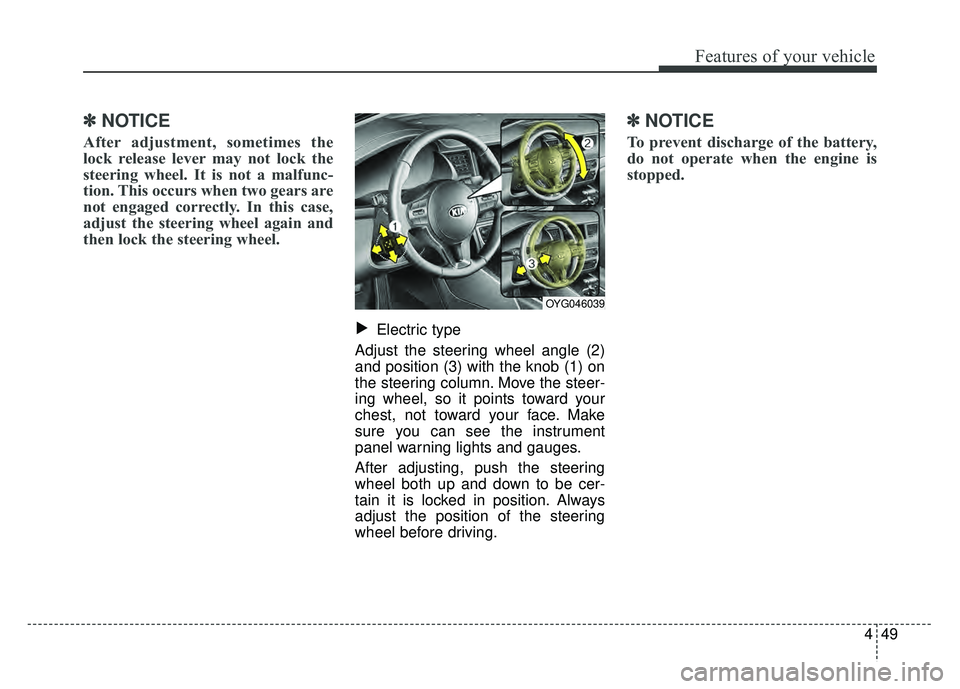
Electric type
Adjust the steering wheel angle (2)
and position (3) with the knob (1) on
the steering column. Move the steer-
ing wheel, so it points toward your
chest, not toward your face. Make
sure you can see the instrument
panel warning lights and gauges.
After adjusting, push the steering
wheel both up and down to be cer-
tain it is locked in position. Always
adjust the position of the steering
wheel before driving.
✽ ✽ NOTICE
To prevent discharge of the battery,
do not operate when the engine is
stopped.
▼
OYG046039
Page 131 of 502

Features of your vehicle
50
4
Heated steering wheel
(if equipped)
With the Engine Start/Stop Button in
the ON position, pressing the heat-
ed steering wheel button warms the
steering wheel. The indicator on the
button will illuminate.
To turn the heated steering wheel off,
press the button once again. The
indicator on the button will turn off.
✽ ✽
NOTICE
The heated steering wheel will turn
off automatically approximately 30
minutes after the heated steering
wheel is turned on.
OYG046040
CAUTION
Do not install any type of grip
cover for the steering wheel, itmay impair the function of theheated steering wheel system.
When cleaning the heated steering wheel, do not use anorganic solvent such as paintthinner, benzene, alcohol andgasoline. Doing so may dam-age the surface of the steeringwheel.
If the surface of steering wheel is damaged by sharpobject, damage to the heatedsteering wheel componentscould occur.
WARNING
If the steering wheel becomes
too warm, turn the system off.
The heated steering wheel may
cause burns even at low tem-
peratures, especially if used for
long periods of time.
Page 132 of 502
451
Features of your vehicle
Horn
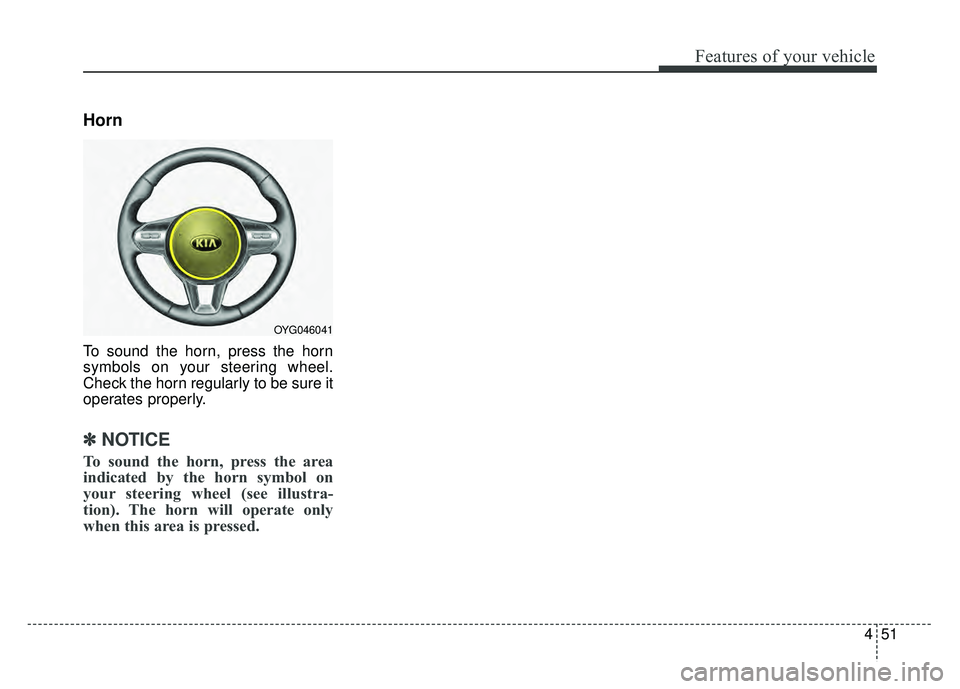
To sound the horn, press the horn
symbols on your steering wheel.
Check the horn regularly to be sure it
operates properly.
✽ ✽NOTICE
To sound the horn, press the area
indicated by the horn symbol on
your steering wheel (see illustra-
tion). The horn will operate only
when this area is pressed.
OYG046041
Page 146 of 502
465
Features of your vehicle
Instrument Cluster Control
Adjusting Instrument ClusterIllumination
The brightness of the instrument
panel illumination is changed by
pressing the illumination control button
(“+” or “-”) when the Engine Start/Stop
button is ON, or the taillights are
turned on. If you hold the illumination control
button (“+” or “-”), the brightness
will be changed continuously.
If the brightness reaches to the maximum or minimum level, an
alarm will sound.
LCD Display Control
The LCD display modes can be
changed by using the control buttons
on the steering wheel.
OYG046102
OYG046157LOYG046103L
OYG046104L
■Type A
■Type B
Page 153 of 502

Features of your vehicle
72
4
Average Fuel Economy (2)
The average fuel economy is calcu-
lated by the total driving distance
and fuel consumption since the last
average fuel economy reset.
- Fuel economy range: 0.0 ~ 99.9MPG or L/100km
The average fuel economy can be reset both manually and automati-
cally.
Manual reset
To clear the average fuel economy
manually, press the OK button
(reset) on the steering wheel for
more than 1 second when the aver-
age fuel economy is displayed. Automatic reset
To make the average fuel economy
be reset automatically whenever
refueling, select the “Fuel economy
auto reset” mode in User Setting
menu of the LCD window (Refer to
“LCD window”).
Under “Fuel economy auto reset”
mode, the average fuel economy will
be cleared to zero (---) when the vehi-
cle speed exceeds 1 mph (1 km/h)
after refueling more than 2 gallons (6
liters).
✽ ✽
NOTICE
The average fuel economy is not dis-
played for more accurate calculation
if the vehicle does not drive more
than 10 seconds or 0.03 miles (50
meters) since Engine Start/Stop but-
ton is turned to ON.
Instant Fuel Economy (3)
This mode displays the instant fuel
economy during the last few sec-
onds when the vehicle speed is
more than 4.9 mph (8 km/h).
- Fuel economy range: 0 ~ 50(MPG), 0 ~ 30 (km/L, L/100 km).
CAUTION - Low Fuel
Level
Level warning light on or withthe fuel level below “0 or E” cancause the engine to misfire anddamage the catalytic converter(if equipped).
Page 158 of 502

477
Features of your vehicle
User Settings Mode
On this mode, you can change set-
ting of the doors, lamps, and so on.Head-Up Display (HUD)
(if equipped)
Display Height : Adjust the height
of the HUD image on the wind-
shield glass.
Rotation : Adjust the degree of the
HUD rotation.
Brightness : Adjust the intensity of
the HUD brightness
Contents Select
- Activate or deactivate each con- tents of the HUD.
-Turn by Turn*
- Traffic Information*
- Advanced Smart Cruise control*
- Cruise control*
- Blind Spot Detection*
* : if equipped
Speedometer Size
: Choose the
size of the HUD speedometer
(Small, Medium, Large).
Speedometer Color : Choose the
color of the HUD speedometer
(White, Orange, Green).
✽ ✽ NOTICE
If you select the Turn By Turn
(TBT) navigation information as
HUD contents, the Turn By Turn
(TBT) navigation information will
not be displayed on the LCD.OYG046129L
WARNING
Do not adjust the User Setting
while driving. You may lose your
steering control and cause
severe personal injury or acci-
dents.
Page 161 of 502

Features of your vehicle
80
4
Convenience
Seat Easy Access (if equipped)
- None : The seat easy access func- tion will be deactivated.
- Normal/Enhanced : When you turn off the engine, the driver’s seat will
automatically move rear 3inches
(7.6cm) (Enhanced) for you to
enter or exit the vehicle more com-
fortably.
If you change the Engine
Start/Stop Button from OFF posi-
tion to the AC function, the driver’s
seat will return to the original posi-
tion.
❈ For more details, refer to “Driver
Position Memory System” in chap-
ter 3.
Steering Easy Access
(if equipped)
- On (checked) : The steering wheel will automatically move forward or
rearward for the driver enter or exit
the vehicle comfortably.
- Off (unchecked) : The steering easy access function will be deac-
tivated.
❈ For more details, refer to “Driver
Position Memory System” in chap-
ter 3.
Wireless smart phone charging
system (if equipped) : If this item
checked, the Wireless smart
phone charging system will be acti-
vated.
Wiper/Light Display (if equipped) :
If this item checked, the Wiper/Light
Display will be activated.
Gear position pop up (if
equipped) : To activate or deacti-
vate the gear position pop-up.
When activated, the gear position
will be displayed on the LCD dis-
play. Service interval
Service Interval
To activate or deactivate the service
interval function.
Adjust Interval
To adjust the interval by mileage and
period.
Reset
To reset the service interval function
Other Features
Page 164 of 502

483
Features of your vehicle
Low Key Battery
(for smart key system)
This warning message illuminatesif the battery of the smart key is
discharged when the Engine
Start/Stop Button changes to the
OFF position.
Press START button while turning
wheel (for smart key system)
This warning message illuminates if the steering wheel does not
unlock normally when the Engine
Start/Stop Button is pressed.
It means that you should press the Engine Start/Stop Button while
turning the steering wheel right
and left. Press brake pedal to start engine
(for smart key system)
This warning message illuminates
if the Engine Start/Stop Button
changes to the ACC position twice
by pressing the button repeatedly
without depressing the brake pedal.
It means that you should depress the brake pedal to start the engine.
Key not in vehicle (for smart key system)
This warning message illuminates if the smart key is not in the vehicle
when you press the Engine
Start/Stop Button.
It means that you should always have the smart key with you. Key not detected (for smart key system)
This warning message illuminates
if the smart key is not detected
when you press the Engine
Start/Stop Button.
Vehicle is On(for smart key system)
If the driver’s door is opened with the engine start/stop button in the
ON position and shift lever in
P(Park) position, the message
above will appear.