2018 KIA CADENZA light
[x] Cancel search: lightPage 80 of 502
Safety features of your vehicle
64
3
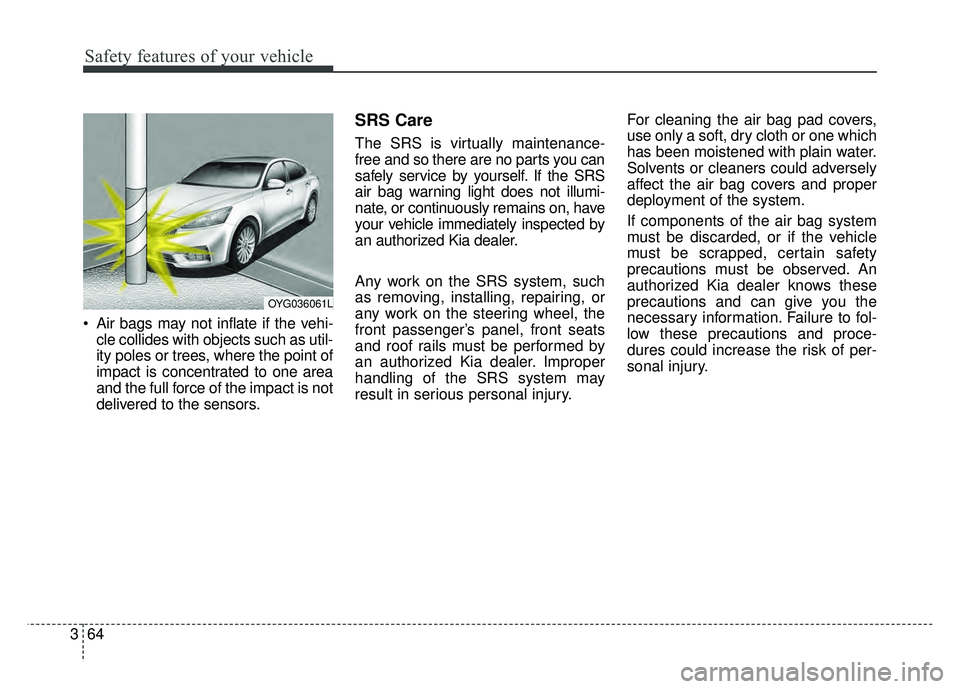
Air bags may not inflate if the vehi-
cle collides with objects such as util-
ity poles or trees, where the point of
impact is concentrated to one area
and the full force of the impact is not
delivered to the sensors.
SRS Care
The SRS is virtually maintenance-
free and so there are no parts you can
safely service by yourself. If the SRS
air bag warning light does not illumi-
nate, or continuously remains on, have
your vehicle immediately inspected by
an authorized Kia dealer.
Any work on the SRS system, such
as removing, installing, repairing, or
any work on the steering wheel, the
front passenger’s panel, front seats
and roof rails must be performed by
an authorized Kia dealer. Improper
handling of the SRS system may
result in serious personal injury. For cleaning the air bag pad covers,
use only a soft, dry cloth or one which
has been moistened with plain water.
Solvents or cleaners could adversely
affect the air bag covers and proper
deployment of the system.
If components of the air bag system
must be discarded, or if the vehicle
must be scrapped, certain safety
precautions must be observed. An
authorized Kia dealer knows these
precautions and can give you the
necessary information. Failure to fol-
low these precautions and proce-
dures could increase the risk of per-
sonal injury.
OYG036061L
Page 83 of 502
Steering wheel . . . . . . . . . . . . . . . . . . . . . . . . . . . . . 4-47
• Electric power steering (EPS) . . . . . . . . . . . . . . . . . . 4-47
• Tilt and telescopic steering . . . . . . . . . . . . . . . . . . . . 4-48
• Heated steering wheel . . . . . . . . . . . . . . . . . . . . . . . . . 4-50
• Horn . . . . . . . . . . . . . . . . . . . . . . . . . . . . . . . . . . . . \
. . . 4-51
Mirrors . . . . . . . . . . . . . . . . . . . . . . . . . . . . . . . . . . 4-52\
• Inside rearview mirror . . . . . . . . . . . . . . . . . . . . . . . . 4-52
• Automatic-dimming function . . . . . . . . . . . . . . . . . . . 4-54
• Compass function . . . . . . . . . . . . . . . . . . . . . . . . . . . . 4-55
• Programming HomeLink
®. . . . . . . . . . . . . . . . . . . . . 4-57
• Standard programming . . . . . . . . . . . . . . . . . . . . . . . 4-57
• Rolling code programming . . . . . . . . . . . . . . . . . . . . . 4-58
• Gate operator & Canadian programming . . . . . . . . 4-59
• Operating HomeLink
®. . . . . . . . . . . . . . . . . . . . . . . . 4-59
• Reprogramming a single HomeLink
®button. . . . . . 4-60
• Erasing HomeLink
®buttons . . . . . . . . . . . . . . . . . . . 4-60
• Outside rearview mirror. . . . . . . . . . . . . . . . . . . . . . . 4-61
Instrument cluster . . . . . . . . . . . . . . . . . . . . . . . . . 4-64
• Instrument cluster control . . . . . . . . . . . . . . . . . . . . . 4-65
• LCD display control . . . . . . . . . . . . . . . . . . . . . . . . . . 4-65
• Gauges . . . . . . . . . . . . . . . . . . . . . . . . . . . . . . . . . . . . \
. 4-66
• Transaxle shift indicator . . . . . . . . . . . . . . . . . . . . . . . 4-69
LCD windows . . . . . . . . . . . . . . . . . . . . . . . . . . . . . 4-70
• Over view . . . . . . . . . . . . . . . . . . . . . . . . . . . . . . . . . . . 4-\
70
• Trip information (Trip computer) . . . . . . . . . . . . . . . 4-70
• LCD Modes . . . . . . . . . . . . . . . . . . . . . . . . . . . . . . . . . 4-74
Warning and indicator lights . . . . . . . . . . . . . . . . 4-86
• Warning lights . . . . . . . . . . . . . . . . . . . . . . . . . . . . . . . 4-86
• Indicator Lights . . . . . . . . . . . . . . . . . . . . . . . . . . . . . . 4-93
Head up display (HUD) . . . . . . . . . . . . . . . . . . . . . 4-98
• Description . . . . . . . . . . . . . . . . . . . . . . . . . . . . . . . . . . 4-98\
• Head Up Display ON/OFF . . . . . . . . . . . . . . . . . . . . . 4-99
• Head Up Display Information . . . . . . . . . . . . . . . . . . 4-99
• Head Up Display Setting. . . . . . . . . . . . . . . . . . . . . . . 4-99
Rear parking assist system . . . . . . . . . . . . . . . . . 4-100
• Operation of the rear parking assist system . . . . . . 4-100
• Non-operational conditions of rear parking assist system . . . . . . . . . . . . . . . . . . . . . . . . . . . . . . . 4-101
• Rear parking assist system precautions . . . . . . . . . 4-102
• Self-diagnosis . . . . . . . . . . . . . . . . . . . . . . . . . . . . . . . 4-103
Rearview camera . . . . . . . . . . . . . . . . . . . . . . . . . 4-104
Surround view monitoring system (SVM) . . . . . 4-105
4
Page 84 of 502

Lighting . . . . . . . . . . . . . . . . . . . . . . . . . . . . . . . . . 4-106
• Battery saver function. . . . . . . . . . . . . . . . . . . . . . . . 4-106
• Lighting control . . . . . . . . . . . . . . . . . . . . . . . . . . . . . 4-106
• High beam operation. . . . . . . . . . . . . . . . . . . . . . . . . 4-108
• High Beam Assist . . . . . . . . . . . . . . . . . . . . . . . . . . . . 4-108
• Turn signals and lane change signals. . . . . . . . . . . . 4-110
• Front fog light . . . . . . . . . . . . . . . . . . . . . . . . . . . . . . 4-111
• Check headlight . . . . . . . . . . . . . . . . . . . . . . . . . . . . . 4-111
• Headlight leveling device . . . . . . . . . . . . . . . . . . . . . 4-112
Wipers and washers . . . . . . . . . . . . . . . . . . . . . . . 4-113
• Windshield wipers . . . . . . . . . . . . . . . . . . . . . . . . . . 4-113
• Front windshield washers . . . . . . . . . . . . . . . . . . . . . 4-115
Interior lights . . . . . . . . . . . . . . . . . . . . . . . . . . . . 4-117
• Automatic turn off function . . . . . . . . . . . . . . . . . . . 4-117
• Room lamp . . . . . . . . . . . . . . . . . . . . . . . . . . . . . . . . . 4-117
• Map lamp . . . . . . . . . . . . . . . . . . . . . . . . . . . . . . . . . . 4-118
• Trunk room lamp. . . . . . . . . . . . . . . . . . . . . . . . . . . . 4-119
• Vanity mirror lamp . . . . . . . . . . . . . . . . . . . . . . . . . . 4-119
• Glove box lamp . . . . . . . . . . . . . . . . . . . . . . . . . . . . . 4-119
Welcome system . . . . . . . . . . . . . . . . . . . . . . . . . . 4-120
• Headlight (Headlamp) escort function . . . . . . . . . . 4-120
• Interior light . . . . . . . . . . . . . . . . . . . . . . . . . . . . . . . 4-120
• Pocket lamp . . . . . . . . . . . . . . . . . . . . . . . . . . . . . . . . 4-120
Defroster . . . . . . . . . . . . . . . . . . . . . . . . . . . . . . . . 4-121
• Rear window defroster . . . . . . . . . . . . . . . . . . . . . . . 4-121
Automatic climate control system . . . . . . . . . . . 4-122
• Automatic heating and air conditioning . . . . . . . . . 4-123
• Manual heating and air conditioning . . . . . . . . . . . 4-125
• System operation . . . . . . . . . . . . . . . . . . . . . . . . . . . . 4-131
• Climate control air filter. . . . . . . . . . . . . . . . . . . . . . 4-133
• Checking the amount of air conditionerrefrigerant and compressor lubricant . . . . . . . . . . 4-134
• Air Conditioning refrigerant label. . . . . . . . . . . . . . 4-134
Windshield defrosting and defogging . . . . . . . . . 4-135
• Automatic climate control system . . . . . . . . . . . . . . 4-135
• Defogging logic. . . . . . . . . . . . . . . . . . . . . . . . . . . . . . 4-136
Clean air . . . . . . . . . . . . . . . . . . . . . . . . . . . . . . . . 4-139
Automatic ventilation. . . . . . . . . . . . . . . . . . . . . . 4-139
• To cancel or reset the Automatic Ventilation . . . . . 4-139
Storage compartments . . . . . . . . . . . . . . . . . . . . . 4-140
• Center console storage . . . . . . . . . . . . . . . . . . . . . . . 4-140
• Glove box . . . . . . . . . . . . . . . . . . . . . . . . . . . . . . . . . . 4-14\
0
• Sunglass holder . . . . . . . . . . . . . . . . . . . . . . . . . . . . . 4-141
4
Page 87 of 502

Features of your vehicle
64
Locking
Pressing the button of the front out-
side door handles with all doors
closed and any door unlocked, locks
all the doors. The hazard warning
lights will blink and the chime will
sound once to indicate that all doors
are locked. The button will only oper-
ate when the smart key is within
28~40 in. (0.7~1 m) from the outside
door handle. If you want to make
sure that a door has locked or not,
you should check the door lock but-
ton inside the vehicle or pull the out-
side door handle.In some instances, when the outside
door button is selected, the doors will
not lock and an audible chime will
sound for 3 seconds if any of the fol-
lowing occurs:
• The smart key is in the vehicle.
The Engine Start/Stop button is in
the ACC or ON position.
Any door except the trunk is opened.
Unlocking
Pressing the button of the driver's (or
front passenger’s) outside door han-
dle with all doors closed and locked,
unlocks the driver's door.
The hazard warning lights will blink
twice to indicate that the driver's door
is unlocked. Also, the outside
rearview mirrors will automatically
unfold if the outside rearview mirror
folding switch is in the AUTO posi-
tion.
The button will only operate when
the smart key is within 28~40 in.
(0.7~1m) from the outside door han-
dle.
OYG046004
Page 89 of 502

Features of your vehicle
84
When the smart key does not work
correctly, open and close the door
with the mechanical key. If you
have a problem with the smart key,
contact an authorized Kia dealer.
If the smart key is in close proximi- ty to your cell phone or smart
phone, the signal from the smart
key could be blocked by normal
operation of your cell phone or
smart phone.
This is especially important when
the phone is active such as making
call, receiving calls, text messag-
ing, and/or sending/receiving
emails. Avoid placing the smart key
and your cell phone or smart
phone in the same pants or jacket
pocket and maintain adequate dis-
tance between the two devices.Remote keyless entry system
operations
Lock (1)
All doors are locked if the lock button
is pressed. If all doors (and trunk) are
closed, the hazard warning lights will
blink once to indicate that all doors
(and trunk) are locked.
However, if any door remains open,
the hazard warning lights will not
operate. But if all doors are closed
after the lock button is pressed, the
hazard warning lights will blink once.
Unlock (2)
All doors can be unlocked if the
unlock button is pressed. The hazard
warning lights will blink twice again to
indicate that all doors are unlocked.
After pressing this button, the doors
will lock automatically unless you
open any door within 30 seconds.
When Two press unlock function is
activated,
- If you press the Door Unlock but-ton(2) on the smart key, driver`s
door will unlock.
- If you press Door Unlock button(2) on the smart key within four sec-
onds again, then all the doors will
unlock.
✽ ✽ NOTICE
You can activate or deactivate the
Two Press Unlock function. Refer to
“User settings” in this chapter.
OYG046056N
CAUTION - Transmitter
Keep the smart key away from
water or any liquid as it canbecome damaged and not func-tion properly.
Page 90 of 502

49
Features of your vehicle
✽
✽NOTICE
If the keyless entry system is inoper-
ative due to exposure to water or liq-
uids, it will not be covered by your
manufacturer's vehicle warranty.
Trunk open (3)
The trunk is opened if the button is
pressed for more than 1 second.
Once the trunk is opened and then
closed, the trunk will lock automati-
cally.
Panic alarm (4)
The horn sounds and the hazard
warning lights blink for about 30 sec-
onds if this button is pressed for
more than 0.5 seconds. To stop the
horn and lights, press any button on
the transmitter.
Transmitter precautions
The smart key will not
work if any of following occurs:
You exceed the operating distance
limit (about 90 feet [30 m]).
The battery in the smart key is weak.
Other vehicles or objects may be blocking the signal.
The weather is extremely cold.
The smart key is close to a radio transmitter such as a radio station
or an airport which can interfere
with normal operation of the trans-
mitter.
When the smart key does not work
properly, open and close the door
with the smart key. If you have a
problem with the smart key, contact
an authorized Kia dealer.
Page 91 of 502

Features of your vehicle
10
4
If the transmitter is in close proxim-
ity to your cell phone or smart
phone, the signal from the trans-
mitter could be blocked by normal
operation of your cell phone or
smart phone. This is especially
important when the phone is active
such as making call, receiving
calls, text messaging, and/or send-
ing/receiving emails.
Avoid placing the transmitter and
your cell phone or smart phone in
the same pants or jacket pocket
and maintain adequate distance
between the two devices.This device complies with Part
15 of the FCC rules.
Operation is subject to the following
two conditions:
1. This device may not cause harmful interference, and
2. This device must accept any inter- ference received, including inter-
ference that may cause undesired
operation.
✽ ✽NOTICE
Changes or modifications not
expressly approved by the party
responsible for compliance could
void the user’s authority to operate
the equipment. If the keyless entry
system is inoperative due to changes
or modifications not expressly
approved by the party responsible
for compliance, it will not be cov-
ered by your manufacturer’s vehicle
warranty.
Battery replacement
A battery should last for several
years, but if the smart key is not
working properly, try replacing the
battery with a new one. If you are
unsure how to use or replace the
battery, contact an authorized Kia
dealer.
CAUTION - Transmitter
damage
Do not drop, wet or expose the
keyless entry system transmit-ter to heat or sunlight.
Page 95 of 502
Features of your vehicle
14
4
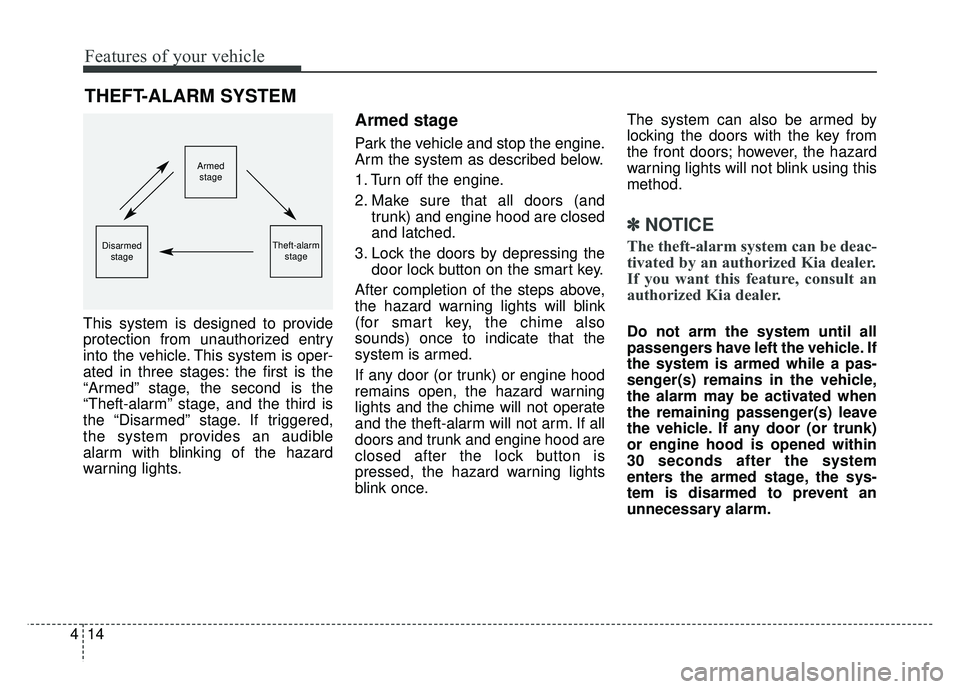
This system is designed to provide
protection from unauthorized entry
into the vehicle. This system is oper-
ated in three stages: the first is the
“Armed” stage, the second is the
“Theft-alarm” stage, and the third is
the “Disarmed” stage. If triggered,
the system provides an audible
alarm with blinking of the hazard
warning lights.
Armed stage
Park the vehicle and stop the engine.
Arm the system as described below.
1. Turn off the engine.
2. Make sure that all doors (and
trunk) and engine hood are closed
and latched.
3. Lock the doors by depressing the door lock button on the smart key.
After completion of the steps above,
the hazard warning lights will blink
(for smart key, the chime also
sounds) once to indicate that the
system is armed.
If any door (or trunk) or engine hood
remains open, the hazard warning
lights and the chime will not operate
and the theft-alarm will not arm. If all
doors and trunk and engine hood are
closed after the lock button is
pressed, the hazard warning lights
blink once. The system can also be armed by
locking the doors with the key from
the front doors; however, the hazard
warning lights will not blink using this
method.
✽ ✽
NOTICE
The theft-alarm system can be deac-
tivated by an authorized Kia dealer.
If you want this feature, consult an
authorized Kia dealer.
Do not arm the system until all
passengers have left the vehicle. If
the system is armed while a pas-
senger(s) remains in the vehicle,
the alarm may be activated when
the remaining passenger(s) leave
the vehicle. If any door (or trunk)
or engine hood is opened within
30 seconds after the system
enters the armed stage, the sys-
tem is disarmed to prevent an
unnecessary alarm.
THEFT-ALARM SYSTEM
Armed
stage
Theft-alarm stageDisarmedstage