Page 262 of 580
WARNING!
You or others could be injured or killed if you leave the
vehicle unattended with the power transfer unit in the
NEUTRAL (N) position without first fully engaging
the parking brake. The NEUTRAL (N) position disen-
gages both the front and rear driveshafts from the
powertrain and will allow the vehicle to roll, even if
the transmission is in PARK. The parking brake
should always be applied when the driver is not in the
vehicle.
4WD LOW
This range is for low speed four-wheel drive. It provides an
additional gear reduction which allows for increased
torque to be delivered to both the front and rear wheels
while providing maximum pulling power for loose, slip-
pery road surfaces only. Do not exceed 25 mph (40 km/h).
NOTE:Refer to “Selec-Terrain — If Equipped” for further
information on the various positions and their intended
usages.
Shifting Procedures
Shifting Into 4X4 LOW
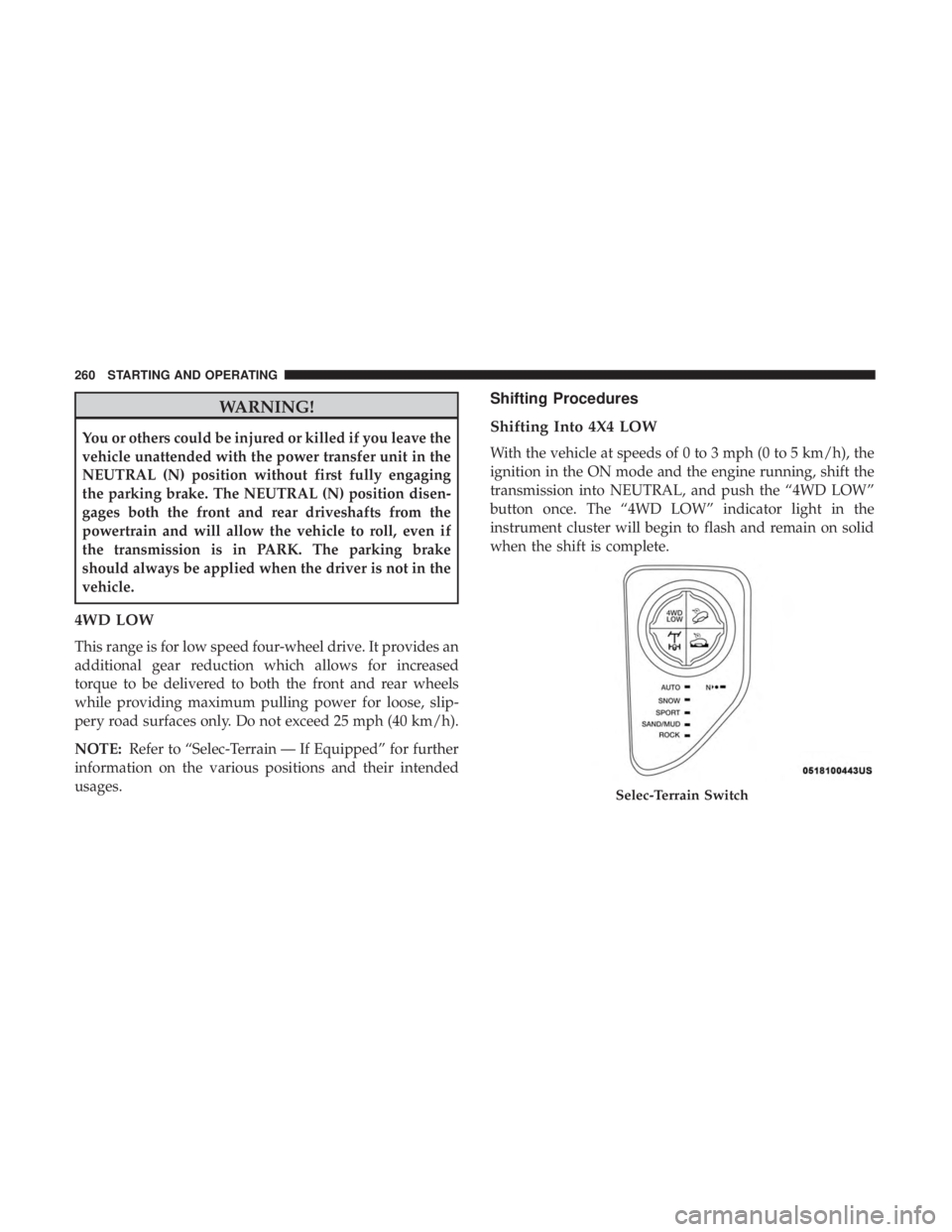
With the vehicle at speeds of 0 to 3 mph (0 to 5 km/h), the
ignition in the ON mode and the engine running, shift the
transmission into NEUTRAL, and push the “4WD LOW”
button once. The “4WD LOW” indicator light in the
instrument cluster will begin to flash and remain on solid
when the shift is complete.
Page 263 of 580

NOTE:If shift conditions/interlocks are not met, a mes-
sage will flash from the instrument cluster display with
instructions on how to complete the requested shift. Refer
to “Instrument Cluster Display” in “Getting To know Your
Instrument Panel” for further information.
Shifting Out Of 4X4 LOW
With the vehicle at speeds of 0 to 3 mph (0 to 5 km/h), the
ignition in the ON mode and the engine running, shift the
transmission into NEUTRAL, and push the “4WD LOW”
button once. The “4WD LOW” indicator light in the
instrument cluster will flash and go out when the shift is
complete.
NOTE:
• If shift conditions/interlocks are not met, a message will
flash from the instrument cluster display with instruc-
tions on how to complete the requested shift. Refer to
“Instrument Cluster Display” in “Getting To Know Your
Instrument Panel” for further information.
• Shifting into or out of 4WD LOW is possible with the
vehicle completely stopped; however, difficulty may
occur due to the mating clutch teeth not being properly
aligned. Several attempts may be required for clutch
teeth alignment and shift completion to occur. The preferred method is with the vehicle rolling 0 to 3 mph
(0 to 5 km/h). If the vehicle is moving faster than 3 mph
(5 km/h), the 4WD system will not allow the shift.
NEUTRAL Shift Procedure
Page 267 of 580
NOTE:
•Rock mode is only available on the vehicles equipped
with the Off-Road package.
• Activate the Hill Descent Control or Selec Speed Control
for steep downhill control. See “Electronic Brake Control
System” in “Safety” for further information.
Instrument Cluster Display Messages
When the appropriate conditions exist, a message will
appear in the instrument cluster. Refer to “Instrument
Cluster Display” in “Getting To Know Your Instrument
Panel” for further information.
POWER STEERING
The electric power steering system will give you good
vehicle response and increased ease of maneuverability in
tight spaces. The system will vary its assist to provide light
efforts while parking and good feel while driving. If the
electric steering system experiences a fault that reduces
assist or prevents the vehicle from providing assist, you
will still have the ability to steer the vehicle manually.
6
STARTING AND OPERATING 265
Page 278 of 580
To Activate/Deactivate
Push and release the Adaptive Cruise Control (ACC)
on/off button. The ACC menu in the instrument cluster
display will read “ACC Ready.”
To turn the system off, push and release the Adaptive
Cruise Control (ACC) on/off button again. At this time, the
system will turn off and the instrument cluster display will
read “Adaptive Cruise Control (ACC) Off.”
Page 280 of 580
WARNING!
The Resume function should only be used if traffic
and road conditions permit. Resuming a set speed that
is too high or too low for prevailing traffic and road
conditions could cause the vehicle to accelerate or
decelerate too sharply for safe operation. Failure to
follow these warnings can result in a collision and
death or serious personal injury.
To Vary The Speed Setting
To Increase Speed
While ACC is set, you can increase the set speed by
pushing the SET(+)button.
The speed increment shown is dependant on the chosen
speed unit of U.S. (mph) or Metric (km/h):
U.S. Speed (mph)
• Pushing the SET (+)button once will result ina1mph
increase in set speed. Each subsequent tap of the button
results in an increase of 1 mph. •
If the button is continually pushed, the set speed will
continue to increase in 5 mph increments until the
button is released. The increase in set speed is reflected
in the instrument cluster display.
Metric Speed (km/h)
• Pushing the SET (+)button once will result in a 1 km/h
increase in set speed. Each subsequent tap of the button
results in an increase of 1 km/h.
• If the button is continually pushed, the set speed will
continue to increase in 10 km/h increments until the
button is released. The increase in set speed is reflected
in the instrument cluster display.
To Decrease Speed
While ACC is set, the set speed can be decreased by
pushing the SET (-)button.
The speed decrement shown is dependant on the chosen
speed unit of U.S. (mph) or Metric (km/h):
U.S. Speed (mph)
• Pushing the SET (-)button once will result in a 1 mph
decrease in set speed. Each subsequent tap of the button
results in a decrease of 1 mph.
278 STARTING AND OPERATING
Page 302 of 580
a close object as a sensor problem, causing the “PARK-
SENSE UNAVAILABLE SERVICE REQUIRED” message
to be displayed in the instrument cluster display.
•ParkSense should be disabled when the liftgate is in the
open position and the vehicle is in REVERSE. An open
liftgate could provide a false indication that an obstacle
is behind the vehicle.