Page 214 of 538

when backing up to the position�Aif the
object projects over the actual moving
course.
HOW TO PARK WITH
PREDICTED COURSE LINES
WARNING
•If the tires are replaced with different
sized tires, the predicted course line may
not be displayed correctly.
•On a snow-covered or slippery road,
there may be a difference between the
predicted course line and the actual
course line.
•The displayed lines will appear slightly
off to the right because the rear view
camera is not installed in the rear center
of the vehicle.
•If the battery is disconnected or be-
comes discharged, the predicted course
lines may be displayed incorrectly. If this
occurs, please perform the following
procedures: – Turn the steering wheel from lock to
lock while the engine is running.
– Drive the vehicle on a straight road
for more than 5 minutes.
•When the steering wheel is turned with
the ignition switch in the ACC position,
the predicted course lines may be dis-
played incorrectly.
The vehicle width and predicted course lines
are wider than the actual width and course.
1. Visually check that the parking space issafe before parking your vehicle.
SAA1897
Display screen, heater and air conditioner, and audio system4-21
Page 215 of 538
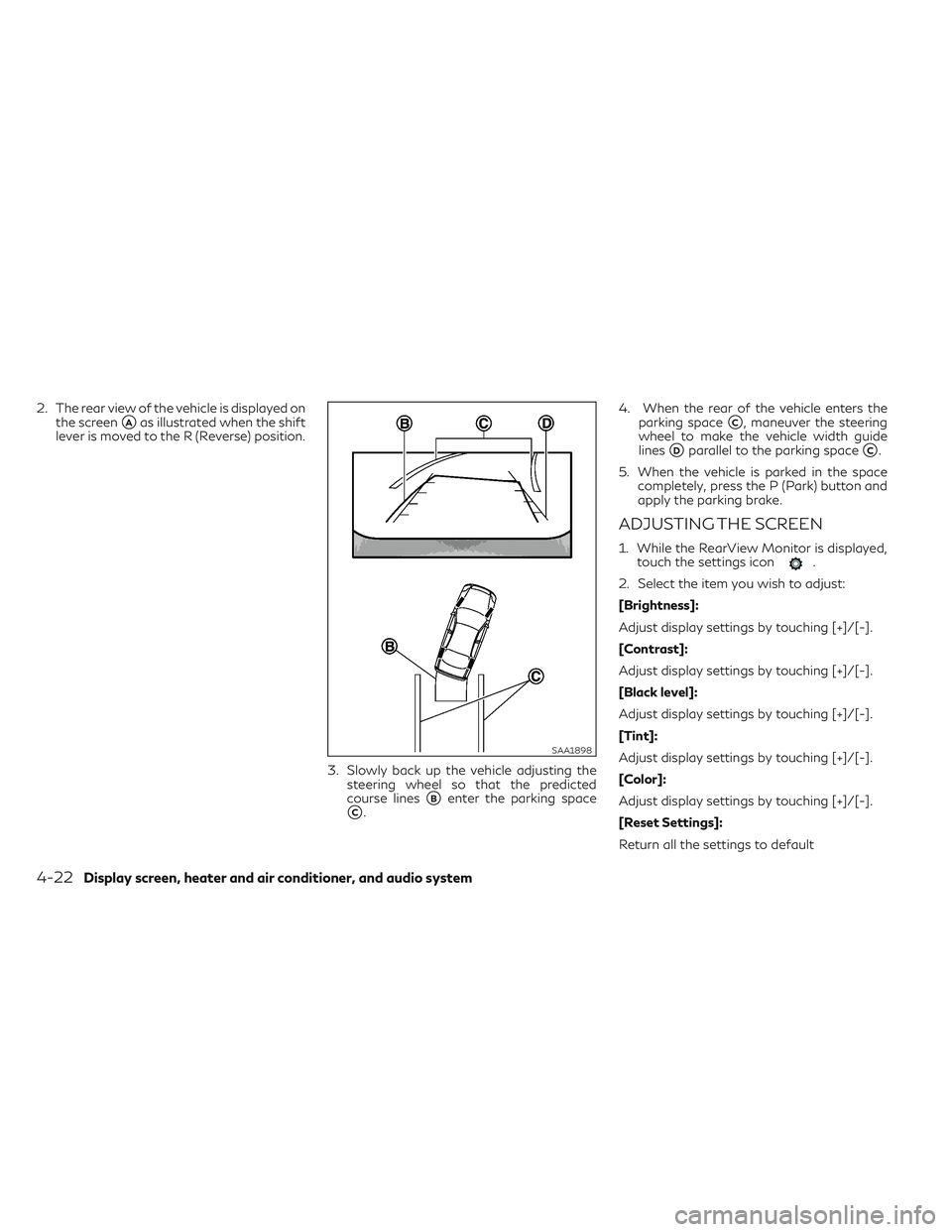
2. The rear view of the vehicle is displayed onthe screen
�Aas illustrated when the shift
lever is moved to the R (Reverse) position.
3. Slowly back up the vehicle adjusting thesteering wheel so that the predicted
course lines
�Benter the parking space
�C. 4. When the rear of the vehicle enters the
parking space
�C, maneuver the steering
wheel to make the vehicle width guide
lines
�Dparallel to the parking space�C.
5. When the vehicle is parked in the space completely, press the P (Park) button and
apply the parking brake.
ADJUSTING THE SCREEN
1. While the RearView Monitor is displayed,touch the settings icon.
2. Select the item you wish to adjust:
[Brightness]:
Adjust display settings by touching [+]/[-].
[Contrast]:
Adjust display settings by touching [+]/[-].
[Black level]:
Adjust display settings by touching [+]/[-].
[Tint]:
Adjust display settings by touching [+]/[-].
[Color]:
Adjust display settings by touching [+]/[-].
[Reset Settings]:
Return all the settings to default
SAA1898
4-22Display screen, heater and air conditioner, and audio system
Page 216 of 538
NOTE
Do not adjust any of the display settings of
the RearView Monitor while the vehicle is
moving. Make sure the parking brake is
firmly applied.
�A[Settings] key
�B
Page 217 of 538
![INFINITI QX30 2018 Owners Manual 1. Push the<MENU>button�Bon the
INFINITI Controller and touch [Settings]
�Ain the vehicle information display.
2. Touch [Camera]/[Sonar]
3. Touch [Camera]
4. Touch [Predictive Course Lines] When this](/manual-img/42/41114/w960_41114-216.png "INFINITI QX30 2018 Owners Manual 1. Push the<MENU>button�Bon the
INFINITI Controller and touch [Settings]
�Ain the vehicle information display.
2. Touch [Camera]/[Sonar]
3. Touch [Camera]
4. Touch [Predictive Course Lines] When this")
1. Push the
Page 218 of 538
SYSTEM MAINTENANCE
CAUTION
•Do not use alcohol, benzine or thinner to
clean the camera. This will cause discol-
oration. To clean the camera, wipe with
a cloth dampened with diluted mild
cleaning agent and then wipe with a dry
cloth.
•Do not damage the camera as the moni-
tor screen may be adversely affected.
If dirt, rain or snow accumulates on the cam-
era
�1, the RearView Monitor may not dis-
play objects clearly. Clean the camera by wip-
ing it with a cloth dampened with a diluted
mild cleaning agent and then wiping it with a
dry cloth.�AAround View Monitor display
�BINFINITI controller
�C
Page 219 of 538

•The Around View Monitor is a conve-
nience feature and is not a substitute for
proper vehicle operation because it has
areas where objects cannot be viewed.
The four corners of the vehicle in par-
ticular, are areas where objects do not
always appear in the bird’s-eye, front,
or rear views. Always check your sur-
roundings to be sure that it is safe to
move before operating the vehicle. Al-
ways operate the vehicle slowly.
•The driver is always responsible for
safety during parking and other
maneuvers.
CAUTION
Do not scratch the lens when cleaning dirt
or snow from the front of the camera.
The Around View Monitor system is designed
as an aid to the driver in situations such as
slot parking or parallel parking.
The monitor displays various views of the
position of the vehicle in a split screen format.
All views are not available at all times. Available views:
•Front View
An approximately 150-degree view of the
front of the vehicle.
•Rear View
An approximately 150-degree view of the
rear of the vehicle.
•Bird's-Eye View
The surrounding view of the vehicle from
above.
•Front-Side View
The view around and ahead of the front
passenger’s side wheel. To display the multiple views, the Around
View Monitor system uses cameras�1lo-
cated in the front grille, on the vehicle’s out-
side mirrors and one just above the vehicle’s
rear number plate.
AROUND VIEW MONITOR
SYSTEM OPERATION
With the ignition switch in the ON position,
move the shift lever to the R (Reverse) posi-
tion or press the button to oper-
ate the Around View Monitor.
The screen displayed on the Around View
Monitor will automatically return to the pre-
vious screen 3 minutes after the
button has been pushed while the shift lever
is in a position other than the R (Reverse)
position.
NAA1638
4-26Display screen, heater and air conditioner, and audio system
Page 220 of 538

Available views
WARNING
•The distance guide lines and the vehicle
width lines should be used as a reference
only when the vehicle is on a paved, level
surface. The distance viewed on the
monitor is for reference only and may be
different than the actual distance be-
tween the vehicle and displayed objects.
•Use the displayed lines and the bird's-
eye view as a reference. The lines and the
bird's-eye view are greatly affected by
the number of occupants, fuel level, ve-
hicle position, road condition and road
grade.
•When driving the vehicle up a hill, ob-
jects viewed in the monitor are farther
than they appear. When driving the ve-
hicle down a hill, objects viewed in the
monitor are closer than they appear.
•Objects in the monitor will appear visu-
ally opposite compared to when viewed
in the rear view and outside mirrors.
•Use the mirrors or actually look to prop-
erly judge distances to other objects.
•The distance between objects viewed in
the rear view differs from actual dis-
tance because a wide-angle lens is used.
•The displayed lines on the rear view will
appear slightly off to the right because
the rear view camera is not installed in
the rear center of the vehicle.
Front view
Rear view
SAA1840Z
SAA1896Z
Display screen, heater and air conditioner, and audio system4-27
Page 221 of 538

Front and rear views:
Guiding lines, which indicate the vehicle
width and distances to objects with refer-
ence to the vehicle body line
�A, are displayed
on the monitor.
Distance guide lines:
Indicate distances from the vehicle body:
•Red line�1: approx.1.5 ft (0.5 m)
•Yellow line�2: approx. 3 ft (1 m)
•Green line�3: approx. 7 ft (2 m)
•Green line�4: approx. 10 ft (3 m)
Vehicle width guide lines
�5:
Indicate the approximate vehicle width when
backing up.
Predicted course lines
�6:
Indicate the predicted course when operating
the vehicle. The predicted course lines will be
displayed on the monitor when the steering
wheel is turned. The predicted course lines
will move depending on how much the steer-
ing wheel is turned and will not be displayed
while the steering wheel is in the straight
ahead position. The front view will not be displayed when the
vehicle speed is above 10 km/h (6 MPH).
NOTE
When the monitor displays the front view
and the steering wheel turns about 90 de-
grees or less from the neutral position, both
the right and left predicted course lines
�6are displayed. When the steering wheel
turns about 90 degrees or more, a line is dis-
played only on the opposite side of the turn.
Bird's-eye view:
WARNING
•Objects in the bird's-eye view will ap-
pear farther than the actual distance.
•Tall objects, such as a curb or a vehicle,
may be misaligned or not displayed at
the seam of the views.
•Objects that are above the camera can-
not be displayed.
•The view for the bird's-eye view may be
misaligned when the camera position
alters.
•A line on the ground may be misaligned
and is not seen as being straight at the
seam of the views. The misalignment will
increase as the line proceeds away from
the vehicle.
•Tire angle display does not indicate the
actual tire angle.
4-28Display screen, heater and air conditioner, and audio system

