2018 INFINITI Q60 instrument panel
[x] Cancel search: instrument panelPage 285 of 466

5-106Starting and driving
JVS0846X
FEB system warning light (on the
instrument panel)
Indicators and warnings (on the vehicle
information display)
Driver assist system forward indica-
tor
Vehicle ahead detection indicator
FEB system emergency warning
indicator
Lower display
FEB WITH PEDESTRIAN DETEC-
TION SYSTEM OPERATION
The FEB with pedestrian detection system
operates at speeds above approximately 3
MPH (5 km/h). For the pedestrian detection
function, the system operates at speeds
between 6 – 37 MPH (10 – 60 km/h).
If a risk of a forward collision is detected, the
FEB with pedestrian detection system will
provide the first warning to the driver by
flashing the driver assist system forward
indicator (orange)
and the vehicle ahead
detection indicator (orange), and provid-
ing an audible warning. In addition, the FEB
with pedestrian detection system pushes the
accelerator pedal up, and then the system
applies partial braking. If the driver applies
the brakes quickly and forcefully, but the
FEB with pedestrian detection system de-
tects that there is still the possibility of a
forward collision, the system will automati-
cally increase the braking force.
If the risk of a collision becomes imminent
and the driver does not take action, the FEB
with pedestrian detection system issues the
second warning to the driver by flashing the
FEB system emergency warning indicator
(red)
, providing an audible warning, and
then automatically applies harder braking.
If a risk of a forward impact with a
pedestrian is detected, the FEB with pedes-
Page 287 of 466

5-108Starting and driving
JVS0847X
FEB system warning light (on the
instrument panel)
Lower display
MENU button
TURNING THE FEB WITH PE-
DESTRIAN DETECTION SYSTEM
ON/OFF
Perform the following steps to turn the FEB
with pedestrian detection system on or off.
1. Push the MENU button
and touch
[Driver Assistance] on the lower display
.
2. Touch [Emergency Assist].
3. Touch [Forward emergency braking] to
turn the system ON/OFF.
When the FEB with pedestrian detection
system is turned off, the FEB system warn-
ing light (orange)
illuminates.
NOTE:
.The FEB with pedestrian detection sys-
tem will be automatically turned ON
when the engine is restarted.
.The Predictive Forward Collision Warn-
ing (PFCW) system is integrated into
the FEB with pedestrian detection sys-
tem. There is not a separate selection in
the display for the PFCW system. When
the FEB with pedestrian detection sys-
tem is turned off, the PFCW system is
also turned off.
Page 291 of 466

5-112Starting and driving
JVS0848X
FEB system warning light (on the
instrument panel)
Driver assist system forward indicator
(on the vehicle information display)
SYSTEM TEMPORARILY UNA-
VAILABLE
Condition A
In the following conditions, the FEB system
warning light (orange)and the driver
assist system forward indicator (orange)
blinks and the system will be turned off
automatically.
.The radar sensor picks up interference
from another radar source.
.The camera area of windshield is misted
or frozen.
.Strong light is shining from the front.
.The cabin temperature is over approxi-
mately 104°F (40°C) in direct sunlight.
.The camera area of windshield glass is
continuously covered with dirt, etc.
Action to take:
When the above conditions no longer exist,
the FEB with pedestrian detection system
will resume automatically.
NOTE:
When the inside of the windshield on
camera area is misted or frozen, it will take
a period of time to remove it after air
conditioner turns on. If dirt appears on this
area, it is recommended you visit an
INFINITI retailer.
Page 295 of 466

5-116Starting and driving
JVS0849X
Driver assist system forward indicator
(on the vehicle information display)
Vehicle ahead detection indicator (on
the vehicle information display)
FEB system warning light (on the
instrument panel)
Lower display
Page 297 of 466
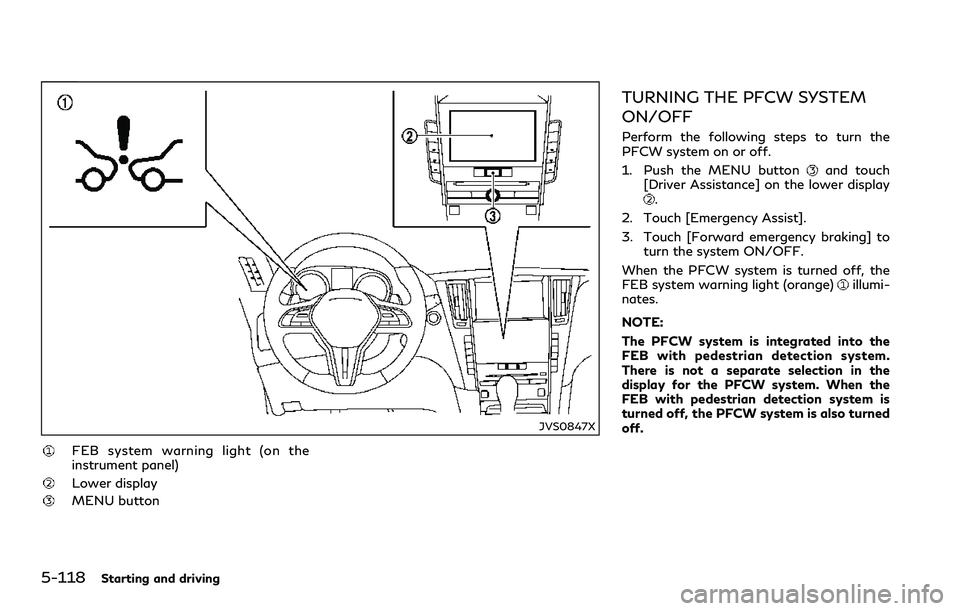
5-118Starting and driving
JVS0847X
FEB system warning light (on the
instrument panel)
Lower display
MENU button
TURNING THE PFCW SYSTEM
ON/OFF
Perform the following steps to turn the
PFCW system on or off.
1. Push the MENU button
and touch
[Driver Assistance] on the lower display
.
2. Touch [Emergency Assist].
3. Touch [Forward emergency braking] to
turn the system ON/OFF.
When the PFCW system is turned off, the
FEB system warning light (orange)
illumi-
nates.
NOTE:
The PFCW system is integrated into the
FEB with pedestrian detection system.
There is not a separate selection in the
display for the PFCW system. When the
FEB with pedestrian detection system is
turned off, the PFCW system is also turned
off.
Page 301 of 466

5-122Starting and driving
JVS0848X
SYSTEM TEMPORARILY UNA-
VAILABLE
FEB system warning light (on the
instrument panel)
Driver assist system forward indicator
(on the vehicle information display)
Page 313 of 466

5-134Starting and driving
wheel from locking, the system helps the
driver maintain steering control and helps to
minimize swerving and spinning on slippery
surfaces.
Using the system
Depress the brake pedal and hold it down.
Depress the brake pedal with firm steady
pressure, but do not pump the brakes. The
ABS will operate to prevent the wheels from
locking up. Steer the vehicle to avoid
obstacles.
WARNING
Do not pump the brake pedal. Doing so
may result in increased stopping dis-
tances.
Self-test feature
The ABS includes electronic sensors, electric
pumps, hydraulic solenoids and a computer.
The computer has a built-in diagnostic
feature that tests the system each time you
start the engine and move the vehicle at a
low speed in forward or reverse. When the
self-test occurs, you may hear a “clunk”
noise and/or feel a pulsation in the brake
pedal. This is normal and does not indicate a
malfunction. If the computer senses a mal-function, it switches the ABS off and
illuminates the ABS warning light on the
instrument panel. The brake system then
operates normally, but without anti-lock
assistance.
If the ABS warning light illuminates during
the self-test or while driving, have the
vehicle checked. It is recommended you visit
an INFINITI retailer for this service.
Normal operation
The ABS operates at speeds above 3 to 6
MPH (5 to 10 km/h).
When the ABS senses that one or more
wheels are close to locking up, the actuator
rapidly applies and releases hydraulic pres-
sure. This action is similar to pumping the
brakes very quickly. You may feel a pulsation
in the brake pedal and hear a noise from
under the hood or feel a vibration from the
actuator when it is operating. This is normal
and indicates that the ABS is operating
properly. However, the pulsation may indi-
cate that road conditions are hazardous and
extra care is required while driving.The Vehicle Dynamic Control (VDC) system
uses various sensors to monitor driver inputs
and vehicle motion. Under certain driving
conditions, the VDC system helps to perform
the following functions.
.Controls brake pressure to reduce wheel
slip on one slipping drive wheel so power
is transferred to a non slipping drive
wheel on the same axle.
.Controls brake pressure and engine out-
put to reduce drive wheel slip based on
vehicle speed (traction control function).
.Controls brake pressure at individual
wheels and engine output to help the
driver maintain control of the vehicle in
the following conditions:
— understeer (vehicle tends to not follow
the steered path despite increased
steering input)
— oversteer (vehicle tends to spin due to
certain road or driving conditions).
The VDC system can help the driver to
maintain control of the vehicle, but it cannot
prevent loss of vehicle control in all driving
situations.
When the VDC system operates, the VDC
warning light
in the instrument panel
flashes so note the following:
.The road may be slippery or the system
may determine some action is required to
help keep the vehicle on the steered path.
VEHICLE DYNAMIC CONTROL
(VDC) SYSTEM
Page 314 of 466

.You may feel a pulsation in the brake
pedal and hear a noise or vibration from
under the hood. This is normal and
indicates that the VDC system is working
properly.
.Adjust your speed and driving to the road
conditions.
See “Vehicle Dynamic Control (VDC) warn-
ing light” (P.2-17).
If a malfunction occurs in the system, the
VDC warning light
illuminates in the
instrument panel. The VDC system automa-
tically turns off.
The VDC OFF switch is used to turn off the
VDC system. The VDC off indicator light
illuminates to indicate the VDC system is off.
When the VDC switch is used to turn off the
system, the VDC system still operates to
prevent one drive wheel from slipping by
transferring power to a non slipping drive
wheel. The VDC warning light
flashes if
this occurs. All other VDC functions are off,
except for brake force distribution, and the
VDC warning light
will not flash. The
VDC system is automatically reset to on
when the ignition switch is placed in the OFF
position then back in the ON position.
See “Vehicle Dynamic Control (VDC) warn-
ing light” (P.2-17) and “Vehicle Dynamic
Control (VDC) off indicator light” (P.2-20).
The computer has a built-in diagnosticfeature that tests the system each time you
start the engine and move the vehicle
forward or in reverse at a slow speed. When
the self-test occurs, you may hear a “clunk”
noise and/or feel a pulsation in the brake
pedal. This is normal and is not an indication
of a malfunction.
VDC operation is reduced when the INFINITI
Drive Mode Selector is used to select the
SPORT+ mode (if so equipped). The VDC
system may not operate in the same circum-
stances when compared to operation in the
standard mode. To help prevent accidents
drive carefully, avoid careless or dangerous
driving techniques and be especially careful
when driving and cornering on slippery
surfaces.
BRAKE FORCE DISTRIBUTION
During braking while driving through turns,
the system optimizes the distribution of
force to each of the four wheels depending
on the radius of the turn.
WARNING
.The VDC system is designed to help
the driver maintain stability but does
not prevent accidents due to abrupt
steering operation at high speeds or
by careless or dangerous drivingtechniques. Reduce vehicle speed
and be especially careful when driving
and cornering on slippery surfaces
and always drive carefully.
.The brake force distribution system
may not be effective depending on
the driving condition. Always drive
carefully and attentively.
.Do not modify the vehicle’s suspen-
sion. If suspension parts such as
shock absorbers, struts, springs, sta-
bilizer bars, bushings and wheels are
not INFINITI recommended for your
vehicle or are extremely deteriorated,
the VDC system may not operate
properly. This could adversely affect
vehicle handling performance, and
the VDC warning light
may
illuminate.
.If brake related parts such as brake
pads, rotors and calipers are not
INFINITI recommended or are extre-
mely deteriorated, the VDC system
may not operate properly and the
VDC warning light
may illumi-
nate.
.If engine control related parts are not
INFINITI recommended or are extre-
mely deteriorated, the VDC warning
light
may illuminate.
Starting and driving5-135