Page 156 of 466

LOG-IN FUNCTION
After setting up the user information, the
system will automatically recognize the user
upon turning on the vehicle.
There will be a personalized welcome greet-
ing and screen prompt to log-in.
This feature allows 4 drivers to use their
own registration, drive mode, driving posi-
tion, air conditioner, and auto settings and
memorizes these custom settings.
The log-in user can be changed on the
welcome greeting screen or the User List
screen. For more details, see the Infiniti
InTouch Owner’s Manual.
The log-in function is linked to the following
items:
.Meter
.Audio
.Navigation system display (if so
equipped)
.Navigation settings (if so equipped)
.Air conditioner
.Automatic drive positioner (if so
equipped)
.Engine/Transmission
.Steering
.Suspension (if so equipped).Active trace control system
.Driver assistance* (if so equipped)
.Body Control Module (BCM)
*: except for the Forward Emergency Brak-
ing (FEB) with pedestrian detection systemWARNING
The Intelligent Key transmits radio
waves when the buttons are pushed.
The FAA advises that the radio waves
may affect aircraft navigation and com-
munication systems. Do not operate the
Intelligent Key while on an airplane.
Make sure the buttons are not operated
unintentionally when the unit is stored
during a flight.
It is possible to lock/unlock all doors and
fuel-filler door, open the trunk lid, activate
the panic alarm and open the windows by
pushing the buttons on the Intelligent Key
from outside the vehicle.
Before locking the doors, make sure the
Intelligent Key is not left in the vehicle.
The remote keyless entry function can
operate at a distance of approximately 33
ft (10 m) from the vehicle. (The effective
distance depends upon the conditions
around the vehicle.)
As many as 4 Intelligent Keys can be used
with one vehicle. For information concerning
the purchase and use of additional Intelli-
gent Keys, contact an INFINITI retailer.
The buttons on the Intelligent Key will not
operate when:
Pre-driving checks and adjustments3-15
REMOTE KEYLESS ENTRY SYSTEM
Page 176 of 466
4 Monitor, climate, audio, phone and voice re-
cognition systems
Infiniti InTouch Owner’s Manual................................... 4-2
Ventilators............................................................................ 4-2
Antenna ................................................................................ 4-3
Window antenna .......................................................... 4-3Satellite antenna......................................................... 4-3
Car phone or CB radio..................................................... 4-3
Page 177 of 466
4-2Monitor, climate, audio, phone and voice recognition systems
Refer to the Infiniti InTouch Owner’s Manual
that includes the following information.
.Infiniti InTouch
.Navigation system (if so equipped)
.Audio system
.Bluetooth
®Hands-Free Phone system
.Heater and air conditioner
.Viewing information
.Other settings
.Voice recognition (if so equipped)
.Monitor system
.Meter settings
.General system information
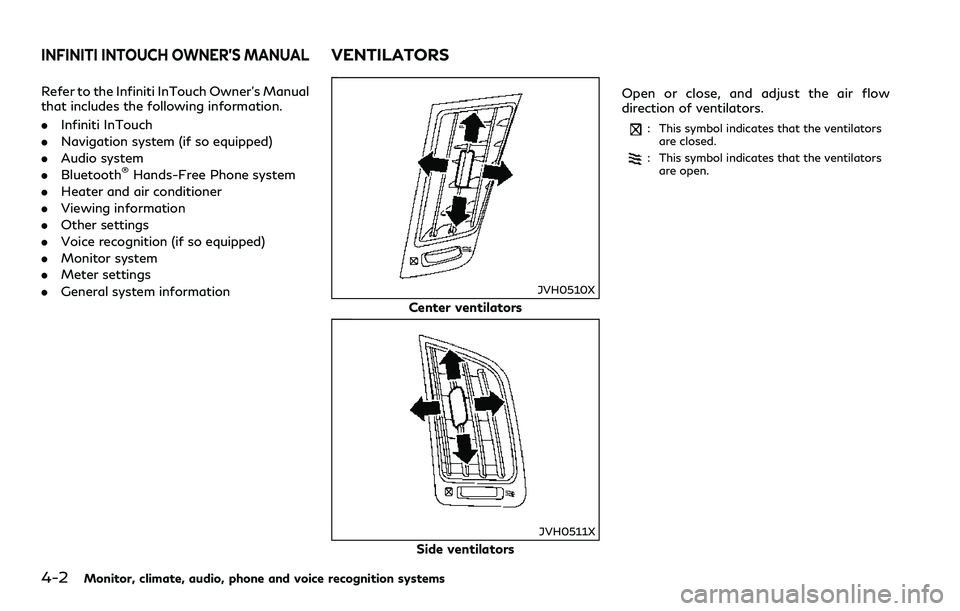
JVH0510X
Center ventilators
JVH0511X
Side ventilatorsOpen or close, and adjust the air flow
direction of ventilators.
: This symbol indicates that the ventilators
are closed.
: This symbol indicates that the ventilators
are open.
INFINITI INTOUCH OWNER’S MANUALVENTILATORS
Page 178 of 466

WINDOW ANTENNA
The antenna pattern is printed inside the
rear window.
CAUTION
.Do not place metalized film near the
rear window glass or attach any
metal parts to it. This may cause poor
reception or noise.
.When cleaning the inside of the rear
window, be careful not to scratch or
damage the rear window antenna.
Lightly wipe along the antenna with
a dampened soft cloth.
JVH0641X
SATELLITE ANTENNA
There is a satellite antenna on the rear part
of the vehicle roof.
A buildup of ice on the satellite radio
antenna can affect satellite radio perfor-
mance. Remove the ice to restore satellite
radio reception.When installing a car phone or a CB radio in
your vehicle, be sure to observe the follow-
ing cautions, otherwise the new equipment
may adversely affect the electronic control
modules and electronic control system har-
ness.
WARNING
.A cellular phone should not be used
for any purpose while driving so full
attention may be given to vehicle
operation. Some jurisdictions prohibit
the use of cellular phones while
driving.
.If you must make a call while your
vehicle is in motion, the hands-free
cellular phone operational mode (if so
equipped) is highly recommended.
Exercise extreme caution at all times
so full attention may be given to
vehicle operation.
.If a conversation in a moving vehicle
requires you to take notes, pull off
the road to a safe location and stop
your vehicle before doing so.
Monitor, climate, audio, phone and voice recognition systems4-3
ANTENNA CAR PHONE OR CB RADIO
Page 179 of 466
4-4Monitor, climate, audio, phone and voice recognition systems
CAUTION
.Keep the antenna as far away as
possible from the electronic control
modules.
.Keep the antenna wire more than 8 in
(20 cm) away from the electronic
control system harness. Do not route
the antenna wire next to any harness.
.Adjust the antenna standing-wave
ratio as recommended by the manu-
facturer.
.Connect the ground wire from the CB
radio chassis to the body.
.For details, it is recommended you
visit an INFINITI retailer.
Page 223 of 466

5-44Starting and driving
— Oncoming vehicles.
— Vehicles remaining in the detec-
tion zone when you accelerate
from a stop.
— A vehicle merging into an adja-
cent lane at a speed approxi-
mately the same as your vehicle.
— A vehicle approaching rapidly
from behind.
— A vehicle which your vehicle over-
takes rapidly.
— A vehicle that passes through the
detection zone quickly.
.The radar sensor’s detection zone is
designed based on a standard lane
width. When driving in a wider lane,
the radar sensors may not detect
vehicles in an adjacent lane. When
driving in a narrow lane, the radar
sensors may detect vehicles driving
two lanes away.
.The radar sensors are designed to
ignore most stationary objects, how-
ever objects such as guardrails, walls,
foliage and parked vehicles may oc-
casionally be detected. This is a
normal operation condition.
.The following conditions may reduce
the ability of the radar to detectother vehicles:
— Severe weather
— Road spray
— Ice/frost/snow build-up on the
vehicle
— Dirt build-up on the vehicle
.Do not attach stickers (including
transparent material), install acces-
sories or apply additional paint near
the radar sensors. These conditions
may reduce the ability of the radar to
detect other vehicles.
.Excessive noise (for example, audio
system volume, open vehicle window)
will interfere with the chime sound,
and it may not be heard.BSW DRIVING SITUATIONS
Indicator on
Indicator off
Indicator flashing
Page 233 of 466
5-54Starting and driving
— When driving with a tire that is
not within normal tire conditions
(for example, tire wear, low tire
pressure, installation of spare tire,
tire chains, non-standard wheels).
— When the vehicle is equipped with
non-original steering parts or sus-
pension parts.
.Excessive noise (for example, audio
system volume, open vehicle window)
will interfere with the chime sound,
and it may not be heard.BSI DRIVING SITUATIONS
Indicator on
Indicator off
Indicator flashing
JVS0737X
Illustration 1 – Approaching from behind
Another vehicle approaching from
behind
Illustration 1: The side indicator light illumi-
nates if a vehicle enters the detection zone
from behind in an adjacent lane.
Page 248 of 466

— Severe weather
— Road spray
— Ice/frost/dirt build up on the
vehicle
.Do not attach stickers (including
transparent material), install acces-
sories or apply additional paint near
the radar sensors. These conditions
may reduce the ability of the radar
sensors to detect other vehicles.
.The sonar sensors detect stationary
objects behind the vehicle. The sonar
sensor may not detect:
— Small or moving objects
— Wedge-shaped objects
— Object close to the bumper (less
than approximately 1 ft (30 cm))
— Thin objects such as rope, wire
and chain, etc.
.The brake engagement by the BCI
system is not as effective on a slope
as it is on flat ground. When on a
steep slope the system may not
function properly.
.Do not use the BCI system under the
following conditions because the sys-
tem may not function properly.— When driving with a tire that is
not within normal tire conditions
(for example, tire wear, low tire
pressure, installation of spare tire,
tire chains, non-standard wheels).
— When the vehicle is equipped with
non-original brake parts or sus-
pension parts.
.Excessive noise (for example, audio
system volume, open vehicle window)
will interfere with the chime sound,
and it may not be heard.
JVS0824X
Vehicle information display
SYSTEM TEMPORARILY UNA-
VAILABLE
If the following message appears in the
vehicle information display, a chime will
sound and the BCI system will be turned off
automatically.
.“Unavailable High Accelerator Temp.”:
If the vehicle is parked in direct sunlight
under high temperature conditions (over
approximately 104 °F (40 °C)) and then
started, the BCI system may be deacti-
vated automatically.
Action to take:
When the interior temperature is re-
Starting and driving5-69